looplet
Health Uyari
- License — License: Apache-2.0
- Description — Repository has a description
- Active repo — Last push 0 days ago
- Low visibility — Only 5 GitHub stars
Code Gecti
- Code scan — Scanned 12 files during light audit, no dangerous patterns found
Permissions Gecti
- Permissions — No dangerous permissions requested
This package provides a lightweight, iterator-based looping mechanism for Large Language Model (LLM) agents. It exposes the agent's tool-calling cycle as a standard Python loop, allowing developers to observe, intercept, and control each step without locking them into a complex framework.
Security Assessment
The overall risk is rated as Low. The tool is designed to manage agent workflows and its core boasts zero runtime dependencies, minimizing supply chain risks. A light code scan across 12 files found no dangerous patterns, no hardcoded secrets, and no broad, dangerous permissions requested. While it inherently facilitates tool execution and network requests to LLM APIs (like OpenAI or Anthropic), this is its expected, explicit function rather than a hidden vulnerability.
Quality Assessment
The project is actively maintained, with its most recent push occurring today. It is properly licensed under the permissive Apache-2.00 and shows strong software engineering practices by including Continuous Integration (CI) and code coverage tracking. However, community visibility and adoption are currently very low. With only 5 GitHub stars, the project is clearly in its early "Beta" phase, meaning long-term maintenance is not guaranteed and community trust is still being established.
Verdict
Safe to use, though developers should account for its early-stage beta status when integrating it into critical production environments.
The tool-calling loop for LLM agents; iterator-first, protocol-hooked, one dependency.
looplet
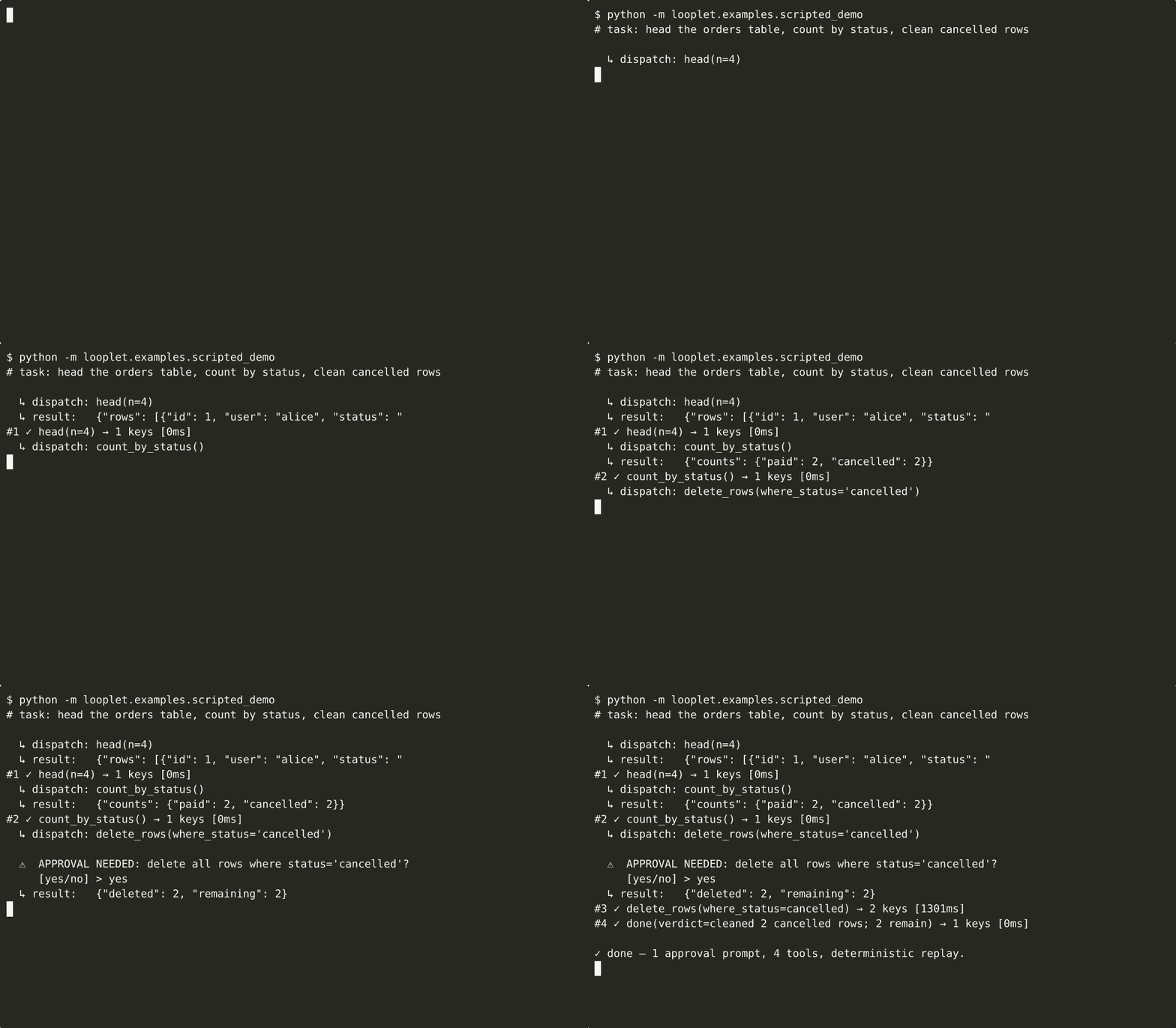




looplet exposes the agent loop as an iterator, makes every step observable, and lets you compose behavior with hooks.
Build LLM agents that call tools in a loop while you keep ordinary
Python control over every step — no graph DSL, no subclassing, no
vendor lock-in. Zero runtime dependencies.
Elevator pitch: looplet is the tiny agent loop you can actually own.
Yield every tool call, inspect every result, intercept any decision,
and grow from a 30-line prototype to a production agent without
switching frameworks.
from looplet import composable_loop

for step in composable_loop(llm=llm, tools=tools, task=task, config=cfg, state=state):
    print(step.pretty())          # → "#1 ✓ search(query='…') → 12 items [182ms]"
    if step.tool_result.error:
        break                     # your loop, your control flow
pip install looplet               # core — zero third-party packages pulled in
pip install "looplet[openai]"     # works with OpenAI, Ollama, Together, Groq, vLLM, …
pip install "looplet[anthropic]"  # or Anthropic directly
The simple story
Every looplet agent turn is the same small mechanism:
- The LLM proposes a tool call.
- The registry validates and dispatches it.
- Hooks observe or steer the turn.
- State records the step.
- The loop yields a
Stepback to yourforloop.
That is the whole mental model. Presets, skills, cartridges, provenance,
native tool calling, and evals are useful layers around this mechanism;
they do not replace it.
for step in composable_loop(llm=llm, tools=tools, state=state, config=config, hooks=hooks):
  print(step.pretty())
Start with ordinary Python code when you want full control. Start with a
cartridge when you want to run or share a packaged capability:
python -m looplet run ./skills/coder "Fix the tests" --workspace .
python -m looplet blueprint ./skills/coder --workspace .
python -m looplet export-code ./skills/coder coder_agent.py
Why it exists
Most agent frameworks give you agent.run(task) and a black box. When the
agent does something wrong at step 7, you can't step in between step 6 and
step 8. You end up forking the library or writing a second agent to babysit
the first.
looplet does the opposite: the loop is the product, and hooks are the
extension API. Every tool call is a Step object you can print, save,
or diff. Every decision the loop makes — what goes in the next prompt,
whether to compact context, whether to dispatch a dangerous tool, whether
to stop — is a Protocol method you implement in a few lines. Hooks
compose without inheritance. Nothing is hidden.
That one design choice is where the library's three practical superpowers
come from:
- Shape agent behaviour without forking — a 10-line hook can redact PII
from every prompt, inject retrieved docs, rewrite tool arguments, or
rate-limit calls to a single tool. Hooks are the extension point the
framework can't close off because the loop itself is built on them. - Manage context on your terms —
compact_chain(Prune, Summarize, Truncate)is three hooks you wire together. Swap the strategy, change
the budget, fire on a different threshold — no monkey-patching. - Debug and eval without a second tool —
step.pretty()is a
human-readable trace,ProvenanceSinkdumps every prompt the LLM saw
plus every tool result into a diff-friendly directory, and pytest-styleeval_*functions turn that trace into a regression suite. Your debug
output is your eval harness.
That is the differentiation: looplet is not trying to be a complete
agent product. It is the control plane for people building one.
The mental model — one picture
looplet is a for loop you own. The LLM proposes a tool call, the
registry dispatches it, hooks observe or steer, state records the result,
and the loop yields a Step. The diagram below expands that simple story
into the hook points you can customize:
%%{init: {"theme":"base","themeVariables":{
"fontFamily":"ui-sans-serif, system-ui, -apple-system, Segoe UI, Roboto, sans-serif",
"fontSize":"15px",
"lineColor":"#94a3b8"
}}}%%
flowchart LR
you(["<b>your code</b><br/><span style='font-size:11px;opacity:.75'>for step in loop(...)</span>"]):::you
h1["<b>pre_prompt</b><br/><span style='font-size:11px;opacity:.9'>redact · inject · compact</span>"]:::hookBlue
h2["<b>pre_dispatch</b><br/><span style='font-size:11px;opacity:.9'>permissions · approval · rewrite</span>"]:::hookAmber
h3["<b>post_dispatch</b><br/><span style='font-size:11px;opacity:.9'>trace · metrics · checkpoint</span>"]:::hookAmber
h4["<b>check_done</b><br/><span style='font-size:11px;opacity:.9'>stop rules · budgets</span>"]:::hookGreen
subgraph loop[" "]
direction LR
prompt(["<b>PROMPT</b><br/><span style='font-size:11px;opacity:.85'>build · call LLM</span>"]):::phaseBlue
dispatch(["<b>DISPATCH</b><br/><span style='font-size:11px;opacity:.85'>validate · run tool</span>"]):::phaseAmber
done{{"<b>DONE?</b>"}}:::phaseGreen
prompt -- "tool call" --> dispatch
dispatch -- "observation" --> done
done -- "no" --> prompt
end
step[/"<b>Step</b><br/><span style='font-size:11px;opacity:.85'>prompt · call · result · usage</span>"/]:::step
you == "task" ==> prompt
done == "yes" ==> step
step == "yield" ==> you
h1 -.-> prompt
h2 -.-> dispatch
h3 -.-> dispatch
h4 -.-> done
linkStyle 0,1,2 stroke:#94a3b8,stroke-width:2px
linkStyle 3 stroke:#475569,stroke-width:3px
linkStyle 4 stroke:#059669,stroke-width:3px
linkStyle 5 stroke:#475569,stroke-width:3px
linkStyle 6 stroke:#3b82f6,stroke-width:1.5px
linkStyle 7 stroke:#f59e0b,stroke-width:1.5px
linkStyle 8 stroke:#f59e0b,stroke-width:1.5px
linkStyle 9 stroke:#10b981,stroke-width:1.5px
classDef you fill:#0f172a,stroke:#334155,stroke-width:2px,color:#f8fafc;
classDef phaseBlue fill:#dbeafe,stroke:#2563eb,stroke-width:2.5px,color:#1e3a8a;
classDef phaseAmber fill:#fef3c7,stroke:#d97706,stroke-width:2.5px,color:#78350f;
classDef phaseGreen fill:#d1fae5,stroke:#059669,stroke-width:2.5px,color:#064e3b;
classDef step fill:#eef2ff,stroke:#4338ca,stroke-width:2.5px,color:#312e81;
classDef hookBlue fill:#eff6ff,stroke:#3b82f6,stroke-width:1.5px,color:#1e40af;
classDef hookAmber fill:#fffbeb,stroke:#f59e0b,stroke-width:1.5px,color:#92400e;
classDef hookGreen fill:#ecfdf5,stroke:#10b981,stroke-width:1.5px,color:#065f46;
style loop fill:#f8fafc,stroke:#cbd5e1,stroke-width:2px,stroke-dasharray:10 6,color:#1e293b;
Every amber box is a Protocol method. A hook is any object that
implements one or more of them — no base class, no inheritance:
class RedactPII:
    def pre_prompt(self, state, log, ctx, step):
        return _scrub_emails(ctx)          # mutates the next LLM prompt

class RetryFlakyTool:
    def pre_dispatch(self, state, log, tc, step):
        if tc.tool == "web_search" and state.last_error:
            return Deny("retry with backoff", retry=True)

for step in composable_loop(..., hooks=[RedactPII(), RetryFlakyTool()]):
    ...
Ship-ready hooks already wired in: ApprovalHook, PermissionHook,CheckpointHook, ContextPressureHook, ThresholdCompactHook,ProvenanceSink, TracingHook, MetricsHook, EvalHook, plus thecompact_chain(Prune, Summarize, Truncate) context strategy. Use any,
all, or none — and drop in your own in 10 lines.
Your first agent (60 seconds)
from looplet import BaseToolRegistry, OpenAIBackend, composable_loop
from looplet.tools import register_done_tool

llm = OpenAIBackend.from_env(model="gpt-4o-mini")  # reads OPENAI_API_KEY etc

tools = BaseToolRegistry()


@tools.tool
def greet(name: str) -> dict:
    """Greet someone by name."""
    return {"greeting": f"Hello, {name}!"}


register_done_tool(tools)

for step in composable_loop(
    llm=llm,
    tools=tools,
    task={"goal": "Greet Alice and Bob, then finish."},
    max_steps=5,
):
    print(step.pretty())
Works out of the box with any OpenAI-compatible endpoint. No Claude-only
SDK, no pydantic schema gymnastics, no LangChain memory objects.
Try it on your laptop against a local Ollama in three lines:
OPENAI_BASE_URL=http://127.0.0.1:11434/v1 \
OPENAI_API_KEY=ollama OPENAI_MODEL=llama3.1 \
python -m looplet.examples.hello_world
When should you reach for looplet?
Use it when you want to build your own agent loop and actually own
the details. Concretely:
- You need to insert logic at an exact phase of the loop — before
the prompt is built, before a tool is dispatched, after a tool
returns — without forking a framework. - You need to swap context-management strategy at runtime (prune,
summarize, truncate, your own) without losing the rest of your stack. - You need the loop to pause for human approval, then resume where
it left off when approval arrives. - You want first-class debugging and evaluation — a printable
Step, a prompt-level provenance dump, pytest-styleeval_*
functions — without bolting on a second tool. - You want zero runtime dependencies and a loop that cold-imports
in ~300 ms (numbers in docs/benchmarks.md).
Don't reach for looplet if you want agent.run(task) to handle
everything and return a string, or if you want a visual graph DSL — a
higher-level framework will feel more natural and the overlap in
features won't be worth the extra control looplet gives you.
Examples
Real-LLM examples read OPENAI_BASE_URL, OPENAI_API_KEY, andOPENAI_MODEL from the environment. Point them at Ollama or any
OpenAI-compatible endpoint, or use --scripted where available for a
deterministic no-model run.
python -m looplet.examples.hello_world                            # 30-line starter
python -m looplet.examples.hello_world --scripted                 # no model required
python -m looplet.examples.coding_agent "implement fizzbuzz"      # bash/read/write/edit/grep
python -m looplet.examples.coding_agent --trace ./traces/         # save full trajectory
python -m looplet.examples.coding_agent "implement add" --scripted --workspace /tmp/demo
python -m looplet.examples.data_agent --clean                     # approval + compact + checkpoints
python -m looplet.examples.data_agent --resume                    # resume from last checkpoint
python -m looplet.examples.data_agent --scripted --auto-approve   # no model required
Runnable cartridges package the same primitives behind a portable folder:
python -m looplet list-bundles examples/coder --json
python -m looplet run examples/coder/skill "Create a tiny add function with tests" --scripted --workspace /tmp/demo
python -m looplet export-code examples/coder/skill /tmp/coder_agent.py  # exact local wrapper
python -m looplet package my_agent:build ./skills/my-agent --name my-agent --description "Run my agent."
python -m looplet wrap-claude-skill ./claude-skills/pdf ./skills/pdf
For a memorable custom agent, start with Dependency Doctor: point it
at a repo and it audits dependency files for security, license, and
maintenance risk, then produces a report card. It is concrete enough to
be useful, broad enough that most developers understand the pain, and it
shows looplet's core value: the user can watch every evidence-gathering
step and add guardrails without rewriting the agent.
OPENAI_BASE_URL=http://127.0.0.1:11434/v1 \
OPENAI_API_KEY=ollama OPENAI_MODEL=llama3.1 \
python examples/dep_doctor/agent.py /path/to/project

# No model required: deterministic local dogfood run
python examples/dep_doctor/agent.py examples/dep_doctor/demo_project --scripted
Other example directions that show off the same infrastructure:examples/git_detective/ for repo-health analysis,examples/threat_intel/ for local-first security briefings, andexamples/coder/ for a coding agent with bash/read/write/edit/test
tools.
# More no-model dogfood runs
python -m looplet.examples.hello_world --scripted
python -m looplet.examples.ollama_hello --scripted
python examples/git_detective/agent.py . --scripted
python examples/threat_intel/agent.py --scripted
python examples/coder/agent.py "Create a tiny add function with tests" --scripted
python -m looplet.examples.coding_agent "Implement add" --scripted --workspace /tmp/demo
python -m looplet.examples.data_agent --scripted --auto-approve --clean
Plus scripted_demo.py —
a scripted MockLLMBackend run used only to record the GIF above.
Not a usage reference.
Learn more
| Doc | What's in it |
|---|---|
| docs/tutorial.md | Build your first agent in 5 steps |
| docs/hooks.md | Writing and composing hooks |
| docs/skills.md | Lazy skills, runnable cartridges, blueprints, and Claude Skill wrapping |
| docs/evals.md | pytest-style agent evaluation |
| docs/provenance.md | Capturing prompts + trajectories |
| docs/recipes.md | Ollama, OTel, MCP, cost accounting, checkpoints |
| docs/benchmarks.md | Cold-import time & dep footprint vs alternatives |
| docs/faq.md | FAQ, including "why not LangGraph?" |
| ROADMAP.md | What's planned, what's frozen, what's out of scope |
| CONTRIBUTING.md | Dev setup, conventions, PR checklist |
| CHANGELOG.md | Release notes |
Stability
looplet follows SemVer. Pre-1.0, minor versions
may introduce breaking changes as the design stabilises — pin conservatively:
looplet>=0.1.8,<0.2
See ROADMAP.md § v1.0 API contract for the
frozen surface and the path to 1.0.
Contributors
Thanks to everyone who has contributed to looplet:
- @mvanhorn - "Why not LangGraph?" FAQ (#17)
See CONTRIBUTING.md for how to get started.
Contributing
Contributions welcome: bug reports, docs, backends, examples, evals.
Start with CONTRIBUTING.md and
docs/good-first-issues.md. Security issues
go through SECURITY.md.
License
Apache 2.0. See LICENSE.
Yorumlar (0)
Yorum birakmak icin giris yap.
Yorum birakSonuc bulunamadi