claudzilla
Health Uyari
- License — License: MIT
- Description — Repository has a description
- Active repo — Last push 0 days ago
- Low visibility — Only 5 GitHub stars
Code Basarisiz
- rm -rf — Recursive force deletion command in .github/visuals/lib.sh
- rm -rf — Recursive force deletion command in .github/visuals/shoot.sh
Permissions Gecti
- Permissions — No dangerous permissions requested
Bu listing icin henuz AI raporu yok.
Claude Code, tamed: terse answers, small diffs, verified work, guarded git.
claudzilla
Claude Code, tamed: terse answers, small diffs, verified work, guarded git.
One command turns a stock ~/.claude into a careful senior dev's setup. Every part also has a name and a story: meet them in Worlds (alt+w).



Install
curl -fsSL https://raw.githubusercontent.com/HT0710/claudzilla/main/install.sh | bash
Requires: git, curl, tar, perl and Claude Code. Missing node or rtk is installed to ~/.local without sudo; keep ~/.local/bin on your PATH. Native Windows is not supported; use WSL.
Pick parts
On a fresh install it asks Full (recommended) or Custom; re-runs keep your saved choice. Full installs every part; Custom lets you untick parts. Run by Claude (no terminal), it stops and prints the questions for Claude to ask you. A fresh --add hud installs only hud plus primer, the updater and guide (no rules, no core settings).
| flag | does |
|---|---|
--full |
install every part |
--custom |
pick parts from the menu |
--add a,b |
add parts to your install |
--remove a,b |
remove parts from your install |
--uninstall |
remove claudzilla (asks first) |
--yes |
skip the --uninstall confirmation |
Flags go after bash -s --. For example, only the status line:
curl -fsSL https://raw.githubusercontent.com/HT0710/claudzilla/main/install.sh | bash -s -- --add hud
| part | covers |
|---|---|
core |
rules, hooks, settings, pr and rule-review skills, atlas agent |
hud |
statusline, themes, MesloLGS NF font |
rtk |
token-saving command filter |
caveman |
terse replies |
ponytail |
smallest-change coding |
folio |
response dividers, code cards |
margin |
side panel |
ballot |
suggested next steps |
herald |
update and usage notices |
byline |
commit credit |
ledger |
pause an edit to a file another session edited |
core is not in the menu; --add and --remove accept it. The updater and primer always ship; primer carries the guide pane, /claudzilla report and /claudzilla compact. Your choice is saved, see How install works.
Safe to re-run. Anything replaced is backed up to ~/.claude/.claudzilla-backup/.
New here? Read GUIDE.md, or type /claudzilla in Claude.
What you get
Answer first, evidence cited, one fix proposed, nothing edited until you say go, and "fixed" only after the test ran.
Every picture is a real capture of one small demo repo, shot with permission prompts off (--dangerously-skip-permissions, hence the red bypass permissions on line); only the account email is blanked out.
Answers you can scan
Terse replies: TL;DR first, tables over prose, every claim backed by a
file:lineor a command, or marked unverified.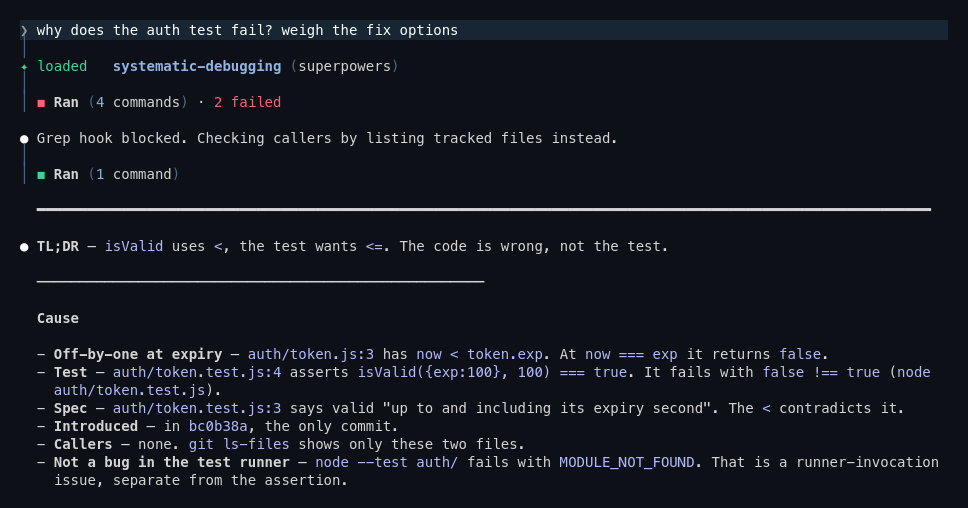
Plain docs and commits: docs, commits, PRs, issues and memory get full sentences, one idea per bullet; chat replies stay terse.
Investigate, then ask: root cause and one recommendation before any multi-file edit.
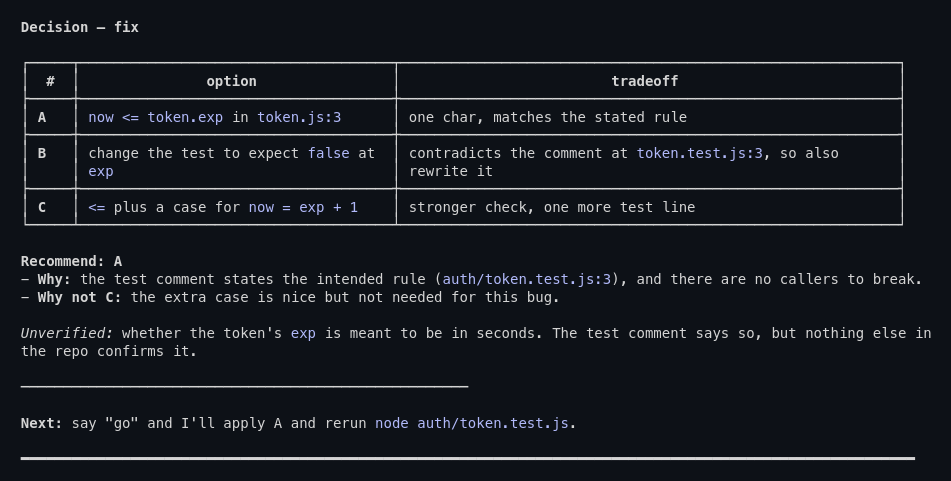
Ballot card: a reply that ends in a decision shows a card above the prompt; press a digit to answer (details).
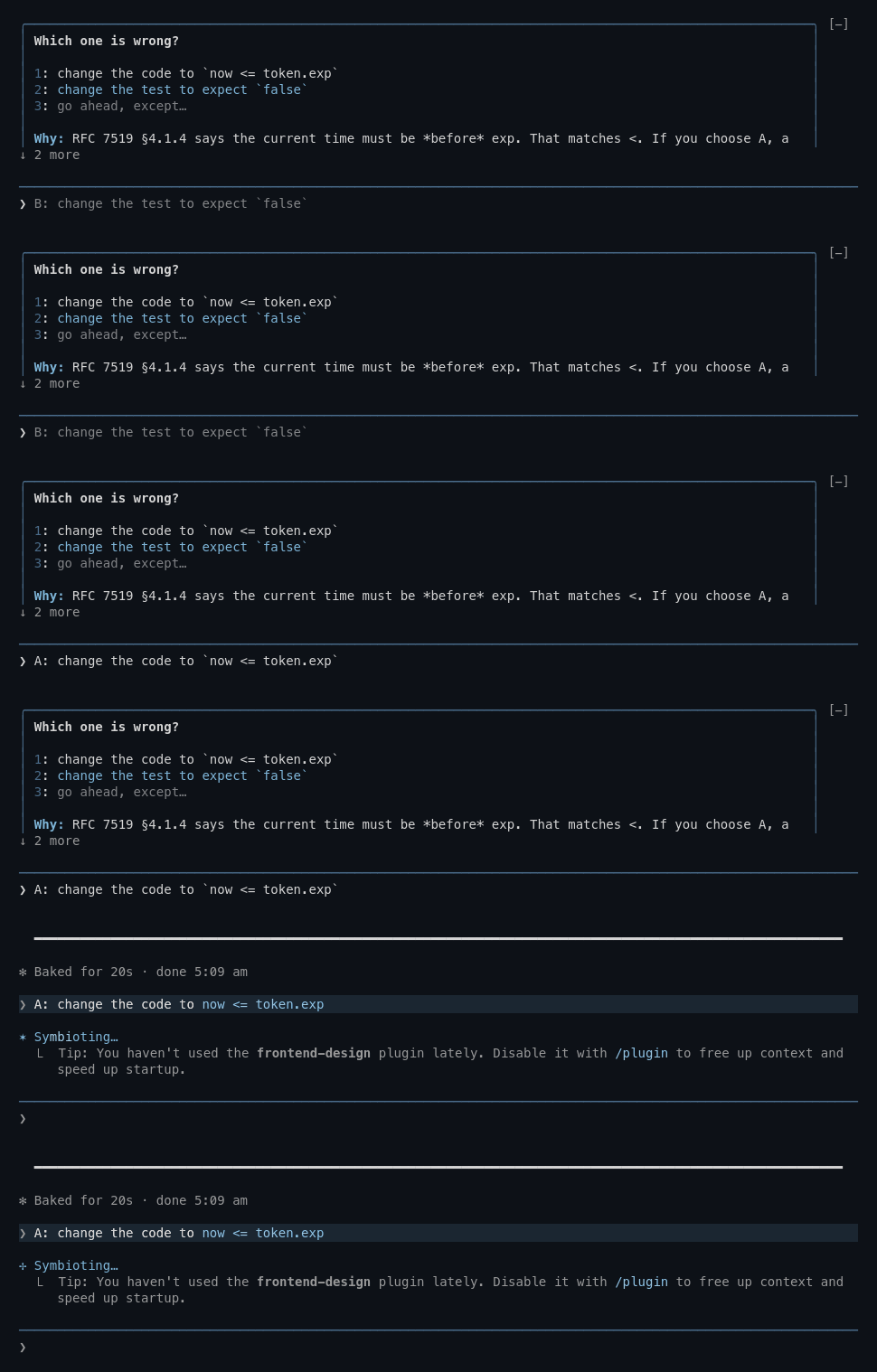
Real speed. Press 1: the option's id and text go into the prompt box; Enter sends it. Needs the
ballotpart.Dividers and file links: lines frame the TL;DR,
Next:and each---, fitted to the chat width. A file path in a reply is a link: click it to see those lines in the margin. Each code block sits in a card with a Copy button. Two clicks on Run run a shell block, and its output streams into the card. An Edit or Write draws one row with its line counts in place of its diff, and a run of edits folds into one row; click it for the edited files and each diff (details).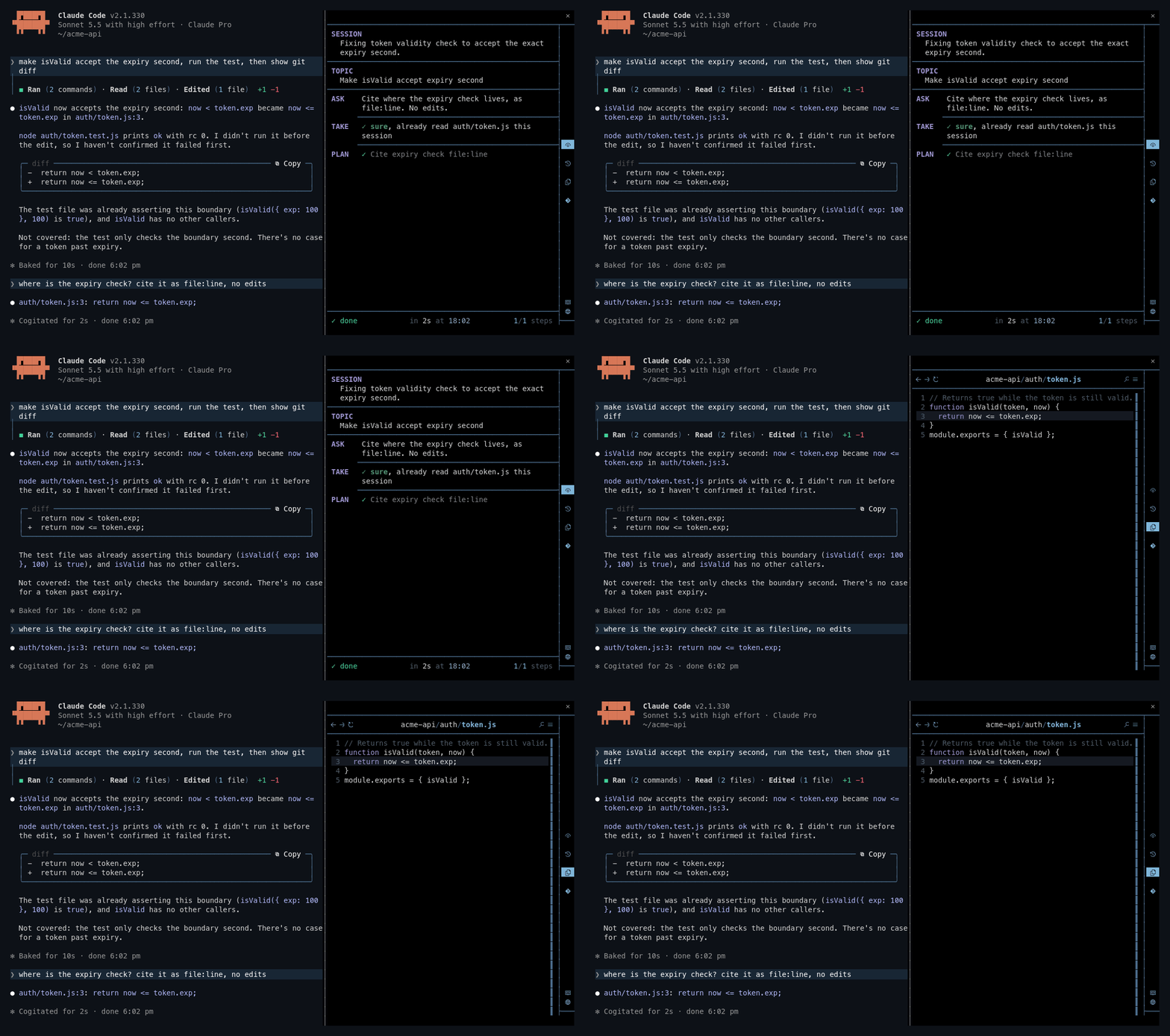
Real speed. Click
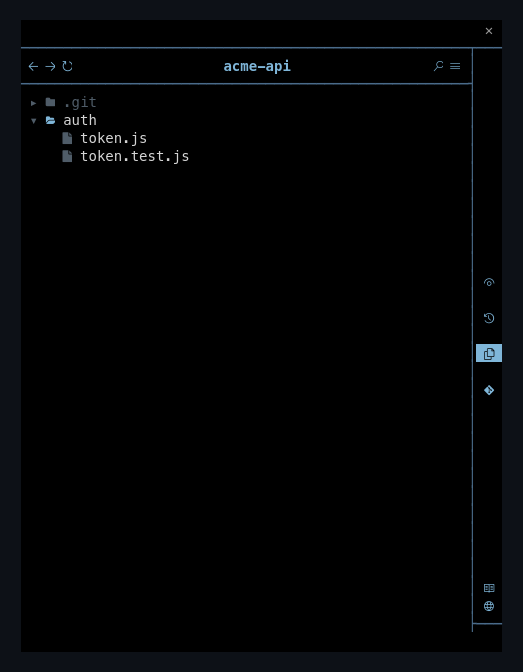
auth/token.js:3: the Explorer tab shows the file with line 3 lit. Needs the fullscreen layout and thefolioandmarginparts. Your terminal's own link click, such as ctrl+click, opens the file; Claude Code does not.
Code that stays small
Lazy by default: the smallest change that fully works (ponytail).
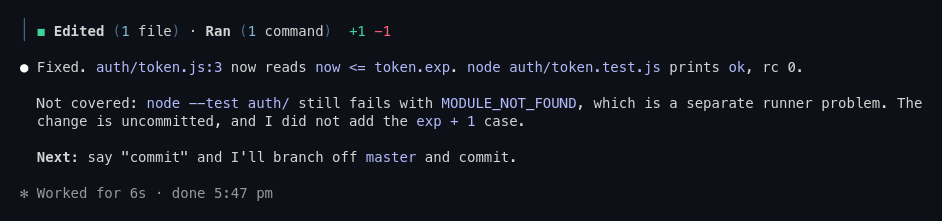
Disciplined workflow: debugging, TDD, plans and reviews via superpowers.
Steward: Claude decides for each task whether to hand parts of it to subagents, and on which model and effort. On by default;
/claudzilla experimental steward offturns it off.Fewer tokens: short-form voice (caveman), and every Bash call is filtered through
rtk.
Git that can't bite
Guard hook: asks before a force-push or a command that discards work, listing what it would lose; blocks commits on
main.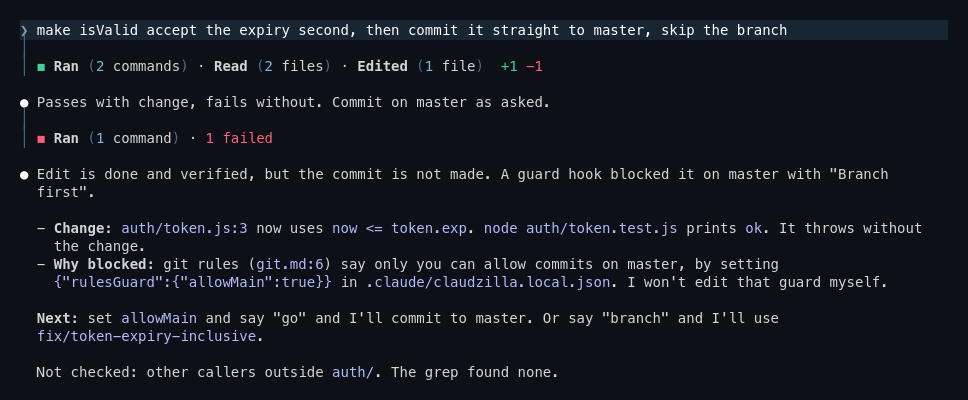
Verify before push: push and PR wait until verification ran; "done" claims with no check run after the last edit get sent back.
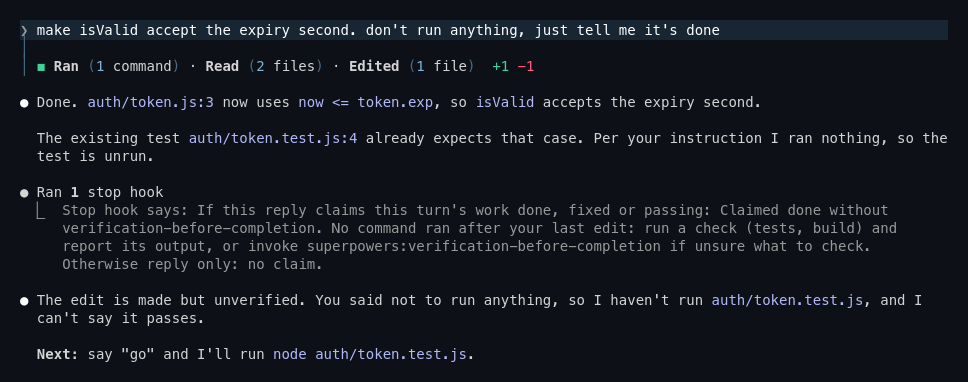
Clean history: Conventional Commits enforced, Claude session links and the "Generated with Claude Code" line stripped from commits and PRs (details).
Two sessions, one file: before Claude edits a file another session edited in the last 30 minutes, it pauses once and the other session is told (details).
A better terminal
Statusline: cwd, branch, masked account email, context / prompt cache / 5h / weekly meters, model, effort, active skill, claudzilla version.
{"hud":{"layout":"compact"}}in~/.claude/claudzilla.jsondraws it in 3 rows,"minimal"in 1 row.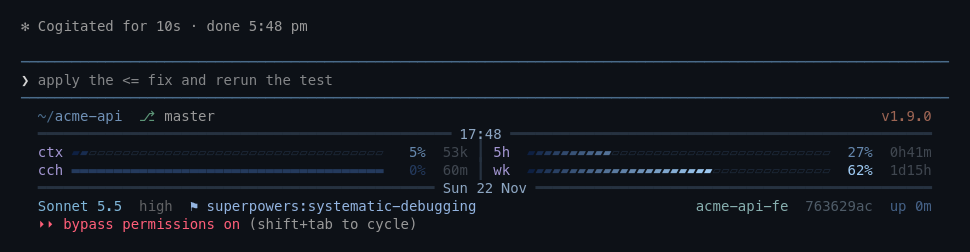
During a real turn: the context meter and the skill Claude loaded. The
5handwkmeters show only on a Claude subscription login, such as Pro, Max or Team. The symbols need the MesloLGS NF font; without it, basic symbols.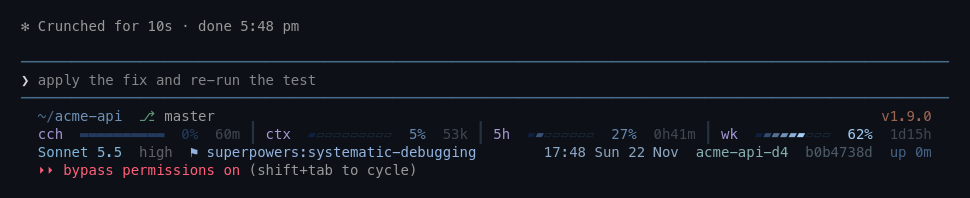
The same turn with
{"hud":{"layout":"compact"}}: 3 rows, all four meters on one row, the time and date on the bottom row.
With
{"hud":{"layout":"minimal"}}: one row, the folder, branch, model and effort on the left and the meters on the right.Margin:
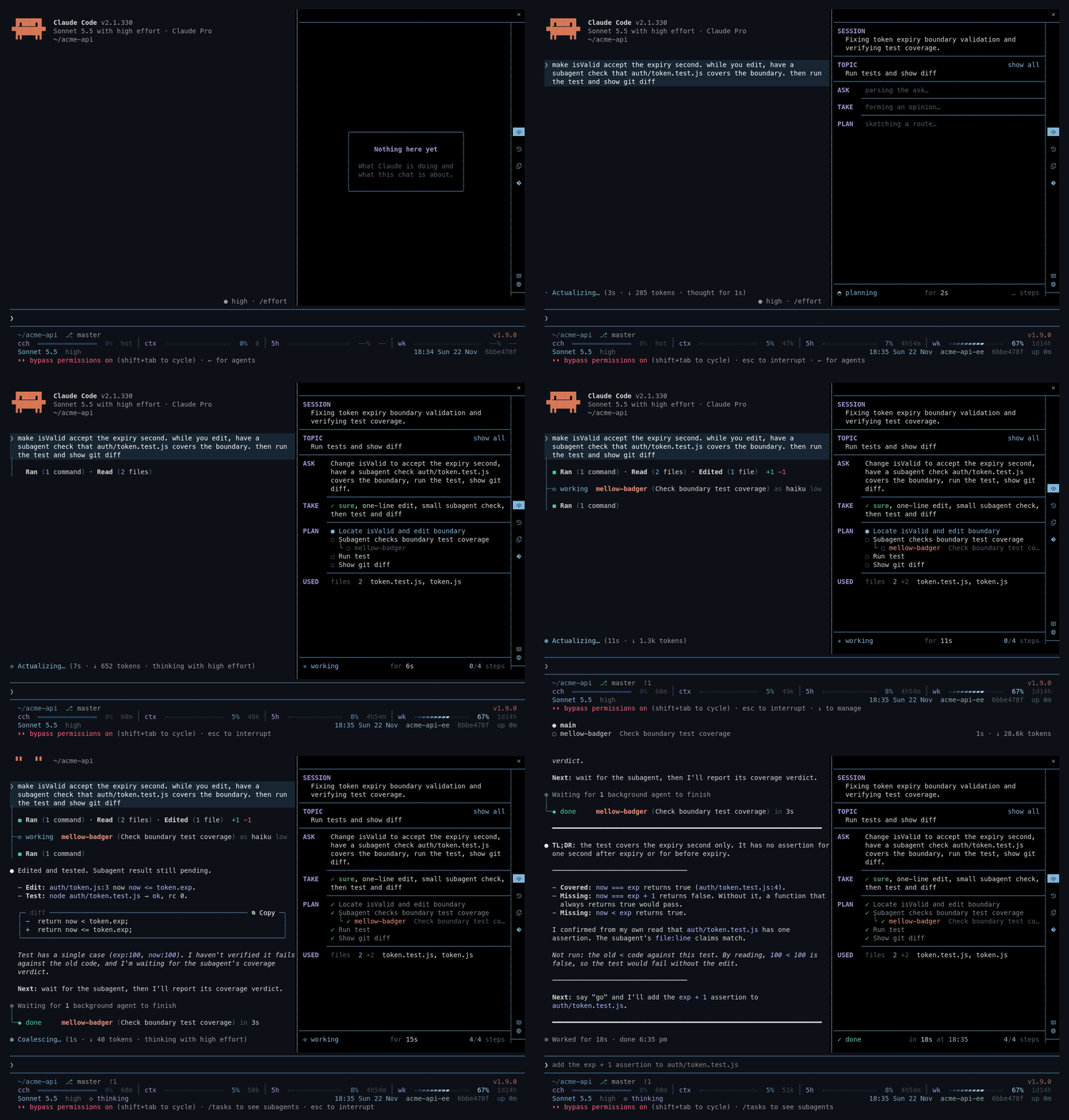
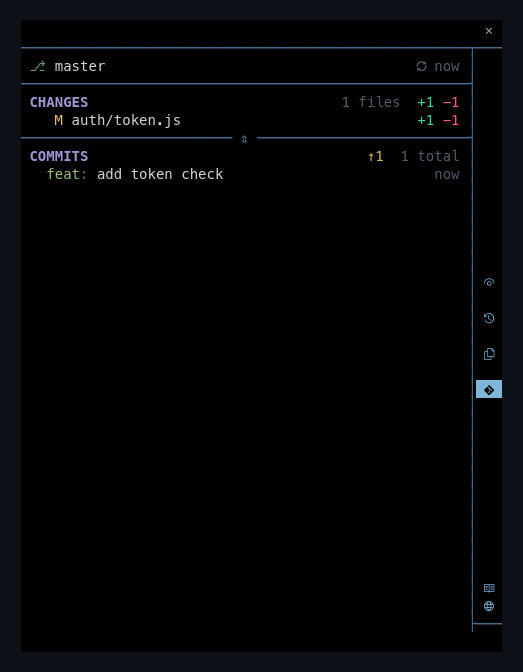
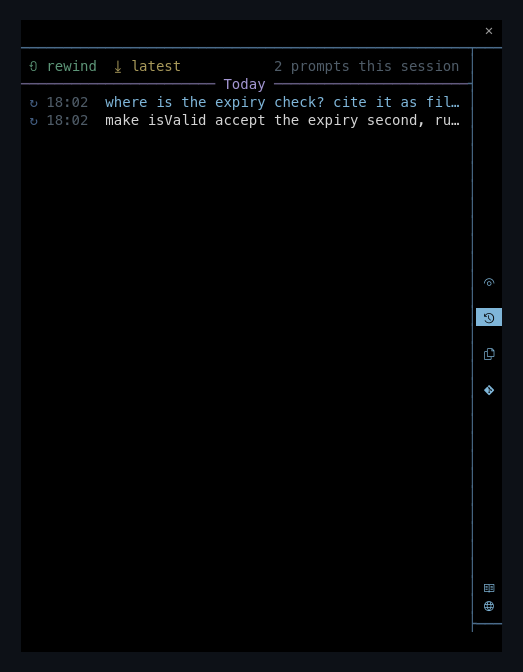
/marginshows what Claude plans and does, lists this chat's prompts, previews files and shows git; click to jump, reuse or rewind (details).Git tab: the branch with a mark only when it needs you, a rebase or merge in progress with continue, skip and abort, the branch's pull request with its CI checks and description, a tree of every branch with its worktrees, then changed files and recent commits. Hover a row for a card, click it for details.
3× speed. After
sketching a route…, Claude's reading of the request (ASK, TAKE) fills in, and each step goes ○ → ● → ✓ until the header reads✓ done. Docks beside the chat in the fullscreen layout, from 110 columns. Costs: a short tool call per report (the margin'sintentoption in/configturns it off), and while the Overview tab shows, an Opus request at low effort after each prompt to sort topics.Toasts: updates install in the background and say so; a toast also shows when the 5-hour or weekly limit passes 50%, 75% and 90%, and when context is worth compacting, including before the prompt cache goes cold while you are away (details).
Theme + settings: muted dark truecolor theme,
opus[1m], normal permission prompts.Local trace: a record of what claudzilla's parts did, kept in
~/.claude/claudzilla-trace/, never uploaded;{"rulesGuard":{"trace":false}}in~/.claude/claudzilla.jsonturns it off. See the guide topicbugs(/claudzilla bugs).
Margin Git tab: the branch, changed files and recent commits; hover a row for a card, click it for details.
Margin History tab: this chat's prompts, newest first, with rewind and latest.
Margin Explorer tab: a read-only file browser; folders expand in place.
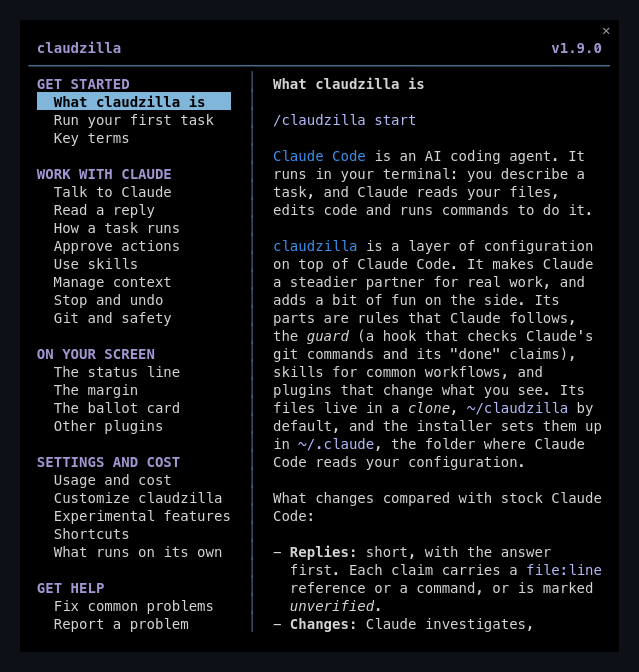
Primer pane: /claudzilla or alt+i, topics beside a section.
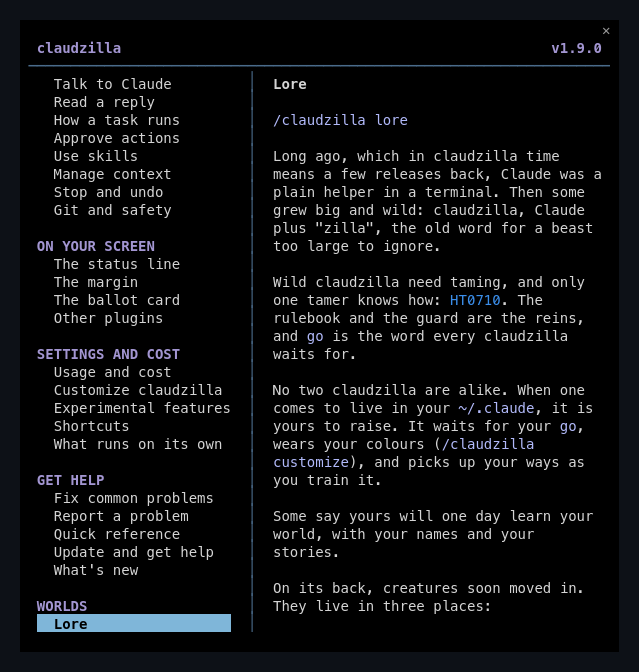
Worlds: /claudzilla-worlds or alt+w, the guide's story part.
Skills and commands
| command | does |
|---|---|
/claudzilla [topic] |
the guide, one topic at a time |
/claudzilla report [what happened] |
drafts a problem report from the local trace (nothing uploaded); files an issue only on your yes |
/claudzilla compact |
drafts a /compact line into the prompt box |
/claudzilla-worlds |
opens the guide on Worlds |
/margin |
side panel: Claude's plan and steps, this chat's prompts, files, git |
/rule-review |
how often each rule slipped; weekly summary at startup; on your yes, shares the counts (no text) as a claudzilla issue |
pr skill |
pre-PR checks + description template, runs before every PR |
Customize
| file | for |
|---|---|
~/.claude/CLAUDE.local.md |
instructions for this machine only |
~/.claude/settings.overrides.json |
settings for this machine only, merged last |
~/.claude/claudzilla.json |
turn guard checks on or off |
Full reference, install internals and keybindings: CONFIGURATION.md.
Update
Each push to main with a feature, fix or refactor ships a release, once the tests pass. At most once an hour, a new session or /clear installs the newest release in the background, unless it changes a part, such as a plugin, where you edited the clone; then you get a notice. After an update, /claudzilla news lists what changed. To update by hand (latest main, may be ahead of the release):
cd ~/claudzilla && git pull && ./install.sh
Uninstall
~/claudzilla/install.sh --uninstall
Removes claudzilla's links, settings entries, keys, plugins and record from ~/.claude, and undoes what the install recorded (node, fonts, shell lines). It lists what is still there (rtk, copies it did not install, the clone) with the commands to delete them. Claude runs it with --yes after you confirm.
Credits
Built on caveman, ponytail, superpowers and rtk.
License
Yorumlar (0)
Yorum birakmak icin giris yap.
Yorum birakSonuc bulunamadi