botloft
Health Uyari
- License — License: NOASSERTION
- Description — Repository has a description
- Active repo — Last push 0 days ago
- Low visibility — Only 5 GitHub stars
Code Gecti
- Code scan — Scanned 12 files during light audit, no dangerous patterns found
Permissions Gecti
- Permissions — No dangerous permissions requested
Bu listing icin henuz AI raporu yok.
A crew of Claude Code bots that stays on and works together on your Windows PC.

Botloft
A crew of AI coding bots that stays on and works together on your computer.




Download · Features · How it works · FAQ · Contributing
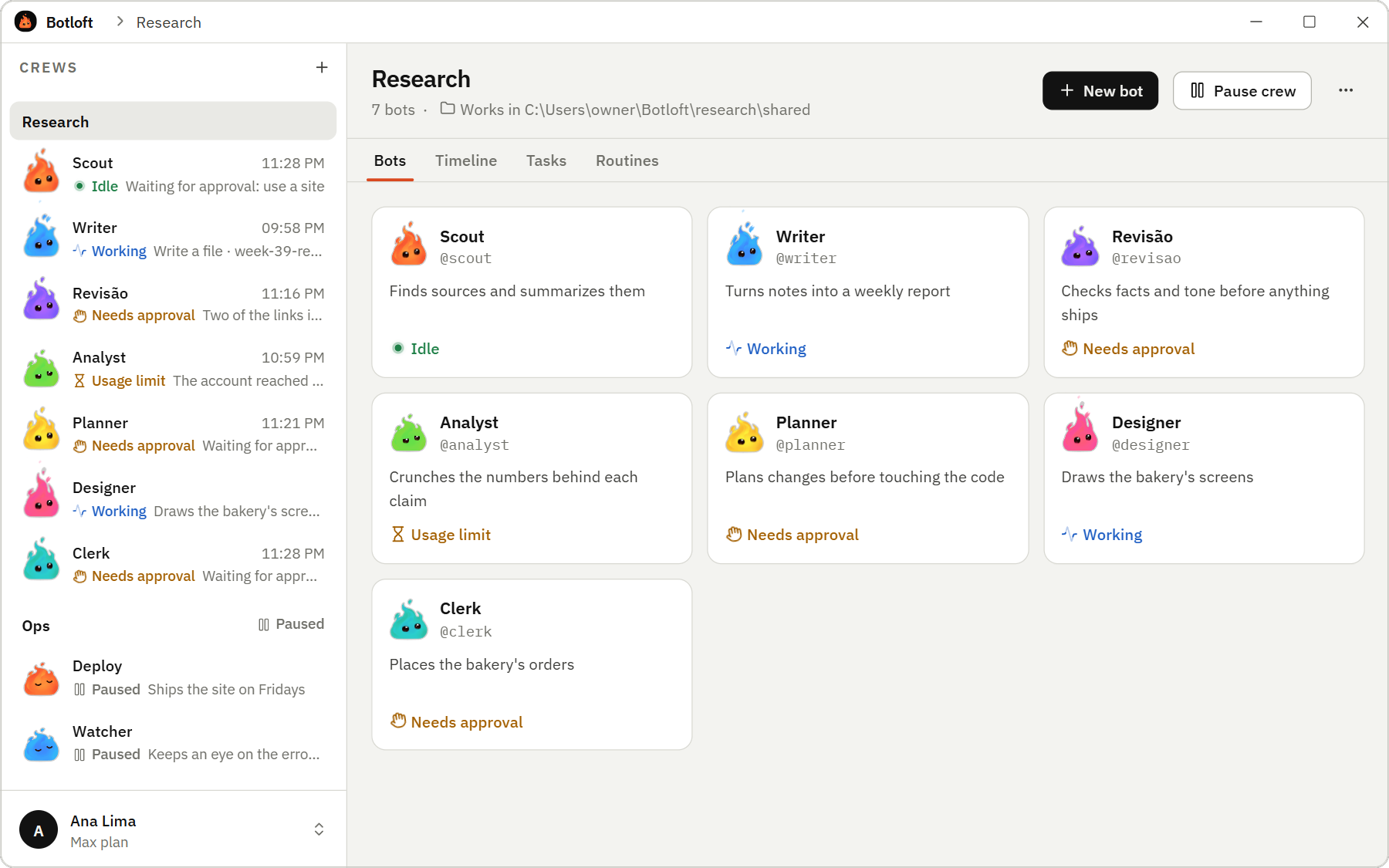
Botloft keeps a crew of bots running on your computer, each on the AI coding agent you choose:
Claude Code, or, as experimental options,
Antigravity and Codex. Each bot
has its own folder, memory and conversation. They pass work to each other, keep going after you
close the window and pick up where they left off after a restart. You talk to each one like in a
chat app, and you decide what they may do.
Claude Code is the full experience. Antigravity and Codex came in 0.15.0 as experimental agents,
off until you turn them on (see Agents).
What you can do
- Start a crew from a goal. Say what the crew is for. Its Chief plans the work and suggests the
bots it needs; you create each one with a click, or say why not. - Pick ready-made bots. The Bot agency has dozens of bots ready for a job, like a developer, a
designer, a writer, a researcher or customer support. Add one to a crew with a click and change
anything about it afterwards. The Chief uses the same list when it suggests a bot. - Chat with every bot. Replies stream in as they are written. Send images and files. When a bot
wants to run a command, edit a file or open a website, a card asks you first, unless you told that
bot it may. Search every chat with Ctrl+K. - Answer their questions. A bot that needs your decision asks in its chat and in the Questions
box, and goes on with what it can, even in a routine at night. Your answer reaches it as a message
whenever you reply. - Let them hand work to each other. Bots send messages and tasks to each other. Every message is
saved before it is sent and retried until it arrives. - Watch them work. See every page a bot opens in its browser, live, and take control to sign in
for it. Sites that refuse to sign in there, like Google, take one click more: sign in in a real
window of the bot's browser, close it, and the bot keeps the login. Watch the screens it designs
take shape while it writes them. Open the files it made. - Let them use your desktop apps (Windows). A bot can read and use the apps open on your
computer, like a spreadsheet or an old program with no website, but only those you allow. It asks
in the chat, and seeing an app and using it are separate permissions. You watch it live, and
Ctrl+Alt+Esc stops every bot on your desktop. Giving a bot the whole desktop, or letting it work
while you are away, first shows a screen that spells out the risks. Botloft itself, terminals,
password managers and password fields are never shared. - Schedule routines. Weekday mornings, every two hours or any cron schedule, with missed runs
and overlaps handled. - Leave them running. Bots keep working after you close Botloft. They start when you sign in,
come back soon after a crash and keep the computer awake while they work. Botloft
waits near the clock and tells you when a bot needs you. - Choose per bot. Which model it uses and how much it asks before acting. See how much of your
plan's usage is left. - Connect your own tools. Add a tool of yours in Settings > Connected tools, like a LinkedIn
reader or your company's system, and turn it on only for the bots that need it. They still ask you
before using it. - Back up and move. Save a sealed backup file, or sign in with your e-mail (no password) to keep
a light copy in the cloud and restore it on another computer. The server cannot read it. Turn on
automatic copies, every day or week and only when something changed, if you want them to go by
themselves (Windows for now). - Keep up from your phone. Choose "Connect a phone" in Settings > Account and phone and scan the
code with your phone's camera: Botloft opens there as a web page you can add to the Home Screen.
Approve requests, answer questions and chat with your bots from anywhere, with a notice when one
needs you. What passes between the phone and your computer is sealed end to end: the server
carries it but cannot read it. Anyone holding the phone unlocked can do the same, so you can lock
the page with a PIN. It uses the same account; files stay on your computer. Checked on Android,
not yet on iPhone.
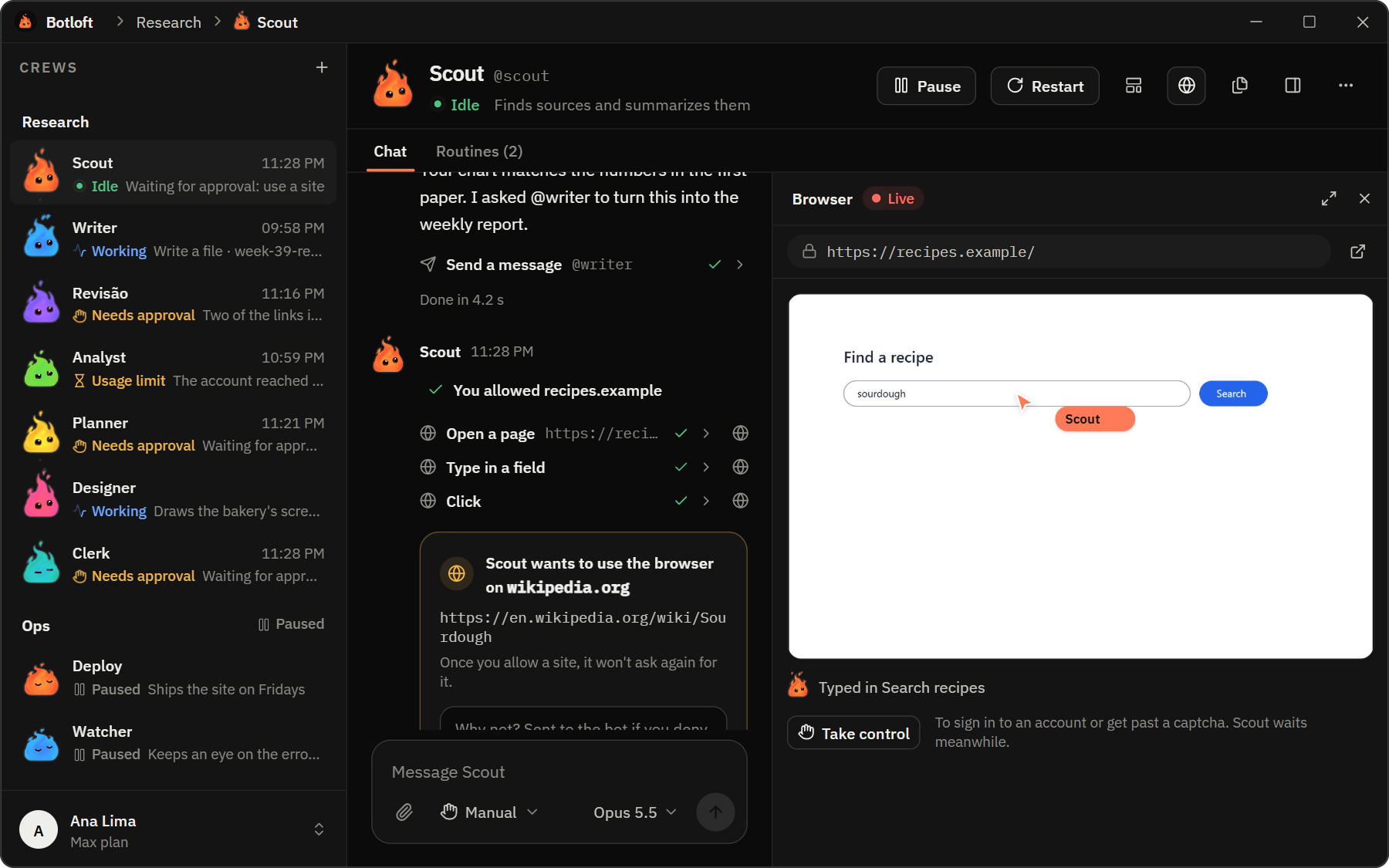 Chat and live browser. Scout asks before using a new site, and you watch it browse. |
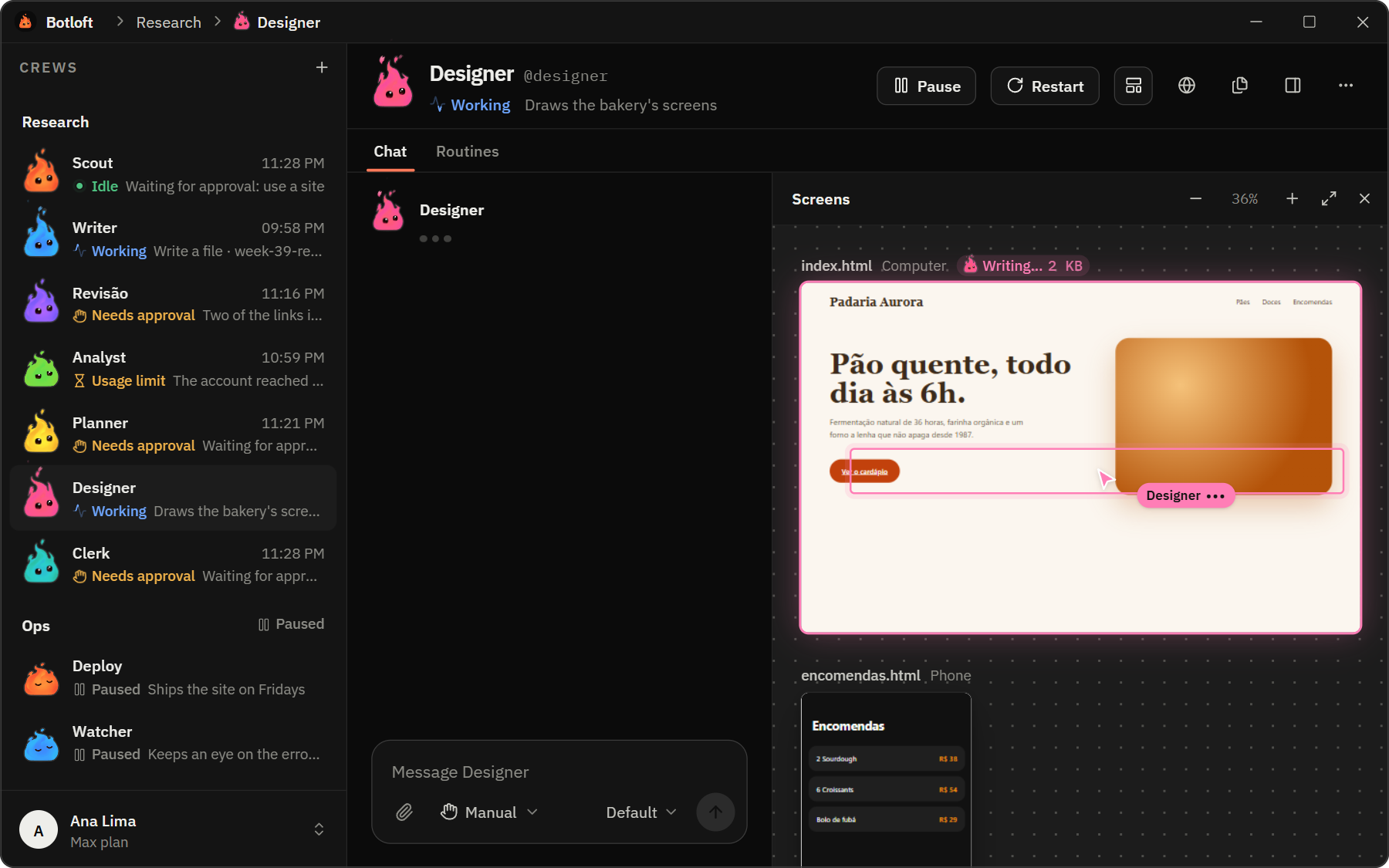 Screens. Designer's pages take shape while it writes them. |
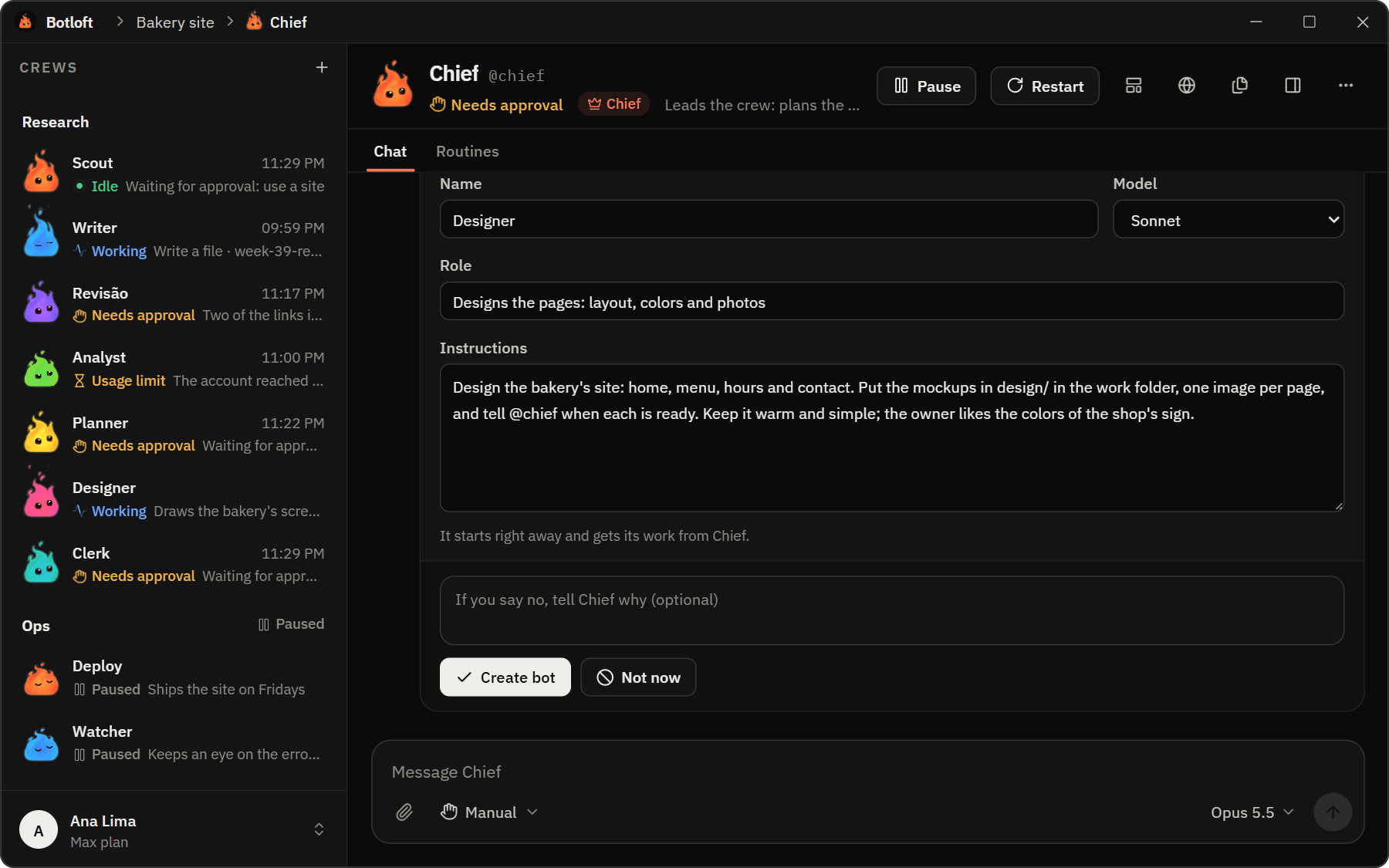 A Chief for each crew. It suggests the bots the work needs. |
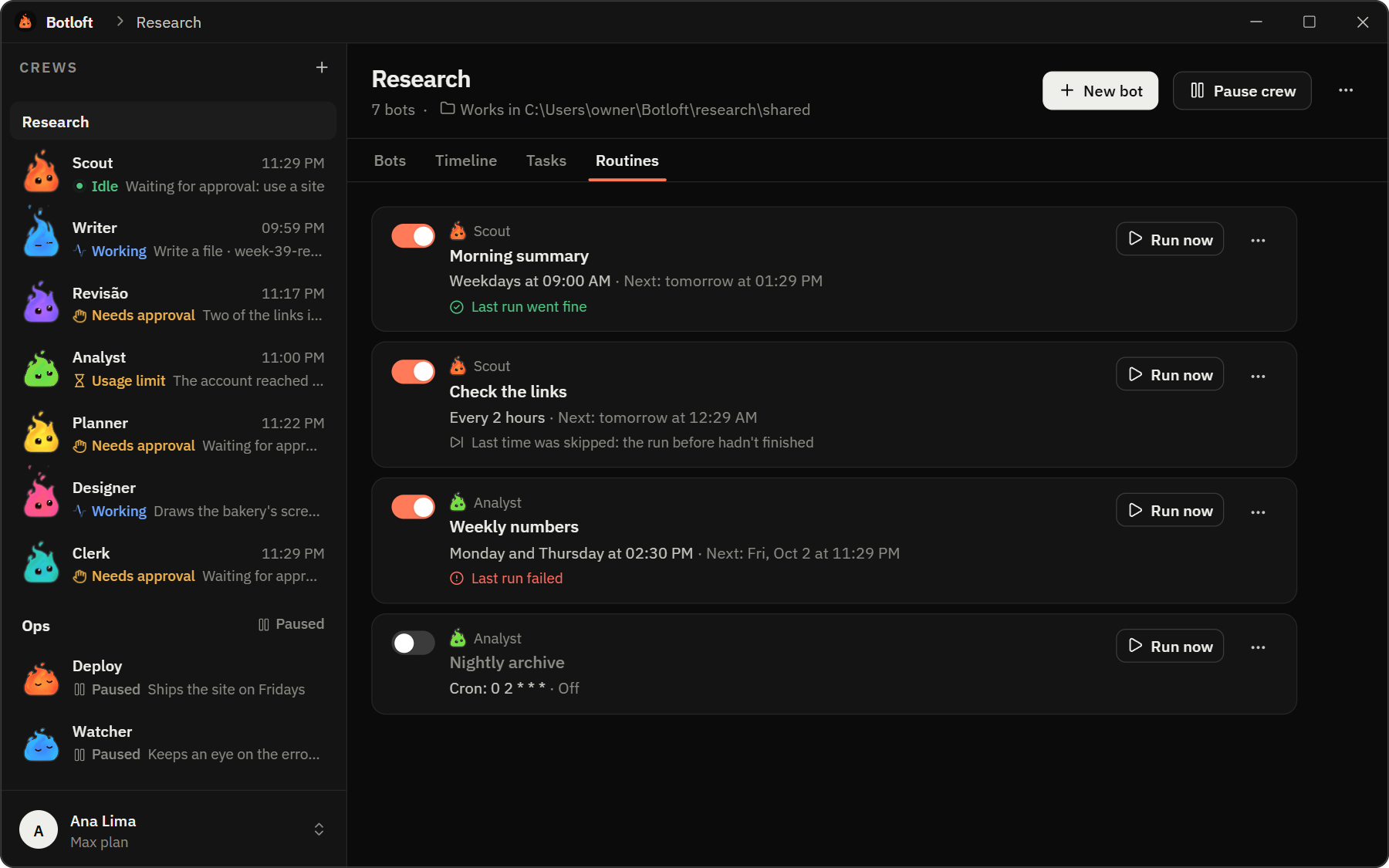 Routines. Work that runs on a schedule, with the last result at a glance. |
Botloft speaks English, Portuguese (Brazil) and Spanish, follows your light or dark theme and updates
itself.
Agents
Antigravity and Codex are experimental and off by default. Claude Code and Antigravity compare
like this:
| Claude Code | Antigravity (experimental) | |
|---|---|---|
| Chat, crew messages, tasks, routines, the live browser | yes | chat, crew messages and tasks; the rest is not checked yet |
| Asks you before acting | yes: each tool, with "always allow" | no: it cannot ask. It works with files in its own folders; commands you list per bot (or "full access") |
| Images | yes | yes, by file |
| Model | your plan's default, or one you pick | its own list; the effort is part of the name |
| Usage meter and "Compact" | yes | an estimate of the conversation size; no compaction |
| Isolation between crews | yes | folders are fenced for its file tools, not for commands you allow |
Claude Code is the full experience. Antigravity and Codex are off until you list them in Botloft'sconfig.toml (experimental_agents = ["agy"], ["codex"] or both); then a new bot can be made on
them, and Settings has "Agent for new bots". A Codex bot asks you before it changes a file or runs a
command, like Claude Code, and shows the exact size of its conversation; it can still read any file.
It has its own model list and effort picker, and understands images. See spec section 30 for what was
checked.
Get started
You need Claude Code, installed and signed in once with
your own account. Bots run on your own plan. (Antigravity and Codex, the experimental agents, work
the same way with their own accounts; see Agents.)
Download Botloft for your computer from the
latest release:- Windows 10 or 11 (64-bit):
Botloft_<version>_x64-setup.exe. Run it; it installs for your
Windows user only, with no administrator prompt. The installer is not code-signed yet, so
Windows SmartScreen may ask you to confirm ("More info", then "Run anyway"). - Linux (64-bit, preview):
Botloft_<version>_amd64.debfor Debian and Ubuntu, orBotloft_<version>_amd64.AppImagefor other distributions (make it executable first). - macOS on Apple Silicon (preview):
Botloft_<version>_aarch64.dmg. Drag Botloft to
Applications and open it once. Apple has not notarized it yet, so macOS blocks it the first
time: allow it in System Settings > Privacy & Security > Open Anyway.
The code signing policy says how releases are made and how to
check your download.- Windows 10 or 11 (64-bit):
Open Botloft. It sets itself up; there is nothing to configure.
Create your first crew and tell it what it is for.
When a new version is out, an Update available button shows in the title bar.
On Windows, uninstalling (Settings > Apps) removes the app and stops Botloft from running in the
background. On Linux and macOS, stop it first with~/.local/share/Botloft/bin/botloftd service uninstall (Linux) or~/"Library/Application Support/Botloft/bin/botloftd" service uninstall (macOS), then remove the
app. Your bots and their files stay either way (see
Where are my bots and their files?).
How it works
flowchart LR
  app["Botloft app<br/>Tauri + React"] -- "JSON-RPC over WebSocket<br/>127.0.0.1 only" --> daemon["botloftd<br/>Rust daemon"]
  daemon --> db[("SQLite")]
  daemon -- "stdin and stdout<br/>stream-json" --> bots["One agent process<br/>per bot"]
  bots -- "Botloft's MCP tools<br/>messages, tasks, requests" --> daemon
- The daemon is the source of truth. Closing the app never stops a bot.
botloftdruns as a
scheduled task of your Windows user, a systemd user service on Linux or a launch agent on macOS:
it starts when you sign in and comes back soon if it dies. - Your agent is the runtime. Each bot is a real session of the agent you chose (
claude -pfor
Claude Code;agy -pfor Antigravity andcodex app-serverfor Codex) with its
own workspace, memory and conversation. There is no custom agent SDK and no API key to manage. - One conversation per bot. Your messages, messages from other bots and notices from the daemon
reach the bot in order. What it does comes back as a chat: replies, tool use and requests you
allow or deny. - Durable before delivered. Every message is written to SQLite before it is sent and retried
until it is delivered or marked as failed, which you can retry.
The full design, from the protocol to the states of a bot, lives in docs/spec.md
(in Portuguese).
Privacy and security
- Local first. The daemon listens on
127.0.0.1, and there is no telemetry. An account is
optional. Without one, Botloft uses the network for nothing beyond updates and your bots' work:
what they send to the agent's provider, which goes through the agent as when you use it yourself,
and the websites and connected tools they use. With one, the server holds only backups sealed with
a password that never leaves your computer, and passes along what a connected phone and your
computer say to each other, sealed end to end (see the FAQ). - You decide what bots may do. Per bot: ask before anything, accept edits, plan only, or decide on
its own what needs your OK. Unless it decides on its own, a bot also asks before its first visit
to each website. - Tokens stay safe. The app authenticates with an owner token readable only by your user account.
Each bot gets its own token per start, and the daemon keeps only its SHA-256 hash. - Botloft is not a sandbox. Every bot runs as your user account, so isolation between bots is
cooperative: a bot can read other bots' folders if it decides to. Give bots only the permissions
you would give that agent directly.
What Botloft sends over the network, what it changes on your computer and how to remove it are in
the code signing policy.
FAQ
Does Botloft cost anything?No. Botloft is free to use, at home or at work, and its source code is public (see
License). The bots run on the agent you chose, with
your own account, so they use your plan's limits; with Claude Code, Botloft shows how much is left.
No. The bots run in the background, even after you close Botloft, and start when you sign in if you
want.
Settings has a switch to stop them when you close the app instead.
Each bot has a folder under Botloft\<crew>\<bot> in your home folder (%USERPROFILE% on Windows,~ on Linux and macOS), and each crew a shared work folder that you can point at a project of
yours. Botloft's own data (SQLite, logs, secrets) is in %LOCALAPPDATA%\Botloft on Windows,~/.local/share/Botloft on Linux and ~/Library/Application Support/Botloft on macOS.
You sign in with a link sent to your e-mail; there is no account password. The cloud copy is the
light one: your crews' structure, the bots' memory and the routines, not the chats or files. Botloft
seals it on your computer with the backup password before sending, so the server stores bytes it
cannot open. It also knows your e-mail, the computers you signed in on, the phones you connected
(and, if you turn on notices, where to send them), and the size and date of each copy. Lose the
backup password and the cloud copies cannot be recovered. Nothing is sent unless you send it, turn
on automatic copies or connect a phone. Automatic copies go every day or week, only when something
changed; for them Windows keeps your backup password in its credential store, on this computer
only, so use a password just for this. A connected phone talks to your computer through the server,
sealed end to end with keys only the two of them have: the server sees when and how much passes,
never what, and the notices it sends the phone are empty. You can delete the copies or the whole
account from the app, and disconnect a phone at any time. The server is this repository'sbotloft-cloud crate: you can run your own and point the app at it.
The Windows installer is not code-signed yet, so SmartScreen does not know its publisher, and Apple
has not notarized the macOS app, so Gatekeeper blocks its first opening until you allow it. Each release is
built by GitHub Actions from this repository, and updates are signed and checked by the app before
they install. The code signing policy says how releases are made and
how to check a download.
Yes, as a preview since 0.8.0: Linux (64-bit, .deb or AppImage) and macOS on Apple Silicon. Intel
Macs are not supported yet.
Windows came first and has had the most use; if something does not work elsewhere, please
open an issue.
No. Botloft is an independent project. It uses Claude Code, Antigravity and Codex
as installed on your computer and is not affiliated with or endorsed by Anthropic, Google or OpenAI.
Status
Botloft is young (version 0.x) and moves fast. The latest release, 0.15.0 (2026-10-10), has bots
that keep running in the background, the chat, crews with a Chief, ready-made bots in the Bot
agency, messages and tasks between bots, routines, the live browser, screens, "always allow" for
requests, questions from bots, chat search, desktop use on Windows, connected tools, backups with an
optional cloud copy, the phone page, the installer and updates, and Antigravity and Codex as
experimental agents. Still open: a code-signed installer.
Requirements: Rust stable (the MSVC toolchain on Windows), Node.js 24 and pnpm. On Linux, the app
also needs the desktop libraries Tauri uses (on Ubuntu: libwebkit2gtk-4.1-dev,libayatana-appindicator3-dev, librsvg2-dev, libxdo-dev). Running real bots also needs an agent
installed and signed in: Claude Code (the native claude executable), Antigravity (agy) or Codex.
# Daemon and libraries
cargo build -p botloftd
cargo test --workspace
cargo clippy --workspace --all-targets -- -D warnings
cargo fmt --all --check

# Desktop app
cd app
pnpm install
pnpm tauri dev
pnpm dev          # the UI alone in a browser, with a fake daemon and sample crews
pnpm check        # typecheck + Biome + Vitest
pnpm bundle       # this system's packages with the daemon inside: NSIS, .deb and AppImage, or .dmg
Set BOTLOFT_HOME to an absolute path such as $PWD\.dev\home during development so the daemon
never touches a real installation in %LOCALAPPDATA%\Botloft.
The daemon manages its own scheduled task (a systemd user service on Linux, a launch agent on
macOS):
botloftd service install     # copy botloftd into the data folder, start it now and at every logon
botloftd service status
botloftd service restart
botloftd service uninstall   # stop it and remove the task; bots and data stay
Each data folder gets its own task, so a dev daemon installed with BOTLOFT_HOME (or --home)
never replaces the real one.
crates/botloft-core    domain types, IDs, message envelope, protocol types
crates/botloft-store   SQLite storage and migrations
crates/botloftd        the daemon
app/                   Tauri v2 + React desktop app
docs/                  specification and ADRs
Contributing
Contributions are welcome: bug reports, ideas, translations and code. Start with
CONTRIBUTING.md; issues labeledgood first issue are a good
first step. Security problems go through SECURITY.md, not public issues.
License
Botloft is licensed under the Functional Source License 1.1, Apache 2.0 future license
(FSL-1.1-ALv2). In short:
- You may use Botloft for anything, including at work, read and change its code, and send
contributions. - You may not offer Botloft, or a copy or a change of it, as a commercial product or service that
competes with it. - Two years after each version is released, that version also becomes available under the
Apache License 2.0.
Versions up to 0.9.1 were released under the Apache License 2.0 and stay under it. The
LICENSE file is what counts; this summary is not legal advice.
The screenshots show sample crews from the app's preview, not
real data.
Yorumlar (0)
Yorum birakmak icin giris yap.
Yorum birakSonuc bulunamadi