agent-emulator
Health Uyari
- License — License: MIT
- Description — Repository has a description
- Active repo — Last push 0 days ago
- Low visibility — Only 5 GitHub stars
Code Gecti
- Code scan — Scanned 12 files during light audit, no dangerous patterns found
Permissions Gecti
- Permissions — No dangerous permissions requested
Bu listing icin henuz AI raporu yok.
Emulation & experimentation platform for trustworthy AI agent infrastructure —trace-driven replay of agent behavior on a sharded blockchain. Built on BlockEmulator-X by HuangLab @ Sun Yat-sen University.
AgentEmulator
Overview
AgentEmulator is an emulation and experimentation platform for trustworthy AI agent infrastructure. The platform was initiated by HuangLab, led by Professor Huawei Huang at the School of Software Engineering, Sun Yat-sen University. AgentEmulator uses blockchain as the foundation for trusted records and settlement. Researchers and students can investigate agent identity, behavioral auditing, payment settlement, incentives, and governance. AgentEmulator aims to support research into trustworthy interaction and collaboration among AI agents.
AgentEmulator is built on BlockEmulator-X, HuangLab's blockchain emulation platform. HuangLab released BlockEmulator-X as open source in June 2026 as the successor to the original BlockEmulator. AgentEmulator extends BlockEmulator-X to experiments that combine AI agent behavior with blockchain execution.
Paper
AgentEmulator: A Blockchain-Empowered Testbed for Trustworthy AI Agent Infrastructure
Jian Zheng, Jianbo Xiong, Feihong Hu, and Huawei Huang (corresponding author). October 2026. Preprint.
DOI: 10.13140/RG.2.2.23825.60000
The paper formalizes the trace–transaction mapping, the three execution orders (logical trace order, backend execution order, visualization order), the reproducibility requirements, and an evaluation methodology for payment completion and execution overhead.
If you use AgentEmulator in your research, please cite this paper (see CITATION.cff):
@misc{zheng2026agentemulator,
  author = {Zheng, Jian and Xiong, Jianbo and Hu, Feihong and Huang, Huawei},
  title = {{AgentEmulator}: A Blockchain-Empowered Testbed for Trustworthy {AI} Agent Infrastructure},
  year = {2026},
  month = oct,
  doi = {10.13140/RG.2.2.23825.60000},
  note = {Preprint available on ResearchGate}
}
Why trustworthy AI agent infrastructure
AI agents are moving out of chat windows and into real workflows: they call APIs, hold identities, pay for services, and act on behalf of people and organizations. When agents transact with each other, three trust gaps appear that better models cannot close:
| Trust gap | What it means in practice |
|---|---|
| Behavior is not auditable | There is no neutral, tamper-resistant record of what an agent did and why. |
| Accountability is not traceable | When an agent errs, exceeds its authority, or causes a loss, you cannot locate which agent, authorized by whom, at which step. |
| Settlement is not trustworthy | Value exchange between agents — and between agents and API services — lacks a neutral ledger. |
Closing these gaps requires a dedicated layer of infrastructure: an auditing and settlement layer that is independent of the models themselves. AgentEmulator is the experimental platform for building and evaluating that layer. In it, the blockchain plays a specific role — a neutral substrate for trusted records and settlement — not a universal solution.
What AgentEmulator is and is not
AgentEmulator measures the infrastructure layer, not agent capability. Capability benchmarks (AgentBench, WebArena, OSWorld, SWE-bench) ask: can the agent finish the task? AgentEmulator asks: when agents join, pay, and leave, are identity, payments, records, and settlement working correctly, at what cost, and under what mechanisms? The two questions are complementary: a completed payment proves a payment happened, not that the task was done well. AgentEmulator supplies the transaction records and account views that make the infrastructure question answerable and reproducible.
What v1.0 does (current release):
AgentEmulator v1.0 supports trace-driven behavior replay, records of identity registration and revocation, direct payments, experimental data collection, and visualization. Researchers describe agent actions in a JSONL trace file. The agentSupervisor module compiles the trace into a transaction dataset. The module then starts a BlockEmulator-X blockchain and submits the transactions for on-chain execution and recording. After the experiment, AgentEmulator records transaction and account data and generates balance plots. AgentEmulator also creates an HTML gallery with Chinese and English interface options. The launch script opens the gallery in the default browser.
In v1.0, agent behavior is predefined in the trace. Transactions follow the User-specified Original Sequence policy. No additional transaction orchestration or scheduling algorithm is included. Researchers can extend the default policy with mechanisms such as transaction reordering, priority rules, or agent weights.
Future releases will expand the supported protocols, scenarios, and evaluation capabilities. Contributions and research-specific extensions are welcome.
What v1.0 deliberately does not do:
it introduces no transaction scheduling algorithm — it follows the User-specified Original Sequence policy, leaving orchestration, priority rules, and agent weights as research extensions.
The five-layer stack
AgentEmulator maps onto a five-layer taxonomy of trustworthy agent infrastructure. The layers define the research agenda; the tooling lands incrementally.
| Layer | Question | AgentEmulator status |
|---|---|---|
| L1 Identity | Who is this agent, and who authorizes it? | did-simple derives deterministic identifiers; DID registry contracts are roadmap |
| L2 Auditing | What did it do, and can it be verified later? | Verifiable-log structures (e.g., Merkle accumulators) are roadmap; v1.0 records the action stream |
| L3 Settlement | How do agents pay each other at high frequency? | direct-pay today; payment channels and batch settlement are roadmap |
| L4 Incentives | How is good behavior rewarded on-chain? | Roadmap (reputation, points, prediction markets) |
| L5 Governance | Who arbitrates disputes, and how do regulators plug in? | Roadmap |
A demonstrated workflow
The paper demonstrates the workflow with 100 agents and 10,000 payment transactions on a 4-shard × 4-node blockchain (single host, Mac mini / Apple M4 Pro / 24 GB, Go 1.25.7, seed 20260903), producing 23 figures across four balance views.
This demonstration establishes the workflow — trace in, ledgers and views out. It does not establish performance or scalability; throughput, latency, and resource overhead require separate timing measurements, which are part of the evaluation methodology in the paper.
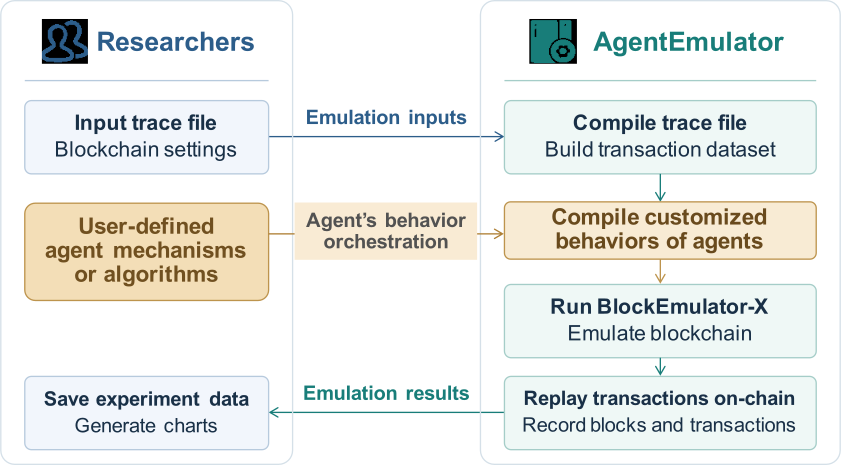
Figure 1. AgentEmulator's general workflow. This diagram illustrates the platform's broader purpose, beyond the current v1.0 release. The user-defined mechanisms and algorithms provide scope for extensions and original research.
Reproducibility
Repeatable experiments require fixed inputs: the same trace bytes, the same seed, the same configuration, the same source revisions, and a clean initial registry. AgentEmulator automates consistent preparation, and the paper's Appendix A specifies the records, checks, and figure-regeneration commands that make a run verifiable.
The HuangLab family
AgentEmulator is part of HuangLab's blockchain experimentation stack at Sun Yat-sen University:
| Project | Role | Link |
|---|---|---|
| BlockEmulator | Emulator for blockchain sharding protocols (IEEE TSC 2025) | https://github.com/HuangLab-SYSU/block-emulator |
| BlockEmulator-X | Successor with EVM execution; the backend of AgentEmulator | https://github.com/HuangLab-SYSU/block-emulator-x |
| AgentEmulator | This project — agent behavior on a sharded blockchain | https://github.com/HuangLab-SYSU/agent-emulator |
| BrokerChain | Academic sharded blockchain testnet (~400 external nodes) | https://github.com/HuangLab-SYSU/BrokerChain |
| brokerchain-mcp | MCP server (register_agent / append_log / open_channel / pay) with dual backends: AgentEmulator simulation and BrokerChain testnet |
in development |
What does AgentEmulator support?
AgentEmulator is designed to simplify experiment setup, mechanism validation, and data analysis. Researchers can configure the underlying blockchain, observe agent behavior, and evaluate how different mechanisms affect experimental outcomes.
Roadmap
Development will focus on five areas: identity, settlement, auditing, incentives, and governance. The roadmap below is provisional and may evolve with research and development progress.
| Stage | Focus |
|---|---|
| v1.0: Basic behavior emulation (current release) | Trace-driven replay of join, pay, and leave actions, with transaction execution, action-to-transaction mapping, account records, and visualization. |
| Near term: Identity and auditing | Smart contract state management for DID registration and revocation, permission declarations, verifiable behavior logs, and traceability. |
| Medium term: Payments and interactions | Micropayments, payment channels, batch settlement, experiments with feedback across multiple rounds, and richer agent service interactions. |
| Later: Incentives and collaborative governance | Task allocation, behavior coordination, and accountability in multi-agent collaboration, with emulation and evaluation of different collaboration strategies. |
| Long term: Benchmarking | Standardized scenarios, datasets, and metrics for comparing trustworthy infrastructure approaches through reproducible experiments. |
Repository
The source code is available on GitHub.
Terminology
The core workflow is: describe agent behavior in a trace → compile the trace into transactions with agentSupervisor → execute the transactions in BlockEmulator-X → collect and visualize the results.
| Term | Description |
|---|---|
| AgentEmulator | An agent behavior emulator built on BlockEmulator-X. AgentEmulator converts agent actions into blockchain transactions, records experimental data, and presents the results. |
| Agent | An experimental participant whose join, pay, and leave actions are defined in a trace. |
| BlockEmulator-X | The underlying blockchain emulator, responsible for node operation, consensus, block production, transaction execution, and on-chain records. See the BlockEmulator-X repository. |
| Trace file | A JSONL input file describing a sequence of agent actions. Each line contains one action or one plain transfer. |
agentEmuConfig.yaml |
The agent-level experiment configuration: trace path, identity derivation seed, output directory, and blockchain execution settings. |
config.yaml |
The BlockEmulator-X configuration template: shard count, node count, block interval, and other blockchain parameters. |
agentSupervisor |
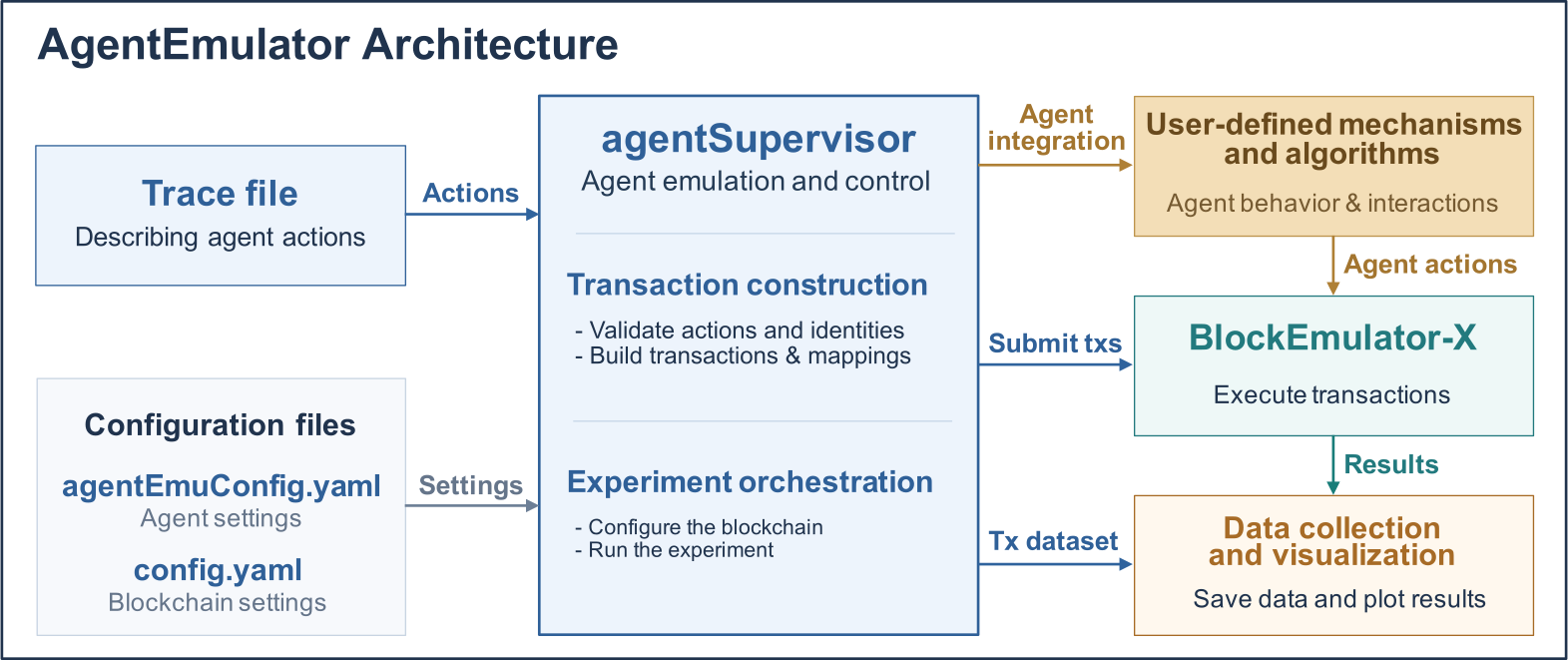
The experiment coordinator. agentSupervisor reads configurations and traces, then compiles actions into transactions. The module also manages blockchain execution and produces experiment outputs. |
agent_id |
A unique identifier assigned to an agent in the trace, such as agent-alice. The identifier distinguishes agents and links each agent's behavior records. |
seed |
The identity derivation seed in agentEmuConfig.yaml. The same seed and agent_id produce the same DID. |
| DID | A Decentralized Identifier derived automatically from seed and agent_id. DIDs do not need to be entered in the trace. |
System architecture
The following diagram shows AgentEmulator's modules and their relationships.
Getting Started
Prerequisites
AgentEmulator runs on macOS, Linux, and Windows.
| Dependency | Required version | Verification command | Purpose |
|---|---|---|---|
| Go | ≥ 1.25 | go version |
Build and run the emulator |
| Python 3 | ≥ 3.8 | python3 --version (Windows: python --version or py -3 --version) |
Generate plots after each experiment |
| matplotlib / numpy / pandas | — | python3 -c "import matplotlib, numpy, pandas" |
Plotting and data analysis |
Install the Python dependencies if needed (use pip on Windows):
pip3 install matplotlib numpy pandas
Clone and build the project:
git clone https://github.com/HuangLab-SYSU/agent-emulator.git
cd agent-emulator
go build ./...      # Verify the build environment
Five-minute quick start
On Windows, run the batch script from Command Prompt or double-click run_agentemu.bat in File Explorer:
run_agentemu.bat
To use a custom configuration:
run_agentemu.bat my-config.yaml
The Windows and Bash scripts follow the same workflow:
Build → clear previous results → run the experiment → generate plots → open the HTML gallery.
If python is unavailable, the Windows script falls back to py -3.
On macOS and Linux, run:
bash run_agentemu.sh
Or specify a custom configuration:
bash run_agentemu.sh my-config.yaml
The launch script performs these steps automatically:
- Build the project with
go build ./.... - Clear previous experiment data by deleting
./exp. - Run the experiment: read
agentEmuConfig.yamland compile the trace into transactions. Start BlockEmulator-X with 4 shards and 4 nodes per shard by default. Stop the blockchain after all transactions have been committed. - Generate plots from the latest round's agent ledgers and save PNG files to
figs/figs_results/. - Build and open the HTML gallery containing the plots.
Press Ctrl-C to stop an experiment safely. Consensus node subprocesses started by BlockEmulator-X will also be cleaned up.
Note: Each run clears previous data in
exp/and plots infigs/figs_results/. Back up any results you wish to retain. Plotting is skipped if the experiment fails. The gallery is generated only after a successful run.
Trace File Setup
A trace file provides the input for an experiment. The file uses JSONL format, with one agent action or one plain blockchain transfer per line. In agent action records, agent_id identifies the agent performing the action, and ts defines the logical order. The action field specifies join, pay, or leave.
Trace file (experiment intent)
    │  Compile intent into blockchain transactions
    │  (DID derivation, nonces, and data fields)
    ▼
Transaction dataset → Emulation replay → Agent ledgers / On-chain metrics → Plots
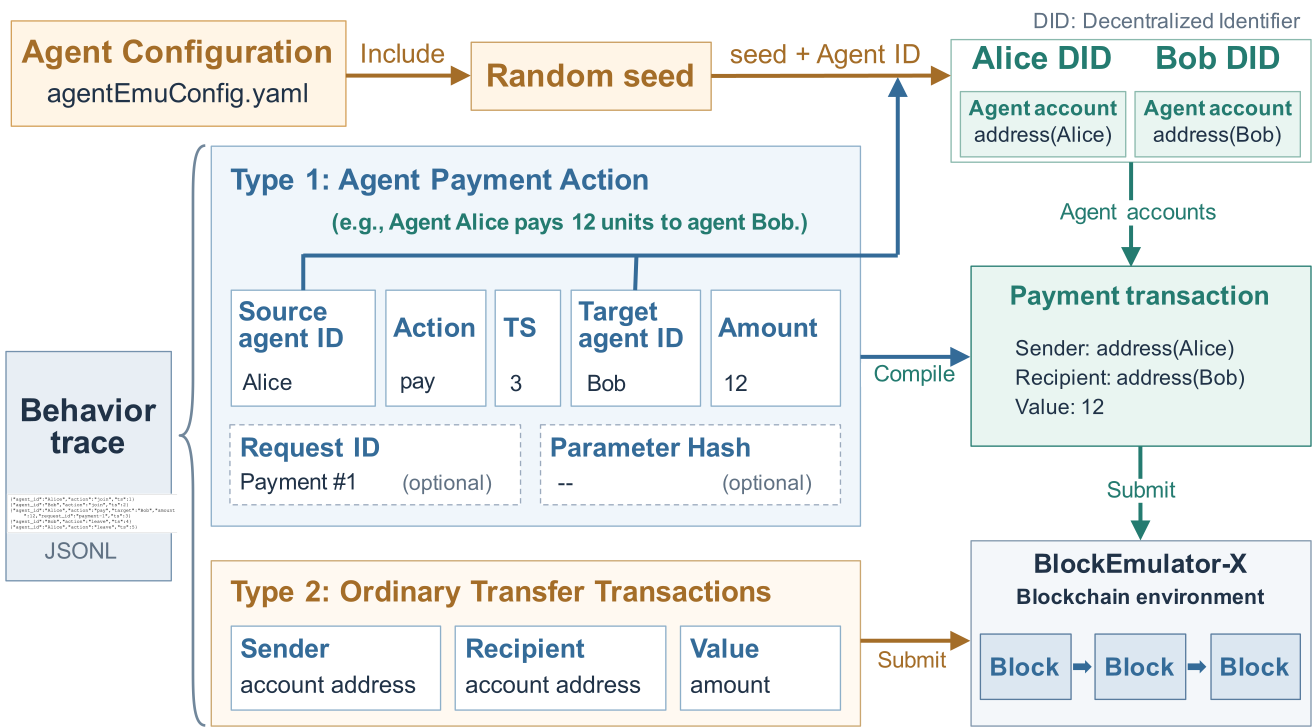
Illustration of the fields in a behavior trace. An agent action is compiled into a payment transaction that the blockchain can process.
Trace Basics
- Actions and transactions. Describe actions in the trace. Blockchain transactions do not need to be constructed manually. AgentEmulator deterministically generates DIDs, transaction nonces, and data fields from the action records and
seed. - Reproducibility and ordering. The same trace, seed, and code version produce the same transaction plan (see FAQ Q10). Records are ordered by
ts, with ties resolved by file order.tsdefines the logical order rather than an on-chain timestamp. Changing the gaps betweentsvalues does not control transaction commit times. - Agent lifecycle.
joinandleaveupdate each agent'sactivestatus inagent_registry.json. Both parties must be active when apayaction is processed. - Record linkage and versioning.
request_idlinks payment actions, on-chain transactions, and ledger records. Globally uniquerequest_idvalues are recommended.params_hashidentifies the version of action parameters. AgentEmulator copiesparams_hashunchanged into the mapping file to support data management across rounds. - Plain transfers. Records with
sender,recipient, andvaluecan be mixed with agent actions to create workloads containing different transaction types.
The repository includes two sample traces:
traces/minimal.jsonl: a minimal example with two agents joining and making a payment.traces/agent=100_txs=10000.jsonl: the default trace, with 100 agents and 10,000 transactions.
Example trace:
{"agent_id":"agent-alice","action":"join","params_hash":"doc-alice-v1","ts":1}
{"agent_id":"agent-bob","action":"join","params_hash":"doc-bob-v1","ts":2}
{"agent_id":"agent-alice","action":"pay","target":"agent-bob","amount":12,"request_id":"payment-1","ts":3}
{"agent_id":"agent-bob","action":"leave","params_hash":"exit-bob","ts":5}
Action Types
| Type | Meaning | Compiled transaction |
|---|---|---|
join |
Register an agent as active | DID register contract call |
pay |
Pay another agent | Plain transfer |
leave |
Deregister an agent | DID revoke contract call |
| Plain transfer | Transfer between blockchain accounts, without an agent action | Plain transfer |
In v1.0, DID contract calls are recorded. The DID contract is not deployed, so no DID contract state is updated. Payments perform actual balance transfers. See FAQ Q3.
Plain transfer records have no action field. AgentEmulator identifies plain transfers by three fields: sender, recipient, and value. The sender field contains an account address. Plain transfers follow the record order in the trace:
{"sender":"0xabc...","recipient":"0xdef...","value":"12345"}
Input Requirements
- Both
agent_idandtargetin apayaction must be active (joined and not yet left). A violation aborts the experiment. - Only an active agent can
leave. An agent that rejoins after leaving must register again. amountmust be a positive integer. New on-chain accounts receive an initial balance of 10^36 wei, which is sufficient for typical experiments.- Do not enter DIDs in the trace. AgentEmulator derives DIDs deterministically from
seedandagent_id. - Use globally unique
request_idvalues to simplify payment-intent lookup and analysis.
Configuration
AgentEmulator has two configuration layers. agentEmuConfig.yaml controls the agent experiment. config.yaml configures the underlying BlockEmulator-X blockchain.
Agent configuration: agentEmuConfig.yaml
base:
  blockemulator_config: ./config.yaml   # Blockchain template: shards, nodes, consensus, etc.
  result_dir: ./exp/agentemu-results    # Root directory for agentSupervisor outputs
  module_root: "."                      # Repository root used to build blockchain binaries
experiment:
  seed: 20260903                        # DID derivation seed
  trace: ./traces/agent=100_txs=10000.jsonl   # Trace file path
chain:
  enabled: true                         # Start the blockchain after compiling transactions
  run_timeout_seconds: 600              # Experiment timeout; adjust for workload size
  node_exit_grace_seconds: 15           # Node shutdown grace period after the supervisor exits
loop:
  max_rounds: 1                         # Round limit; multi-round feedback is reserved for future use
protocols:
  pay:
    plugin: direct-pay                  # Currently supports direct payments only
  identity:
    plugin: did-simple
    contract_address: "0x0000000000000000000000000000000000000030"
Blockchain configuration: config.yaml
By default, AgentEmulator uses BlockEmulator-X's native configuration. agentSupervisor treats config.yaml as a template and generates a separate blockchain configuration for each experiment. The module adjusts storage and log paths and sets the transaction source to trace_source_JSONL. The module also sets tx_number to the number of transactions compiled from the trace.
Common settings include:
system.shard_num/system.node_num: number of shards and nodes per shard.consensus_node.block_interval: block interval in milliseconds.system.log.log_level:debug,info,warn, orerror.
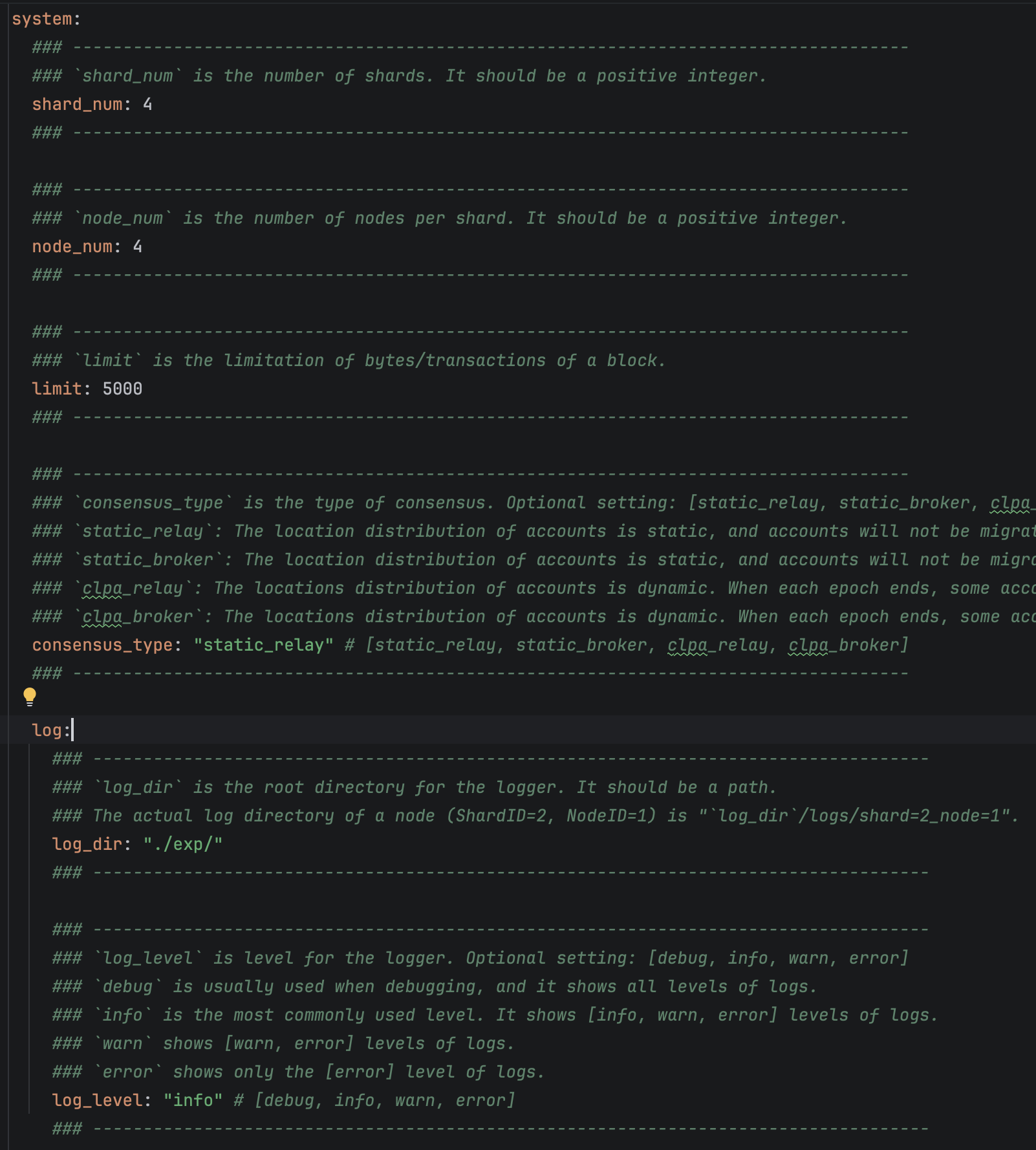
Example BlockEmulator-X configuration
Running and Monitoring Experiments
Start an experiment as described in the quick start:
bash run_agentemu.sh # Or: bash run_agentemu.sh <config-file>
- Blockchain logs stream to the console. Full logs are also saved to
exp/agentemu-results/round_001/chain/logs/. - To preview the compiled transaction dataset without running the blockchain, set
chain.enabledtofalseinagentEmuConfig.yaml. - At the end of a run, the script prints the output paths for experiment data and generated figures.
Output Files
Results directory
exp/agentemu-results/
├── agent_registry.json            # agent_id ↔ DID mapping and active status
├── rounds_summary.json            # Record and transaction counts per round
└── round_001/
    ├── agent_transactions.jsonl   # Transactions: hash, parties, value, nonce, data
    ├── agent_action_txs.jsonl     # Action-to-transaction mapping: intent ↔ on-chain hashes
    ├── Agent_Events.csv           # Agent action event stream
    ├── agents/                    # Per-agent ledgers used for plotting
    │   ├── agent-001.csv
    │   └── ...                    # One file per active agent
    └── chain/                     # Blockchain run outputs
        ├── config.yaml / ip_table.json
        ├── logs/                  # Runtime logs from BlockEmulator-X nodes
        └── results/
            ├── relay_stats_detail_tx_info.csv   # Lifecycle of each on-chain transaction
            └── relay_stats_brief_info.csv       # TPS/TCL summary by epoch
Agent ledger format: agents/agent-XXX.csv
Each row records an agent operation, using the following columns:
block_height, tx_hash, sender, recipient, value, balance, block_time_ms
balanceis the agent's balance after the transaction. Balance values are approximately 10^36 and exceed the range ofint64. Read balance values as strings.block_time_msis the production time of the block containing the transaction.- Rows are ordered by block time, with ties resolved by shard, block height, and position within the block.
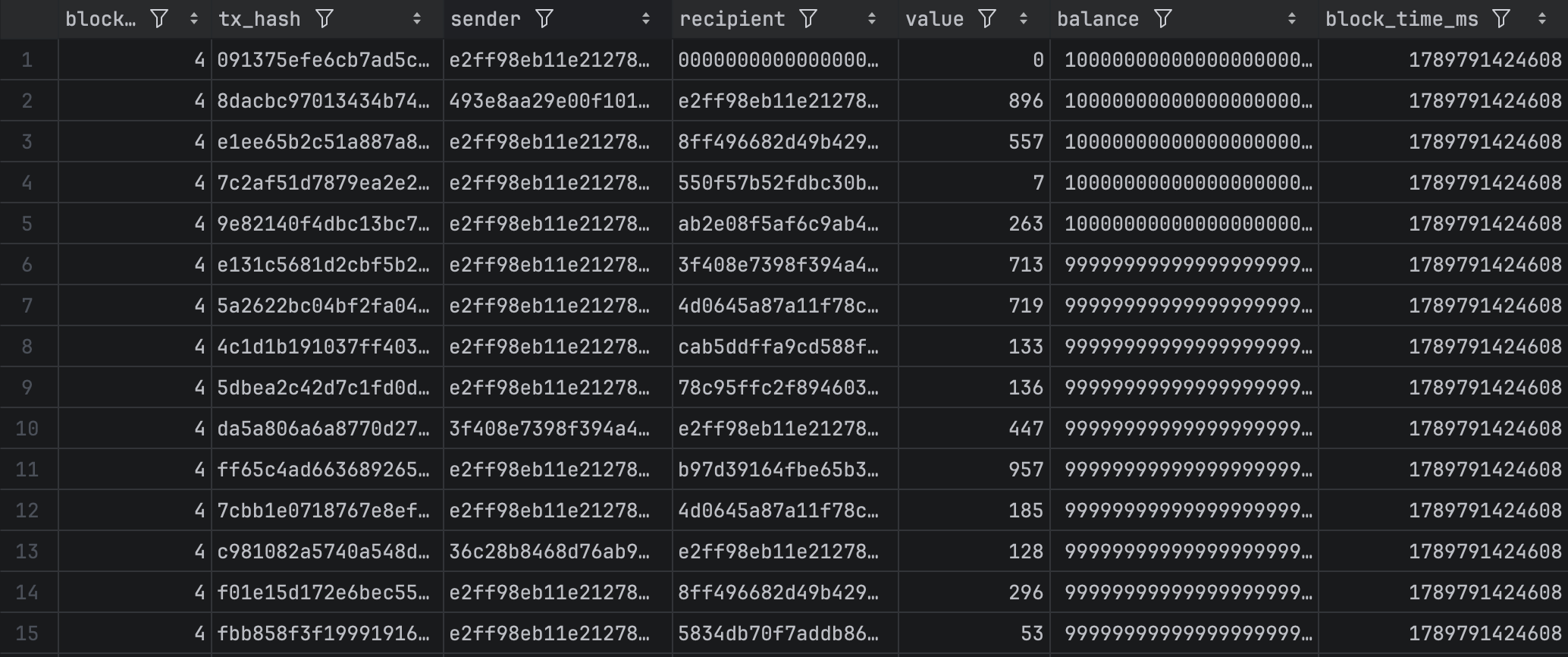
Agent ledger
The following example shows a record from agent_action_txs.jsonl. Each action occupies one line in the file. The example is wrapped for readability.
{"seq":3,"action":"pay","agent_id":"agent-alice","target":"agent-bob","amount":12,
 "ts":3,"request_id":"payment-1","params_hash":"","tx_hashes":["f58c994e..."]}

Agent action record
Visualizing Results
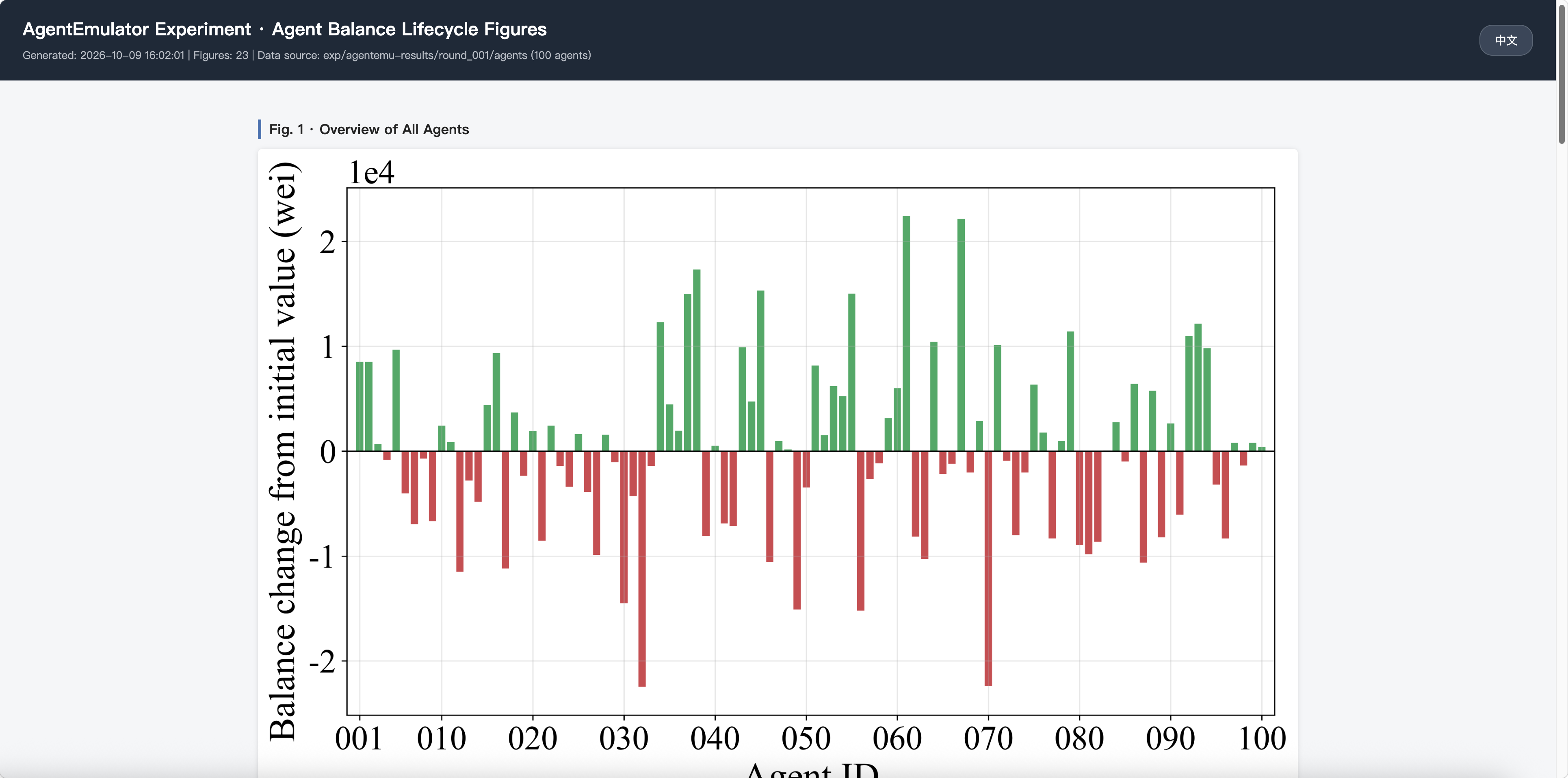
After a successful experiment, AgentEmulator reads the agent ledger CSV files and generates balance plots styled for academic publications. PNG files are saved to figs/figs_results/ and assembled into a static HTML gallery at figs/figs_results/index.html. The gallery supports Chinese and English interface text and opens automatically in the default browser.
Automatic plotting workflow
After a successful run, run_agentemu.sh (or run_agentemu.bat on Windows):
- Locates the
agents/directory in the highest-numbered round underexp/agentemu-results/. - Clears previous plots and
index.htmlfromfigs/figs_results/. - Runs
figs/python_code/plot_agent_balance.pyto generate the PNG figures. - Runs
figs/python_code/build_fig_html.pyto build the gallery. - Opens the gallery using
openon macOS,xdg-openon Linux, orstarton Windows.
Generated figures
All plots show changes relative to the initial balance: Δbalance = balance − initial balance.
| Figure | Content | PNG file |
|---|---|---|
| 1 | Final balance changes for all agents, ordered by agent ID. Each bar represents one agent; green bars indicate balance increases, and red bars indicate balance decreases. | fig1_all_agents_overview.png |
| 2 | Agent balance changes over the global transaction index. Transactions are deduplicated by tx_hash and replayed in a deterministic order. The plot shows the minimum–maximum envelope, the P25–P75 interquartile band, and the mean across agents. |
fig2_global_tx_order.png |
| 3 | Agent balance changes aligned by normalized transaction progress. Each agent's transaction index is scaled to 0–1, and each gray line represents an agent. The mean curve falls below zero during intermediate stages and returns to zero at the endpoint. | fig3_normalized_progress.png |
| 4 | Individual agent balance changes in groups of five, ordered by each agent's related transaction index. | fig4_agents_001-005.png … fig4_agents_096-100.png |
Example experiment
The results below were generated on a Mac mini running macOS 15.6. The Mac mini had an Apple M4 Pro processor and 24 GB of memory. The processor had 12 cores: 8 performance cores and 4 efficiency cores. The blockchain layer used HuangLab's BlockEmulator-X with Go 1.25.7.
The experiment used multiple processes on a single machine with these settings:
- Topology: 4 shards with 4 consensus nodes each (16 consensus nodes in total), plus one supervisor. Nodes communicated in
directmode over127.0.0.1. Consensus nodes used ports in the range 32217–32547. The supervisor used port 38800. - Consensus and cross-shard processing:
static_relay, with static account placement and relay-based cross-shard transactions. The block interval was 2000 ms. Transactions were packed by count, with up to 5000 transactions per block. - Storage: BoltDB for blocks, Ethereum-style LevelDB for world state, and a Bloom filter bitmap length of 4096.
- Workload: seed
20260903, 100 agents, and a trace containing 10,000 transactions, replayed throughtrace_source_JSONL. Each round automatically compiled the transactions and started a fresh BlockEmulator-X emulation run.
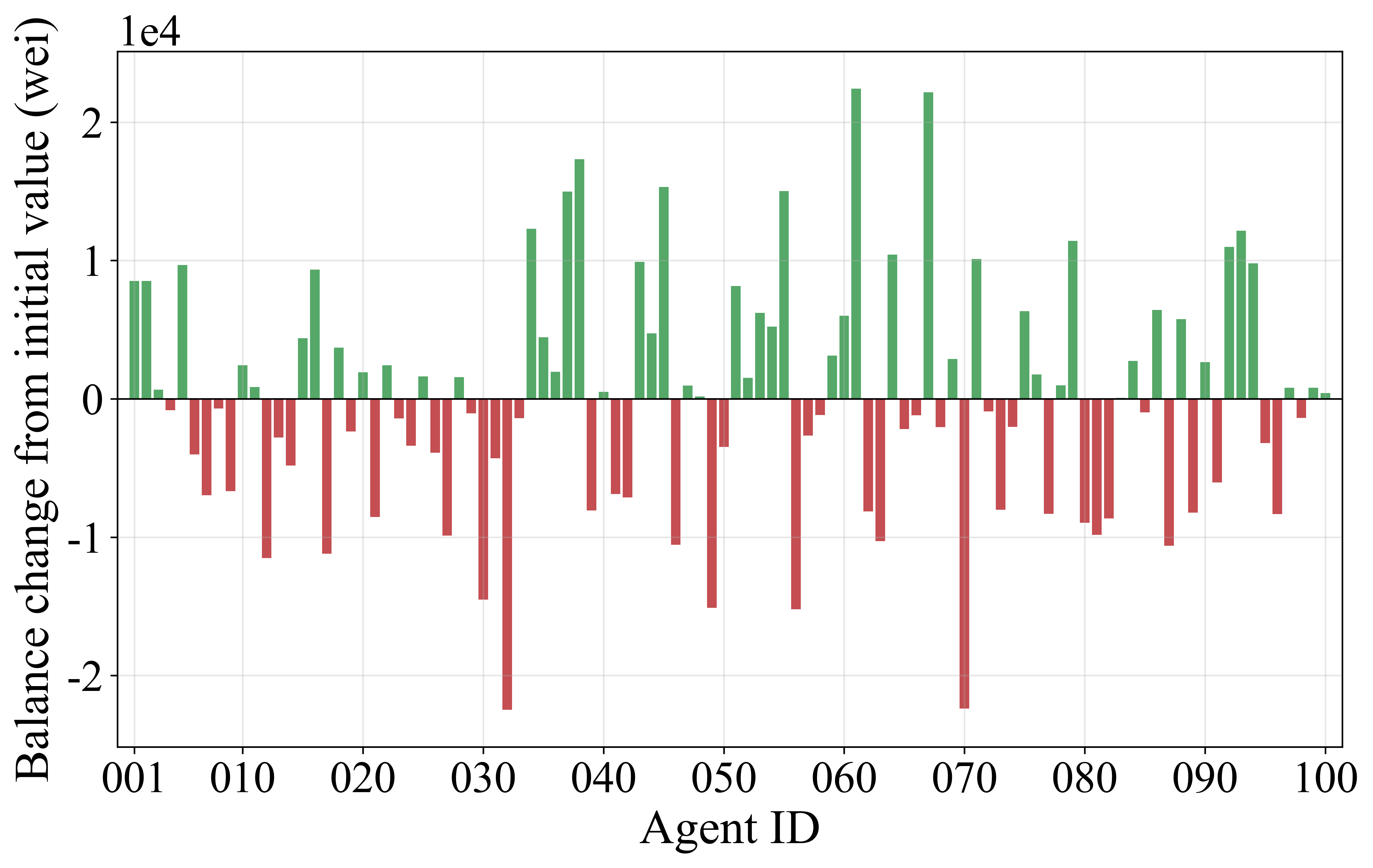
Final balance changes relative to initial balances for all 100 agents, ordered by agent ID. Each bar represents one agent. Green bars indicate balance increases, and red bars indicate balance decreases.
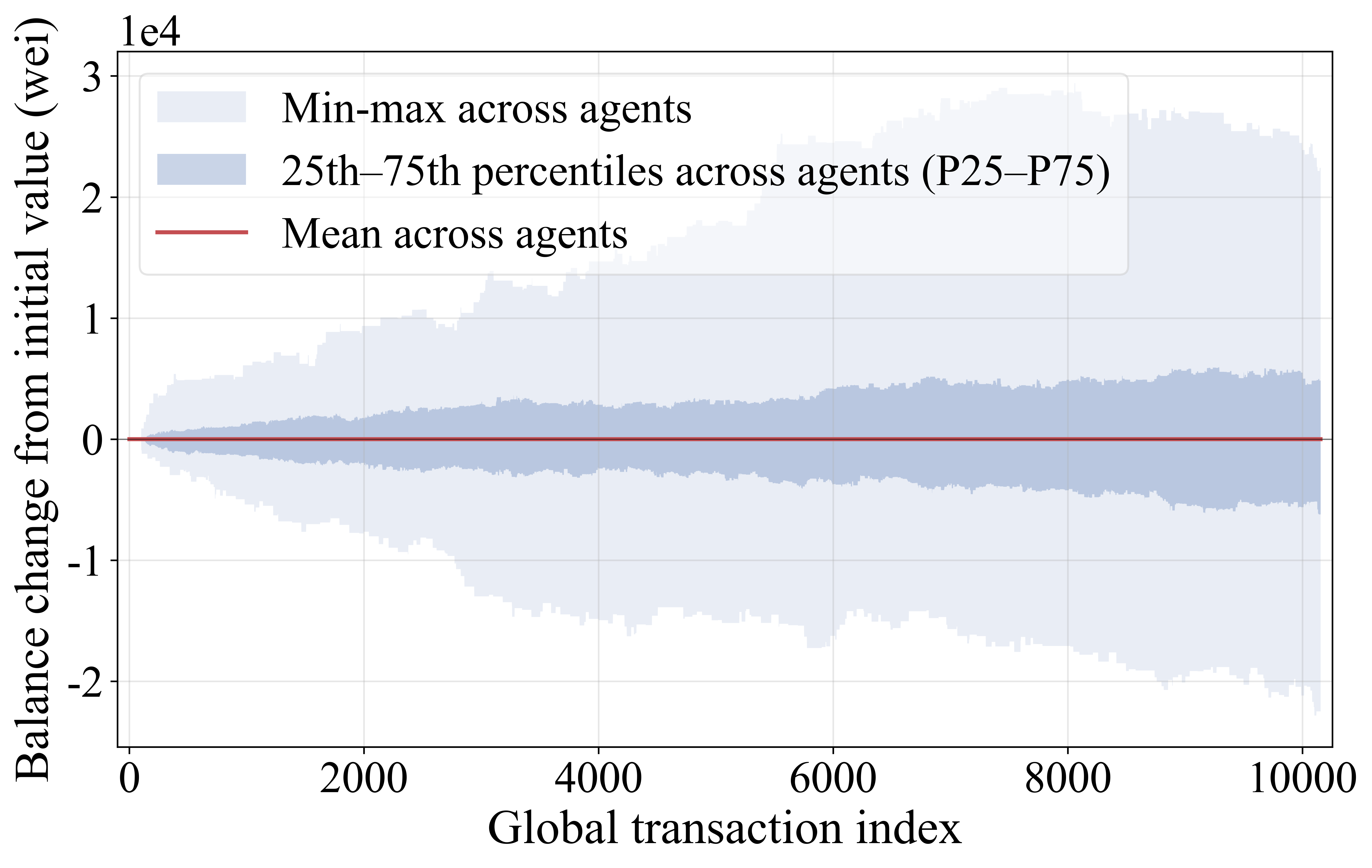
Balance changes vs. the global transaction order. The figure shows account-balance changes across the global sequence of all transactions.
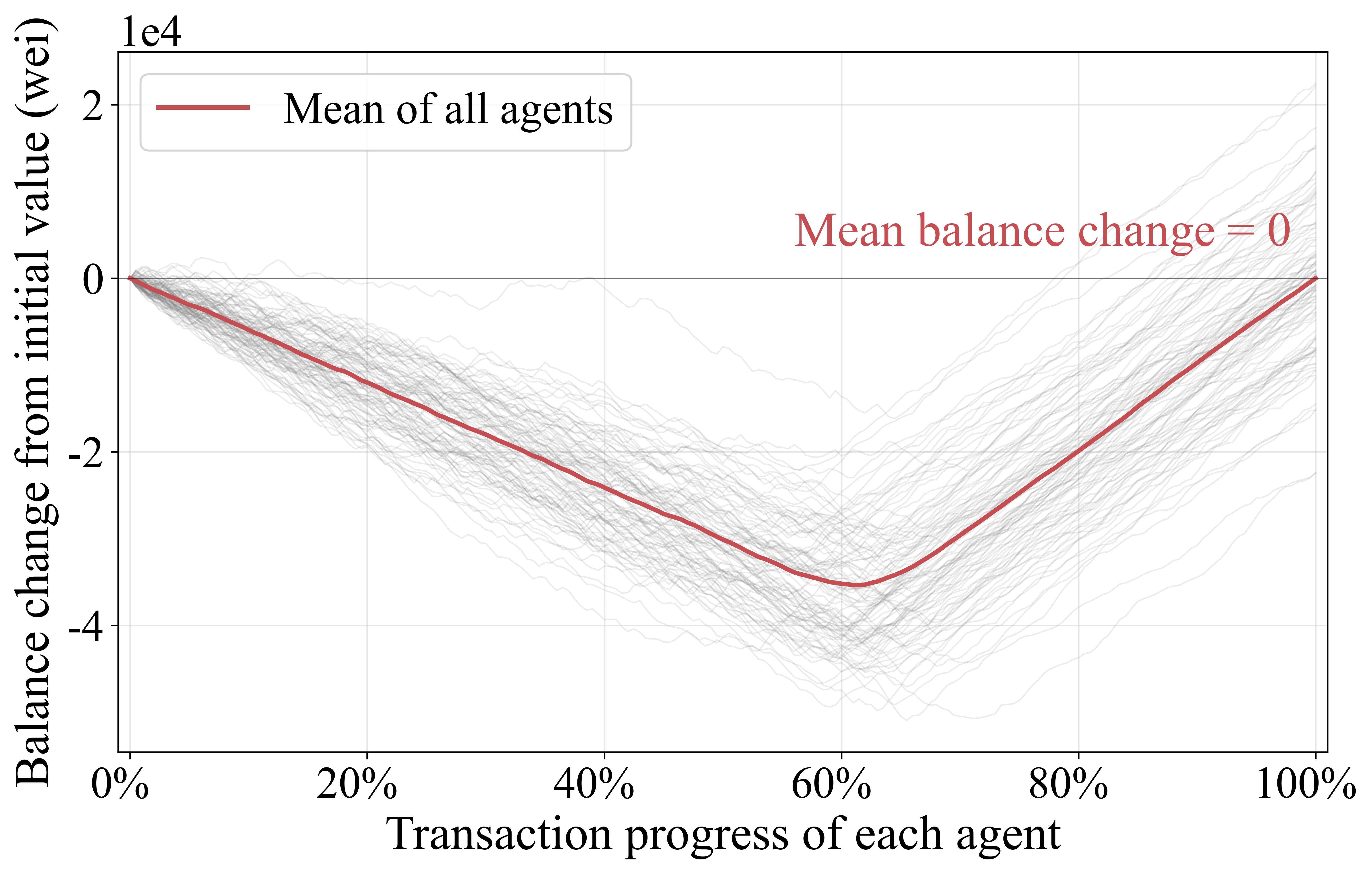
Balance changes vs. the progress of each agent's related transactions. The figure presents balance changes following each agent's finalized transactions, where each gray line represents an agent.
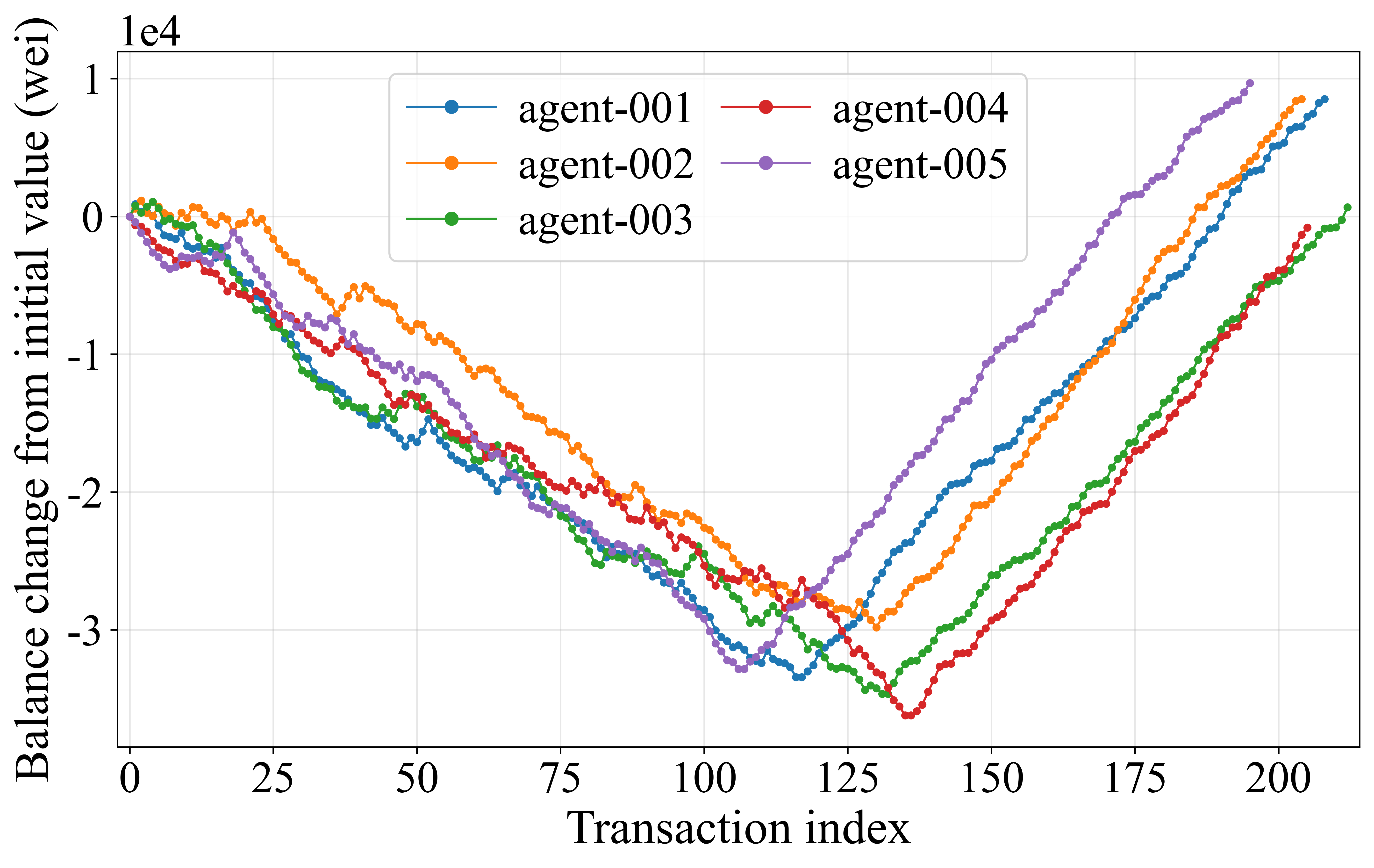
Balance changes relative to initial balances for agents #001–#005, ordered by each agent's related transaction index.
Using the HTML gallery
- The dark header displays the title, generation time, figure count, source data directory, and agent count.
- Figures 1–3 are displayed in full. Figure 4 is presented in groups of five agents. Click any image to open the image at full resolution.
- Use the language button in the upper-right corner (
ENor中文), or pressL, to switch between Chinese and English. The language setting applies to the page title, section headings, metadata, and footer. The gallery remembers your language preference. - Text embedded in plots is generated by the plotting script and does not change with the page language.
HTML results gallery
Regenerating plots manually
You can regenerate plots without rerunning the experiment. Run these commands from the repository root:
# Use the latest round; save plots to figs/figs_results/
python3 figs/python_code/plot_agent_balance.py
python3 figs/python_code/build_fig_html.py

# Specify data and output directories, for example to plot a saved run
python3 figs/python_code/plot_agent_balance.py \
    --data-dir exp/agentemu-results/round_001/agents \
    --fig-dir figs/figs_results
python3 figs/python_code/build_fig_html.py \
    --data-dir exp/agentemu-results/round_001/agents

# Rebuild only the gallery, using existing plots
python3 figs/python_code/build_fig_html.py

# Open the gallery on macOS
open figs/figs_results/index.html
On Windows, use the following commands in Command Prompt. Replace python with py -3 if needed.
python figs\python_code\plot_agent_balance.py
python figs\python_code\build_fig_html.py

python figs\python_code\plot_agent_balance.py --data-dir exp\agentemu-results\round_001\agents --fig-dir figs\figs_results
python figs\python_code\build_fig_html.py --data-dir exp\agentemu-results\round_001\agents

rem Open the gallery
start "" figs\figs_results\index.html
| Script | Option | Default | Description |
|---|---|---|---|
plot_agent_balance.py |
--data-dir |
Latest round's agents/ directory |
Directory containing agent CSV files |
plot_agent_balance.py |
--fig-dir |
figs/figs_results/ |
Output directory for PNG figures |
build_fig_html.py |
--fig-dir |
figs/figs_results/ |
Directory to scan for PNG files and write index.html |
build_fig_html.py |
--data-dir |
None | Used only to display the data source and agent count |
Analyzing Results
To determine whether and when a payment was confirmed, join the action mapping with the on-chain transaction records:
agent_action_txs.jsonl (request_id → transaction hashes) → relay_stats_detail_tx_info.csv (hash → commit times).
import json, csv

chain = {}
with open('exp/agentemu-results/round_001/chain/results/relay_stats_detail_tx_info.csv') as f:
    for row in csv.DictReader(f):
        chain[row['OriginalHash']] = row

total = confirmed = 0
for line in open('exp/agentemu-results/round_001/agent_action_txs.jsonl'):
    a = json.loads(line)
    if a['action'] != 'pay':
        continue
    total += 1
    if all(h in chain for h in a['tx_hashes']):
        confirmed += 1
        # Example: inspect a payment's confirmation time
        # print(a['request_id'], chain[a['tx_hashes'][0]]['Tx finally commit time'])

print(f'Fully confirmed payment intents: {confirmed}/{total}')
Transaction latency is calculated as Tx finally commit time − Tx create time. For cross-shard transactions, the CSV output further breaks processing down into Relay1 and Relay2 proposal and commit times.
You can also analyze agent ledgers directly with pandas. Read large numeric values as strings to preserve precision:
import pandas as pd
df = pd.read_csv('exp/agentemu-results/round_001/agents/agent-001.csv',
                 dtype={'balance': str, 'value': str})
FAQ
Q1. Why does a new run fail with file already exists: .../block_record.csv?
Output files from a previous run are still present. AgentEmulator requires new output files and cannot overwrite existing files. Use run_agentemu.sh to clear old results automatically. Before starting an experiment manually, remove the previous results. On macOS or Linux, run rm -rf exp/agentemu-results, then go run cmd/agentemu/main.go.
Q2. Why does join sometimes produce no registration transaction?
A registration transaction is generated only when an agent joins for the first time or rejoins after leaving. Check whether the agent is already active in agent_registry.json. To regenerate registration transactions for all agents, remove the previous results before running again.
Q3. Do agent payments use smart contracts?
No. agentSupervisor compiles pay actions into plain transfer transactions. Only join and leave are compiled into DID contract calls. In v1.0, the DID contract is not deployed. DID contract calls are recorded at the EVM layer without updating DID contract state. Payment transactions perform actual balance transfers.
Q4. How can I reduce console output?
Set system.log.log_level to warn in config.yaml, or redirect output to a file:
bash run_agentemu.sh > run.log 2>&1
Q5. How can I run a small, single-shard experiment?
Set system.shard_num to 1 in config.yaml. Adjust the actions and transaction count in the trace to control the workload size.
Q6. Why does the HTML gallery not open after an experiment?
Check the end of the console output for figures & gallery: ./figs/figs_results/index.html.
- If the gallery path is missing and
warn: no agent CSVs ...appears, the experiment produced no agent ledger data. No agent ledger data is expected whenchain.enabledisfalse. Under that configuration, AgentEmulator compiles the trace without running the blockchain. - If the line appears but the gallery does not open, open
figs/figs_results/index.htmlmanually. On macOS, runopen figs/figs_results/index.html.
Q7. How do I resolve ModuleNotFoundError: matplotlib?
Install the plotting dependencies in the Python environment used to run the scripts:
pip3 install matplotlib numpy pandas
Alternatively, run the scripts with a Python interpreter that already has these packages installed.
Q8. How can I regenerate plots from historical data?
Set --data-dir to the desired round_XXX/agents/ directory and run the plotting scripts manually. Back up historical data and figures before starting a new experiment. run_agentemu.sh clears both exp/ and figs/figs_results/ on every run.
Q9. How can I change which agents appear in Figure 4 or adjust the group size?
Figure 4 currently groups agents in sets of five. Edit the Figure 4 section in figs/python_code/plot_agent_balance.py to filter agents or change the group size. The 5 in range(0, len(dfs), 5) specifies the number of agents per group.
Q10. Are experiments reproducible?
With the same seed, trace, and code version, the generated transaction dataset and agent action CSV are byte-for-byte identical. Agent ledger records also use a deterministic global ordering. On-chain transaction packing and timing remain subject to runtime conditions, as in BlockEmulator-X.
Q11. On Windows, why is python not recognized, or why does python open the Microsoft Store?
Python may not be installed, or the Python installation directory may be missing from PATH. Download Python from the official website and select Add python.exe to PATH during installation.
If the Python launcher is already installed, use py -3. The run_agentemu.bat script automatically falls back to py -3 when python is unavailable.
Install dependencies with the interpreter you intend to use:
python -m pip install matplotlib numpy pandas
Or, with the Python launcher:
py -3 -m pip install matplotlib numpy pandas
Research Team
This work is led by HuangLab, Professor Huawei Huang's research group at the School of Software Engineering, Sun Yat-sen University. HuangLab studies blockchain sharding, consensus protocols, on-chain finance, and the intersection of AI and blockchain. HuangLab's blockchain research has appeared in IEEE/ACM ToN, TSC, TC, TPDS, TDSC, INFOCOM, WWW, ICDCS, SRDS, and other journals and conferences.
- AgentEmulator repository: emulation and experimentation for trustworthy AI agent infrastructure.
- BlockEmulator website: an open-source platform for blockchain sharding experiments.
- BlockEmulator repository.
HuangLab has focused on blockchain sharding theory and system architecture for the past seven years. Readers interested in blockchain sharding, consensus protocols, or DeFi are welcome to follow HuangLab's research. Visit the HuangLab website or follow HuangLab's WeChat public account, Huang-Lab.
Contributing
Contributions are welcome via the standard GitHub pull-request flow: benchmarks, plugins, traces, and documentation. See CONTRIBUTING.md.
License
MIT. See LICENSE.
Yorumlar (0)
Yorum birakmak icin giris yap.
Yorum birakSonuc bulunamadi