ComfyUI_Skills_OpenClaw
Health Gecti
- License — License: MIT
- Description — Repository has a description
- Active repo — Last push 0 days ago
- Community trust — 148 GitHub stars
Code Basarisiz
- rm -rf — Recursive force deletion command in .github/workflows/sync-frontend.yml
Permissions Gecti
- Permissions — No dangerous permissions requested
Bu listing icin henuz AI raporu yok.
A powerful ComfyUI workflow skill for OpenClaw and other AI agents that support skills.
ComfyUI Skills for OpenClaw
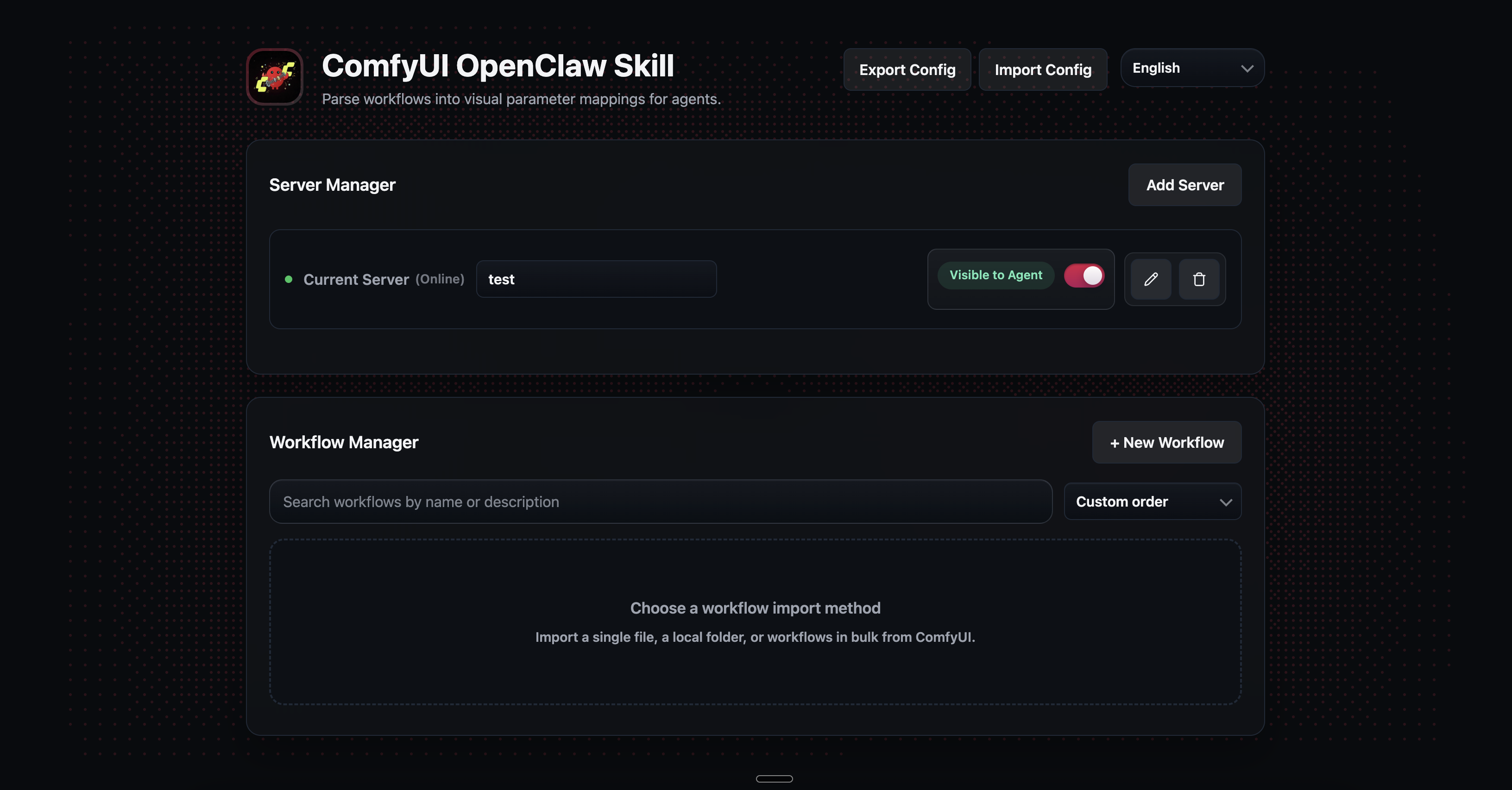

This project is a ComfyUI skill integration layer for OpenClaw, Codex, and Claude Code. It turns the workflows you build and export from ComfyUI in API format into callable skills that these agents can trigger with natural language.
It converts natural language requests into structured skill arguments, maps them to ComfyUI workflow inputs, submits jobs to ComfyUI, waits for completion, then pulls generated images back to local disk.
For the upstream ComfyUI local server routes that back this skill, see docs/comfyui-native-routes.md.
Features
Workflow-to-Skill Conversion
- Turn your ComfyUI workflows into skills that OpenClaw, Codex, or Claude Code can call directly
- Set up parameters in three steps: upload a workflow, pick the nodes to expose, then name and describe each parameter
- Input nodes are detected automatically from the workflow — no need to hunt through the JSON by hand
- When you update a workflow, preview the parameter changes first and carry over existing mappings
- Supports bulk workflow import from a ComfyUI server or local JSON files
Multi-Server Management
- Manage multiple ComfyUI servers and route jobs to different machines as needed
- Servers and workflows each have their own toggle — agents only see a workflow when both are enabled
- Workflows with the same name on different servers stay separate, identified by
server/workflowcomposite IDs - Set a per-server output directory and choose a default server
Web UI
- Frontend source lives in a separate repository; run
scripts/update_frontend.shto pull the latest build - Runtime update checks prefer pulling the main repo via git, and fall back to refreshing
ui/static/from the frontend release when git update is unavailable - A local web interface for managing all servers and workflows in one place
- Reorder workflows by dragging, or sort by name, status, or custom order
- Search and filter workflows across all servers
- Available in English, Simplified Chinese, and Traditional Chinese — switch languages from the UI
Configuration Transfer
- Export your current configuration and workflows into a single portable JSON file
- Choose exactly which workflows to include before exporting
- Preview what will change on the target machine before applying an import
- Control whether to overwrite existing workflows or sync environment settings from the source machine
Workflow Execution
- Submit a job, wait for it to finish, and download the generated images to local storage automatically
- Supports multi-image output in a single run
- Agents can query all available workflows and their parameters from the command line for automated use
CLI Tools
- A full set of command-line tools for headless environments and scripting
- Covers server management, workflow listing, job execution, and configuration import/export
ComfyUI Native API Scope
This repository should be understood as two layers:
- Native ComfyUI server routes on the target generation server, such as
/prompt,/history/{prompt_id},/view,/ws, and/queue - This project's own manager API under
/api/*, used by the local UI to manage saved servers, workflows, and transfer bundles
The current skill implementation is centered on the native execution flow:
POST /promptGET /history/{prompt_id}GET /view
That route-level reference is documented in docs/comfyui-native-routes.md.
Installation
ComfyUI Skills for OpenClawManual install:
cd ~/.openclaw/workspace/skills
git clone https://github.com/HuangYuChuh/ComfyUI_Skills_OpenClaw.git comfyui-skill-openclaw
cd comfyui-skill-openclaw
python3 -m venv .venv
source .venv/bin/activate
python3 -m pip install -r requirements.txt
cp config.example.json config.json
If python3 --version is below 3.10, create the virtual environment with any installed python3.10+ interpreter, for example python3.12 -m venv .venv.
Let OpenClaw install it for you:
Send this prompt to OpenClaw:
Please install this ComfyUI skill into my OpenClaw workspace.

Target path:
~/.openclaw/workspace/skills/comfyui-skill-openclaw/

Requirements:
1. Run `cd ~/.openclaw/workspace/skills` first.
2. Clone this repository into `comfyui-skill-openclaw`.
3. Keep SKILL.md at the project root.
4. Install Python dependencies from requirements.txt.
5. Run `cp config.example.json config.json`.
6. Set the default ComfyUI server URL to http://127.0.0.1:8188 unless I specify another one.
7. Make sure OpenClaw can discover and call this skill after installation.
Manual install:
cd ~/.claude/skills
git clone https://github.com/HuangYuChuh/ComfyUI_Skills_OpenClaw.git comfyui-skill
cd comfyui-skill
python3 -m venv .venv
source .venv/bin/activate
python3 -m pip install -r requirements.txt
cp config.example.json config.json
If python3 --version is below 3.10, create the virtual environment with any installed python3.10+ interpreter, for example python3.12 -m venv .venv.
Let Claude Code install it for you:
Send this prompt to Claude Code:
Please install this ComfyUI skill into my Claude Code skills directory.

Target path:
~/.claude/skills/comfyui-skill/

Requirements:
1. Run `cd ~/.claude/skills` first (create the directory if it doesn't exist).
2. Clone this repository into `comfyui-skill`.
3. Keep SKILL.md at the project root.
4. Install Python dependencies from requirements.txt.
5. Run `cp config.example.json config.json`.
6. Set the default ComfyUI server URL to http://127.0.0.1:8188 unless I specify another one.
7. Make sure Claude Code can discover and call this skill after installation.
Manual install:
cd ~/.codex/skills
git clone https://github.com/HuangYuChuh/ComfyUI_Skills_OpenClaw.git comfyui-skill
cd comfyui-skill
python3 -m venv .venv
source .venv/bin/activate
python3 -m pip install -r requirements.txt
cp config.example.json config.json
If python3 --version is below 3.10, create the virtual environment with any installed python3.10+ interpreter, for example python3.12 -m venv .venv.
Let Codex install it for you:
Send this prompt to Codex:
Please install this ComfyUI skill into my Codex skills directory.

Target path:
~/.codex/skills/comfyui-skill/

Requirements:
1. Run `cd ~/.codex/skills` first (create the directory if it doesn't exist).
2. Clone this repository into `comfyui-skill`.
3. Keep SKILL.md at the project root.
4. Install Python dependencies from requirements.txt.
5. Run `cp config.example.json config.json`.
6. Set the default ComfyUI server URL to http://127.0.0.1:8188 unless I specify another one.
7. Make sure Codex can discover and call this skill after installation.
Updating
To update the skill, run the update script and restart the UI or your agent runtime:
./update.sh
This pulls the latest code, syncs frontend assets, and installs any new Python dependencies in one step.
If you prefer updating manually, you can also run git pull followed by pip install -r requirements.txt.
If you use the update prompt in the Web UI, it follows the same repository-first update flow.
ComfyUI Workflow Setup
Before you start, make sure your ComfyUI server is already running. The default local address is http://127.0.0.1:8188.
UI Setup (Recommended)
- macOS/Linux:
./ui/run_ui.sh, or double-clickui/run_ui.command - Windows:
ui\run_ui.bat - Visit:
http://localhost:18189 - Upload a workflow JSON exported from ComfyUI with Save (API Format)
- Add your first ComfyUI server in the UI
- Select which parameters should be exposed to OpenClaw and save the mapping
Config File Setup
1) Edit config.json
Configure the server first. Minimal example:
{
  "servers": [
    {
      "id": "local",                  // Server ID, also used as the directory name and workflow prefix
      "name": "Local",                // Display name
      "url": "http://127.0.0.1:8188", // ComfyUI server URL
      "enabled": true,                // Whether this server is enabled
      "output_dir": "./outputs"       // Image output directory
    }
  ],
  "default_server": "local"           // Default server ID
}
2) Place Workflow Files
Each workflow uses its own directory, for example:
data/local/Default/
  workflow.json  # ComfyUI API-format workflow export
  schema.json    # Parameter mapping exposed to OpenClaw/Agent
3) Write schema.json
schema.json should include at least:
descriptionenabledparameters
Minimal example:
{
  "description": "Default test workflow", // Human-readable description for OpenClaw/Agent
  "enabled": true,                        // Whether this workflow is enabled
  "parameters": {
    "prompt": {                           // Parameter name exposed to OpenClaw/Agent
      "node_id": 10,                      // Node ID in workflow.json
      "field": "prompt",                  // Input field name under that node
      "required": true,                   // Whether this field is required
      "type": "string",                   // Parameter type
      "description": "Prompt text"        // Parameter description
    },
    "seed": {
      "node_id": 10,
      "field": "seed",
      "required": false,
      "type": "int",
      "description": "Random seed"
    }
  }
}
Notes:
- The workflow ID comes directly from the directory name. For example, if the directory is
data/local/Default/, the workflow ID isDefault - Each entry in
parametersdefines one input exposed to OpenClaw/Agent node_idandfieldmust match the actual node and input field inworkflow.json
If you want a full example, refer to:
data/local/Default/workflow.jsondata/local/Default/schema.json- These two files are generic examples. Before running them, replace node
4'sckpt_nameinworkflow.jsonwith a checkpoint name that exists on your ComfyUI server.
4) Verify the Configuration
List the available workflows:
python scripts/registry.py list
Run a test generation:
python scripts/comfyui_client.py \
  --workflow <server_id>/<workflow_id> \
  --args '{"prompt":"test"}'
Example:
python scripts/comfyui_client.py \
  --workflow local/Default \
  --args '{"prompt":"A premium product photo"}'
On success, the output looks like this:
{
  "status": "success",
  "prompt_id": "...",
  "images": ["./outputs/<prompt_id>_...png"]
}
Agent-Assisted Setup
- Let OpenClaw or another agent edit
config.json - Let the agent write
workflow.jsonandschema.jsoninto the target workflow directory - After writing the files, let the agent run a verification step
Workflow Requirements
An API-format workflow plus a Save Image output node is the baseline requirement for stable use. To avoid failed or empty runs:
The workflow must be exported in ComfyUI API format
- In ComfyUI, click Save (API Format)
- Place the exported JSON at
data/<server_id>/<workflow_id>/workflow.json
The workflow must end with a
Save Imagenode- The current client downloads results from ComfyUI output images
- Without a
Save Imagenode (or equivalent image output), the workflow may finish but return no downloadable image
Multi-Server Management
You can configure multiple ComfyUI servers so OpenClaw can route jobs across different hardware targets such as a local GPU or a remote instance.
Core Concepts
- Dual-Layer Toggles: Both servers and individual workflows can be enabled or disabled. A workflow is only visible to the AI agent if both the server and the workflow itself are enabled.
- Namespacing: Workflows are identified with a composite ID:
<server_id>/<workflow_id>(e.g.,local/sdxl-basevs.remote-a100/sdxl-base).
CLI Configuration
On headless machines, you can use the built-in CLI tool scripts/server_manager.py:
python scripts/server_manager.py list
python scripts/server_manager.py add --id remote --name "Remote Node" --url http://10.0.0.1:8188
python scripts/server_manager.py disable remote
You can still manage all server settings through the web UI.
Configuration Migration
If you move this skill to another path or another machine, use the built-in bundle flow to transfer the current configuration and workflow mappings.
UI flow:
- Click
Export Configon the main page to downloadopenclaw-skill-export.json - Before export, you can expand each server and uncheck workflows you do not want to include; all workflows are selected by default and servers are collapsed by default
- Open the UI on the target machine and click
Import Config - Select the exported JSON bundle
- Review the preview summary, then decide whether to also apply the source machine's default server, URL, and output directory
CLI flow:
python scripts/transfer_manager.py export --output ./openclaw-skill-export.json
python scripts/transfer_manager.py import --input ./openclaw-skill-export.json --dry-run
python scripts/transfer_manager.py import --input ./openclaw-skill-export.json
Optional flags:
--apply-environment: also apply bundle default server, URL, and output directory during import--no-overwrite: skip existing workflows instead of overwriting them
Default import behavior:
- Existing workflows with the same ID are overwritten
- Existing servers are merged instead of replaced
- The target machine keeps its current
url,output_dir, anddefault_serverunless--apply-environmentis used
Common Issues
- If ComfyUI returns HTTP 400 on
/prompt, the workflow payload or one of the parameter values is usually invalid. sizemust match values accepted by the underlying node (e.g.3:4,1728x2304).- If
config.jsonpoints to the wrong server URL, job queueing will fail.
Changelog
See CHANGELOG.md for the full release history.
Roadmap
- Workflow version history and rollback
- Upgrade preview before applying a new workflow version
- Parameter migration support when upgrading a workflow
- Authentication support for remote ComfyUI servers
- Better schema validation before queueing
- Richer error reporting from ComfyUI node errors
- Execution history with parameter and result tracking
- Webhook callbacks on task completion
- Scheduled workflow execution (cron-style)
- Guided workflow rewrite recipes for agents
- Native ComfyUI plugin with AI-assisted parameter mapping — describe what a workflow does in natural language inside ComfyUI, and let the AI automatically infer node-field relationships to generate
schema.json, eliminating manual parameter configuration - AI agent workflow generation — describe your image/video generation goal in natural language, and let the AI agent automatically construct, connect, and configure a complete ComfyUI workflow graph from scratch
Project Structure
ComfyUI_Skills_OpenClaw/
├── SKILL.md                    # Agent instruction spec (how to call registry/client)
├── README.md
├── README.zh.md
├── LICENSE
├── .gitignore
├── requirements.txt            # Python deps (FastAPI, requests, etc.)
├── config.example.json         # Example runtime config
├── config.json                 # Actual local runtime config (gitignored)
├── asset/
│   └── banner-ui-dashboard-20260322.png
├── data/
│   ├── <server_id>/
│   │   └── <workflow_id>/
│   │       ├── workflow.json       # ComfyUI workflow API export
│   │       └── schema.json         # Exposed parameter mapping
├── scripts/
│   ├── server_manager.py       # CLI tool for managing servers
│   ├── registry.py             # List workflows + exposed parameters for agent
│   ├── comfyui_client.py       # Inject args, queue prompt, poll history, download images
│   └── shared/                 # Shared config & JSON utils (reused across scripts)
│       ├── config.py
│       ├── json_utils.py
│       └── runtime_config.py
├── ui/
│   ├── app.py                  # FastAPI app – routes only
│   ├── open_ui.py              # Agent-friendly UI launcher
│   ├── services.py             # Business logic (workflow CRUD)
│   ├── models.py               # Pydantic request/response models
│   ├── json_store.py           # Low-level JSON file read/write helpers
│   ├── settings.py             # App-level settings
│   ├── run_ui.sh               # Start UI (macOS/Linux)
│   ├── run_ui.command          # Double-click launcher (macOS)
│   ├── run_ui.bat              # Launcher (Windows)
│   └── static/                 # Modular ES6 frontend (HTML/CSS/JS)
└── outputs/
    └── .gitkeep
Project Keywords And Resources
Project Keywords
This repository is organized around the following search intents:
- OpenClaw
- ComfyUI
- ComfyUI Skills
- ComfyUI workflow automation
- OpenClaw ComfyUI integration
- AI image generation skill
- Xiao Long Xia (small crawfish / 小龙虾, project nickname)
Core files for project understanding and retrieval:
README.md(English overview)README.zh.md(Chinese overview)SKILL.md(agent execution contract)docs/llms.txtanddocs/llms-full.txt(LLM-oriented summaries)
Project Resources
- Project summary:
docs/llms.txt - Extended project context:
docs/llms-full.txt - Project discovery checklist:
docs/PROJECT_DISCOVERY_CHECKLIST.md
Yorumlar (0)
Yorum birakmak icin giris yap.
Yorum birakSonuc bulunamadi