Pointcast
Health Warn
- License — License: MIT
- Description — Repository has a description
- Active repo — Last push 0 days ago
- Low visibility — Only 5 GitHub stars
Code Warn
- process.env — Environment variable access in dev/e2e/capture.spec.ts
Permissions Pass
- Permissions — No dangerous permissions requested
No AI report is available for this listing yet.
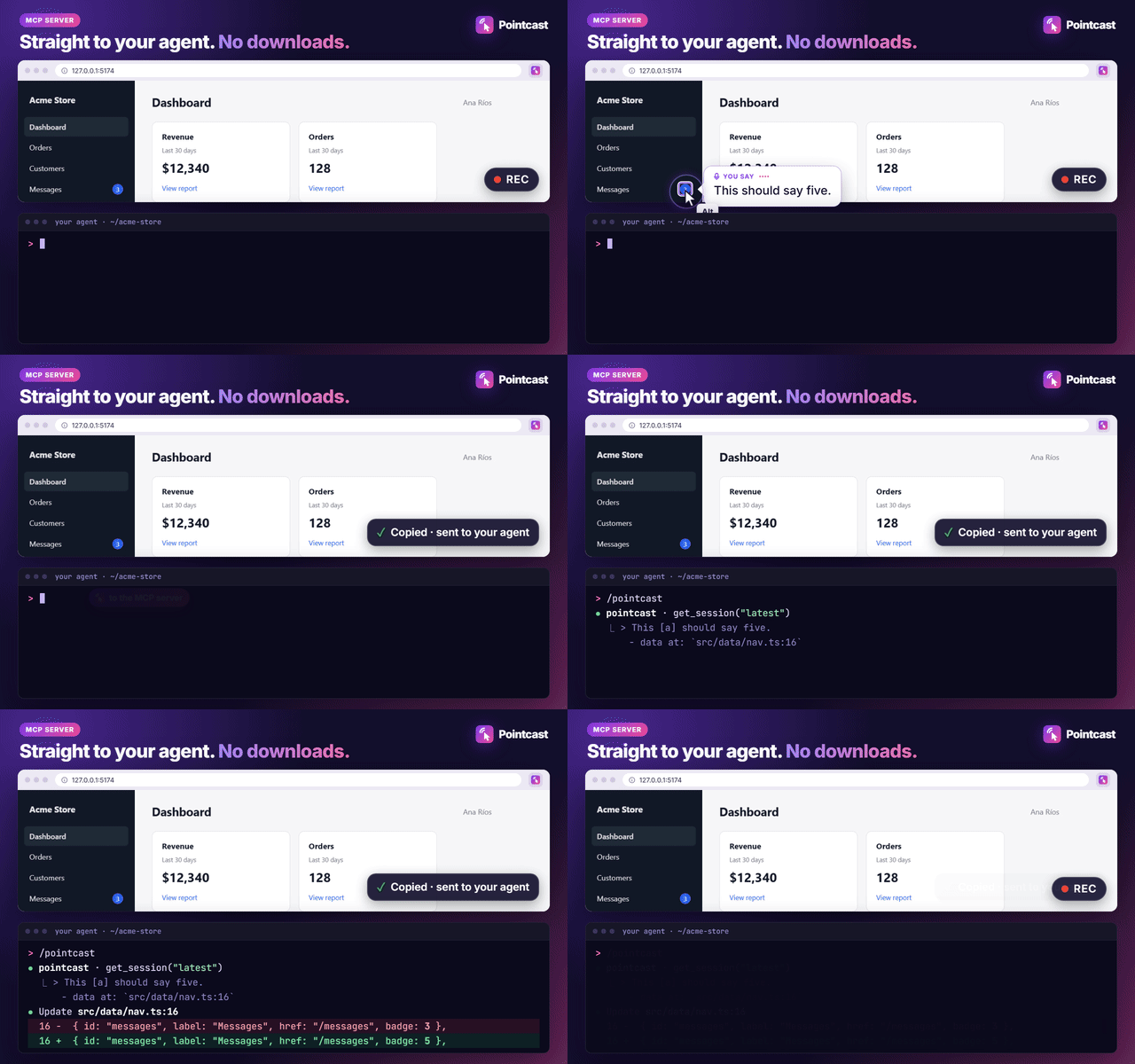
Talk and Alt+click on your web app; Claude Code, Codex, Gemini CLI or Cursor get the exact elements and the lines of code behind them. Local Whisper.
Pointcast
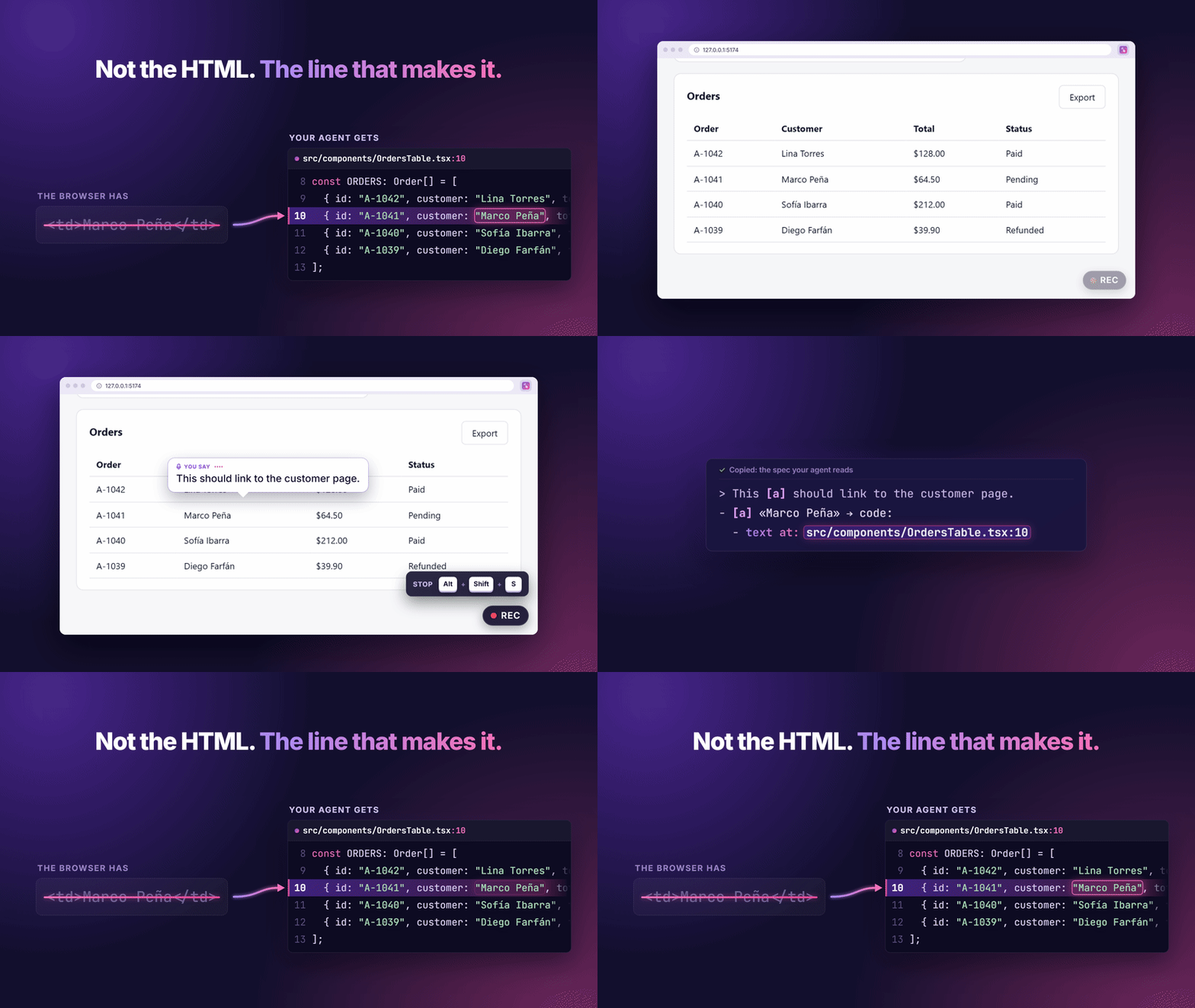
Talk and Alt+click on your web app. Your coding agent gets the exact elements, and the lines of code behind them.
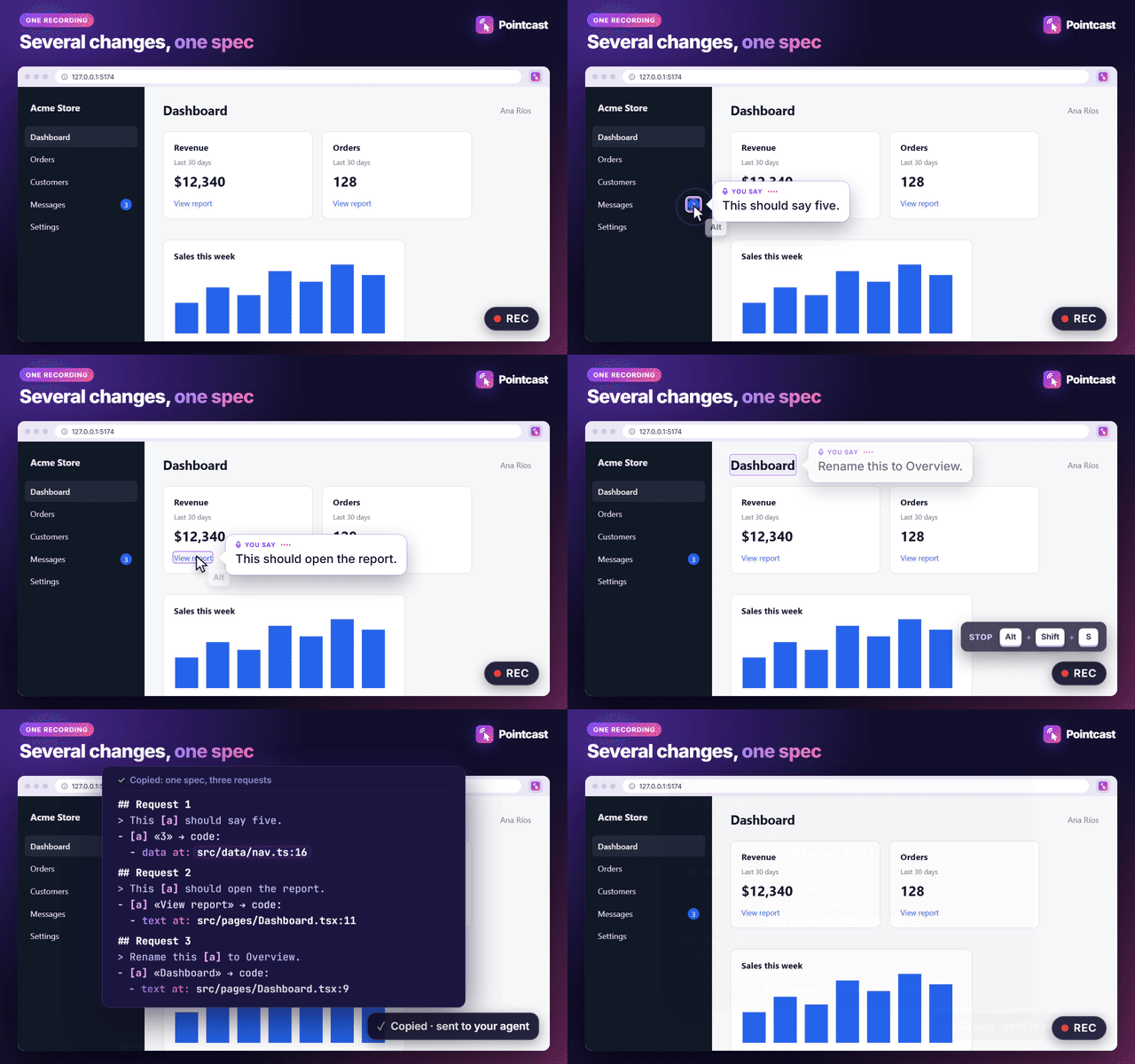
One recording covers a whole list of UI changes: say what you want while you point, press Stop, and Claude Code, Codex, Gemini CLI or Cursor get a spec that leads with src/…:line. In an evaluation on three real admin dashboards, pointing raised the agent's accuracy from 78 % to 89 % over the same words without pointing; in a follow-up, adding the code lines cut the tokens it spent finding the elements by more than half. Your voice is transcribed locally, in the browser.
In a typed-mode evaluation on four apps (React, Vue, Svelte, Django), an agent reading one Pointcast recording with six changes found the right code 96 % of the time, against 85 % for a quick hand-typed request with the same six changes, with 24 % fewer tokens and 75 % fewer searches. One change per request is more accurate but not cheaper: the saving comes from batching.


Quick start · How it works · Eval · Discussions · Changelog
Public beta (0.6). Chrome and Edge on desktop. CI-tested on Windows, macOS and Linux (Chrome); Edge developed and tested on Windows. Feedback: issues.
Quick start
One command, in your project (Node.js ≥ 22.12):
npx pointcast@latest setup
It finds your coding agents (Claude Code, Codex, Gemini CLI, Cursor) and, after asking you, adds Pointcast to each one; says what your stack needs (Django: pointcast-django; React, Vue, Svelte: nothing); tells you how to add the browser extension; and ends with pointcast doctor. Each change shows the exact command or file first. --dry-run only shows the plan, --yes skips the questions (D14).
Or by hand:
1. Add the extension. The Chrome Web Store listing is in review; meanwhile, load the release zip.
2. Connect your agent (optional: it fetches your latest recording itself and resolves each element to its line in your repository):
# Claude Code, then /pointcast
claude plugin marketplace add Hugelidus/pointcast && claude plugin install pointcast@pointcast
# Codex CLI, then in a new session $pointcast:pointcast (or "apply my latest pointcast recording")
codex plugin marketplace add Hugelidus/pointcast && codex plugin add pointcast@pointcast
# Gemini CLI, then /pointcast in a folder you trust
gemini extensions install https://github.com/Hugelidus/pointcast
# Cursor, Windsurf or any MCP client: run this MCP server (config: packages/cli/README.md#mcp-server)
npx -y [email protected] mcp
Any other agent: paste the spec from the clipboard. (In Windows PowerShell 5.1, run each && half on its own line.)
3. Record on your app on localhost: press Record, talk while you Alt+click things (⌥ Option+click on macOS), press Stop.
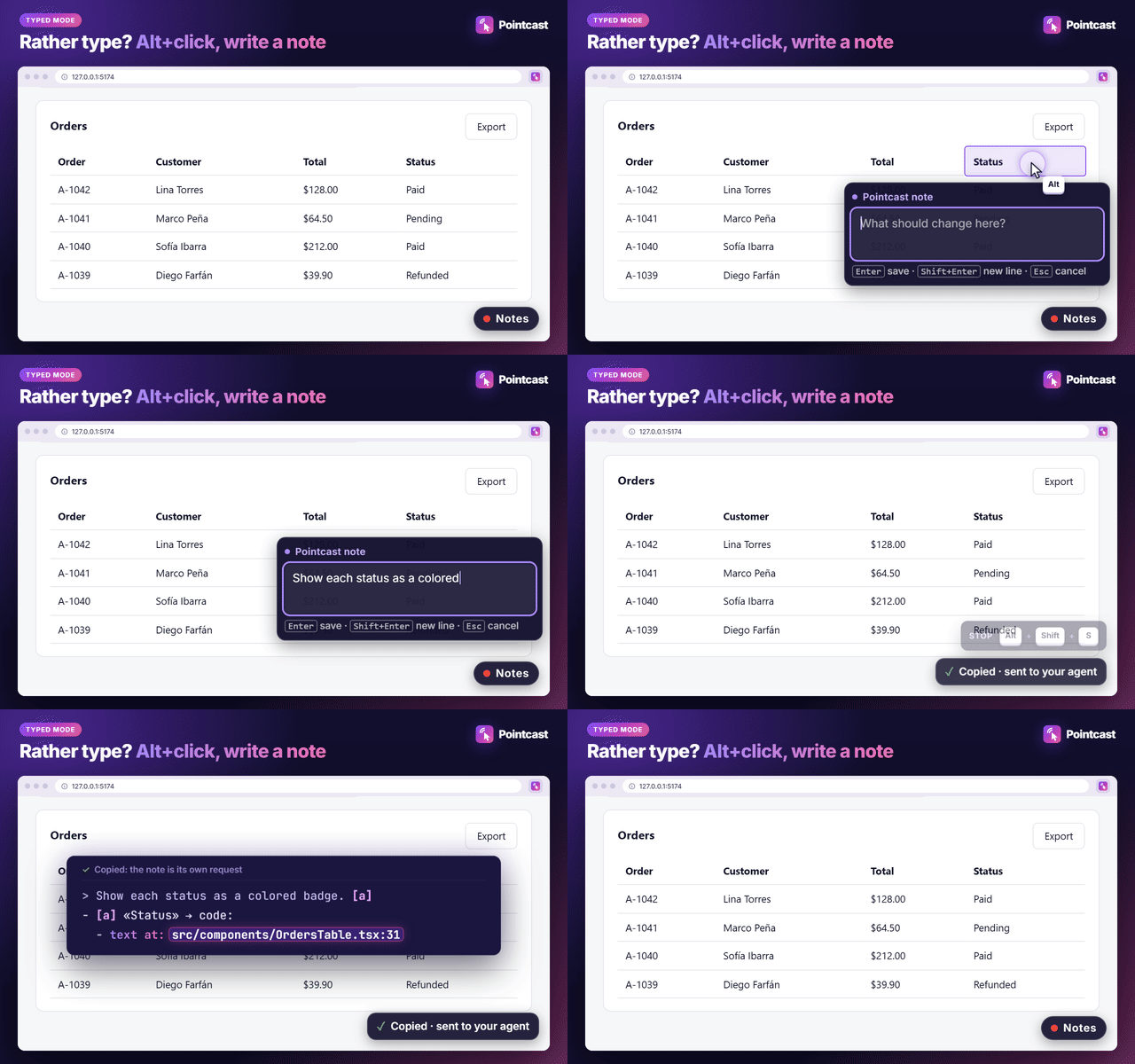
Rather type than talk? Pick ⌨️ Typed above Record in the popup. Each Alt+click then opens a small box next to the element: type what should change, press Enter (Esc drops that gesture). No microphone, no speech model, and Stop gives you the spec at once.
 Manual install (release zip), updating from 0.1.x, and where recordings go
Download the newest pointcast-<version>-chrome.zip from Releases and unzip it. Open chrome://extensions (edge://extensions in Edge), turn on Developer mode, choose Load unpacked and pick the unzipped folder. To build it yourself, see CONTRIBUTING.md.
Updating an unpacked 0.1.x? Remove it and load 0.2 as a new extension, once. From 0.2 on, every build has the same extension id (the Chrome Web Store item's), so the id changes this one time: allow the microphone again, and the speech model downloads once more.
Where recordings go. While your agent's pointcast MCP server runs (the plugins above, or npx -y [email protected] mcp), recordings go straight to it, with no downloads. Without it, Chrome's downloads save them to Downloads/pointcast/; then turn off Ask where to save each file before downloading (chrome://settings/downloads), or Chrome asks for every file and the sessions miss the folder where the plugins, the MCP server and the CLI look. The popup tells you when that happened.
Other sites. Pointcast runs on localhost, 127.0.0.1, [::1], *.localhost and *.test out of the box. For a staging server or a preview deployment, open the popup there and press Enable on <host>: Chrome asks for access to that host only.
The CLI (optional, Node ≥ 22.12): npx pointcast process re-renders the latest session with its code lines resolved in the current repository; npx pointcast --help lists every option.
How it works
- Record. Press Record in the extension (or Alt+Shift+S, ⌥⇧S on macOS) and talk while you use your app.
- Point. Alt+click (⌥ Option+click on macOS) or select text on whatever you are talking about. The Alt+click never reaches your app.
- Stop. Your voice is transcribed on your machine, and each sentence becomes a request with the elements you pointed at while saying it (in Typed mode, each note you typed becomes a request with its element):
## Request 2

> And this [a] button should export the order status.

- [a] «Export» → code:
  - used at: `src/pages/Dashboard.tsx` — `<OrdersTable>`
  - text at: `src/components/OrdersTable.tsx:22` — `<button type="button" id="orders-export" className="btn btn-export"> Export </button>`
  - within: `<Dashboard>` in `src/App.tsx` ← `<App>` in `src/main.tsx`
  - on screen: button «Export» in «Orders» on `/`
(From a real recording on dev/examples/react-dashboard, spoken in Spanish and translated here; selector, DOM path and styles lines trimmed. The app has a second «Export» button, in another component: the spec names this one.)
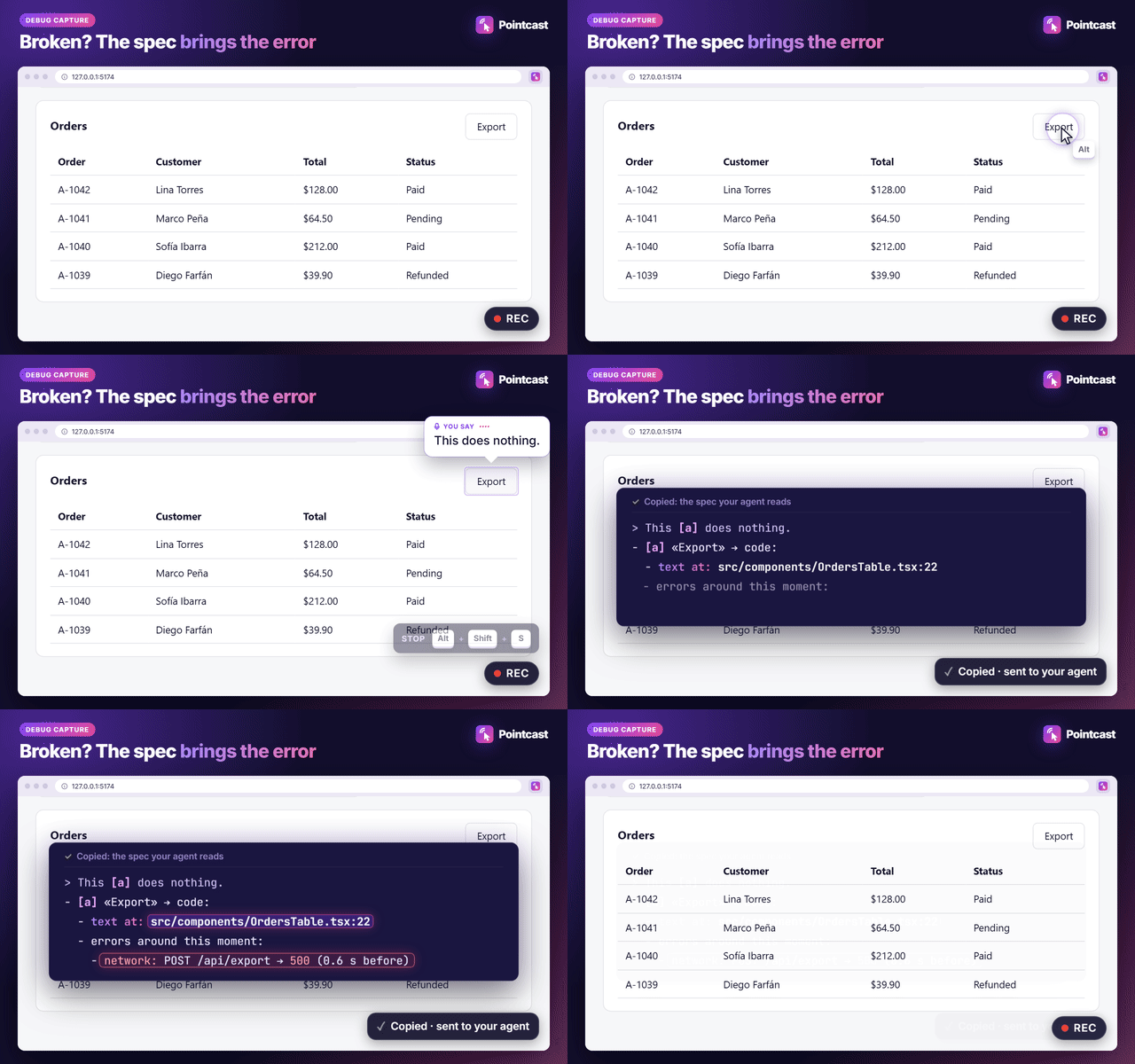
When something is broken ("this button does nothing"), the element also lists what failed on the page around that moment: uncaught errors, console.error/warn and failed requests (POST /api/export → 500), never a request body (D13).
Your agent fetches the spec through its plugin, or you paste it. On React 19, Vue 3 and Svelte 5 dev builds, and Django templates with pointcast-django, each element leads with its code: where that instance is used, which component defines it (marked when it is shared) and the line where its text or data lives. Other pages get the DOM description: selector, path, HTML and text.
Next.js App Router (next dev, Turbopack): Client and Server Components both get their chain (used at: the file and line, up to the page or layout), mapped through Next's own dev source maps. Through the MCP server or the CLI, which read your repo, text written in a component or in a data module it imports gets its text at:/data at: line; text computed at runtime gets none. The pasted spec has the chain without those lines, and next dev --webpack gets no chain (what was measured).
The component chain comes from the page. The exact lines need your source, and Pointcast reads it where it is:
- Clipboard (what Stop does): at Stop, the extension reads the chain's files from your page's own Vite dev server (
/src/…?raw), within 2 s and in memory only; the spec keeps paths, line numbers and one source line per location. With webpack or Next.js the pasted spec has the chain but notext at:lines, and the popup says why. - MCP server and agent plugins: the lines are resolved in your local repository, whatever the dev server.
pointcast processdoes the same from the CLI.
Nothing is added when the text is written more than once: no line beats a wrong line.
Why it helps
A coding agent can't see what "this" is in "make this sortable and move this next to that", and a screen recording doesn't give it the DOM element or the file behind it. In the evaluation, pointing helped exactly where narration alone is ambiguous: two "Export" buttons, two identical cards, a shared Button component. A careful, deliberately written request is still more accurate (96 %): Pointcast doesn't replace precise writing, it replaces having to write precisely while you'd rather point and talk.
How it compares
| Pointcast | MCP Pointer | react-grab | MarkuprPlus | |
|---|---|---|---|---|
| Captures | DOM element + narration | DOM element only | DOM element only | screen pixels + narration |
| Narration | yes (local Whisper) | no | no | yes |
| Multiple elements over time | yes, one spec per recording | one at a time | one at a time | tied to a screenshot |
| Source location | React 19, Vue 3, Svelte 5 dev builds and Django templates: the instance and the line of its text | React fiber (experimental) | React fiber | — |
| Audio leaves your machine | no (local by default) | n/a | n/a | depends on provider |
| Works with | any framework | any | React only | any |
Works with
| Agent | How | Apply a recording |
|---|---|---|
| Claude Code | plugin | /pointcast [session-id] |
| Codex CLI | plugin (the same one) | $pointcast:pointcast [session-id], or ask to "apply my latest pointcast recording" |
| Gemini CLI | extension | /pointcast [session-id] |
| Cursor, Windsurf | MCP server | ask for your latest pointcast recording |
| Any other agent | the clipboard | paste |
Browsers: Chrome and Microsoft Edge. Brave, Opera, Vivaldi and Arc are Chromium too and load the same extension, but are untested. Firefox is not supported yet.
Privacy
- Local-first. Audio and transcription stay on your machine by default (Whisper in the browser, via transformers.js). No account, no server, no API key. Besides the model download and your dev server, the extension only talks to your own
pointcastMCP server on127.0.0.1, which accepts recordings from the Pointcast extension only. - Off by default everywhere but local dev hosts. Any other site needs an explicit, per-host opt-in; the extension never asks for "all sites".
- Sensitive fields are never captured: password fields,
autocomplete=current-password|new-password|one-time-code|cc-*, or anything markeddata-sensitive. On a site you've enabled, text that looks like personal data is redacted too. - Allowlist, not blocklist. Only a fixed set of HTML attributes is ever captured.
- Page errors only while recording, with no request bodies, headers or query values, and redacted on enabled sites; Capture console and network errors in the popup's Settings turns them off.
- A plain click is never captured. Only Alt+click and text selection are; every other click reaches your app as if the extension weren't there.
Privacy policy: PRIVACY.md. Rationale and the canary test that verifies it: docs/decisions.md. Security problems: report them privately (SECURITY.md).
FAQ
Does this send my voice anywhere? No, by default. A local Whisper model (Xenova/whisper-base, 294 MB, downloaded once, so the first recording takes longer) runs in the browser. The CLI's optional --engine openai sends audio to an OpenAI-compatible endpoint only if you choose it.
What if I point at the wrong element? Popup → Undo last gesture, or Alt+Shift+U. In Typed mode, Esc in the note box drops that gesture.
Can I use it without a microphone? Yes: choose ⌨️ Typed in the popup and type a note for each element instead of speaking. The app you are testing never receives the keys you type into the note box.
How accurate is the transcription? ~93 % word accuracy on Spanish test recordings (D1).
Is this affiliated with Anthropic, OpenAI, Google, Cursor or any agent vendor? No. Pointcast is an independent, MIT-licensed tool.
Known limitations of the beta- Chromium browsers only, desktop.
- The code pointer needs a dev build of React, Vue 3 or Svelte 5, or a Django app in
DEBUGwith pointcast-django. Production builds, Angular and other server-side templates get the DOM description only. On Next.js, onlynext devwith Turbopack (the default) gives the chain. - Show in folder works only for recordings Chrome's downloads saved; for one your MCP server stored, the popup names its folder instead.
- Shared multi-user computers: another user could send recordings to your running MCP server, or receive yours while it is down. There, turn off Send to a running pointcast MCP server in the popup's Settings and start the server with
--no-handoff. - Port forwards: a forward of local port 20547 (
ssh -L, or an editor's automatic port forwarding) sends your recordings to the MCP server on the other machine, which is how to use one on a remote dev server; on a shared host it can be another user's. See the CLI's README.
Roadmap
Now 0.3: Django templates, pointcast doctor; 0.2 sent recordings straight to a running MCP server and added Claude Code, Codex and Gemini CLI integrations and Edge. Next: code lines from more dev servers (webpack, Next.js), frameworks (Angular) and server templates (Jinja, Rails, Laravel), readable GitHub issues from a recording, store listings, Firefox. Pick one up: help wanted. Considered and why: docs/ideas.md; design decisions: docs/decisions.md.
Contributing
Bug reports, ideas and PRs are welcome: build and run it from source with CONTRIBUTING.md. Questions and ideas: Discussions. Please follow the code of conduct.
License
Reviews (0)
Sign in to leave a review.
Leave a reviewNo results found