pmtui
Health Uyari
- License — License: MIT
- Description — Repository has a description
- Active repo — Last push 0 days ago
- Low visibility — Only 5 GitHub stars
Code Basarisiz
- rm -rf — Recursive force deletion command in install.sh
- network request — Outbound network request in install.sh
Permissions Gecti
- Permissions — No dangerous permissions requested
Bu listing icin henuz AI raporu yok.
A tmux-backed supervisor and dashboard for persistent AI coding sessions. Keeps one claude/codex agent per project moving toward its goal, and pulls you in only when a decision needs a human.
Keep one AI coding agent per project moving toward its goal — and only pull you in when a decision genuinely needs a human.




Install · Quick start · Keys · Guide · Spec
pmtui is a native Rust supervisor for long-running claude / codex sessions. Each project
session owns one persistent tmux terminal. It gets nudged on a cadence so it keeps making
progress toward a goal you set, and reaches you only when a decision genuinely needs a human.
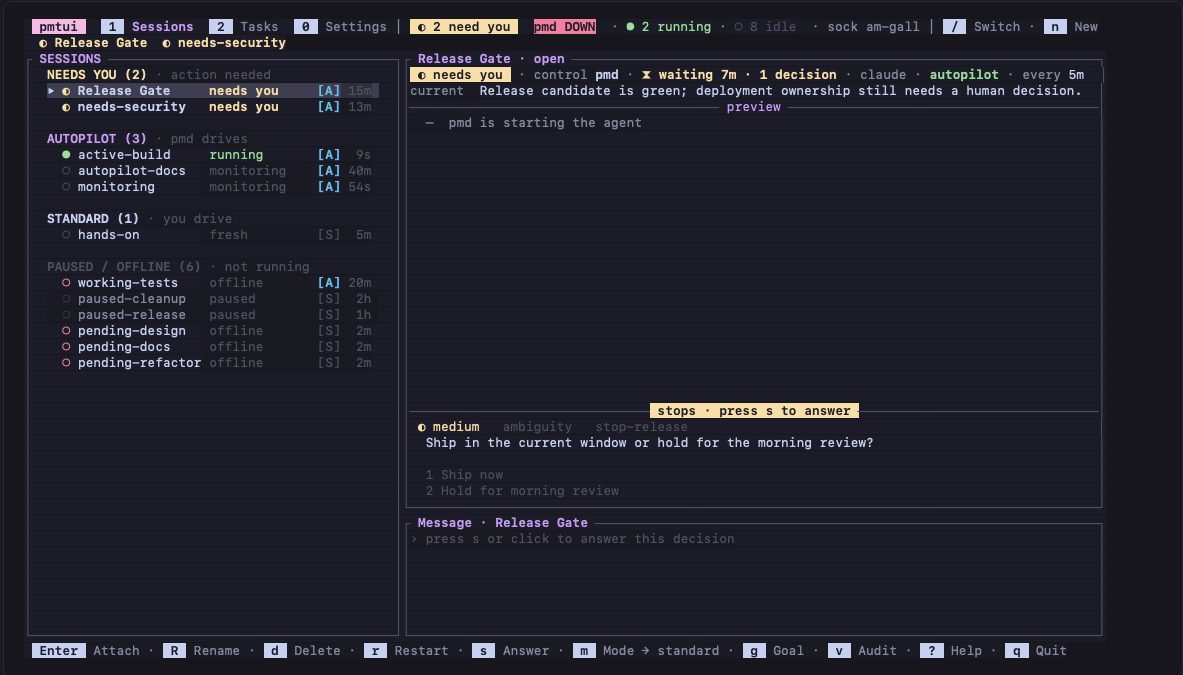
Sessions — every project grouped by who drives it, with the selected session's live transcript
beside it. The rail tells you where you are needed; the pane tells you why.
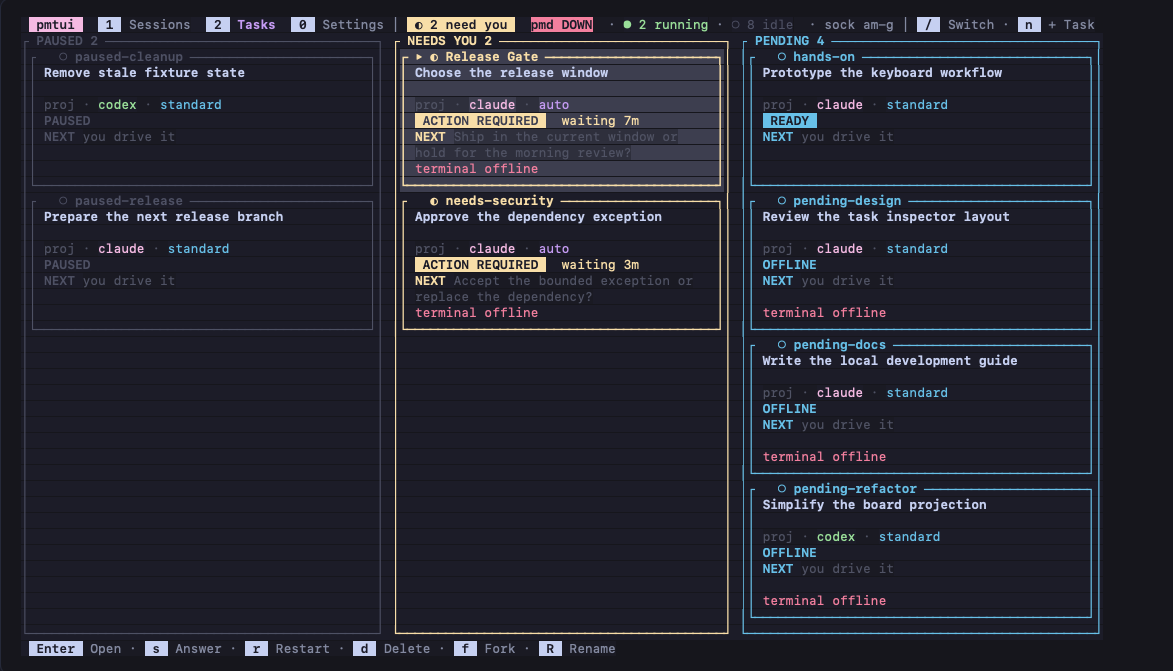
Tasks — the same sessions as cards, in the columns that answer "what should I do next".
Two binaries:
pmd— an optional headless driver. For each enabled project it runs the heartbeat: nudge
the agent when it goes idle, read the decision marker it writes, detect stalls, and route
escalations to the log and desktop notifications.pmtui— a ratatui dashboard over those projects. It is file-based: it reads each
project's on-disk state to render and writes files to act, so it works whether or not the
daemon is running.
Install
curl -fsSL https://raw.githubusercontent.com/hung-phan/pmtui/main/install.sh | bash
That puts pmd and pmtui in ~/.local/bin — a prebuilt, checksum-verified binary for your
platform when one is published, otherwise a cargo build from source. The Linux binaries are
statically linked, so they do not care which distribution or libc version you run; and the
installer starts each downloaded binary before installing anything, falling back to a source build
if it will not run on your machine. tmux is required at
runtime and managed launches need tmux 3.0 or newer; the installer tells you how to get it, andpmd doctor reports a tmux that is too old. If ~/.local/bin is not on your PATH, the installer
prints the one line to add.
Installed commands are thin wrappers that check for updates in the background at most once a day
and run the real binary immediately, so opening is never blocked. You can also ask from inside the
dashboard, on the Updates row of Settings. Updating, uninstalling, pinning a version and
source-only builds are all flags on the same script — see
the installer FAQ.
Quick start
pmtui          # open the dashboard
pmd            # run the driver (optional; it is what drives autopilot rows)
pmd doctor     # inspect setup and state, changing nothing
Both read ~/.config/pmd/registry.json and the private tmux socket pmd by default; --registry
and --socket override them, and --help lists the rest.
In the dashboard:
ncreates a session. Point it at a project directory — the Directory row lists where
you can go as whole paths (↑/↓to pick,enterto take) and completes as you type — and
optionally type a first Message: the interactive Claude/Codex terminal starts on it right away. Leave it empty to
start at the agent's prompt. The Name field is an optional human-readable label.enterattaches you to that session's terminal. It is an ordinaryclaude/codexREPL:
work in it, pressctrl+qto leave it, and the session keeps its conversation — the agent
keeps running, and you are back on the dashboard.mturns on autopilot. From then on a runningpmdnudges that session on its
cadence, auto-handles ordinary choices, and escalates the rest to you. Give an autopilot
session a goal withg— it is the direction every nudge steers by.1,2and0switch views: Sessions, the terminal-first list with the selected
session's transcript beside it, Tasks, the same sessions as cards in Paused, Needs You,
Pending, Autopilot and Working columns, and Settings, a table of preferences — the theme,
from the 38opalineships, and Updates, which says which pmtui you are running and, in one
keypress, installs a newer one and restarts onto it. The active view is the underlined tab in
the header.ssends one message without taking over the terminal, or answers an open decision.?lists every key.
The mouse works wherever the keyboard does: click a row or card to select it, the preview title to
attach, or any visible keybar chip to run it.
Next: docs/GUIDE.md walks through autopilot, goals, directives and the
session list.
Keys (pmtui)
| Key | Action | Key | Action |
|---|---|---|---|
j / k |
move selection | / |
find and switch session |
1 / 2 / 0 |
select the Session, Task or Settings view | n |
new session |
enter |
attach (or resume a paused row) | s |
message, or answer an open stop |
ctrl+q |
leave an attached session, back to the dashboard (the agent keeps running) | ||
in the message, goal and directive fields: ^J new line (alt+enter too), alt+b/alt+f word, ^w kill word, ^x^e $EDITOR |
|||
f |
fork conversation into a new Standard session | ||
R |
rename the selected session | ||
m |
mode — the autonomy tier (standard ⇄ autopilot) |
g |
edit the goal |
d |
delete session | p |
pause |
c |
cadence | r |
restart the agent |
i |
edit the standing directive (autopilot) | e |
pick the decider engine + model (autopilot) |
q |
quit | v |
turn and decision audit (autopilot) |
w |
set the worker model for the selected session (restart to apply) | ? |
key reference |
Handing work to a child job (pmtui spawn)
An agent inside a managed session can hand an independent piece of work to a child job: one
headless run that does the task, reports a result and exits.
"$PMTUI_BIN" spawn --request-id "$(cat /proc/sys/kernel/random/uuid)" \
  --title "Fix flaky fork test" --message "<self-contained task spec>" --json
Every managed terminal carries PMTUI_BIN and its own state directory in the environment, and gets
the pmtui-spawn skill that documents this procedure. The command writes one request into that
state directory and waits for the running dashboard to answer with a receipt beside it. It never
touches the registry, tmux or $HOME, so it works inside Codex's sandbox, and rerunning it with the
same request id never creates a second child.
Five children run at once and a sixth waits its turn. In a git repository each one works in its own
worktree on its own branch and commits there, so children never overwrite each other — and nothing
reaches your checkout until you press a on the finished row. pmtui spawn --status lists every child
this session asked for. pmtui spawn --help lists the flags, and
SPEC §4 defines the command's contract.
Learn more
- docs/GUIDE.md — using it day to day: how the heartbeat works, what escalates
and what does not, goals, directives, the session list, the registry, and the FAQ. - docs/SPEC.md — the living specification: exact, normative behavior and
guarantees. - AGENTS.md — contributing: invariants, source layout, and the full test matrix.
Build & test (contributing)
Requires a recent stable Rust (edition 2024). The coverage gate also needs tmux, jq, andcargo-llvm-cov. Project-local skills are canonical under .agents/skills/; the .claude/skills/
entries are symlinks to them, so update only the .agents copy.
scripts/link-release.sh builds both binaries and links them into ~/.local/bin so the commands
on your PATH are your working copy (--no-build refreshes only the symlinks), andscripts/pmtui-dogfood.sh renders the dashboard against isolated scratch sessions.
cargo build                     # builds pmd and pmtui
cargo test                      # lib + bins + integration + doc-tests (the FULL non-ignored suite)
cargo clippy --all-targets -- -D warnings
cargo fmt --all -- --check      # must be clean
cargo audit
bash tests/coverage_test.sh
bash tests/install_sh_test.sh
bash tests/repo_contract_test.sh
cargo test --test integration -- --ignored --test-threads=1
Some integration tests shell out to real tmux and are #[ignore]d so cargo test stays fast;
that real-tmux acceptance is the load-bearing end-to-end gate. AGENTS.md has the
full test and eval matrix (real-tmux acceptance, the LLM nudge judge, and the decider benchmark).
The decider benchmark runs both engines by default; set PM_DECIDER_BENCH_ENGINE=claude or=codex to run just one. The original design write-up isdocs/superpowers/specs/2026-08-12-agent-manager-daemon-design.md.
Star history
If pmtui saves you time, a star helps other people find it.
License
MIT © 2026 Hung Phan.
Use it, change it, ship it, sell it — just keep the copyright notice and the license text with it. The
software comes with no warranty.
Yorumlar (0)
Yorum birakmak icin giris yap.
Yorum birakSonuc bulunamadi