codex-multi-profile
Health Pass
- License — License: MIT
- Description — Repository has a description
- Active repo — Last push 0 days ago
- Community trust — 94 GitHub stars
Code Fail
- child_process — Shell command execution capability in cli.js
- spawnSync — Synchronous process spawning in cli.js
- child_process — Shell command execution capability in index.js
- spawnSync — Synchronous process spawning in index.js
- os.homedir — User home directory access in index.js
- process.env — Environment variable access in index.js
- fs module — File system access in index.js
Permissions Pass
- Permissions — No dangerous permissions requested
No AI report is available for this listing yet.
Multi-workspace profile router, MCP server isolation auditor, and CLAUDE.md <-> AGENTS.md instruction bridge for Claude Code and OpenAI Codex.
Codex Multi-Profile




Multi-workspace profile router, MCP server security auditor, and CLAUDE.md ↔ AGENTS.md instruction bridge for Claude Code and OpenAI Codex.
Isolate Enterprise, Open-Source Maintainer, and Personal agent environments across repositories.
Tiếng Việt · How it works · Troubleshooting · Support
Built for developers, open-source maintainers, and consulting engineers who work across separate authorized Enterprise SSO, Client, and Personal workspaces in Claude Code and OpenAI Codex.
Core Capabilities (v2.0)
| Module | What it solves |
|---|---|
Claude Code & Codex Profile Store (WorkspaceProfileStore) |
Isolate ~/.claude/settings.json, ~/.codex, and workspace .mcp.json profiles (enterprise, oss-maintainer, research) with atomic file swaps |
MCP Security & Isolation Auditor (mcp-audit) |
Statically audits .mcp.json and claude_desktop_config.json for hardcoded credentials (sk-ant-*, ghp_*), non-loopback HTTP/SSE endpoints, and unsafe shell wrappers |
Instruction Bridge (sync-docs) |
Deterministically synchronizes shared engineering rules between CLAUDE.md (Claude Code) and AGENTS.md (OpenAI Codex) across polyglot repositories |
| Windows Store Codex Workspace Switcher | Hot-switches authorized Enterprise, Team, and Personal workspaces in 2–3 seconds directly from the Microsoft Store Codex avatar menu |
Cross-Platform CLI & Node.js SDK (Claude Code, MCP & Codex)
Requires Node.js 18+ on macOS, Linux, or Windows:
# Install globally or invoke via npx
npm install -g codex-multi-profile

# 1. Audit .mcp.json for secret leakage and non-loopback MCP transports
npx codex-multi-profile mcp-audit .mcp.json

# 2. Synchronize CLAUDE.md <-> AGENTS.md instructions in a repository
npx codex-multi-profile sync-docs .

# 3. List isolated Claude Code (~/.claude) or Codex (~/.codex) profiles
npx codex-multi-profile profiles claude
Programmatic SDK Usage (Node.js / TypeScript)
const {
  WorkspaceProfileStore,
  auditMcpConfig,
  syncWorkspaceInstructions
} = require("codex-multi-profile");

// 1. Audit an MCP configuration before activating a workspace profile
const audit = auditMcpConfig({
  mcpServers: {
    github: {
      command: "npx",
      args: ["-y", "@modelcontextprotocol/server-github"],
      env: { GITHUB_PERSONAL_ACCESS_TOKEN: "${GITHUB_PERSONAL_ACCESS_TOKEN}" }
    }
  }
});
if (!audit.valid) throw new Error("MCP security audit failed");

// 2. Save and activate an isolated Claude Code profile
const store = new WorkspaceProfileStore();
store.saveProfile("oss-maintainer", {
  agent: "claude",
  settings: { model: "claude-sonnet-4-5" }
});
store.activateProfile("oss-maintainer", { agent: "claude", workspaceDir: process.cwd() });

// 3. Keep CLAUDE.md and AGENTS.md aligned
syncWorkspaceInstructions(process.cwd(), { direction: "claude-to-codex" });
Native Windows Desktop Integration (Microsoft Store Codex App)
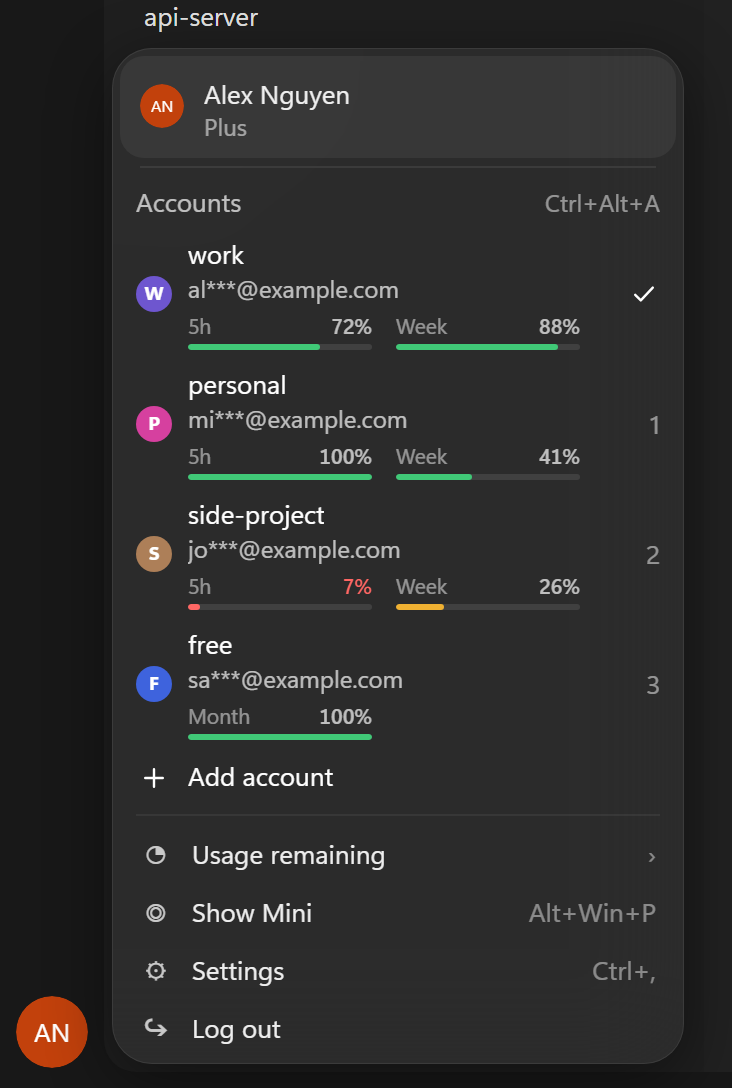
Click your avatar at the bottom-left of the Windows Store Codex app. Under your identity row there is an Accounts workspace section:
| In the menu | Does |
|---|---|
| Click a workspace profile | Switches to that workspace in 2-3 seconds; the Codex window stays open (from a sign-in screen Codex restarts, ~10 s) |
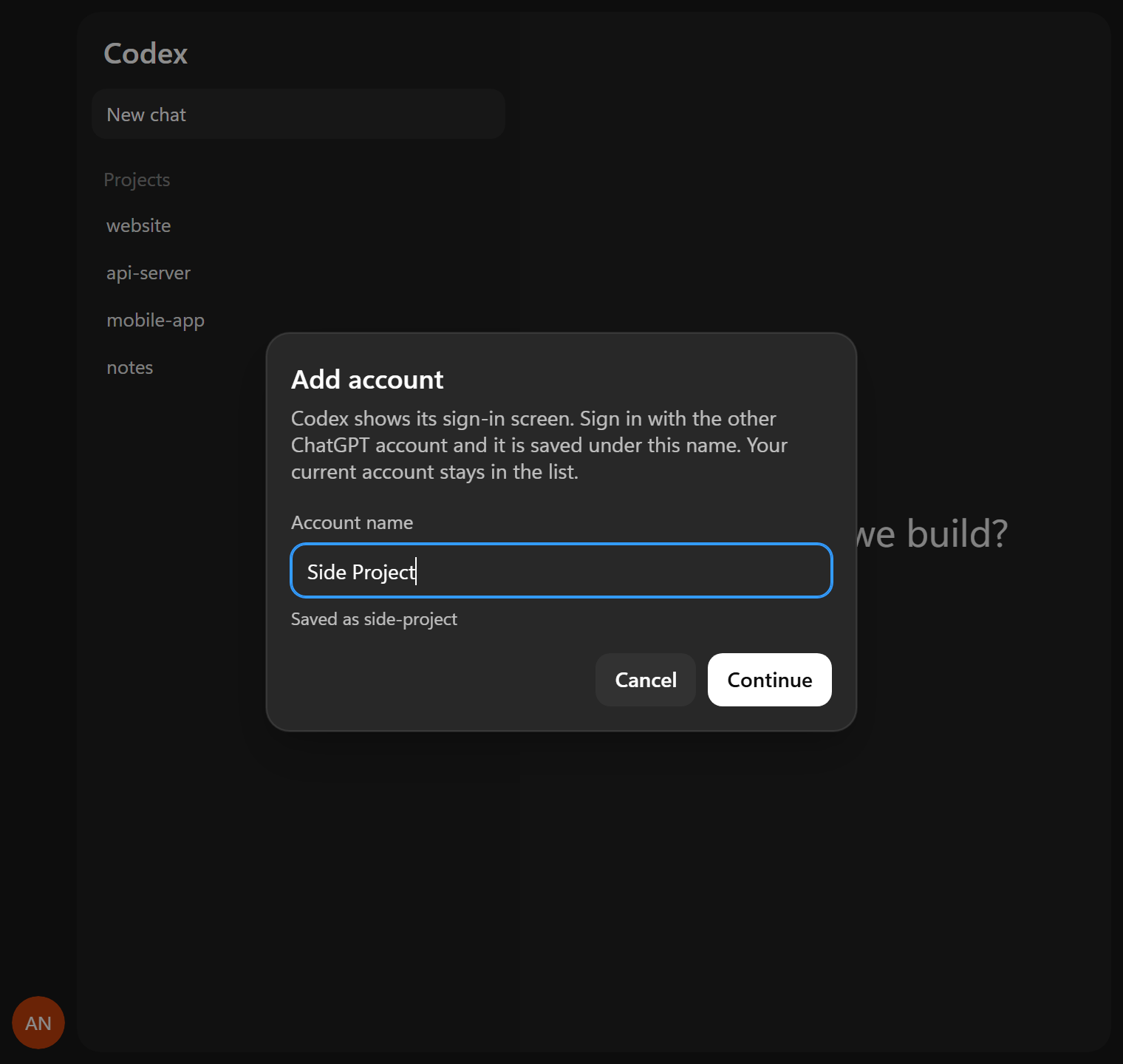
| Add account | Codex restarts on its sign-in screen; sign in with your other authorized workspace and save it under a profile label |
| Pencil / trash (hover a row) | Rename / remove a saved workspace profile (the active profile cannot be removed) |
1-9 while the menu is open |
Activate the workspace profile with that number |
Ctrl+Alt+A |
Open the workspace switcher from anywhere in Codex |
| Telemetry bars | Displays remaining session quota windows (5h and weekly windows) per workspace; hover for reset timestamp |
The menu follows the application's language (Vietnamese or English) and its light / dark theme.
Screenshots use synthetic profiles; rendered from switcher-inject.js withnode tools/screenshots/capture.mjs.
Install (Windows Desktop Helper)
Requires Windows 10/11 and Codex from the Microsoft Store:
irm https://raw.githubusercontent.com/Hung2124/codex-multi-profile/main/install.ps1 | iex
Or via npm / npx (Node.js 18+):
npx codex-multi-profile install
This registers the currently signed-in workspace as main, places a Codex shortcut on the Desktop and Start menu, and starts a lightweight background watcher at sign-in (~25 MB, no window). -NoAutoStart skips the startup watcher.
Upgrading from the legacy 0.1–0.2 clone-based layout:
$env:CODEX_MP_REMOVE_LEGACY = '1'; irm https://raw.githubusercontent.com/Hung2124/codex-multi-profile/main/install.ps1 | iex
Good to know
- Use the profile menu instead of "Log out" when switching workspaces. Logging out inside the app revokes the active refresh token on the server.
- A saved session that expired shows the sign-in screen after switching; signing in again refreshes the stored profile automatically.
- Active streaming generations are stopped cleanly before swapping credentials.
- The local helper runs only while the app is open (~130 MB, near-zero CPU).
Command line (CI, agents, scripts)
# Cross-platform MCP & instruction tooling:
codex-multi-profile mcp-audit .mcp.json --json
codex-multi-profile sync-docs .
codex-multi-profile profiles claude --json

# Windows Desktop workspace profile management:
codex-multi-profile list --json
codex-multi-profile status
codex-multi-profile switch enterprise

# Or directly via PowerShell:
$cli = "$env:LOCALAPPDATA\CodexMultiProfile\CodexAccounts.ps1"
powershell -NoProfile -ExecutionPolicy Bypass -File $cli list      # or: status | save -Name x | switch -Name x | rename -Name x -NewName y | remove -Name x | lang -Name vi
Uninstall
powershell -NoProfile -ExecutionPolicy Bypass -File "$env:LOCALAPPDATA\CodexMultiProfile\Uninstall-CodexMultiProfile.ps1" # add -RemoveAccounts to delete saved profiles
~\.codex and ~\.claude (conversations, project memory, and active settings) are never deleted.
Privacy and security
- Saved workspace profiles stay on disk (
%LOCALAPPDATA%\CodexMultiProfileon Windows or~/.config/codex-multi-profileon macOS/Linux). Nothing is transmitted externally. - The UI layer only ever receives masked emails (
ab***@example.com), never raw tokens. - The
mcp-auditcommand flags plaintext secrets in.mcp.jsonbefore they can be committed or loaded into an untrusted workspace. - Application binaries are never modified. See docs/architecture.md and SECURITY.md.
License
MIT
Reviews (0)
Sign in to leave a review.
Leave a reviewNo results found