second-yourself
Health Uyari
- License — License: MIT
- Description — Repository has a description
- Active repo — Last push 0 days ago
- Low visibility — Only 8 GitHub stars
Code Basarisiz
- network request — Outbound network request in .claude/skills/adopt/adopt_fingerprint.py
- rm -rf — Recursive force deletion command in .claude/skills/adopt/test_adopt.sh
- rm -rf — Recursive force deletion command in .claude/skills/deep-lint/style-rerun/test_style_rerun.sh
Permissions Gecti
- Permissions — No dangerous permissions requested
Bu listing icin henuz AI raporu yok.
Second yourself. An AI that remembers you: an operating system for agents (Claude Code) on a self-maintaining, cited Obsidian wiki that is its long-term memory, after Karpathy's LLM-wiki pattern. Research assistant today; a shared brain for multi-agent work. Pre-1.0, in active development.
Second Yourself
Second yourself. An AI that remembers you, on an Obsidian wiki that maintains itself.
Tony Stark never had to reintroduce himself to Jarvis. With today's AI you do it every day: close the chat, and everything you explained is gone.
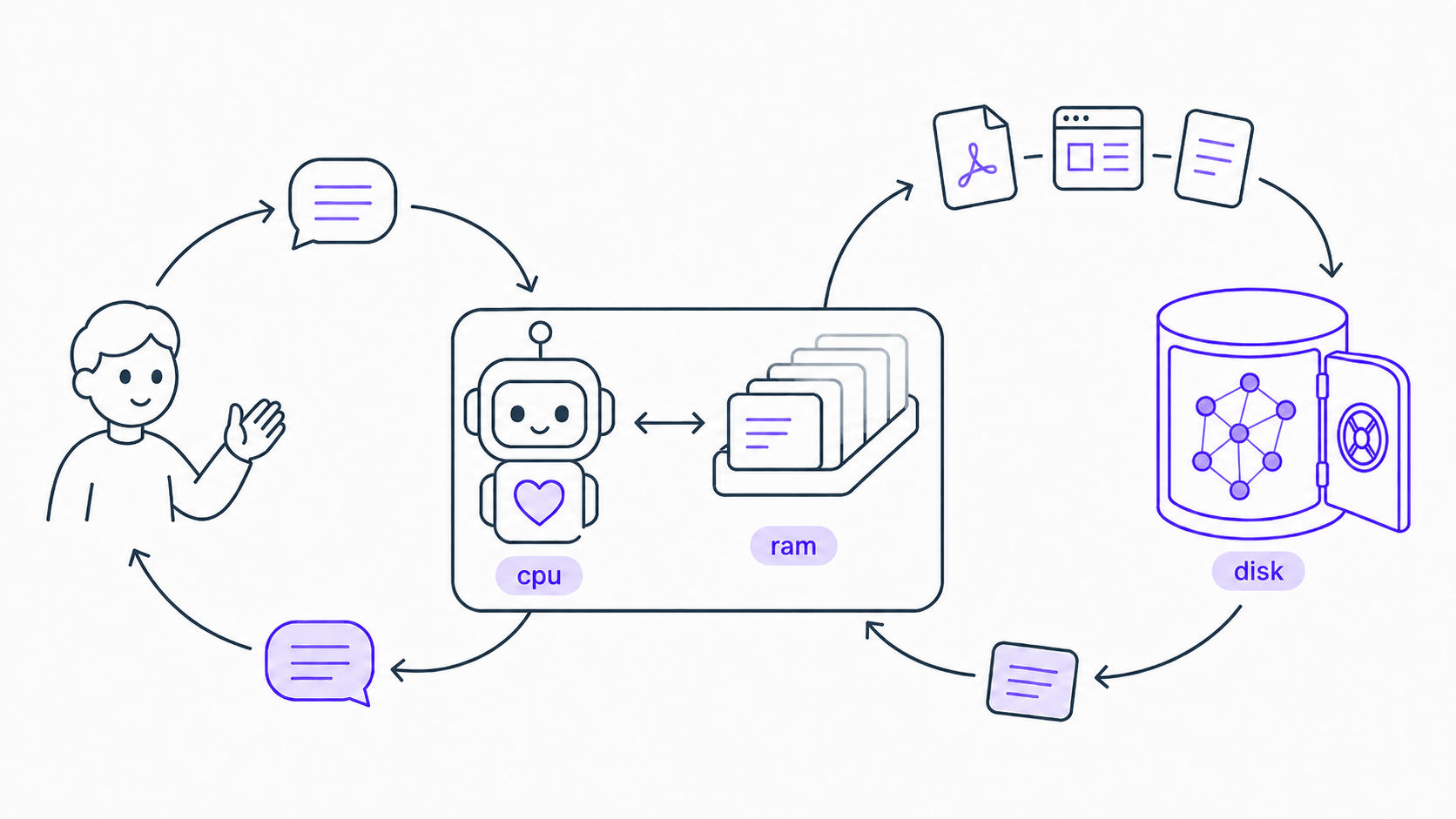
The problem is memory, not intelligence. An agent does all its thinking in a context window that empties the moment a conversation ends. Think of the model as a CPU and the context window as its RAM, fast but volatile; with no disk underneath, everything you teach it is quietly thrown away. This project adds that disk, with a layered wiki as the bridge. You drop raw sources into your Obsidian vault, the agent compiles them into linked notes it looks after entirely on its own, and whenever a conversation needs something, the right notes flow back up into working memory. Everything stays plain Markdown, yours to open, read and correct. Feed it for a month and the assistant stops being a stranger; a year in, nothing else will know your work the way it does.
A second brain stores what you know. A second self knows it with you and acts on it. Second Yourself is the whole machine. The operating system is this repository, the rules, skills and helper agents that schedule work, move memory into context, enforce permissions and keep the log. The disk is the wiki it compiles for you. The processor is whichever frontier model you plug in. Processors are replaced every year and get better each time. The operating system and the disk are yours, and they compound.
What you build on that memory is up to you:
- A second you, the goal this project is built towards: an agent that knows your work, your habits and your people because it remembers them, and can act for you rather than only answer, from a brief in your voice to an elderly parent's medication and appointments.
- A research assistant, what ships today: drop in papers and articles, ask questions, and get answers cited from your own library.
- A shared brain for many agents, which already runs: a head agent holding the wiki briefs specialist helper agents under a written contract, with independent critic and verifier agents and unattended multi-hour runs.
What it does today
Simply drop in your sources (PDFs, slides, links, blogs, and almost any other file format). The agent processes each one into linked Markdown, files it correctly, and keeps your cross-references and catalogue completely up to date. Instead of building a folder of unread clippings, you create a structured, compounding knowledge base that an AI can read natively.
Once populated, the wiki can:
- Answers and generation: The agent answers questions and creates almost any deliverable, from briefs and reports to presentations, tables, and cross-source syntheses.
- Smart referencing: It acts as a living, cited knowledge base that any agent can draw from. Every note carries a confidence level, so answers are grounded in your own sources and weighted by how trustworthy each one is, all while maintaining highly efficient token usage.
- Persistent insight: It proactively synthesises across your sources and offers to save valuable answers as permanent, linked notes, so a brilliant idea from a conversation can be preserved instead of lost when the chat ends.
- Self-maintenance and growth: The system actively cross-links files, merges duplicates, and flags conflicting information or knowledge gaps. It automatically maintains your catalogue and graph as your information compounds.
Reliability is built in rather than hoped for. Every answer cites the pages it drew on. Every page carries a graded trust level. Every check runs against a planted control, so a silent failure cannot pass as a clean result. Every change to the framework itself is reviewed by an independent critic agent before it lands.
We purposely designed the architecture to be universal and highly adaptable. Although it is pre-tuned for AI and machine learning research (treating models and benchmarks as primary note types), you can easily customise the repository to perfectly fit your own field or workflow. You can also personalise the agent itself in CUSTOMISATION.md, created on first setup: its name, tone, output styles and task roles come as starter examples, and the file is open-ended, so add whatever standing preferences you want every session to follow.
Setup
This is a framework rather than a plugin: it runs on an AI coding agent that reads CLAUDE.md and the skills in .claude/skills/. Setup takes about ten minutes.
Obsidian and the agent. Install Obsidian and open this folder as a vault. Then install the agent: the Claudian community plugin (Settings → Community plugins → Browse → Claudian), or Claude Code run from a terminal in the vault. Claudian is the only Obsidian plugin the framework requires.
Command-line tools. Install MarkItDown, which converts PDFs and Office documents to Markdown:
pip install 'markitdown[all]'python3,curl, andgitare also used, and are usually already present.Capture skills (recommended). Install kepano's obsidian-skills. The agent uses
defuddlefor clean web capture andobsidian-clifor vault access. Without them, the framework falls back tocurland MarkItDown.Web Clipper (optional). The Obsidian Web Clipper browser extension saves web pages into
raw/in one click. You can also drop files inraw/or paste a URL to the agent.Clone and initialise.
git clone https://github.com/HurricaHjz/second-yourself.git
cd second-yourself
bash setup.sh
Always run
setup.shonce before first use. It creates the wiki registries and applies the graph colour palette. It is safe to re-run at any time and never overwrites existing notes.To start with the bundled demo instead, run
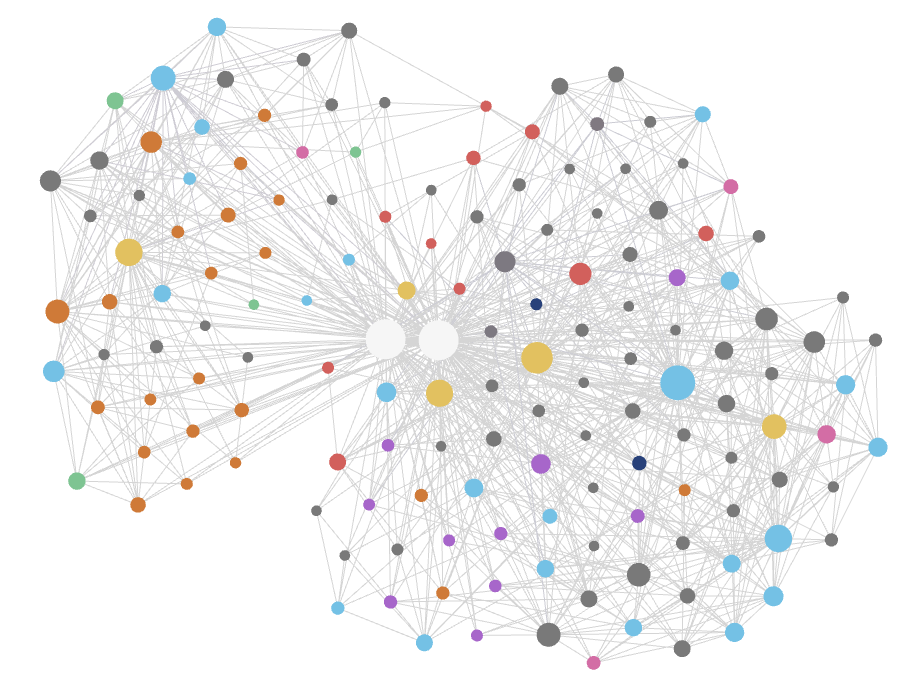
bash setup.sh --with-example. Then open the folder in Obsidian, open the graph view, and ask the agent/query what is GPT?. The answer is drawn from the demo wiki, with links to the notes behind it. Runbash setup.sh --resetwhen you are ready to start your own knowledge base. After that, theexamples/folder is safe to delete.A fresh vault's graph is empty until you load the demo or
/ingestyour first source. That is expected, not a fault.setup.shand your first ingest apply the colour palette automatically, and Obsidian then colour-codes nodes by type. If the colours ever vanish later (Obsidian can rewrite its own graph config), just ask the agent to restore your graph colours.Back up your vault (optional). Install the Obsidian Git plugin to sync your whole vault, notes included, to a private repository for version history and multi-device backup. Keep that private remote separate from this public framework repo. Your notes are never part of it.
Hardware and running costs
Any computer that runs Obsidian is enough. The intelligence lives in the cloud agent, so there is no GPU to buy and no local model to host, and the vault itself is plain text that stays at megabytes even after months of use. The one optional extra, qmd semantic search, runs a small embedding model comfortably on a laptop CPU.
The real cost is API credits or plan quota, and the framework is built to keep it small. The agent reads selectively, catalogue first and then only the notes a task needs, instead of loading the whole vault. It also benefits from Claude's prompt caching. The stable opening of every session (the agent's rules and your preferences) is cached after the first turn, and re-reading cached text costs about a tenth of the normal input price, so long working sessions stay warm and cheap. Two habits help: batch new sources into one ingest run, and keep one task per conversation.
Usage
New here? Read the Manual. It covers the commands, the capture → compile → ask → maintain workflow, and all the options in full, so this README doesn't repeat them.
How it works
Sources live in raw/; compiled notes live in wiki/, organised by type, with a generated index.md and log.md. The skills:
| Skill | Purpose |
|---|---|
ingest |
Compile sources from raw/ into linked notes. |
gather |
Capture a topic into raw/ — web-search it, or start from a page and the sources it cites. |
query |
Answer a question from the wiki, with citations. |
output |
Produce a grounded, cited document in output/. |
lint |
Check the wiki for broken links, orphans, and gaps (cheap, frequent). |
deep-lint |
Heavier ~monthly pass, token-bounded: audit confidence levels, flag stale claims, and re-check a capped set of sources against their live online versions. |
attic |
Retire notes into cold storage, or restore them — only ever on your explicit instruction. |
project |
Manage your own working repositories (Overleaf LaTeX, code) from the vault on your instruction: clones live outside the vault, the wiki keeps one registry row per repository, and content enters only as commit-pinned snapshots through raw/ when you ask. |
reflect |
Capture what a working session taught — insight, method lessons, defects — and file what you approve. Only on your explicit instruction. |
adopt |
Bring a third-party skill or tool into the vault: fingerprint it, recommend a use level, report, then install and record it on your yes; --retire reverses. |
delegate |
The agent's own runbook for handing work to subagents: which lane, what it may write, how its findings get checked. You never call it; it shapes how larger jobs are run. |
qmd-search |
(optional) Local semantic search over the wiki via qmd; dormant unless installed. |
export-template |
Sync with the framework repo: --pull updates your copy from upstream; --push is the maintainer's publish path. See the Manual. |
What the repository tracks
The repository holds the framework only: skills, rules, configuration, and a small demo. Your own notes stay on your machine: wiki/, raw/, output/, attic/, index.md, log.md, and your personal CUSTOMISATION.md are excluded by .gitignore, so pushing only ever publishes changes to the framework.
To back those notes up, use the optional Obsidian Git step above. That gives you a separate, private repository.
Credits and licence
Based on Andrej Karpathy's LLM Wiki pattern and kepano's obsidian-skills. Released under the MIT License (LICENSE).
Yorumlar (0)
Yorum birakmak icin giris yap.
Yorum birakSonuc bulunamadi