oculos
Health Gecti
- License — License: MIT
- Description — Repository has a description
- Active repo — Last push 0 days ago
- Community trust — 131 GitHub stars
Code Gecti
- Code scan — Scanned 12 files during light audit, no dangerous patterns found
Permissions Gecti
- Permissions — No dangerous permissions requested
Bu listing icin henuz AI raporu yok.
If it's on the screen, it's an API. Control any desktop app via REST + MCP. Rust.

OculOS
If it's on the screen, it's an API.
Control any desktop app through JSON. REST API + MCP server. Single binary. Zero dependencies.
Quick Start • How It Works • API • SDKs • MCP Setup • Dashboard • Security • Examples • API Spec • Changelog • Contributing



OculOS is a lightweight daemon that reads the OS accessibility tree and exposes every button, text field, checkbox, and menu item as a JSON endpoint. It works as a REST API for scripts, testing, and CI/CD — and as an MCP server for AI agents like Claude, Cursor, and Windsurf.
No screenshots. No pixel coordinates. No browser extensions. No code injection. No AI required. Just structured JSON.
Demo — Claude Code + OculOS → Calculator (5×5=25)
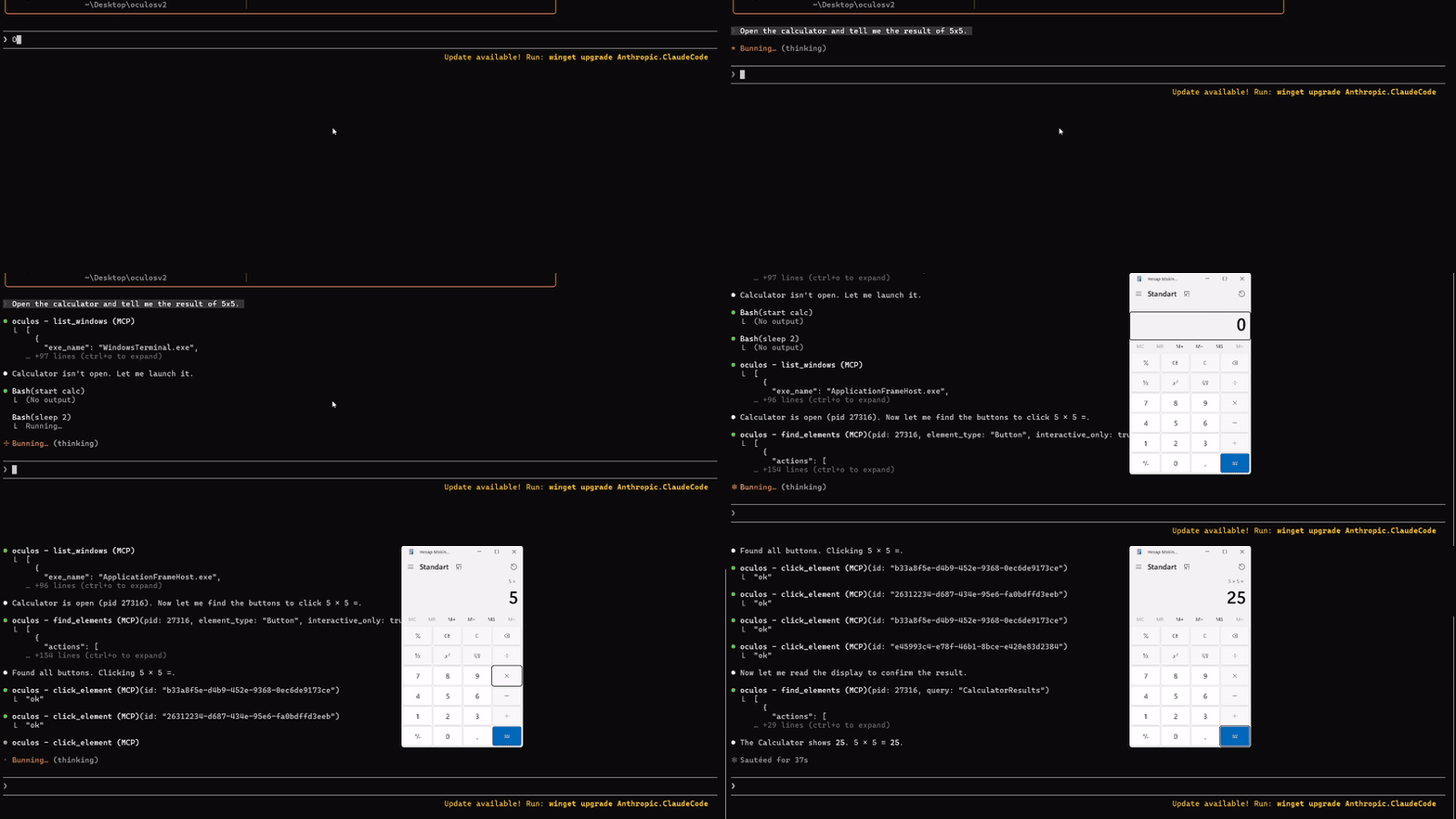
Claude Code uses OculOS MCP tools to open Calculator, find buttons, click 5 × 5 =, and read the result — fully autonomous.
Claude Code + OculOS → Spotify
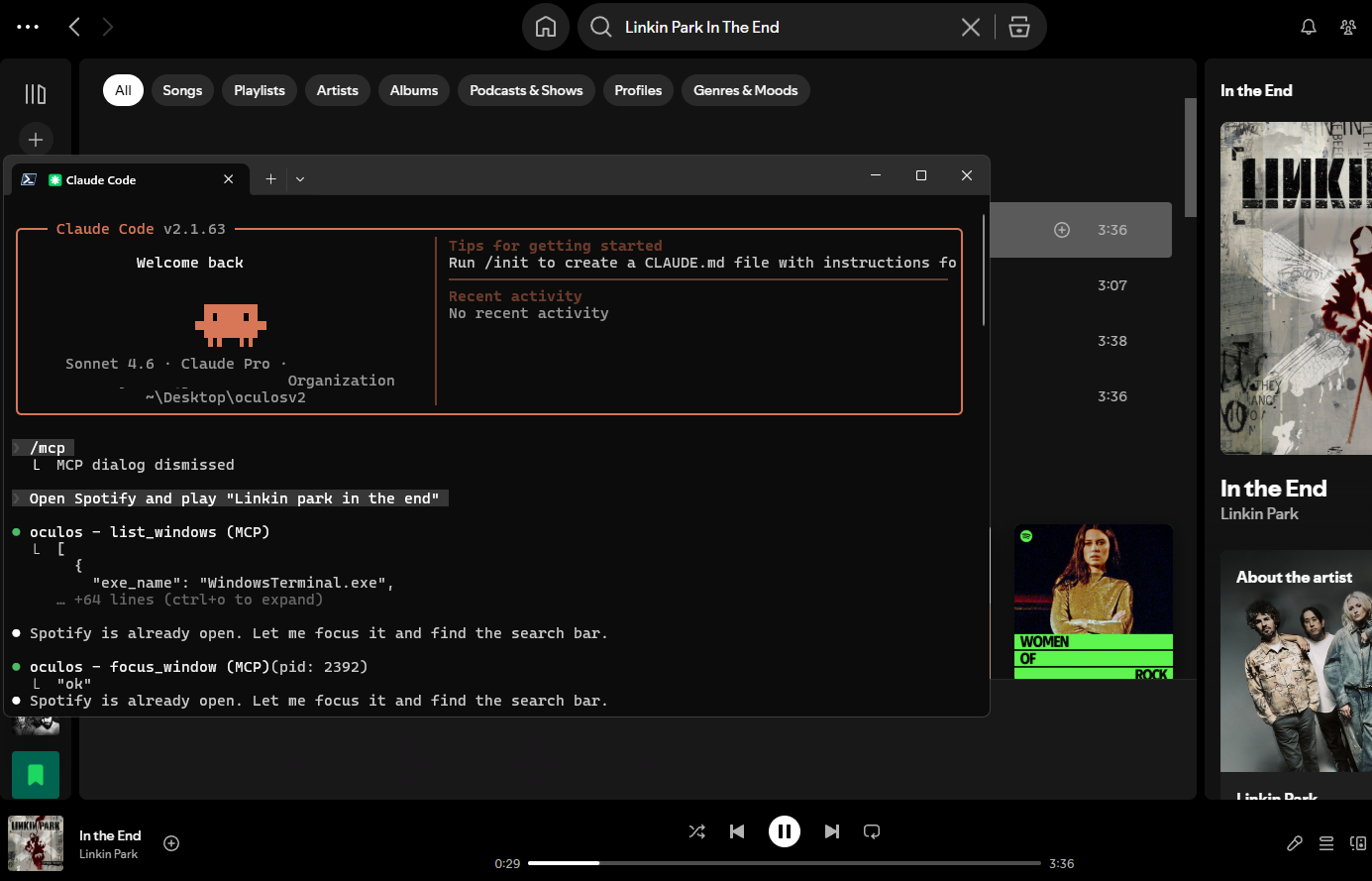
Claude Code uses OculOS MCP tools to find Spotify, focus it, search for a song, and play it — fully autonomous.
Web Dashboard
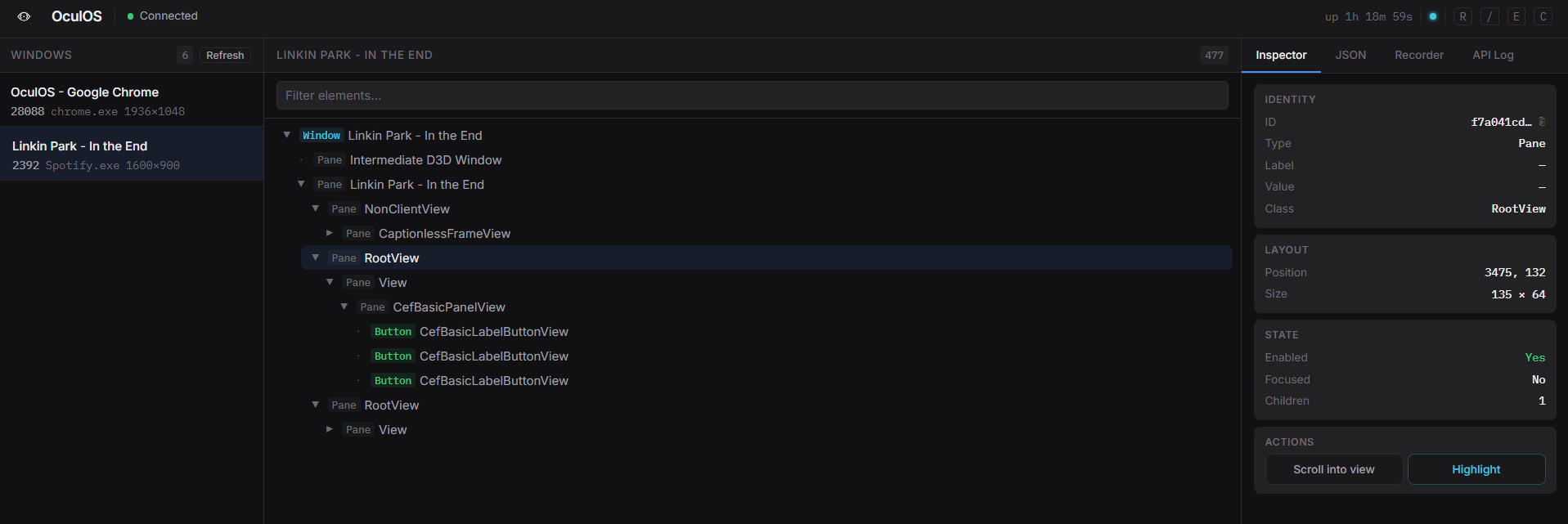
Built-in dashboard with window list, interactive element tree, inspector, recorder, and live WebSocket events.
Quick Start
git clone https://github.com/huseyinstif/oculos.git
cd oculos
cargo build --release
macOS: Grant Accessibility Permission
OculOS reads the OS accessibility tree, so macOS requires you to grant permission:
- Open System Settings → Privacy & Security → Accessibility
- Click the lock icon and enter your password
- Click + and add your terminal app (Terminal, iTerm2, Windsurf, etc.) or the
oculosbinary itself - Make sure the toggle is enabled
Without this permission, OculOS can list windows but cannot read UI elements or interact with them.
Linux: requirements
OculOS talks to the AT-SPI2 accessibility bus, which every mainstream desktop (GNOME, KDE, Xfce…) starts automatically. It also enables org.a11y.Status.IsEnabled at startup so Chromium/Electron/Firefox apps expose their trees.
- at-spi2-core — the accessibility bus and registry (
sudo apt install at-spi2-core) - xdotool — keyboard input (
send-keys, keyboard scrolling) and window focus/close (sudo apt install xdotool). X11 only; on Wayland it reaches XWayland apps only. - wmctrl (optional) — graceful window close
HTTP mode (API + Dashboard)
./target/release/oculos
# API       → http://127.0.0.1:7878
# Dashboard → http://127.0.0.1:7878   (embedded in the binary)
By default OculOS only listens on 127.0.0.1 and needs no token. See Security before exposing it to a network.
MCP mode (for AI agents)
./target/release/oculos --mcp
How It Works
OculOS reads the OS accessibility tree and assigns each UI element an oculos_id (16 hex chars). You use that ID to interact. IDs are stable: finding the same element again returns the same ID, so polling agents don't pile up new IDs. An ID expires after 30 minutes without use, or when the element disappears — then you get a not_found error and simply search again.
# 1. List open windows
curl http://localhost:7878/windows

# 2. Get the UI tree for a window
curl http://localhost:7878/windows/{pid}/tree

# 3. Find a specific element
curl "http://localhost:7878/windows/{pid}/find?q=Submit&type=Button"

# 4. Click it
curl -X POST http://localhost:7878/interact/{id}/click

# 5. Type into a text field
curl -X POST http://localhost:7878/interact/{id}/set-text \
  -H "Content-Type: application/json" \
  -d '{"text":"hello world"}'
Every element includes an actions array — the API tells you exactly what you can do:
{
  "oculos_id": "a3f8c2d1e4b5f607",
  "type": "Button",
  "label": "Submit",
  "enabled": true,
  "actions": ["click", "focus"],
  "rect": { "x": 120, "y": 340, "width": 80, "height": 32 }
}
API
Discovery
| Endpoint | Description |
|---|---|
GET /windows |
List all visible windows |
GET /windows/{pid}/tree |
Full UI element tree |
GET /windows/{pid}/find?q=&type=&interactive= |
Search elements (q = label / automation_id substring, type case-insensitive) |
GET /windows/{pid}/wait?q=&type=&interactive=&timeout=&until= |
Wait until a match appears (until=appears, default) or is gone; timeout ms (default 5000, max 30000) → 408 timeout |
GET /hwnd/{hwnd}/tree |
Tree by window handle (Windows, macOS — on Linux hwnd is 0, use the PID routes) |
GET /hwnd/{hwnd}/find |
Search by window handle |
GET /hwnd/{hwnd}/wait |
Wait by window handle |
Window operations
| Endpoint | Description |
|---|---|
POST /windows/{pid}/focus |
Bring to foreground |
POST /windows/{pid}/close |
Close gracefully |
GET /windows/{pid}/screenshot |
Capture window as PNG (Windows; other platforms return unsupported) |
Element interactions
| Endpoint | Body | Description |
|---|---|---|
POST /interact/{id}/click |
— | Click |
POST /interact/{id}/set-text |
{"text":"…"} |
Replace text content |
POST /interact/{id}/send-keys |
{"keys":"…"} |
Keyboard input |
POST /interact/{id}/focus |
— | Move focus |
POST /interact/{id}/toggle |
— | Toggle checkbox |
POST /interact/{id}/expand |
— | Expand dropdown / tree |
POST /interact/{id}/collapse |
— | Collapse |
POST /interact/{id}/select |
— | Select list item |
POST /interact/{id}/set-range |
{"value":N} |
Set slider value |
POST /interact/{id}/scroll |
{"direction":"…"} |
Scroll container |
POST /interact/{id}/scroll-into-view |
— | Scroll into viewport |
POST /interact/{id}/highlight |
{"duration_ms":N} |
Highlight on screen (Windows) |
GET /interact/{id}/screenshot |
— | Capture one element as PNG (Windows) |
POST /interact/batch |
{"actions":[...], "stop_on_error":true, "delay_ms":0} |
Up to 100 interactions in one request |
scroll directions: up, down, left, right, page-up, page-down.
Batch — each action is {"element_id", "action", "text"?, "keys"?, "value"?, "direction"?}. All steps are validated before anything runs (one bad step → 400, nothing executed). With stop_on_error (default true) execution stops at the first failing step; delay_ms pauses between steps (max 5000). The response has one {index, action, element_id, success, error, code?} per executed step.
Send-keys syntax
| Syntax | Meaning |
|---|---|
hello world |
Typed as Unicode text; \n = Enter, \t = Tab |
{ENTER} {TAB} {ESC} {SPACE} {BACKSPACE} {DELETE} {INSERT} |
Special keys |
{HOME} {END} {PGUP} {PGDN} {UP} {DOWN} {LEFT} {RIGHT} |
Navigation |
{F1}…{F24} {CAPSLOCK} {PRINTSCREEN} {MENU} |
More keys |
{CTRL+A} {CTRL+SHIFT+T} {ALT+F4} {WIN+D} |
Chords — modifiers CTRL, ALT, SHIFT, WIN (= CMD/SUPER) |
{MOD+C} |
Cmd on macOS, Ctrl elsewhere |
{WIN} |
A lone modifier is pressed and released |
{TAB 3} |
Repeat (1–100) |
{{ }} |
Literal braces (also {LBRACE}, {RBRACE}, {PLUS}) |
Names are case-insensitive. The whole string is parsed before anything is typed; invalid syntax returns 400 invalid_input.
System
| Endpoint | Description |
|---|---|
GET /health |
Status, version, platform, uptime, auth_required (never needs a token) |
GET /ws |
WebSocket: action, tree_loaded and windows events (?token= when auth is on) |
Responses & error codes
Every JSON response is {"success": bool, "data": …, "error": string|null, "code"?: string}. On failure, code tells you what to do:
code |
HTTP | Meaning |
|---|---|---|
not_found |
404 | Element ID unknown/expired or window gone — search again |
invalid_input |
400 | Bad parameter: unknown element type, bad key syntax, invalid batch step… |
unsupported |
400 | The element or platform can't do this |
timeout |
408 | A wait condition wasn't met in time |
permission_denied |
403 | The OS refused access (e.g. macOS Accessibility permission) |
forbidden |
403 | Host / Origin not allowed (see Security) |
unauthorized |
401 | API token missing or wrong |
internal |
500 | Unexpected error |
MCP Setup
Works with any MCP-compatible client. Add to your config:
{
  "mcpServers": {
    "oculos": {
      "command": "/path/to/oculos",
      "args": ["--mcp"]
    }
  }
}
Tested with: Claude Code, Claude Desktop, Cursor, Windsurf
Tools: list_windows, get_ui_tree, get_ui_tree_hwnd, find_elements (with limit, default 100), find_elements_hwnd, wait_for_element (appear or gone), click_element, set_text, send_keys, focus_element, toggle_element, expand_element, collapse_element, select_element, set_range, scroll_element, scroll_into_view, highlight_element, screenshot_window / screenshot_element (returned as MCP images), batch_actions, focus_window, close_window.
Tool output is compact JSON (null/empty fields dropped) to save context; failures come back as isError: true tool results with the error code. Logs go to stderr, so the stdout JSON-RPC stream stays clean.
For non-MCP agents (OpenAI, Gemini, custom), paste AGENTS.md into the system prompt and give the agent HTTP access.
Dashboard
Built-in web UI at http://127.0.0.1:7878, embedded in the binary (no static/ folder needed; --static-dir overrides it while developing):
- Window list — all open windows with focus/close buttons
- Element tree — full interactive UI tree with search and filter
- Inspector — element details, properties, all available actions, element screenshot
- Recorder — record a sequence of interactions, export as Python, JavaScript, or curl. Steps are saved as selectors (window
exe_name+ elementautomation_id, or label + type), so exported scripts keep working after a restart; they readOCULOS_TOKENwhen auth is on - JSON viewer — raw element data with copy
- WebSocket — live event indicator, real-time action feed
- Shortcuts —
Rrefresh ·/search ·Eexpand ·Ccollapse ·Hhighlight ·JJSON
Security
OculOS can drive every app on your desktop, so the defaults are strict:
- Loopback only by default — it binds to
127.0.0.1:7878; nothing on the network can reach it. - Host check — the
Hostheader must be an IP address orlocalhost(add names with--allow-host), which blocks DNS-rebinding attacks from web pages. - Origin check, no CORS — browser requests carrying an
Originmust come from the dashboard itself (same host) or an origin listed with--allow-origin;Origin: nullis rejected. No CORS headers are sent otherwise, so other websites can't call the API. Scripts, SDKs and MCP clients send noOriginand are unaffected. Rejections are 403forbidden. - Optional token —
--token <T>orOCULOS_TOKEN=<T>requires the token on every route exceptGET /healthand the dashboard page. Send it asX-OculOS-Token: <T>orAuthorization: Bearer <T>(WebSocket:/ws?token=<T>); otherwise you get 401unauthorized. - Automatic token for network binds — binding to a non-loopback address (e.g.
--bind 0.0.0.0:7878) without a token generates a random one and prints it in the log at startup.
The dashboard gets the token automatically when opened from the same machine. From another machine, open http://<host>:7878/?token=<token> (the token is removed from the address bar and kept for the browser tab), or paste it into the prompt in the top bar.
# Expose on the LAN with your own token
OCULOS_TOKEN=$(openssl rand -hex 16) ./target/release/oculos --bind 0.0.0.0:7878

# Let a local web app on :3000 call the API from the browser
./target/release/oculos --allow-origin http://localhost:3000
Traffic is plain HTTP; for remote use prefer an SSH tunnel or VPN. See SECURITY.md.
Platform Support
| Platform | Backend | Status |
|---|---|---|
| Windows | UI Automation (windows-rs) |
✅ Full — Win32, WPF, Electron, Qt |
| Linux | AT-SPI2 (atspi + zbus) |
✅ Working — GTK, Qt, Electron |
| macOS | Accessibility API (AXUIElement + CoreGraphics) |
✅ Working — Cocoa, Electron, Qt |
App Compatibility
| App type | Coverage | Notes |
|---|---|---|
| Win32 / WPF / WinForms | Excellent | Full deep tree, all interactions |
| GTK / Qt | Excellent | Full tree on all platforms |
| Electron (Spotify, VS Code, Slack, Chrome) | Good | Key interactive elements exposed; tree is shallower than native |
| Cocoa (macOS native) | Good | Standard controls fully exposed |
| Custom-drawn / OpenGL / DirectX | Poor | Minimal or no accessibility tree — games, CAD, etc. |
Tip: Run
curl "localhost:7878/windows/{pid}/find?interactive=true"to see what's available for any app.
Client SDKs
Official wrappers for the REST API, with token support (OCULOS_TOKEN), waits, screenshots, batches, request timeouts and typed errors (OculOSError with code / status). Install from source (PyPI/npm packages coming soon):
Python
cd sdk/python
pip install .
from oculos import OculOS

client = OculOS()  # token from $OCULOS_TOKEN if set
windows = client.list_windows()
[ok] = client.wait_for(pid=pid, q="OK", type="Button", timeout_ms=5000)
client.click(ok["oculos_id"])
client.set_text(element_id, "hello world")
client.wait_for(pid=pid, q="Saving", until="gone")
See sdk/python for full docs.
TypeScript
cd sdk/typescript
npm install
npm run build
import { OculOS } from "./sdk/typescript/dist/index.js";

const client = new OculOS(); // { baseUrl, token, timeoutMs } — token defaults to OCULOS_TOKEN
const windows = await client.listWindows();
const [ok] = await client.waitFor({ pid, query: "OK", type: "Button", timeoutMs: 5000 });
await client.click(ok.oculos_id);
await client.setText(elementId, "hello world");
See sdk/typescript for full docs.
CLI
oculos [OPTIONS]

  -b, --bind <ADDR>            Bind address [default: 127.0.0.1:7878]
      --token <TOKEN>          Require this API token [env: OCULOS_TOKEN]
                               (auto-generated when binding to a non-loopback address)
      --allow-origin <ORIGIN>  Allow a browser origin to call the API (enables CORS for it; repeatable)
      --allow-host <HOST>      Accept an extra Host header name (repeatable)
      --static-dir <DIR>       Serve the dashboard from DIR instead of the embedded copy (development)
      --log <LEVEL>            Log level: trace/debug/info/warn/error [default: info] (logs go to stderr)
      --mcp                    Run as MCP server over stdin/stdout
  -h, --help                   Print help
  -V, --version                Print version
How OculOS Differs
| OculOS | Vision agents | Screen coordinate tools | Browser-only tools | |
|---|---|---|---|---|
| Approach | OS accessibility tree | Screenshots + LLM | Pixel positions | DOM / a11y tree |
| Scope | Any desktop app | Any (with latency) | Any (fragile) | Browser only |
| Speed | Instant | Seconds | Instant | Instant |
| Deterministic | ✅ | ❌ | ✅ | ✅ |
| GPU required | ❌ | ✅ | ❌ | ❌ |
| Cloud required | ❌ | Usually | ❌ | ❌ |
| Semantic | ✅ Labels + types | Varies | ❌ Coordinates | ✅ |
Everything Built So Far
Core
- Windows UIA backend (full — Win32, WPF, Electron, Qt)
- Linux AT-SPI2 backend
- macOS Accessibility backend (
AXUIElement, CoreGraphics window enumeration, CGEvent keyboard simulation) - REST API server (Axum)
- MCP server (JSON-RPC 2.0 over stdio)
- Stable element IDs with a bounded, self-expiring registry
- Full keyboard simulation engine (chords, repeats, literal braces — same syntax on every OS)
- Security: loopback default, Host/Origin checks, optional API token
Dashboard
- Window list with focus/close
- Interactive element tree with search/filter
- Element inspector with all actions
- API request log
- JSON viewer with copy
- Keyboard shortcuts
Advanced
- Element highlighting (native GDI overlay)
- Automation recorder (record + export selector-based Python/JS/curl scripts)
- WebSocket live events
- Health endpoint (uptime, version, platform)
Planned
See docs/ROADMAP.md for the prioritised roadmap (compact text snapshots, post-action diffs, coordinate actions, event-driven waits, selectors, vision/OCR fallback, safety layer…).
- macOS element highlighting (native overlay)
- Python & TypeScript client SDKs
- Batch operations (multiple interactions per request)
- Conditional waits (
/waitendpoint with timeout,until=gone, by PID or HWND) - Screenshot capture (window and element)
- GitHub Actions CI (Windows, Linux, macOS)
- Docker image for CI/CD
- OpenAPI spec
-
--versionCLI flag - Element caching & diffing (change detection)
- PyPI / npm SDK publishing
Contributing
We welcome contributions! See CONTRIBUTING.md for details.
Top areas:
- Tests — cross-app integration tests
- macOS highlight — native overlay for element highlighting
- Element caching — change detection & diffing
- Documentation — guides, examples, tutorials
License
Yorumlar (0)
Yorum birakmak icin giris yap.
Yorum birakSonuc bulunamadi