plip-oss
Health Gecti
- License — License: MIT
- Description — Repository has a description
- Active repo — Last push 0 days ago
- Community trust — 11 GitHub stars
Code Uyari
- network request — Outbound network request in src/mcp_vision/buddy/account.py
Permissions Gecti
- Permissions — No dangerous permissions requested
Bu listing icin henuz AI raporu yok.
Open-source runtime for grounded, model-agnostic computer-use agents with verifiable action receipts.
Plip
Personal staff that lives in your MacBook's notch. Hold Control+Option and
talk. Plip looks at your screen, explains things step by step, and does the busywork
for you: finds files, tidies your desktop, pulls up flights, sets reminders,
rewrites your text. It thinks with the Claude, ChatGPT or
Cursor plan you already pay for, or free with a Google account.
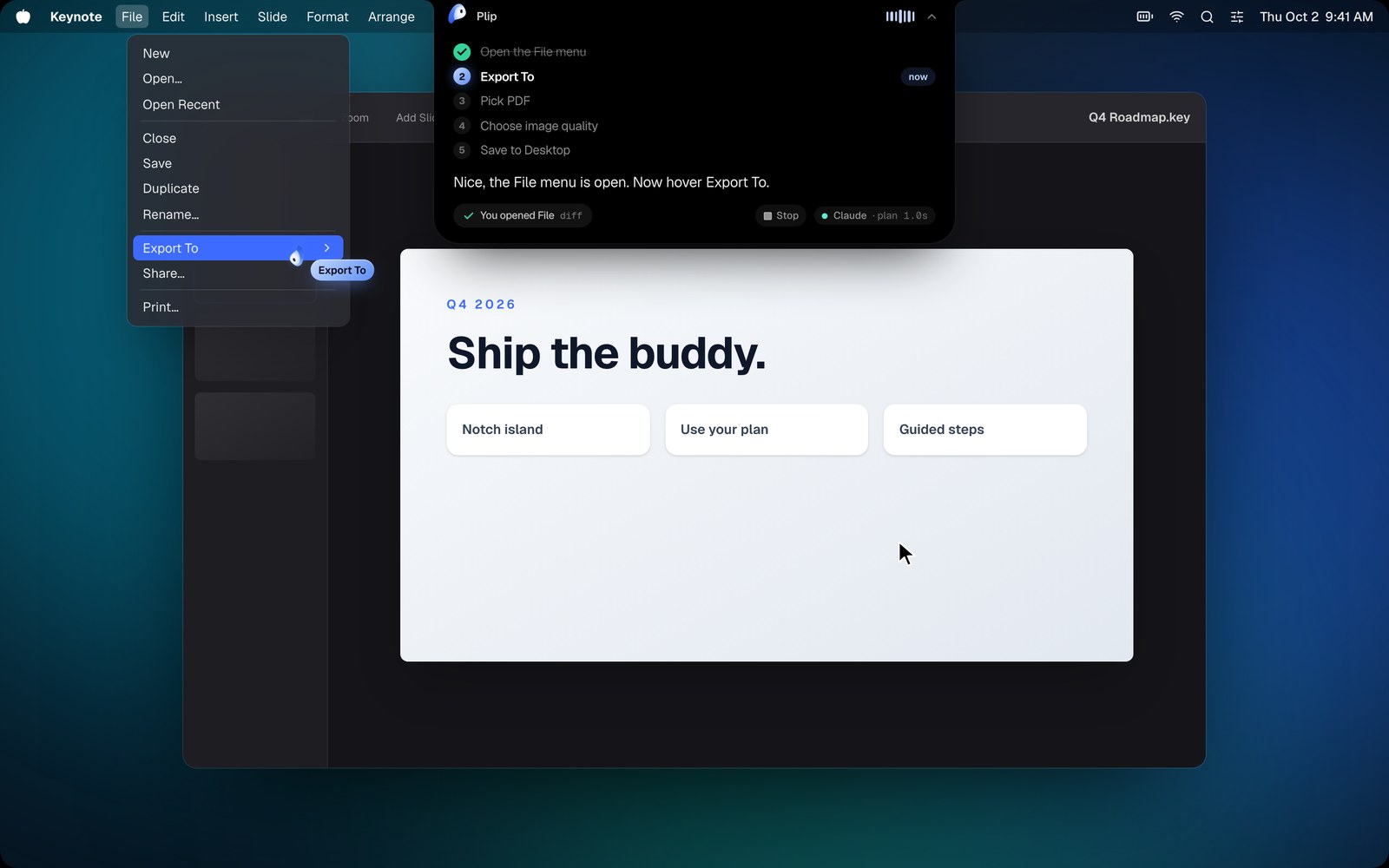
"how do I send this deck as a PDF?"
→ a five-step checklist drops out of the notch, and Plip slips out of the notch to
point at the next click. Plip watches your screen and checks each step off as you go.
"tidy up my desktop"
→ "I'll sort your desktop into folders. Here's the plan." A card shows what goes
where. Say "yes" or click Tidy up, and "undo" puts it all back.
| Ask | Plip |
|---|---|
| "find my lease pdf" | Spotlight search, reads you the hits, opens the one you want |
| "tidy up my desktop" | shows the plan (Screenshots 12, Documents 5…), moves files on your yes, "undo" puts them back |
| "flights to Miami next Friday" | opens Google Flights, waits for results, tells you the best options and points at the cheapest |
| "rewrite this email to sound friendlier" | replaces the selected text in place |
| "remind me to call the dentist at 4" · "set a 10 minute tea timer" | Reminders, Notes and timers that ping you |
| "turn on dark mode" · "volume 30" · "run my Log Water shortcut" | Mac settings and your Apple Shortcuts |
| "remember I prefer aisle seats" | adds it to what Plip knows about you |
Anything that moves your files shows you a preview first, and nothing
happens until you say yes.
Download
⬇ Download Plip for Mac (.dmg): free and open source. macOS 13+, Apple Silicon.
- Open the
.dmgand drag Plip into Applications. - Open Plip from Applications. If macOS says it can't check it for malicious software,
go to System Settings → Privacy & Security and click Open Anyway (only the first time). - A short welcome walks you through it: allow Screen Recording, Accessibility and Microphone, then
Connect the AI you already pay for (or get a free Google key), and try one ask. No sign-in needed. - Hold Control+Option, ask something, let go.
- After your first task, Plip offers Continue with Google once. Say Later if you like: it asks at most
three times, and the Account tab has it whenever you want (what it holds).
Something broken? Click Report a bug in Plip's menu bar (or Settings → General), or
open a GitHub issue.
Quick start (from source)
curl -fsSL https://raw.githubusercontent.com/hussainn7/plip-oss/main/scripts/install.sh | bash
plip                 # Plip moves into your notch; the dashboard opens on first run
Run from a terminal, macOS checks the terminal's permissions, not Plip's: turn on Terminal (or iTerm,
or your editor) under System Settings → Privacy & Security → Accessibility, or the shortcut hears nothing.
Plip says so when it starts. Prefer another shortcut than Control+Option? Pick one in Settings → General.
The first-run walkthrough asks for three macOS switches, then gives Plip a brain. Nothing
to type into a terminal:
| You have | What to click | Sees screenshots |
|---|---|---|
| Claude Pro / Max | Connect next to Claude: Plip installs Claude Code and opens the browser to sign in | yes |
| ChatGPT Plus / Pro | Connect next to ChatGPT: Plip downloads the Codex CLI from GitHub (checked against its SHA-256) and opens the browser to sign in | yes |
| Cursor | Connect next to Cursor (Cursor CLI) | text only (Plip reads it the screen map) |
| Google AI Pro / Ultra | Use Gemini, once you're signed in to Antigravity (Plip uses its CLI, tools off) | text only |
| no AI plan | Get my free key (Google AI Studio, any Google account), then Paste key. Plip checks it with Google | yes |
| an API key | paste an ANTHROPIC_API_KEY under Brain |
yes, fastest first word |
Already signed in to one of these? Plip finds it and uses it. The free Google key has limits (a few requests a minute, more per day). On Google's
free tier, Google may use what Plip sends it (screenshots included) to improve its products, and human reviewers
may read it (outside the EEA, Switzerland and the UK; see the Gemini API terms),
so use a paid plan for private work.
Plip runs the CLI once per question in an empty scratch folder with its own tools
switched off, so the model only ever sends back words and Plip's action tags. Plip
does the actions itself, and anything that buys, sends or deletes asks you first.
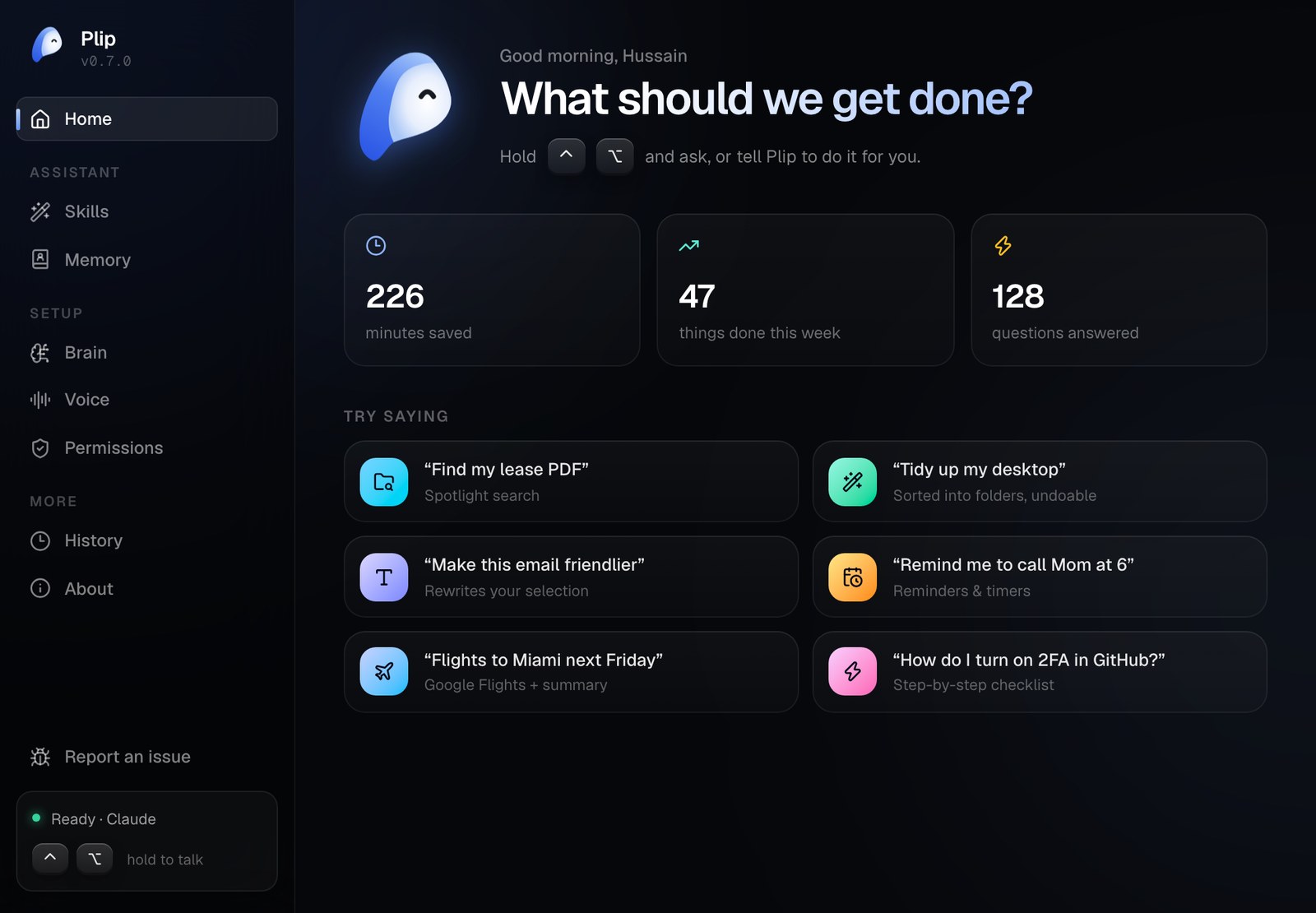
Then hold Control+Option, talk, and let go.
- The island drops out of the notch with a live waveform and your words, then shows
what Plip is doing (looked at 2 screens, searched files, snapped to "Export"). - Click ⌃ on the island to minimize it back into the notch; hover to peek.
- Press the shortcut again while Plip is talking to interrupt it.
- Plip ends on a yes-or-no suggestion ("want me to add it to your cart?"): click Yes on
the island, or hold the keys and say it. - Menu bar: Stop while Plip is working, Keep going when a task paused, Open Plip, Brain,
Show Plip by my cursor, Forget this conversation.
Optional extras
| Key | Without it | With it |
|---|---|---|
TYPESAFE_API_KEY |
rule-based routing, heuristic snapping | Jev System-1 routing and element choice in ~100 ms |
ELEVENLABS_API_KEY |
macOS say |
a natural ElevenLabs voice (eleven_flash_v2_5) |
ASSEMBLYAI_API_KEY |
on-device Apple Speech | AssemblyAI streaming (u3-rt-pro) |
Paste them in the dashboard, or see .env.example. plip doctor checks
brains, keys and permissions from the terminal.
Listening on your Mac with Parakeet. Under Voice → Listening, pick Parakeet for
NVIDIA's Parakeet Unified 0.6B instead of Apple's recognizer: it catches more of what you
say, with punctuation, and nothing leaves your Mac. It's a one-time 663 MB download
(pinned, checksummed, resumable); Apple's keeps listening until it's done.
Activity. The Activity tab's Usage view shows every request from this Mac: per day, when you ask, how
it ended, which brain and plan, and what it would cost at API prices (what your plan is
worth). It stays on your Mac.
Permissions in one click. Allow opens the exact page in System Settings with a small
card docked under it: drag Plip into the list and it's on.
Try it from the terminal (macOS and Linux)
plip ask --image screenshot.png "where's the export button?"
plip ask --engine codex --json "find my lease pdf"     # prints what Plip said, did, and pointed at
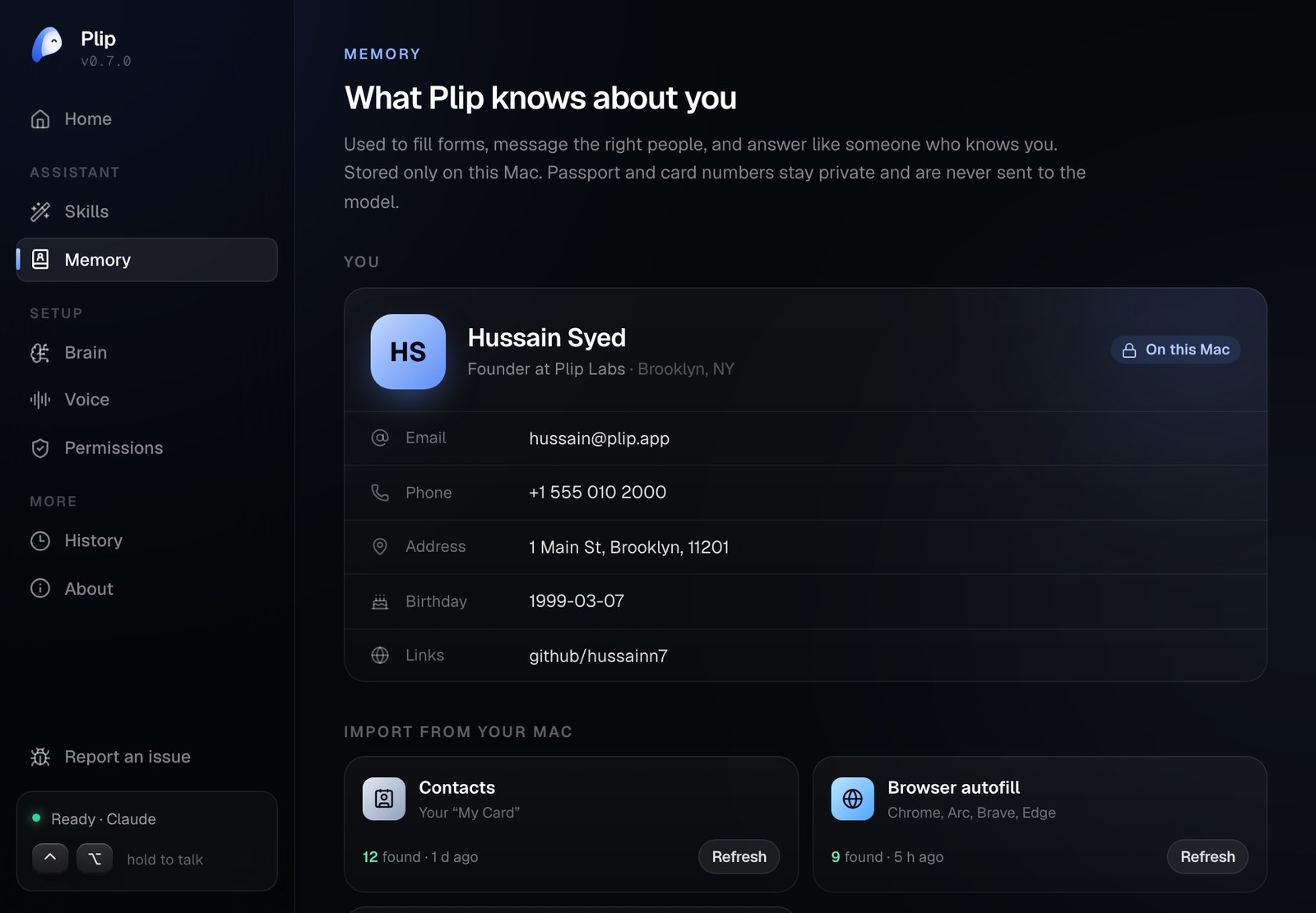
Memory: Plip knows you
Plip keeps a small knowledge panel about you on your Mac, and uses it to answer like
someone who knows you. Import it in a few
seconds from what's already on your Mac:
- Contacts: your "My Card" (name, emails, phones, address, birthday, company, links)
- Browser autofill: Chrome, Arc, Brave and Edge profiles
- Mail: your accounts and addresses
- ChatGPT, Claude or Gemini memory: copy Plip's prompt into your assistant and paste
its answer back. This is the same pattern as Claude's Import Memory.
Everything lives in ~/.config/mcp-vision/memory.json (mode 0600). Passport, card and
Social Security numbers are detected, stored privately, and never sent to the model.
From the terminal: plip memory import contacts, plip memory show, plip memory prompt.
How it thinks
⌃⌥ ──▶ mic ──▶ AssemblyAI / Apple Speech ──▶ transcript ──▶ notch island (live)
                                               │
 screenshots (prefetched) ─┐                   ▼
 Accessibility screen map ─┼──▶ Jev router (needs screen? which monitor? walkthrough?)
 what Plip knows about you ┘
                           ▼
   your brain (Claude Code / Codex / Cursor / Gemini / API), streamed
     ├─▶ sentences ──▶ TTS queue (speaks sentence 1 while 2 is synthesized)
     ├─▶ [POINT:x,y:label]       ──▶ snap to the real control ──▶ Plip slips out of the notch to it
     ├─▶ [STEPS:n] [PLAN: a | b] ──▶ checklist in the notch; Plip watches the screen and gives the next step
     └─▶ [DO:name {json}]        ──▶ action engine ──▶ preview + your yes (if it moves files) ──▶ done
                                       └──▶ results (search hits, a loaded page) go back for one more turn
- Screen map. Plip lists the frontmost app's real controls (label, role, center in
screenshot pixels), so the model points at things that exist, fills the right fields,
and text-only brains can still point. - Walkthroughs. For "how do I…" the model announces the steps, and Plip shows them
as a checklist. A 64×40 screen fingerprint tells Plip when you've done a step, and it
takes a fresh look before giving the next one. - Actions. The model asks for actions with
[DO:…]tags. Plip runs them itself on
your Mac (open, Spotlight, AppleScript, Shortcuts, Accessibility), with timeouts,
an undo history, and a local log. - Depth. Fast, Balanced and Deep map to low, medium and high effort.
Everything above the windows is platform-neutral and tested, including the CLI
engines (through real subprocesses) and a full plip CLI run against a fake Claude
Code. The macOS layer is three WKWebViews (island, mascot, dashboard) rendering one
React bundle, plus an event tap and audio glue. See docs/BUDDY.md.
Development
python3.12 -m venv .venv && source .venv/bin/activate
pip install -e '.[dev]'
ruff check . && python -m pytest

cd ui && npm install && npm run build      # React 19 + Tailwind 4 + Motion → src/mcp_vision/buddy/web/index.html
npm run dev                                # open #showcase for the fake-desktop demo, #settings, #island
npm run e2e                                # clicks through the island and dashboard in Chromium
More in CONTRIBUTING.md.
License
MIT
Updates
Once a day Plip asks GitHub whether a newer release is out (one request to api.github.com, nothing about you in
it). When there is one, the notch says so once, and the menu bar, Home and Settings → General offer
Download: it opens the new DMG; quit Plip, then drag the new one into Applications. Your settings,
memory and sign-in stay. Turn it off in Settings → General → Tell me about new versions.
Your account
Sign-in never stands between you and Plip. When you finish (or skip) the welcome, the download gives you a
guest account: a random name like Quiet Nomad, no email, kept by Supabase Auth, Plip's account server
(its "anonymous sign-in"). That's how we count people using Plip. After your first task (and your third, and once
when a new version is out) Plip offers Continue with Google; after three Laters it stops asking, and
Settings → Account has the button.
Signing in with Google links Google to that same account: Google tells Supabase your name, email address and
profile picture, and the account (name, email, the link to your picture, when you joined and when you last signed
in) gains them. If that Google already has a Plip account (your last Mac), you're signed in to that one instead.
Nobody is counted twice. Why sign in: Pro is coming, and signed-in people get it first. Nothing syncs between
Macs yet.
- On this Mac,
~/.config/mcp-vision/account.json(readable only by you) keeps your name, email and Google
picture (once you've signed in; the picture is downloaded once, to show in Settings) and the session. - Each time Plip starts, it renews the session with Supabase once. If your account was removed, Plip signs out and
makes a new guest one. Offline, the name stays here and the account is made next launch. - What you ask Plip, your screen, memory and history are never sent to the account server or tied to your account.
Which setup steps you reached is counted, with the account id (Analytics). - A guest account holds nothing about you but its random name. Sign out ends its session; the rows
themselves are cleared from the server from time to time, and Plip doesn't make a new one until you sign out or
reinstall. The opt-out below covers the analytics, not the account server: a download with a Supabase project
talks to it whenever Plip starts. - Settings → Account → Sign out forgets the Google account on this Mac and ends the session; Plip keeps working
as a new guest account. To have an account deleted, email [email protected] from the address you signed in with
(the full policy is at plip.dev/privacy).
Running from source without a Supabase project (the default) has no accounts at all and never contacts the
account server. The code is src/mcp_vision/buddy/account.py.
Analytics
Plip sends one anonymous ping per day (random install id, version, macOS version) so we can count active users, and
one event per setup step reached, once each: a walkthrough step shown or skipped, a permission granted (which one),
an AI connected (which provider), the first task finished, sign-in offered / done / put off (at which moment, after
how many tasks). All of it is keyed on the install id and carries your account id once you have one (see
Your account), so we can see where setup loses people. Before 0.10.0 the install id was never
linked to an account; it is now, for that funnel. No screens, files, or prompts are ever sent, and nothing about
what you ask. Opt out of all of it with MCP_VISION_NO_ANALYTICS=1 or DO_NOT_TRACK=1.
Yorumlar (0)
Yorum birakmak icin giris yap.
Yorum birakSonuc bulunamadi