d-code
Health Warn
- License — License: MIT
- Description — Repository has a description
- Active repo — Last push 0 days ago
- Low visibility — Only 5 GitHub stars
Code Fail
- exec() — Shell command execution in src/main/claude/quick-ask.ts
Permissions Pass
- Permissions — No dangerous permissions requested
No AI report is available for this listing yet.
Unofficial desktop client for the Claude Code CLI — session history, live chat, editor with LSP and debugger, git, and plan limits
D-code
An unofficial desktop client for the Claude Code CLI.
Sessions on the left, the conversation in the middle, usage and limits on the right —
plus an editor, git, terminals and a debugger when you need them.

Not affiliated with Anthropic. "Claude" and "Claude Code" are their trademarks.
This is a personal project that drives the official CLI as a subprocess; it ships
no Anthropic code, bundles no credentials and requires your own subscription.
What it is
The Claude Code CLI is excellent and lives in a terminal. This wraps it in a window:
every session you have ever run, searchable; token and cost accounting that is
actually correct; your 5-hour and weekly limits; and enough of an IDE that you rarely
need to leave.
It reads the same files the CLI writes and speaks the same headless stream-json
protocol. Nothing is intercepted or reimplemented — when the app is closed, the CLI
behaves exactly as before.
Screenshots
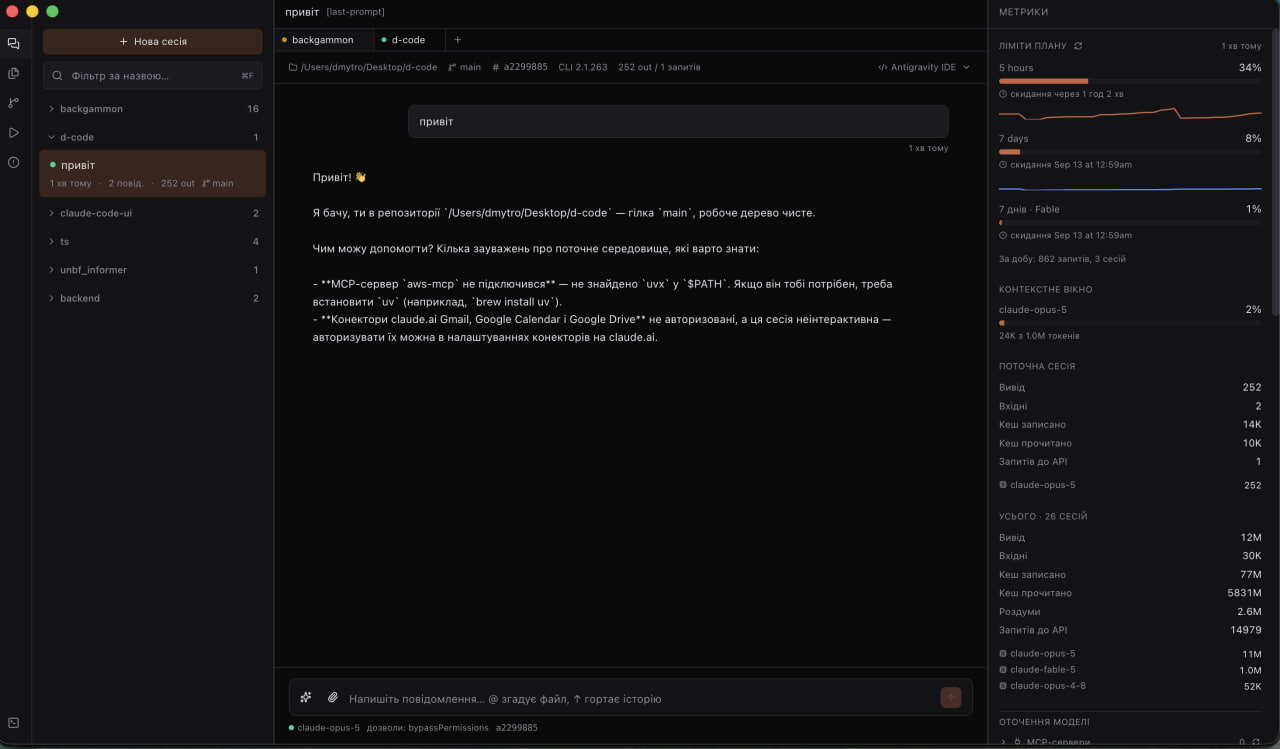
Sessions on the left, the conversation in the middle, limits and token accounting on the right.
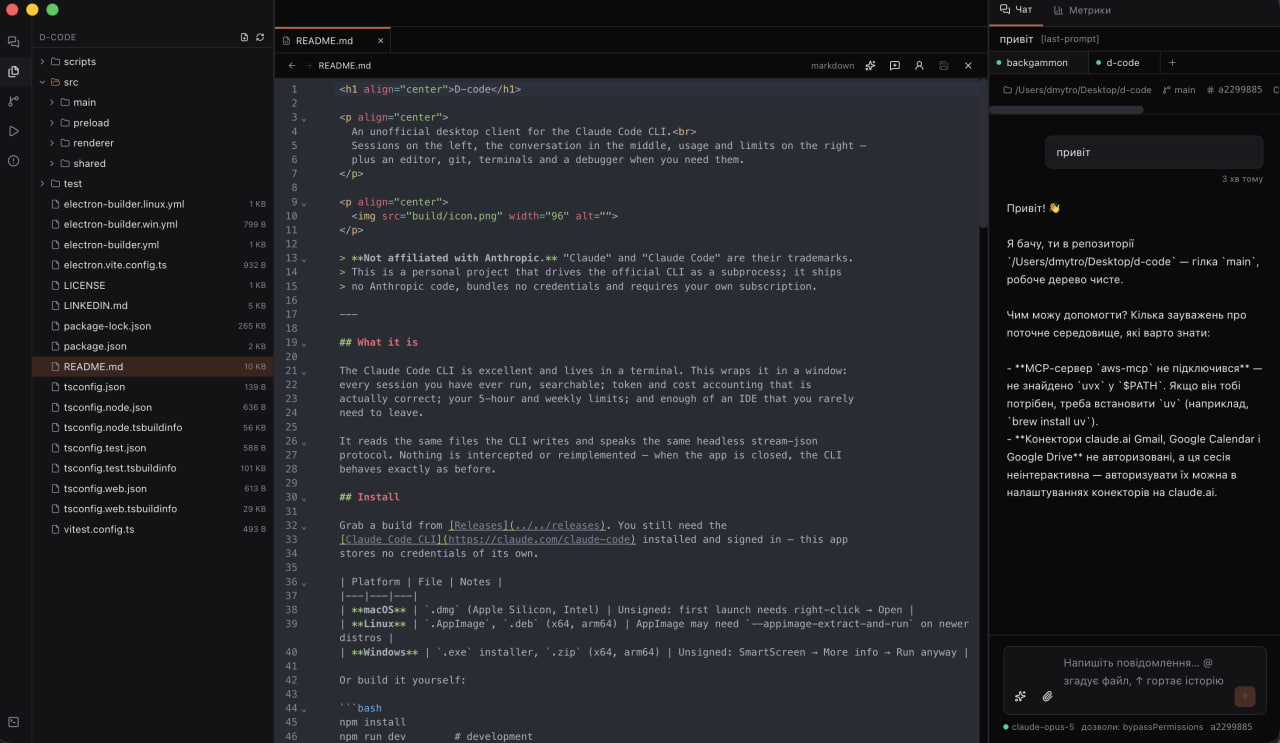
The editor with the file tree and the chat kept alongside it.
Install
Grab a build from Releases. You still need the
Claude Code CLI installed and signed in — this app
stores no credentials of its own.
| Platform | File | Notes |
|---|---|---|
| macOS | .dmg (Apple Silicon, Intel) |
Unsigned: first launch needs right-click → Open |
| Linux | .AppImage, .deb (x64, arm64) |
AppImage may need --appimage-extract-and-run on newer distros |
| Windows | .exe installer, .zip (x64, arm64) |
Unsigned: SmartScreen → More info → Run anyway |
Or build it yourself:
npm install
npm run dev        # development
npm run dist       # package for the current platform
Feature support
Everything works on every platform unless noted. The gaps are honest ones — each has
a reason, listed below the table.
| macOS | Linux | Windows | |
|---|---|---|---|
| Live chat, streaming, interrupt | ✅ | ✅ | ✅ |
| Session history, search, forking | ✅ | ✅ | ✅ |
| Token and cost accounting | ✅ | ✅ | ✅ |
| Editor, LSP, rename, debugger | ✅ | ✅ | ✅ |
| Git, diffs, conflicts, pull requests | ✅ | ✅ | ✅ |
| Images, attachments, checkpoints | ✅ | ✅ | ✅ |
Tasks (npm run with live output) |
✅ | ✅ | ✅ |
| Embedded terminal | ✅ | ✅ | ✅ |
| Open in external terminal | Terminal.app | 7 emulators¹ | Windows Terminal / cmd |
| Open in IDE | /Applications |
.desktop files |
Program Files |
| Limits history graph | ✅ | ➖² | ✅³ |
| Desktop notifications | ✅ | ✅ | ✅ |
¹ x-terminal-emulator, gnome-terminal, konsole, xfce4-terminal, alacritty,kitty, xterm — the first one found wins.
² The graph reads plan-usage-history.json, written by the Claude desktop app, which
does not exist on Linux. Current percentages are unaffected — they come from polling
the CLI directly.
³ Only if the Claude desktop app is installed and has run recently.
A note on prebuilt packages. The Linux and Windows builds in
release/that
were cross-built from macOS ship without the embedded terminal:node-ptyis a
native module and has to be compiled on the platform it runs on. The Terminal tab
says so plainly. Builds from CI (see.github/workflows/release.yml) run on each
native OS and have no such gap.
Features
| Sessions | Every project the CLI has touched, grouped, searchable, with live-process indicators |
Full-text search (⌘F) |
Across all transcripts, optionally inside tool arguments and results |
| Chat tabs | Each tab is its own CLI process, so one can think while you type in another |
| Interrupt | Stops the turn and returns your text to the composer for editing |
| Images and files | Paste, drag or attach; images go as base64, files by path |
| Editor | CodeMirror with 20+ languages, split view, breadcrumbs, blame gutter |
| Language server | Completion, hover, go-to-definition (F12), project-wide rename (F2) |
| Debugger | Breakpoints, call stack, variables, expression evaluation |
| Git | Stage, commit, push/pull, stashes, branch diffs, conflict resolution |
| Pull requests | List, create and follow check status through gh |
| Checkpoints | Roll files back to their state before any message — the CLI snapshots them |
| Activity | Tokens per day, top tools with error counts, per-project breakdown, cache coverage |
| Live model switching | Model and permission mode change in a running conversation |
| Two languages | English and Ukrainian, switchable in settings |
Architecture
src/main/claude/     CLI subprocess, stream-json protocol, conversation manager
src/main/store/      path encoding, transcript parser, session scanner
src/main/metrics/    plan limits
src/main/system/     workspaces, editors, git, terminals, platform differences
src/main/lsp/        JSON-RPC client and language server manager
src/main/debug/      Node debugging over CDP
src/renderer/        React interface
src/shared/          domain types and the IPC contract
Everything platform-specific lives in src/main/system/platform.ts — the rest of the
code does not know which OS it is on.
What the CLI format actually looks like
The transcript format in CLI 2.1.x differs from most public write-ups. These are the
findings that make the difference between a correct client and a plausible-looking one:
- There is no
summaryline type. Session titles come from, in order:agent-name→ai-title→last-prompt→ the first user message. - Tokens must be deduplicated by
requestId. One API reply is written as several
lines with identicalusage. Without dedup, output tokens inflate 2.6–3.1× on
real transcripts. Theusage.iterations[]field is a breakdown of the same usage,
not extra calls. - Subagents are not in the main file. They live in
<session-id>/subagents/agent-<id>.jsonland their tokens are not counted in the
parent transcript. TheirsessionIdis identical to the parent's — only the file
tells them apart. - Project directory names are irreversible. Every character outside
[a-zA-Z0-9]
becomes-, sofoo.bar,foo_barandfoo barcollapse into one directory. The
real path comes from thecwdfield inside the transcript. - Slash commands arrive as
userlines withoutisMeta. Content is the only way
to tell them from a human message (<command-name>,<local-command-stdout>). costUSDis absent from transcripts. For live sessions the CLI reports cost
itself inresult.total_cost_usdandresult.modelUsage[].costUSD.system/initonly arrives after the first message. Waiting for it before
allowing input is a deadlock.statusLineis never invoked in headless mode, so limit percentages cannot
come from there.--remote-controlonly works interactively. In headless the flag is accepted
and does nothing.- Interrupt with a control request, not a signal:
{"type":"control_request","request":{"subtype":"interrupt"}}on stdin. SIGINT
would end the process. An interrupted turn returns as aresultwithis_error: true— that is normal, not a failure. - Images go in as
{"type":"image","source":{"type":"base64",…}}plus an[Image #N]marker in the text — exactly the shape the CLI writes into transcripts. - Model and permission mode change live via
set_modelandset_permission_modecontrol requests. After a mode change the CLI sends a freshsystem/initwithout amodelfield — it must not overwrite the stored model. /usageworks headless and costs nothing. It is the most accurate limits
source. The output is prose (Current session: 56% used · resets Aug 23 at 3:19pm),
so the parser has to be forgiving.fs.watchdoes not work onplan-usage-history.json: it is replaced
atomically via rename, after which the watcher holds a dead inode.watchFile
survives that.trackingPathin file history can be relative —realParentDirfrom the same
record is the base.backupFileName: nullmeans the session created the file.- The set of service line types grows with versions. September 2026 added
pr-link, linking a session to a pull request. It is written every time the
session returns to that PR: 915 lines for 83 distinct PRs in one real session, so
deduplication byprNumberis not optional.
Language server and debugger
Completion, hover, go-to-definition and rename run throughtypescript-language-server. Two traps cost real time:
- A TypeScript 7 project has no
tsserver.js. The native compiler has no server
mode at all, so a private copy of TypeScript 5 is kept alongside and pointed at. - The
--tsserver-pathflag is gone. The path goes ininitializationOptionsas{ tsserver: { path } }.
Debugging deliberately does not use DAP: Node speaks the Chrome DevTools Protocol
natively, so --inspect-brk plus a WebSocket is enough. Four things had to be handled:
- The first pause is an artefact.
--inspect-brkstops on line one before anything
runs; skipping it is what makes user breakpoints work. - Stack frames carry no path, only a
scriptId— resolved throughDebugger.scriptParsed. - The engine knows files by resolved paths. A
/var/…directory is/private/var/…
to it, and a breakpoint set in a tab would silently never fire. - The script never exits while a debugger is attached ("Waiting for the debugger to
disconnect…"). The socket closes onRuntime.executionContextDestroyed.
Terminals
Terminals use node-pty, a native module that must be built against Electron's ABI:
npx electron-rebuild -f -w node-pty
Without it the app does not crash — the Terminal tab simply reports the module as
unavailable and shows this command. Tasks (npm run) need no pty and always work.
License
MIT — see LICENSE.
Reviews (0)
Sign in to leave a review.
Leave a reviewNo results found