claude-usage-bar
Health Uyari
- License — License: MIT
- Description — Repository has a description
- Active repo — Last push 0 days ago
- Low visibility — Only 5 GitHub stars
Code Gecti
- Code scan — Scanned 2 files during light audit, no dangerous patterns found
Permissions Gecti
- Permissions — No dangerous permissions requested
Bu listing icin henuz AI raporu yok.
macOS menu bar widget that displays your Claude Code rate limit usage in real time
claude-usage-bar
macOS menu bar widget that shows your Claude Code rate limit usage in real time.




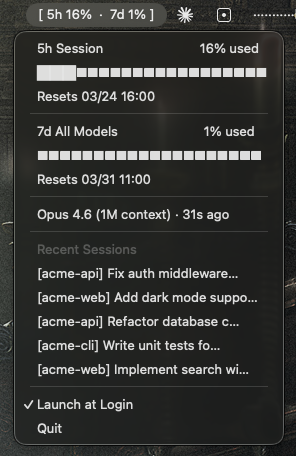
What it shows
| Feature | What it does |
|---|---|
| Menu bar | 5h session and 7d weekly usage at a glance, marked ⚠ once a window reaches 80% |
| Dropdown | Progress bars and reset times for both windows |
| Display modes | Toggle between 5h + 7d (full) and 5h only (short) from the Display submenu; the choice is remembered |
| Recent sessions | The last 5 sessions — click one to copy its claude --resume command |
| Auto-refresh | Updates every time you chat with Claude Code |
| Inactive state | Shows ⏸ when Claude Code has not been used for 10+ minutes |
Requirements
- macOS (Apple Silicon / Intel)
- Claude Code v2.1.80+ —
rate_limitsinstatusLine - Claude Pro / Max / Team — rate limit data requires a subscription
Install
brew tap hwayoungjun/tap
brew install claude-usage-bar
Setup is automatic: ~/.claude/settings.json is configured on install and on every app launch.
git clone https://github.com/hwayoungjun/claude-usage-bar.git
cd claude-usage-bar
go build -o claude-usage-bar .
./claude-usage-bar setup
Uninstall
brew uninstall claude-usage-bar
This removes the LaunchAgent, the statusLine config, and the app data along with the binary.
Usage
| Command | What it does |
|---|---|
claude-usage-bar |
Launch the widget — it backgrounds itself |
claude-usage-bar --foreground |
Launch in the foreground, for debugging |
claude-usage-bar restart |
Stop the running widget and start it again |
claude-usage-bar setup |
Configure ~/.claude/settings.json |
claude-usage-bar uninstall |
Remove config, LaunchAgent, and statusLine settings |
claude-usage-bar --version |
Print the build and the path of this binary |
restart picks up a new build without hunting for the running process: it unloads a
launchd-managed job so the plist is re-read, signals a copy started by hand, waits for the
single-instance lock to come free, then starts it again. Under brew services it prints thebrew services restart line to run instead.
Auto-start on login
brew services start claude-usage-bar
Or enable Launch at Login from the dropdown menu.
How it works
Claude Code sends rate limit data through the statusLine hook on every assistant message.
This tool captures that data and draws it in the menu bar.
Sessions started from the Claude desktop app are covered too. statusLine never fires for
those — the app runs Claude Code headless and draws its own UI, so there is no terminal status
line to render — so the widget falls back to the usage history the desktop app keeps for its
own meter (~/Library/Application Support/Claude/plan-usage-history.json). That costs no API
call and no credentials, but it only carries percentages, and only about every 15 minutes.
Claude Code (terminal) ──stdin──▶ claude-usage-bar statusline ──▶ usage.json
                                                                     │
                                                                     ▼
Claude desktop app ──▶ plan-usage-history.json ──────────▶ claude-usage-bar (menu bar)
- Claude Code calls
claude-usage-bar statuslineafter each assistant message. - The
statuslinesubcommand parses rate limit data from stdin and writes~/.config/claude-usage-bar/usage.json. - The menu bar widget watches
usage.jsonvia fsnotify and updates instantly. - When the desktop app's history is more recent than the last
statusLinereport, the widget
shows that instead, labelledClaude app; reset times carry over from the laststatusLine
report while they are still in the future.
[!NOTE]
Only the 5h session and 7d all-models windows are drawn. ThestatusLinepayload declares
five more — the per-model 7d windows, an OAuth-apps window, a server-labelledmodel_scoped
list and anextra_usagecredit budget — but on the account this could be checked against
every one of them arrived null or absent, so there was nothing to draw. Seeinternal/statuslinefor the details.
Development
Dependencies point one way: the composition root wires adapters to the domain, and the domain
knows about neither.
| Package | Layer | Responsibility |
|---|---|---|
main.go |
composition root | subcommand dispatch and wiring |
internal/app |
— | shared identifiers (binary name, launchd labels) |
internal/usage |
domain | readings, which source to trust, staleness, formatting |
internal/session |
domain | session rows and layout, plus the transcript reader |
internal/textwidth |
domain | display-column measurement and truncation |
internal/shellquote |
domain | quoting for the resume command and the hook command |
internal/store |
adapters | usage.json, desktop history, preferences, instance lock |
internal/statusline |
adapter | the Claude Code hook payload |
internal/install |
adapters | Claude Code settings, LaunchAgent, uninstall |
internal/ui |
adapter | the systray menu |
make test
The domain packages carry the tests: usage 98%, session 92%, textwidth 100%, shellquote 100%,
statusline 93%. The file adapters follow at store 79% and install 61%. The systray layer holds
no rules and is not covered.
| Target | What it does |
|---|---|
make build |
Build ./bin/claude-usage-bar |
make dev |
Run in the foreground, for debugging |
make install |
Install to /usr/local/bin (Apple Silicon: PREFIX=/opt/homebrew) |
make uninstall |
Remove the binary and run the app's uninstall |
make setup |
Configure ~/.claude/settings.json |
make test |
Run the tests |
make release |
Build the darwin arm64 and amd64 binaries |
make help |
List every target |
License
MIT — see LICENSE.
This project is not affiliated with Anthropic. Claude and Claude Code are trademarks of Anthropic.
Yorumlar (0)
Yorum birakmak icin giris yap.
Yorum birakSonuc bulunamadi