self-hosted-ai-stack
Health Gecti
- License — License: MIT
- Description — Repository has a description
- Active repo — Last push 0 days ago
- Community trust — 84 GitHub stars
Code Gecti
- Code scan — Scanned 12 files during light audit, no dangerous patterns found
Permissions Gecti
- Permissions — No dangerous permissions requested
Bu listing icin henuz AI raporu yok.
Deploy a complete self-hosted AI stack with Docker Compose. Includes Ollama, AnythingLLM, LiteLLM, Whisper, Kokoro, Embeddings, Docling, and MCP Gateway. Local-first, private by default, multi-arch (amd64, arm64) with optional NVIDIA GPU acceleration.
English | 简体中文 | 繁體中文 | Русский
Self-Hosted AI Stack



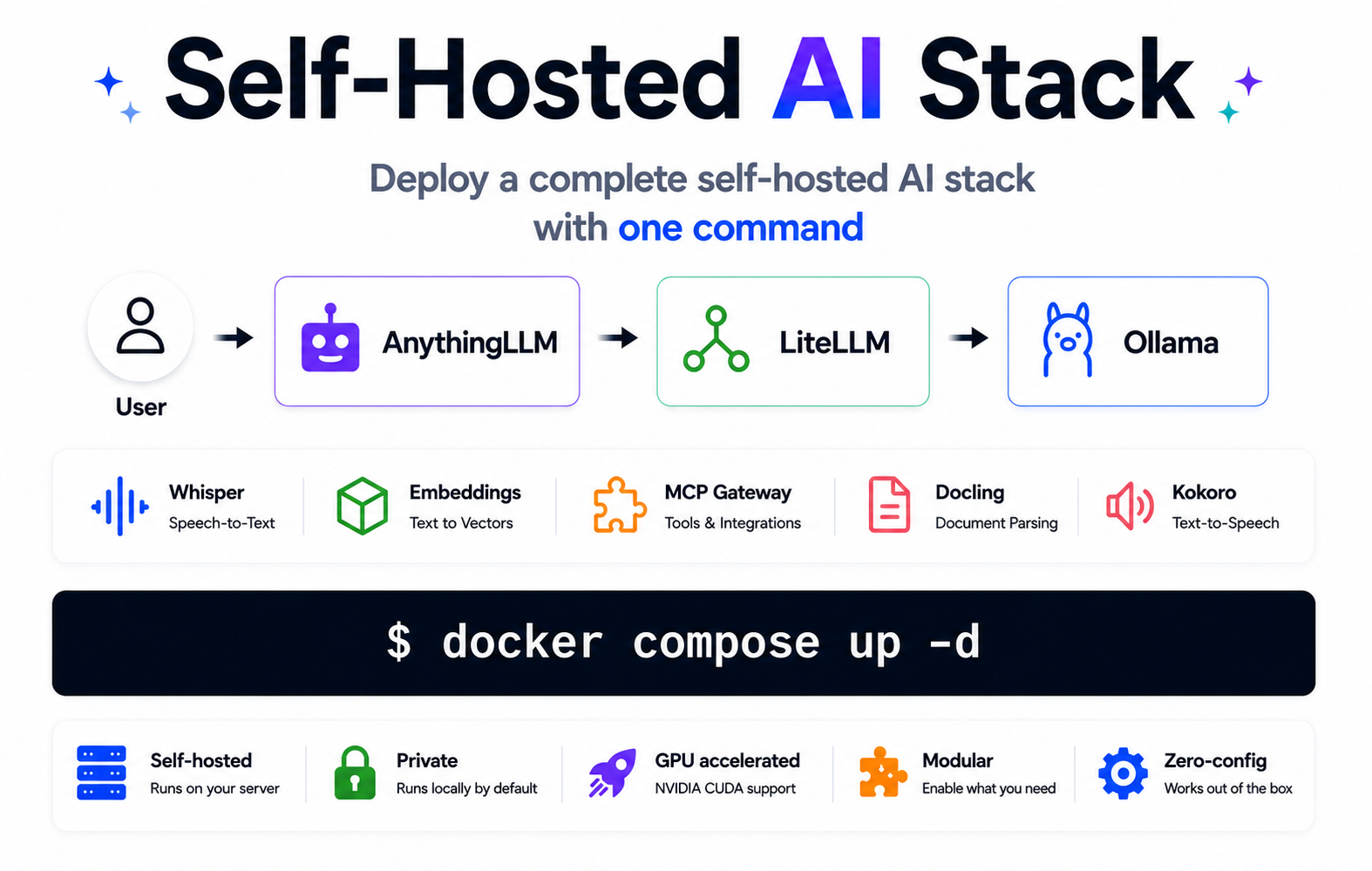
Includes Ollama, LiteLLM, AnythingLLM, Whisper, MCP Gateway, Embeddings, Docling, and Kokoro — fully configured and ready to run with Docker Compose.
- Zero-config: all services auto-configure on first start
- Secure: AnythingLLM password protection is enabled by default, and Ollama, LiteLLM, and MCP Gateway generate API keys automatically
- HTTPS-ready: optional Caddy overlay provides automatic TLS and binds direct HTTP ports to localhost
- Private: runs locally by default with optional external provider support via LiteLLM
- Optional auth: Whisper, WhisperLive, Kokoro, Embeddings, and Docling work without API keys by default (set keys via env files for public deployments)
- Lightweight stacks for lower memory requirements (as low as ~4.5 GB)
- GPU acceleration via NVIDIA CUDA
- Multi-arch:
linux/amd64,linux/arm64
Community
- 📬 Subscribe for project updates (1–2 emails/month) — get free AI and VPN deployment guides (PDF)
- 💬 Join the r/selfhostedstack community for discussions and showcases
- ⭐ Star the repository if you find it useful — it helps others discover it
Self-Hosted AI Stack is maintained by the author of Setup IPsec VPN (28k+ stars).
Included services
| Service | Role | Default port |
|---|---|---|
| Ollama (LLM) | Runs local LLM models (llama3, qwen, mistral, etc.) | 11434 |
| AnythingLLM | Web-based chat UI — password-protected by default | 3001 |
| LiteLLM | AI gateway with Admin UI — routes requests to Ollama and 100+ providers | 4000 |
| Embeddings | Converts text to vectors for semantic search and RAG | 8000 |
| Whisper (STT) | Transcribes spoken audio to text | 9000 |
| WhisperLive (real-time STT) | Real-time speech-to-text transcription over WebSocket | 9090 |
| Kokoro (TTS) | Converts text to natural-sounding speech | 8880 |
| MCP Gateway | Provides MCP tools (filesystem, fetch, GitHub, search, databases) to AI clients | 3000 |
| Docling | Converts documents (PDF, DOCX, etc.) to structured text/Markdown | 5001 |
Quick start
Requirements:
- A Linux server (local or cloud) with Docker installed
- At least 8 GB of RAM (with small models). For larger LLM models (8B+), 16 GB or more is recommended.
- You can comment out services you don't need to reduce memory usage.
Start the full stack:
# Clone the repository to get the compose files
git clone https://github.com/hwdsl2/self-hosted-ai-stack
cd self-hosted-ai-stack
docker compose up -d
Existing installs: If you cloned this project before it was renamed from
docker-ai-stack, your existing checkout and deployment continue to work. GitHub redirects the old repository URL, and you do not need to rename your local directory, containers, volumes, or networks.
Pull a model (required before making LLM requests):
docker exec ollama ollama_manage --pull llama3.2:3b
Run the health check to verify all services are working:
./stack-check.sh
Tip: On first start, services may take a few minutes to initialize. If any checks fail, wait and run
./stack-check.shagain. Usedocker compose logsto check progress.
For detailed troubleshooting, see the Troubleshooting guide.
Get the LiteLLM master key (used to log into the Admin UI and for LLM requests):
docker exec litellm litellm_manage --showkey
docker exec ollama ollama_manage --showkey
docker exec litellm litellm_manage --showkey
docker exec mcp mcp_manage --showkey
Access AnythingLLM (Chat UI):
AnythingLLM is pre-configured to connect to your local LLM via LiteLLM. On first start, it may take a few minutes to become available (check progress with docker logs anythingllm).
Password-protected by default. A random admin password is auto-generated on first start, printed once to docker logs anythingllm, and saved to /app/server/storage/.initial_admin_password inside the anythingllm-data volume. The seeded password persists across container upgrades. Change it any time from Settings → Security; after you do, .initial_admin_password may no longer match the current login password.
Retrieve the auto-generated password:
# At any time from the data volume:
docker exec anythingllm cat /app/server/storage/.initial_admin_password

# Or from the live logs (only shown on first start):
docker compose logs anythingllm | grep -A4 "FIRST RUN"
Open http://<server-ip>:3001 in your browser and log in with the password above.
Tip: When exposing AnythingLLM beyond
localhostor a trusted LAN, use the included Caddy HTTPS overlay so the password is encrypted in transit and direct HTTP ports are bound to localhost. See Internet-facing deployments below.
Access the LiteLLM Admin UI:
Open http://<server-ip>:4000/ui in your browser. Log in with username admin and your LiteLLM master key as the password. The UI provides virtual key management, spend tracking, and model configuration.
Tip: In the Admin UI, click Playground in the left menu. Select a local model (e.g.,
ollama/llama3.2:3b) from the dropdown and start chatting — a quick way to verify your local LLM is working end-to-end.
Stop the stack:
# Stop and remove all containers (data is preserved in Docker volumes)
docker compose down
GPU acceleration (NVIDIA CUDA)
For NVIDIA GPU acceleration, use the CUDA compose file:
docker compose -f docker-compose.cuda.yml up -d
Tip: To avoid adding
-f docker-compose.cuda.ymlto every subsequentdocker composecommand (down,pull,logs, etc.), set it once for your shell session:export COMPOSE_FILE=docker-compose.cuda.ymlThen run plain
docker composecommands as usual. To make it persistent, addCOMPOSE_FILE=docker-compose.cuda.ymlto a.envfile in this directory. Rununset COMPOSE_FILEto switch back to the CPU configuration.
Requirements: NVIDIA GPU, NVIDIA driver 575.57.08+ (Linux) or 576.57+ (Windows), and the NVIDIA Container Toolkit installed on the host. CUDA images are linux/amd64 only.
Podman users: The Compose
deploy:GPU block is ignored by Podman. Use CDI instead — see Using Podman.
Lightweight stacks
Don't need the full stack? Use a pre-configured subset from the stacks/ folder:
| Stack | Services | Memory | Use case |
|---|---|---|---|
| chat-ui | Ollama + LiteLLM + AnythingLLM | ~5 GB | Web-based ChatGPT-like chat interface |
| voice-pipeline | Whisper + Ollama + LiteLLM + Kokoro | ~6 GB | Speech-to-text → LLM → text-to-speech |
| voice-chat | Whisper + Ollama + LiteLLM + Kokoro + AnythingLLM | ~6.5 GB | Chat UI with voice input/output |
| rag-pipeline | Ollama + LiteLLM + Embeddings | ~5 GB | Semantic search + LLM Q&A |
| rag-pipeline-full | Ollama + LiteLLM + Embeddings + Docling | ~6 GB | Document parsing + semantic search + LLM Q&A |
| code-assistant | Ollama + LiteLLM + MCP Gateway + Embeddings | ~5 GB | AI coding with tools + semantic code search |
| ai-tools | Ollama + LiteLLM + MCP Gateway | ~5 GB | AI coding assistant with tool access |
| chat-only | Ollama + LiteLLM | ~4.5 GB | Minimal local ChatGPT replacement |
git clone https://github.com/hwdsl2/self-hosted-ai-stack
cd self-hosted-ai-stack/stacks/chat-ui  # or voice-pipeline, voice-chat, rag-pipeline, rag-pipeline-full, code-assistant, ai-tools, chat-only
docker compose up -d
Architecture
graph LR
    A["🎤 Audio input"] -->|transcribe| W["Whisper<br/>(speech-to-text)"]
    D["📄 Documents"] -->|parse| DC["Docling<br/>(document → text)"]
    DC -->|embed| E["Embeddings<br/>(text → vectors)"]
    E -->|store| VDB["pgvector<br/>(in shared Postgres)"]
    W -->|query| E
    VDB -->|context| L["LiteLLM<br/>(AI gateway)"]
    W -->|text| L
    L -->|routes to| O["Ollama<br/>(local LLM)"]
    L -->|response| T["Kokoro TTS<br/>(text-to-speech)"]
    T --> B["🔊 Audio output"]
    C["🤖 AI client<br/>(Cline, Claude, etc.)"] -->|MCP tools| M["MCP Gateway<br/>(MCP endpoint)"]
    C -->|chat| L
    L -->|MCP protocol| M
    U["👤 User"] -->|chat| AN["AnythingLLM<br/>(chat UI)"]
    AN -->|LLM requests| L
    AN -->|MCP tools| M
    U -->|use| C
    U -->|speak| A
    U -->|upload| D
Notes:
- Ollama's port (
11434) and MCP Gateway's port (3000) are internal to the Docker network and not exposed to the host by default. Access your LLM through LiteLLM on port4000. - Kokoro (TTS), Docling (document parsing), and WhisperLive (real-time STT) are disabled by default to reduce memory usage. Uncomment these services in
docker-compose.ymlto enable them.
Running without Docker Compose
If you prefer using docker run commands directly, first create a shared network so services can communicate:
docker network create ai-stack
Then start each service on the shared network:
Note: With manual
docker run, wait for each dependency to become ready before starting services that use it (for example, wait for PostgreSQL and any other dependencies, such as Ollama or MCP, before LiteLLM; if using AnythingLLM, wait for LiteLLM before starting it). For production or shared Docker networks, change the default PostgreSQL password before first start and update every matching connection string.
# PostgreSQL with pgvector (required by LiteLLM; pgvector enables vector storage for RAG)
docker run -d --name litellm-db --restart always \
    --network ai-stack \
    -e POSTGRES_USER=litellm \
    -e POSTGRES_PASSWORD=litellm \
    -e POSTGRES_DB=litellm \
    -v litellm-db:/var/lib/postgresql \
    pgvector/pgvector:pg18-trixie

# Ollama (LLM)
docker run -d --name ollama --restart always \
    --network ai-stack \
    -v ollama-data:/var/lib/ollama \
    -v ollama-shared:/var/lib/ollama-shared \
    hwdsl2/ollama-server

# MCP Gateway
docker run -d --name mcp --restart always \
    --network ai-stack \
    -v mcp-data:/var/lib/mcp \
    -v mcp-shared:/var/lib/mcp-shared \
    hwdsl2/mcp-gateway

# LiteLLM (AI gateway)
docker run -d --name litellm --restart always \
    --network ai-stack \
    -p 4000:4000 \
    -e LITELLM_OLLAMA_BASE_URL=http://ollama:11434 \
    -e LITELLM_MCP_URL=http://mcp:3000/mcp \
    -e LITELLM_DATABASE_URL=postgresql://litellm:litellm@litellm-db:5432/litellm \
    -v litellm-data:/etc/litellm \
    -v ollama-shared:/var/lib/ollama-shared:ro \
    -v mcp-shared:/var/lib/mcp-shared:ro \
    -v litellm-shared:/var/lib/litellm-shared \
    hwdsl2/litellm-server

# Embeddings
docker run -d --name embeddings --restart always \
    --network ai-stack \
    -p 127.0.0.1:8000:8000 \
    -v embeddings-data:/var/lib/embeddings \
    hwdsl2/embeddings-server

# Whisper (STT)
docker run -d --name whisper --restart always \
    --network ai-stack \
    -p 127.0.0.1:9000:9000 \
    -v whisper-data:/var/lib/whisper \
    hwdsl2/whisper-server

# WhisperLive (real-time STT)
docker run -d --name whisper-live --restart always \
    --network ai-stack \
    -p 127.0.0.1:9090:9090 \
    -v whisper-live-data:/var/lib/whisper-live \
    hwdsl2/whisper-live-server

# AnythingLLM (chat UI)
docker run -d --name anythingllm --restart always \
    --network ai-stack \
    -p 3001:3001 \
    -e STORAGE_DIR=/app/server/storage \
    -e LLM_PROVIDER=generic-openai \
    -e GENERIC_OPEN_AI_BASE_PATH=http://litellm:4000/v1 \
    -e GENERIC_OPEN_AI_MODEL_PREF=ollama/llama3.2:3b \
    -e GENERIC_OPEN_AI_MODEL_TOKEN_LIMIT=131072 \
    -e EMBEDDING_ENGINE=native \
    -e DISABLE_TELEMETRY=true \
    -v anythingllm-data:/app/server/storage \
    -v litellm-shared:/var/lib/litellm-shared:ro \
    -v "$(pwd)/chat-ui-bootstrap.sh:/usr/local/bin/chat-ui-bootstrap.sh:ro" \
    --entrypoint /bin/bash \
    mintplexlabs/anythingllm:1.13 \
    /usr/local/bin/chat-ui-bootstrap.sh

# Kokoro (TTS)
docker run -d --name kokoro --restart always \
    --network ai-stack \
    -p 127.0.0.1:8880:8880 \
    -v kokoro-data:/var/lib/kokoro \
    hwdsl2/kokoro-server

# Docling (document parsing)
docker run -d --name docling --restart always \
    --network ai-stack \
    -p 127.0.0.1:5001:5001 \
    -v docling-data:/var/lib/docling \
    hwdsl2/docling-server
Note: The shared network allows services to reach each other by container name (e.g., LiteLLM connects to Ollama via http://ollama:11434). You can start only the services you need — they don't all have to run together.
Pull a model (required before making LLM requests):
docker exec ollama ollama_manage --pull llama3.2:3b
Using Podman
The stack runs under Podman on a best-effort basis. The CPU compose files work as-is; GPU acceleration and SELinux-enabled hosts need a couple of extra steps described below. Podman 4.1+ is recommended.
1. Install the Docker CLI shim. So that the docker commands in this README and the stack-check.sh health check work unchanged, install the podman-docker package (provides a docker → podman wrapper):
# Fedora / RHEL / CentOS Stream
sudo dnf install -y podman-docker

# Debian / Ubuntu
sudo apt-get install -y podman-docker
Note: A shell
alias docker=podmanis not sufficient — aliases are not seen by scripts such asstack-check.sh. Use thepodman-dockerpackage (or adocker→podmansymlink in yourPATH) instead. Alternatively,stack-check.shauto-detects Podman; you can also force it withCONTAINER_ENGINE=podman ./stack-check.sh.
2. Install a Compose provider. podman compose delegates to an external provider. Install either podman-compose or docker-compose:
# Fedora / RHEL / CentOS Stream
sudo dnf install -y podman-compose

# Debian / Ubuntu
sudo apt-get install -y podman-compose
3. Start the stack. With the shim installed, every command in this README works unchanged. Without it, substitute podman for docker:
git clone https://github.com/hwdsl2/self-hosted-ai-stack
cd self-hosted-ai-stack
podman compose up -d
Run the health check (auto-detects the engine):
./stack-check.sh
GPU acceleration (CDI). Podman does not read the Compose deploy.resources GPU block. Instead, use the Container Device Interface (CDI). After installing the NVIDIA Container Toolkit, generate a CDI spec:
sudo nvidia-ctk cdi generate --output=/etc/cdi/nvidia.yaml
Then expose the GPU to the relevant services. For podman compose, replace the deploy: block in docker-compose.cuda.yml with a devices: entry for the ollama (and whisper) services:
    devices:
      - nvidia.com/gpu=all
For a plain podman run command, add --device nvidia.com/gpu=all.
SELinux. On SELinux-enabled hosts (Fedora, RHEL, CentOS Stream), bind-mounted files need a relabel suffix, or the container will be denied access. Add :z (shared) to the chat-ui-bootstrap.sh bind mount:
- In
docker-compose.yml: change./chat-ui-bootstrap.sh:/usr/local/bin/chat-ui-bootstrap.sh:roto./chat-ui-bootstrap.sh:/usr/local/bin/chat-ui-bootstrap.sh:ro,z - In the
podman runcommand above: change"$(pwd)/chat-ui-bootstrap.sh:/usr/local/bin/chat-ui-bootstrap.sh:ro"to"$(pwd)/chat-ui-bootstrap.sh:/usr/local/bin/chat-ui-bootstrap.sh:ro,z"
Named volumes do not need relabeling.
Next steps: Pull a model and access the services — follow the instructions in Quick start starting from "Pull a model." With the podman-docker shim installed, all commands work unchanged.
Connect MCP Gateway to LiteLLM
LiteLLM and MCP Gateway are automatically wired when using the compose files in this repository — no manual key setup is needed.
API keys are shared automatically between services via Docker shared volumes:
- Ollama generates an API key on first start and copies it to a shared volume
- MCP Gateway does the same
- LiteLLM reads both keys from the shared volumes on startup
The LITELLM_MCP_URL=http://mcp:3000/mcp and LITELLM_OLLAMA_BASE_URL=http://ollama:11434 environment variables are pre-configured in the compose files, so all services are connected automatically with a single docker compose up -d.
Once connected, AI clients that call LiteLLM can use MCP tools (filesystem, fetch, GitHub, etc.) directly through the LiteLLM proxy.
Voice pipeline example
Transcribe a spoken question, get a local LLM response via Ollama, and convert it to speech:
Note: Kokoro (TTS) is disabled by default. To use this example, first uncomment the kokoro service in docker-compose.yml, then run docker compose up -d.
Tip: Need a sample audio file? Download this English speech sample (WAV, MIT License) from the Azure Samples repository:
curl -L -o sample_speech.wav \
    "https://github.com/Azure-Samples/cognitive-services-speech-sdk/raw/master/sampledata/audiofiles/katiesteve.wav"
LITELLM_KEY=$(docker exec litellm litellm_manage --getkey)

# Step 1: Transcribe audio to text (Whisper)
TEXT=$(curl -s http://localhost:9000/v1/audio/transcriptions \
    -F file=@sample_speech.wav -F model=whisper-1 | jq -r .text)

# Step 2: Send text to Ollama via LiteLLM and get a response
RESPONSE=$(curl -s http://localhost:4000/v1/chat/completions \
    -H "Authorization: Bearer $LITELLM_KEY" \
    -H "Content-Type: application/json" \
    -d "{\"model\":\"ollama/llama3.2:3b\",\"messages\":[{\"role\":\"user\",\"content\":\"$TEXT\"}]}" \
    | jq -r '.choices[0].message.content')

# Step 3: Convert the response to speech (Kokoro TTS)
curl -s http://localhost:8880/v1/audio/speech \
    -H "Content-Type: application/json" \
    -d "{\"model\":\"tts-1\",\"input\":\"$RESPONSE\",\"voice\":\"af_heart\"}" \
    --output response.mp3
Vector database
The stack's PostgreSQL ships with the pgvector extension, so you can store and query embeddings in the same database that LiteLLM uses — no separate vector database required.
Enable the extension once (the database persists, so this only needs to be done a single time):
docker exec litellm-db psql -U litellm -d litellm -c 'CREATE EXTENSION IF NOT EXISTS vector;'
Verify it is enabled:
docker exec litellm-db psql -U litellm -d litellm -c "SELECT extname, extversion FROM pg_extension WHERE extname='vector';"
You can then create a table with a vector column (use the dimension of your embedding model — e.g. 384 for the default BAAI/bge-small-en-v1.5) and run similarity search with the <=> operator. For larger-scale or hybrid search, you can run a dedicated vector database such as Qdrant or Chroma instead.
RAG pipeline example
Embed documents for semantic search, retrieve context, then answer questions with a local Ollama model:
LITELLM_KEY=$(docker exec litellm litellm_manage --getkey)

# Step 1: Embed a document chunk and store the vector in your vector DB
curl -s http://localhost:8000/v1/embeddings \
    -H "Content-Type: application/json" \
    -d '{"input": "Docker simplifies deployment by packaging apps in containers.", "model": "text-embedding-ada-002"}' \
    | jq '.data[0].embedding'
# → Store the returned vector alongside the source text in pgvector (included in the stack's Postgres), or another vector DB such as Qdrant or Chroma.

# Step 2: At query time, embed the question, retrieve the top matching chunks from
#          the vector DB, then send the question and retrieved context to Ollama via LiteLLM.
curl -s http://localhost:4000/v1/chat/completions \
    -H "Authorization: Bearer $LITELLM_KEY" \
    -H "Content-Type: application/json" \
    -d '{
      "model": "ollama/llama3.2:3b",
      "messages": [
        {"role": "system", "content": "Answer using only the provided context."},
        {"role": "user", "content": "What does Docker do?\n\nContext: Docker simplifies deployment by packaging apps in containers."}
      ]
    }' \
    | jq -r '.choices[0].message.content'
MCP tools example
Use MCP Gateway to give your AI assistant access to files, web, and GitHub:
MCP_KEY=$(docker exec mcp mcp_manage --showkey | grep '^mcp-' | head -1)

# Use MCP endpoint with an AI client (e.g., Cline in VS Code)
# Set the MCP server URL: http://localhost:3000/mcp
# Set Authorization header: Bearer <api_key>

# Or test the MCP endpoint directly with an initialize request
curl -s http://localhost:3000/mcp \
    -X POST \
    -H "Authorization: Bearer $MCP_KEY" \
    -H "Content-Type: application/json" \
    -H "Accept: application/json, text/event-stream" \
    -d '{"jsonrpc":"2.0","id":1,"method":"initialize","params":{"protocolVersion":"2025-03-26","capabilities":{},"clientInfo":{"name":"test","version":"1.0"}}}'
Customization
Each service can be configured with an optional env file. Copy the example env file from the respective repository, edit it, and uncomment the volume mount in docker-compose.yml:
| Service | Env file | Repository |
|---|---|---|
| Ollama | ollama.env |
docker-ollama |
| LiteLLM | litellm.env |
docker-litellm |
| Embeddings | embed.env |
docker-embeddings |
| Whisper | whisper.env |
docker-whisper |
| WhisperLive | whisper-live.env |
docker-whisper-live |
| Kokoro | kokoro.env |
docker-kokoro |
| MCP Gateway | mcp.env |
docker-mcp-gateway |
| Docling | docling.env |
docker-docling |
AnythingLLM is configured through its web UI at http://<server-ip>:3001. You can change the LLM provider, model, embedding engine, and other settings in Settings. See AnythingLLM docs for more details.
Use the stack's Embeddings service (optional). By default AnythingLLM embeds documents in-process with its bundled MiniLM model and stores the vectors in its own LanceDB. To use the stack's Embeddings service (BAAI/bge-small-en-v1.5) and/or the stack's pgvector-enabled Postgres instead, edit the anythingllm service in docker-compose.yml: comment out EMBEDDING_ENGINE=native and uncomment the opt-in block beneath it. Also uncomment the depends_on note so the embeddings/db services start first. The opt-in block points at http://embeddings:8000/v1 and postgresql://litellm:litellm@db:5432/litellm; AnythingLLM auto-creates the vector extension and anythingllm_vectors table on first use. ⚠️ Switching the embedder or vector store on an existing deployment makes previously embedded documents incompatible — re-embed your workspaces after the change.
For detailed configuration options, API reference, and model management, see the documentation in each service's repository.
Internet-facing deployments
By default, all services listen over plain HTTP. For internet-facing deployments, use the included Caddy overlay to add automatic HTTPS. In proxy mode, Caddy is the only public listener on ports 80 and 443; the direct AnythingLLM and LiteLLM ports are rebound to 127.0.0.1.
Prerequisites:
- Docker Compose
2.24.4+(required for the proxy overlay's port override) - A DNS
A/AAAArecord for your domain pointing to this server - Inbound
80/tcp,443/tcp, and ideally443/udpopen in your firewall/security group - No other service already using ports
80or443on the host
CPU stack:
DOMAIN=chat.example.com [email protected] \
  docker compose -f docker-compose.yml -f docker-compose.proxy.yml up -d
CUDA stack:
DOMAIN=chat.example.com [email protected] \
  docker compose -f docker-compose.cuda.yml -f docker-compose.proxy.yml up -d
Open https://chat.example.com (replace with your DOMAIN) to access AnythingLLM. In proxy mode, http://127.0.0.1:3001 and http://127.0.0.1:4000/ui remain available on the host, but the direct 3001 and 4000 ports are not reachable from outside the server.
The standard compose files publish LiteLLM on port 4000. The proxy overlay changes that direct port to localhost-only, and the included Caddyfile routes only AnythingLLM by default. Uncommenting the optional LiteLLM hostname block exposes LiteLLM through Caddy, so keep the LiteLLM master key secret.
Troubleshooting:
docker logs ai-stack-caddy
# Use the same -f files you used to start the stack
docker compose -f docker-compose.yml -f docker-compose.proxy.yml ps
If Caddy reports an unknown request_body directive, pull the current caddy:2 image and restart the overlay.
For older Docker Compose versions or Podman, use a host-based reverse proxy instead: bind direct HTTP ports to localhost in the compose file (for example, "127.0.0.1:3001:3001/tcp" and "127.0.0.1:4000:4000/tcp") and proxy to those localhost ports. Each service repository includes a detailed reverse proxy guide with Caddy and nginx examples.
When exposing services to the internet, set API keys for services that are optional-auth by default (Whisper, WhisperLive, Kokoro, Embeddings, Docling) via their respective env files.
Backup and restore
Your API keys, models, and configuration are stored in Docker volumes. Back up before upgrading or making changes:
# Export API keys (while containers are running)
docker exec ollama ollama_manage --showkey
docker exec litellm litellm_manage --showkey
docker exec mcp mcp_manage --showkey

# Back up all volumes (stop services first)
# Stop and remove all containers (data is preserved in Docker volumes)
docker compose down
mkdir -p backups
for vol in ollama-data litellm-data litellm-db embeddings-data whisper-data whisper-live-data kokoro-data mcp-data docling-data anythingllm-data caddy-data caddy-config; do
  docker volume inspect "$vol" >/dev/null 2>&1 && \
    docker run --rm -v "${vol}:/source:ro" -v "$(pwd)/backups:/backup" \
      alpine tar czf "/backup/${vol}.tar.gz" -C /source .
done
Note: The ollama-shared, mcp-shared, and litellm-shared volumes are ephemeral key-sharing volumes and do not need to be backed up.
For restore instructions, server migration, and the full pre-upgrade checklist, see the Backup and Restore guide.
Update images
To update all services to the latest versions:
git pull
docker compose pull
docker compose up -d
./stack-check.sh
git pull updates all project files (including any changes to compose files); docker compose pull updates the service images. If you've customized docker-compose.yml, git pull will merge changes automatically, or prompt you to resolve conflicts on the same lines.
One-time note for older installs: If you set an AnythingLLM password before the .env persistence fix, the first container recreation after upgrading may clear that password and leave AnythingLLM unprotected. After updating, open AnythingLLM immediately and confirm password protection is still enabled. If it is not, set a new password in Settings → Security. Future container recreations will preserve it.
AnythingLLM is pinned to a stable release tag instead of latest because the upstream latest image tracks the master branch. When a newer AnythingLLM release is available, back up first, update the tag in the compose files, then run the commands above.
Your data is preserved in the Docker volumes. Always back up before upgrading.
License
Copyright (C) 2026 Lin Song
This work is licensed under the MIT License.
This project is an independent Docker configuration and is not affiliated with, endorsed by, or sponsored by Docker, Inc., Ollama, Berri AI (LiteLLM), Hugging Face, hexgrad (Kokoro), OpenAI, SYSTRAN, or MCPHub. Docker is a trademark or registered trademark of Docker, Inc.
Yorumlar (0)
Yorum birakmak icin giris yap.
Yorum birakSonuc bulunamadi