sibyl
Health Gecti
- License — License: AGPL-3.0
- Description — Repository has a description
- Active repo — Last push 0 days ago
- Community trust — 23 GitHub stars
Code Gecti
- Code scan — Scanned 12 files during light audit, no dangerous patterns found
Permissions Gecti
- Permissions — No dangerous permissions requested
This tool provides a collective intelligence runtime for AI agents. It combines a knowledge graph, task orchestration, and persistent memory to help coding sessions retain context across multiple interactions.
Security Assessment
Overall risk: Medium. The MCP server is designed to ingest documents, interact with databases (such as PostgreSQL, FalkorDB, and Neo4j), and build a persistent knowledge graph, which inherently requires accessing and storing potentially sensitive user data. The automated code scan of 12 files found no dangerous patterns, no hardcoded secrets, and no dangerous permission requests. However, because the tool processes external inputs and manages persistent storage, proper data sanitization and secure database configurations should be verified by the developer during implementation.
Quality Assessment
The project demonstrates strong maintenance and community health. It is licensed under AGPL-3.0, which is excellent for open-source transparency but requires careful review if you plan to use this tool in proprietary commercial software. The repository is highly active, with its last push occurring today, and has garnered 23 GitHub stars, indicating a small but growing base of early community trust.
Verdict
Use with caution: The automated security checks are clean and the project is actively maintained, but its heavy reliance on external databases and document ingestion requires you to verify your own secure infrastructure before deploying.
Collective intelligence runtime for AI agents. Knowledge graph + orchestration + persistent memory.

Build With Memory That Compounds
✦ Knowledge Graph + Task Workflow ✦









Why Sibyl? • Quickstart • CLI • Web UI • FAQ
🔮 The Vision
Persistent memory for your projects, tasks, and research. A collective intelligence that compounds
with every session and makes your graph more useful over time.
Most coding sessions start cold. No memory of what worked, what failed, or what you learned
yesterday. Notes drift. Tasks scatter. Useful context disappears.
Sibyl changes that.
A knowledge graph gives your work persistent memory. Epics and tasks structure execution. Search,
docs ingestion, and graph exploration keep hard-won context close at hand for both humans and tools.
The whole becomes greater than the sum of its parts.
✦ What You Get
| Capability | What It Means |
|---|---|
| 🔮 Collective Intelligence | Every session compounds. The graph gets smarter as your team and tools capture real work |
| 🎯 Semantic Search | Find knowledge by meaning—"authentication patterns" finds OAuth solutions even if "OAuth" isn't in the text |
| 🧠 Persistent Memory | What you learn today helps tomorrow. Patterns, decisions, and gotchas stay searchable across sessions |
| 🦋 Task Workflow | Plan with epics and tasks. Track execution across sessions and teammates in one place |
| 📚 Doc Ingestion | Crawl and index external documentation into your graph |
| 🏢 Multi-Tenancy | Isolated graphs per organization. Enterprise-ready from day one |
| 🌐 Graph Visualization | Interactive D3 visualization of your knowledge connections |
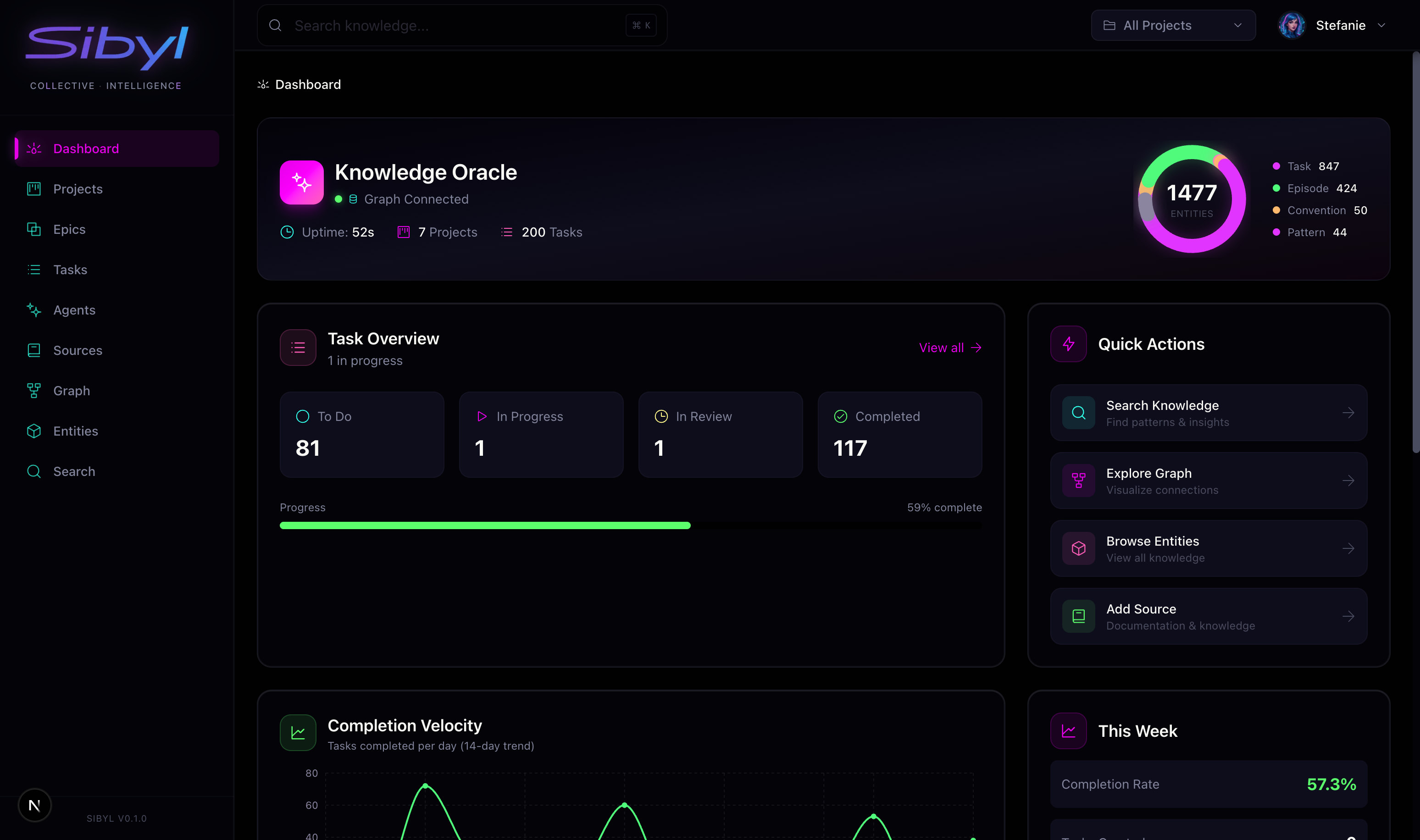 Dashboard |
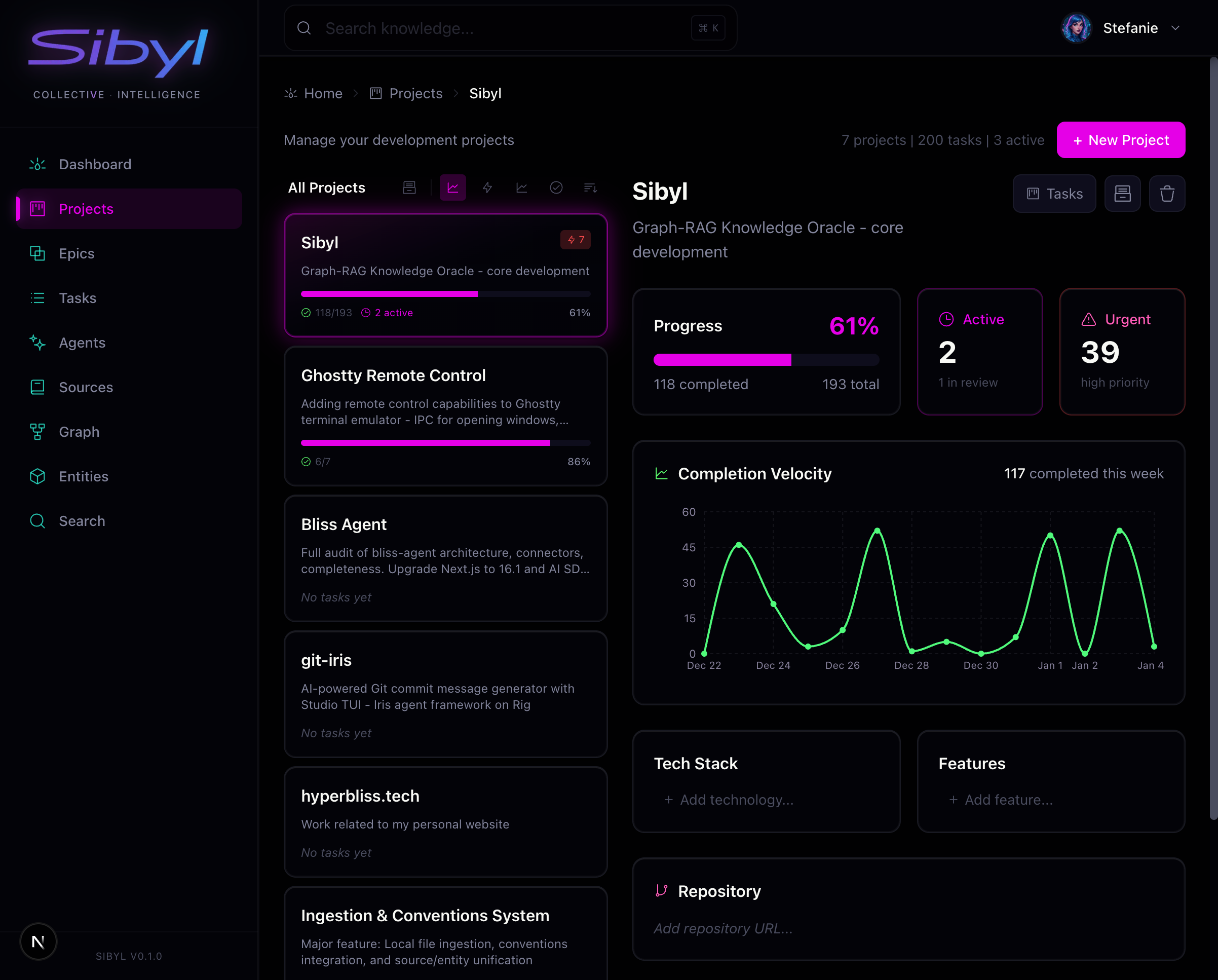 Projects |
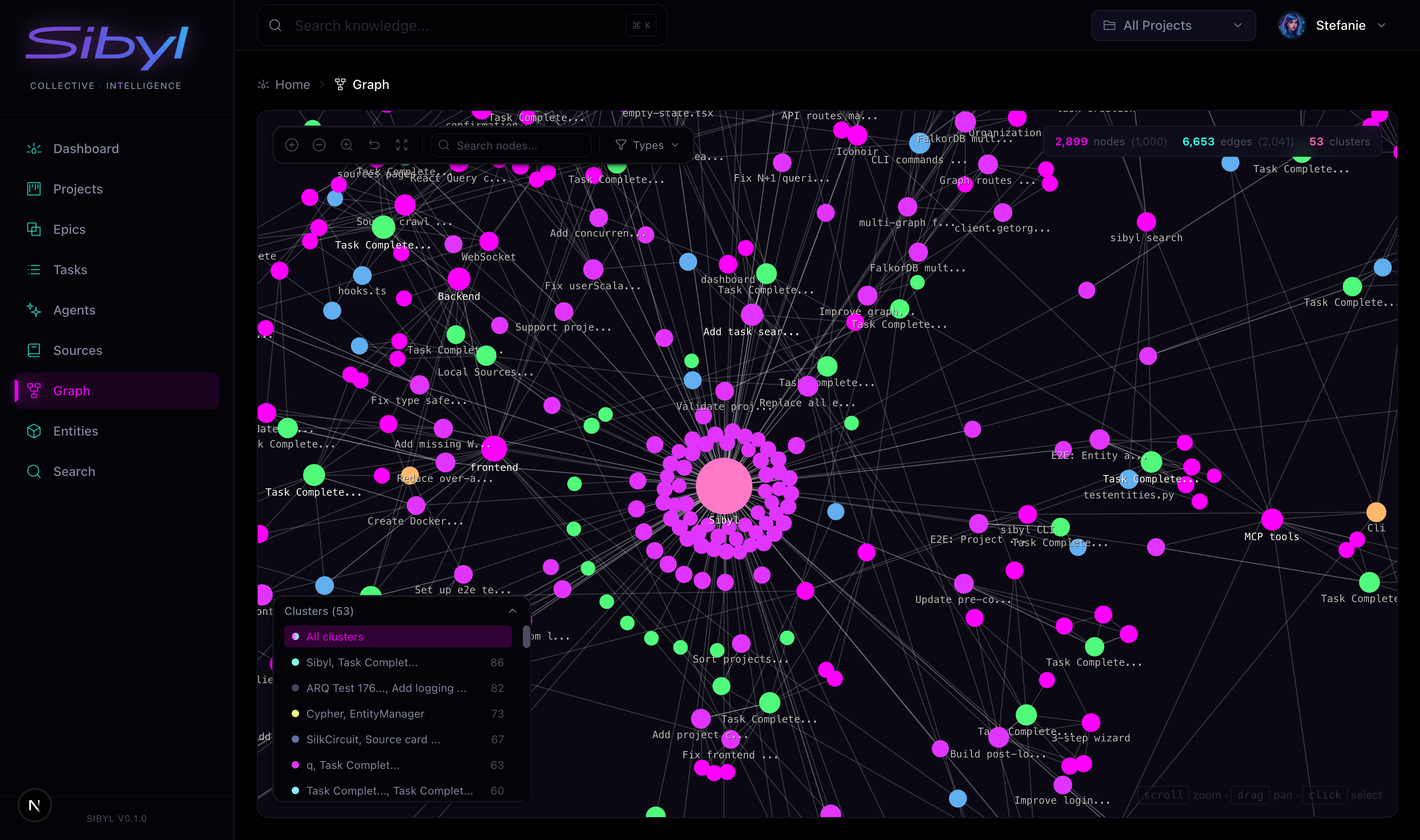 Knowledge Graph |
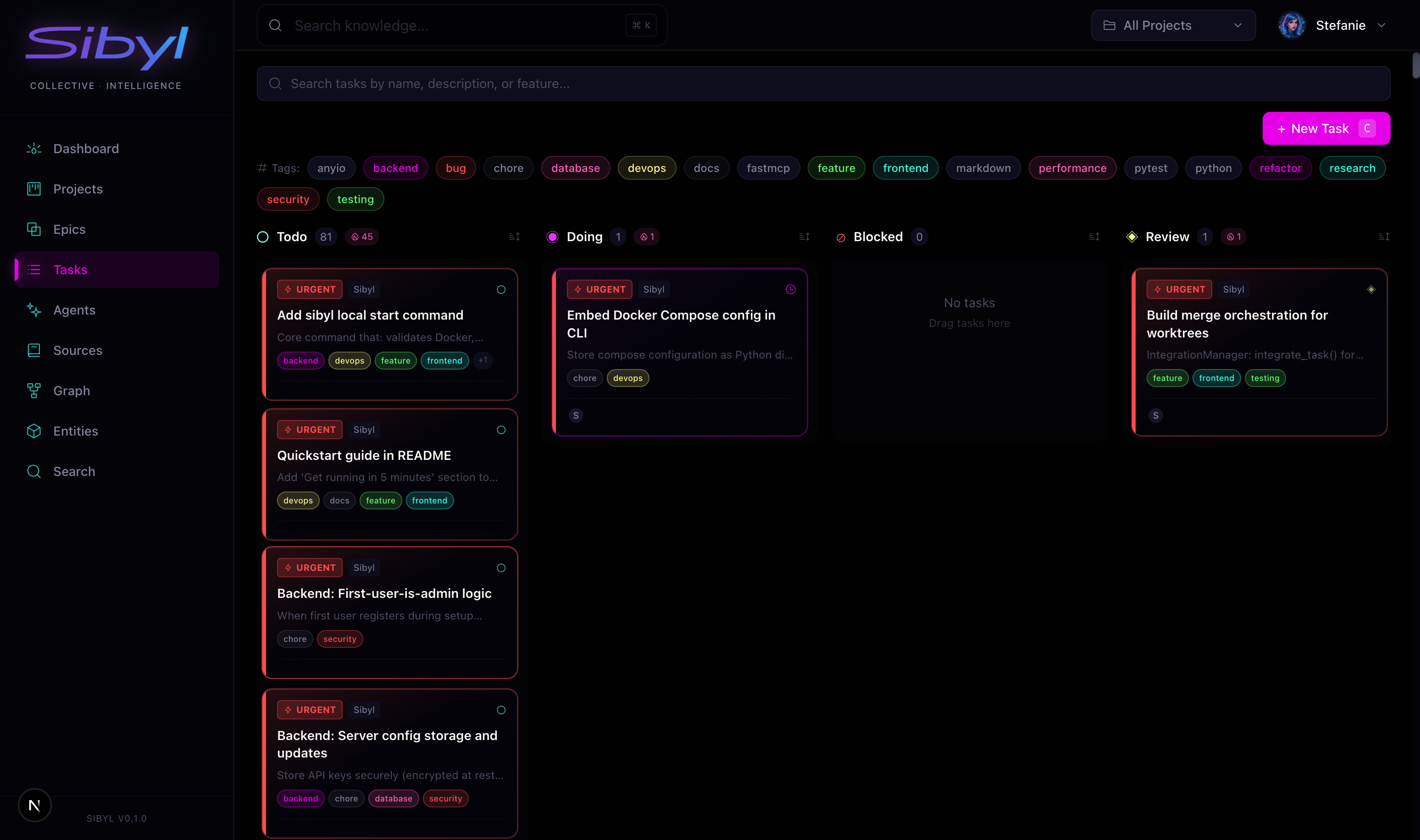 Task Workflow |
⚡ Quickstart
One-Liner Install
curl -fsSL https://raw.githubusercontent.com/hyperb1iss/sibyl/main/install.sh | sh
Installs uv (if needed), installs sibyl-dev, starts Sibyl. Done.
Manual Install (UV)
uv tool install sibyl-dev
sibyl local start
Alternative: pipx
pipx install sibyl-dev
sibyl local start
CLI Commands
sibyl local start    # Start all services
sibyl local stop     # Stop services
sibyl local status   # Show running services
sibyl local logs     # Follow logs
sibyl local reset    # Nuke and start fresh
Development Setup
# One-line setup (installs proto, moon, toolchain, dependencies)
./setup-dev.sh

# Or manually:
curl -fsSL https://moonrepo.dev/install/proto.sh | bash
proto use                  # Installs node, pnpm, python, uv
proto install moon
uv sync && pnpm install

# Configure
cp apps/api/.env.example apps/api/.env
# Add SIBYL_OPENAI_API_KEY + SIBYL_JWT_SECRET

# Launch everything
moon run dev

# Verify
curl http://localhost:3334/api/health
Retrieval Benchmarks
# Synthetic retrieval and ranking benchmarks
moon run bench-retrieval

# Live read-only benchmark against your running Sibyl stack
moon run bench-live
bench-live exercises the real /api/search path with your CLI auth context and auto-skips when
the local stack or auth is unavailable.
Ports:
| Service | Port | URL |
|---|---|---|
| API + MCP | 3334 | http://localhost:3334 |
| Web UI | 3337 | http://localhost:3337 |
| FalkorDB | 6380 | — |
🗂️ Core Workflow
Sibyl is strongest when it stays close to the work itself:
- Capture knowledge from debugging, implementation, and research
- Search semantically when you need the pattern again
- Track execution with projects, epics, and tasks
- Ingest docs so external references live beside internal learnings
- Explore the graph to see how ideas, tasks, and sources connect
The CLI
The CLI is the power-user interface. Clean output, optimized for scripting and durable project
workflows.
# Install globally
moon run cli:install

# Or install the published package directly
uv tool install sibyl-dev
Core Commands
# Search your knowledge
sibyl search "authentication patterns"
sibyl search "OAuth" --type pattern

# Add knowledge
sibyl add "Redis connection pooling" "Pool size must be >= concurrent requests to avoid blocking"

# Task workflow
sibyl task list --status todo,doing
sibyl task start <task_id>
sibyl task complete <task_id> --learnings "Key insight: always check TTL first"

# Explore the graph
sibyl explore related ent_xyz    # Find connected entities
sibyl explore traverse ent_xyz   # Walk outward from an entity
Task Workflow
backlog ──▶ todo ──▶ doing ──▶ review ──▶ done ──▶ archived
                       │
                       ▼
                    blocked
Output Formats
sibyl task list                  # Table output (default)
sibyl task list --json           # JSON for scripts
sibyl task list --csv            # For spreadsheets
Web UI
A full admin interface at http://localhost:3337:
- Dashboard — Stats overview, recent activity, quick actions
- Tasks — Kanban-style workflow with inline editing
- Graph — Interactive D3 visualization of knowledge connections
- Search — Semantic search with filters
- Sources — Configure documentation crawling
- Settings — Organizations, API keys, preferences
Built with: Next.js 16, React 19, React Query, Tailwind CSS, SilkCircuit design system
MCP Integration
Connect Claude Code, Cursor, or any MCP client to Sibyl:
{
  "mcpServers": {
    "sibyl": {
      "type": "http",
      "url": "http://localhost:3334/mcp",
      "headers": {
        "Authorization": "Bearer sk_your_api_key"
      }
    }
  }
}
The 4-Tool API
| Tool | Purpose | Examples |
|---|---|---|
search |
Find by meaning | Patterns, tasks, docs, errors |
explore |
Navigate structure | List entities, traverse relationships |
add |
Create knowledge | Episodes, patterns, tasks |
manage |
Lifecycle & admin | Task workflow, crawling, health |
Claude Code Skills & Hooks
Sibyl ships with skills and
hooks for seamless Claude Code integration.
Install:
moon run skills:install    # Install /sibyl skill
moon run hooks:install     # Install context hooks
/sibyl skill — Full CLI access from Claude Code:
/sibyl search "authentication patterns"
/sibyl task list --status doing
/sibyl add "OAuth insight" "Token refresh needs..."
Hooks — Automatic context injection:
| Hook | Trigger | Action |
|---|---|---|
| SessionStart | Session begins | Shows active tasks, reminds to capture learnings |
| UserPromptSubmit | Every prompt | Searches graph, injects relevant patterns |
The UserPromptSubmit hook extracts keywords from your prompt, searches Sibyl, and injects matching
patterns as context—so Claude always knows what you've learned before.
See skills/ and hooks/ for implementation details.
Architecture
sibyl/
├── apps/
│   ├── api/              # FastAPI + MCP server (sibyld)
│   ├── cli/              # REST client CLI (sibyl)
│   └── web/              # Next.js 16 frontend
├── packages/python/
│   └── sibyl-core/       # Shared library (models, graph, tools)
├── skills/               # Claude Code skills
├── charts/               # Helm charts for K8s
└── docs/                 # Documentation
Stack:
- Backend: Python 3.13 / FastMCP / FastAPI / Graphiti / FalkorDB
- Frontend: Next.js 16 / React 19 / React Query / Tailwind 4
- Database: FalkorDB (graph) + PostgreSQL (relational)
- Build: moonrepo + uv (Python) + pnpm (TypeScript)
- Integrations: Claude Code, MCP clients, and project-local hooks
Authentication
JWT Sessions (Web UI)
SIBYL_JWT_SECRET=your-secret-key    # Required
SIBYL_JWT_EXPIRY_HOURS=24            # Optional
API Keys (Programmatic Access)
# Create via CLI
sibyl auth api-key create --name "CI/CD" --scopes mcp,api:read

# Scopes: mcp, api:read, api:write
OAuth (GitHub)
SIBYL_GITHUB_CLIENT_ID=...
SIBYL_GITHUB_CLIENT_SECRET=...
Deployment
Docker Compose (Production)
docker compose -f docker-compose.prod.yml up -d
Kubernetes (Helm)
helm install sibyl ./charts/sibyl \
  --set backend.existingSecret=sibyl-secrets \
  --set backend.database.existingSecret=sibyl-postgres
See docs/deployment/ for detailed guides:
Development
# Start everything
moon run dev

# Individual services
moon run dev-api          # API + worker
moon run dev-web          # Frontend only

# Quality checks
moon run api:test         # Run API tests
moon run api:lint         # Lint
moon run web:typecheck    # TypeScript check
moon run core:check       # Full check on core library

# Database
moon run docker-up        # Start FalkorDB + PostgreSQL
moon run docker-down      # Stop databases
Entity Types
| Type | What It Holds |
|---|---|
pattern |
Reusable coding patterns |
episode |
Temporal learnings, discoveries |
task |
Work items with full workflow |
project |
Container for related work |
epic |
Feature-level grouping |
rule |
Sacred constraints, invariants |
source |
Knowledge origins (URLs, repos) |
document |
Crawled/ingested content |
FAQ
Who is Sibyl for?
Solo developers who want durable memory for projects and debugging. Teams who want shared
knowledge that compounds. Anyone building with AI who is tired of repeating context every
session.
Do I need AI agents to use Sibyl?
No. The knowledge graph and task system are the core product: documentation, task tracking, captured
learnings, and semantic search over what your team already knows.
How does it compare to Mem0 / LangMem / similar?
Sibyl is self-hosted and open source—you own your data. It includes a full task workflow
system, not just memory. It has a web UI for humans, not just APIs for machines. And it keeps
knowledge, tasks, and docs connected in one graph instead of scattering them across tools.
What LLM APIs do I need?
- OpenAI (required): For embeddings (
text-embedding-3-small) - Anthropic (optional): For additional model-powered extraction workflows
A typical solo developer uses ~$5/month in API costs.
Can multiple people collaborate?
Yes. Organizations have isolated graphs with role-based access. Multiple users can share knowledge,
assign tasks, and collaborate on the same graph.
Is it production-ready?
Sibyl is in active development (v0.1.x). The core features work well, but expect rough edges. We
use Sibyl to build Sibyl—every feature, task, and learning you see here was tracked inside the
system itself.
🗺️ Roadmap
Where we're headed:
- Stronger project boundaries — Finish project membership and permission flows end to end
- Deeper graph retrieval — Better ranking, traversal, deduplication, and relationship-aware
search - Brainstorming spaces — Dedicated areas for ideation before execution
- External data connectors — Feed more docs, repos, and notes into the graph
- Workflow polish — Sharper epic/task planning, progress views, and review loops
The graph gets smarter. The workflow gets sharper.
💜 Philosophy
Search Before Implementing
The graph knows things. Before you code:
sibyl search "what you're building"
sibyl search "error you hit" --type episode
Work In Task Context
Never do significant work outside a task. Tasks provide traceability, progress tracking, and
knowledge linking.
Capture What You Learn
If it took time to figure out, save it:
sibyl add "Descriptive title" "What, why, how, caveats"
Bad: "Fixed the bug" Good: "JWT refresh fails when Redis TTL expires. Root cause: token
service doesn't handle WRONGTYPE. Fix: try/except with regeneration fallback."
Complete With Learnings
sibyl task complete <id> --learnings "Key insight: ..."
The graph should be smarter after every session.
Contributing
We welcome contributions! See CONTRIBUTING.md for guidelines.
# Fork, clone, then:
./setup-dev.sh
moon run dev

# Make changes, then:
moon run :check           # Lint + typecheck + test
License
AGPL-3.0 — See LICENSE


If Sibyl helps your team remember, give us a ⭐ or support the project
✦ Built with obsession by Hyperbliss Technologies ✦
Yorumlar (0)
Yorum birakmak icin giris yap.
Yorum birakSonuc bulunamadi