captain-miao
Health Uyari
- License — License: MIT
- Description — Repository has a description
- Active repo — Last push 0 days ago
- Low visibility — Only 8 GitHub stars
Code Basarisiz
- rm -rf — Recursive force deletion command in npm/launch.mjs
- rm -rf — Recursive force deletion command in scripts/stage-npm-packages.sh
Permissions Gecti
- Permissions — No dangerous permissions requested
Bu listing icin henuz AI raporu yok.
Mission control for your coding agent sessions. A TUI that drives your own terminal (Kitty/zellij), so every session stays a native window or pane in the workflow you already have.

captain-miao
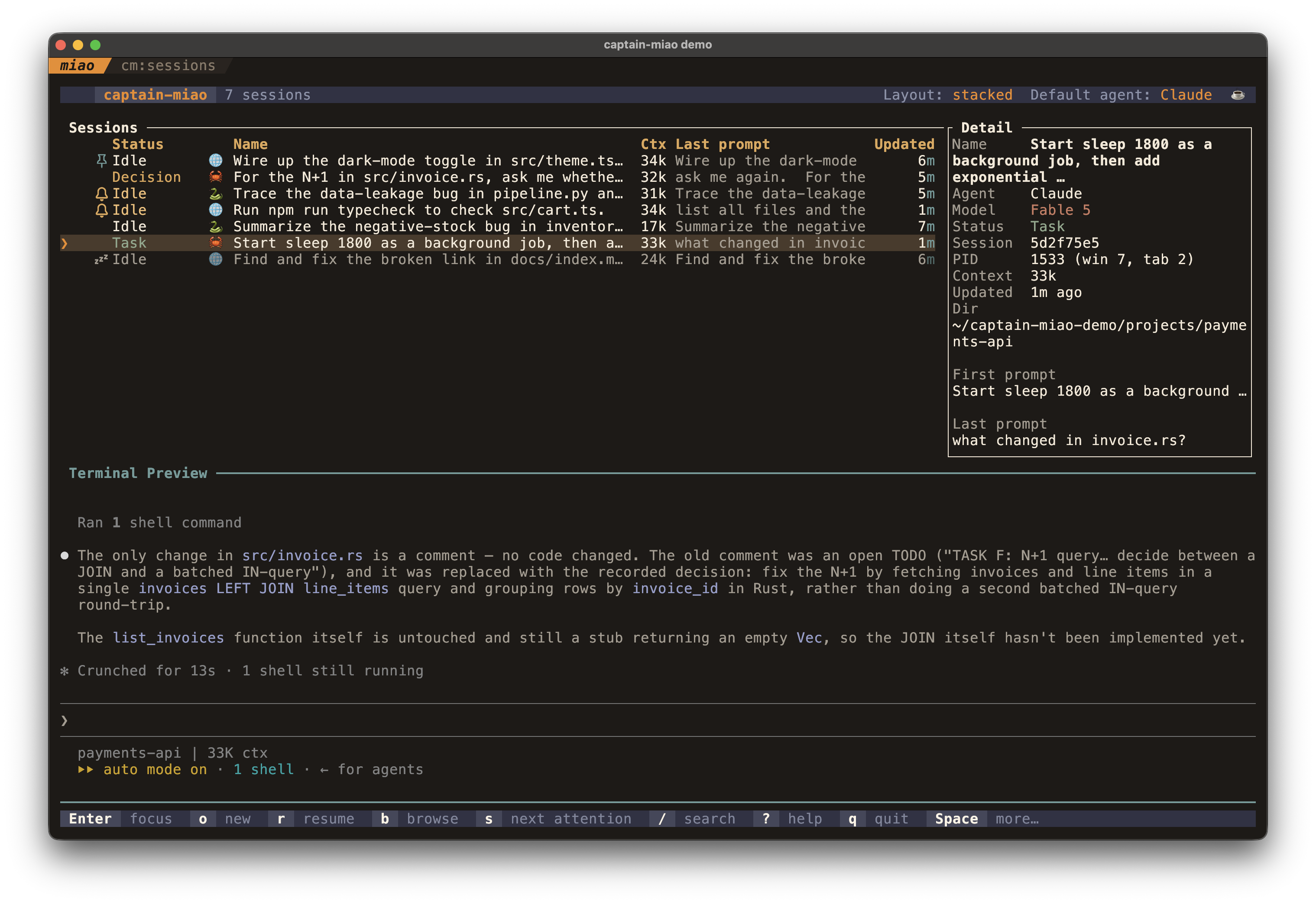
A TUI dashboard for managing multiple AI coding sessions running in the terminal emulator or multiplexer of your choice, such as Kitty and zellij.
https://github.com/user-attachments/assets/e51ffc2f-0d6c-41c1-a825-0de32f2bed3a
When you run several agent sessions at once, it's hard to tell which is working, which is waiting on you, and which has already finished. captain-miao watches every session and shows the whole fleet at a glance (status, working directory, context usage, and a live preview), and lets you start, focus, fork, or kill any of them without leaving the dashboard.
Unlike herdr or cmux, captain-miao embeds no terminal of its own. It drives the
Kitty or zellij you already run (every session is a native window or pane,
controlled through the terminal's own protocol), so it stays one small, focused
tool and the rest of your workflow is yours to compose.
Highlights
- The whole fleet at a glance: every session in one table, with status, working directory, model, context usage, git branch, and a live transcript preview.
- Never miss a prompt: sessions waiting on your approval or an answer are flagged.
- Full session lifecycle: launch, resume, fork, and kill sessions from the dashboard, with a filterable picker for recent working directories.
- Support Claude Code and Codex today, behind a backend abstraction built to extend to other coding agents.
- direnv-aware: a session started in a directory with an
.envrcpicks up that environment automatically (viadirenv exec). - r3 integration: when a session's running background task is an
r3 watchwaiting for your review, it flags as Review and surfaces as needing your attention. - Keep-awake: prevents your machine from sleeping while any session is still working (
caffeinateon macOS,systemd-inhibiton Linux). - Pin, mute, mark: pin important sessions to the top, mute the ones you don't need right now, and flag the ones to follow up on.
Requirements
- A supported terminal: Kitty with remote control enabled (see Kitty setup), or zellij ≥ 0.44 (run captain-miao inside the zellij session; no extra setup needed).
- Claude Code and/or Codex on your
PATH.
Installation
From source with Cargo
cargo install --git https://github.com/hyperlogue/captain-miao
Building needs a Rust toolchain and a C compiler (for the statically-bundled SQLite that reads Codex session titles).
From a prebuilt binary (npm)
No Rust toolchain, no build:
npx @hyperlogue/captain-miao          # run it once
npm install -g @hyperlogue/captain-miao   # or install the `captain-miao` command
bunx @hyperlogue/captain-miao works too. The npm package is a small launcher
that execs a prebuilt native binary shipped as a per-platform optional
dependency, so your package manager downloads only the one binary matching your
machine; nothing is fetched at runtime. Prebuilt binaries cover macOS (Apple
silicon + Intel) and Linux (x86-64 + arm64), and are also attached to every
GitHub Release as a.tar.gz if you'd rather download one directly.
With Nix
A flake is provided; run it straight from GitHub:
nix run github:hyperlogue/captain-miao
Kitty setup
captain-miao drives Kitty over its remote-control protocol, so your kitty.conf must allow it. Remote control is a real privilege (a program that has it can read your terminal and run commands), so the tightest setup kitty offers pairs a password with an authorization script:
allow_remote_control password
remote_control_password "i-am-the-captain-miao" captain_miao_rc.py
listen_on unix:/tmp/mykitty
Kitty resolves that filename against your config directory, so put the script at ~/.config/kitty/captain_miao_rc.py:
# The only remote-control commands captain-miao issues.
ALLOWED_COMMANDS = frozenset({
    "ls", "get-text", "launch", "focus-window",
    "focus-tab", "close-window", "detach-window", "goto-layout",
})

def is_cmd_allowed(pcmd, window, from_socket, extra_data):
    # Reject the in-terminal escape-code channel; only the listen_on socket gets in.
    return from_socket and pcmd["cmd"] in ALLOWED_COMMANDS
Every request must now clear three checks: arrive over the socket (not the escape-code channel that a shell, even one across ssh, could otherwise use), carry the password, and name one of the commands above. i-am-the-captain-miao is captain-miao's built-in default, so this works as written; to use your own secret instead, set remote_control_password (above) and [kitty] rc_password in captain-miao's config to match. Keep the script the last item after the password; command names listed alongside it are allowed without ever calling your function.
Looser alternatives: allow_remote_control socket-only (off the escape-code channel, but no password and no allowlist) or allow_remote_control yes (no checks at all; avoid it). captain-miao verifies remote control at startup and exits with a diagnostic if it can't connect.
Keep the stack layout enabled. captain-miao's default Stacked session layout puts every session in one kitty tab and shows one at a time via kitty's stack layout. The default enabled_layouts * already includes it; if you've narrowed that list, add stack or sessions tile instead of stacking. (The alternate Per-tab layout, toggled with Space l, needs no particular layout.)
Usage
Run the dashboard inside a supported terminal (Kitty or zellij):
captain-miao
captain-miao must be launched from within Kitty or a zellij session; it exits with an error otherwise. When run inside a zellij session it auto-selects the zellij backend (override with
[terminal] backendin the config).
From the dashboard, o / O start new sessions and r resumes existing ones. You can also drive captain-miao from the shell:
| Command | What it does |
|---|---|
captain-miao |
Run the TUI dashboard (the default). |
captain-miao claude [dir] [args…] |
Launch Claude Code in dir (default .) with tracking hooks. Args starting with - (e.g. --resume) are forwarded straight to claude. |
captain-miao codex [dir] [args…] |
Launch Codex in dir with tracking hooks; extra args are forwarded to codex. |
captain-miao focus [--window-id <id>] |
Focus the running dashboard window; with --window-id, also ring the session running in that Kitty window. |
captain-miao hook <event> |
Internal: forwards an agent hook event to the launcher. You won't run this yourself; it's wired up automatically. |
Sessions launched via claude / codex are wrapped by a launcher process that injects the tracking hooks, so they show up in the dashboard automatically. Hooks are injected per-session and torn down on exit; nothing is written to your global ~/.claude/settings.json.
Key bindings
Press ? in the dashboard for the complete list. Highlights:
| Key | Action |
|---|---|
j/k, ↑/↓, Ctrl-n/p |
Navigate sessions |
gg / G |
Jump to top / bottom |
1..9 / Ctrl-1..9 |
Select Nth session / select and focus its window |
Enter |
Focus the selected session's window |
o / O |
New session (same tab / prompt for cwd) |
r / f |
Resume picker / fork (resume selected in place) |
b |
Browse every running and resumable session in one list |
x |
Kill the selected session |
s |
Jump to the next session needing attention |
m / p / i |
Mute / pin / toggle needs-input on the selected session |
y |
Copy the selected session id to the clipboard |
t / w |
Move window to tab (Kitty only) / switch to or open the cwd's work tab |
h/l, ←/→ |
Scroll the preview horizontally |
Ctrl-u / Ctrl-d |
Scroll the preview up / down |
R |
Refresh the preview now |
Space v / Space d |
Toggle the preview / detail panel |
Space i |
Edit the selected directory's icon + color |
Space e / Space E |
Restart the selected / all idle sessions |
Space z |
Toggle keep-awake (inhibit OS sleep while sessions work) |
Space a |
Set the default backend for new sessions (Claude / Codex) |
Space l |
Switch session layout (stacked in one tab / one tab per session) |
? |
Show the full key list (help overlay) |
/ |
Search |
q / Ctrl-c |
Quit |
Pressing Space (the leader) shows a which-key strip of the available follow-up keys in the footer.
In the cwd picker, Ctrl-t switches the backend for that one launch and Ctrl-d drops the highlighted recent directory.
Custom keybindings. Every Normal-mode command above is remappable via a [keybinds] table in ~/.config/captain-miao/config.toml. Map a command id to a key (or list of keys); an empty list unbinds it:
[keybinds]
kill = "X"                      # move kill from x to X
jump_attention = ["s", "n"]     # bind two keys to one command
restart = "space r"             # remap a leader sequence
toggle_detail = []              # unbind a command
Keys parse forms like "ctrl+u", "O" (= "shift+o"), "space e", "enter", "f5", and arrow names. Ctrl-c, g g, and the 1..9 / Ctrl-1..9 selectors are fixed.
Command ids are the string in each Command::id(); the authoritative list lives in the DEFAULTS table in src/app/keymap.rs, and they match the actions in the key-bindings table above.
Configuration
captain-miao reads an optional TOML file at ~/.config/captain-miao/config.toml (or $XDG_CONFIG_HOME/captain-miao/config.toml). Every key is optional and falls back to the default shown below; an unparseable file falls back to defaults rather than crashing. The complete set of options:
[terminal]
backend = "kitty"            # "kitty" | "zellij"; unset auto-detects (zellij inside a zellij session, else Kitty)
sessions_layout = "stacked"  # "stacked" | "per-tab" (the runtime Space l toggle overrides this)

[kitty]
rc_password = "i-am-the-captain-miao"   # the built-in default, and a published constant; set your own (see Kitty setup)

[launcher]
default_agent = "claude"     # backend for new sessions: "claude" | "codex" (Space a overrides)
approval_grace_secs = 2      # grace window after a permission dialog before a transcript change reads as "dismissed"
max_recent_cwds = 50         # entries kept in the workdir picker's recent list
resume_list_limit = 200      # max sessions listed in the resume picker
new_tab_title = "{agent}: {basename}"     # new-session tab title; placeholders: {agent} {basename} {cwd}
resume_tab_title = "{agent}: {basename}"  # resumed-session tab title

[thresholds]
context_warning_tokens = 175000    # context usage turns to the warning color here
context_critical_tokens = 400000   # …and to the critical color here
preview_stale_secs = 20            # show "updated Ns ago" once the preview is older than this (0 = always)

[polling]
fs_reload_debounce_ms = 100        # debounce for filesystem-watch reloads
preview_debounce_ms = 200          # debounce before re-fetching the preview
event_poll_ms = 100                # input poll interval (floored at 10)
preview_auto_refresh_secs = 10     # auto-refresh the preview while focused + busy + unscrolled (0 disables)

[ui.panels]
preview_auto_min_height = 16       # min body height before the preview auto-shows
detail_auto_min_width = 70         # min body width before the detail panel auto-shows
detail_default_width = 36          # detail panel column width
narrow_max_width = 90              # at/below this body width the layout stacks vertically

[ui.table]
name_truncate = 35                 # max characters of a session name before truncation

[colors.ui]
title_fg = "cyan"
header_fg = "cyan"
attention_fg = "yellow"
error_fg = "red"
highlight_bg = "dark_gray"
selection_fg = "blue"
selection_symbol = "❯ "

[colors.picker]
highlight_bg = "dark_gray"
chevron_fg = "blue"

[debug]
enabled = false                    # verbose logging; also enabled by CAPTAIN_MIAO_DEBUG=1
log_file = "debug.log"
keybind_log_file = "keybinds.log"

[keybinds]
# Remap any Normal-mode command: command-id = "key" or ["key", "alt"]; [] unbinds.
# command-ids are the Command::id() strings in src/app/keymap.rs (DEFAULTS table).
# e.g. kill = "X"  /  jump_attention = ["s", "n"]  /  restart = "space r"
Colors accept named values (cyan, dark_gray, …) or #rrggbb hex. The command ids for [keybinds] are the ones in the key-bindings table above (kill, jump_attention, restart, toggle_preview, …).
How it works
captain-miao is built around a strict unidirectional data flow:
- The launcher wraps each agent process and is the single source of truth for that session's state. It receives hook events over a Unix socket and writes a JSON state file.
- Hooks are thin forwarders: they parse the agent's hook payload from stdin and send it to the launcher socket.
- The dashboard is a pure viewer. It watches the session state directory and per-backend transcript dirs with
notify(FSEvents on macOS, inotify on Linux) and re-reads files when they change. It performs no IPC of its own.
State lives under ~/.local/state/captain-miao/ and runtime sockets under $XDG_RUNTIME_DIR/captain-miao/, both owner-only: session state files record your prompt text, so they are written 0600 under a 0700 directory. For a deeper tour of the architecture, module layout, hook wiring, and data files, see AGENTS.md.
Roadmap
- Remote hosts over SSH: one dashboard federating sessions across several machines, with per-host pty pools so remote sessions survive ssh drops, laptop sleep, and dashboard restarts. The full lifecycle (open / resume / attach / detach / kill / browse across hosts) is implemented behind the
remotecargo feature (cargo build --release --features remote), but it isn't yet verified end-to-end against a real host, and restart and fork stay local-only. Design notes: docs/remote-sessions.md. - More agent backends: the per-session backend is an abstraction, so other coding agents (Kimi Code, opencode, Grok, …) can slot in alongside Claude Code and Codex.
- More terminal backends: the terminal layer is an abstraction (Kitty and zellij today), so other terminals and multiplexers (tmux, WezTerm, …) can slot in.
License
MIT. See LICENSE.
Yorumlar (0)
Yorum birakmak icin giris yap.
Yorum birakSonuc bulunamadi