phi
Health Uyari
- No license — Repository has no license file
- Description — Repository has a description
- Active repo — Last push 0 days ago
- Low visibility — Only 5 GitHub stars
Code Gecti
- Code scan — Scanned 12 files during light audit, no dangerous patterns found
Permissions Gecti
- Permissions — No dangerous permissions requested
Bu listing icin henuz AI raporu yok.
Φ phi — a terminal multiplexer and browser-based control center for AI coding assistants (OpenCode, Claude Code, Antigravity, Pi Coder).
Φ phi
A terminal multiplexer and browser-based control center for AI coding assistants.
Phi gives you a single web UI to run, monitor, and switch between multiple AI coding agents — OpenCode, Claude Code, Antigravity (Agy), and Pi Coder — each running in a real PTY, alongside a live git diff of your work. Think of it as mission control for AI coders.
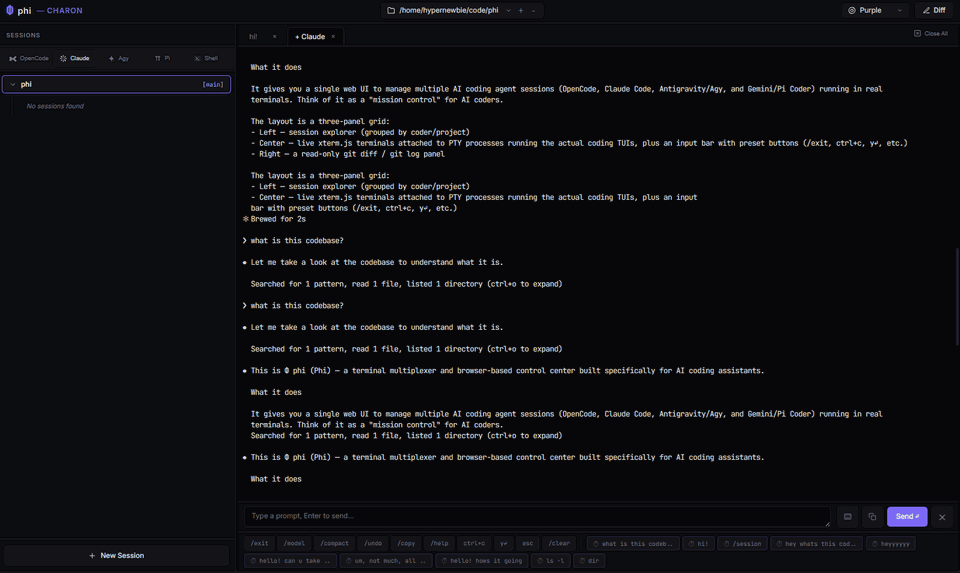
Features
- One UI, many agents — spawn and tab between OpenCode, Claude Code, Antigravity, Pi Coder, and plain shell sessions, all in the browser.
- Real terminals — each session is a genuine PTY rendered with xterm.js (WebGL with canvas fallback), so the agent TUIs render exactly as they would in your terminal.
- Session resume — Phi reads each tool's on-disk history (OpenCode's SQLite DB, Claude Code's project JSONL, Antigravity's conversation files, Pi's session files) and lets you reattach to a past conversation with one click.
- Detach & survive — closing a browser tab detaches the PTY but keeps the process alive for a 30-minute grace period. Reopen the session to reattach to the still-running agent.
- Live git diff — a read-only side panel streams
git diffandgit logfor the active workspace so you can watch the agent's changes land. - Git worktree aware — browse and switch between git worktrees per workspace.
- Quick-action presets — one-tap buttons for common agent commands (
/exit,/model,/compact,ctrl+c,y↵,esc, …), plus a staged input bar for composing longer prompts. - Multiple workspaces & themes — register several project directories and pick a UI accent color.
- Optional access password — set it from Config to gate Phi's APIs and terminal WebSockets; trusted browsers stay unlocked without repeated prompts.
- Vikunja Kanban Board — a drag-and-drop Kanban dashboard (using SortableJS) embedded as a custom tab type, synced directly to your local Vikunja REST API via a backend HTTP proxy.
Architecture
Phi is a single Go binary serving a vanilla-JS frontend (no build step, no framework).
phi/
├── main.go                 HTTP server, API routes, static file server, config
├── pkg/
│   ├── pty/                PTY spawning, process registry, 30-min detach timer
│   ├── session/            Per-tool session parsers (opencode/claude/agy/pi) + worktrees
│   ├── ws/                 Binary WebSocket hub + PTY⇄browser I/O bridge
│   ├── diff/               git diff / git log streamers
│   └── coders/             Command definitions & preset buttons per assistant
└── web/                    index.html, *.js (xterm.js client), style.css, vendor/
WebSocket protocol (binary, type-prefixed frames):
| Prefix | Client → Server | Server → Client |
|---|---|---|
0x01 |
stdin bytes → PTY | PTY output → xterm.js |
0x02 |
resize {cols, rows} |
control / metadata JSON |
0x03 |
ping | pong |
0x07 |
— | md-changed push {"dir"} (fsnotify: a watched markdown dir changed) |
See PLAN.md for the full design notes and locked decisions.
Installation & Quickstart
Method 1: Using NPM (Easiest, Cross-Platform)
Phi is distributed as the @hypernewbie/phi-code package on NPM. The installer automatically downloads the correct precompiled binary for your operating system (macOS, Linux, or Windows) and architecture (arm64 or amd64).
# Install globally
npm install -g @hypernewbie/phi-code

# Launch in your project directory
cd ~/code/my-project
phi
Method 2: Using Go Install
If you have Go 1.26+ installed:
go install github.com/hypernewbie/phi@latest
cd ~/code/my-project
phi
After launching, open http://localhost:7070 in your browser. The web UI is fully embedded, so you can run it from any directory.
Getting started
Prerequisites
- Go 1.26+
- Whichever agent CLIs you want to drive, on your
PATH:opencode,claude,agy,pi git(for the diff/log panels)
Build from source
git clone https://github.com/hypernewbie/phi.git
cd phi
go build -o phi .
Then run ./phi from any project directory (or move the binary onto your PATH) and open http://localhost:7070.
The directory you launch Phi from becomes the default workspace; switch between projects from the workspace picker in the UI and add more with the + button.
Frontend dev (live reload)
- Terminal 1:
./phi(backend, :7070) - Terminal 2:
pnpm run dev→ open http://localhost:5173 - If editing
web-src/*.ts, also runpnpm run watch:web(tsc rewritesweb/*.js; Vite reloads on the output). - If phi runs on a non-default port, set the env var for both:
PHI_PORT=8080 ./phi+PHI_PORT=8080 pnpm run dev(the flag-portalone won't retarget the proxy). - Note: :5173 is dev-only; :7070 always serves the embedded (build-time) UI; prod is unchanged.
Enable the pre-commit hook (once per clone) so frontend checks run before you commit:
git config core.hooksPath .githooks
The hook (.githooks/pre-commit) only acts on commits that touch frontend files: it syntax-checks staged web/*.js, and when *.ts sources change it runs typecheck + build:web and blocks if the emitted web/ tree drifts from web-src/ (stage the rebuilt files and recommit). It's advisory — bypass with git commit --no-verify; CI (.github/workflows/test.yml) is the enforced backstop.
Flags
| Flag | Default | Description |
|---|---|---|
-port |
7070 |
Port for the web server |
-ip |
lan |
Bind target. lan binds loopback plus every RFC 1918 LAN and Tailscale interface; use 127.0.0.1 for local-only access, 0.0.0.0 for every interface, or an explicit address. |
-log-level |
info |
Log level: debug|info|warn|error (or PHI_LOG env var). debug also enables WS/PTY frame traces and span timing lines. |
-otel-endpoint |
(none) | OTLP/gRPC collector endpoint (host:port) for OpenTelemetry export (or PHI_OTEL_ENDPOINT env var). Only takes effect in a binary built with -tags otel — the default build parses and ignores it, adding zero OTel dependencies. |
Network access: By default Phi is available on localhost, private LAN, and Tailscale addresses—not public interfaces. Phi does not add authentication, so use
-ip 127.0.0.1for local-only access and do not use-ip 0.0.0.0unless you deliberately want to expose it on every interface.
Configuration
State is stored in ~/.phi/:
config.json— registered workspaces, theme color, and per-workspace worktree state.sessions.json— local names/timestamps for Antigravity sessions (its conversation files are binary, so Phi keeps a sidecar map).
Both are created automatically. config.json also holds an optional browser-derived access-password verifier; an empty value disables access protection. Set or clear it from Config rather than editing it by hand. Phi's access password protects casual LAN/Tailnet access, but HTTPS is still required against an active hostile-network attacker.
Supported assistants
| ID | Name | Command | Session source |
|---|---|---|---|
opencode |
OpenCode | opencode |
~/.local/share/opencode/opencode.db (SQLite) |
claude |
Claude Code | claude |
~/.claude/projects/ (JSONL) |
agy |
Antigravity | agy |
~/.gemini/antigravity-cli/conversations/ (.pb) |
pi |
Pi Coder | pi |
Pi session files |
bash |
Shell | bash -l |
— |
Yorumlar (0)
Yorum birakmak icin giris yap.
Yorum birakSonuc bulunamadi