hypershots
Health Uyari
- License — License: NOASSERTION
- Description — Repository has a description
- Active repo — Last push 0 days ago
- Low visibility — Only 5 GitHub stars
Code Basarisiz
- rm -rf — Recursive force deletion command in skills/hypershots/scripts/edit-pass.sh
- exec() — Shell command execution in skills/hypershots/scripts/fetch-fonts.sh
- rm -rf — Recursive force deletion command in skills/hypershots/scripts/fetch-fonts.sh
- fs module — File system access in skills/hypershots/scripts/fetch-fonts.sh
Permissions Gecti
- Permissions — No dangerous permissions requested
Bu listing icin henuz AI raporu yok.
Beautiful App Store screenshots — perfect to spec, shipped end to end. An open-source skill for Claude Code & Codex: deterministic HTML panels, one-pass translation, AI sticker art, spec-preserving makeovers.
HyperShots
Beautiful App Store screenshots — perfect to spec, shipped end to end. Deterministic HTML where Apple has rules, generative AI where it sells.
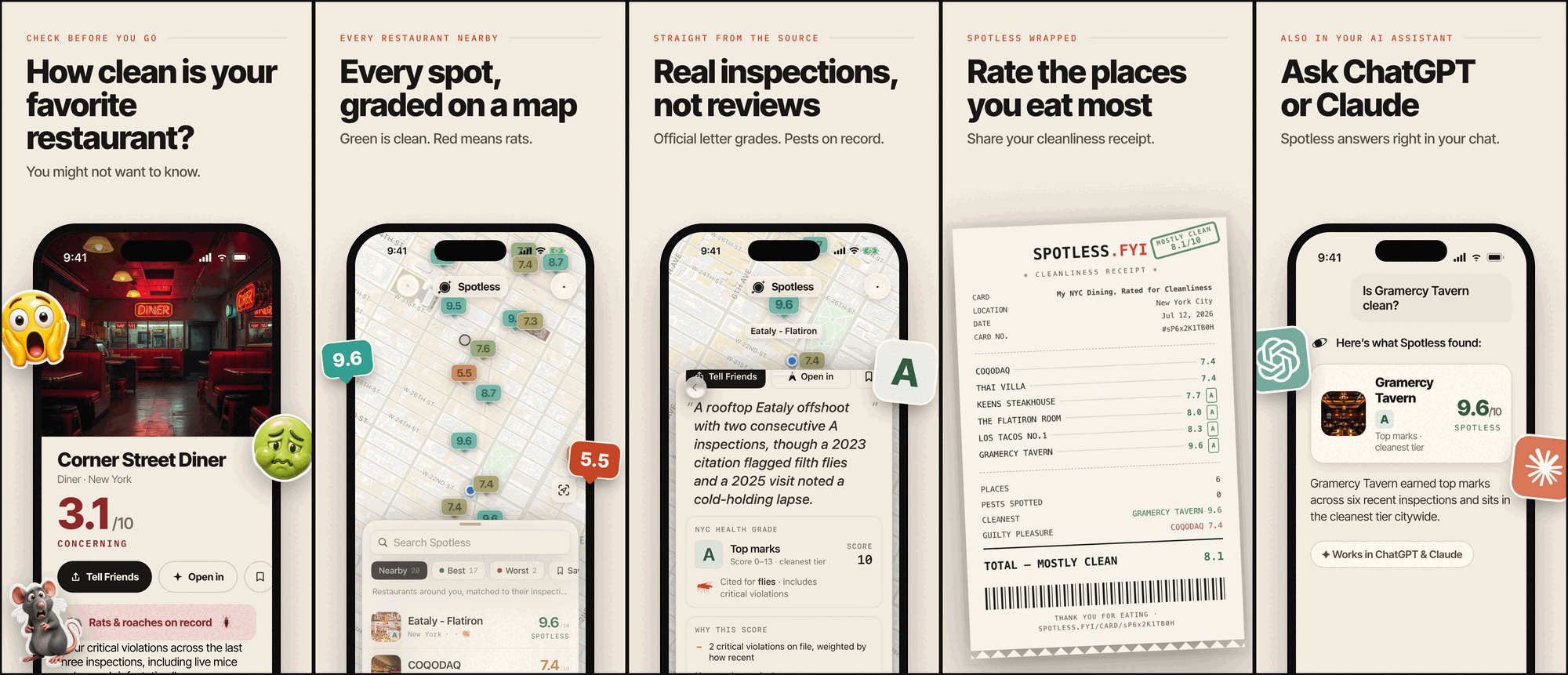
This set was submitted to the App Store with Spotless v1.0 (July 2026).
Install
npx skills add hypersocialinc/hypershots
One command — it detects your agent (Claude Code, Codex & friends) and installs interactively. Non-interactive/CI form: add --skill hypershots --agent claude-code (or --agent codex; the skill ships agents/openai.yaml).
Why not just generate the whole image?
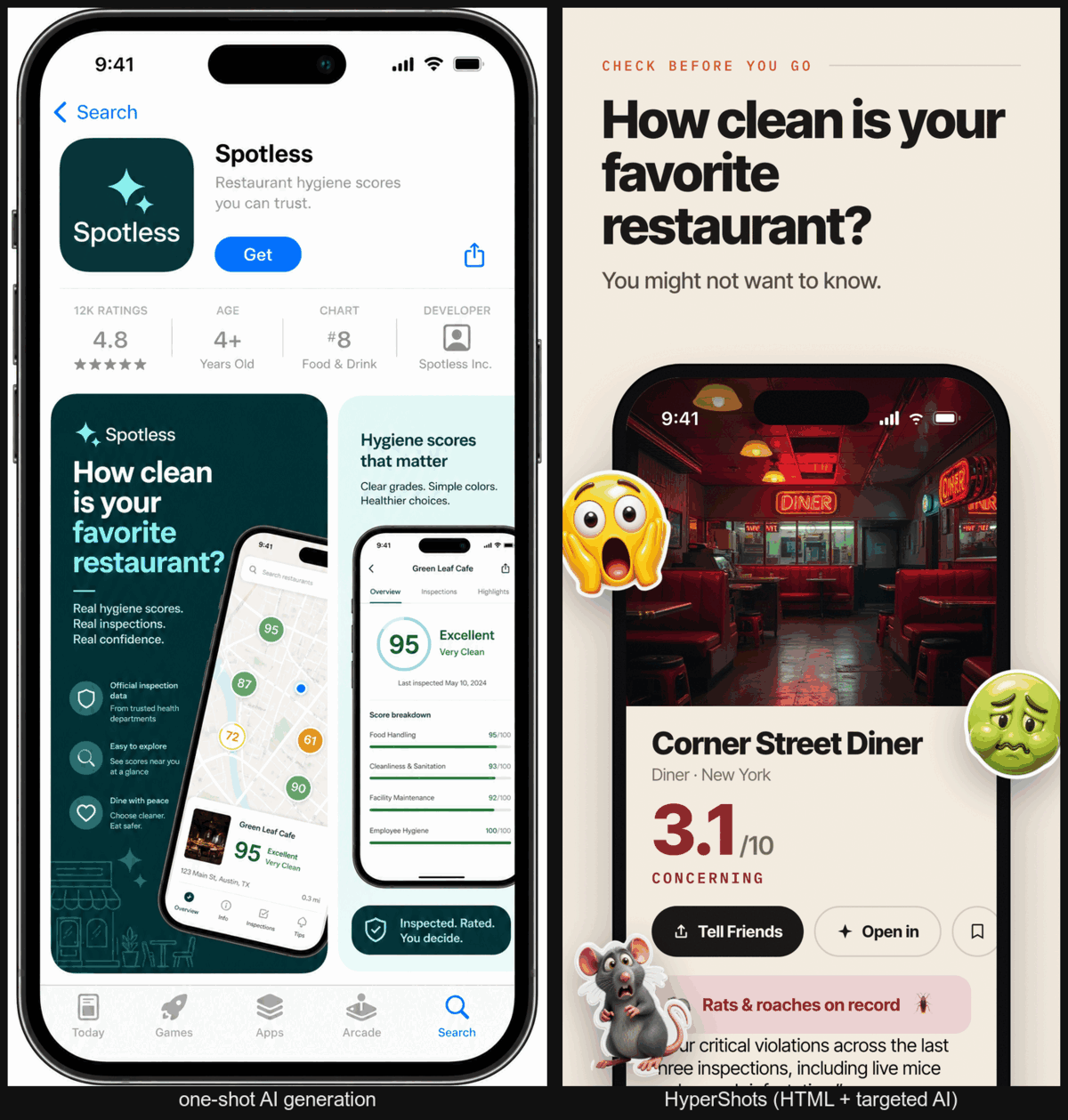
Device frames and store canvases are pure geometry — an agent expresses them perfectly in CSS arithmetic, while an image model only approximates them: asked for a marketing panel, one-shot generation drew a picture of the App Store, with warped nested frames, melted small text, and a 1024×2048 canvas Apple doesn't accept. HyperShots is deterministic everywhere Apple has rules — frame, fonts, copy, exact pixels, locales — and generative only where it helps: cutout sticker assets and an optional style grade. The half you must get right is arithmetic; the half that sells is the only part left to the model.
Every language, one command
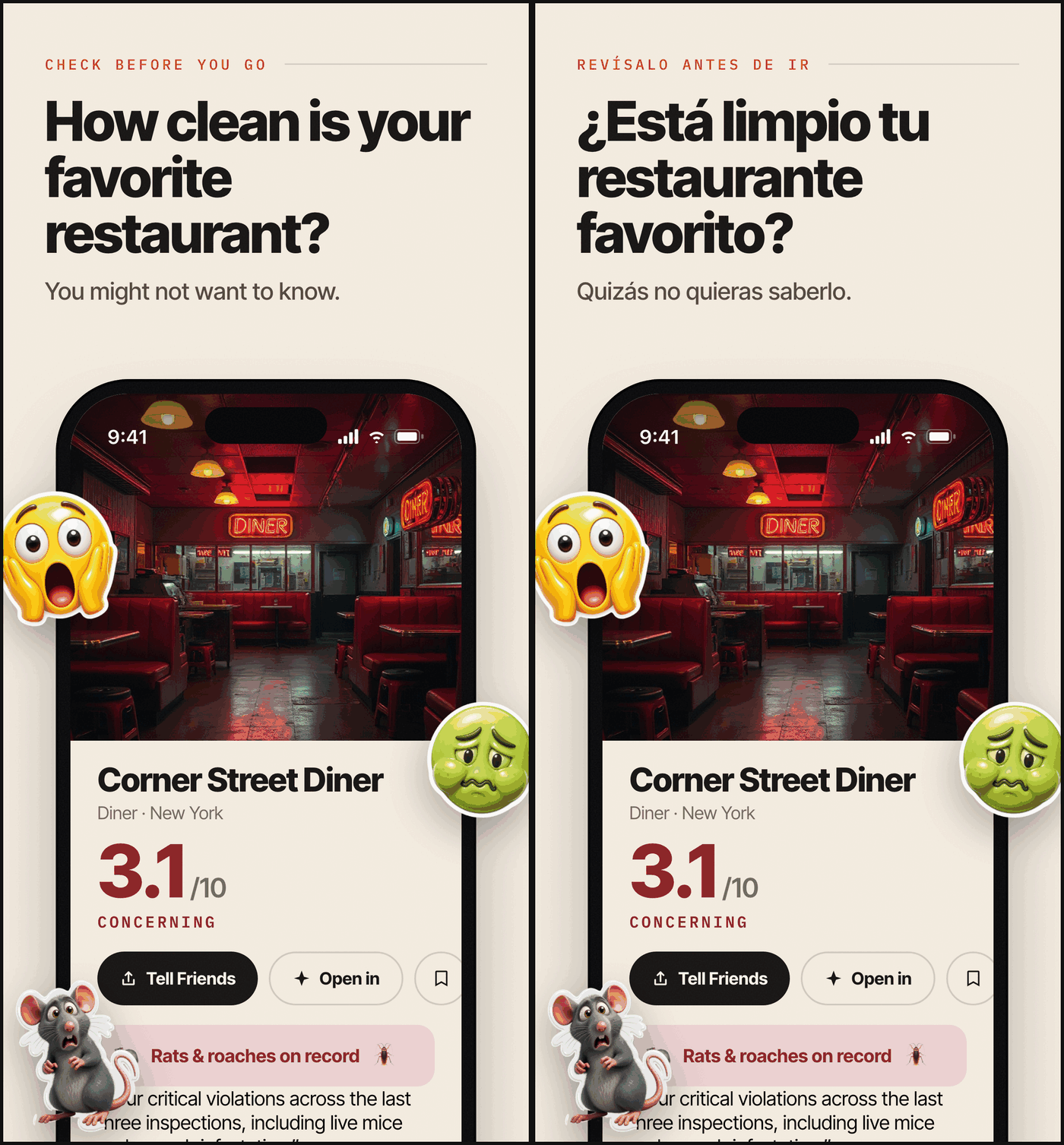
One command per locale: string extraction via data-i18n markers, atomic injection (missing or unused keys are fatal), auto-fit headlines that shrink until they clear the device — same layout, translated copy, re-validated output.
60-second quickstart
$ npx skills add hypersocialinc/hypershots --skill hypershots --agent claude-code

you>  Make App Store screenshots for my app. Captures are in ./captures.

agent> bash <skill>/scripts/scaffold.sh .shots
       # asks the brief questionnaire: positioning, panel count,
       # headlines, stickers, device profile, locales — then authors
       # bespoke panel HTML and a theme layer from your brand

agent> bash <skill>/scripts/render.sh .shots iphone-6.9 en
       rendered panel-1 -> .shots/out/iphone-6.9/en/panel-1.png (target 1290x2796)
       ...
       OK: 5 panels rendered for iphone-6.9/en

agent> bash <skill>/scripts/validate.sh .shots iphone-6.9 en
       PASS panel-1.png 1290x2796 alpha:no profile:ok
       PASS panel-2.png 1290x2796 alpha:no profile:ok
       PASS panel-3.png 1290x2796 alpha:no profile:ok
       PASS panel-4.png 1290x2796 alpha:no profile:ok
       PASS panel-5.png 1290x2796 alpha:no profile:ok
       VALIDATED: 5 panels, 1290x2796, store-compliant

agent> node <skill>/scripts/make-review.mjs .shots
       # opens an App Store-style review page — give feedback by panel number
The rendered PNGs in out/ upload to App Store Connect as-is.
How it works
| Deterministic (HTML/CSS + headless Chrome) | Generative (opt-in, via genmedia/fal.ai) |
|---|---|
| Device frame geometry (Dynamic Island, bezels, screen aspect) | Cutout sticker assets: GPT Image 2 → BiRefNet v2 background removal → transparent PNG |
Vendored fonts (@font-face, no network race) |
Photographic backgrounds |
| Exact store canvas from per-profile CSS variables | Optional whole-panel style grade (GPT Image 2 edit, set-consistent via a style anchor) |
Per-locale copy with data-i18n markers + auto-fit |
Protected mode: frame and text regions are masked, then re-composited from the clean render — AI never ships your typography |
validate.sh: dimensions, alpha, ICC profile, panel count |
Store specs (what the validator enforces)
| Device class | Exact px (portrait) | Notes |
|---|---|---|
| iPhone 6.9″ | 1290×2796 or 1320×2868 | The only required iPhone size; Apple auto-scales it down. Default profile. |
| iPhone 6.5″ | 1284×2778 or 1242×2688 | Legacy slot, still accepted (the Spotless set shipped it). |
| iPad 13″ | 2064×2752 or 2048×2732 | Required only if the app ships an iPad build. |
Plus the asset rules: PNG, flattened (no alpha), untagged or sRGB ICC, max 10 per device size per localization — validate.sh checks all of it after every render, so a set that renders green cannot be rejected for asset specs.
How this differs
- fastlane frameit — device frames around captures with basic bezel-text titles (localizable via
.strings); no bespoke panel layout, generated assets, or spec validation. - ParthJadhav/app-store-screenshots — a template editor webapp; HyperShots is agent-authored bespoke HTML per app, no template library.
- adamlyttleapps' ASO screenshots skill — Pillow scaffold + AI polish; similar thesis, different guarantees.
- SaaS editors (AppScreens, AppLaunchpad, Screenshots.pro) — template picking in a browser, per-seat pricing, no agent workflow.
What no surveyed tool combines: a hard validator (dimensions, alpha, ICC, count — enforced, not documented), translate mode with auto-fit as a first-class gear, the cutout-sticker pipeline (generate → background-removal → transparent PNG), and the protected style grade (mask + re-composite, so graded panels keep pixel-exact frames and text).
Requirements
- Chrome or Chromium and Node — required. That's the whole deterministic pipeline.
- ImageMagick — optional: validator fix-ups (alpha flatten) and style-grade compositing.
- genmedia +
FAL_KEY— optional and consent-gated: only generated assets and the style grade need it. Everything else works without any AI at all.
Roadmap
- Google Play — phone screenshots 1080×1920 + the 1024×500 feature graphic. Specs are already documented in
references/store-specs.md; good first PR. - iPad authoring pass (required when the app ships an iPad build — 0.75 aspect, a fresh pass from the same brief, not a re-render).
- Landscape sets.
- Dark-mode sets (cheap via theme tokens).
- RTL + CJK locales (needs a Noto fallback stack; today's vendored fonts cover Latin incl. Central/Eastern European).
- Provider choice beyond fal/genmedia.
- App-preview video — out of scope; see hypersocialinc/agent-skills
transparent-videofor the alpha-video bridge.
FAQ
How do I capture the app screenshots that go inside the frame?
That's upstream of HyperShots — use fastlane snapshot or your simulator tooling, then point the brief at the captures.
How do I upload the finished set?fastlane deliver — and the skill ships the runbook: skills/hypershots/references/fastlane-deliver.md (out/ → fastlane/screenshots/ mapping, the working lane, the first-version gotchas). HyperShots produces exactly the assets a deliver lane consumes (out/<profile>/<locale>/panel-*.png).
Can I use it without any AI?
Yes. The deterministic half is standalone: bring your own PNGs or plain emoji instead of generated stickers, skip the style grade, and nothing ever needs a fal key.
License?
MIT. Vendored fonts (Inter Tight, IBM Plex Mono) are SIL OFL 1.1.
MIT © 2026 HyperSocial Incorporated · fonts under the SIL Open Font License 1.1
Yorumlar (0)
Yorum birakmak icin giris yap.
Yorum birakSonuc bulunamadi