Hover
Health Uyari
- License — License: Apache-2.0
- Description — Repository has a description
- Active repo — Last push 0 days ago
- Low visibility — Only 5 GitHub stars
Code Uyari
- process.env — Environment variable access in examples/basic-app/playwright.config.ts
Permissions Gecti
- Permissions — No dangerous permissions requested
Bu listing icin henuz AI raporu yok.
Local-first, open-source AI testing for the web. The widget rides on Claude Code or OpenAI Codex (your local CLI — no API key, no per-token billing) to drive your real Chrome via Playwright MCP. Verified sessions crystallize into plain @playwright/test specs that run in CI with zero AI deps. Support mainstream front-end projects
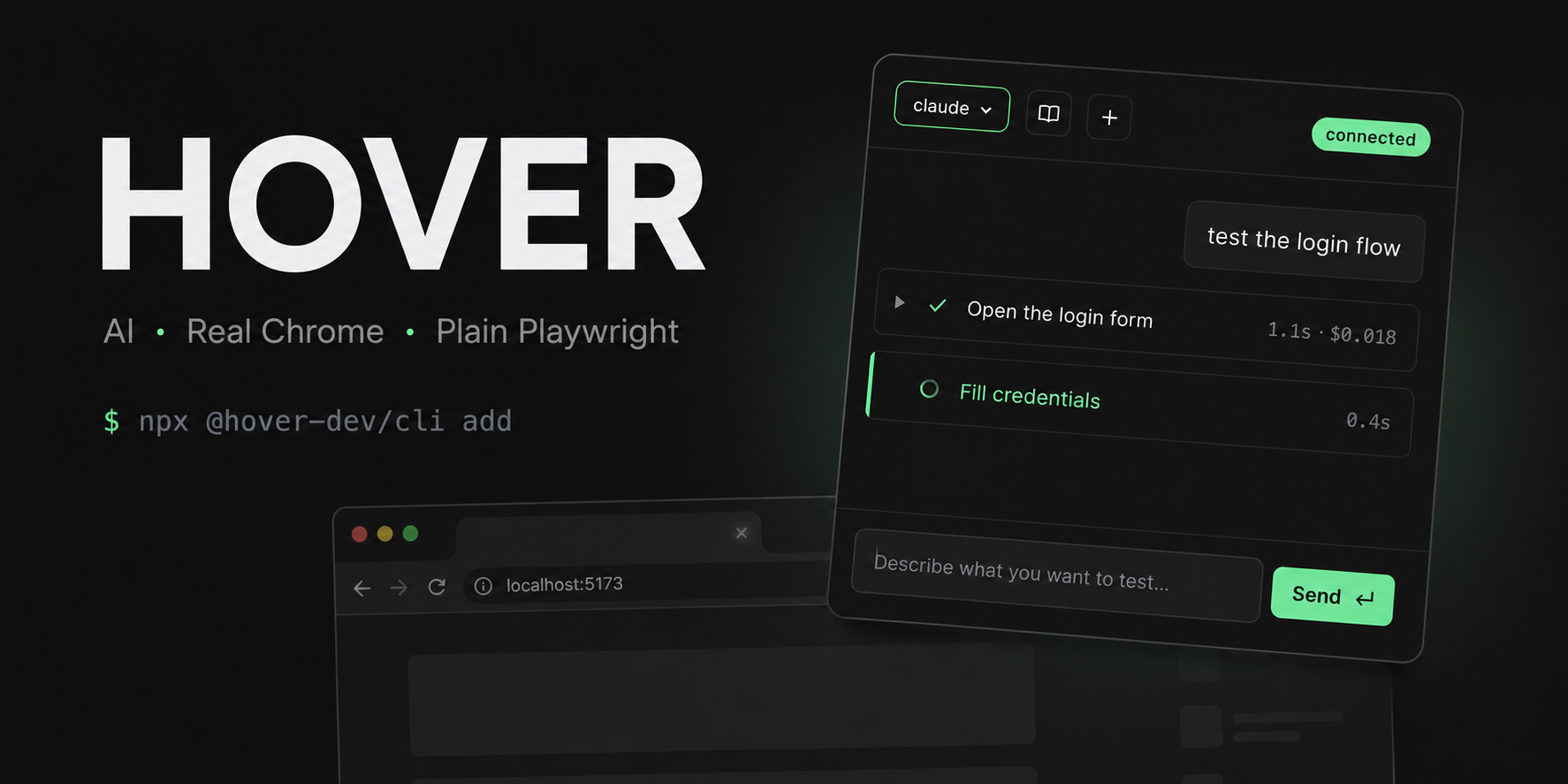






Open the floating chat in your dev page, describe what you want to verify in plain English, watch AI operate your app for real. When the run is clean, click Save as spec — Hover writes a standard @playwright/test file you can run in CI without an agent in the loop, forever.
No API key, no per-token billing. Hover spawns the coding-agent CLI already on your PATH (claude / codex) and rides on the subscription you already pay for.
┌──────────────────────────────────────────────────────────┐
│  type natural language ── AI drives your Chrome via CDP  │
│              │                                           │
│              ▼                                           │
│       browser_click, browser_type, …  (Playwright MCP)   │
│              │                                           │
│              ▼                                           │
│   verified session ── Save as Playwright spec ──┐        │
│                                                 ▼        │
│                       __vibe_tests__/login-flow.spec.ts  │
│                       (plain @playwright/test, no agent) │
└──────────────────────────────────────────────────────────┘
See it in action
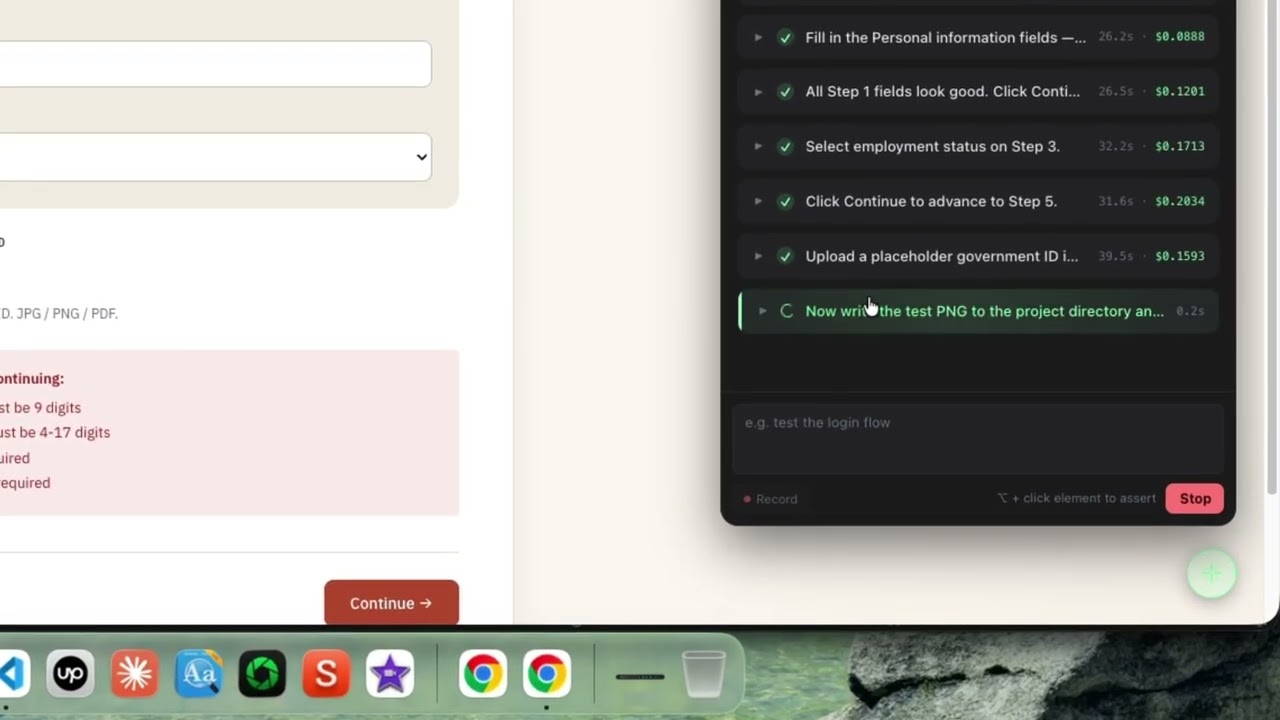
Ten real example apps live under examples/. Four stress different testing surfaces (login, multi-step form, cart checkout, canvas + DOM mix) — the Hover widget is driving each one. The other six exercise bundler / framework coverage (Astro, Nuxt, Next, webpack, React Native Web, plus a deliberately-uninstrumented third-party origin used by the e-commerce popup flow).
Testing surfaces
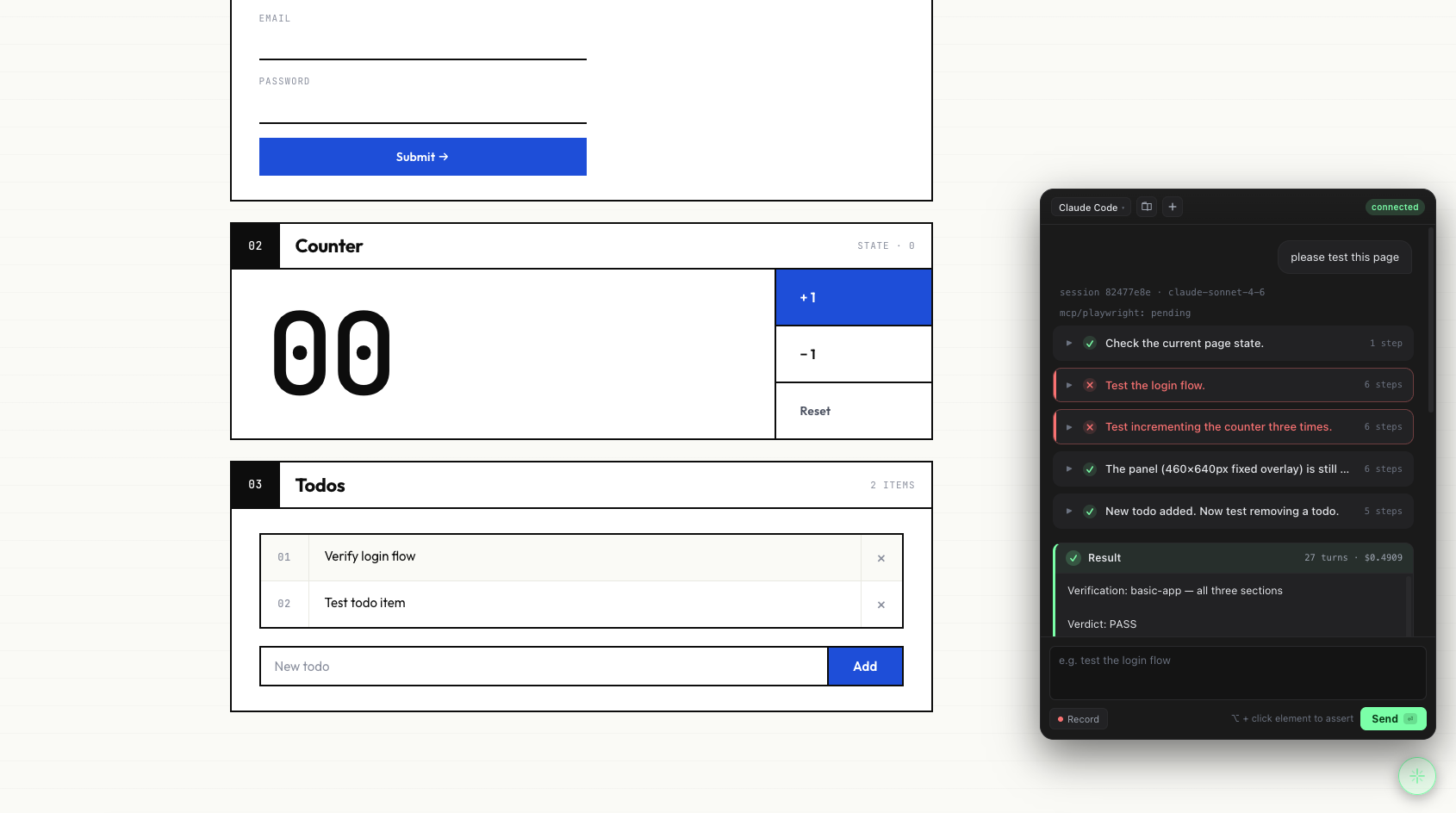 01 · basic-app — the smoke baseline. Login → increment a counter → add a todo. The agent ran the full sequence in 11 turns at $0.16; the result card surfaces both Save as Skill (replayable from the next conversation) and Save as spec (a standard @playwright/test file).
|
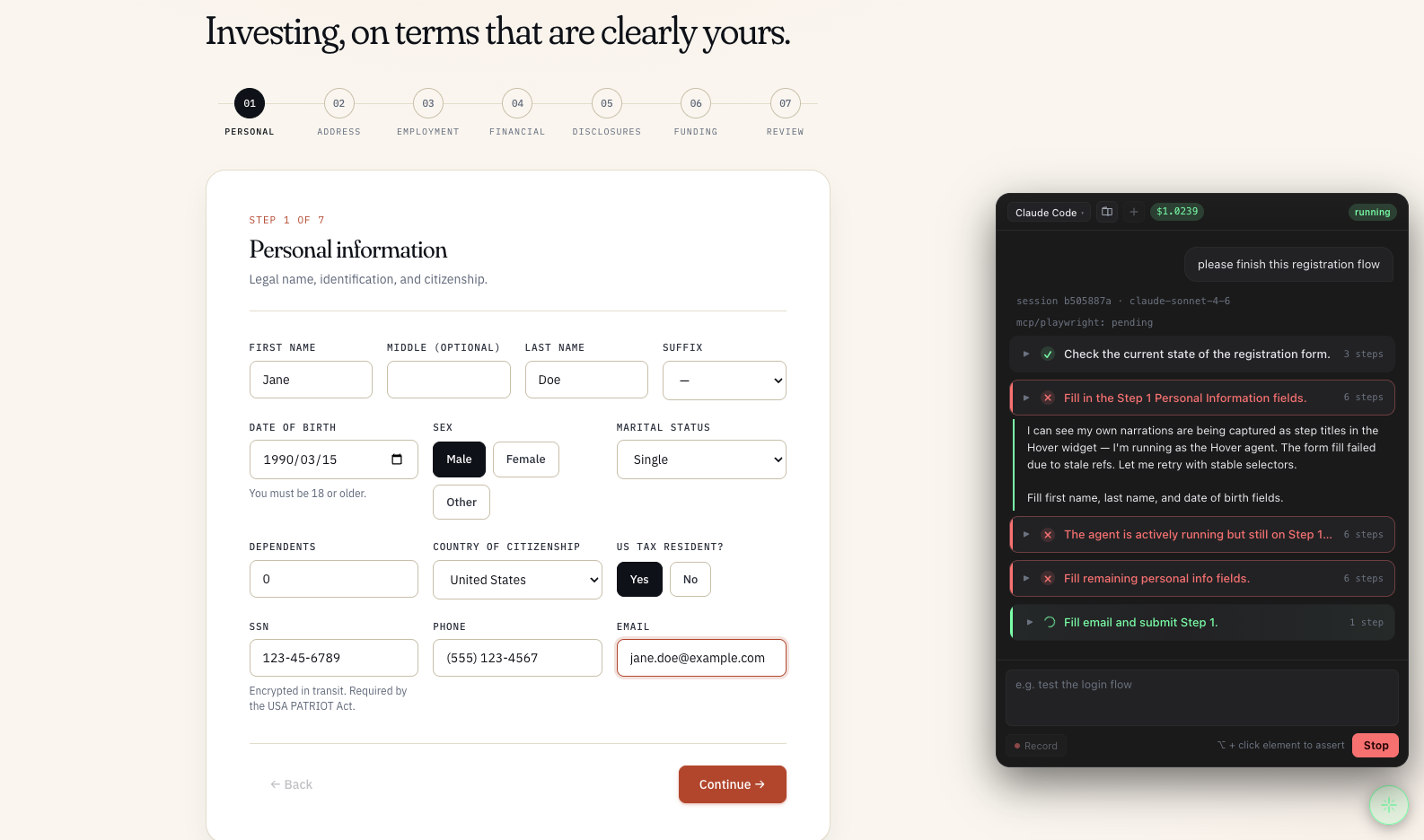 02 · stock-registration — ~50-field broker application with conditional reveals. The agent filled the text fields, then the form's own validator caught three required radio groups (Sex / Marital status / US tax residency). Hover pauses and surfaces a done card explaining why — the human can flip those three radios and re-run.
|
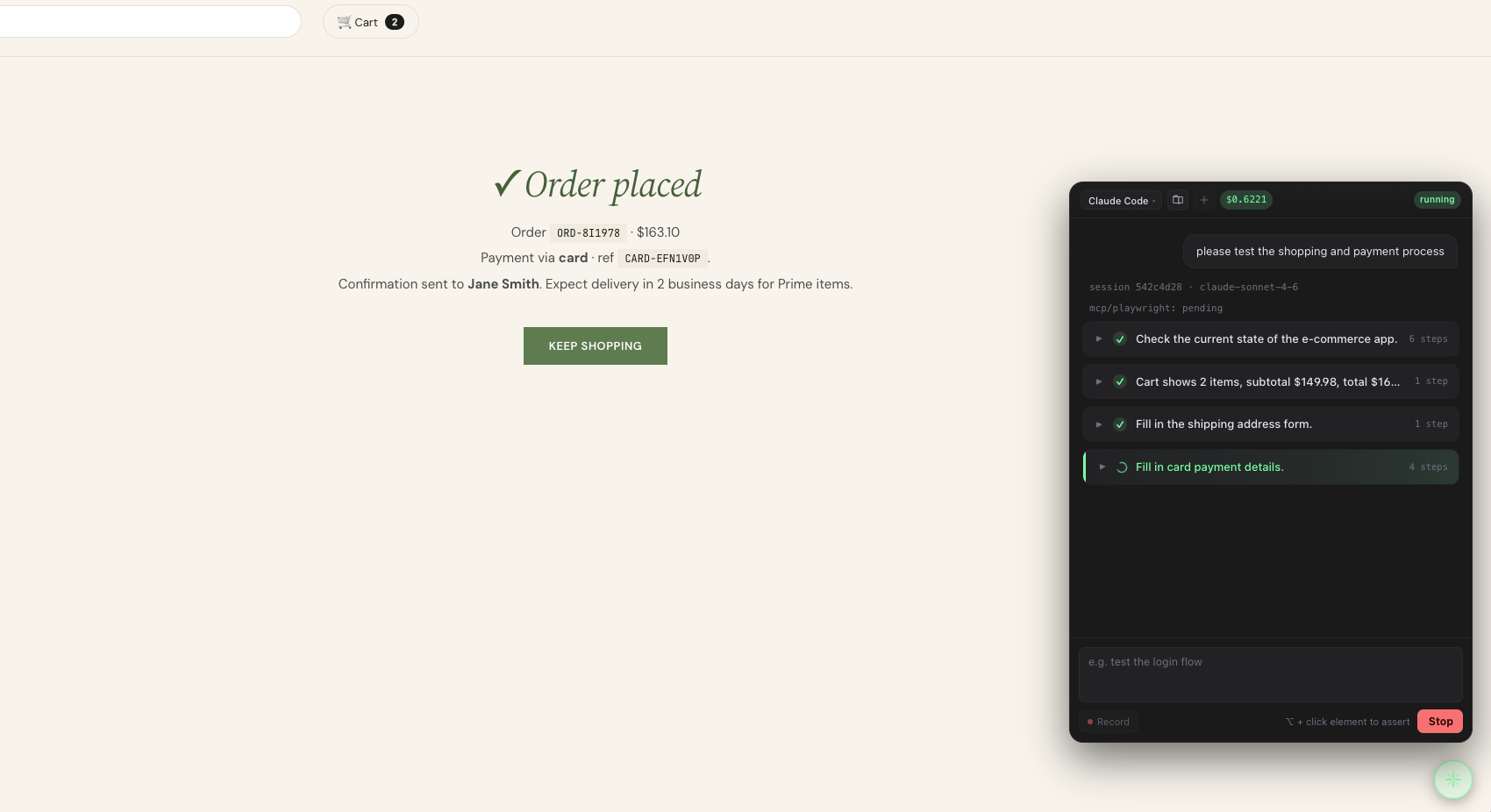 03 · e-commerce — Amazon-style storefront. "Buy two top-rated headphones, ship to my saved address, pay with card." The agent picked the right category, added two items, and walked the cart up to the payment step. Long action chain, real cart state, ready for Save as spec.
|
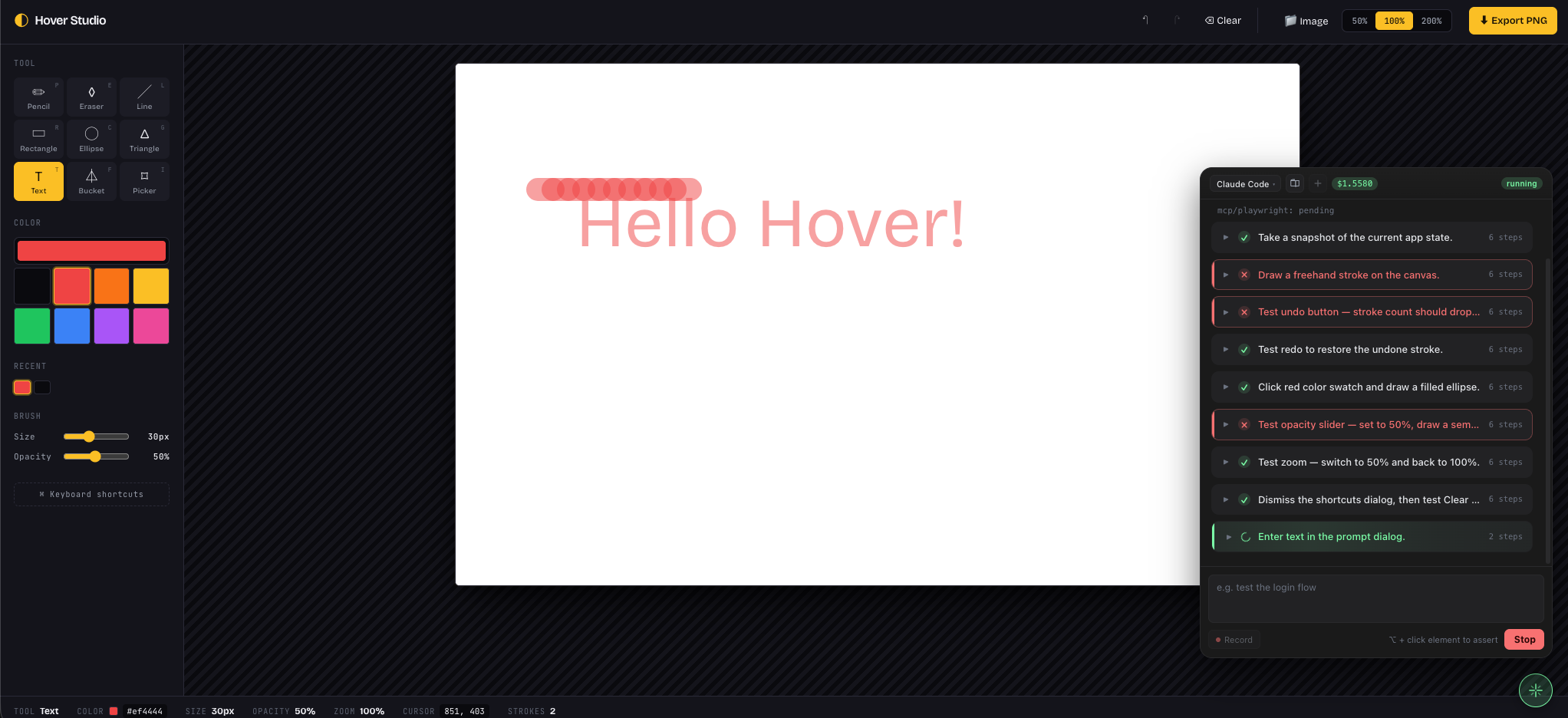 04 · canvas-paint — a drawing app where the artwork is an opaque <canvas>. Snapshots can't read pixel content, but the agent navigates the DOM toolbar (Tool · Color · Brush size · Save) end-to-end — proving Hover's semantic-selector preference holds up when the visual surface itself isn't introspectable.
|
Bundler coverage
Each of the six targets below pairs the same counter + todo smoke page with a different host bundler / framework, so each Hover integration package has a dedicated dogfood ground.
| Example | Bundler / framework | Hover package | Port |
|---|---|---|---|
examples/astro-app |
Astro 5 (static, astro dev) |
@hover-dev/astro |
5178 |
examples/nuxt-app |
Nuxt 4 (SSR, nuxt dev) |
@hover-dev/nuxt |
5179 |
examples/next-app |
Next.js 16 App Router (Turbopack, next dev) |
@hover-dev/next |
5182 |
examples/webpack-app |
vanilla webpack 5 + webpack-dev-server |
webpack-plugin-hover |
5180 |
examples/rn-web-app |
React Native Web (Vite, react-native → react-native-web alias) |
vite-plugin-hover |
5181 |
examples/payment-provider |
Vite, no Hover plugin | n/a | 5177 |
The payment-provider target is deliberately uninstrumented — examples/e-commerce's "Pay with PayHover" button opens it in a new tab, and the agent has to discover, switch to, drive, and confirm callback into the original tab without a widget present.
React Native — only the Web target is supported
Hover targets browser-runnable frontends. React Native (native iOS / Android) is not supported and not on the roadmap — Hover's stack (Chrome DevTools Protocol + Playwright + Shadow-DOM widget) doesn't translate to native mobile, and that space is well served by Maestro, Detox, and Appium. React Native Web projects compile to plain DOM and are fully covered — see examples/rn-web-app for the wire-up (a one-line react-native → react-native-web Vite alias).
Why Hover
Several good tools already exist in this space; Hover is what falls out when you optimise for a different axis — artifact portability.
| Tool | What it does | The trade-off |
|---|---|---|
| Playwright Codegen | Records your clicks → .spec.ts. No AI, no auth |
Can't think — just replays what you did literally |
| Stagehand / Midscene | AI-augmented tests; both ship caches so steady-state CI runs skip the LLM on cache hits. Configure an OpenAI / Anthropic API key — per-token billing on cache misses | Tests still run inside the vendor SDK + a cache file in your repo. Not portable to a plain Playwright runner |
| Hover | AI drives the browser once to explore; saves a deterministic spec, a replayable skill, and a Jira-importable case from the same click. No API key — Hover spawns the coding-agent CLI already on your PATH (claude / codex), so your existing Claude Pro/Max or ChatGPT subscription covers it |
Crystallised spec is brittle to UI changes — when it breaks, re-run the agent (it doesn't self-heal at CI time) |
What Hover is not trying to do: be the better test-time AI runtime. Stagehand's caching + self-healing is more sophisticated than anything we'd build, and Midscene's vision fallback handles canvas / iOS / Android targets we can't touch.
What Hover IS trying to do: make the saved artifact be plain @playwright/test code that runs with npx playwright test on a fresh machine, zero AI deps. The agent's job ends at "save"; CI is pure Playwright. That's the handoff.
One exploration, three audiences
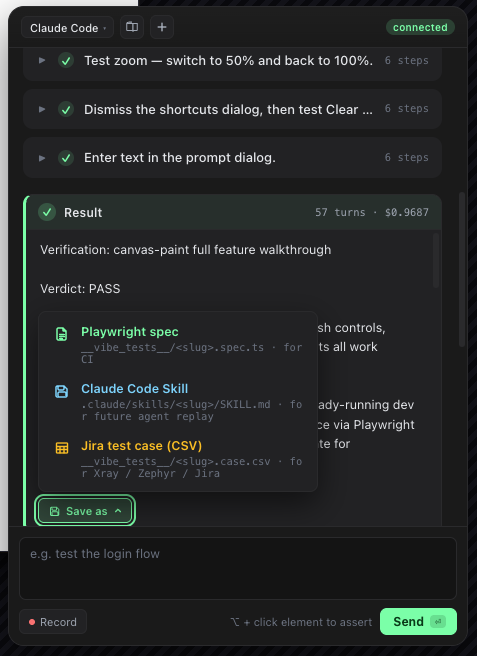
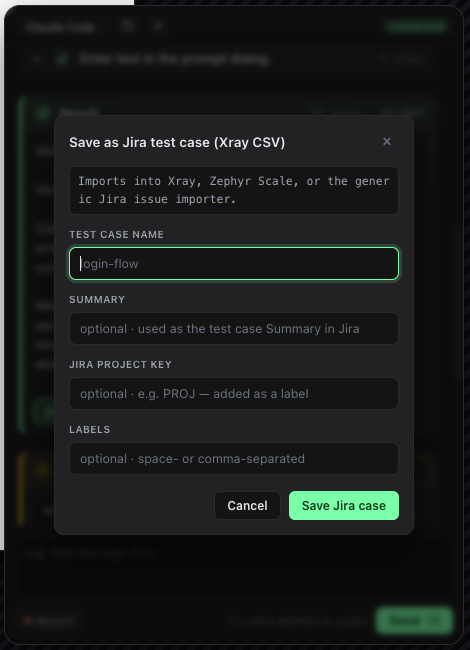
A verified Hover session can crystallize three different ways. A single 💾 Save as ▾ dropdown on the done card opens a menu listing all three; pick one, two, or all three.
- 📜 Save as spec →
__vibe_tests__/<slug>.spec.ts— standard@playwright/testcode withgetByRole / getByLabel / getByTestIdsemantic selectors. Runs in CI, in pre-commit, on a fresh machine. No agent, noclaudebinary, no API key. Ground truth for the flow. The JSDoc header now carries a numbered plain-EnglishSteps:block plus anExpected:block, so QA / PMs can read what the test does without opening Playwright docs. - 💾 Save as Skill →
.claude/skills/<slug>/SKILL.md— a replayable instruction set the agent auto-discovers next time. Type "execute login-as-claude" in any future conversation and the recorded steps run again, in your real browser, using the same Playwright MCP sandbox. Skills are plain Markdown checked into your repo. - 📋 Save as Jira case →
__vibe_tests__/<slug>.case.csv— a multi-row CSV in the Xray Test Case Importer format (Manual Test type, one Action per row, Expected Result on the last row). Drag it into Xray, Zephyr Scale, or the native Jira issue importer and the agent's flow shows up as a real, trackable test case — instantly assignable, linkable to a story / sprint, runnable as a Manual Test session. No copy-pasting steps from a code editor into Jira ever again.
📜 .spec.ts |
💾 SKILL.md |
📋 .case.csv |
|
|---|---|---|---|
| Lands in | __vibe_tests__/ |
.claude/skills/ |
__vibe_tests__/ |
| Read by | Node + Playwright (CI) | Claude Code / agent | Xray · Zephyr Scale · Jira issue importer |
| Audience | CI, devs writing code | Future you, exploring | QA reviewing · PM tracking · auditor signing off |
| Determinism | Hard contract | Best-effort replay | Manual review — human runs and ticks |
| Edit with | Code editor | Markdown editor | Spreadsheet, or the test-mgmt UI after import |
Pick one or pick all three. Spec for CI, Skill for the next exploration, Case for the test team / sprint board — same session, same Save card.
Shareable across the team, not locked into a tool
All three files check into the same git repo as the rest of your code. The moment a frontend developer saves a flow, everyone else can use it — no Hover required, no agent, no token:
- QA / dedicated testers clone the repo and run
pnpm test:e2efor the deterministic specs, or drag the matching.case.csvinto Xray / Zephyr Scale / Jira and run the same flow as a tracked Manual Test session. They don't need to install Hover, configure Chrome, or know what an "agent" is. - Other frontends invoke a saved skill from their own Hover widget — "execute login-as-claude" replays the recorded steps in their own browser session. Skills work best for flows that don't depend on user-specific data or dynamic element IDs — think navigation sequences, form patterns, and UI explorations rather than session-bound state.
- PR review treats every saved spec as plain code — diff-able, blame-able,
requestChanges-able. There's no proprietary file format, no SaaS dashboard, no "the test passed but we can't see how it got there". - Sprint planning / PM tracking —
.case.csvimports into Jira as a real test issue, linkable to a story, assignable to a tester, runnable as a Manual Test session. The Jira board now reflects what your app can do, not just what's planned. - Onboarding is
git clone && pnpm install && pnpm test:e2e. The test suite doubles as living documentation of how every important flow in the app works — new hires watch real browsers walk through real scenarios.
Everything checks into git. Nothing lives in a vendor's database. A spec written on a developer's laptop on Monday is reviewed by QA on Tuesday and runs in CI from Wednesday — same file, no export step.
What you get today
- Vite plugin that injects a Shadow-DOM widget into your dev page. No-op in production. Marked
data-hover="true"so your own Playwright runs can skip it. - No API key, no
.env, no per-token billing. Hover spawns whichever coding-agent CLI is on yourPATHand reuses the subscription you already pay for (Claude Pro / Max, ChatGPT Pro). The@hover-dev/corepackage contains zero LLM SDK code — there's nothing to authenticate against. Get the most out of the agent quota you've already bought. - Multi-agent.
claude(hard sandbox, recommended) andcodex(soft sandbox) are both wired. Service auto-detects which one you have on PATH; the widget header shows the active agent as a pill (claude ▾) with a dropdown to switch on the fly.cursor-agent/aider/gemini-cliare one-file additions to the registry. - Per-agent sandbox policy. Hard-sandbox agents (claude) get an explicit allow/deny list so only Playwright MCP is callable;
Bash,Edit,Write,Read,WebFetch, etc. all explicitly denied;--max-budget-usdceiling supported. Soft-sandbox agents (codex) can't disable their built-in tools at the CLI level, so we use--sandbox read-only+ a strictdeveloper_instructionssystem prompt; the widget marks these with a ⚠ badge so you know the surface is broader. - Widget v2 — info hierarchy that scales. Conversation reads as one row per natural-language intent, not a flood of raw
browser_clickevents. Tool-call detail is folded behind a chevron; the running step gets a mint left bar + spinner. Dark panel, single mint accent, custom inline-SVG icons + theme-matched tooltip — designed to sit unobtrusively over your dev page. - Result & Findings cards. At the end of a run the widget renders the agent's verification report as a dedicated Result card (markdown-stripped, plain text) with the Save-as dropdown attached. If the agent's summary contained a
## Findingsblock — bugs, minor issues, observations — those land in a separate Findings card with severity-coded rows. Bug discovery is a first-class output, not buried in narration. - CDP-attached browser driving. Hover drives a debug Chrome it launches under an isolated profile at
<tmpdir>/hover-chrome, never a fresh headless Chromium. Your main Chrome profile is untouched — log in once inside the debug Chrome and that session persists across Hover commands and dev-server restarts, because the profile dir is reused. - Three crystallisation formats.
- Save as Playwright spec →
__vibe_tests__/<slug>.spec.ts, usesgetByRole / getByLabel / getByTestIdsemantic selectors. JSDoc header carries plain-English Steps + Expected blocks so non-coders can review. - Save as Skill →
.claude/skills/<slug>/SKILL.md, replayable by saying "execute login-as-claude" in a future conversation. - Save as Jira case →
__vibe_tests__/<slug>.case.csv, an Xray-compatible multi-row CSV that imports straight into Jira / Xray / Zephyr Scale as a Manual Test issue.
- Save as Playwright spec →
- Record mode with built-in checks — Toggle Record in the footer, do the flow manually, get the same step sequence as if the agent had driven it. While recording, the sub-toolbar lets you switch what the next click captures:
- ● Record — record the click / fill / select as a Playwright step (default)
- ✓ Exists — check the element appears:
expect(SEL).toBeVisible() - ¶ Says — check the element's text matches:
expect(SEL).toHaveText("…") - = Equals — check an input / select / checkbox's current value
Check modes are one-shot — after the click commits the assertion, you snap back to Record. The same Save card downstream takes everything: actions and checks bake into the same.spec.ts. The downstream save path doesn't care whether the steps came from a human or from Claude.
- Fix prompt button — A separate ⌖ Fix button next to Record. Click it, click any element on the page, type what you'd like to change, and Hover assembles a precise prompt — source
file:line:col, ancestor source chain, React component chain, Playwright selector, outer HTML — onto your clipboard. Paste into Cursor / Claude Code / Windsurf and the agent has exact context. See Fix prompt below. - Voice mode (push-to-talk + spoken progress). Hold the round 🎙 button next to Send, speak your instruction (中文 or English — Hover detects), release to fire. While the agent works, key step events (
Opening page/Clicking …/Done in N steps) get read aloud in the same language you used, so you can keep your eyes on the page under test. Pure browser-native Web Speech API — zero extra API keys, zero service-side changes. Chrome 139+ runs the recogniser on-device (SODA pack). Toggle TTS off from the new ⚙ settings panel. See Voice mode below. - Session persistence + resume. Widget state survives page reload via
localStorage; the next prompt resumes the sameclaude --session-id.
Bug discovery as a first-class output
The agent's verification report and any bugs it finds get their own cards at the end of the run — separate from the step-by-step timeline. The Result card holds the narrative summary (PASS / FAIL + steps the agent took); the Findings card lists every ## Bug / ## Minor / ## Note the agent flagged, severity-coloured.
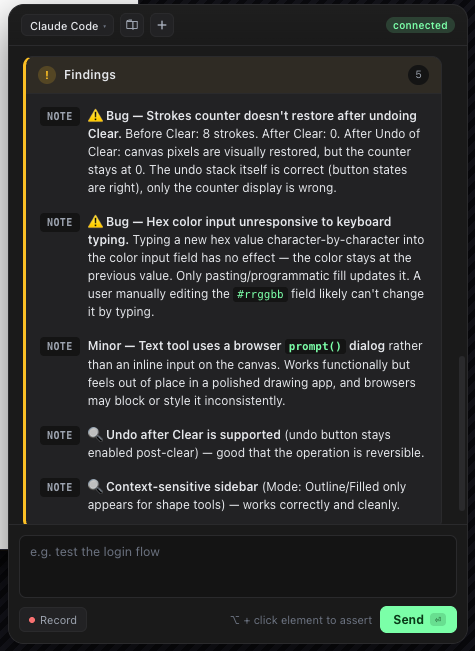
The system prompt teaches the agent to emit this structured block at the end of every run, so QA reading the saved spec can scan the bug list without scrolling through tool calls.
Voice mode
Speak your prompt; hear the agent's progress. Hold the round 🎙 button next to Send (push-to-talk) — the icon switches to a live elapsed-seconds counter and the mint glow pulses while listening. Mid-sentence pauses don't cut you off; the recogniser stays open until you release. Speak Chinese or English — Hover detects the language from your prompt and routes both the TTS playback voice (prefers Siri / Premium / Google over legacy system voices) and the spoken step phrasing to match (打开页面 / 点击登录按钮 / 完成,共 5 步 vs. Opening page / Clicking Submit / Done in 5 steps).
Three knobs worth knowing:
- Push-to-talk only. No always-listening mode — privacy by default, no hot-mic in your dev environment.
- TTS on by default, one click to mute. Open the ⚙ settings panel in the header, flip Speech narration off. In-flight utterances cut immediately. State persists across reloads.
- No cloud round-trip. Both STT and TTS use the browser's built-in Web Speech API. On Chrome 139+ the recogniser installs SODA language packs and runs on-device — audio never leaves your machine. No new API keys, no
.enventries, no service-side changes. Firefox (noSpeechRecognition) sees a disabled mic button with a "use Chrome" tooltip.
Voice playback is filtered, not a fire-hose: only tool_use events that map to a humanised verb (Clicking, Filling form, Switching tab, …) get spoken; browser_snapshot / browser_take_screenshot / read-only diagnostics are deliberately silent so the ear isn't drowned in noise. The Stop button cancels any in-flight utterance the moment you press it.
Pick your agent — claude, codex, or roll your own
The widget header shows the active agent as a pill. Click it for a dropdown of every agent in the registry, marked with what's installed on your PATH and what isn't (with copy-pasteable install hints). Switch on the fly without restarting the dev server.
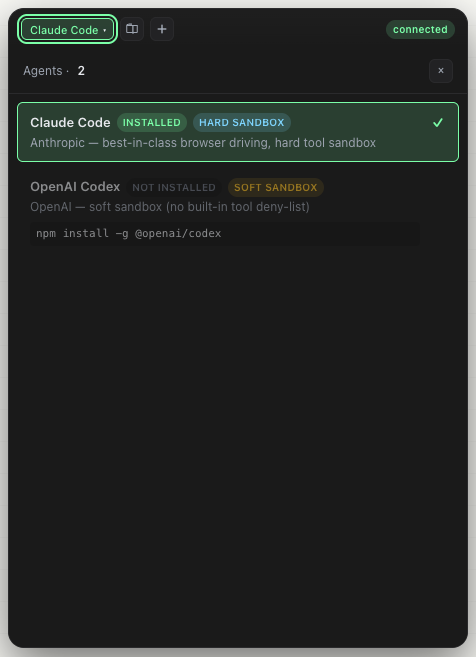
claude is the recommended default (hard sandbox, MCP-only tool surface). codex is wired as the second-class citizen (soft sandbox — codex doesn't expose a built-in-tool deny list at the CLI level, so we lean on its --sandbox read-only flag + a strict developer_instructions prompt). The widget marks soft-sandbox agents with a ⚠ badge so you know the surface is broader.
Adding cursor-agent / aider / gemini-cli / your own coding-agent CLI is one file in packages/core/src/agents/registry.ts.
Fix prompt
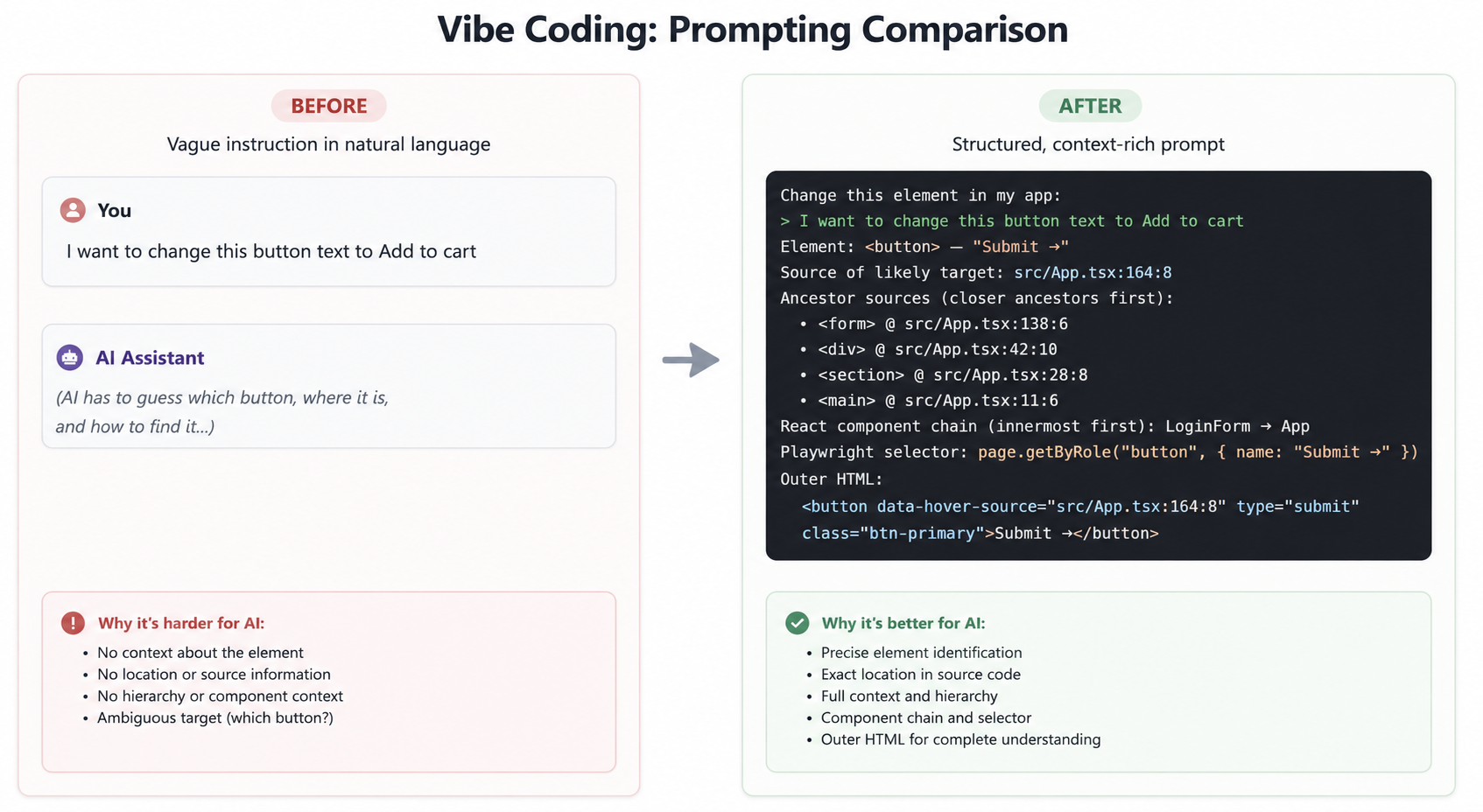
The widget knows the source location of every host element on your page — a Vite transform stamps data-hover-source="file:line:col" onto every <button> / <div> / <input> you authored in JSX. Click the ⌖ Fix button next to Record, click any element, type what you'd like to change, hit ⌘↵, and Hover assembles a precise prompt into your clipboard. Paste it into Cursor / Claude Code / Windsurf and your agent has exact context.
The prompt is fact-only — no leading instructions for the agent to echo back, no "please open the right file" boilerplate. Just your intent (as a markdown blockquote) followed by what Hover observed:
Change this element in my app:

> Make this button red and add a loading spinner on click

Element: <button> — "Add to cart"
Source of likely target: src/components/ShadcnButton.tsx:42:11
Ancestor sources (closer ancestors first):
  • <div> @ src/routes/Cart.tsx:71:6
  • <section> @ src/routes/Cart.tsx:64:4
  • <main> @ src/App.tsx:11:6
React component chain (innermost first): ShadcnButton → CartLineItem → Cart → App
Playwright selector: page.getByRole("button", { name: "Add to cart" })
Outer HTML:
  <button data-hover-source="src/components/ShadcnButton.tsx:42:11" class="btn-primary">Add to cart</button>
Two parts of this matter:
- Likely-target descent — if you click a
<div>wrapping a button, Hover auto-points the prompt at the inner button (it's almost always what you meant). The<div>itself appears as "Clicked" in the prompt so the agent has both anchors. - Ancestor chain catches wrapper-rendered hosts —
<StyledButton>renders a<button>from insidestyled-components' source; Hover's transform can't reach into a library, so the element's own source stamp would point to library internals. But the DOM ancestor chain still carries the user's call site — typically the<div>that wraps<StyledButton>in your component. The agent reads the chain and lands on the right file.examples/basic-app/src/wrapper-lab.tsxexercises five wrapper shapes (bare host, styled-components, className-forwarding, multi-layer nested, Radix Slot/asChild) with measured findings recorded in the file header.
Clicking Fix mid-recording is allowed — Record pauses while the popover is open and resumes automatically when you close it (Submit or Cancel). The Record button is disabled during Fix so you can't accidentally end the paused session; Fix's Submit / Cancel is the only path back.
Quick start
You need two terminals on first run. Once Chrome and Vite are up, they stay running across many loops.
git clone https://github.com/Hyperyond/Hover.git
cd Hover
pnpm install
pnpm --filter basic-app exec playwright install chromium   # for `pnpm test:e2e` only
# Terminal 1 — basic-app on http://localhost:5173. Examples pass
# `autoLaunchChrome: true`, so this ALSO spawns a debug Chrome on port 9222
# (isolated profile under <tmpdir>/hover-chrome) navigated to the dev URL.
pnpm dev:example:basic-app
# Terminal 2 — run the AI smoke loop (CDP preflight → invoke claude → stream events)
pnpm smoke
# or with custom target + prompt:
pnpm smoke http://localhost:5173/ "log in then add a todo named 'verify hover'"
Or just open http://localhost:5173/ in the debug Chrome, click the ✨ floating button, and type into the widget.
Install
One command, zero global installs:
npx @hover-dev/cli add
The CLI detects your bundler (Vite / Astro / Nuxt / Webpack), reads your lockfile to pick the right package manager (pnpm / yarn / bun / npm), installs the matching Hover package as a dev dep, and AST-edits your config file. Idempotent — safe to re-run.
Force a specific bundler if detection picks wrong:
npx @hover-dev/cli add --vite      # vite-plugin-hover
npx @hover-dev/cli add --astro     # @hover-dev/astro
npx @hover-dev/cli add --nuxt      # @hover-dev/nuxt
npx @hover-dev/cli add --webpack   # webpack-plugin-hover
Preview without changing anything: npx @hover-dev/cli add --dry-run.
pnpm add -D vite-plugin-hover     # for Vite projects
# or `@hover-dev/astro`, `@hover-dev/nuxt`, `webpack-plugin-hover`
Then add the plugin/integration to your bundler config — see the per-package READMEs under packages/.
No .npmrc, no auth tokens. All packages are public on npmjs.com.
No .env to fill out either. Hover doesn't ship an LLM SDK; it shells out to whichever coding-agent CLI is on your PATH — claude (install) or codex (install). Whatever you're already logged into covers it.
Then just run your dev server:
pnpm dev
Open your dev URL in any Chrome. The ✨ launcher appears bottom-right and tells you what to do via its colour:
- Blue — you're already in a debug Chrome. Click and chat.
- Amber — no debug Chrome yet. Click and the widget launches one for you (isolated profile under
<tmpdir>/hover-chrome, navigated to your dev URL), then prompts you to switch over. - Gray — a debug Chrome is running, but this window isn't it. Click to bring the right window to the front.
Prefer it to pre-warm Chrome at vite dev? hover({ autoLaunchChrome: true }). Prefer to start Chrome yourself? pnpm exec hover-chrome (or npx hover-chrome).
Use it in a React (Vite) project
// vite.config.ts
import { defineConfig } from 'vite';
import react from '@vitejs/plugin-react';
import { hover } from 'vite-plugin-hover';

export default defineConfig({
  plugins: [
    react(),
    hover(),                 // 👈 add this line
  ],
});
That's the whole integration. vite dev as usual; open your app; click ✨. The launcher colour tells you what (if anything) it needs from you.
Verified specs that you save via the widget land in
__vibe_tests__/at your project root. Run them withnpx playwright test. They import only@playwright/testand have no runtime dependency on Hover — so CI can run them with the widget completely disabled.
Use it in a Vue (Vite) project
// vite.config.ts
import { defineConfig } from 'vite';
import vue from '@vitejs/plugin-vue';
import { hover } from 'vite-plugin-hover';

export default defineConfig({
  plugins: [
    vue(),
    hover(),                 // 👈 add this line
  ],
});
Same flow. Vite dev server → debug Chrome → ✨.
Works the same in Svelte / Solid / Qwik / vanilla — anything whose Vite dev server actually runs user Vite plugins'
transformIndexHtml. The plugin is framework-agnostic at that layer.Astro has its own HTML pipeline that bypasses
transformIndexHtmlon.astropages — use the@hover-dev/astrointegration instead, which wraps the same service + widget bundle behind Astro'sinjectScriptAPI.Nuxt renders HTML through Nitro, not Vite, so
transformIndexHtmlis a no-op for Nuxt's SSR responses — use the@hover-dev/nuxtmodule, which pushes the widget intonuxt.options.app.head.script(Nitro inlines it into the SSR'd HTML).Webpack-based projects (vanilla
webpack-dev-server, Rspack, Rsbuild, legacy CRA viacraco, legacy Vue CLI viaconfigureWebpack) — usewebpack-plugin-hover, which tapsHtmlWebpackPlugin'salterAssetTagGroupshook.Next.js ships Turbopack as the default bundler since Next 16 and Turbopack does not load webpack plugins. Users on
next dev --webpackcan wirewebpack-plugin-hovermanually (see the package README). A Turbopack-native@hover-dev/nextis on the roadmap.
Plugin options
hover({
  port: 51789,             // local WebSocket port; auto-bumps if taken
  enabled: true,           // false to disable (default: only in dev mode)
  chromeDebugPort: 9222,
  agentId: 'claude',       // matches @hover-dev/core's agent registry
  model: 'sonnet',         // 'opus' costs ~5× — use sonnet for browser driving
  maxBudgetUsd: undefined, // hard $ ceiling per agent invocation; no default — use Stop in the widget
  sourceAttribution: true, // stamps data-hover-source="file:line:col" on host JSX elements;
                           // dev-only — set false to disable if another tool conflicts
});
The ten example apps
Each one is a real, runnable app under examples/ — together they cover both testing surfaces and bundler/framework integrations:
| App | Port | Stresses |
|---|---|---|
| basic-app | 5173 | Login + counter + todos. Baseline smoke · Vite + React |
| e-commerce | 5174 | Long action chains: product list → cart → checkout, cross-tab payment popup · Vite + React |
| stock-registration | 5175 | ~50-field brokerage form with conditional reveals — AI form-fill on rich controls · Vite + React |
| canvas-paint | 5176 | DOM toolbar amidst <canvas> pixels — semantic selectors when snapshots are opaque · Vite + React |
| payment-provider | 5177 | Deliberately no Hover plugin — simulates a third-party origin in cross-tab flows · Vite |
| astro-app | 5178 | Astro 5 static smoke page — verifies @hover-dev/astro via injectScript |
| nuxt-app | 5179 | Nuxt 4 SSR smoke page — verifies @hover-dev/nuxt via app.head.script |
| next-app | 5182 | Next.js 16 App Router smoke page (Turbopack default) — verifies @hover-dev/next via withHover + instrumentation.ts + <HoverScript /> |
| webpack-app | 5180 | Vanilla webpack 5 + webpack-dev-server, plain JS no React — verifies webpack-plugin-hover via alterAssetTagGroups |
| rn-web-app | 5181 | React Native Web — react-native imports aliased to react-native-web, compiled to DOM via Vite. Demonstrates RN Web is in scope (RN native is not) |
Run any of them with pnpm dev:example:<name>.
How it works
┌────────────────┐   chat (WebSocket)   ┌──────────────────┐
│  Widget        │ ───────────────────▶ │  @hover/core     │
│  (Shadow DOM,  │ ◀─────────────────── │  Node service    │
│   in dev page) │   step events        │  (127.0.0.1)     │
└────────────────┘                      └────────┬─────────┘
                                                 │ spawn
                                                 ▼
                                        ┌──────────────────┐
                                        │  claude (CLI)    │
                                        │  --strict-mcp,   │
                                        │  --allowedTools  │
                                        │  mcp__playwright │
                                        └────────┬─────────┘
                                                 │ MCP
                                                 ▼
                                        ┌──────────────────┐
                                        │  Playwright MCP  │
                                        └────────┬─────────┘
                                                 │ CDP (port 9222)
                                                 ▼
                                        ┌──────────────────┐
                                        │  Your Chrome     │
                                        │  (existing tab)  │
                                        └──────────────────┘
Architecture and boundary constraints live in CLAUDE.md. Per-package internals in packages/core/README.md.
Built on the shoulders of
nexu-io/open-design— the Local CLI Agent First architecture. Hover doesn't bundle any AI runtime; itPATH-scans for whatever coding-agent CLI the developer already has installed (claude, today) and treats it as a sidecar. The "local daemon as the only privileged process, agent-as-teammate" worldview, the strict-sandbox-by-default posture, and the per-invocation USD budget cap are all direct inspirations. Open Design proved the loop end-to-end for a design surface; Hover applies it to a testing surface, with the deterministic Playwright spec as the artifact instead of an HTML/PDF.- Playwright Codegen — the deterministic spec is the artifact posture. AI authors are fashionable; AI runtime in CI is a recurring mistake. Hover keeps the artifact deterministic so CI never has to talk to a model.
- Stagehand and Midscene — proved that an LLM can usefully drive a real browser at test time. Hover takes the same loop and shortens it: agent drives the browser once during authoring, then steps out.
If your favourite agent (codex, cursor-agent, aider, gemini, qwen-code, …) isn't yet supported, it's a one-file addition in packages/core/src/agents/registry.ts — PRs warmly welcome.
Roadmap
- v0.0.1-poc — Phase 0 — end-to-end feasibility (
claude -pdrives Chrome via CDP) ✓ - v0.1.x — Phase 1 — Vite plugin + chat UI + persistent service + Save as Spec ✓
- v0.2.x — Phase 2 — multi-agent (claude + codex), dark widget v2, Result + Findings cards, custom tooltip, code-quality pass ✓
- v0.3.x —
@hover-dev/next— Next.js 16+ Turbopack-native integration ✓. Three pieces —withHover(nextConfig, opts)wrapper fornext.config.mjs, a<HoverScript />Server Component forapp/layout.tsx, and aregister()helper forinstrumentation.ts. The existingwebpack-plugin-hoveronly coversnext dev --webpack; this package is the Turbopack-native path.npx @hover-dev/cli addroutes Next projects here automatically. - v0.4.x — Click → Suggest fix prompt. ✓ Independent footer Fix button + element picker + intent popover + clipboard handoff. A Vite transform stamps
data-hover-source="file:line:col"on every host JSX element (React 19 compatible — runsenforce: 'pre'so it sees JSX before@vitejs/plugin-reactcollapses it). The picker walks the DOM ancestor chain to catch wrapper-rendered hosts (styled-components, className-forwarding, multi-layer nested, Radix Slot/asChild — all five shapes verified againstexamples/basic-app/src/wrapper-lab.tsx). React component chain comes from_debugOwner. Vue / Svelte source-attribution is planned but not yet shipped. - v0.5.x — Merged Record + Assert workflow + AI-compiled spec output. Three stages:
- A ✓ — Record mode now contains a sub-toolbar with four modes:
● Record / ✓ Exists / ¶ Says / = Equals. Check sub-modes are one-shot and follow Playwright codegen's pattern. The hidden⌥click=assertchord is gone — Record and Fix coexist via pause-insert-resume: clicking Fix mid-recording pauses capture, and recording resumes automatically when the Fix popover closes. - B planned — Record steps will carry the same source-attribution metadata as the Fix prompt (own
data-hover-source+ ancestor chain +_debugOwnerchain), feeding C. - C planned —
writeSpec.tsrewritten to call your local CLI agent (claude / codex) to AI-compilestate.messages+state.assertionsinto a polished.spec.ts, falling back to the existing deterministictranslateStepcodegen on failure. Outputs are still standard@playwright/testfiles; the AI is an authoring-time aid, not a CI dependency.
- A ✓ — Record mode now contains a sub-toolbar with four modes:
- v0.6.x — Voice mode ✓. Push-to-talk speech input + spoken progress narration, fully browser-native (Web Speech API). 中文 / English autodetect across STT, TTS phrasing, and voice picker (prefers Siri / Premium / Google over legacy system voices). Chrome 139+ runs the recogniser on-device via SODA. Settings panel (⚙ in the header) lets the user mute narration; state persists across reloads. Zero service-side change — STT text feeds the existing
{type:'command'}WS message, TTS reads off the existing{type:'event'}downstream. (you are here) - v0.7.x — multi-tab / cross-origin + more agents + Chrome extension.
- Multi-tab / cross-origin flows (Stripe, OAuth, "Pay with PayHover") —
examples/payment-provideralready stresses thewindow.open→postMessagepath, but the agent's handling ofbrowser_tabs(list/select)is brittle in the wild. - More agents wired into the registry —
cursor-agent/aider/gemini-cli/qwen-code. - Chrome extension (drops the Vite-plugin dependency for non-Vite stacks).
- Multi-tab / cross-origin flows (Stripe, OAuth, "Pay with PayHover") —
v0.6.x is what you can use today.
Project status
🟢 v0.6.0 shipped. Dogfood-ready across all six host bundlers: Vite, Astro, Nuxt, Next.js (Turbopack), webpack 5, and React Native Web. v0.4–0.5 brought the Playwright-codegen-style sub-toolbar (Record / Exists / Says / Equals), a dedicated Fix prompt button (Fix enterable mid-recording — pauses capture, auto-resumes on close), and the Vite source-attribution transform. v0.6 adds Voice mode: push-to-talk STT + spoken step narration via the browser-native Web Speech API, 中文 / English autodetect, on-device on Chrome 139+, with a new ⚙ settings panel to mute.
Tracking issues at github.com/Hyperyond/Hover/issues.
Contributing
See CONTRIBUTING.md. TL;DR:
- Node 22+ / pnpm 10+
- Conventional Commits (enforced by
commit-msghook) pnpm typecheck && pnpm testbefore pushing- Keep
mainrunnable — speculative work onexperiment/<name>branches
License
Apache-2.0 © Hyperyond
Yorumlar (0)
Yorum birakmak icin giris yap.
Yorum birakSonuc bulunamadi