orchbee
Health Uyari
- License — License: MIT
- Description — Repository has a description
- Active repo — Last push 0 days ago
- Low visibility — Only 8 GitHub stars
Code Basarisiz
- process.env — Environment variable access in apps/desktop/rsbuild.config.ts
- exec() — Shell command execution in apps/desktop/scripts/mac-disk-image.mjs
- exec() — Shell command execution in apps/desktop/scripts/package.mjs
- process.env — Environment variable access in apps/desktop/scripts/package.mjs
Permissions Gecti
- Permissions — No dangerous permissions requested
Bu listing icin henuz AI raporu yok.
A modern, multiplexed terminal for running and orchestrating AI agents.

Orchbee
A modern, multiplexed terminal for running and orchestrating AI agents.
Sessions persist in the background and remain accessible from the terminal, the desktop, and the command line simultaneously, giving people and agents a shared environment to work in.


Features · Install · Tech Stack · Community
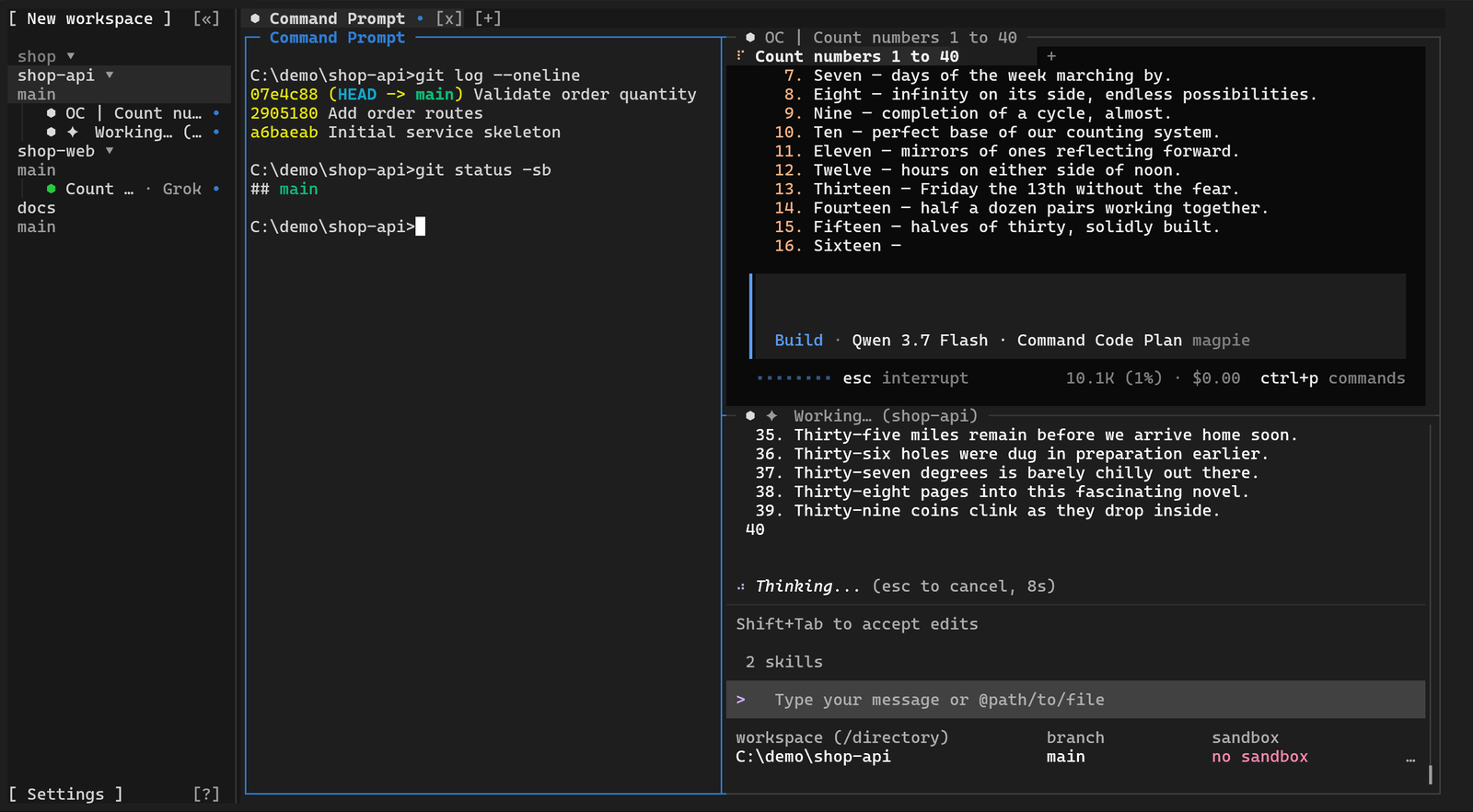
Orchbee is a modern terminal built for the age of AI agents. It is a complete terminal first, built on the core of Ghostty, and everything else is built around it.
Its core is multiplexing. A conventional terminal session ends when its window closes. An Orchbee Session persists in the background and can be attached from several clients at once: the terminal interface, the desktop application, and the command line present and control the same Session in real time.
This makes Orchbee a shared environment for people and agents. Every operation available to a person is equally available to an agent through the orchbee command line. CLI agents such as Claude Code, Codex, OpenCode, and Pi run unchanged and gain a capability they lack on their own: the ability to work together.
Orchbee recognizes more than 30 agent CLIs, presents the status of each at a glance, and organizes work by project in the sidebar.
The name combines orchestrator with bee—independent workers coordinating as one.
[!NOTE]
Orchbee does not replace your existing CLI agents; it provides the terminal environment in which they can work together. It shifts your role from human-in-the-loop to human-on-the-loop: instead of driving every step, you supervise the system and step in when needed.
Features
High-Performance Terminal
Terminal emulation runs in a lightweight native process built on the core of Ghostty. The terminal interface and the desktop application receive the finished screen from that process and only draw it. The desktop application renders with WebGPU, with a Canvas 2D fallback.
Multiplexed Sessions
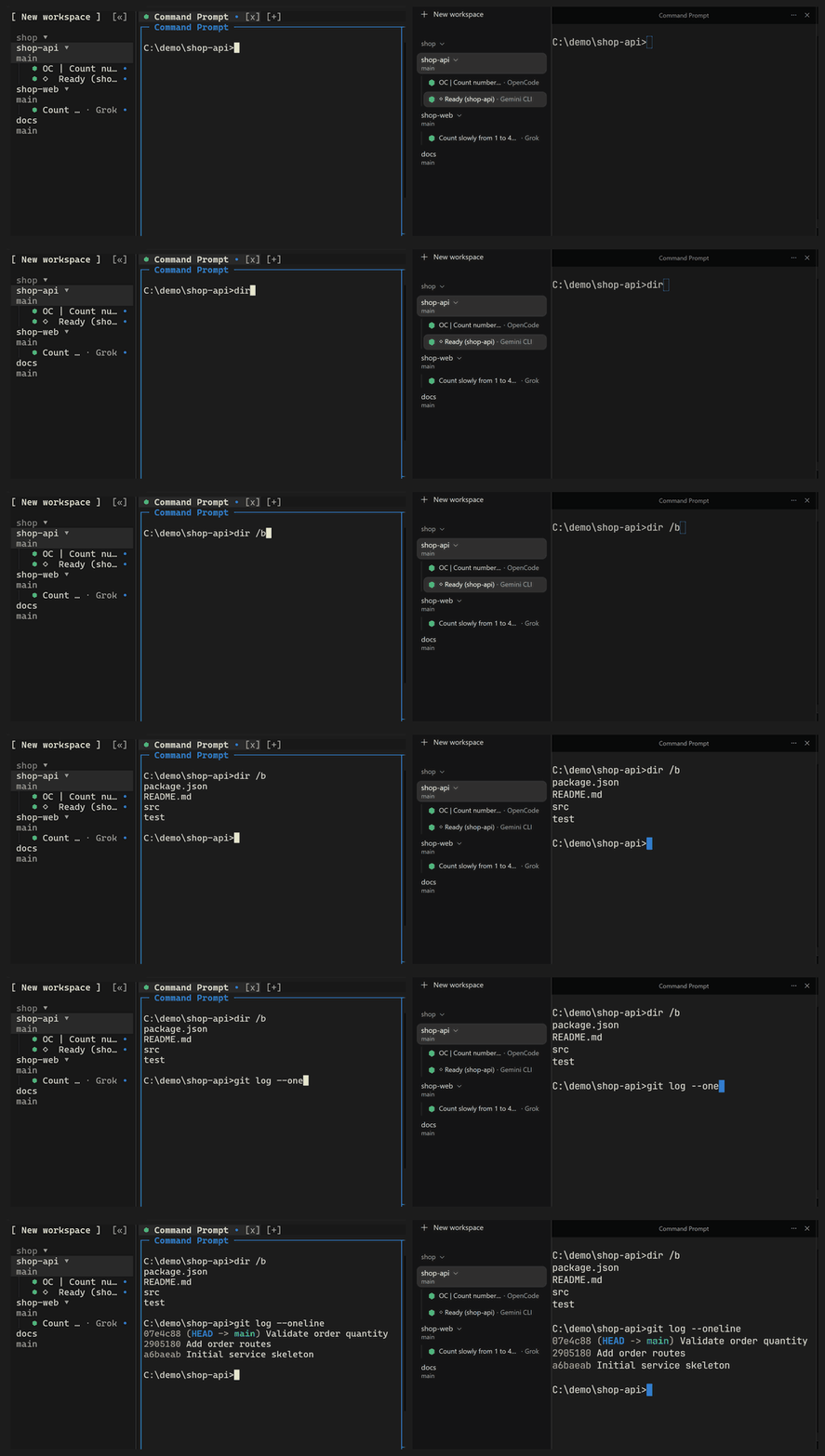
A Session keeps running in the background after its window is closed, along with the shells and agents in it. The terminal interface, the desktop application, and the command line can attach to the same Session at the same time, and input from one is visible in the others.
Agent-to-Agent Collaboration
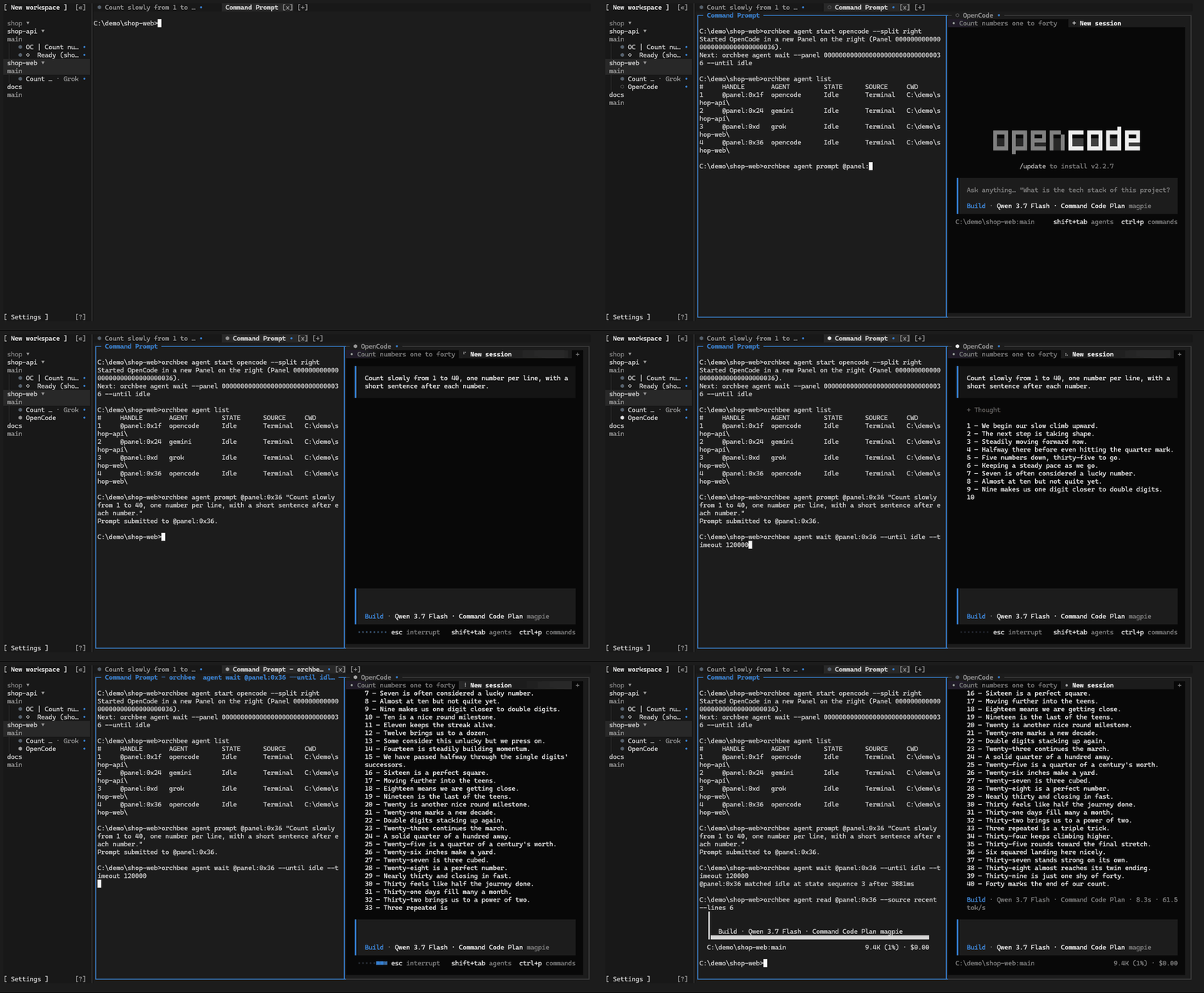
Stop managing agents one terminal at a time. Agents can prompt and spawn other agents, read each other's output, send commands across terminals, delegate tasks, and coordinate work—while you stay in control from one place.
Each step is one orchbee command:
orchbee agent start codex --split right
orchbee agent list
orchbee agent prompt @panel:0x36 "Review the current changes"
orchbee agent wait @panel:0x36 --until idle --timeout 120000
orchbee agent read @panel:0x36 --source recent --lines 40
orchbee agent list prints the handle of each agent, such as @panel:0x36.
Agent Status and Organization
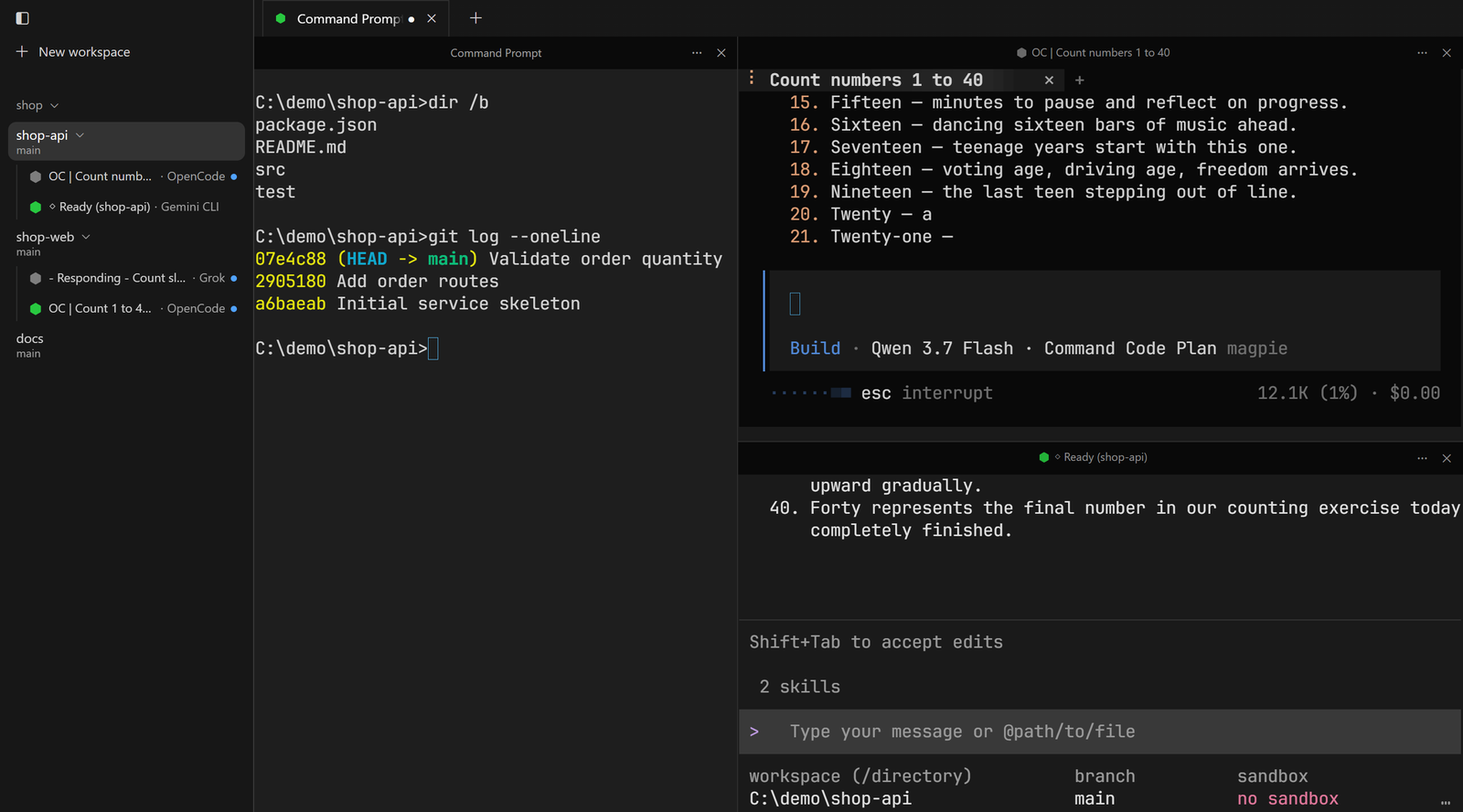
Orchbee recognizes more than 30 agent CLIs without any setup and shows the state of each one: working, needs attention, or done. The sidebar lists every agent across all projects and organizes work by project, Workspace, and Git worktree.
Remote Machines
When local resources are not enough, other computers can be added over SSH to extend the compute and execution environments available to agents. Remote machines act as an extension of the local machine, and agents use them without changing their workflow. This feature is in development and is planned for the first release.
Install
[!IMPORTANT]
Orchbee is in beta. It runs on Windows 11 (x86_64) and on macOS 13 or later (Apple silicon and
Intel); Linux builds are in progress.
Windows: desktop app, terminal and CLI
Download Orchbee-<version>-windows-x86_64-setup.exe from the
releases page and run it.
- Installs for the current user only; no administrator rights needed.
- Adds the
orchbeecommand to yourPath. Open a new terminal to use it. - The installer is not code-signed yet, so Windows SmartScreen may ask you to confirm.
macOS: desktop app, terminal and CLI
Install from a terminal:
curl -fsSL https://orchbee.com/install.sh | sh                  # terminal interface and CLI
curl -fsSL https://orchbee.com/install.sh | sh -s -- --desktop  # the desktop app as well
The desktop app goes into
/Applicationswhen you can write to it, otherwise into~/Applications.The command is linked at
~/.local/bin/orchbee. When yourPATHlacks that folder, as zsh's does
on a new Mac, the installer prints the line to add to~/.zshrc. Add it and open a new terminal:export PATH="$HOME/.local/bin:$PATH"
Or download the disk image from the
releases page:Orchbee-<version>-macos-aarch64.dmg for Apple silicon, Orchbee-<version>-macos-x86_64.dmg for
Intel. Open it and drag Orchbee to Applications.
- The app is not notarized by Apple yet, so macOS blocks the first open of a browser download. Click
Done, then Open Anyway in System Settings › Privacy & Security; the
website has the steps. The terminal install skips this. - Terminals inside Orchbee find
orchbee; for other terminals, run the first command above.
Known limits on macOS:
- Intel Macs are tested in CI only.
- Remembered SSH passwords: macOS asks again for Keychain access after each update, until Orchbee is
signed. - Images show in terminals that speak the Kitty graphics protocol, such as Ghostty and kitty; iTerm2
and Terminal.app show a coarser cell picture.
Terminal and CLI only
npm install -g orchbee@next
Requires Node.js 22 or later. This installs the terminal interface and the CLI, without the desktop app.
Start
orchbee # open the terminal interface
Or open Orchbee from the Start menu on Windows, or from Applications on macOS.
Update
orchbee update
Installs the newest version beside the one you have. Running terminals and Agents are not
interrupted: they keep the old version until they are restarted. Open Orchbee again to use the new
one. The desktop app also offers Update when a newer version is ready. Version 0.1.0-beta.1 has
no update command, so from it install the next version once by hand, with the installer or npm as
above.
Uninstall
On Windows, remove Orchbee from Settings › Apps, or run orchbee uninstall. On macOS, runorchbee uninstall, then move Orchbee from Applications to the Trash. For an npm install, runorchbee uninstall and then npm rm -g orchbee. Your data in ~/.orchbee is kept; add--delete-data to remove it too.
Prerequisites: Windows 11, Git, Node.js >=22, Corepack, Rust 1.97.0 through rustup, Zig 0.16.0
git clone https://github.com/i-need-token/orchbee.git
cd orchbee
corepack enable
pnpm install
Start the desktop application:
pnpm desktop
Build the terminal interface into a folder, then run the program that the command prints:
node scripts/stage-local-runtime.mjs --output "$env:LOCALAPPDATA\OrchbeeNative"
Tech Stack
- Rust — terminal interface, command line, and background services
- Zig — native terminal process
- Ghostty VT — terminal emulation
- Electron — desktop application shell
- React — desktop interface
- TypeScript — desktop application and shared package code
- WebGPU — GPU-accelerated terminal rendering
- Node.js — repository tooling
Community
- GitHub Issues — bug reports and feature requests
- Security Policy — private vulnerability reporting
License
MIT. Third-party components are listed in THIRD_PARTY_NOTICES.md.
Yorumlar (0)
Yorum birakmak icin giris yap.
Yorum birakSonuc bulunamadi