Herald-OS
Health Warn
- License — License: MIT
- Description — Repository has a description
- Active repo — Last push 0 days ago
- Low visibility — Only 6 GitHub stars
Code Fail
- fs.rmSync — Destructive file system operation in apps/desktop/electron/backend/bridge-plugin.test.ts
- process.env — Environment variable access in apps/desktop/electron/backend/bridge-plugin.test.ts
- fs.rmSync — Destructive file system operation in apps/desktop/electron/backend/bridge-plugin.ts
- process.env — Environment variable access in apps/desktop/electron/backend/bridge-plugin.ts
- os.homedir — User home directory access in apps/desktop/electron/backend/coexist.ts
- process.env — Environment variable access in apps/desktop/electron/backend/coexist.ts
Permissions Pass
- Permissions — No dangerous permissions requested
No AI report is available for this listing yet.
An agent-native operating system, with Hermes Agent as the interface. Independent project, not affiliated with Nous Research.
Herald OS
An agent-native operating system, with Hermes Agent as the interface.


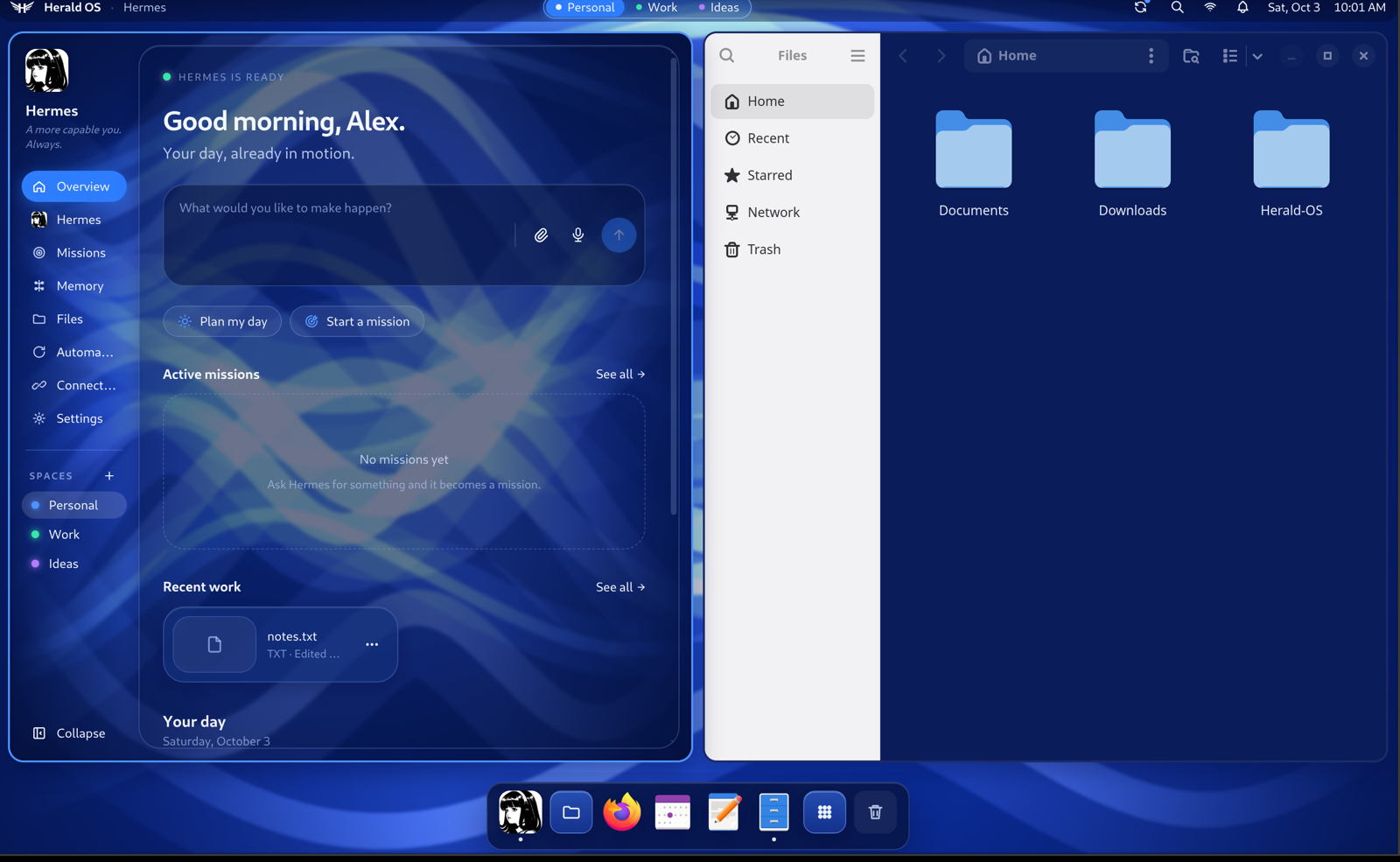
Herald OS is an operating system built around an AI agent. Instead of working through menus and
folders yourself, you talk or type to Hermes, and it works across the whole machine: it opens apps,
finds and organises files, watches what is running, remembers what matters to you, runs routines on
a schedule, and builds software while you watch. Every action that changes something goes through a
permission system you control.
[!NOTE]
Herald OS is an independent project by Luke The Dev. It is
not an official Hermes or Nous Research product, and it is not affiliated with, sponsored by or
endorsed by Nous Research. Herald OS runs on Hermes Agent,
the open-source agent Nous Research publishes, which is installed alongside it.
Status: alpha (0.1). Expect rough edges, and keep backups of anything you let an agent
touch.
Install
Every download is on the releases page.
Pick the way that matches your machine:
| Your machine | What to install |
|---|---|
| A Mac with Apple Silicon | Herald OS for macOS |
| A PC you can give to Herald OS | The Herald OS Linux installer |
| Arch Linux | The Arch package |
| Omarchy | The Arch package, then one command |
| Another Linux | The tarball |
| An Apple Silicon Mac, to try the whole OS | The virtual machine |
Hermes needs a model provider whichever you pick: a Nous Portal
account, or an API key for a provider Hermes supports (OpenRouter, OpenAI, Anthropic, a local model,
and others). Herald OS shows a sign-in card the first time Hermes needs one.
macOS
You need macOS 13 (Ventura) or later on Apple Silicon.
1. Install Hermes Agent and choose a model, if you don't have it yet:
curl -fsSL https://hermes-agent.nousresearch.com/install.sh | bash
source ~/.zshrc
hermes setup
2. Install Herald OS. Download HeraldOS-<version>-mac-arm64.dmg from the
releases page, open it and drag Herald OS to
Applications.
3. Let it open. This build is not notarized by Apple yet, so macOS stops it the first time.
Run this once, then open Herald OS from Applications:
xattr -dr com.apple.quarantine "/Applications/Herald OS.app"
Herald OS takes over the screen: Cmd+Ctrl+F leaves or re-enters fullscreen and Cmd+Q quits. On
its first start it adds its system tools to Hermes (~/.hermes/plugins/herald-os-bridge). macOS asks
for Screen Recording, Accessibility or Microphone access the first time a feature needs it: asking
about the screen, typing an emoji into another app, or talking to Hermes.
Herald OS Linux on a PC
The whole operating system, for a 64-bit Intel or AMD PC: Fedora underneath, everything you see is
Herald.
Download both parts of the installer from the
releases page,herald-os-<version>-x86_64.iso.part0and.part1(GitHub takes files of up to 2 GB), and join
them. On macOS or Linux:cat herald-os-<version>-x86_64.iso.part* > herald-os-<version>-x86_64.iso shasum -a 256 -c herald-os-<version>-x86_64.iso.sha256 # sha256sum -c on LinuxOn Windows:
copy /b herald-os-<version>-x86_64.iso.part0 + herald-os-<version>-x86_64.iso.part1 herald-os-<version>-x86_64.iso.Write the ISO to a USB stick of 8 GB or more with
Fedora Media Writer or
balenaEtcher.Start the PC from the stick and follow the installer. Its disk screen lets you erase the disk or
install next to Windows, and encrypt it. Secure Boot can stay on.The first start sets up Hermes Agent, then Herald OS asks for your name, a password and Wi-Fi.
Updates come as a whole new version of the system: herald-os update installs one, andherald-os rollback goes back to the one before. Already on Fedora Silverblue or another bootc
system? docs/LINUX.md covers switching it to the
Herald OS image instead.
Arch Linux
git clone https://github.com/iamlukethedev/Herald-OS.git
cd Herald-OS/packaging/arch/herald-os-bin
makepkg -si
herald-os setup        # once per user: Hermes Agent and Herald's system tools
The package downloads the release build for your architecture (x86_64 or aarch64). Then choose
Herald OS on your login screen for the full session (it needs niri; the package's optional
dependencies list what each panel uses), or run herald-os-app to use Herald OS as an app inside
your current desktop. The package is not on the AUR yet.
Omarchy
Install the Arch package, then:
herald-os omarchy install
Herald OS becomes an app inside Omarchy. It follows Omarchy's theme and has a row on the Omarchy
menu. Super+Alt+H opens it, and Super+Alt+A, C, V, X, E and M ask Hermes about the
window, open the command bar, talk, dictate, pick an emoji and show Missions. herald-os omarchy remove takes it all out again. This has been tested against Omarchy 4's own configuration and
scripts, but not yet on an Omarchy machine: reports
are welcome.
Another Linux
The tarball carries the app and its command-line tools. For x86_64 (use the arm64 tarball on ARM):
sudo mkdir -p /opt/herald-os
sudo tar -xzf herald-os-<version>-linux-x64.tar.gz -C /opt/herald-os --strip-components=1
sudo chown root:root /opt/herald-os/chrome-sandbox && sudo chmod 4755 /opt/herald-os/chrome-sandbox
sudo ln -sf /opt/herald-os/resources/herald-os-linux/bin/* /usr/local/bin/
herald-os setup        # once per user: Hermes Agent and Herald's system tools
herald-os-app          # Herald OS as an app inside your desktop
The whole OS in a virtual machine
On an Apple Silicon Mac, one command downloads the latest release's VM disk (about 2.7 GB) and
boots it with Apple's virtualization, so the graphics are accelerated:
brew install qemu zstd
git clone https://github.com/iamlukethedev/Herald-OS.git && cd Herald-OS
bash linux/vm/try.sh
The first start sets itself up in a few minutes, Hermes Agent included. The disk is also on the
releases page in two parts, herald-os-<version>-aarch64.qcow2.zst.part0 and .part1: join them
with cat, unpack with zstd -d, and it imports into UTM. To build the VM
from your checkout instead and work on Herald OS Linux, see
Building from source.
How Herald OS fits together
Herald OS Linux is the operating system. Fedora supplies the kernel, drivers and packages, and
everything you see is Herald. The machine boots to the Herald splash screen and signs you straight
in. The niri compositor arranges the windows, Herald draws the menu bar, dock, notifications, app
launcher and system menus, and its theme styles the lock screen. Hermes starts with the session,
with tools to see and operate the machine. Linux apps such as Firefox, LibreOffice and VS Code run
as windows inside it, and a curated set comes preinstalled. It installs on a PC from the installer
image or runs in a virtual machine, and it updates as a whole system you can roll back.
On Arch Linux and Omarchy, Herald OS is a package: the full session from the login screen, or
Herald as an app inside Hyprland and Omarchy, following Omarchy's theme and keys.
Herald OS also runs on a Mac, fullscreen over macOS: the same interface, agent and tools, with
macOS underneath handling the hardware and your Mac apps. It is the quickest way to try Herald OS,
and where most of it is built.
Herald OS does not fork Hermes. It runs a standard Hermes Agent install and adds its system
abilities as a regular Hermes plugin, herald-os-bridge.
A look around
 |
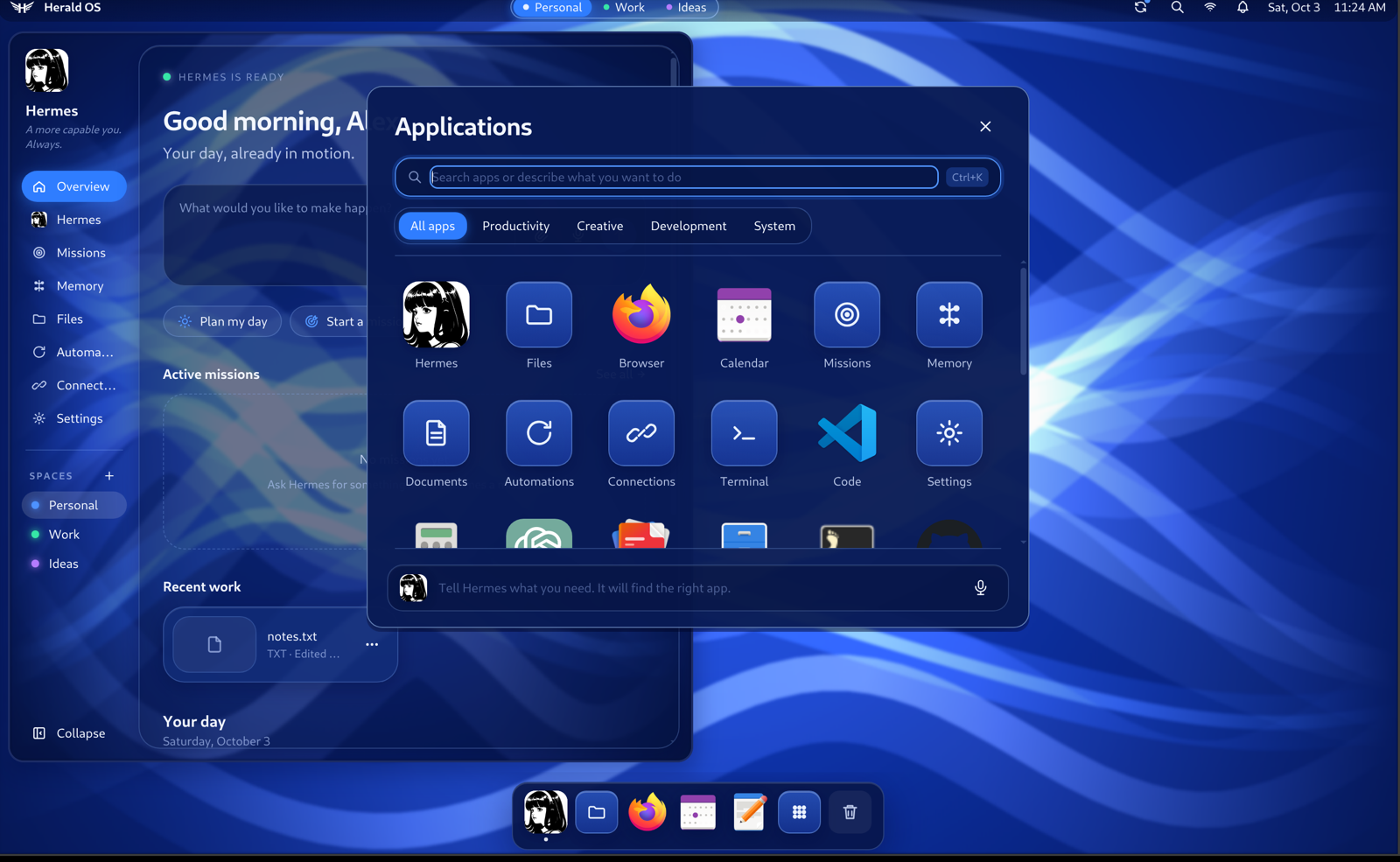 |
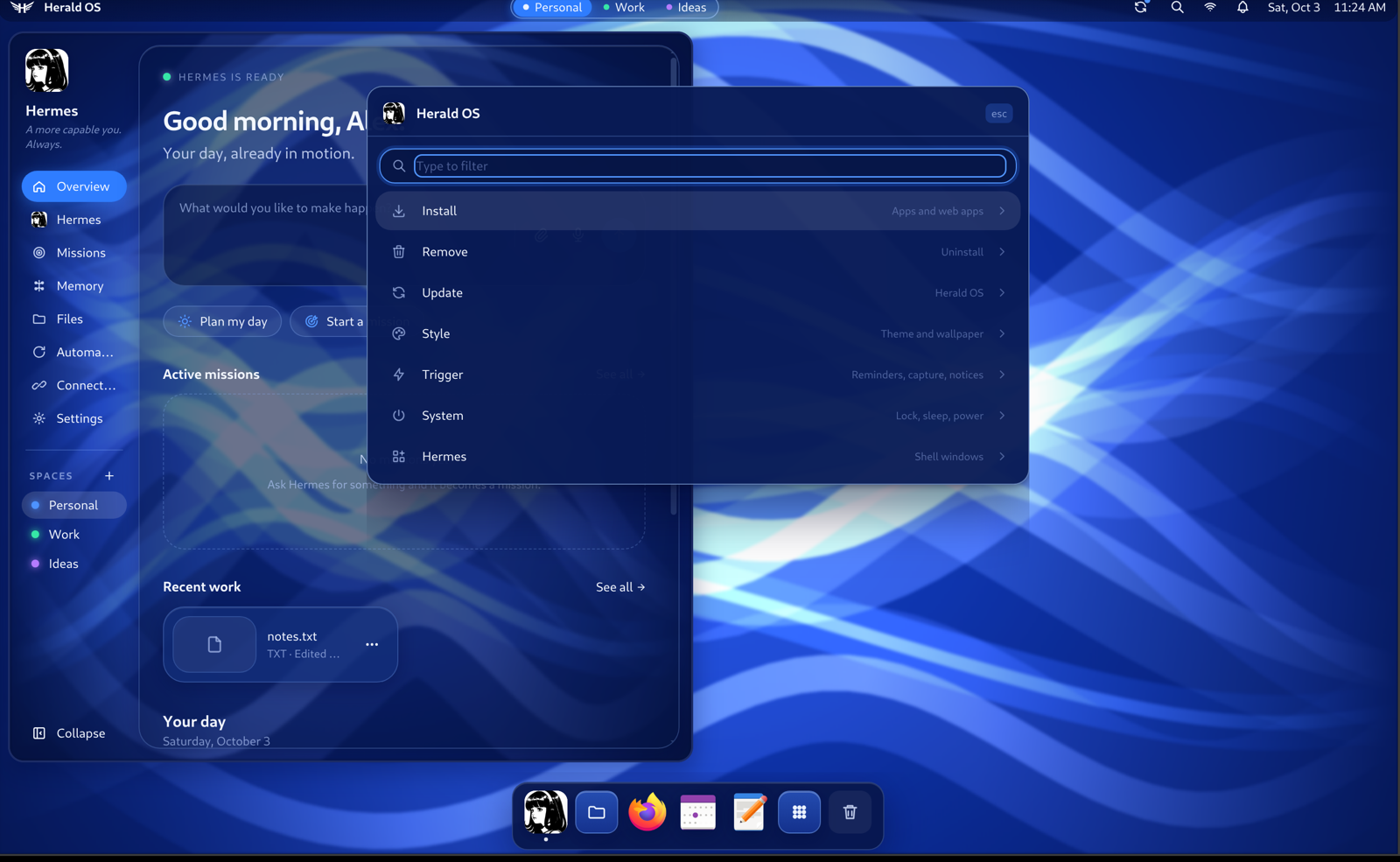
| Herald OS Linux boots to its own splash screen and signs you straight in. | The launcher holds Herald's own apps and every installed Linux app. |
 |
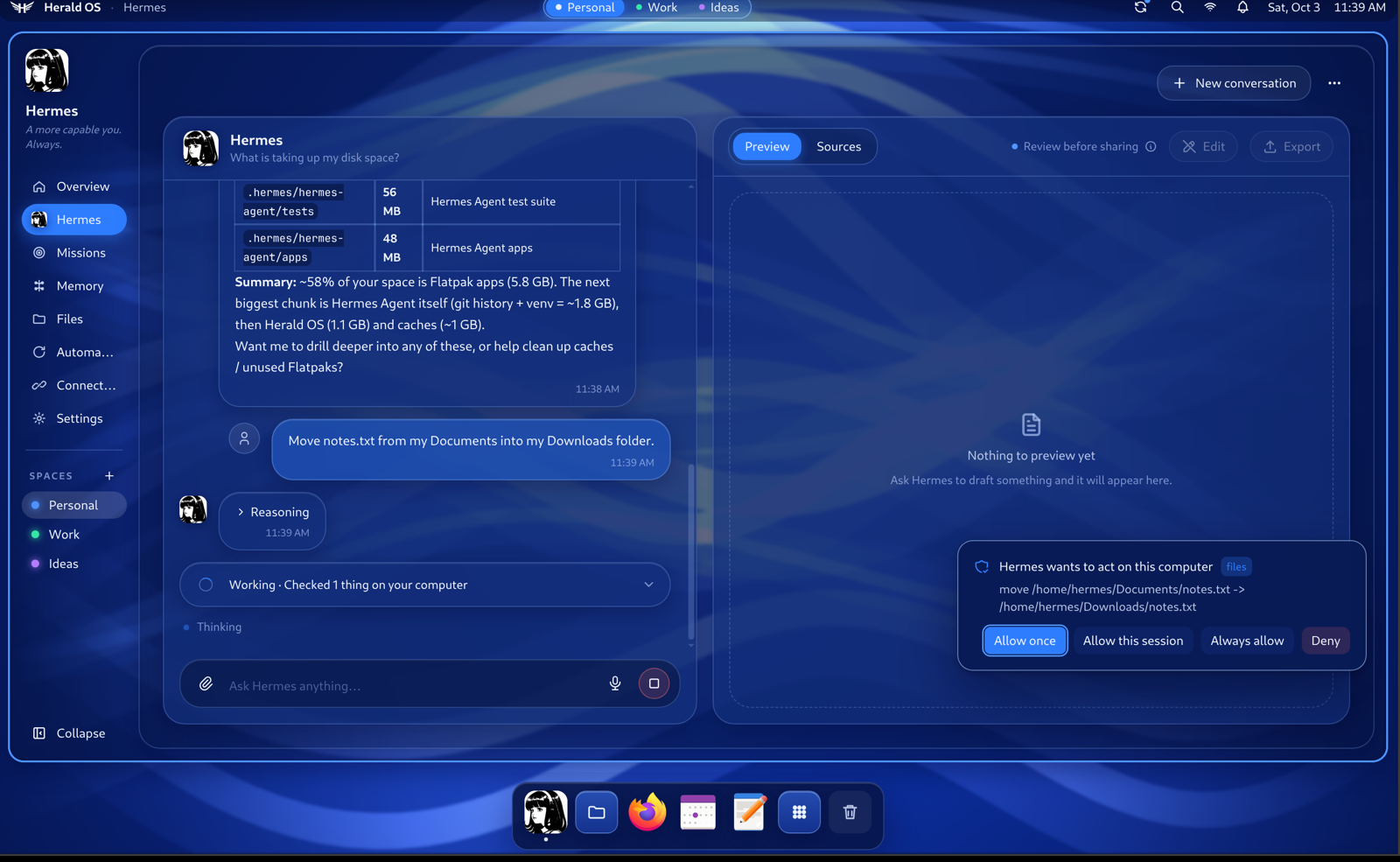 |
| One menu installs apps, changes the theme and updates the system. Hermes can do the same. | Hermes answers with its system tools and asks before it changes anything. |
What you get
- Hermes at the centre. Overview, Hermes, Missions, Memory, Files, Automations, Connections and
Settings, plus a Terminal, a System monitor, and floating chat windows. - Pick up where you left off. When you open Herald OS or come back after a break, Hermes looks
at your recent documents, project folders (with their git state), conversations and today's
calendar, and puts up to three threads of work on the Overview. Continue reopens a thread's
conversation, folder and files; its suggested next step starts only when you click it. - A command bar for every action in the OS: open pages and apps, add memories, run automations,
start missions. - System tools for Hermes: system info, processes, disk usage, file search, opening apps,
moving and trashing files, and more, each with a permission tier, protected paths, an audit log
and the standard Hermes approval card. See docs/SYSTEM-BRIDGE.md. - Voice: press the voice key or say "hey Hermes" and talk. Hermes answers out loud and can
operate the interface ("open missions", "remember that my sister's birthday is in May"). A free
engine works with any speech provider; an opt-in realtime engine is available. See
docs/VOICE.md. - Studio: say "build a website for a hair salon" and watch it happen in one window: the
project's files, the code as it is written, the commands it runs, and a live preview. - Crash help: when a program crashes, a notification offers to have Hermes read the crash
report and explain, in plain words, what went wrong and whether it is worth reporting. - Make it yours: twelve themes (two light) that also dress Hermes's own command line, a theme
made from any image, themes installed from git, your own fonts, and Hermes can design one from a
description. Widgets for the menu bar, the Overview or their own window run sandboxed with only
the permissions you grant, and Hermes can write them for you. Arrange the menu bar and its clock,
add your own control-menu entries, and put your logo in About and your picture on the lock
screen. See the manual. - The screen: select part of the screen and ask Hermes about it; pick a colour, read a QR code
or copy the text from anywhere on it; and type an emoji into any app (Cmd+Ctrl+Eon the Mac,Super+Ctrl+Eon Linux). - Usage: what Hermes used this week and this month, and what is left on your model plan, with
a warning at 90%. - When something happens: automations that run when you log in, come back after a break, the
battery runs low or a program crashes, and hook scripts for the same moments. - On Herald OS Linux, the rest of an OS: a control menu to install and remove apps, change the
theme and update the system; one-click installs for AI tools such as Claude Code, Codex and local
models; themes that recolour everything from the menu bar to the terminal; Wi-Fi, Bluetooth,
sound, display and battery panels; screenshots, screen recording, night light and do not disturb;
web apps in their own windows; clipboard history, a lock screen and a power menu; fingerprint and
security-key sign-in; a firewall that refuses incoming connections; and one command,herald-os update, that updates Herald OS, Hermes and Fedora, withherald-os rollbackto undo
it.
The manual covers using all of it, with every hotkey and a page for
people coming from macOS.
Building from source
To work on Herald OS, or to run what is on main:
- Herald OS Linux in a virtual machine gives you the whole operating system, built from your
checkout. The first setup takes about half an hour, most of it downloads. - Herald OS on macOS runs from your checkout in a few minutes if you already have Node.js.
Herald OS Linux in a virtual machine
You need an Apple Silicon Mac with Homebrew and about 20 GB of free disk space.
The virtual machine gets 4 cores and 8 GB of memory; on a Mac with 8 GB in total, start it withMEM=4096 in front of the command. Nothing on the Mac itself changes: the VM is a disk image inlinux/vm/build/.
1. Install QEMU and get the code.
brew install qemu
git clone https://github.com/iamlukethedev/Herald-OS.git
cd Herald-OS
2. Download Fedora and prepare the first boot.
bash linux/vm/download-image.sh   # Fedora Cloud for ARM, about 500 MB
bash linux/vm/make-seed.sh        # first-boot setup and an SSH key, in linux/vm/build/
3. Boot the virtual machine. A window opens on your Mac. The first boot installs Herald OS:
the system packages, Hermes Agent and the default apps.
bash linux/vm/run-qemu.sh
bash linux/vm/run-qemu.sh console   # follow the install; Ctrl+C stops watching
Wait until the console prints ==> Provisioning complete. That takes 30 to 45 minutes, mostly
downloads. If it prints ==> Provisioning FAILED instead, see Troubleshooting.
4. Install the Herald shell. This copies your checkout into the VM, builds it there and starts
Herald OS:
bash linux/dev/push.sh
5. Sign Hermes in. The first time Hermes needs a model, Herald OS shows a sign-in card with a
short code: open the link on any device and enter the code. To use an API key or another provider
instead, open a shell in the VM with bash linux/dev/push.sh ssh and run hermes setup.
From then on, bash linux/vm/run-qemu.sh stop shuts the VM down and bash linux/vm/run-qemu.sh
starts it again, straight into Herald OS. After you change the code on your Mac,bash linux/dev/push.sh installs it. docs/LINUX.md covers UTM, display scaling on
Retina screens, the session model and the dev loop.
Herald OS on macOS from source
You need:
- macOS 13 (Ventura) or later on Apple Silicon. Intel Macs are untested. Herald OS is
developed on macOS 26. - Node.js 22.12 or later (nodejs.org, or
brew install node). - Git, and the Xcode Command Line Tools (
xcode-select --install) for native modules. - Hermes Agent 0.21.3 or later, with a model provider set up (step 1 below).
1. Install Hermes Agent and choose a model. Herald OS on macOS uses your own Hermes install.
If you don't have it yet:
curl -fsSL https://hermes-agent.nousresearch.com/install.sh | bash
source ~/.zshrc
hermes setup
hermes setup walks you through choosing a model provider and signing in. You can change it later
with hermes model, or from Herald OS under Settings. Check that Hermes works on its own before
going further:
hermes doctor
hermes        # say hello, then exit with Ctrl+D
2. Get the code.
git clone https://github.com/iamlukethedev/Herald-OS.git
cd Herald-OS
3. Bootstrap.
npm run bootstrap
This is safe to re-run, and you should re-run it after every git pull. It:
- downloads the pinned Hermes gateway client the shell is compiled against (
upstream/); - installs the Node packages and downloads Electron;
- links the
herald-os-bridgeplugin into~/.hermes/pluginsand enables it and its tools; - migrates settings from the project's earlier name (Hermes OS), if you had it installed;
- reports which optional voice packages your Hermes install has.
4. Start Herald OS.
npm run dev
Herald OS starts your Hermes runtime in the background (hermes serve, on 127.0.0.1 only), shows
the boot screen, and takes over the screen. Cmd+Ctrl+F leaves or re-enters fullscreen; Cmd+Q
quits and stops the backend it started.
Edits to the interface (apps/desktop/src) reload live. Changes to the Electron main process need
a restart (Ctrl+C, then npm run dev again).
5. Check that everything works.
- Hermes answers. Open the Hermes page (
Cmd+2) and ask something. If it asks you to sign in,
use the card it shows, or runhermes setupagain. - System tools work. Ask "what is using the most memory right now?". Hermes should answer with
thesystem_processestool rather than a shell command. Ask it to move a file and you should get
an approval card first. - Voice works (optional). Press
Alt+Spaceand allow microphone access when macOS asks.
Settings > Voice has "Say hello" and "Start talking" buttons to test it.
Using Herald OS
Keyboard shortcuts
On Herald OS Linux the system key is Super (the Windows or Command key), and Super+K lists every
shortcut. In the virtual machine the system key is Alt (Option on a Mac keyboard) instead, soSuper+A becomes Alt+A: the Mac keeps Command for itself. Herald's own pages also answer toCtrl on Linux, so Ctrl+K and Ctrl+1 work everywhere.
| Action | Herald OS Linux | macOS |
|---|---|---|
| Command bar | Super+Shift+Space or Ctrl+K |
Cmd+K |
| All applications | Super+A |
Cmd+Shift+A |
| Talk to Hermes | Super+V |
Alt+Space |
| Ask Hermes about the focused window | Super+Space |
|
| Herald OS menu: apps, themes, updates | Super+M or Super+Alt+Space |
|
| Overview, Hermes, Missions, Memory, Files, Automations, Connections | Ctrl+1 ... Ctrl+7 |
Cmd+1 ... Cmd+7 |
| Settings | Super+, |
Cmd+, |
| Terminal | Super+Return |
Cmd+8 |
| Close window | Super+Q |
Cmd+W |
| Emoji, typed into any app | Super+Ctrl+E |
Cmd+Ctrl+E |
| Clipboard history | Super+Ctrl+V |
|
| Lock, power menu | Super+Ctrl+L, Super+Escape |
|
| Toggle fullscreen, quit | Cmd+Ctrl+F, Cmd+Q |
On Linux, every hotkey and menu item is a herald-os command, so Hermes and your scripts can do
the same things: herald-os install app obsidian, herald-os theme set ice, herald-os update.herald-os commands lists them all.
Permissions
Hermes's system tools have four tiers. read tools (system info, file search) and act tools
(opening an app) run straight away and are logged. mutate tools (create, move, rename) ask first,
and you can allow them for the session or always. destructive tools (stopping a process, moving
files to the Trash) ask every time. Some locations, such as ~/.ssh, your keychains and Hermes's
own credentials, are always refused.
Settings > Privacy shows the policy and the audit log (~/.hermes/herald-os/audit.jsonl). Hermes's
own terminal tool keeps following Hermes's approval settings.
Pick up where you left off is off until you turn it on from the Overview. It reads names and dates
(recent files and folders, project branches and commit messages, conversation titles, today's
event titles, open apps), never file contents, window titles or the screen, and sends them to your
Hermes model provider to write the suggestions. Settings > Privacy turns it off and lists folders
and words it must leave out, such as a client's name.
Settings and data
| What | Where |
|---|---|
| Herald OS preferences | ~/.hermes/herald-os/prefs.json (edit them in Settings) |
| Audit log, control socket | ~/.hermes/herald-os/ |
| Log file | ~/.hermes/logs/herald-os.log |
| Hermes config, memories, sessions, credentials | ~/.hermes/, managed by Hermes |
A few options come from environment variables, mostly for development: starting windowed on macOS
(HERALD_OS_WINDOWED=1), using a different Hermes checkout (HERALD_OS_HERMES_ROOT), or a
throwaway Hermes home (HERMES_HOME=/tmp/herald-test). .env.example lists them
all.
Building a macOS release
npm run dist:mac
This writes an Apple Silicon DMG and zip to apps/desktop/release/. Before installing, know that:
- A local build is not notarized. electron-builder signs it with a code-signing identity from
your keychain if it finds one, and leaves it unsigned otherwise. A copy that was downloaded or sent
to you will not open the first time: choose Open Anyway in System Settings → Privacy & Security, or
runxattr -dr com.apple.quarantine "/Applications/Herald OS.app". The release workflow
(.github/workflows/release.yml) builds a signed and notarized one when the repository has theMAC_CERTIFICATE_P12,MAC_CERTIFICATE_PASSWORD,APPLE_ID,APPLE_APP_SPECIFIC_PASSWORDandAPPLE_TEAM_IDsecrets; set the same variables locally (CSC_LINKandCSC_KEY_PASSWORDfor the
certificate) to notarize from your Mac. - macOS notifications need a signed build. Notifications still appear inside Herald OS, but the
macOS ones it sends while you are in another app only work when the build is code-signed. - The system tools plugin comes with the app. On its first start the app links its copy into
~/.hermes/pluginsand enables it. A link from a checkout (npm run bootstrap) stays as it is. - Hermes Agent is not bundled. The app finds it as in development:
HERALD_OS_HERMES_ROOT,
then~/.hermes/hermes-agent, thenhermeson your PATH.
Building a Linux release
npm run dist:linux --workspace apps/desktop            # this machine's architecture
npm run dist:linux --workspace apps/desktop -- --arm64  # or pick one
This writes herald-os-<version>-linux-<arch>.tar.gz to apps/desktop/release/: the app, with theherald-os CLIs, the niri session, themes, the install catalog and the bridge plugin underresources/. Build on the target architecture (node-pty is compiled, not cross-built); the release
workflow builds x64 and arm64 on matching runners. The tarball is what the Arch package and the
Herald OS image install; on its own, unpack it to /opt/herald-os, make chrome-sandbox root-owned
and mode 4755, and the session finds it there.
Project layout
apps/desktop/               The Herald shell: Electron main (electron/), preload/, React interface (src/)
packages/hermes-client/     Typed client for the Hermes gateway (JSON-RPC over WebSocket, REST)
plugins/herald-os-bridge/   Hermes plugin: system tools, permission tiers, audit log, UI control
linux/                      Herald OS Linux: provisioning, session, niri config, themes, apps, VM tooling
examples/widgets/           sample widget plugins (ADR-019)
scripts/                    bootstrap, upstream sync, bridge tests, secret scan
upstream/                   UPSTREAM.lock, the pinned Hermes version the shell builds against
docs/                       architecture, decisions, system bridge, voice, Linux
New here? Read docs/ARCHITECTURE.md, then
apps/desktop/README.md for where things go in the shell.
Development
npm run typecheck     # TypeScript: interface, Electron main and preload, client package
npm test              # Vitest
npm run test:bridge   # pytest for the bridge plugin
npm run build         # production build into apps/desktop/dist
bash scripts/check-secrets.sh   # gitleaks over the history and your changes
CI runs all of these on Ubuntu and macOS. CONTRIBUTING.md has the conventions.
Updating
- Herald OS Linux:
herald-os update(or Update in the Herald OS menu) installs the new system,
Hermes Agent and the Flatpak apps, andherald-os rollbackgoes back. - The Mac app: download the new DMG and replace the app in Applications.
hermes updateupdates
Hermes itself, whenever you like. - Arch and Omarchy: run
git pullandmakepkg -siagain inpackaging/arch/herald-os-bin. - From source on macOS:
git pull, thennpm run bootstrap. - The development VM:
git pullon the Mac, thenbash linux/dev/push.sh.
The shell compiles against a pinned Hermes version (upstream/UPSTREAM.lock), so updating Hermes
does not change the shell's code. Moving the pin is described in upstream/README.md.
Troubleshooting
- "No Hermes runtime found", or the boot screen never finishes. Run
hermes doctor. If Hermes
lives somewhere other than~/.hermes/hermes-agentand is not on your PATH, start withHERALD_OS_HERMES_ROOT=/path/to/hermes-agent npm run dev. The cause is usually in~/.hermes/logs/herald-os.log. - macOS says Herald OS "is damaged" or "cannot be opened". The build is not notarized yet: run
xattr -dr com.apple.quarantine "/Applications/Herald OS.app"and open it again. - Hermes uses shell commands instead of its system tools.
hermes plugins listshould showherald-os-bridgeas enabled;hermes plugins enable herald-os-bridgeturns it on. From a
checkout, re-runnpm run bootstrap; on Linux,herald-os setup. Then restart Herald OS. - The VM's first boot fails or never finishes. A failed step prints
==> Provisioning FAILED at line N, andbash linux/vm/run-qemu.sh consoleshows where it
stopped./var/log/herald-os-provision.login the VM has the whole run (bash linux/dev/push.sh ssh
opens a shell there).bash linux/vm/run-qemu.sh resetdeletes the VM's disk so the next start
begins again. - Herald OS Linux shows a black screen after
push.sh. Open a shell withbash linux/dev/push.sh sshand read~/.local/state/herald-os/shell.logandjournalctl -u greetd. npm run devwaits on a download. Electron downloads itself on first use. Bootstrap does this
up front; behind a proxy, see Electron's installation docs.- Native module errors after changing Node versions. Delete
node_modulesand runnpm run bootstrapagain. - The microphone does nothing on macOS. Check System Settings > Privacy & Security >
Microphone. In development the permission belongs to Electron (or your terminal); in a built
release, to Herald OS. - Stuck fullscreen on macOS.
Cmd+Ctrl+F, or start withHERALD_OS_WINDOWED=1 npm run dev. - Still stuck? Ask in #help on Discord, or open an issue on
GitHub.
Contributing and security
Contributions are welcome: see CONTRIBUTING.md. Come and ask questions, share
ideas or show what you built on Discord. Please report
vulnerabilities privately, as described in SECURITY.md.
License
MIT. Herald OS builds on Hermes Agent by
Nous Research, also MIT; see NOTICE. Herald OS is an independent project and is not
affiliated with Nous Research; the Hermes names refer to Nous Research's project and are used only
to say what Herald OS runs on.
Reviews (0)
Sign in to leave a review.
Leave a reviewNo results found