secbot
mcp
Basarisiz
Health Gecti
- License — License: NOASSERTION
- Description — Repository has a description
- Active repo — Last push 0 days ago
- Community trust — 54 GitHub stars
Code Basarisiz
- rm -rf — Recursive force deletion command in build.sh
Permissions Gecti
- Permissions — No dangerous permissions requested
Purpose
This is an AI-driven automated penetration testing bot designed for authorized security assessments. It integrates with large language models to automate network discovery, vulnerability scanning, OSINT, and report generation.
Security Assessment
Overall Risk: High
The tool's core functionality requires executing shell commands and making active network requests to scan and interact with target systems. It naturally accesses and generates sensitive security data. A rule-based scan found a recursive force deletion command (`rm -rf`) inside a build script, which introduces a risk of unintended local file loss. However, the audit found no hardcoded secrets and no dangerous broad permissions requested at the application level. Because it is designed to actively probe and exploit network infrastructures, it inherently carries a high risk and must be strictly isolated to authorized environments.
Quality Assessment
The project appears to be actively maintained, with its last push occurring today. It has garnered 54 GitHub stars, indicating a modest but present level of community trust. The documentation is thorough, featuring clear security warnings about unauthorized use and detailed architectural outlines. On the downside, the repository uses a custom license marked as "NOASSERTION," meaning developers must manually review the terms before utilizing the code to ensure compliance.
Verdict
Use with caution—it is a powerful and actively maintained offensive security tool that must only be deployed in strictly controlled, legally authorized testing environments due to its destructive build scripts and invasive network capabilities.
This is an AI-driven automated penetration testing bot designed for authorized security assessments. It integrates with large language models to automate network discovery, vulnerability scanning, OSINT, and report generation.
Security Assessment
Overall Risk: High
The tool's core functionality requires executing shell commands and making active network requests to scan and interact with target systems. It naturally accesses and generates sensitive security data. A rule-based scan found a recursive force deletion command (`rm -rf`) inside a build script, which introduces a risk of unintended local file loss. However, the audit found no hardcoded secrets and no dangerous broad permissions requested at the application level. Because it is designed to actively probe and exploit network infrastructures, it inherently carries a high risk and must be strictly isolated to authorized environments.
Quality Assessment
The project appears to be actively maintained, with its last push occurring today. It has garnered 54 GitHub stars, indicating a modest but present level of community trust. The documentation is thorough, featuring clear security warnings about unauthorized use and detailed architectural outlines. On the downside, the repository uses a custom license marked as "NOASSERTION," meaning developers must manually review the terms before utilizing the code to ensure compliance.
Verdict
Use with caution—it is a powerful and actively maintained offensive security tool that must only be deployed in strictly controlled, legally authorized testing environments due to its destructive build scripts and invasive network capabilities.
⚠️ 本工具仅用于授权的安全测试。未经授权使用本工具进行网络攻击是违法的。一个智能化的自动化渗透测试机器人,具备AI驱动的安全测试能力。
README.md









安全警告:本工具仅用于获得明确授权的安全测试、研究与教学。未经授权的网络攻击、渗透、爆破或控制行为可能违法。详见 docs/SECURITY_WARNING.md。
分支定位
- 当前分支:
main - 前端形态:仅保留
terminal-ui/(TUI) - 已移除:
app/(移动端)与desktop/(桌面端)
功能概览
- 统一后端:基于 FastAPI 暴露 REST + SSE 接口,当前分支主要面向 CLI/TUI 工作流。
- 多智能体执行:支持
secbot-cli自动模式与superhackbot专家模式,结合规划、执行、总结链路完成安全任务。 - 安全测试能力:覆盖内网发现、端口与服务识别、Web 安全、OSINT、系统控制、防御扫描与报告生成。
- 多推理后端:内置 Ollama、DeepSeek、OpenAI、Anthropic、Gemini、Groq、OpenRouter 及多家 OpenAI 兼容厂商。
- 前端形态:当前分支仅保留
terminal-ui/(Ink)工程。 - SQLite 持久化:对话历史、提示词链、用户偏好和 API Key 配置可持久化到 SQLite。
架构概览
flowchart LR
  subgraph Clients["客户端"]
    tui["terminal-ui (Ink)"]
    mobile["app (Expo / React Native)"]
    desktop["desktop (Tauri + React)"]
  end

  tui --> api["FastAPI /api/*"]
  mobile --> api
  desktop --> api

  api --> session["SessionManager"]
  session --> planner["Planner / QA / Agent Router"]
  planner --> tools["安全工具与系统控制"]
  tools --> summary["Summary / Reports"]
  summary --> db["SQLite"]
更细的 UI 与事件流说明见 docs/UI-DESIGN-AND-INTERACTION.md,API 细节见 docs/API.md。
环境要求
- Python
3.10+ - uv(推荐,用于同步 Python 依赖)
- Node.js
18+
说明:从源码运行terminal-ui/、app/、desktop/时需要;仅跑后端可不装 - Ollama(可选,本地模型时需要)
安装与启动
方式一:从源码运行(推荐)
git clone https://github.com/iammm0/secbot.git
cd secbot

# Python 依赖
uv sync

# 终端 TUI 依赖
cd terminal-ui
npm install
cd ..
创建 .env,至少填写一组可用推理后端配置。仓库当前没有根目录 .env.example,请直接手动新建:
# 云端推理(默认推荐)
LLM_PROVIDER=deepseek
DEEPSEEK_API_KEY=sk-your-api-key
DEEPSEEK_MODEL=deepseek-reasoner

# 或改用本地 Ollama
# LLM_PROVIDER=ollama
# OLLAMA_BASE_URL=http://localhost:11434
# OLLAMA_MODEL=gemma3:1b
# OLLAMA_EMBEDDING_MODEL=nomic-embed-text
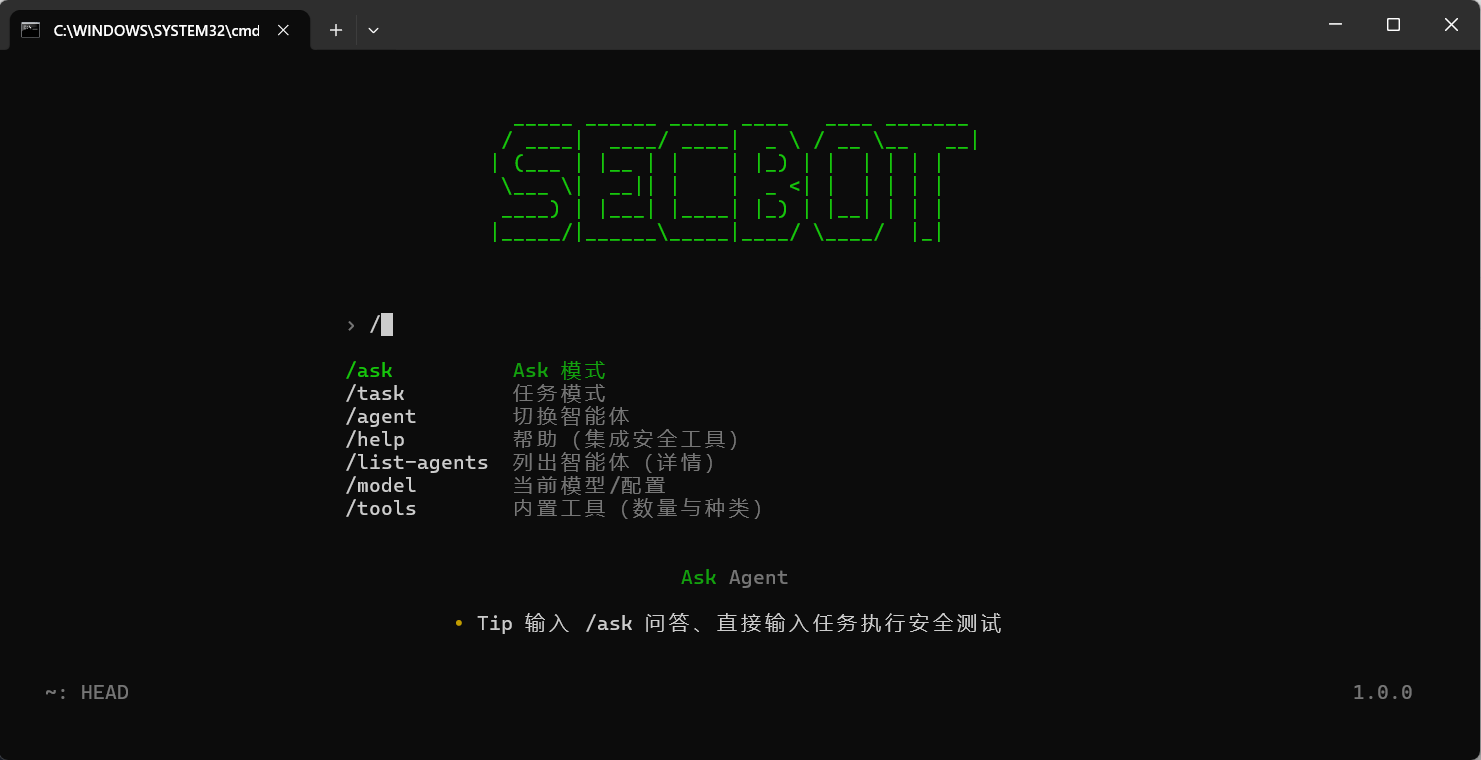
启动完整终端体验:
python main.py
# 或
uv run secbot
说明:
python main.py/uv run secbot会自动拉起本地后端,并进入全屏terminal-ui- 如果只想调试后端,用
uv run secbot --backend - 如果后端已经在运行,也可以单独启动
terminal-ui
uv run secbot --backend

# 新开一个终端
cd terminal-ui
npm run tui
方式二:下载 GitHub Release
从 Releases 下载对应平台的 zip 包并解压。当前发布产物仍沿用历史命名,解压后可执行文件通常为:
- Windows:
hackbot.exe - Linux / macOS:
hackbot
在可执行文件同目录创建 .env 后再运行,例如:
LLM_PROVIDER=deepseek
DEEPSEEK_API_KEY=sk-your-api-key
更详细的发布包说明见 docs/RELEASE.md。
方式三:安装 wheel / 本地包
如果你只需要命令入口和后端,也可以本地安装当前仓库:
uv pip install -e .
# 或
pip install .
可用命令包括:
secbot
secbot --backend
secbot --tui
hackbot
hackbot-server
secbot-server
注意:通过 wheel / pip 安装时,包内不一定包含 terminal-ui 的 Node 前端资源。此时 secbot 会优先保证后端可启动,完整 TUI 请使用源码运行或 GitHub Release。
快速开始
1. 先跑起来
python main.py
2. 常见开发入口
# 仅后端
uv run secbot --backend

# 仅终端 TUI
uv run secbot --tui

# 说明:`main` 分支不包含移动端与桌面端工程
3. 常用环境变量
| 变量 | 用途 | 默认值 |
|---|---|---|
LLM_PROVIDER |
当前推理后端 | deepseek |
DEEPSEEK_API_KEY |
DeepSeek API Key | 无 |
DEEPSEEK_MODEL |
DeepSeek 默认模型 | deepseek-reasoner |
OLLAMA_BASE_URL |
Ollama 服务地址 | http://localhost:11434 |
OLLAMA_MODEL |
Ollama 默认模型 | gemma3:1b |
OLLAMA_EMBEDDING_MODEL |
Ollama 嵌入模型 | nomic-embed-text |
DATABASE_URL |
SQLite 路径 | sqlite:///./data/secbot.db |
LOG_LEVEL |
日志级别 | INFO |
4. 常见斜杠命令
| 命令 | 说明 |
|---|---|
/model |
选择推理后端、模型、API Key、Base URL |
/agent |
切换 secbot-cli / superhackbot |
/list-agents |
查看当前可用智能体 |
/system-info |
查看系统信息 |
/db-stats |
查看 SQLite 统计 |
/logs |
查看运行日志 |
目录结构
secbot/
├── main.py                 # 一键启动入口(后端 + terminal-ui)
├── secbot_cli/             # 命令行入口与启动编排
├── router/                 # FastAPI 路由层
├── core/                   # 智能体、执行器、规划器、记忆等核心逻辑
├── tools/                  # 安全工具、Web 研究、协议、报告、云安全等
├── database/               # SQLite 模型与数据库管理
├── terminal-ui/            # Ink 终端前端
├── hackbot_config/         # 配置、环境变量与持久化偏好
├── scripts/                # 启动与构建脚本
├── tests/                  # 测试
└── docs/                   # 项目文档
文档索引
| 文档 | 说明 |
|---|---|
| docs/QUICKSTART.md | 从源码启动、前后端调试与常见入口 |
| docs/API.md | FastAPI REST + SSE 接口说明 |
| docs/APP.md | Expo / React Native 移动端说明 |
| docs/LLM_PROVIDERS.md | 多厂商模型后端与配置方式 |
| docs/OLLAMA_SETUP.md | 本地 Ollama 配置与排障 |
| docs/UI-DESIGN-AND-INTERACTION.md | terminal-ui 的交互设计与上下文架构 |
| docs/DEPLOYMENT.md | 后端部署与 systemd 示例 |
| docs/DOCKER_SETUP.md | Docker 当前策略说明 |
| docs/RELEASE.md | Release 包使用与源码打包说明 |
| docs/DATABASE_GUIDE.md | SQLite 结构与数据库操作 |
| docs/CHANGELOG.md | 版本变更记录 |
贡献
欢迎提交 Issue 和 Pull Request。
- Fork 本仓库
- 创建分支:
git checkout -b feat/your-change - 提交修改:
git commit -m "docs: update guides" - 推送分支并发起 PR
许可证
本项目使用 LICENSE 中定义的 Secbot Open Source License:
- 允许个人学习、学术研究、教学与非营利技术交流
- 修改与分发时需保留版权与协议声明
- 商业用途需事先获得书面授权
商用授权联系:[email protected]
作者
赵明俊(Zhao Mingjun)
- GitHub: @iammm0
- Email: [email protected]
Yorumlar (0)
Yorum birakmak icin giris yap.
Yorum birakSonuc bulunamadi