vibetime
Health Gecti
- License — License: MIT
- Description — Repository has a description
- Active repo — Last push 0 days ago
- Community trust — 29 GitHub stars
Code Uyari
- network request — Outbound network request in server/src/index.ts
- network request — Outbound network request in server/src/routes/auth.ts
Permissions Gecti
- Permissions — No dangerous permissions requested
Bu listing icin henuz AI raporu yok.
Track what you actually ship with AI. No config, no account, no daemon.
◆ Vibetime

Track what you actually ship with AI.
Vibetime wraps Claude Code, Codex, and Gemini and prints a session summary every time you're done. No config, no account, no daemon.
Install
npm install -g vibetime-cli
Setup
vibe init
source ~/.zshrc   # or ~/.bashrc — or restart your terminal
Adds shell hooks that wrap claude, codex, and gemini. The tools work exactly the same — Vibetime tracks your git state while you code and prints the endcard when you're done.
Fish shell — vibe init writes bash/zsh syntax. Fish users should add hooks manually to ~/.config/fish/config.fish:
function claude; vibe __wrap claude $argv; end
What you get
Every time you close a Claude Code, Codex, or Gemini session:
╭─────────────────────────────────────────────╮
│  ◆ vibe  ·  api  ·  2h 14m                  │
├─────────────────────────────────────────────┤
│                                             │
│  3 commits  ·  +847 −231  ·  12 files       │
│                                             │
│  ████████░░  shipped  ✦                     │
│                                             │
╰─────────────────────────────────────────────╯
Sessions are scored by what happened in git:
| tier | bar | meaning |
|---|---|---|
| shipped | ████████░░ |
commits + meaningful changes |
| progressed | ██████░░░░ |
commits, small changes |
| tinkering | ████░░░░░░ |
changes but no commits |
| exploring | ██░░░░░░░░ |
a few lines touched |
| idle | ░░░░░░░░░░ |
nothing changed |
| interrupted | ░░░░░░░░░░ |
session killed or crashed |
How duration works — Vibetime polls your git state every 30 seconds. If no file changes, commits, or staging activity are detected for 30 minutes, the idle time is excluded from your session duration. Laptop sleep and background idle are automatically handled. Non-git projects use wall-clock time.
Share your week
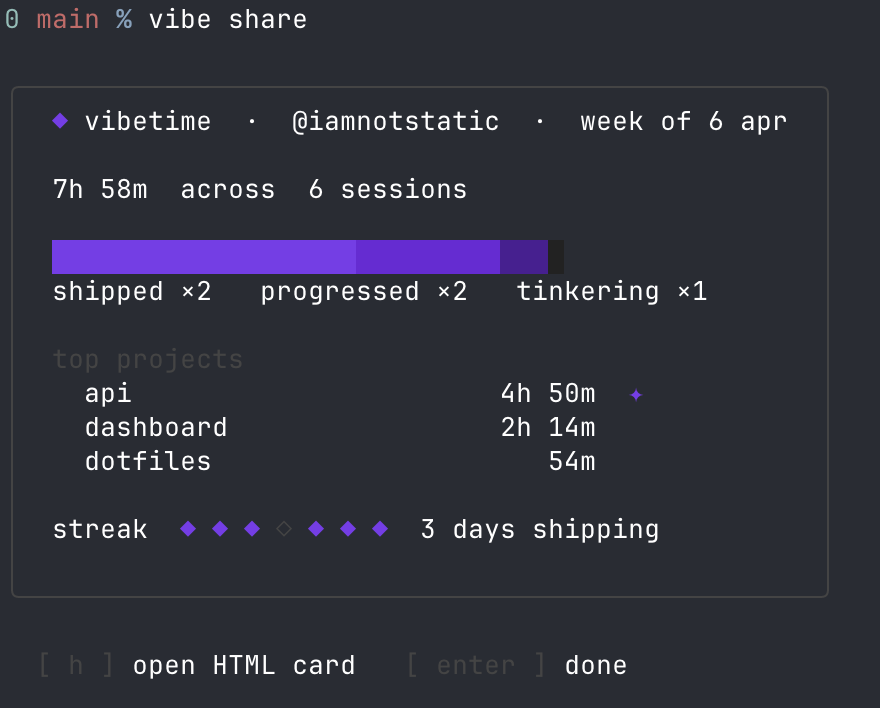
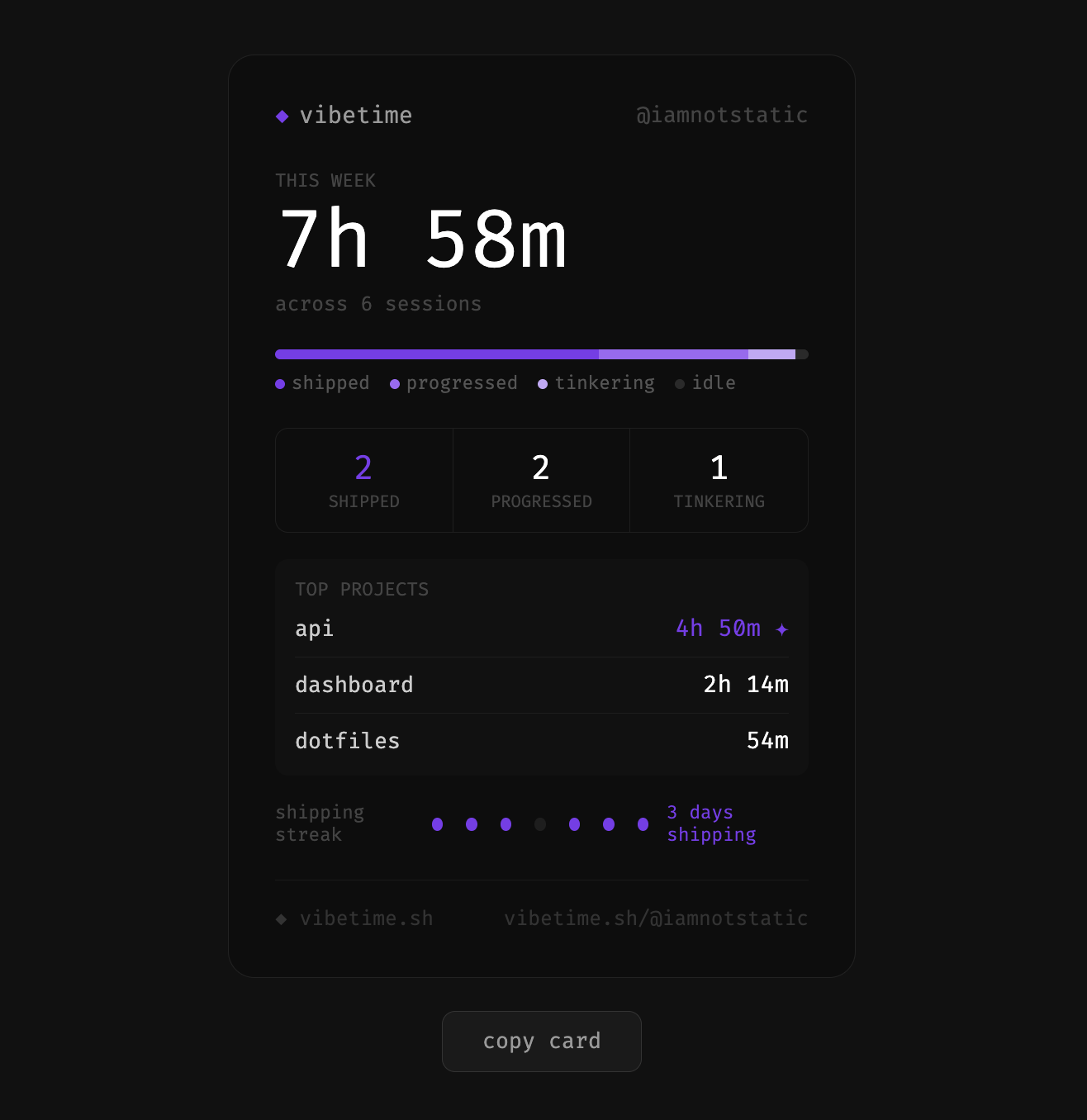
Run vibe share to print your weekly card. Press h to open the HTML version — copy it, screenshot it, post it.
Streaks track consecutive days you shipped. If you shipped yesterday but not yet today, your streak shows ⏳ — you still have time.
Adding more tools
Vibetime wraps any AI CLI. To track a tool not listed above:
vibe config add-tool aider
Leaderboard (opt-in)
Live at vibetime.club/leaderboard. Public web view, no CLI required to browse.
vibe login        sign in with github
vibe leaderboard  view the leaderboard from your terminal
vibe logout       sign out and stop submitting
The leaderboard ranks users by shipped sessions in the last rolling 7 days. Tabs on the web view switch to last 30 days or all time.
Sign-in uses the GitHub device flow: no browser callback, just a short code you paste on github.com. Until you run vibe login, no network requests are made.
Once logged in, the endcard renders as usual and the session submits in the background. If you're offline the submit retries at the end of the next session, so anything you ship will eventually appear.
Submitted fields: tool, startedAt, endedAt, durationSeconds, commits, linesAdded, linesRemoved, filesTouched, momentum, and a SHA-256 hash of the project name. Branch names, raw repo names, exit codes, and your local handle never leave the machine.
vibe logout removes ~/.vibe/auth.json and submission stops immediately.
Commands
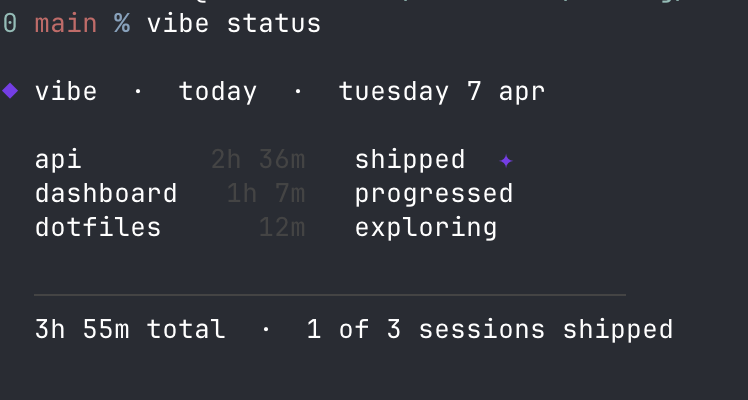
vibe status                  today's sessions (includes active sessions)
vibe log                     last 20 sessions
vibe share                   weekly summary card
vibe share --html            shareable HTML card
vibe login                   sign in to the leaderboard via github
vibe logout                  sign out of the leaderboard
vibe leaderboard             shipped sessions, last 7 days
vibe config show             current settings
vibe config set handle <name> set your @handle (shown on share cards)
vibe config add-tool <name>  track a new AI CLI tool
vibe uninstall               remove shell hooks
Sessions belong to the day they started — a session that runs past midnight appears under the previous day.
Uninstall
vibe uninstall
npm uninstall -g vibetime-cli
vibe uninstall removes all shell hooks from your rc file. Your session data in ~/.vibe/ is preserved — delete it manually if you want a clean removal.
Privacy
Vibetime has no telemetry and no account by default. Everything stays on your machine unless you opt in to the leaderboard with vibe login.
It reads git metadata only — commit counts, line counts, file counts. It never reads file contents, environment variables, API keys, or anything you type into the wrapped tool. The AI CLI's stdin/stdout are passed straight through via spawn with stdio: 'inherit'.
All data is stored locally in ~/.vibe/. If you've signed in to the leaderboard, see the section above for the exact fields submitted.
License
Yorumlar (0)
Yorum birakmak icin giris yap.
Yorum birakSonuc bulunamadi