Bunbun
Health Uyari
- License — License: MIT
- Description — Repository has a description
- Active repo — Last push 0 days ago
- Low visibility — Only 6 GitHub stars
Code Basarisiz
- rm -rf — Recursive force deletion command in scripts/build-gtk-layer-shell.sh
- rm -rf — Recursive force deletion command in scripts/package-linux.sh
- rm -rf — Recursive force deletion command in scripts/package.sh
- network request — Outbound network request in scripts/setup.sh
Permissions Gecti
- Permissions — No dangerous permissions requested
Bu listing icin henuz AI raporu yok.
A native Dynamic Island for Windows, with a little bunny who keeps an eye on your coding agents. Media, dashboards, one-click agent approvals. C++20 + Direct2D, no Electron
Bunbun
A native Dynamic Island for Windows and Linux, with a small bunny named Bun who keeps an eye on your coding agents.



Get started · Studio · Features · Settings · Docs
Bunbun is one island at the top of your screen (or the bottom, or on every display). It shows
what's playing, your calendar, weather, system stats, Wi-Fi and Bluetooth, notifications, timers and
a file shelf. When your coding agent is working, Bun shows what it's doing; when the agent needs
permission, you answer with one click. It shows one thing at a time: an alert takes the island,
then steps aside.
It's C++20, Win32 and Direct2D: no Electron, about 30 MB of memory and 1–3 % of one core
while idle.
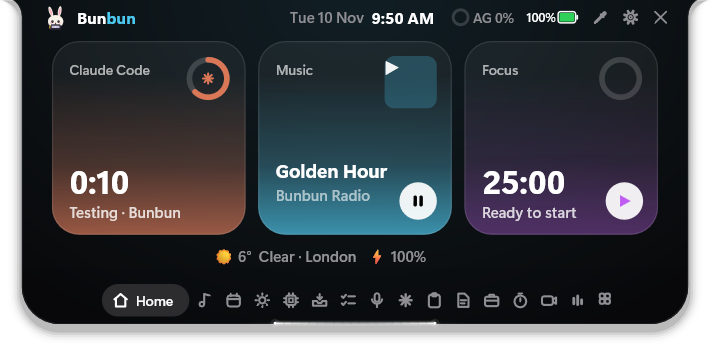
The Studio island
Open the island and it becomes a small dashboard: the date and time on top, your Home cards (by
default your coding agent, what's playing and a focus timer), and a tab bar along the bottom with
every page and a volume slider. Scroll or click a tab to move between pages. Titles, tabs and
highlights follow the colour of the album you're playing; each coding agent keeps its own colour.
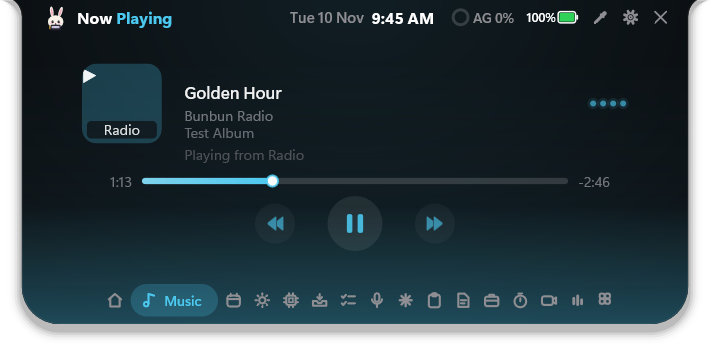 Music. Cover, controls, a seek bar and live bars that move with the song. |
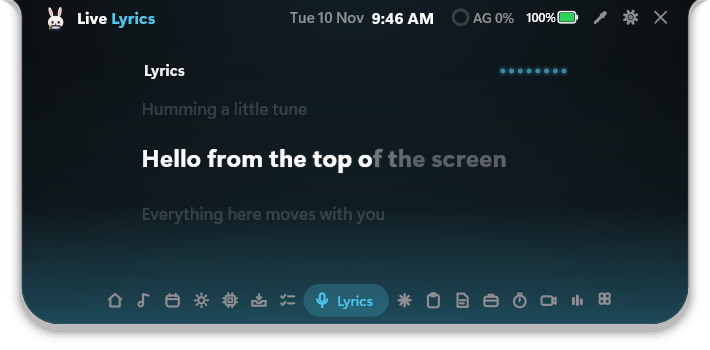 Lyrics. Synced lyrics, with the line being sung lighting up. |
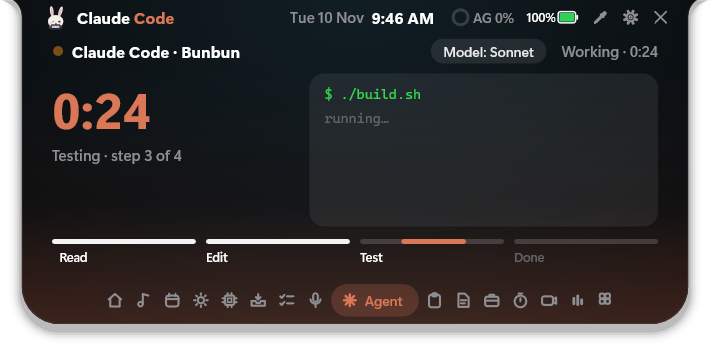 Agent. What your coding agent is doing, tasks done today and your usage limits. |
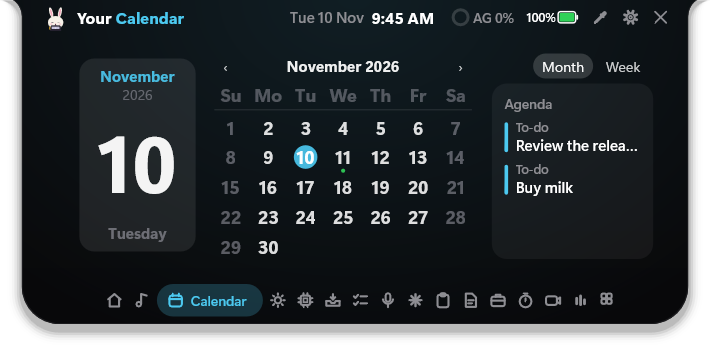 Calendar. The month, and your next meeting and to-dos beside it. |
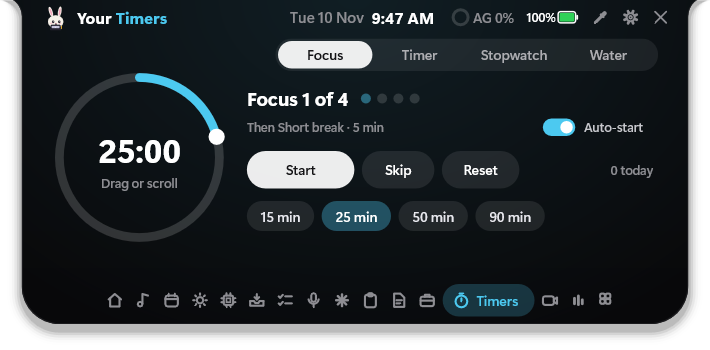 Timers. A focus timer, a countdown you set on a ring, a stopwatch, and water. |
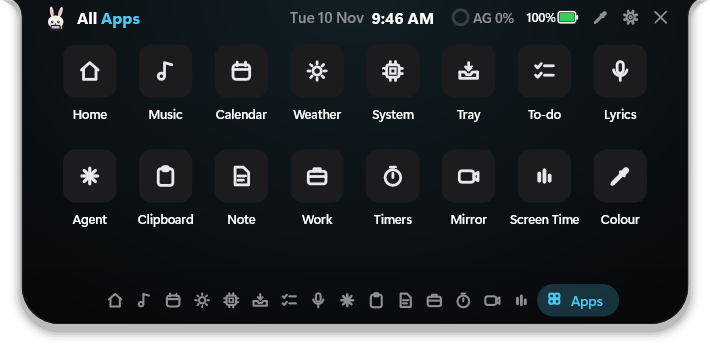 All apps. Every page, the colour picker and Settings in one grid. |
Choose which pages the island has, put them in any order and pick the three Home cards in
Settings → Island pages. Prefer the original look? Switch to Classic on the same screen.
Features
Coding agents, on the island
- Live ticker of what your agent is doing:
Edits · island.cpp,Runs · ./build.sh,+14 −0. - One-click Allow / Deny for permission requests, and answers to single questions.
- Works with Claude Code, Antigravity, Cursor and GitHub Copilot (VS Code agent mode and CLI).
Connect each one in a click; Bunbun backs up the agent's config first and only adds its own entries. - Fails safe. If Bunbun is closed or you don't click, the agent asks in its own window exactly as
it would without Bunbun. Nothing is ever approved for you.
Bun, your mascot
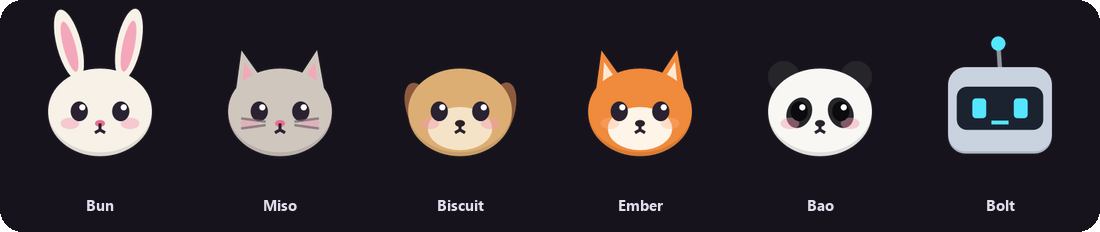
Six characters, all drawn in code: Bun the bunny, Miso the cat, Biscuit the dog,
Ember the fox, Bao the panda and Bolt the robot. Each has its own colours and reacts to
what's happening:
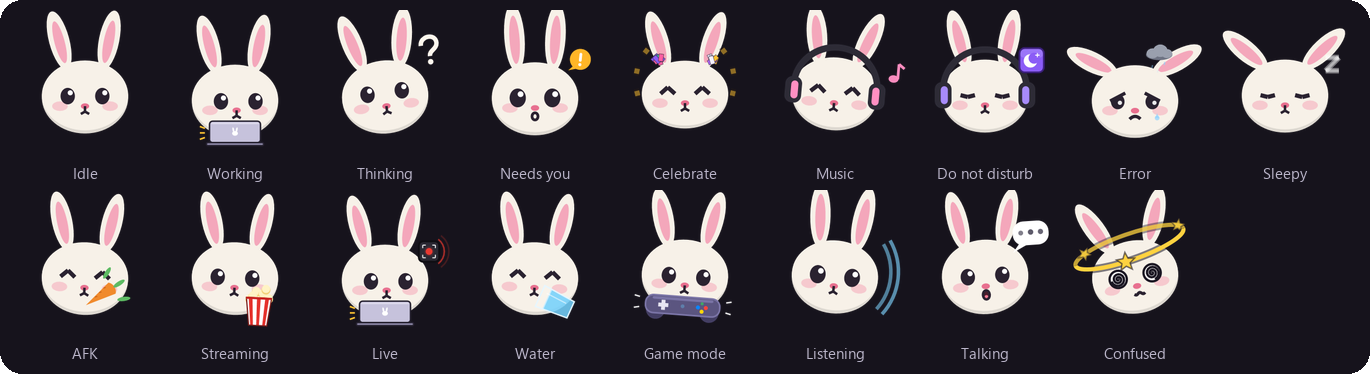
Bun sits beside the clock, puts on headphones when music plays, hops when a task finishes, nibbles a
carrot when you step away, and puts on headphones and a moon when Do Not Disturb is on. You can also load your own art as a
skin pack.
Everything else on the island
| Music | Album art, controls, live bars, synced lyrics, and the song title or the current lyric line on the small island (it sizes itself to the song) |
| Dashboards | Hover to expand, scroll to switch: calendar, weather, hardware monitor (CPU, RAM, GPU, disk, network speed), connectivity (tap Wi-Fi or Bluetooth to toggle, hold it to pick a network or device; battery on laptops), file shelf |
| System flyouts | Volume, brightness, battery, Bluetooth devices, Caps Lock |
| To-dos & reminders | Ask Bun add buy milk, remind me at 3pm to call Sam or remind me every weekday at 9 to stand up; a To-do tab, a reminder pill with Snooze and Done (quiet in full screen, presentations and meetings), and a To-dos page in Settings to edit and reschedule. Stored on your PC only |
| Focus mode | focus 50: a timer, the mascot on do-not-disturb, notifications held back, and a summary of what you ticked off |
| Meetings | Paste your calendar's private iCal link (Google or Outlook) and the island counts down to your next meeting with a Join button |
| Downloads | Browser downloads show as they arrive (name, size, speed), then "Downloaded" |
| Edge light | A light along the island's outline: twin comets that meet at the bottom, a single comet, or a soft breathing glow. Plays on whatever you pick (hover, opening, closing, track change, notifications, agents, system pop-ups, or always), in white, the album art's colour, or one you choose. Settings → Appearance → Edge light |
| Studio layout | The default (see above): a header, Home cards, an icon tab bar with a volume slider, and Ask Bun as a chat. Classic, the original island, is one click away |
| Clipboard & note | Your last 8 copies (click to copy again) and one quick note with checkboxes |
| Colour picker | Pick any pixel on screen with a magnifier and copy it as HEX, RGB or HSL |
| Timers | One page for Pomodoro (focus, short and long breaks, auto-start, length chips), a countdown set on a ring with your own presets, a stopwatch with laps, and Water; plus an optional nudge when a distracting app comes up |
| Home your way | Pick what each Home card shows (agent, music, focus, weather, calendar, battery or system), add up to four links under them, and open any page from All apps |
| Work mode | For office work, or alongside coding agents: Settings asks what Bunbun is for (AI agents, office work, both, or study). Set your working days, hours, lunch and breaks; the island follows them, pauses for lunch, reminds you to take breaks, counts time away and asleep, and makes a work report (today, yesterday or the last 7 days) you can save as an image or a PDF. Study follows your timetable instead: subjects, Pomodoro sessions that count, a daily goal with a streak, and a study report by subject |
| Screen Time | How long each app has been in front today and over the last week, with each app's own name and icon, and an optional daily limit. Counts only while you're at the PC; stored on your PC only |
| Water | A Water page (a glass filling up to your daily goal, a drop per glass, + glass and the week), and optional reminders paced across your active hours: Drank or Later right on the island, and a nudge to refill your bottle. Stored on your PC only |
| Backup & restore | Settings → General saves your settings and Bunbun's data (water, Screen Time, notes, to-dos, the work log, your mascot packs and Ask Bun prompt) in one .zip, and restores it, on Windows or Linux. A copy of what you had is kept first. From a script: bunbun-settings --backup <file> / --restore <file> |
| Game mode | Live FPS, CPU, RAM, GPU and disk in place of the clock, with your mascot on the left holding a controller. Pick which stats show, labels and a compact size in Settings. Windows |
| Mirror | An optional camera and sound check before a call: a camera preview, a live microphone level and a speaker test tone, with a choice of which devices to test; the camera and mic run only while you test |
| Tuck away | Ctrl+Alt+H folds the island to a thin status line; point at it to bring it back. In full screen it tucks itself by default; Settings → Animations → In full screen can keep it showing (hover and all) or hide it |
| Notifications & clipboard | App toasts and a peek at what you copy |
| Local AI (optional) | Turn on a small language model that runs offline on your PC. Bun then answers free-form questions and works like an agent: "get me ready for a meeting" turns on DND, lowers the volume and opens Teams; "is it warmer in Delhi or Mumbai?" looks both up and compares. No account, no keys; you download the model yourself (guide) |
| Privacy dots | Orange while the microphone is in use, green for the camera, blue while the screen is recorded, and a short note naming the app ("Discord is using your microphone") |
| Ask Bun | Press Ctrl+Alt+B and type open notepad, volume 40, next song, timer 25 min, weather, 12*7, dnd on, wifi off, brightness 60, add buy milk, remind me in 20 min to stretch, drank 500 ml, how much water, start work, take a break, how long have I worked, undo… Up arrow recalls earlier commands; Ctrl+Z undoes the last one A local assistant: nothing is sent to any AI service |
The settings app
Every option has a home, and changes reach the island the moment you make them. If a change ever
can't be saved, a banner says so and offers to try again.
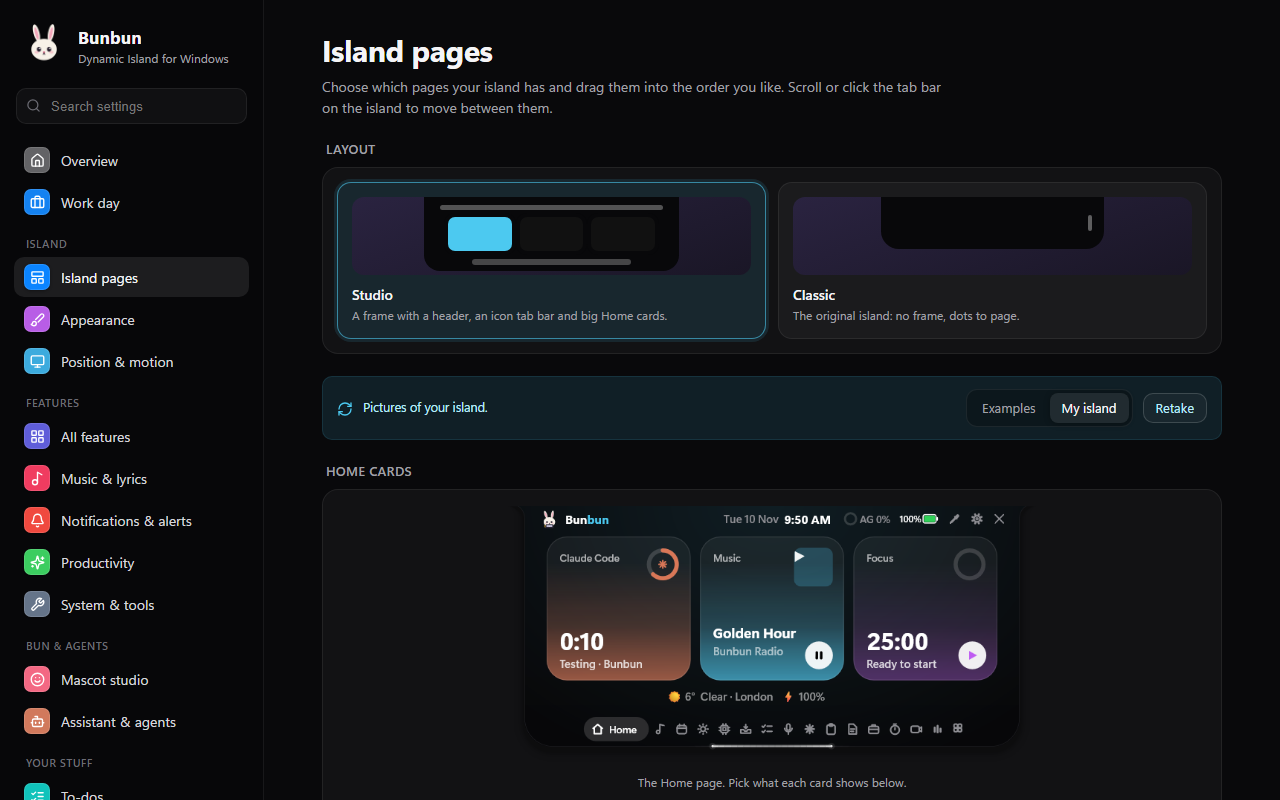
Island pages shows real pictures of your own island. Pick Studio or Classic, choose what each
Home card shows, then switch pages on or off and drag them into order. The pictures keep themselves
up to date: the island saves one whenever you look at a page.
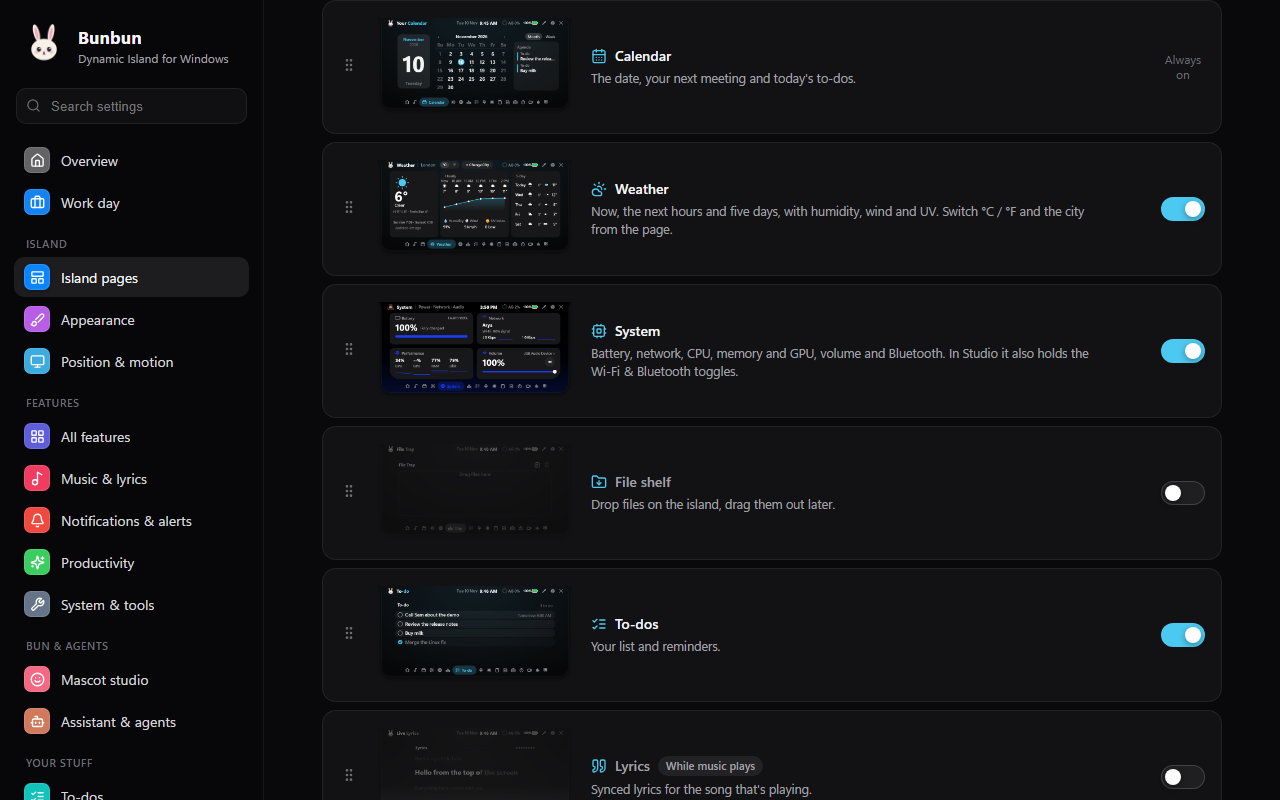 Pages. Every page with its picture, a switch, and a handle to drag it into place. |
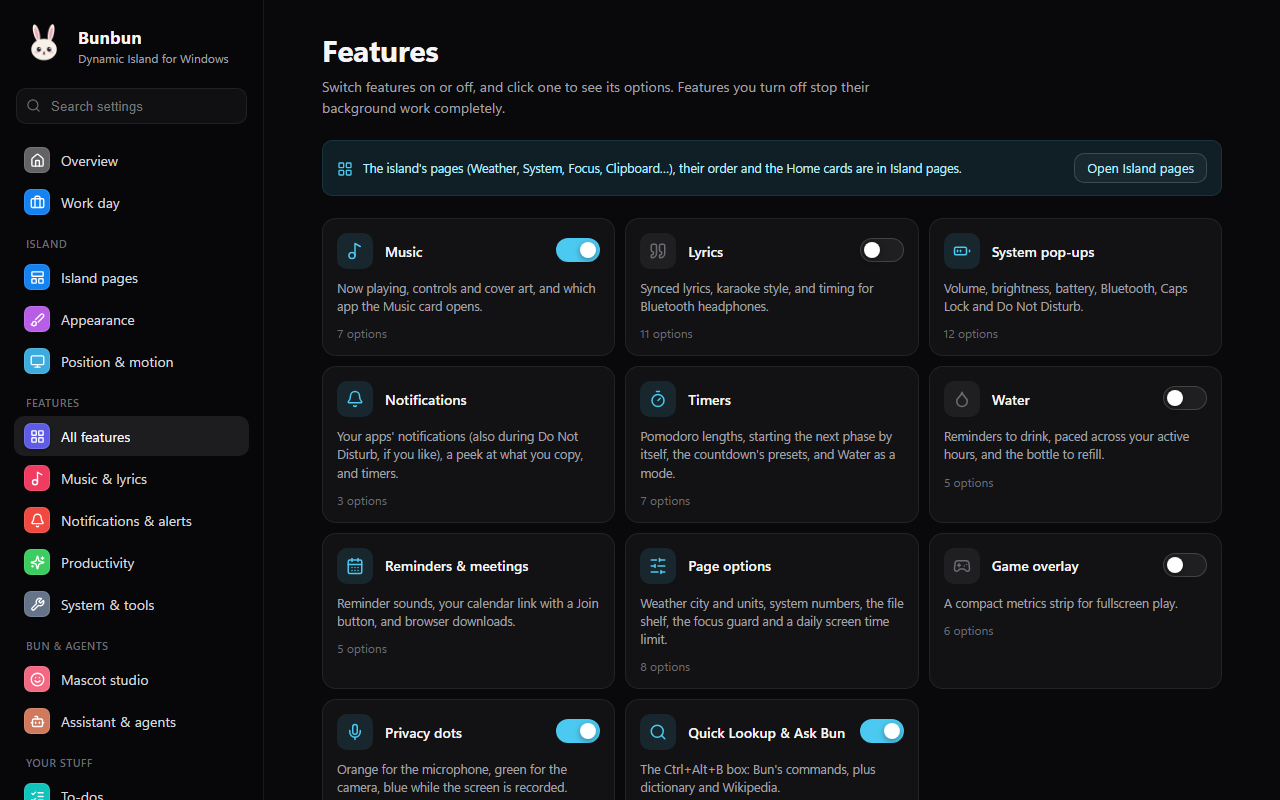 Features. Grouped switches; click one for its options. What you turn off stops completely. |
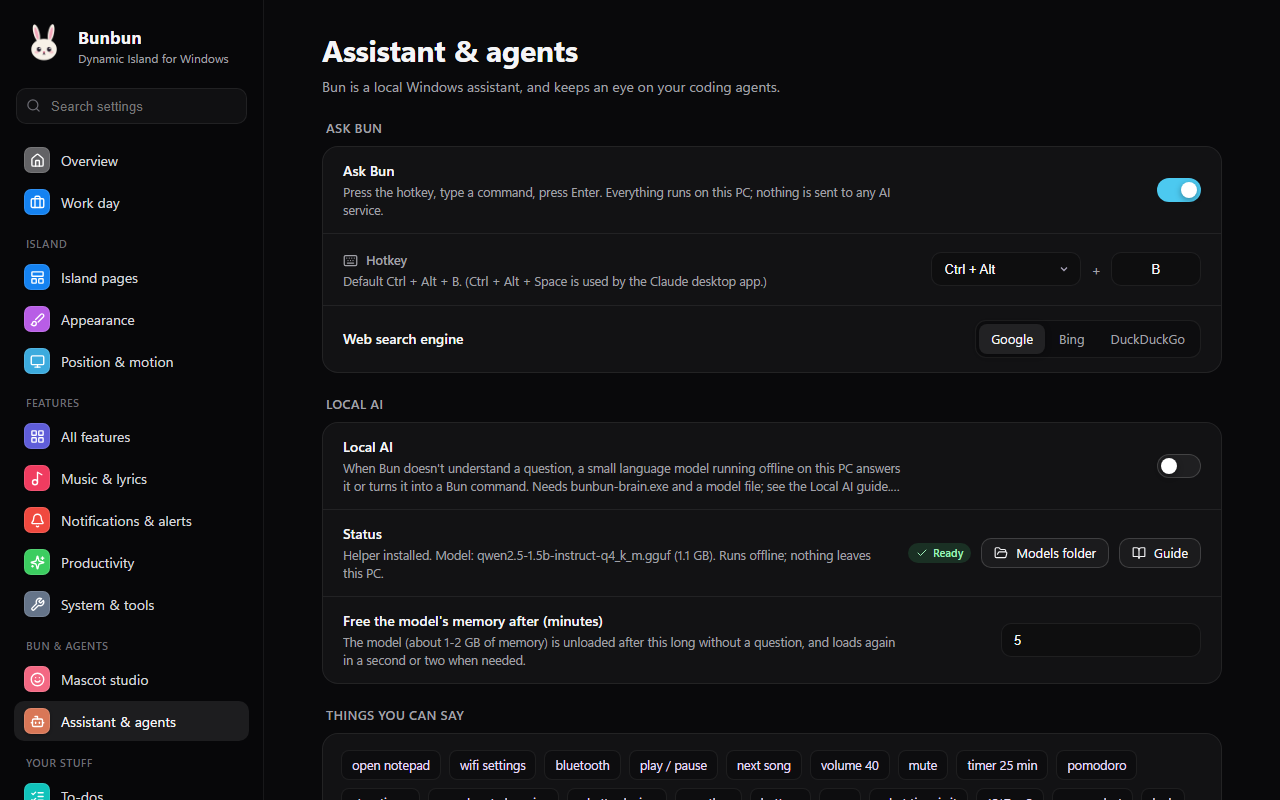 Assistant & agents. Ask Bun, optional local AI, and connecting Claude Code, Antigravity, Cursor, Copilot and Codex. |
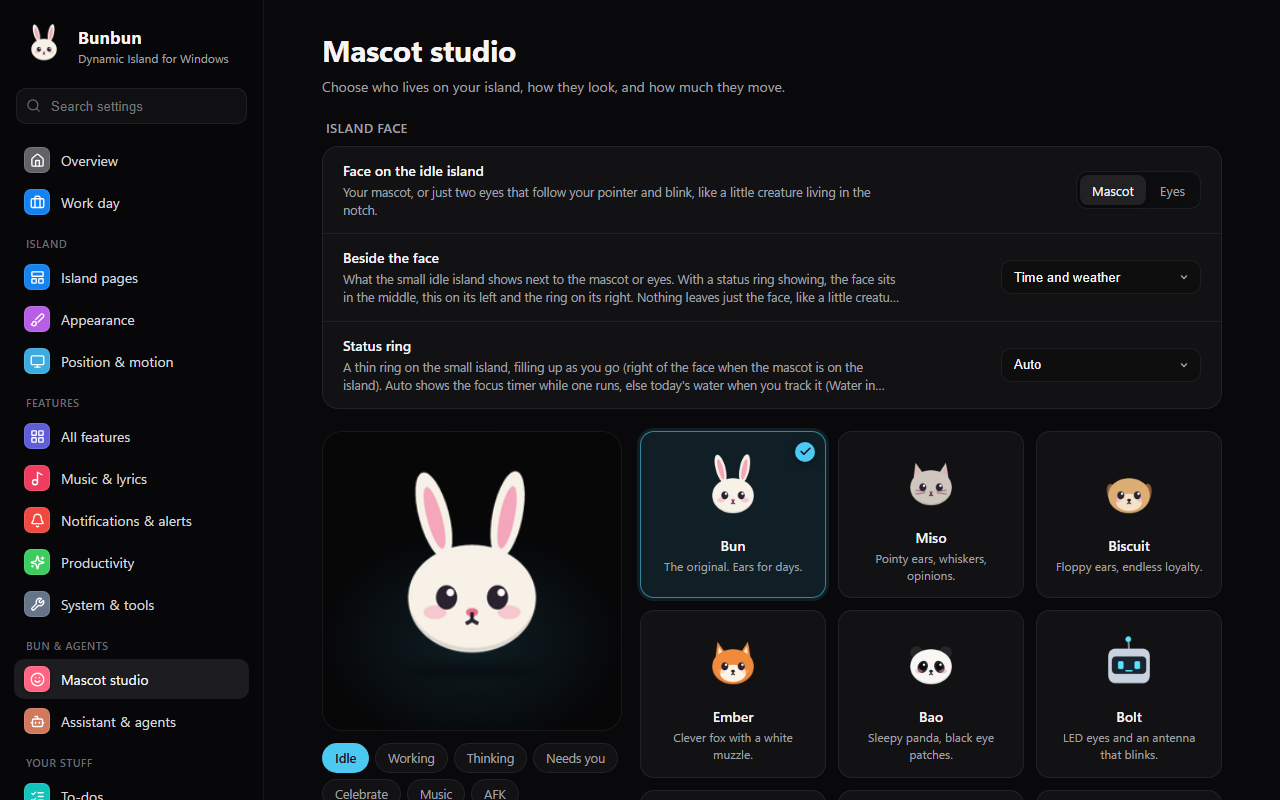 Mascot studio. Characters, moods, eyes or mascot on the idle island, and your own skin packs. |
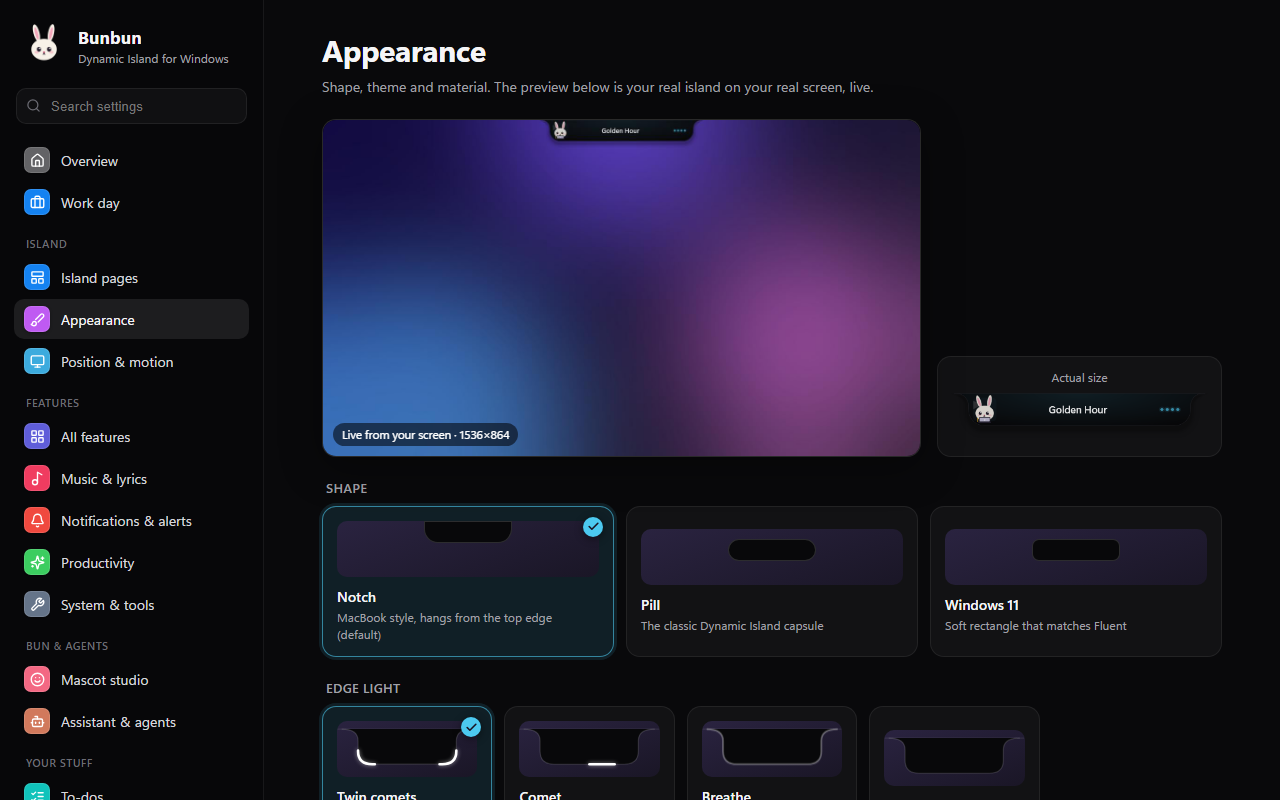 Appearance. Pill, notch or Windows 11 shape, themes, and a live preview of your island on your wallpaper. |
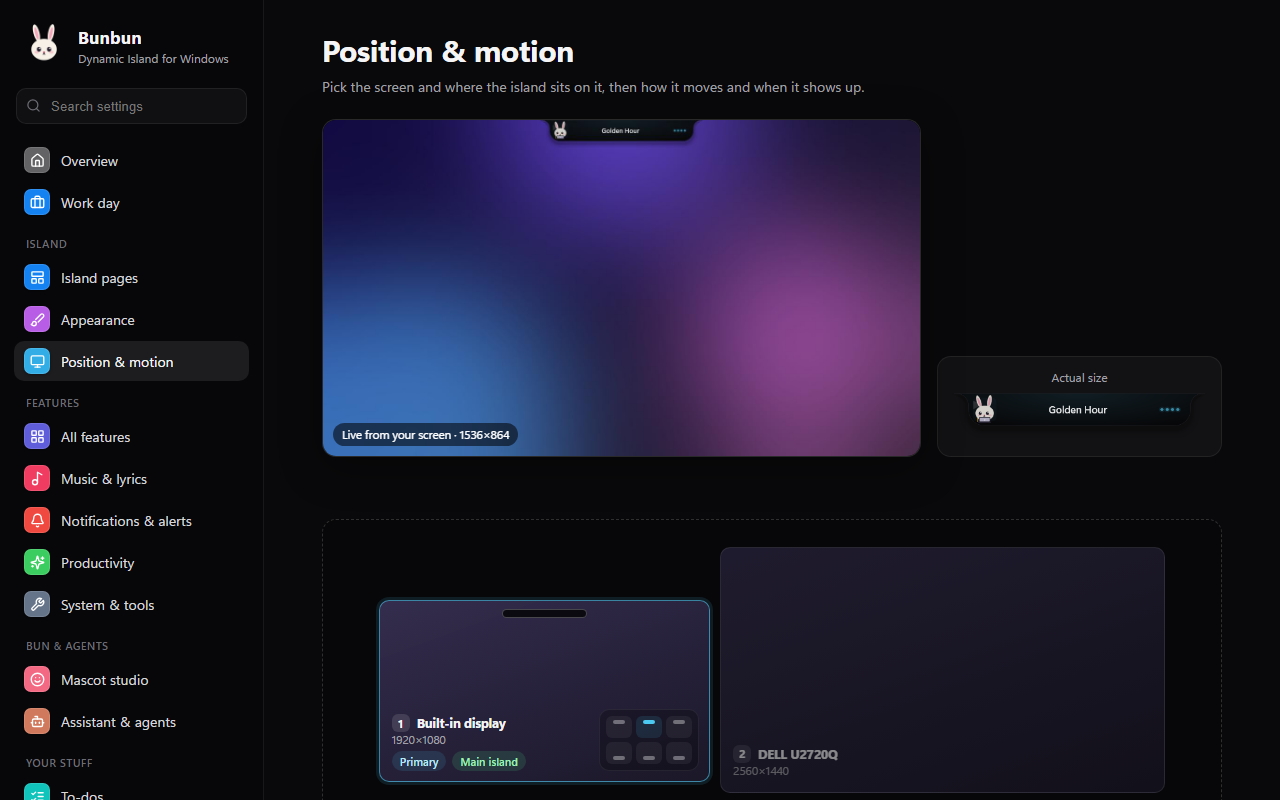 Position & motion. Any screen, or all of them, top or bottom per display, and how the island moves. |
Download
Grab Bunbun-<version>-setup.exe from the latest release and run it;
that one file is all you need. It installs for your account only (no admin prompt) into %LOCALAPPDATA%\Programs\Bunbun, adds
Bunbun to the Start menu, and can:
- start Bunbun when you sign in;
- install the WebView2 Runtime if your Windows doesn't have it (the settings window needs it;
Windows 11 always does); - set up Local AI for Ask Bun: tick it and the installer downloads a small
language model (about 1.1 GB, checked against its published hash) and turns it on. Skip it and
add a model any time later.
Uninstall from Settings → Apps. It quits Bunbun and disconnects the coding agents connected to
it first; your settings, skin packs and models stay in your AppData folders.
It runs on Windows 10 and 11 (x64). The app isn't code-signed yet, so SmartScreen may warn the
first time: choose More info → Run anyway. Check the download against SHA256SUMS.txt on the
release page if you like.
Linux
Each release also has Bunbun-<version>-amd64.deb for Debian, Ubuntu and their derivatives
(sudo apt install ./Bunbun-<version>-amd64.deb) and Bunbun-<version>-x86_64.AppImage for
most other distributions. It needs a 64-bit PC with glibc 2.35 or newer: Ubuntu 22.04, Debian 12,
openSUSE Leap 15.6 or newer, current Fedora, Arch, Linux Mint and Kali all qualify, and are tested
(RHEL 9 and its rebuilds are too old). It runs on GNOME and KDE, on Wayland and X11. The Linux version has the
Studio island with its pages (Home, music, lyrics, calendar, weather, system, quick toggles, to-dos,
agents, clipboard, note, focus), the mascot, coding agents with plans, questions and replies, and the
settings app. Ask Bun and the tray icon aren't on Linux yet. See
Bunbun on Linux for what works where.
Get started
Run it. Install it (above), or build it yourself (see
docs/building.md):./scripts/setup.sh./build.shFind Bun. Bun appears in the tray and the island at the top of your screen.
Connect your agent in Settings → Assistant & agents, or from the command line:
build/bunbun.exe --connect claudeSee docs/agents.md for Antigravity, Cursor and Copilot.
| Hotkey | Does |
|---|---|
| Ctrl+Alt+B | Opens Ask Bun |
| Ctrl+Alt+D | Hides or shows the island |
| Ctrl+Alt+H | Tucks the island into a thin line; point at it to bring it back |
Hover the island to expand it, scroll to step through activities and dashboards, and right-click it
for quick options. Settings live in %APPDATA%\Bunbun\settings.ini.
Documentation
| Doc | What's in it |
|---|---|
| Building | Toolchain, building, tests, the live dev loop, the Linux build |
| Linux | Installing on Linux, what works on which desktop, how the port is built |
| Coding agents | Connecting agents, how approvals work, troubleshooting |
| Mascots | Characters, moods, custom skin packs |
| Local AI | Optional offline AI for Ask Bun: what to download, setup, how it works |
| Architecture | How the pieces fit, source layout, security model |
| Contributing | Code style, where to add things, project rules |
| Security | Reporting vulnerabilities |
| Changelog | What changed in each version |
Privacy
No telemetry and no Bunbun AI service. The optional local AI runs entirely on your PC. You can instead point Ask Bun at Ollama on your PC, or paste your own Google Gemini key (off by default; then your questions go to Google, never your calendar or to-dos). The network is used only by the weather, lyrics and dictionary
modules (and weather for a city you ask about), by the calendar link you add (fetched every 5 minutes), by web searches you ask Bun for, and by a once-a-day update check that asks GitHub for the
latest release (turn it off in Settings → General → Updates). Weather comes from Open-Meteo; with
no city set, the location comes from Windows' own location service (never from your IP address),
and its coordinates are sent to Open-Meteo and to BigDataCloud for the place name. Agent hooks talk to the island
over a local pipe that only your user account can open.
Updates
Bunbun checks GitHub once a day and shows a notification when a new version is out. Click it,
Update available in the tray menu, or Update in Settings → General → Updates, and Bunbun
updates itself: it closes, a small window with Bun downloads the new version, checks it against the
release's published checksums, installs it and opens the new Bunbun. Nothing is installed until you
choose Update. Your settings, skin packs and connected agents carry over. A copy you unzipped or
built yourself opens the release page instead.
Contributors
Thanks to everyone who has helped build Bunbun. This wall updates itself from GitHub.
Want to be on it? Contributing says how to start.
Credits & license
Bunbun builds on open-source work; see THIRD_PARTY_NOTICES.md.
Released under the MIT License.
Yorumlar (0)
Yorum birakmak icin giris yap.
Yorum birakSonuc bulunamadi