project-cairn
Health Pass
- License — License: MIT
- Description — Repository has a description
- Active repo — Last push 0 days ago
- Community trust — 145 GitHub stars
Code Pass
- Code scan — Scanned 11 files during light audit, no dangerous patterns found
Permissions Pass
- Permissions — No dangerous permissions requested
No AI report is available for this listing yet.
Turn project work into reusable knowledge — an AI-agent skill for Claude Code & Codex
Project Cairn
Turn project work into reusable knowledge.
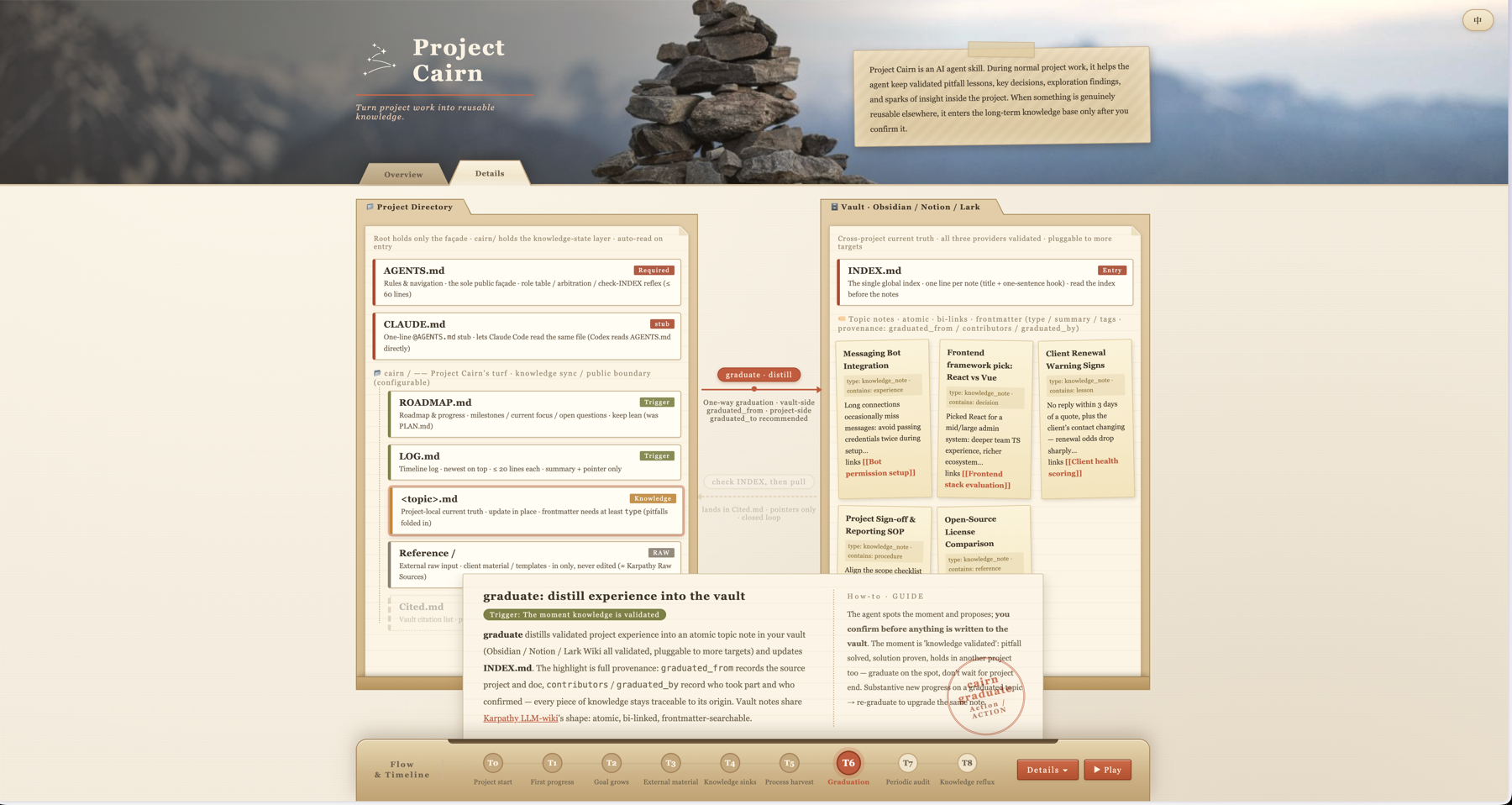
Open the interactive guide to learn more about the Skill
Sound familiar?
- The same problem comes back in the next project.
- Start a new session or switch agents, and you are explaining the context and rules all over again.
- Plans, progress, and conclusions are scattered, so the agent keeps jumping between old and new directions.
- You know the answer exists. It is just buried somewhere in an old chat.
What Project Cairn does
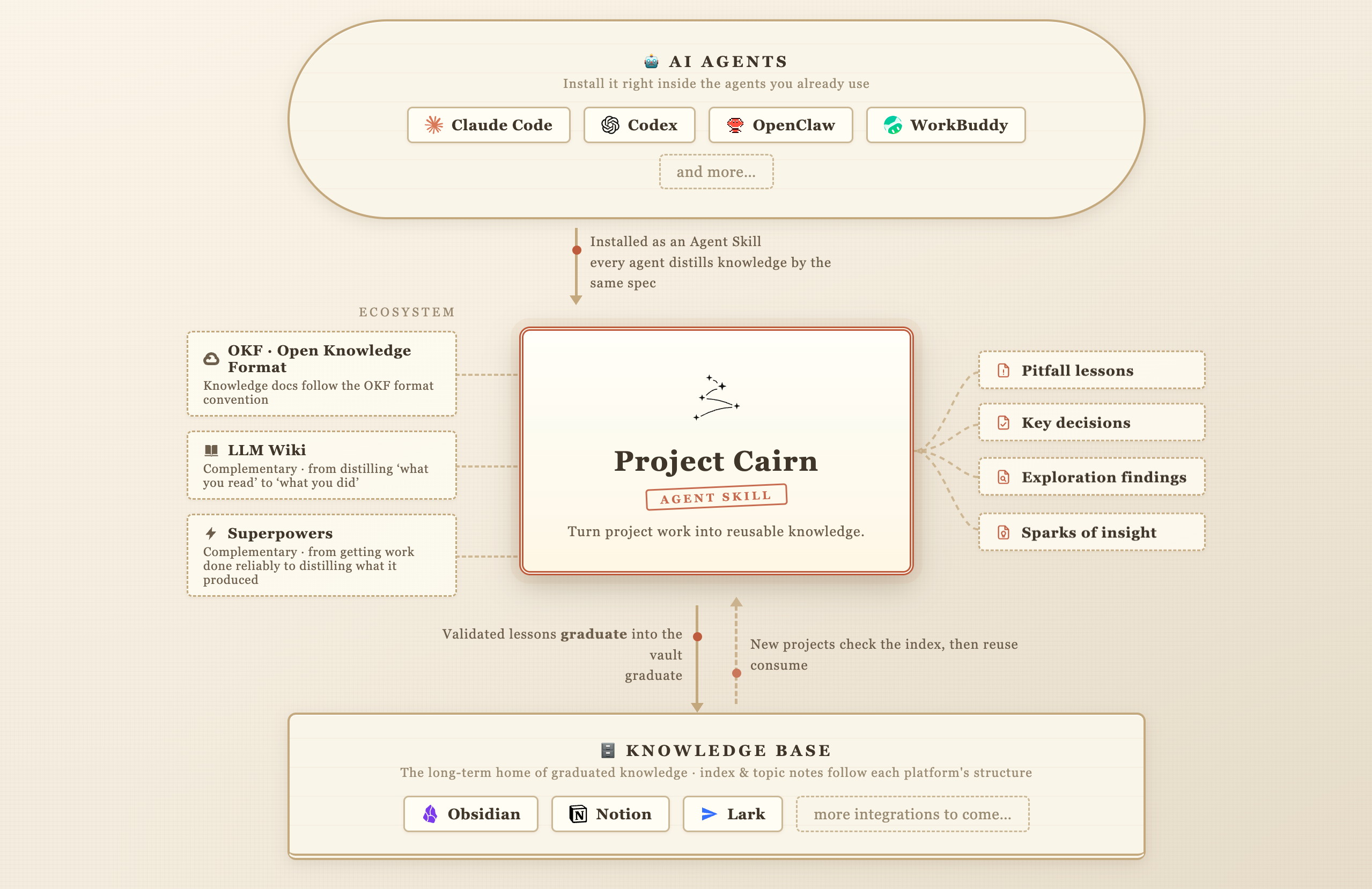
Project Cairn is an agent skill. During normal project work, it helps the agent keep validated pitfall lessons, key decisions, exploration findings, and sparks of insight inside the project. When something is genuinely reusable elsewhere, the agent can prepare it for a long-term knowledge base after you confirm it.
The files have distinct jobs:
AGENTS.mdholds the rules the agent reads whenever it enters the project.cairn/LOG.mdrecords what happened, with short summaries and pointers.cairn/ROADMAP.mdkeeps the overall goal, plan, and current progress.cairn/<topic>.mdholds the current conclusion for one subject.cairn/Cited.mdpoints to external knowledge that actually shaped the project, without copying its body.
A cairn is a trail marker built by earlier travelers. The name captures the goal: let the next project see where the previous one found a safe route.
Who it is for
Project Cairn is useful when you run several AI-collaboration projects, switch between skill-compatible agents such as Claude Code and Codex, or need project knowledge to survive beyond one person's memory.
Install
Claude Code, user-level installation:
git clone https://github.com/iBlinkQ/project-cairn.git ~/.claude/skills/project-cairn
Codex, user-level direct skill path:
git clone https://github.com/iBlinkQ/project-cairn.git ~/.agents/skills/project-cairn
WorkBuddy, import the local skill package:
- Download the Project Cairn ZIP.
- Open Skills from the WorkBuddy sidebar. Select Add Skill, then Upload Skill.
- Choose the downloaded ZIP file. WorkBuddy configures it automatically, so you do not need to copy it into a directory.
See the official WorkBuddy skill guide for the installation interface.
For another skill-compatible agent, clone the repository into the directory where that agent loads skills. SKILL.md should sit directly at the root of project-cairn/, not inside another nested folder.
Prerequisites are git, plus bash for scripts/*.sh. The shell scripts have been verified on macOS and Linux; Windows users need WSL or Git Bash. Python scripts require Python 3. There is no package-manager release yet.
Start in three steps
- Ask the agent to "Initialize Project Cairn in this project." It will collect the project summary, git policy, and migration choice, then create the rules and configuration. Connecting a knowledge-base provider can be deferred until the first graduation.
- Keep working normally. During ordinary collaboration turns, the agent follows
AGENTS.mdto maintain progress and current conclusions. There is no separate recording service to run. - When a validated lesson could help another project, ask the agent to prepare a graduation candidate. Nothing is written to the long-term knowledge base until you confirm the scope. Later projects search first and add a pointer to
cairn/Cited.mdonly when a result actually influences the work.
The two sides
Project Cairn separates two lifecycles instead of putting every kind of information into one ever-growing file.
| Side | What it keeps | Typical home | When it is read |
|---|---|---|---|
| Project side | Rules, progress, current conclusions, and local cases | root AGENTS.md and cairn/ |
while entering and advancing the project |
| Knowledge-base side | Distilled knowledge that can be reused across projects | Obsidian, Notion, or Lark / Feishu wiki | when new work needs an earlier lesson |
The project side keeps local facts and conclusions current. Once a lesson proves useful beyond that project, human-confirmed graduation distills it into the knowledge-base side. Each side remains authoritative for its own scope.
How a lesson reaches the next project
Take the messaging-bot problem:
- Initialization writes the Cairn rules and configuration into the project.
- As the agent investigates, meaningful progress is recorded in
LOG.md. - Once the cause and fix are verified, the current conclusion moves into a topic note.
- Stable conclusions from specs, plans, reviews, or retrospectives may also be distilled. The process artifacts stay where they are.
- The agent notices that the lesson may be reusable and proposes it as a graduation candidate.
- After you approve, the agent removes project-specific noise, adds context and limits, records provenance, writes the note, and updates the provider's index.
- A later project searches the knowledge base before solving the problem again. If a note shapes the work,
Cited.mdrecords a pointer rather than a duplicate.
The interactive overview expands this journey into T0 through T8, including roadmap maintenance, audit, and re-graduation: explore the full flow.
What it keeps
Project Cairn does not stamp out a directory full of empty templates. Beyond the core initialization files, documents appear only when a real signal calls for them.
| File | Responsibility |
|---|---|
AGENTS.md |
Rules and navigation |
.cairn/config.yaml |
Machine-readable configuration |
cairn/LOG.md |
Reverse-chronological history |
cairn/ROADMAP.md |
Overall goal, plan, and current progress |
cairn/<topic>.md |
Current truth for one topic |
cairn/Reference/ |
External source material owned by the project |
cairn/Cited.md |
Pointers to knowledge that influenced the work |
Schemas, configurations, and contracts consumed directly by code stay in the code tree. Cairn keeps the knowledge around them: why they look this way, what alternatives were tested, and what went wrong during implementation.
Topic notes use Markdown and YAML frontmatter with at least a type field, following the minimal convention of Google's Open Knowledge Format. Project Cairn does not claim to implement the complete OKF bundle.
Graduated notes carry provenance through graduated_from, contributors, graduated_by, and authoring_mode, so readers can trace a conclusion back to the people, project, and source material that produced it.
Automation boundaries
- Project Cairn has no background hook and does not run after a chat ends.
- Routine maintenance happens during normal work because the project's
AGENTS.mdcarries the rules. - The agent may suggest a graduation candidate, but it cannot write to the long-term knowledge base without human confirmation.
- Connecting Obsidian, Notion, or Lark / Feishu can be deferred until the first graduation.
- Audit reports contradictions, stale conclusions, and omissions; it does not silently rewrite important decisions.
Graduation writes from the project side to the knowledge-base side. Reuse works by searching first, then leaving a pointer in Cited.md when a note is actually used. It is explicit consumption, not background synchronization between two stores.
Verified knowledge bases
Project Cairn has verified graduation paths for:
- Obsidian, using vault-relative files,
INDEX.md, and native WikiLinks. - Notion, using a database as both the container and index, with structured metadata mapped to properties.
- Lark / Feishu wiki, using nodes in a knowledge-space tree with links that can be read back.
Every provider follows the behavioral contract in references/provider-interface.md while keeping its platform's native link and index model. Provider-specific execution paths live under references/graduation/. Before any write, the matching read-only preflight can check installation, authentication, and access:
scripts/obsidian-preflight.sh
scripts/notion-preflight.sh
scripts/lark-preflight.sh
Learn more
Project Cairn complements adjacent tools instead of replacing them:
| Tool or approach | Main job | Relationship to Cairn |
|---|---|---|
| LLM Wiki | Organize source material you have read into a wiki | LLM Wiki focuses on source knowledge; Cairn focuses on knowledge learned through project work |
| Open Knowledge Format | Make knowledge files exchangeable by people and machines | OKF concerns format; Cairn concerns formation, maintenance, graduation, and reuse |
| Agent memory | Preserve an agent's preferences and working context | Memory supports agent continuity; Cairn supports project-knowledge continuity |
| superpowers | Make delivery more reliable through specs, plans, tests, and review | superpowers manages the process; Cairn keeps the stable conclusions learned from it |
An agent remembering something is not the same as a project learning it.
Docs map
| Reference | Use it for |
|---|---|
references/init.md |
Initializing or retrofitting Project Cairn |
references/maintenance.md |
Maintaining LOG.md, ROADMAP.md, and topic notes |
references/graduation.md |
Judging, distilling, and writing reusable knowledge |
references/graduation/ |
One execution path per provider (Lark wiki, Notion, Obsidian) |
references/provider-interface.md |
The behavioral contract for provider adapters |
references/consume.md |
Searching, using, and citing external knowledge |
references/audit.md |
Finding drift, contradictions, and missing records |
references/upgrade.md |
Checking and upgrading an initialized project |
references/frontmatter.md |
Fields for project notes and knowledge-base notes |
references/branch-closure.md |
Salvaging knowledge before an exploration branch closes |
references/zh-glossary.md |
Fixed terminology for Chinese project documentation |
Contributing
Issues and pull requests are welcome. Project Cairn is documentation-first, so most contributions belong in SKILL.md, references/*.md, assets/templates/*, or scripts/. If a change affects behavior, explain the reason and impact in the pull request.
License
Reviews (0)
Sign in to leave a review.
Leave a reviewNo results found