orchestrator-supaconductor
Health Gecti
- License — License: MIT
- Description — Repository has a description
- Active repo — Last push 0 days ago
- Community trust — 305 GitHub stars
Code Basarisiz
- execSync — Synchronous shell command execution in lib/skills-core.js
Permissions Gecti
- Permissions — No dangerous permissions requested
Security Assessment: Overall risk is Medium. The primary concern is a failed audit check for synchronous shell command execution within the codebase. While the tool does not request inherently dangerous permissions or contain hardcoded secrets, executing shell commands opens up potential vectors for arbitrary code execution if used maliciously or exposed to untrusted inputs. Users should be aware of exactly what commands the agents are running on their systems.
Quality Assessment: Quality is high. The project is licensed under the permissive MIT license and is actively maintained, with the most recent push occurring today. It enjoys a solid level of community trust with over 300 GitHub stars. Furthermore, the developer recently implemented important safety and stability features, such as atomic file locks, bounded knowledge injection, and execution state reconciliation, showing a mature approach to project management.
Verdict: Use with caution — the tool is well-maintained and popular, but developers should review the synchronous shell execution logic to ensure it aligns with their local security standards before deploying.
Multi-agent orchestration system for Claude Code with parallel execution, automated quality gates, Board of Directors, and bundled Superpowers skills
SupaConductor
Turn Claude Code into a full engineering team.
One command builds features, fixes bugs, and ships code — with automated planning, execution, and quality checks.




What Is This? • Install • Get Started • How It Works • Commands • FAQ • Community
What's New in v3.7.0
- Board of Directors fast-path — Routine tracks now use a single Opus call (all 5 lenses in one pass) at ~1/10th the cost of the full multi-agent deliberation. Full board is reserved for high-stakes decisions: production deploys, security architecture, breaking API changes, data-loss migrations.
- Plan revision guard — Prevents infinite planning loops. Tracks the number of times a plan is rejected and calls it done (with warnings) after 3 revisions.
- Execution state reconciliation — On session resume,
plan.mdcheckboxes are now treated as the source of truth. Prevents already-completed tasks from being re-executed after a crash. - Atomic file locks — Parallel workers can no longer accidentally acquire the same file lock simultaneously. Uses
fcntlOS-level locking on a dedicated mutex file. - Bounded knowledge injection — The knowledge brief injected before planning is capped at 500 tokens (top-3 most relevant patterns and errors). Prevents context growth as your project's knowledge base accumulates.
What Does This Do?
You tell Claude Code what you want. SupaConductor figures out how to build it — step by step, with quality checks at every stage.
Without SupaConductor, you prompt Claude Code and hope for the best. You manually review, re-prompt, and fix what it misses.
With SupaConductor, you type one command:
/orchestrator-supaconductor:go Add user authentication with Google OAuth
And it automatically:
- Writes a detailed specification
- Creates an implementation plan with task dependencies
- Executes each task (in parallel when possible)
- Checks the work with specialized evaluators
- Fixes any issues it finds
- Marks the work complete when everything passes
No babysitting. No re-prompting. Just describe what you want and walk away.
What's Inside
| Component | Count | What It Does |
|---|---|---|
| Commands | 36 | Slash commands you type to control everything |
| Skills | 39 | Specialized knowledge modules that activate when needed |
| Agents | 15 | Autonomous workers that handle planning, coding, and evaluation |
| Evaluators | 4 | Quality checkers for UI/UX, code quality, integrations, and business logic |
| Board of Directors | 5 | Virtual executives who deliberate on major decisions |
| Lead Engineers | 4 | Architecture, Product, Tech, and QA specialists |
Bundles Superpowers v4.3.0 (MIT) — everything works out of the box with zero setup.
Installation
Option 1: Marketplace (recommended)
Open Claude Code and run:
/install Ibrahim-3d/orchestrator-supaconductor
Option 2: Clone from GitHub
git clone https://github.com/Ibrahim-3d/orchestrator-supaconductor.git ~/.claude/plugins/orchestrator-supaconductor
Option 3: Download manually
Download the latest release and extract it to ~/.claude/plugins/orchestrator-supaconductor/.
Verify it works
Start a new Claude Code session and type /orchestrator-supaconductor:. You should see a list of commands appear. If you see /orchestrator-supaconductor:go, you're all set.
Getting Started
Step 1: Set up your project
Open Claude Code in your project folder and run:
/orchestrator-supaconductor:setup
This walks you through an interactive setup that:
- Analyzes your existing codebase (or starts fresh for new projects)
- Helps define your product vision and tech stack
- Creates a
conductor/folder in your project to track all work - Generates an initial development sprint with ready-to-execute tracks
You only need to do this once per project.
Step 2: Build something
Tell it what you want in plain English:
/orchestrator-supaconductor:go Add Stripe payment integration with webhooks
/orchestrator-supaconductor:go Fix the login bug where users get logged out after refresh
/orchestrator-supaconductor:go Build a dashboard with real-time analytics charts
/orchestrator-supaconductor:go Refactor the database layer to use connection pooling
That's it. SupaConductor takes over from here — planning, coding, testing, and evaluating the work automatically.
Step 3: Check on progress
/orchestrator-supaconductor:status
Shows all your active tracks, what step each one is on, and what's completed.
Step 4: Resume interrupted work
If a session ends before a track completes, just run:
/orchestrator-supaconductor:go
It picks up exactly where it left off.
How It Works
Every piece of work follows a structured cycle called the Evaluate-Loop:
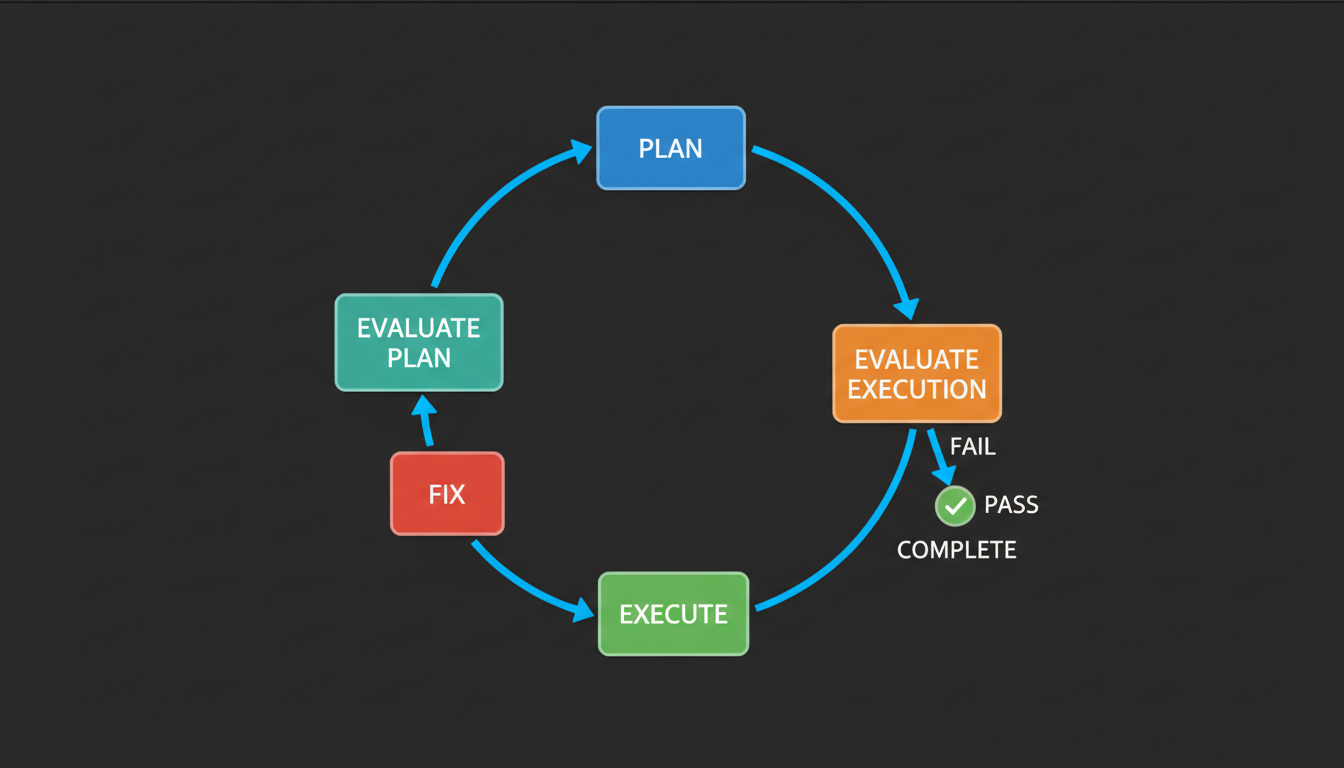
| Step | What Happens |
|---|---|
| Plan | Breaks your goal into tasks with a dependency graph |
| Evaluate Plan | Checks for scope issues, overlap with other work, and feasibility |
| Execute | Writes code, runs tests, tracks progress — parallel when possible |
| Evaluate Execution | Specialized checkers review UI/UX, code quality, integrations, and business logic |
| Fix | Addresses any failures, then loops back to evaluation (up to 5 fix cycles; up to 3 plan revisions) |
| Complete | All checks pass — track is marked done |
The loop runs fully automated. It stops when the work passes all quality checks or when it needs your input.
Parallel Execution
When tasks don't depend on each other, they run simultaneously:
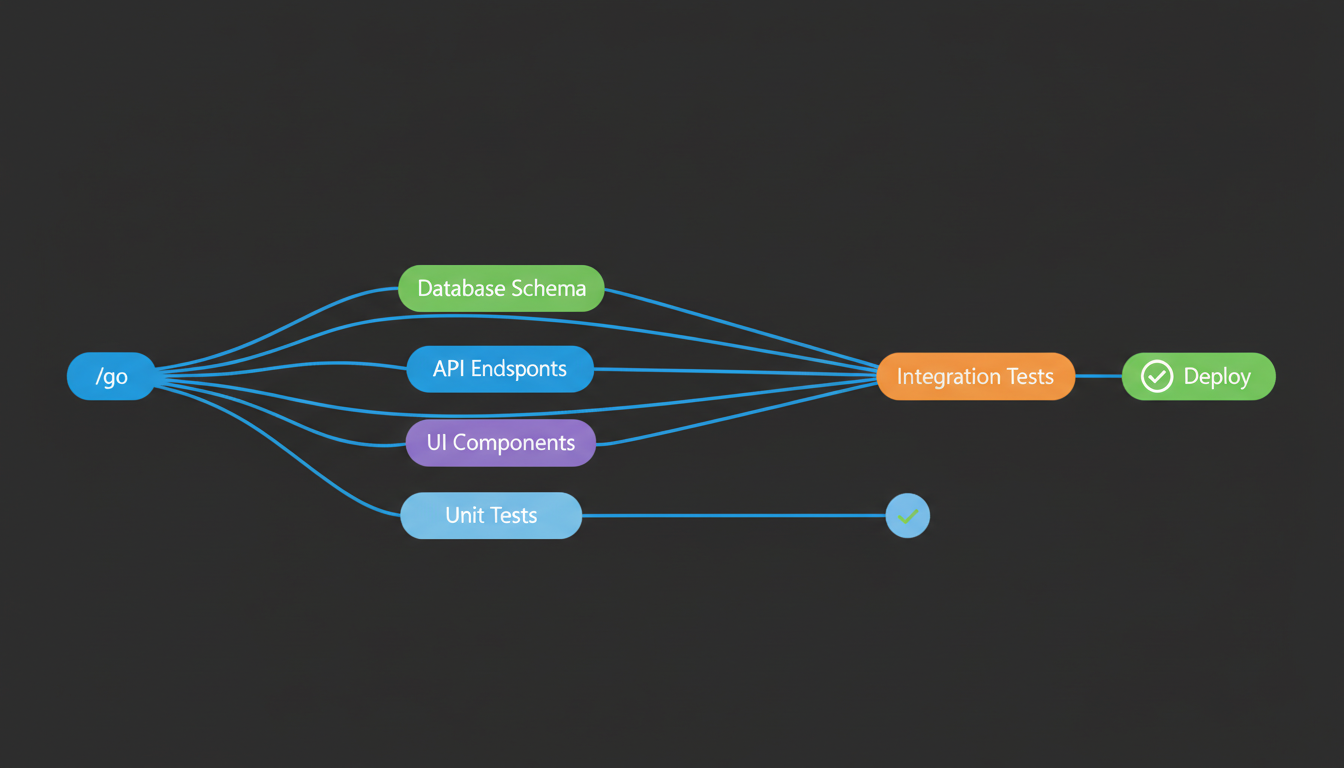
This means a feature with 6 tasks might only take as long as 3, because independent tasks run in parallel.
Two Modes
SupaConductor can work in two ways:
| Mode | Behavior | Best For |
|---|---|---|
| Agentic (default) | Fully autonomous — makes all decisions itself | Experienced users who trust the system |
| Human-in-the-loop | Pauses at key decision points to ask you | Learning the system, critical work, or when you want more control |
Switch modes by editing conductor/config.json in your project:
{ "mode": "agentic" }
{ "mode": "human-in-the-loop" }
Board of Directors
For major decisions — and automatically for high-stakes tracks like production deploys, security architecture changes, breaking API migrations, or data-loss operations — a virtual board deliberates with written rationale:
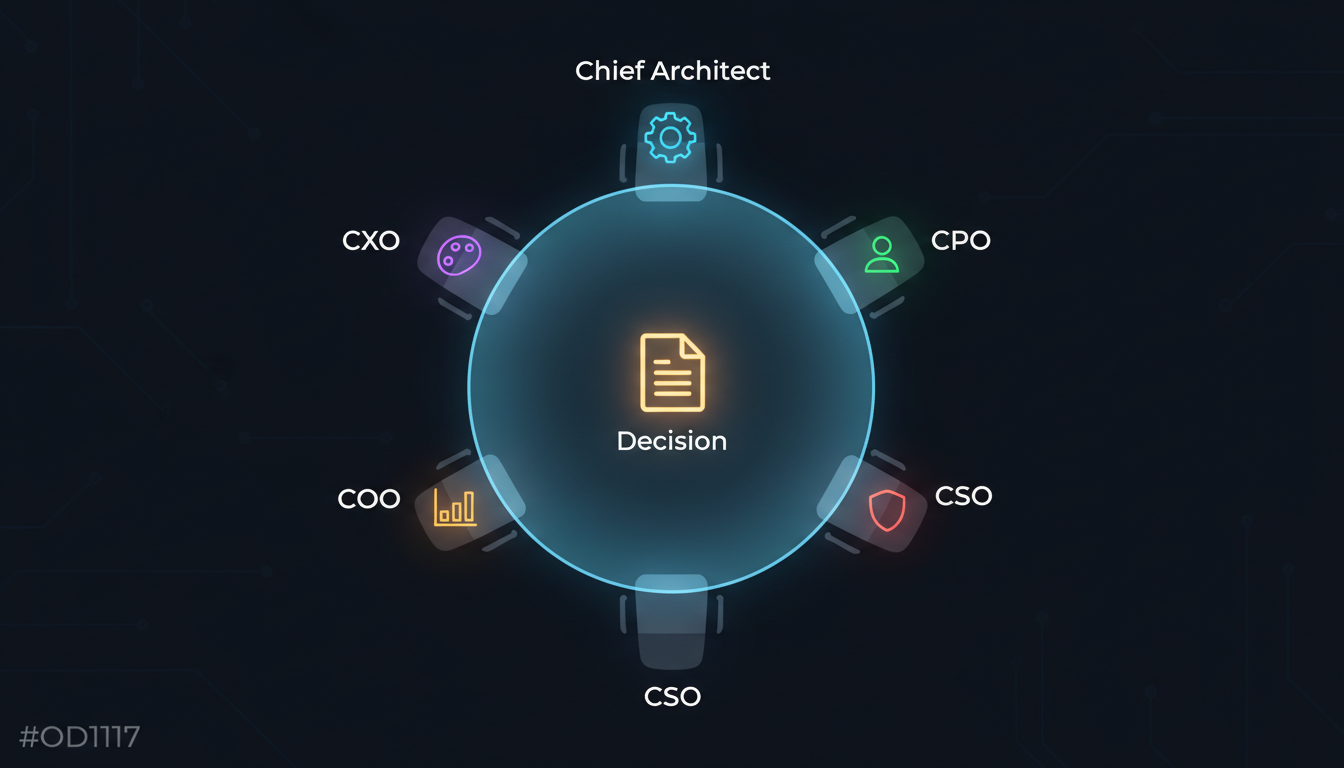
| Director | Focus |
|---|---|
| Chief Architect | System design, scalability, technical debt |
| Chief Product Officer | User value, market fit, feature scope |
| Chief Security Officer | Vulnerabilities, compliance, data protection |
| Chief Operations Officer | Feasibility, timelines, deployment risks |
| Chief Experience Officer | UX/UI, accessibility, user journeys |
Each director independently assesses your question, then they discuss and vote with written rationale.
/orchestrator-supaconductor:board-meeting Should we migrate from REST to GraphQL?
/orchestrator-supaconductor:board-review Add real-time notifications via WebSocket
Use board-meeting for full deliberation (detailed, takes longer) or board-review for quick assessments.
All Commands
The Main Ones
| Command | What It Does |
|---|---|
/orchestrator-supaconductor:go <goal> |
Describe what you want — everything else is automatic |
/orchestrator-supaconductor:setup |
Set up SupaConductor in your project (run once) |
/orchestrator-supaconductor:status |
See all your tracks and their progress |
/orchestrator-supaconductor:implement |
Continue the Evaluate-Loop on the current track |
/orchestrator-supaconductor:new-track |
Create a new track with more manual control |
Quality and Review
| Command | What It Does |
|---|---|
/orchestrator-supaconductor:phase-review |
Run a quality gate on completed work |
/orchestrator-supaconductor:cto-advisor |
Get a CTO-level architecture review |
/orchestrator-supaconductor:board-meeting <topic> |
Full board deliberation with voting |
/orchestrator-supaconductor:board-review <topic> |
Quick board assessment |
/orchestrator-supaconductor:ui-audit |
Accessibility and UI/UX review |
Expert Advisors
Ask for advice from virtual executives — they analyze your project and give guidance:
| Command | Advisor |
|---|---|
/orchestrator-supaconductor:ceo |
Business strategy and product direction |
/orchestrator-supaconductor:cmo |
Marketing strategy and positioning |
/orchestrator-supaconductor:cto |
Technical architecture and engineering |
/orchestrator-supaconductor:ux-designer |
User experience and design |
Planning and Execution
| Command | What It Does |
|---|---|
/orchestrator-supaconductor:writing-plans |
Create a structured implementation plan |
/orchestrator-supaconductor:executing-plans |
Execute an existing plan step by step |
/orchestrator-supaconductor:brainstorming |
Creative exploration before building |
/orchestrator-supaconductor:systematic-debugging |
Structured approach to finding and fixing bugs |
/orchestrator-supaconductor:using-git-worktrees |
Isolate feature work in separate git worktrees |
/orchestrator-supaconductor:finishing-a-development-branch |
Wrap up a branch — merge, PR, or cleanup |
Loop Control (Advanced)
These give you fine-grained control over individual loop steps:
| Command | Step |
|---|---|
/orchestrator-supaconductor:loop-planner |
Run just the planning step |
/orchestrator-supaconductor:loop-plan-evaluator |
Evaluate just the plan |
/orchestrator-supaconductor:loop-executor |
Run just the execution step |
/orchestrator-supaconductor:loop-execution-evaluator |
Evaluate just the execution |
/orchestrator-supaconductor:loop-fixer |
Run just the fix step |
/orchestrator-supaconductor:parallel-dispatcher |
Dispatch parallel workers manually |
/orchestrator-supaconductor:task-worker |
Run a single task from the plan |
Architecture
How the system fits together
                         /go <your goal>
                              |
                   +----------v-----------+
                   |    Orchestrator       |
                   |   (controls the loop) |
                   +----------+-----------+
                              |
          +-------------------+-------------------+
          v                   v                   v
     +--------+         +---------+         +----------+
     |  Plan  | ------> | Execute | ------> | Evaluate |
     +--------+         +---------+         +----------+
          |                   |                   |
          v                   v                   v
    writing-plans      parallel-dispatcher   4 evaluators
    plan-evaluator      |-- task-worker      |-- eval-ui-ux
    cto-reviewer        |-- task-worker      |-- eval-code-quality
                        +-- task-worker      |-- eval-integration
                                             +-- eval-business-logic

     +----------------------+    +----------------------------+
     |  Board of Directors  |    |  Knowledge / Retrospective |
     |  5 directors + vote  |    |  patterns.md + errors.json |
     +----------------------+    +----------------------------+
What gets created in your project
When you run /orchestrator-supaconductor:setup, it creates a conductor/ folder:
your-project/
+-- conductor/
    |-- tracks.md                # Registry of all your work tracks
    |-- config.json              # Mode setting (agentic or human-in-the-loop)
    |-- workflow.md              # How the development process works
    |-- authority-matrix.md      # Who can make which decisions
    |-- decision-log.md          # Record of architectural decisions
    |-- product.md               # Product vision and requirements
    |-- tech-stack.md            # Technology choices and constraints
    |-- knowledge/
    |   |-- patterns.md          # Patterns learned from completed work
    |   +-- errors.json          # Fixes for recurring errors
    +-- tracks/
        +-- feature-name/
            |-- spec.md          # What needs to be built
            |-- plan.md          # How to build it (tasks + dependencies)
            +-- metadata.json    # Current state and configuration
All of these are plain Markdown and JSON files. You can read, edit, or delete them anytime.
FAQ
Do I need to know how to code?
You need Claude Code installed and running — that requires basic terminal knowledge. But once SupaConductor is set up, you describe what you want in plain English and it handles the implementation.
How much does this cost in API credits?
SupaConductor uses the same Claude API as normal Claude Code — it just structures the work more carefully. Because it runs multiple agents (planning, execution, evaluation), it uses roughly 3-5x the API calls compared to doing everything manually in one conversation.
SupaConductor optimizes costs automatically: it uses Opus (the most capable model) for planning and evaluation, and Sonnet (faster, cheaper) for execution tasks.
Ways to reduce cost:
- Use
/orchestrator-supaconductor:implementif you write specs yourself - Skip board meetings for small features (they're opt-in)
- Use human-in-the-loop mode to stay in control of scope
How much of my context window does this use?
Skills use progressive disclosure — only ~100 tokens each for metadata. Full instructions load only when activated (typically under 5,000 tokens each). The 39 skills are not loaded all at once.
Agents run as separate conversations with their own context windows, so they don't fill up your main conversation.
| Component | Context Used | When |
|---|---|---|
| Orchestrator | ~4,000 tokens | Active during /go |
| Planner | ~3,000 tokens | During planning only |
| Evaluator | ~2,500 tokens each | Only the active evaluator loads |
| Board meeting | ~5,000 tokens | On-demand only |
| Idle | ~500 tokens | Between steps |
Does this work with Cursor, Windsurf, or other AI tools?
No — SupaConductor is a Claude Code plugin that requires Claude Code's plugin system (agents, skills, slash commands, hooks).
However, the conductor/ directory it creates is just Markdown files. Any AI tool can read them. If you start with SupaConductor and switch tools later, your specs, plans, and documentation remain useful.
Is this overkill for small tasks?
For a quick one-file fix — yes, just use Claude Code directly. Use SupaConductor when:
- The work touches 3 or more files
- You'd normally plan before coding
- You want automated quality checks
- You want the work done right the first time
You can also use individual commands without the full loop:
/orchestrator-supaconductor:board-review Should we use Redis or PostgreSQL for sessions?
/orchestrator-supaconductor:cto-advisor
/orchestrator-supaconductor:writing-plans
Can I use this alongside other Claude Code plugins?
Yes. SupaConductor uses the /orchestrator-supaconductor: namespace and doesn't conflict with any other plugins, built-in commands, or MCP servers.
How do I update to a newer version?
If you installed via marketplace:
/install Ibrahim-3d/orchestrator-supaconductor
If you cloned via git:
cd ~/.claude/plugins/orchestrator-supaconductor && git pull
How do I uninstall?
# Disable without removing
/plugin    # Toggle it off in the plugin menu

# Full removal
rm -rf ~/.claude/plugins/orchestrator-supaconductor
The conductor/ directory in your project stays — it's just documentation files.
Migration from the Old Name
If you previously installed conductor-orchestrator-superpowers (the old name):
- Disable the old plugin: run
/pluginin Claude Code and toggle it off - Delete the old folder:
rm -rf ~/.claude/plugins/conductor-orchestrator-superpowers - Install SupaConductor using the instructions above
- Run
/orchestrator-supaconductor:setupin your existing projects to update references
Your existing tracks and data are safe — only the command prefix changed from /conductor: to /orchestrator-supaconductor:.
Community
- Discussions — Ask questions, share ideas, show what you've built
- Issues — Report bugs or request features
- Changelog — See what's new in each release
Requirements
- Claude Code CLI
- Git
Third-Party
Bundles Superpowers v4.3.0 by Jesse Vincent, licensed under MIT. See LICENSES/superpowers-MIT.
License
MIT — see LICENSE
Yorumlar (0)
Yorum birakmak icin giris yap.
Yorum birakSonuc bulunamadi