harneo
Health Uyari
- License — License: MIT
- Description — Repository has a description
- Active repo — Last push 0 days ago
- Low visibility — Only 5 GitHub stars
Code Gecti
- Code scan — Scanned 12 files during light audit, no dangerous patterns found
Permissions Gecti
- Permissions — No dangerous permissions requested
Bu listing icin henuz AI raporu yok.
Harness manager for Claude Code: one audited library of skills, subagents, settings and MCP servers, shipped into any project as a profile. Every write previewed and backed up.

Harneo
A harness manager for Claude Code.
Keep every skill, command, subagent, setting and MCP server you trust in one library,
compose profiles from it, and install the right profile into any project: previewed, backed up, reversible.
See your factory on a map, and test any new skill against it before you install it.





Install · How it works · CLI · Contributing
Videos: Harnmap and Harnfit (32 s) · the library, audit and refit (24 s)
Why
If you use Claude Code across many projects, your harness (.claude/ skills, commands, subagents, hooks, settings.json, MCP servers, CLAUDE.md) ends up copied by hand from repo to repo. Copies drift, nobody remembers where a skill came from, risky ones slip in, and refitting an existing project means overwriting files you meant to keep.
Harneo keeps the library outside your projects and ships it into them:
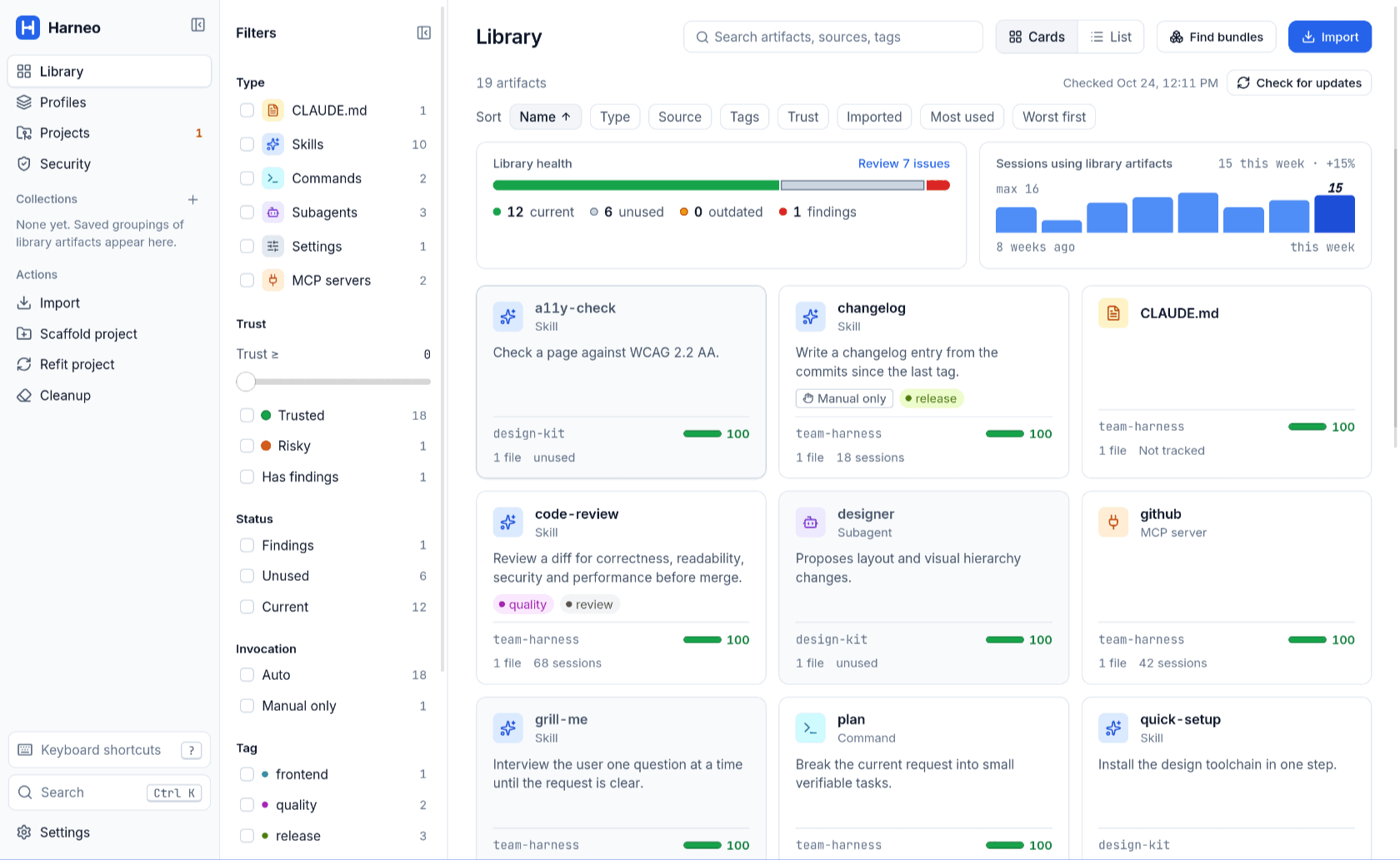
- One library for the whole harness, not only skills: skills, commands, subagents, settings, MCP servers, output styles, workflows, plugins,
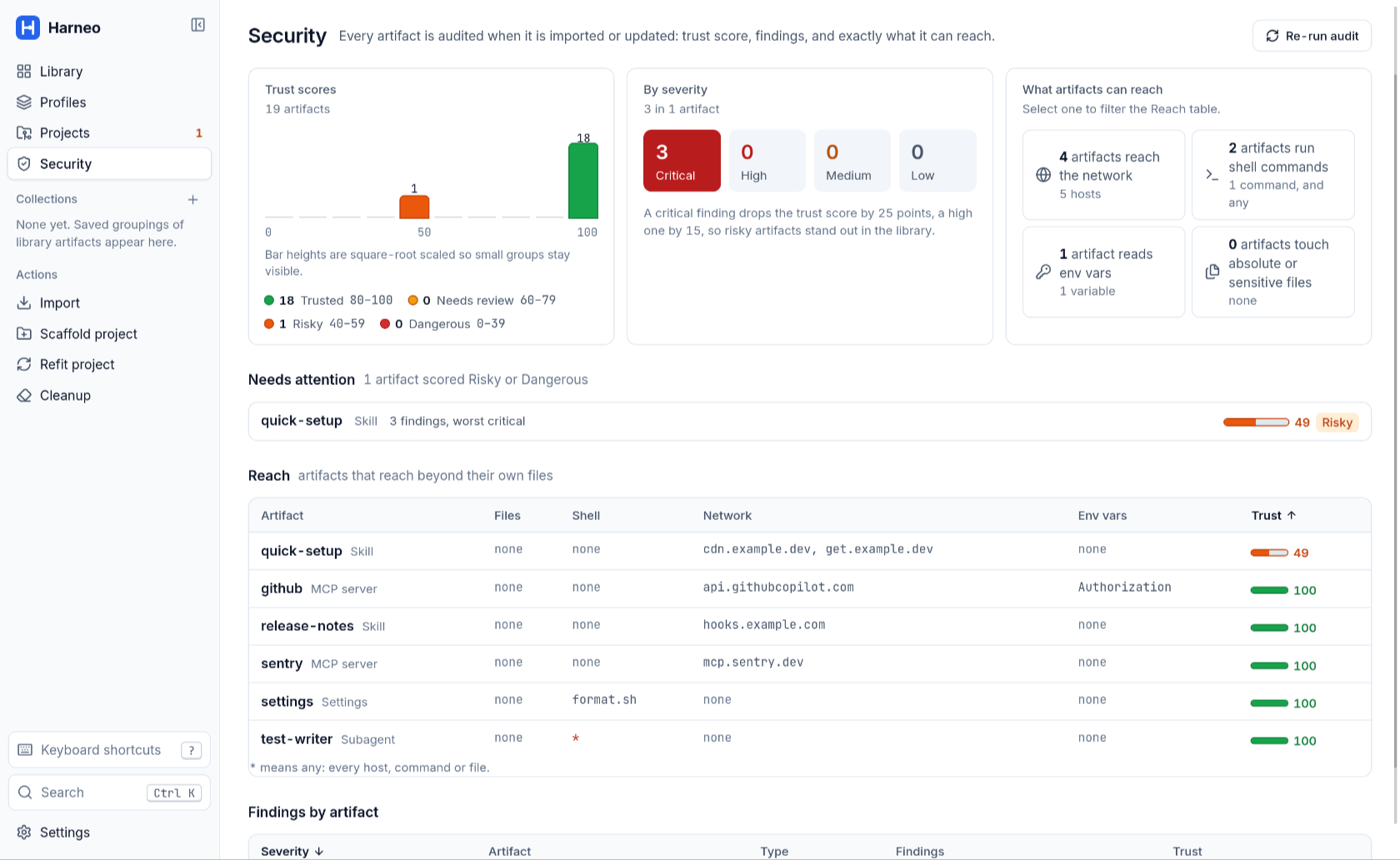
CLAUDE.mdand rules. - A security audit on import. Every artifact gets a trust score, findings by severity and what it can reach (network, shell, environment variables, files). Risky ones start excluded.
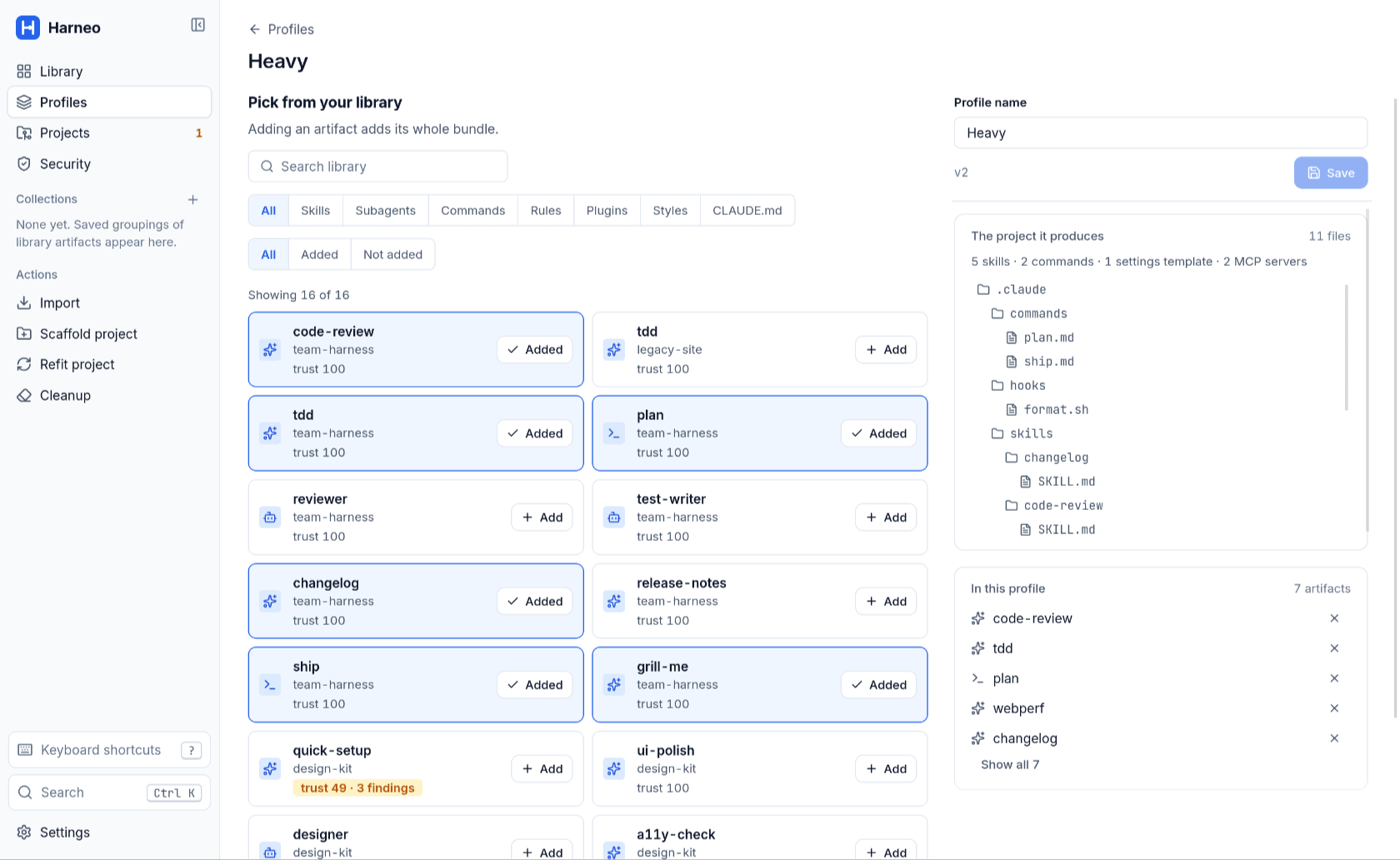
- Profiles. Compose a light or heavy setup once, clone it, export it as one file.
- Harnmap. Claude draws a profile as the workflow it is (software, research, writing, video…): which artifact sits at which stage, what is always on, what you reach for anytime, and what naturally comes next. Edit it like a diagram.
- Harnfit. Found a new skill online? Fit it into a profile's map before it touches a project: it fits, fits with changes (and which), or conflicts, quoting the lines that clash with what you already run.
- Safe writes. Every write is previewed first, every replaced file is backed up, and removing a profile restores the originals. Losing a project's own
CLAUDE.mdorsettings.jsonlines is flagged in red. - Drift and cleanup. See which projects diverged from their profile, which artifacts are outdated, unused or duplicated.
- Local first. No account, no server, no analytics. A desktop app and a CLI share the same library. See Privacy for what the optional Claude features send.
Status
Harneo is v0.3, early and moving fast. It is a personal tool shared openly, under the MIT license.
| Platform | State |
|---|---|
| Linux | Built and tested by the maintainer (Arch; Debian/Ubuntu and Fedora packages documented). |
| macOS | Should work, untested by the maintainer. Reports welcome. |
| Windows | Should work, untested by the maintainer. Reports welcome. |
On Linux, download the desktop app from the latest release (AppImage or .deb). On macOS and Windows, and for the CLI on any OS, you build Harneo from source: one setup script and two build commands, below.
Install
Linux: prebuilt packages
Each release carries the desktop app as an AppImage and a .deb (built by CI from the release tag, ADR-003), plus SHA256SUMS. They are unsigned: check the download against SHA256SUMS.
sha256sum -c SHA256SUMS --ignore-missing

# Any distro: the AppImage (some distros need libfuse2 / fuse2 installed first)
chmod +x Harneo_*_amd64.AppImage
./Harneo_*_amd64.AppImage

# Debian / Ubuntu: the .deb (pulls in WebKitGTK 4.1)
sudo apt install ./Harneo_*_amd64.deb
The packages hold the desktop app only. For the harneo CLI, build from source below.
From source
Every OS follows the same five steps: install the prerequisites, clone, run the setup script, build, put the two binaries on your PATH. The setup script shows every command it will run and asks before running any of them; --check (-Check on Windows) only reports what is missing.
What you end up with:
| Binary | What it is |
|---|---|
harneo-app |
The desktop app. |
harneo |
The CLI. Same engine, same library. |
Both are written to target/release/ (with .exe on Windows). No installer is built.
Linux
1. Prerequisites. git, and a distro that setup.sh knows: Arch (pacman), Debian or Ubuntu (apt), Fedora (dnf). Other distros work if you install the Tauri 2 Linux packages yourself; BUILDING.md lists them per distro.
2–4. Clone, set up, build.
git clone https://github.com/ibrahimkobeissy/harneo.git
cd harneo
./scripts/setup.sh                    # installs Rust, Node 22+ and WebKitGTK 4.1 and friends, after a confirmation
npm ci
npm run tauri build -- --no-bundle    # the app
cargo build --release -p harneo-cli   # the CLI
If setup.sh just installed Rust through rustup, open a new shell (or run . "$HOME/.cargo/env") before building.
5. Install on your PATH.
install -m 755 target/release/harneo-app target/release/harneo ~/.local/bin/
harneo --version
harneo-app &
Optional, to get Harneo in your app launcher, create ~/.local/share/applications/harneo.desktop:
[Desktop Entry]
Type=Application
Name=Harneo
Comment=Harness manager for Claude Code
Exec=harneo-app
Icon=/path/to/harneo/src-tauri/icons/icon.png
Categories=Development;
macOS
1. Prerequisites.
xcode-select --install # compilers and git
Then install Homebrew; setup.sh uses it for the rest.
2–4. Clone, set up, build.
git clone https://github.com/ibrahimkobeissy/harneo.git
cd harneo
./scripts/setup.sh                    # installs rustup and node@22 through Homebrew, after a confirmation
Homebrew installs node@22 and rustup keg-only: they are not on your PATH until you add them. setup.sh prints the exact line to add when that is the case; it looks like this. Add it, then open a new shell:
echo 'export PATH="$(brew --prefix rustup)/bin:$(brew --prefix node@22)/bin:$HOME/.cargo/bin:$PATH"' >> ~/.zshrc
exec zsh
Then build:
npm ci
npm run tauri build -- --no-bundle    # the app
cargo build --release -p harneo-cli   # the CLI
5. Install on your PATH.
mkdir -p ~/.local/bin
install -m 755 target/release/harneo-app target/release/harneo ~/.local/bin/
echo 'export PATH="$HOME/.local/bin:$PATH"' >> ~/.zshrc   # if ~/.local/bin is not on your PATH yet
harneo --version
harneo-app &
--no-bundle builds a plain binary, not a .app, so Harneo starts from the terminal and does not appear in Launchpad. If you want a .app, see Bundles in BUILDING.md.
Windows
1. Prerequisites. Windows 10 or 11 with winget (it ships with current versions) and Git for Windows (winget install --id Git.Git -e). setup.ps1 installs the rest: rustup, Node.js LTS, Visual Studio 2022 Build Tools with the C++ workload, and the WebView2 runtime.
2–4. Clone, set up, build. In PowerShell:
git clone https://github.com/ibrahimkobeissy/harneo.git
cd harneo
powershell -ExecutionPolicy Bypass -File scripts\setup.ps1   # installs what is missing, after a confirmation
Close and reopen PowerShell so the new tools are on your PATH, then:
cd harneo
npm ci
npm run tauri build -- --no-bundle    # the app
cargo build --release -p harneo-cli   # the CLI
5. Install on your PATH.
$bin = "$env:LOCALAPPDATA\Programs\Harneo"
New-Item -ItemType Directory -Force $bin | Out-Null
Copy-Item target\release\harneo-app.exe, target\release\harneo.exe $bin
[Environment]::SetEnvironmentVariable('Path', "$([Environment]::GetEnvironmentVariable('Path','User'));$bin", 'User')
Open a new terminal, then harneo --version and harneo-app. To pin it to Start, right-click harneo-app.exe in that folder → Pin to Start.
Try it without installing
From the repo, after the setup script and npm ci:
npm run tauri dev                     # the app, with hot reload
cargo run -p harneo-cli -- --help     # the CLI
Update
git pull
npm ci
npm run tauri build -- --no-bundle
cargo build --release -p harneo-cli
Then copy the two binaries over the old ones, as in step 5. Your library is kept: it lives in your data folder, not next to the binaries.
Uninstall
Delete the two binaries, then, if you want to remove your library as well, the data folder (harneo paths prints it):
| OS | Data folder |
|---|---|
| Linux | ~/.local/share/io.harneo |
| macOS | ~/Library/Application Support/io.harneo |
| Windows | %APPDATA%\io.harneo |
Harneo writes nothing else outside the projects you point it at. Projects keep the files a profile wrote into them; remove a profile from a project in the app first to restore its originals.
Troubleshooting
- Something is missing.
./scripts/setup.sh --check(orscripts\setup.ps1 -Check) lists it and installs nothing. - Linux: blank window or a WebKit error. Make sure WebKitGTK 4.1 is installed (not 4.0); on NVIDIA, try
WEBKIT_DISABLE_DMABUF_RENDERER=1 harneo-app. - macOS or Windows problem. These platforms are untested by the maintainer. Please open an issue with your OS version and the full error.
BUILDING.md has every prerequisite in detail, the options of the setup scripts and the contributor tools.
How it works
Import. Point Harneo at a folder (a repo, or
~/.claude/) or paste a git URL, then tick the artifacts to keep. Each one gets a security audit and a trust score on arrival, and risky ones start excluded.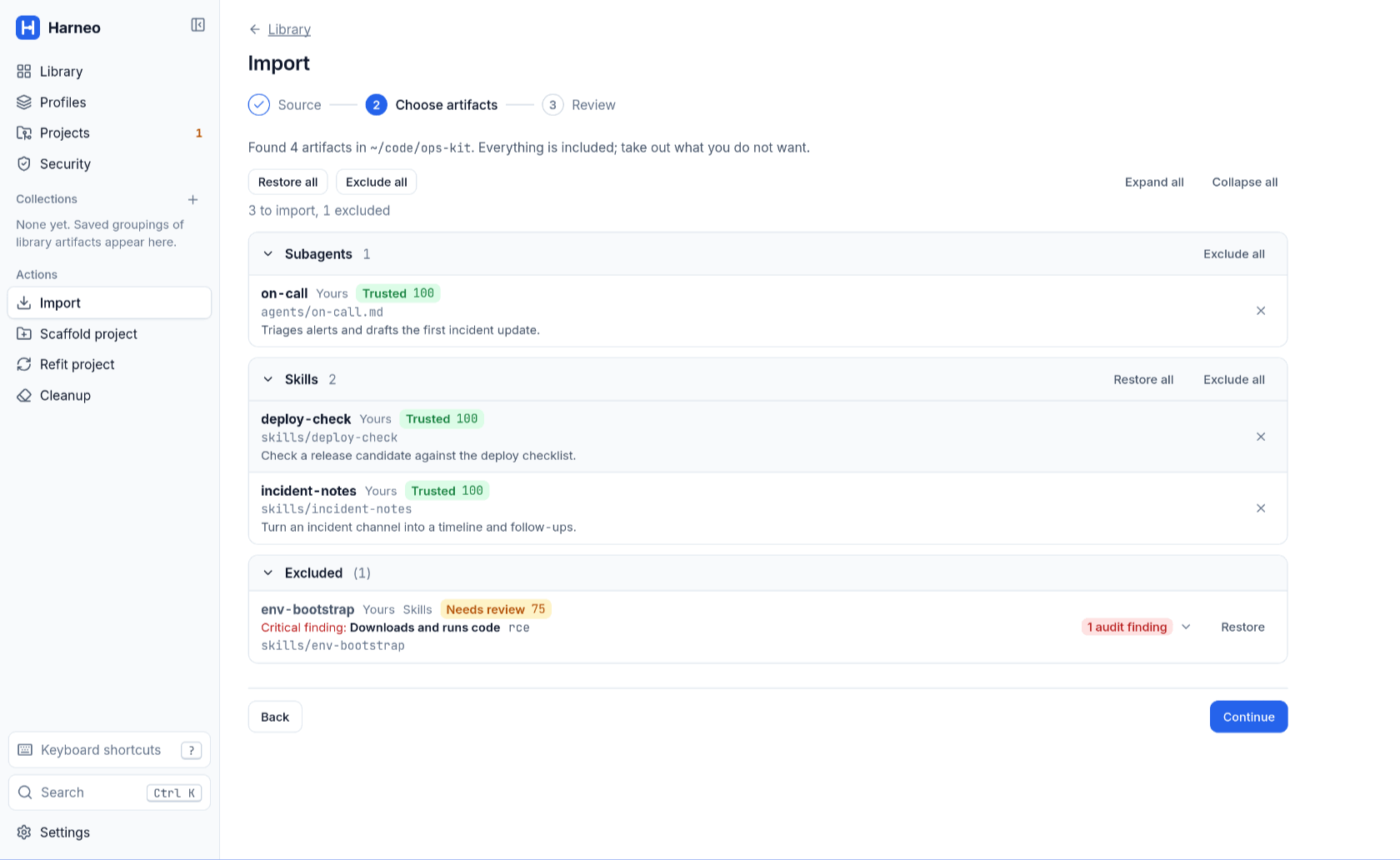
Library. Browse what you imported by type, bundle or source, with tags, collections, usage and an outdated flag. Security sums up the audit: trust scores, findings by severity, and what each artifact can reach.
Profiles. Pick artifacts (and their bundles), one Settings template and MCP servers to make a profile. Clone it to make a lighter or heavier one; export it as one file to share.
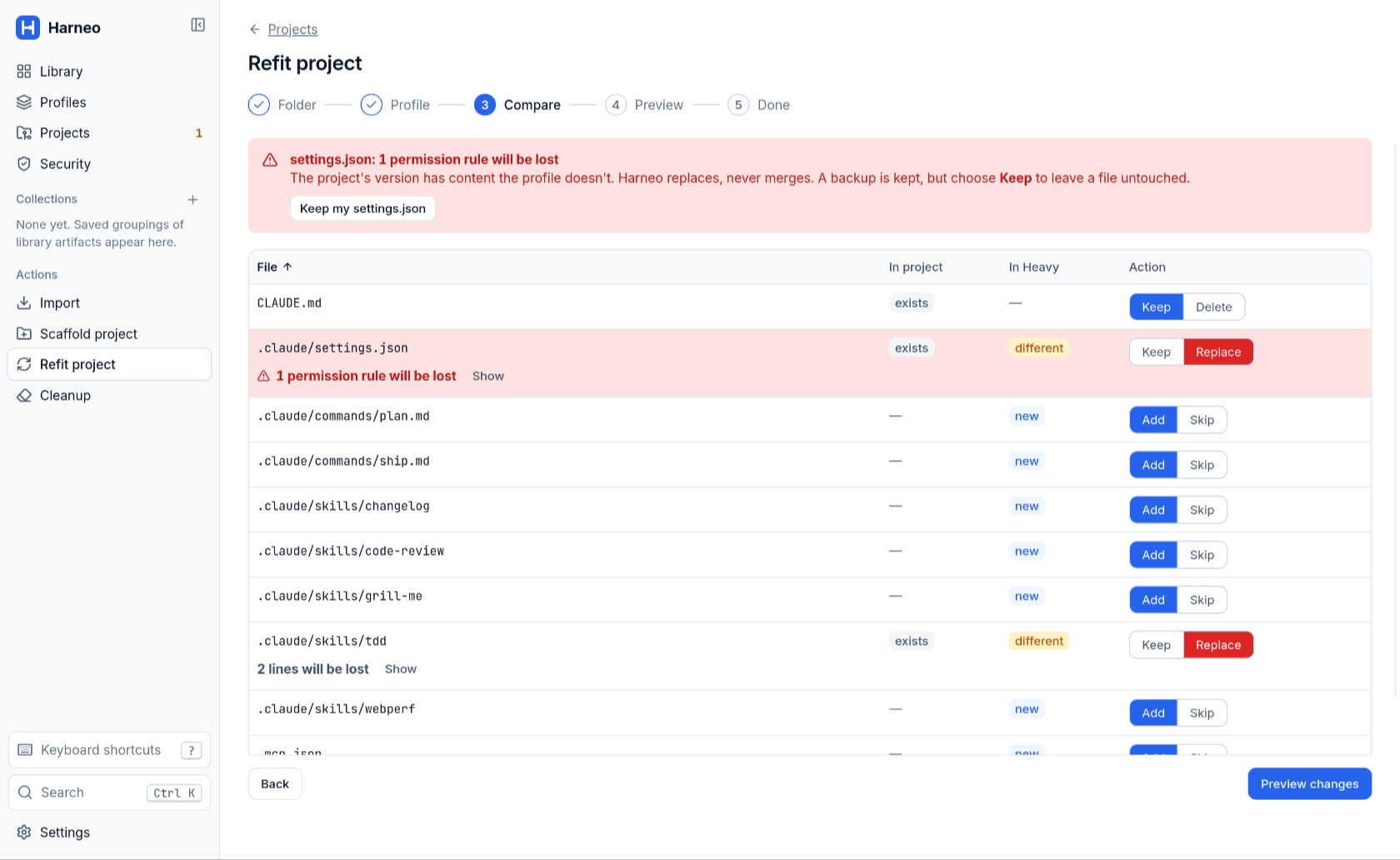
Scaffold or refit. Scaffold writes a profile into an empty folder. Refit an existing project chooses keep, replace or delete per item, and warns in red when a replaced file loses the project's own content. Both show a dry-run preview first, back up every replaced file and write a
HARNESS.md.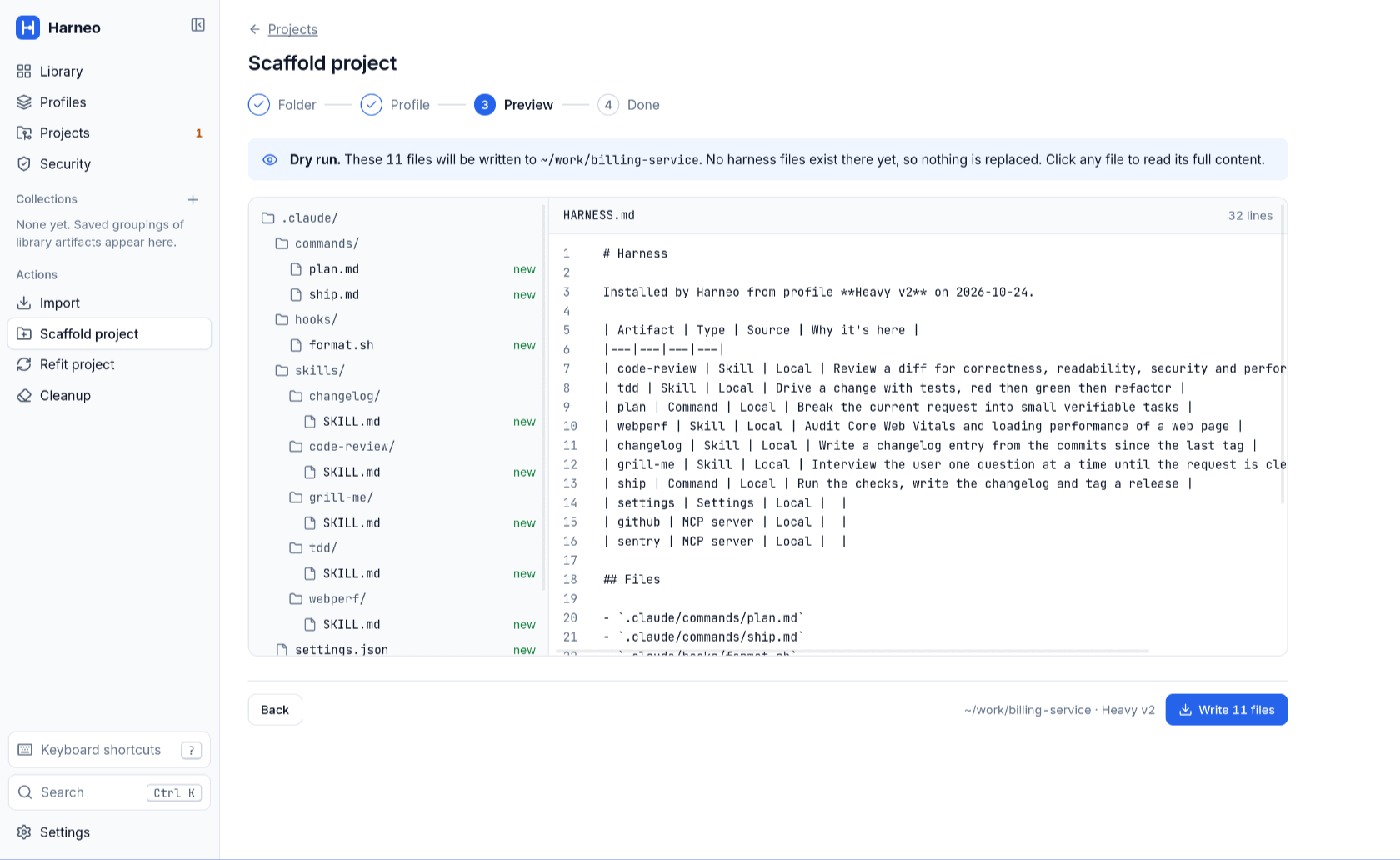
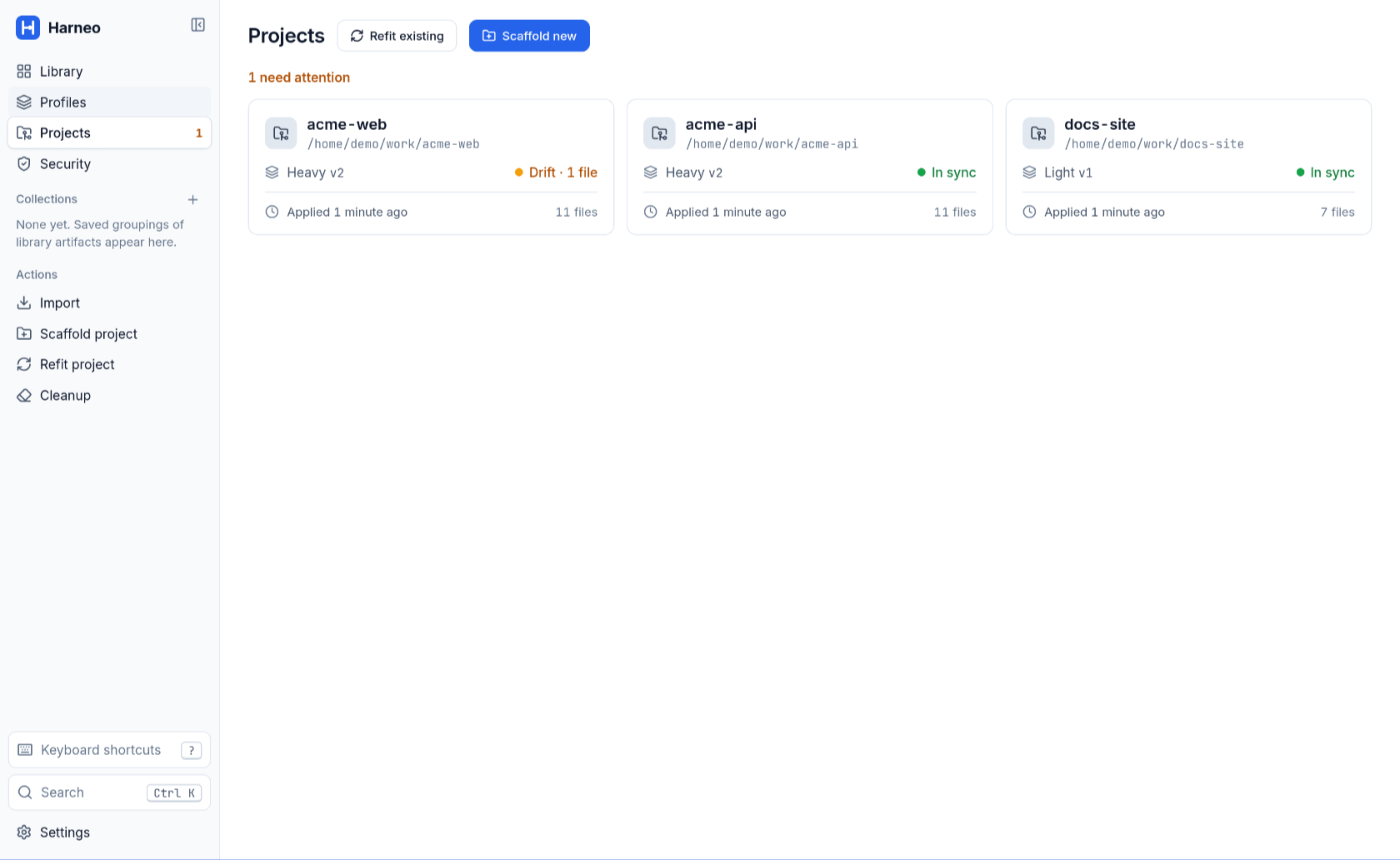
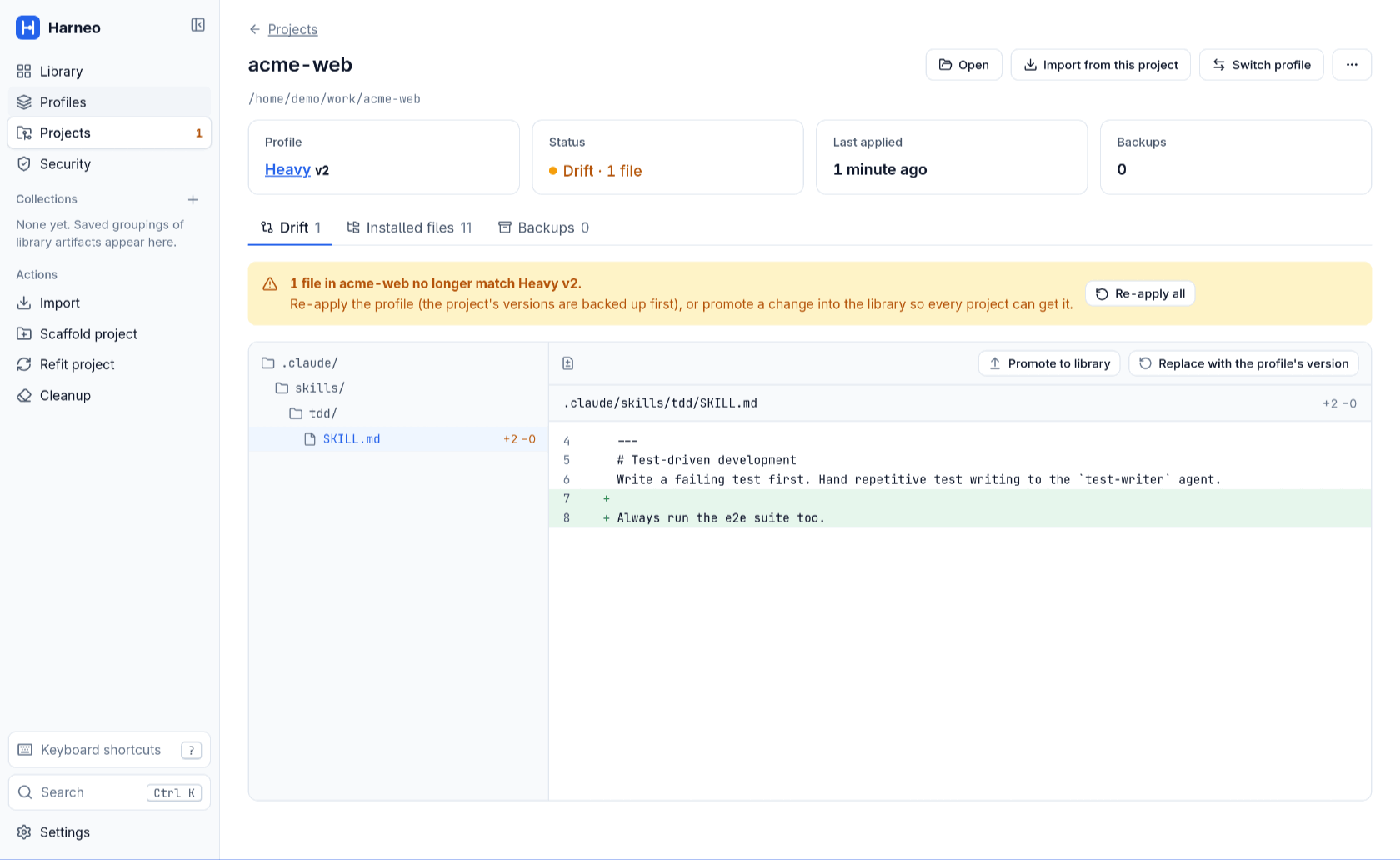
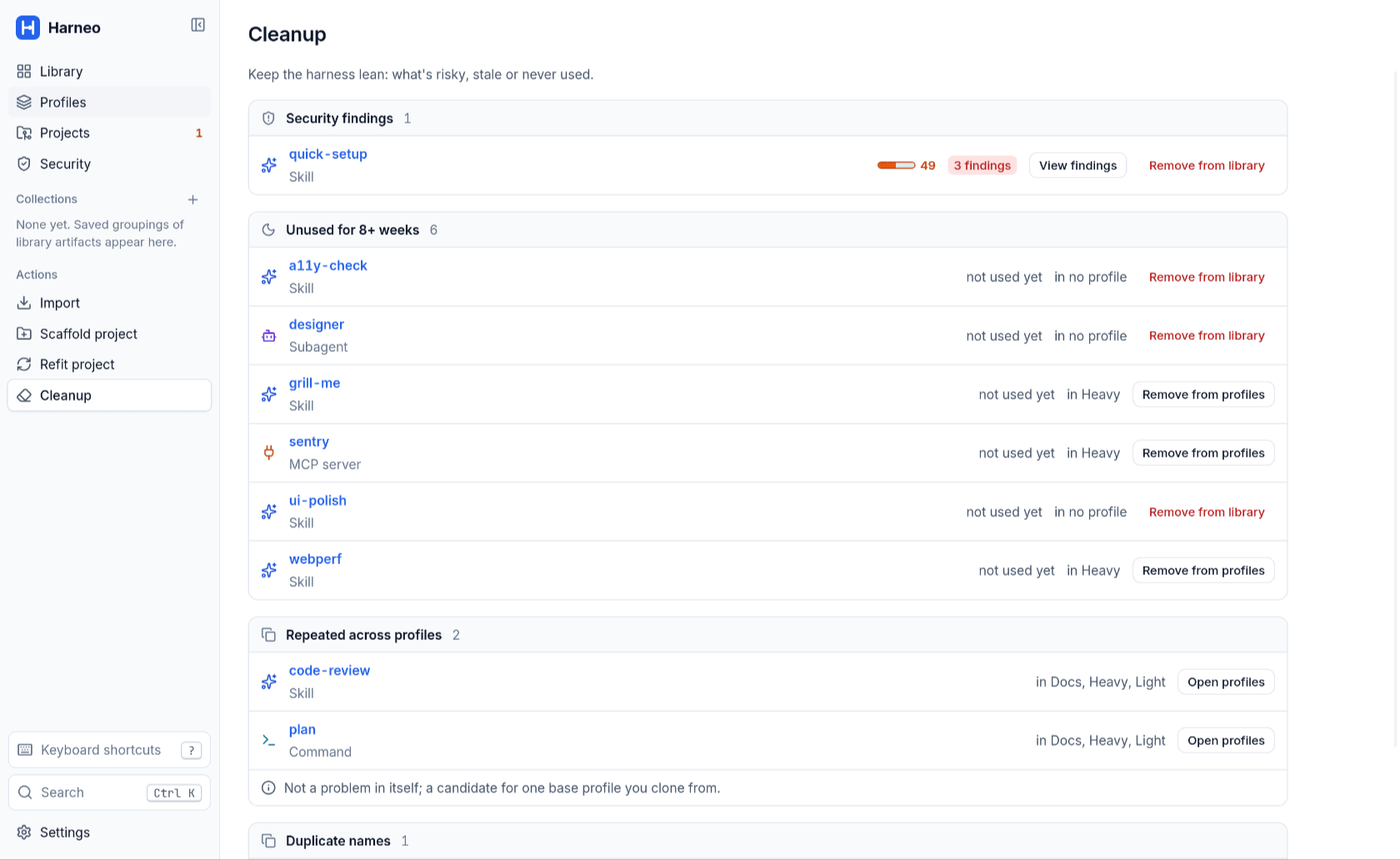
Live with it. Projects shows drift from the profile (re-apply, or promote the change to the library). Cleanup suggests unused or duplicated artifacts. Removing a profile from a project restores its originals.
Map and fit. Harnmap sends a profile to your
claudeCLI, which lays it out on its category's template: stages on the line, a toolbelt of anytime tools, a floor of always-on settings and rules, the loops back, and for each artifact why it sits there and its natural next steps. Move, pin, hide or re-draw; every drawing is kept in the map's history. Harnfit (from a library artifact or the import review) shows a candidate as a dashed NEW node where it would go, with a verdict, the change it needs, and the quoted lines that clash; Add to profile when you agree.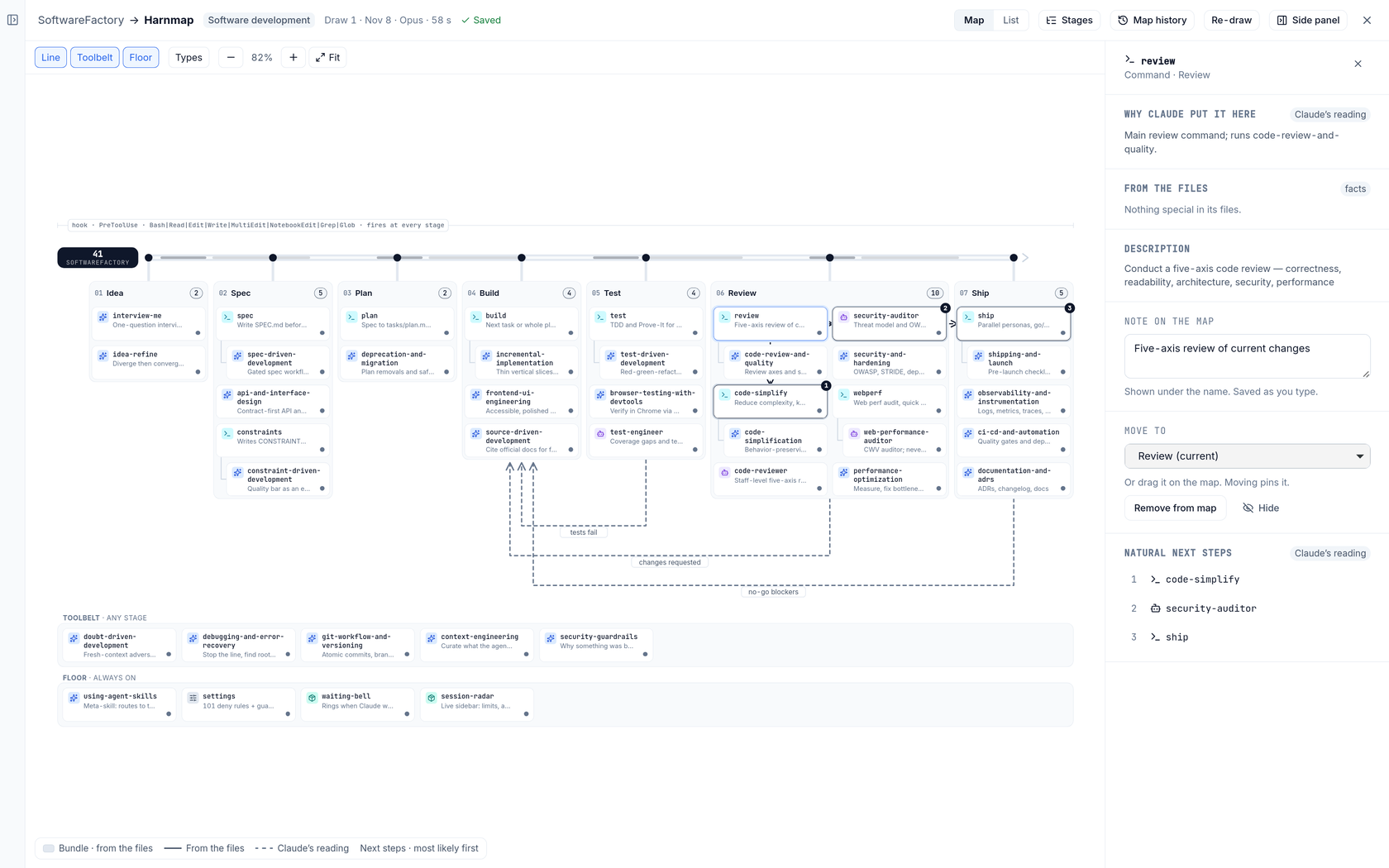
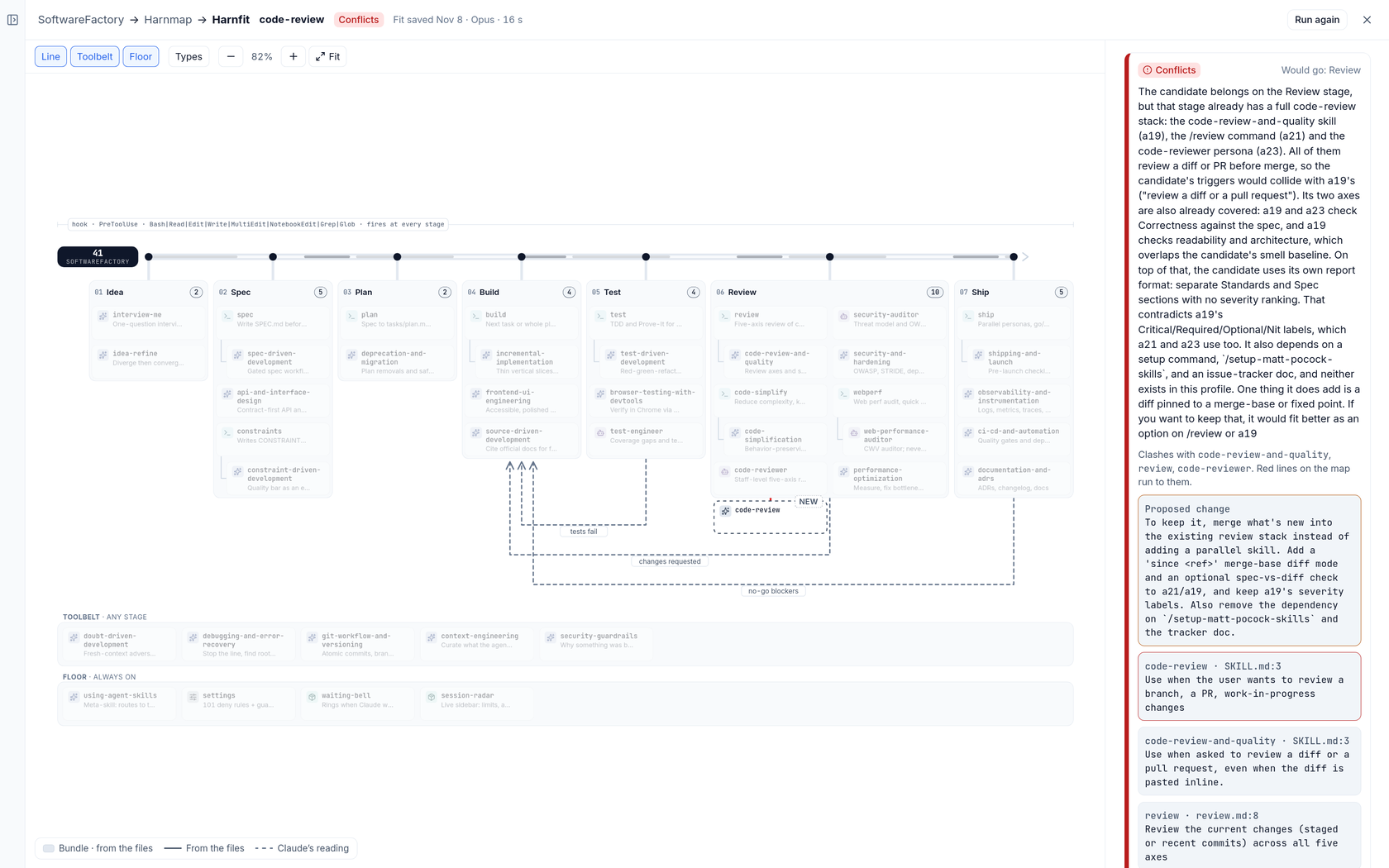
The screenshots use dummy data, except the Harnmap and Harnfit ones, which show public skill packs (addyosmani/agent-skills, mattpocock/skills) and the verdicts Claude returned for them. MANUAL.md walks through every screen: the command palette and shortcuts, plugins taken whole or in parts, large and Claude-managed files at import, smart collections, the project page and its backups, and every setting.
CLI
The CLI uses the same library as the app, for terminals and scripts:
harneo scan ./some-folder                       # list the artifacts and problems in a folder
harneo audit ./some-folder                      # trust score, findings and reach of each artifact
harneo profiles                                 # list your profiles
harneo scaffold --profile heavy ./my-api        # write a profile into a new project (--dry-run to preview)
harneo status                                   # drift of every registered project
harneo update                                   # update outdated artifacts that have no local edits
harneo paths                                    # where your library lives
harneo --help                                   # everything else
Privacy
Harneo has no server, no account and no analytics. It talks to the network in two ways only, both through programs you already have: git, to fetch the sources you import from, and your own claude CLI, on your own Claude plan.
Sent to Claude, each with a switch in Settings:
| Feature | Default | What is sent |
|---|---|---|
| Confirm audit findings with Claude | On | For each audit finding: its rule, file, line and 3 lines of context each side (secret values replaced), plus the artifact's name and description, so Claude can tell an attack from text that defends against one. Nothing else from the artifact. harneo audit --no-claude skips it for one run. |
| Ask Claude about repo layouts at import | On | When you split a plugin into parts (to learn which folders each part needs), and on its own for files Harneo couldn't place only in a source with no plugin (next to a plugin, a button asks): file paths, manifests and the first 40 lines of the Markdown files concerned. Secret-looking files are listed by name, never read. A plugin taken whole is never sent. |
| Detect bundles and tags at import | Off | Artifact text, to propose bundles and tags. |
Sent to Claude when you press the button, with no setting (the button is the go-ahead, and what it sends is listed next to it):
| Feature | What is sent |
|---|---|
| Harnmap Draw / Re-draw | The profile's category template and stages, your pinned places, the description you typed, and for each artifact: its name, type, description, what Harneo read from its files, and up to 4,000 characters of its main file. An artifact with a secret-looking audit finding goes with its name, type and description only. |
| Harnfit / Run again | The profile's current map, the candidate artifact in full (up to 12,000 characters), and the profile's artifacts' main files (4,000 characters each, up to 120,000 in all). |
If the claude CLI is not installed, none of these run. Each Settings row says exactly what it sends and to whom. The model that reads your artifacts is Haiku unless you pick Sonnet or Opus in Settings.
Other network access, nothing from your library is sent:
- Git sources. Importing from a git URL clones it. Check for updates at start (on by default, at most once a day; switch in Settings) and Check for updates in the Library look at each source with
gitfor artifacts that changed. Nothing is updated without you. - Plugins. Scaffold and refit install a profile's plugins for the project through your
claudeCLI (claude plugin install --scope project), from each plugin's own marketplace. Plugins are never copied.
Read on your machine, never sent: your Claude Code session logs in ~/.claude/projects/, read only, to count how often each artifact is used (Settings → Data shows the folder and Re-index). Harneo also watches the library and your registered projects' harness files to notice changes; it only reads them (Pause live rescan in Settings).
- Error reports (off unless you set it up). Harneo can report errors to a Sentry project of your own. Nothing is sent unless you set
HARNEO_SENTRY_DSN; no DSN is built in. BUILDING.md explains what is and isn't sent. - Secrets. MCP secrets are stored only as
${VAR}placeholders, never as values.
Local log files, never sent. Harneo writes plain-text logs to ~/.local/state/harneo/logs/ ($XDG_STATE_HOME/harneo/logs/; the local app-data folder on macOS and Windows; HARNEO_LOG_DIR replaces it), one harneo-YYYY-MM-DD.log file per day (UTC), one timestamped line per event. Files older than 14 days are deleted. Today they record every call to the claude CLI: which feature asked, the paths (or artifact names) that went into it, how long it took, the exit code, the error text, and whether the answer parsed; for a plugin's parts, which parts Claude's answer covered and which it missed; and when an import was blocked for lack of that answer. They never hold prompt text, file contents, secrets or environment values, and nothing in them is uploaded. Settings → Diagnostics → Open logs folder opens the folder; delete the files whenever you like.
Develop
| Goal | Command |
|---|---|
| Run the app (dev) | npm run tauri dev |
| Build the app (release) | npm run tauri build -- --no-bundle |
| Run the CLI | cargo run -p harneo-cli -- --version |
| Test | npm test and cargo test --workspace |
| Lint | npm run lint |
| Fix lint and format | npm run fix |
| Gate after each edit | npm run check:fast |
| Gate before a change is done | npm run check:task |
Gate before merge to main |
npm run check:full |
./scripts/setup.sh --dev installs the gate tools; CONSTRAINTS.md defines what each check runs. The code is a Tauri 2 app (src-tauri/, React + TypeScript in src/) on a shared Rust core (crates/harneo-core) used by the app and the CLI (crates/harneo-cli). CONTEXT.md is the product source of truth.
Contributing
Bug reports, platform reports (especially macOS and Windows) and pull requests are welcome. Start with CONTRIBUTING.md. Security issues: see SECURITY.md, please don't open a public issue. Everyone taking part follows the Code of Conduct.
Acknowledgements
Harneo's security audit rules are ported from HarnessKit (Apache 2.0). See THIRD_PARTY_NOTICES.md.
License
MIT © 2026 Ibrahim Kobeissy
Yorumlar (0)
Yorum birakmak icin giris yap.
Yorum birakSonuc bulunamadi