my-claude-code
Health Uyari
- No license — Repository has no license file
- Description — Repository has a description
- Active repo — Last push 0 days ago
- Low visibility — Only 9 GitHub stars
Code Basarisiz
- network request — Outbound network request in package.json
- spawnSync — Synchronous process spawning in packages/@ant/computer-use-input/src/index.ts
Permissions Gecti
- Permissions — No dangerous permissions requested
This tool is a personal fork of the official Anthropic Claude Code CLI. It is modified to remove telemetry, bypass safety prompt restrictions, and add multi-provider support (OpenAI, Bedrock, Vertex AI).
Security Assessment
Overall Risk: High. This fork fundamentally alters the security boundaries of the original CLI by reducing safety prompt layers, which could allow the underlying AI models to execute more dangerous commands without standard restrictions. The code makes outbound network requests to connect to various AI providers. Most critically, the tool uses synchronous process spawning (`spawnSync`), meaning it can execute commands directly on your local system. While no hardcoded secrets or dangerous permissions were found, piping a remote install script (`curl | bash`) directly into your shell is always a high-risk action, especially with modified CLI tools.
Quality Assessment
The project is actively maintained, with its most recent push occurring today. However, it suffers from low community visibility (only 9 GitHub stars), which means few independent developers have reviewed the code for vulnerabilities or malicious behavior. Additionally, the repository lacks a formal license file, meaning the legal terms for using, modifying, or distributing this modified version of Anthropic's software are entirely unclear.
Verdict
Use with caution (or Not recommended for enterprise environments) due to stripped safety guardrails, active local code execution capabilities, and unvetted origin.
Personal build of Claude Code with multi-provider support (Anthropic, OpenAI Codex, Bedrock, Vertex AI)
my-claude-code
A personal build of Claude Code with multi-provider support and experimental feature flags.








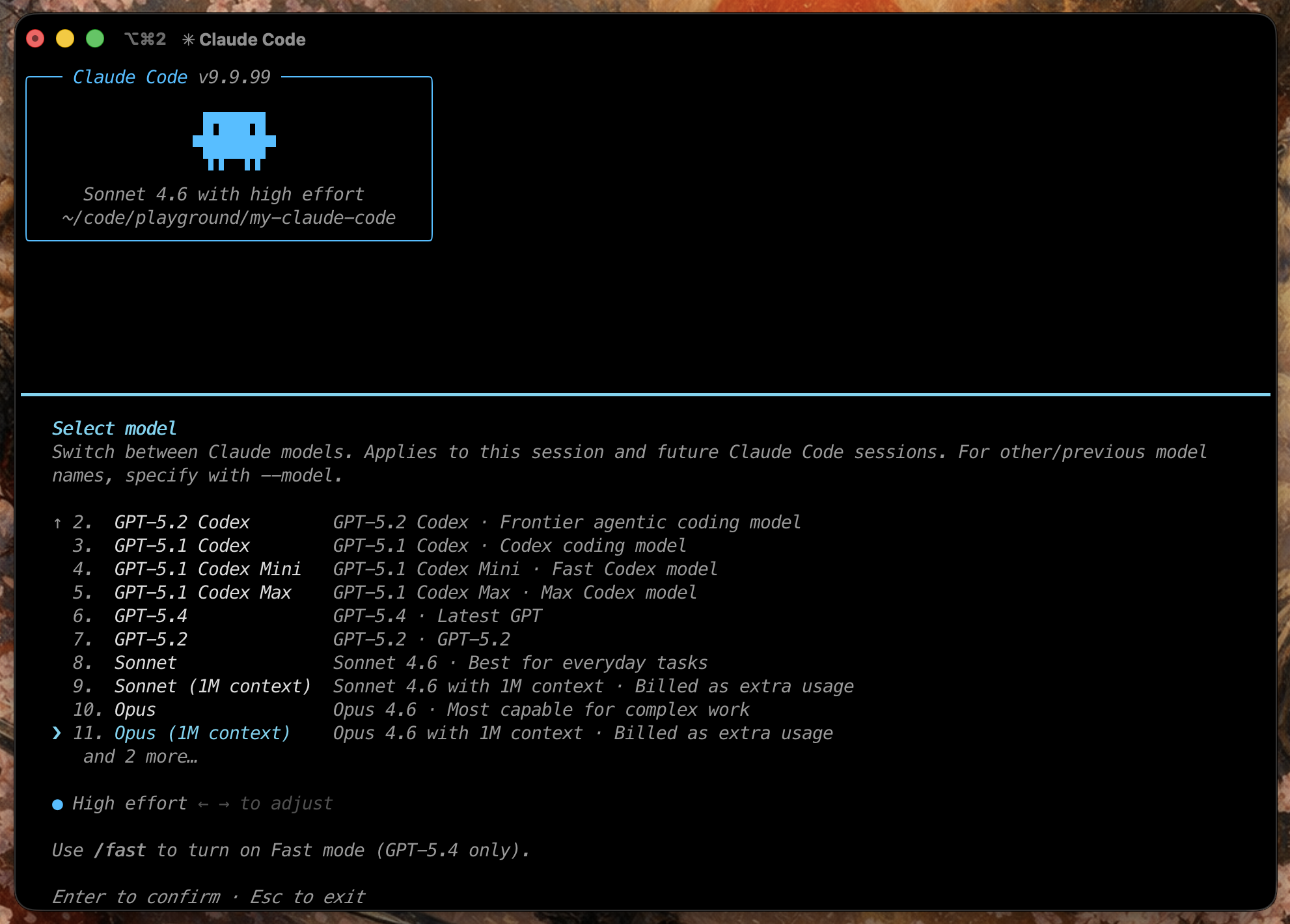
Table of Contents
- What This Repository Is
- Quick Start
- Authentication and Providers
- Build and Run
- Feature Flags and Supporting Docs
- Project Structure
- Contributing
What This Repository Is
my-claude-code is a personal fork of Anthropic's Claude Code CLI, maintained as a public build workspace.
This fork makes three practical changes over upstream:
- telemetry-related behavior is removed or stubbed where possible
- prompt-layer restrictions added by the CLI wrapper are reduced
- build-time experimental feature flags are exposed for local builds and testing
Quick Start
Option 1: Clone and build locally
git clone https://github.com/Icarus603/my-claude-code.git
cd my-claude-code
bun install
bun run build
./dist/cli.js
Option 2: One-line installer
curl -fsSL https://raw.githubusercontent.com/Icarus603/my-claude-code/main/install.sh | bash
The installer checks your system, installs Bun if needed, clones the repo, builds dist/cli.js, and symlinks my-claude-code into ~/.local/bin.
Uninstall
To completely remove my-claude-code from your system:
# Remove the binary symlink
rm ~/.local/bin/my-claude-code

# Remove the installation directory
rm -rf ~/my-claude-code

# Remove configuration and cache (optional)
rm -rf ~/.my-claude-code
Authentication and Providers
This repo supports multiple providers, but they do not all authenticate the same way.
Anthropic
Use Anthropic directly with either:
ANTHROPIC_API_KEY/loginfor Anthropic OAuth
export ANTHROPIC_API_KEY="..."
./dist/cli.js
OpenAI Codex
Codex authenticates via OpenAI OAuth through the CLI:
./dist/cli.js
Inside the CLI, run /login and choose the Codex login flow.
After a successful Codex login, CLAUDE_CODE_USE_OPENAI=1 is persisted in your user config automatically, so new terminal sessions will continue using OpenAI Codex without a manual export.
Supported model examples:
| Model | ID |
|---|---|
| GPT-5.3 Codex | gpt-5.3-codex |
| GPT-5.4 | gpt-5.4 |
| GPT-5.4 Mini | gpt-5.4-mini |
AWS Bedrock
Bedrock does not use /login. It uses AWS credentials plus provider flags.
export CLAUDE_CODE_USE_BEDROCK=1
export AWS_REGION="us-east-1"
./dist/cli.js
Google Vertex AI
Vertex does not use /login. It uses Google Cloud credentials.
gcloud auth application-default login
export CLAUDE_CODE_USE_VERTEX=1
./dist/cli.js
Anthropic Foundry
Foundry does not use /login. It uses explicit environment configuration.
export CLAUDE_CODE_USE_FOUNDRY=1
export ANTHROPIC_FOUNDRY_API_KEY="..."
./dist/cli.js
Provider Summary
| Provider | Selection | Authentication |
|---|---|---|
| Anthropic | default | ANTHROPIC_API_KEY or Anthropic /login |
| OpenAI Codex | default after Codex login | OpenAI /login |
| AWS Bedrock | CLAUDE_CODE_USE_BEDROCK=1 |
AWS credentials |
| Google Vertex AI | CLAUDE_CODE_USE_VERTEX=1 |
Google ADC |
| Anthropic Foundry | CLAUDE_CODE_USE_FOUNDRY=1 |
ANTHROPIC_FOUNDRY_API_KEY |
Build and Run
Requirements
- Bun
>= 1.3.11 - macOS or Linux
- valid credentials for whichever provider you plan to use
Install Bun if needed:
curl -fsSL https://bun.sh/install | bash
Standard build
bun install
bun run build
./dist/cli.js
Build output
| Command | Output | Notes |
|---|---|---|
bun run build |
./dist/cli.js |
compiled standalone binary |
bun run dev |
source execution | slower startup, no standalone binary |
Common usage
# interactive mode
./dist/cli.js

# one-shot prompt
./dist/cli.js -p "what files are in this directory?"

# choose a model explicitly
./dist/cli.js --model claude-opus-4-6

# switch to Codex backend
CLAUDE_CODE_USE_OPENAI=1 ./dist/cli.js
Selected environment variables
| Variable | Purpose |
|---|---|
ANTHROPIC_API_KEY |
Anthropic API key |
ANTHROPIC_AUTH_TOKEN |
alternative Anthropic auth token |
ANTHROPIC_MODEL |
override default Anthropic model |
ANTHROPIC_BASE_URL |
custom Anthropic-compatible endpoint |
CLAUDE_CODE_USE_OPENAI |
force OpenAI Codex backend |
CLAUDE_CODE_USE_BEDROCK |
switch to AWS Bedrock |
CLAUDE_CODE_USE_VERTEX |
switch to Google Vertex AI |
CLAUDE_CODE_USE_FOUNDRY |
switch to Anthropic Foundry |
CLAUDE_CODE_OAUTH_TOKEN |
OAuth token provided via environment |
CLAUDE_CONFIG_DIR |
override the config directory (default: ~/.my-claude-code) |
Config isolation
This fork defaults CLAUDE_CONFIG_DIR to ~/.my-claude-code so its settings, auth tokens, teammate models, and MCP configs are fully separate from an official Claude Code installation in ~/.claude.
To share config with the official installation:
export CLAUDE_CONFIG_DIR="$HOME/.claude"
./dist/cli.js
Feature Flags and Supporting Docs
- FEATURES.md: technical audit of compile-time feature flags in this snapshot
- AGENTS.md: Codex-oriented repo guidance for coding agents
- CLAUDE.md: Claude-oriented repo guidance for coding agents
- ARCHITECTURE.md: deep-dive into codebase design and architecture
The default build already includes this repo's current working feature bundle:
bun run build
./dist/cli.js
To enable specific flags manually:
bun run ./scripts/build.ts --feature=ULTRAPLAN --feature=ULTRATHINK
Project Structure
scripts/
  build.ts                build script and feature flag bundler

src/
  entrypoints/cli.tsx     CLI entrypoint
  commands.ts             slash command registry
  tools.ts                tool registry
  QueryEngine.ts          message and tool orchestration

  commands/               slash command implementations
  tools/                  tool implementations
  components/             Ink/React terminal UI
  hooks/                  React hooks
  services/               API, OAuth, MCP, analytics integrations
  state/                  application state
  skills/                 skill system
  plugins/                plugin system
  bridge/                 IDE bridge
  voice/                  voice support
  tasks/                  background task management
Contributing
Issues and pull requests are welcome. For larger changes, open an issue first to discuss the approach.
Yorumlar (0)
Yorum birakmak icin giris yap.
Yorum birakSonuc bulunamadi