claude-code-mods
Health Uyari
- License — License: MIT
- Description — Repository has a description
- Active repo — Last push 0 days ago
- Low visibility — Only 7 GitHub stars
Code Basarisiz
- exec() — Shell command execution in agent-watch/hooks/ui.tsx
Permissions Gecti
- Permissions — No dangerous permissions requested
Bu listing icin henuz AI raporu yok.
Six Claude Code mods: plan limits and context above the prompt, an allowlist coach for permission prompts, subagent tokens, tests in the status line, one-click actions and a quiet transcript
Claude Code mods
English | Português (Brasil)




Your plan limits, your context and what the agent is doing, right above the prompt. Six
mods for Claude Code, installed from one marketplace.
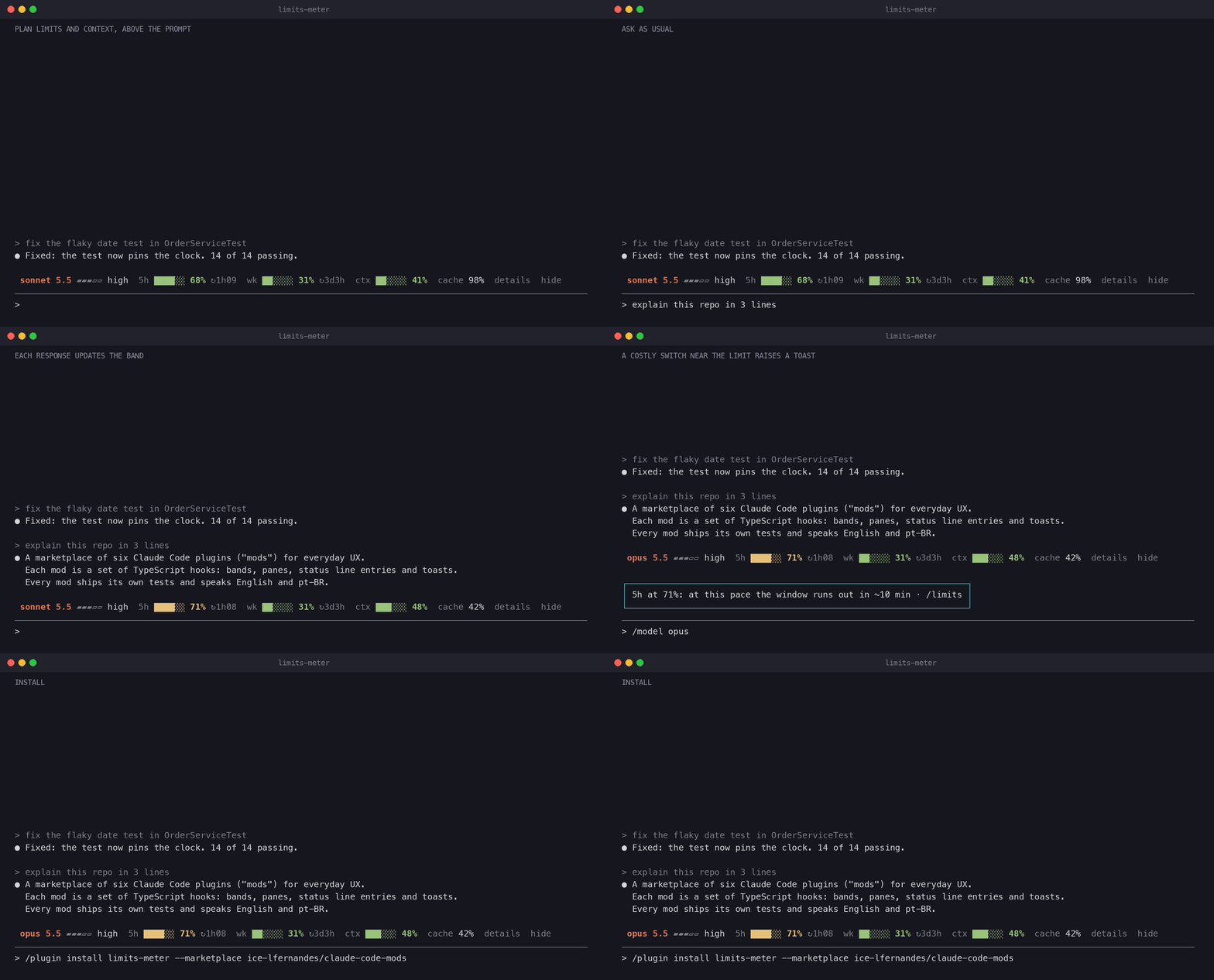
limits-meter through a request, the /limits pane and a costly switch near the limit
(mp4). Drawn from the mod's real output byscripts/screenshots/limits-meter-demo.sh.
Mods for everyday Claude Code UX. A mod is a Claude Code plugin made of function hooks: it can
draw a band above the prompt, a pane, a status line entry or a toast. Requires Claude Code
2.1.287 or later.
| Mod | Command | What it does |
|---|---|---|
| limits-meter | /limits |
Plan limits and context above the prompt: model and effort, 5-hour and weekly windows with reset times, context fill, cache hit rate, tokens per turn, and a toast on a costly model switch near the limit |
| allowlist-coach | /allowlist |
Counts permission dialogs per rule; after 5 approvals with no refusal, offers to add the rule to permissions.allow, asking before it writes |
| agent-watch | /watch |
Subagents at a glance: tokens per agent, a toast when one stalls, and a summary naming the heaviest agent when they finish |
| test-hud | /test-hud |
Test runs at a glance: passing over total in the status line, a sparkline of failures across runs, the failing tests, and a toast when the suite turns green |
| launchpad | /pad |
A menu of one-click actions under the header, above the prompt or in a pane: each button runs an installed command, skill or agent. ◆ pad opens a control panel: model and effort in one click, this collection's mods, the shortcuts. Pick and order up to 8 in /pad configuration, or ship a team's in the repository |
| plain-view | /plain-view |
A quiet transcript: tool rows step aside and the agent's plan shows as a card above the prompt, with the current step, progress bars and a summary when the turn ends |
Using the mods
The images below are drawn from each mod's real output: scripts/screenshots/run.sh drives the
mod with sample data through claude plugin test and renders what it drew.
limits-meter
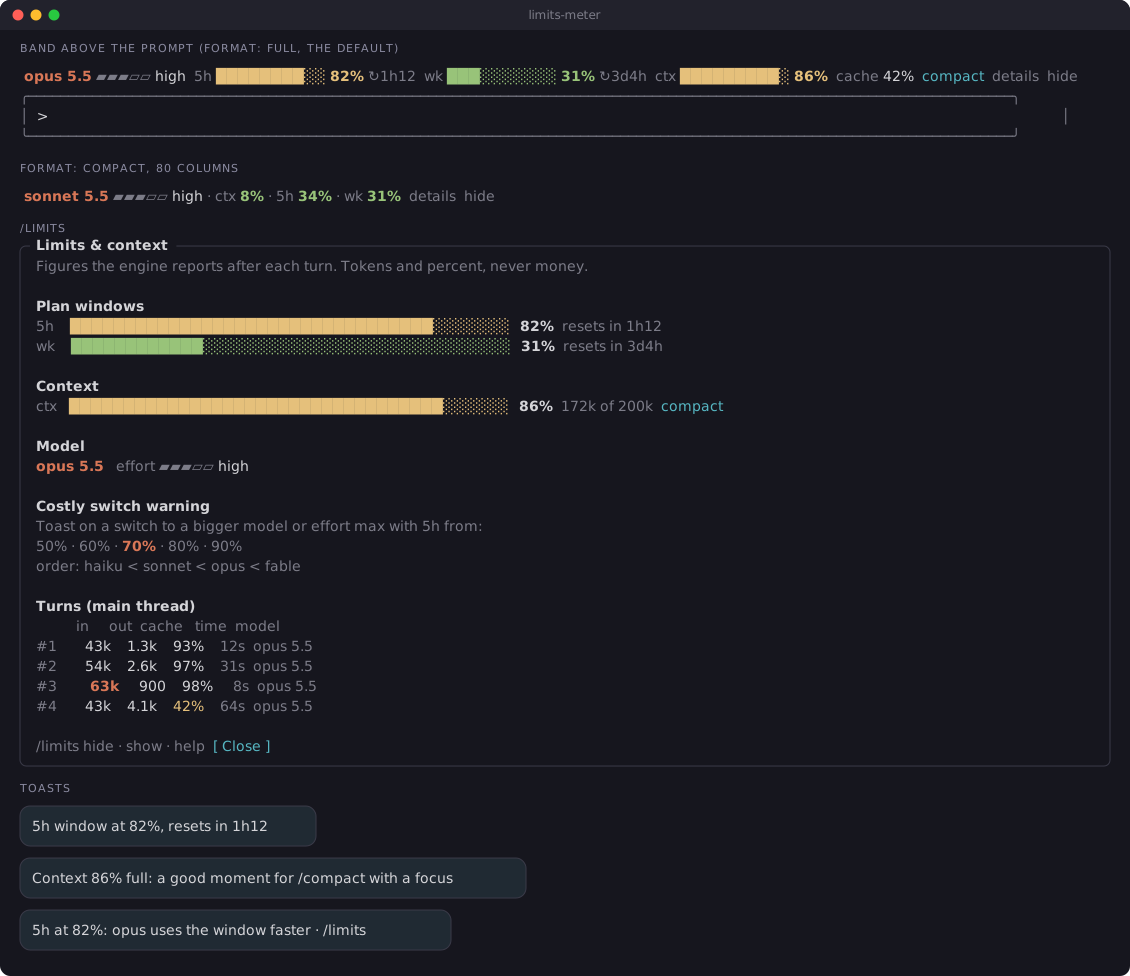
The band shows on its own after the first response. Commands:
/limits          open the pane: plan windows, context in tokens, the last 20 turns
/limits hide     hide the band above the prompt, in later sessions too
/limits show     bring the band back
/limits warn N   warn on a costly switch with the 5-hour window from N% (default 70)
/limits help     list the commands
The band leads with the model and effort; format: compact draws it as one line of numbers.
From 85% context the band and the pane show compact, which puts /compact [focus] in the
prompt and runs nothing. details on the band opens the pane. The pane also says when a window
reaches 100% at the current pace, before it resets, and draws the context fill turn by turn.
A switch to a bigger model (haiku < sonnet < opus < fable) or to effort max with the 5-hour
window at 70% or more shows one toast with the minutes left at the pace of the last 3 turns.
Install
/plugin install limits-meter --marketplace ice-lfernandes/claude-code-mods
Or for one session, from a clone: claude --plugin-dir ./limits-meter.
allowlist-coach
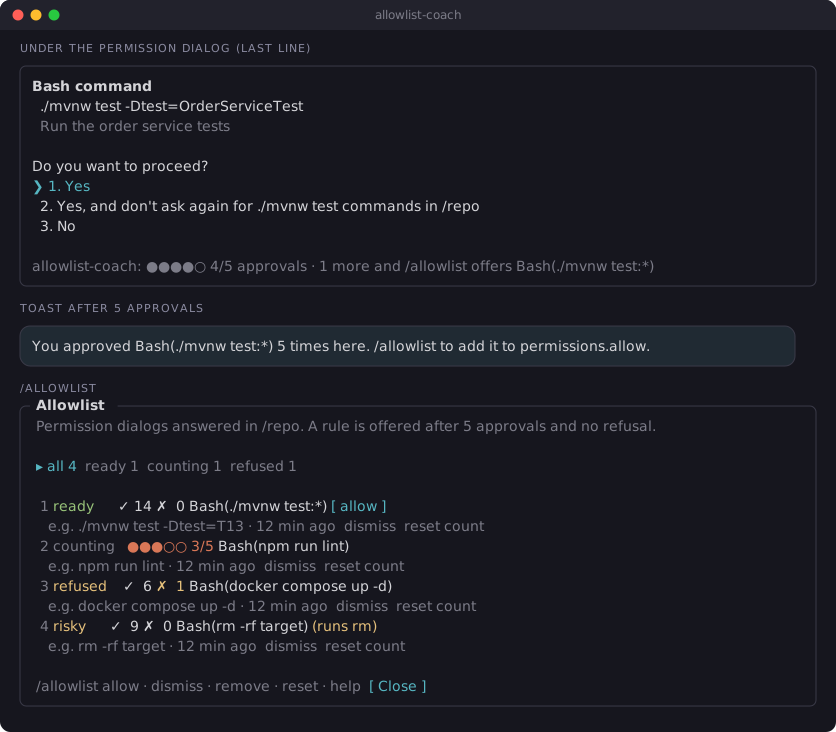
It counts on its own each time you answer a permission dialog. Commands:
/allowlist             open the pane: every counted rule, numbered, ready ones first
/allowlist allow 1     add rule 1 to permissions.allow (asks first, and which file)
/allowlist dismiss 2   stop offering rule 2
/allowlist remove 1    take rule 1 back out of allow, when the coach added it (asks first)
/allowlist reset 2     set rule 2's count back to zero (asks first)
/allowlist reset       clear this project's counts (asks first)
/allowlist help        list the commands
The pane has tabs by status, a filter, and a scrolling list. A risky rule says why it is never
offered.
Install
/plugin install allowlist-coach --marketplace ice-lfernandes/claude-code-mods
Or for one session, from a clone: claude --plugin-dir ./allowlist-coach.
agent-watch
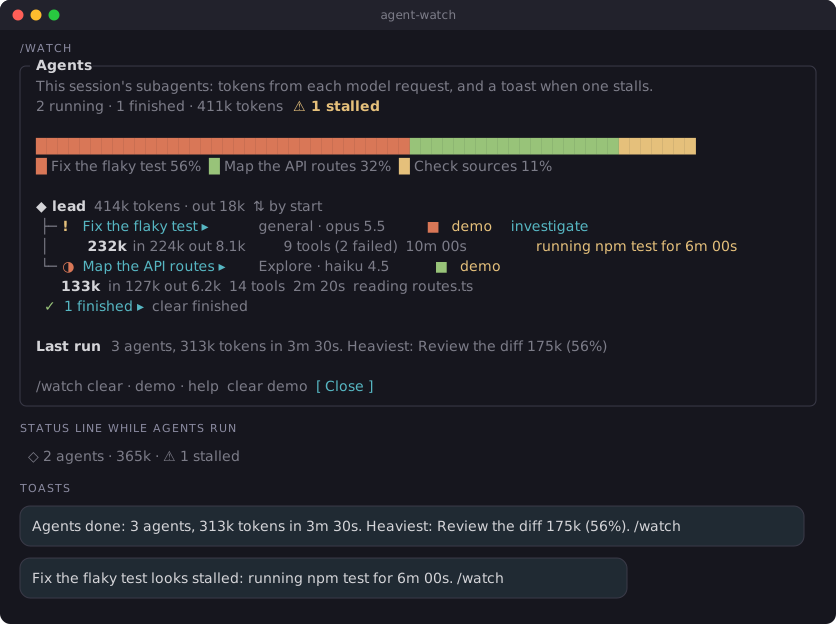
The status line and the toasts show on their own while subagents run. Commands:
/watch              open the pane: agent tree with tokens, tool calls and what each one is doing
/watch demo         add three fake agents, one of them stalled, to see the pane
/watch clear        drop finished and demo agents
/watch clear done   drop finished agents only
/watch clear demo   drop demo agents only
/watch help         list the commands
Finished agents fold into one line in the pane; press it to open them. A bar shows each
agent's share of the tokens, a name opens its last tool calls, and a stalled agent has aninvestigate button that asks about it in the prompt.
Install
/plugin install agent-watch --marketplace ice-lfernandes/claude-code-mods
Or for one session, from a clone: claude --plugin-dir ./agent-watch.
test-hud
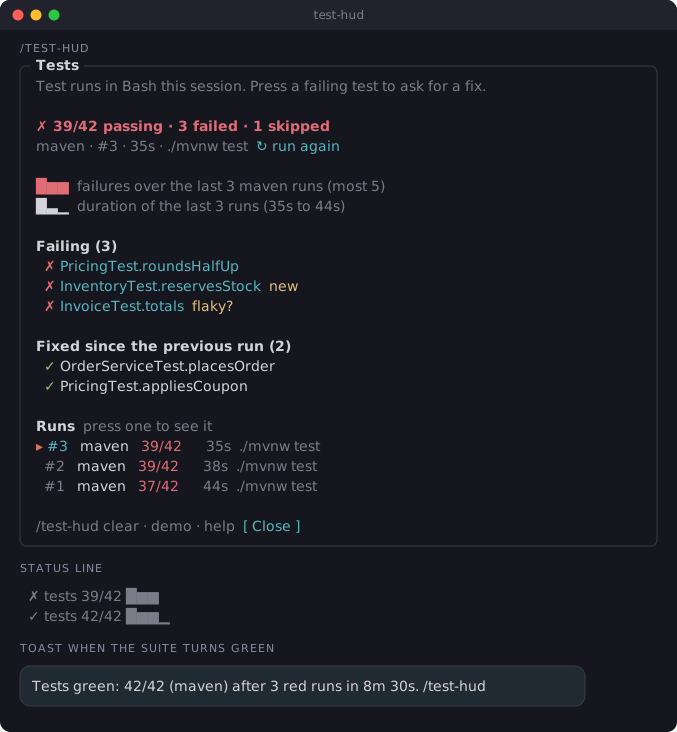
The status line and the toast show on their own each time a test runner runs in Bash. Commands:
/test-hud           open the pane: last run, failing tests (new ones marked), fixed tests,
                    sparkline, last 10 runs
/test-hud demo      add six fake runs that go from red to green
/test-hud clear     drop the runs
/test-hud help      list the commands
In the pane, press a failing test to ask Claude for a fix, or run again to ask for the same
command: both put the request in the prompt and run nothing. Press a run in the list to see it;
failing tests that failed, passed and failed again are marked flaky?. With the keepHistory
option the runs carry over to the next session in the same project.
Install
/plugin install test-hud --marketplace ice-lfernandes/claude-code-mods
Or for one session, from a clone: claude --plugin-dir ./test-hud.
launchpad
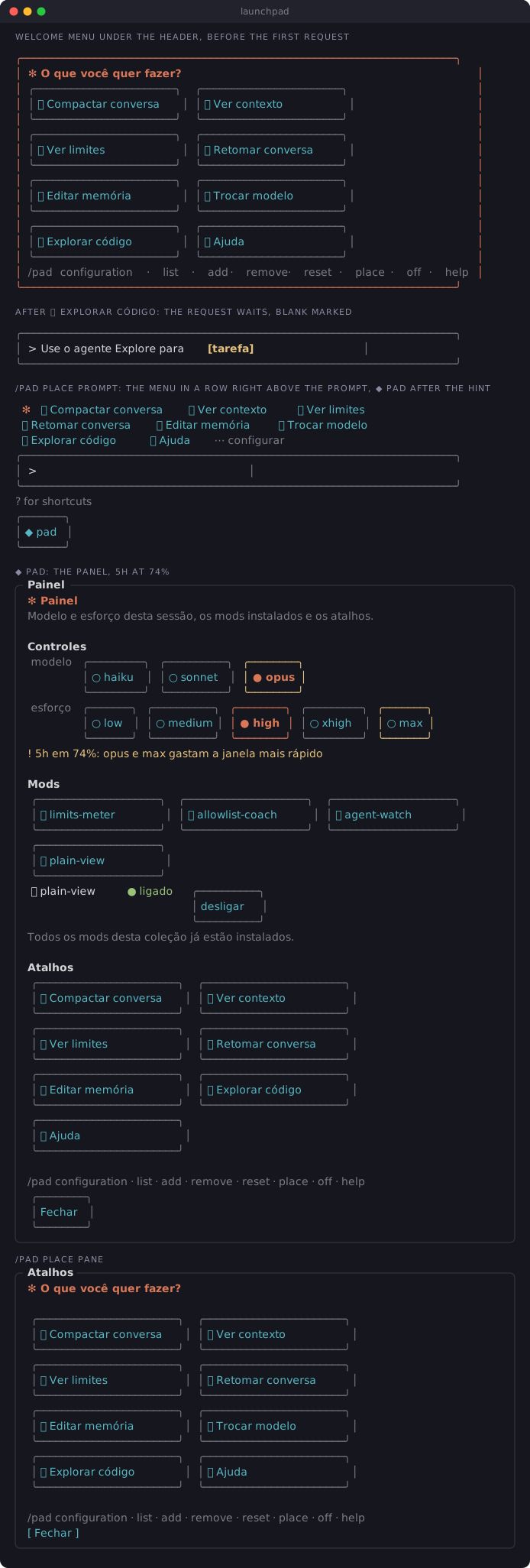
The menu shows on its own when a session starts and after /clear, until the first prompt.◆ pad, under the hint line below the prompt, opens the control panel: the session's
model and effort as buttons (a press runs /model or /effort; opus and max turn yellow
when the 5-hour window passes 70%), a button for each mod of this collection installed, by its
name, and the shortcuts. Commands:
/pad                                        show the menu again
/pad panel                                  open the control panel, as ◆ pad does
/pad configuration                          pane to order, remove and add buttons, up to 8, and the mods to install
/pad list                                   every button with what it runs
/pad add 🔎 Revisão | /code-review          add a button for an installed command, skill or @agent
/pad remove 3                               drop button 3
/pad reset                                  back to the defaults
/pad place header | prompt | pane           where the menu shows: under the header, right above the prompt, or in a pane
/pad off | on                               turn the menu off or back on
Install
/plugin install launchpad --marketplace ice-lfernandes/claude-code-mods
Or for one session, from a clone: claude --plugin-dir ./launchpad.
plain-view
Off until you turn it on (/plain-view on, the enabled option, or the switch in launchpad's
panel). While it is on, the transcript keeps the conversation and drops the tool rows that
worked; a failed or interrupted call, a permission dialog and the agent's questions always draw
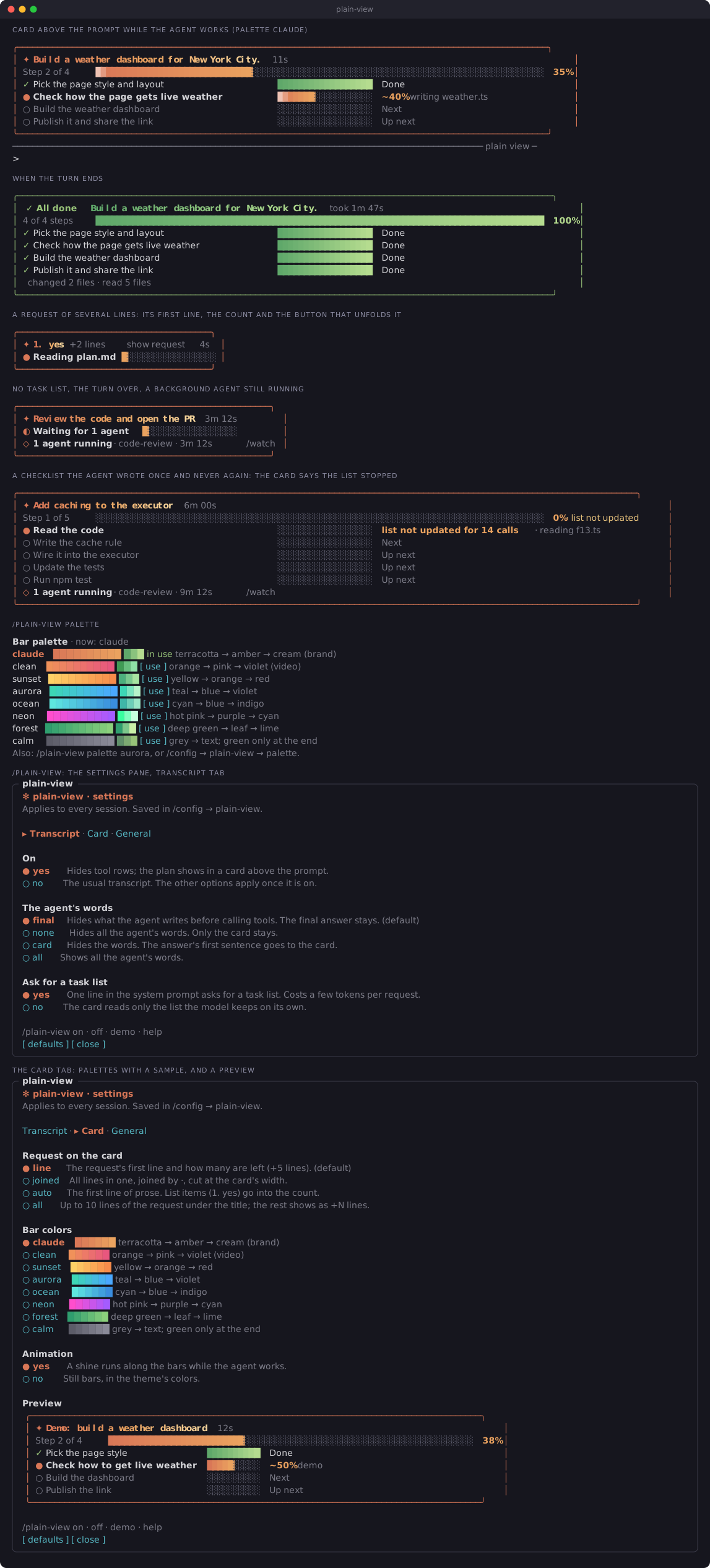
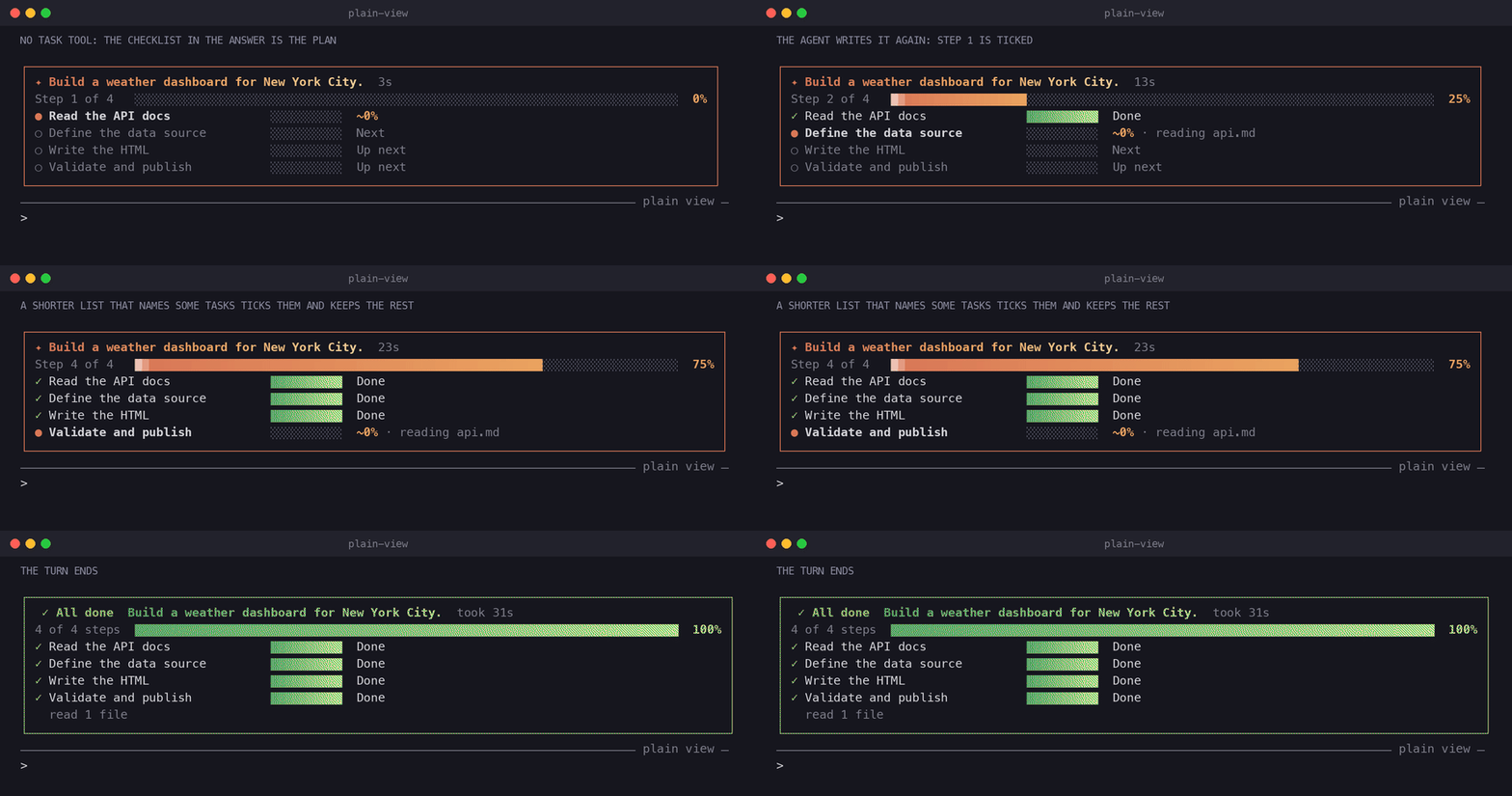
in full. Above the prompt, a card follows the request: its title, Step 2 of 4 with a bar, one
row per task of the agent's list with its own bar (Done, ~40% for the current step, Next,Up next). The current step's percentage is an estimate from its tool calls, hence the ~.
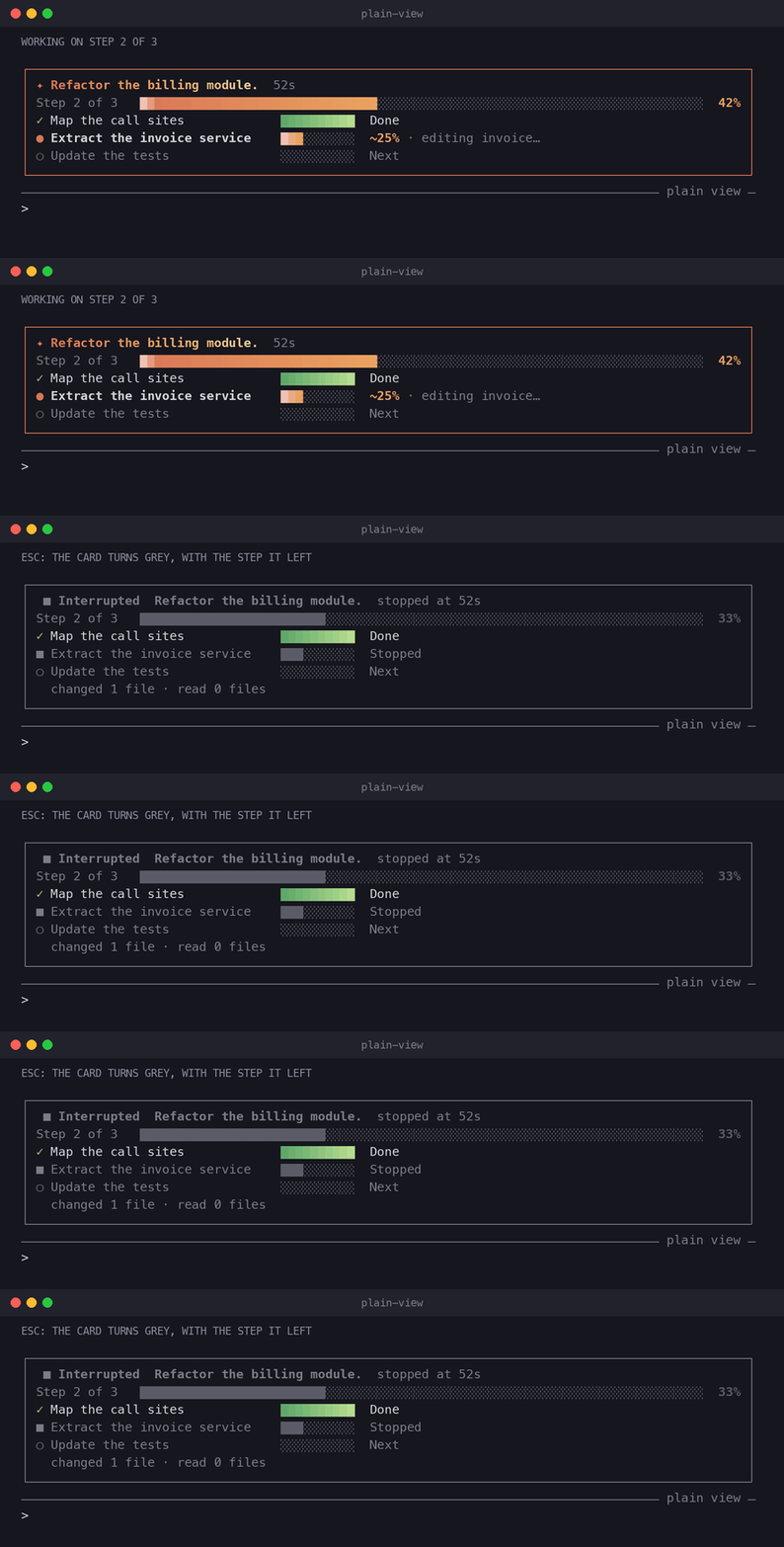
When the turn ends the card turns green with the time it took and the files changed and read,
or grey on Esc; the next request starts a fresh one, and [-] folds it.
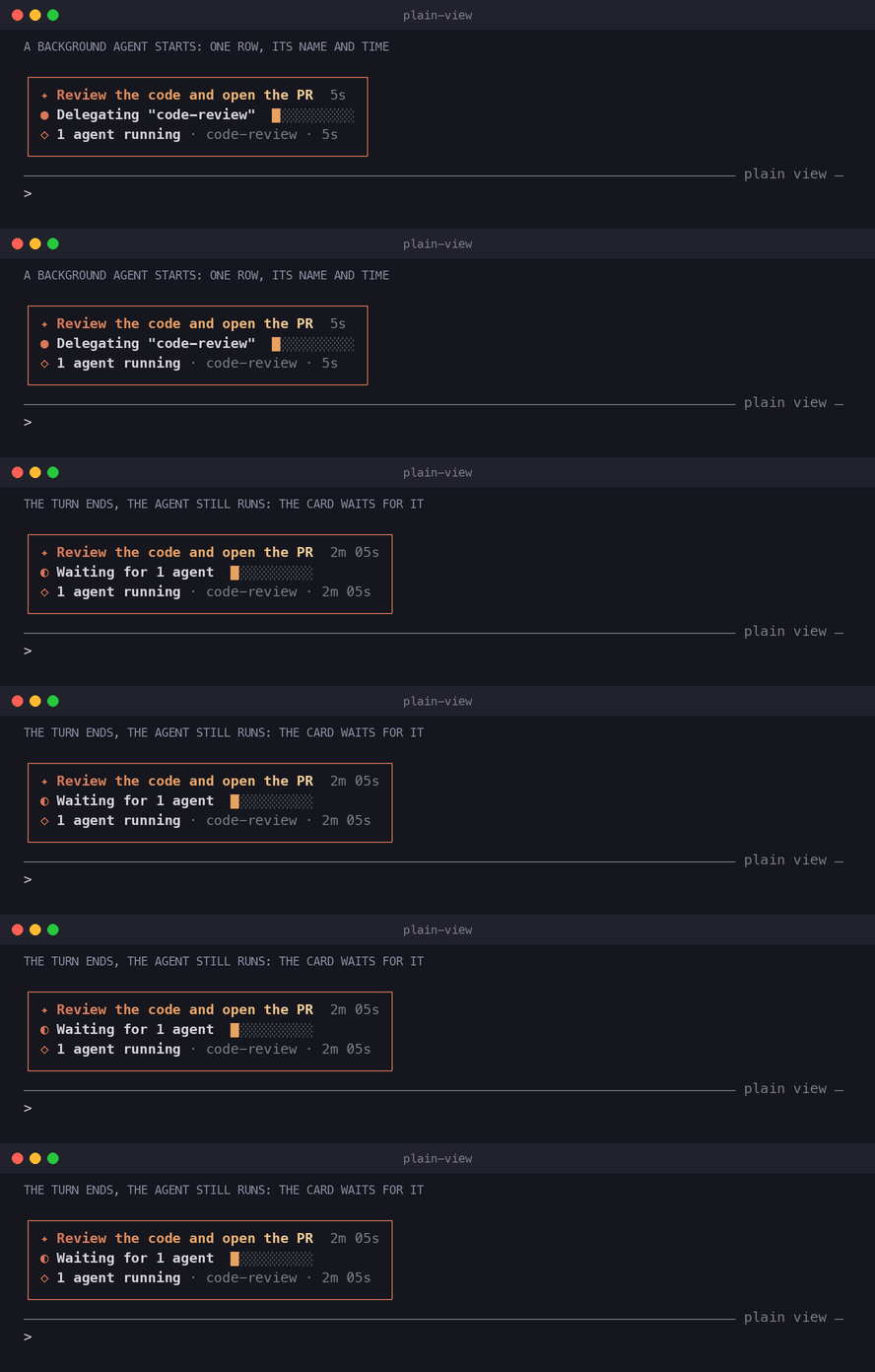
The agents the main turn hands work to show in one row of the card (◇ 1 agent running · code-review · 3m 12s, with agent-watch's /watch when it is installed), and with no task list
the card waits for them (Waiting for 1 agent). A turn with no list that called tools or agents
ends in a small green card (✓ Done, the time, the files and the agents); a plain conversation
leaves none.
Three options shape what you see, all in /config:
agentText, what stays of the agent's messages:final(default: the messages written before
a tool call step aside, the final answer stays),none,card(the answer's first sentence in the end card) orall. Failures, permission dialogs and the agent's questions always show. The agent's
thinking is drawn outside any mod's reach;"showThinkingSummaries": falsein~/.claude/settings.jsonhides it everywhere, ctrl+o included.askForTasks(on by default): one line in the system prompt asks the model to keep a task
list for work of more than two steps, or a checklist in its reply when the session has no task
tool, so the card shows each step; a few tokens per request. When a checklist in the text stops
moving, the card sayslist not updatedand the model gets a short reminder with a tool result.
Off, the card reads the list the agent keeps on its own, or a checklist in its answer.request, how much of a request of several lines the card's title shows:line(default: the
first line and+5 lines),joined,auto(the first line of prose) orall. The card'sshow requestbutton unfolds the whole request.
/plain-view                   the settings pane: every option in three tabs, one click each
/plain-view on | off          show or hide the card and the tool rows
/plain-view demo              a sample plan in the card for 12 seconds
/plain-view palette           the 8 bar palettes with a sample, and a button to switch
/plain-view palette aurora    switch to one by name
/plain-view help              list the commands
The bars are a gradient of the palette option's colors (default claude) with a shine that
runs while the agent works. Each palette has a dark and a light set, picked by your theme.animation: off keeps the bars still, in the theme's own colors.
Four short scenarios, each drawn by the mod itself:
A task list (mp4)
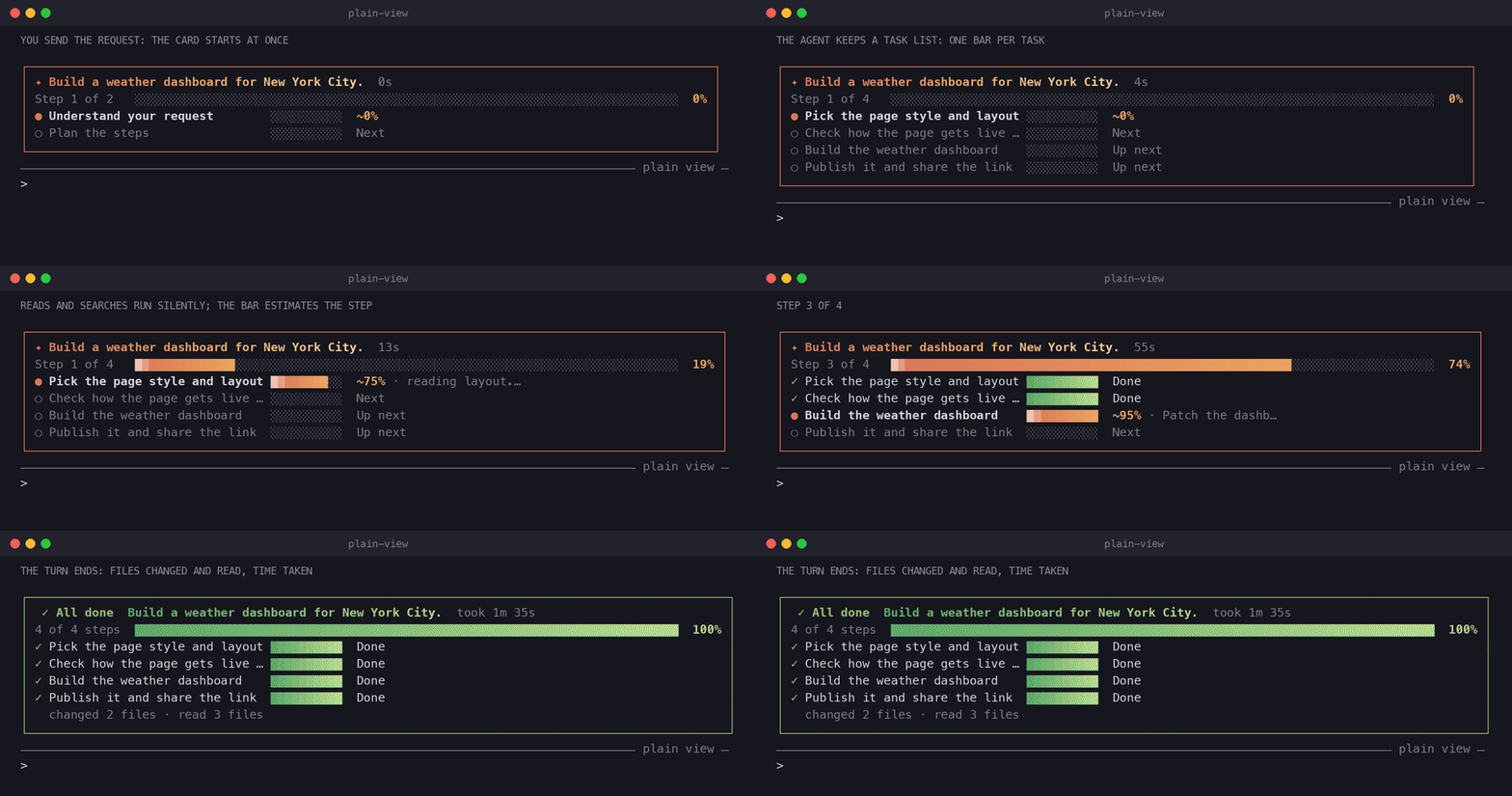
No task tool: a checklist in the answer (mp4)
Esc interrupts the turn (mp4)
A background agent (mp4)
Install
/plugin install plain-view --marketplace ice-lfernandes/claude-code-mods
Or for one session, from a clone: claude --plugin-dir ./plain-view.
Install
Each mod's section above has its own install line. In a Claude Code terminal session:
/plugin install limits-meter --marketplace ice-lfernandes/claude-code-mods
Answer y to add the marketplace, then pick a scope.
To try a mod for one session from a clone:
claude --plugin-dir ./limits-meter
What each mod reaches
A mod runs inside Claude Code with your permissions and is not sandboxed. Read it before you
load it, and run claude plugin validate <folder> to list every event it hooks and every call
it makes.
| Mod | Network | Runs processes | Files | Calls a model | Sends data anywhere |
|---|---|---|---|---|---|
| limits-meter | No | No | No | No | No |
| allowlist-coach | No | No | Reads and writes .claude/settings.local.json, or .claude/settings.json when you pick it, after you confirm |
No | No |
| agent-watch | No | No | No | No | No |
| test-hud | No | No | Reads Bash's saved copy of an output too long to show whole | No | No |
| launchpad | No | No | Reads .claude/launchpad.json and the agent files in .claude/agents/, in the project and in your home folder |
No | No |
| plain-view | No | No | No (writes its own options through /config when you run on, off or palette, or press one in its settings pane) |
No | No |
Developing
claude plugin validate ./limits-meter
claude plugin test ./limits-meter
claude plugin validate ./allowlist-coach
claude plugin test ./allowlist-coach
claude plugin validate ./agent-watch
claude plugin test ./agent-watch
claude plugin validate ./test-hud
claude plugin test ./test-hud
claude plugin validate ./launchpad
claude plugin test ./launchpad
claude plugin validate ./plain-view
claude plugin test ./plain-view
Every mod ships tests, including a render test on the terminal and desktop surfaces.
Checks before a merge
GitHub Actions (.github/workflows/ci.yml) runs on every pull request and every push to main,
with no Claude login and no model call:
claude plugin validateandclaude plugin testfor each mod, on a pinned Claude Code version;scripts/check-shared.sh: the shared files are the same in every mod;scripts/check-manifests.py: every JSON file parses, the marketplace lists every mod, and each
entry's name and description match the mod'splugin.json;scripts/check-versions.sh <base>: a mod changed in the pull request raised its version, since
Claude Code updates an installed plugin only when the version moves;- the screenshots match what the mods draw now (
scripts/screenshots/run.sh, then no diff); shellcheckon the scripts.
Run the same checks locally before a push:
./scripts/check-shared.sh
python3 scripts/check-manifests.py
./scripts/check-versions.sh origin/main
./scripts/screenshots/run.sh && git diff --stat screenshots
Shared helpers
A mod installs alone and cannot import another mod's code. The helpers every mod needs live inhooks/ui.tsx, tested by tests/ui.test.ts, and both files are copies, the same in each mod:
language and icon style from the options, a prompt fill with its [blank] marked, the window of
a long list, a row of clickable verbs, and the number formats. Nothing in it takes $: the
engine follows $ only into functions of the file that uses it, so the calls on $ stay in
each mod's register.tsx. A mod that names tool calls also carries hooks/phrases.ts andtests/phrases.test.ts: a tool call in a few words, in both languages (reading routes.ts,searching "invoice"). Change one copy, copy it to the other mods, then check them:
./scripts/check-shared.sh
Pane layout
Every pane follows the same outline, after launchpad's /pad configuration:
- A dim hint on top: what the pane shows and where the figures come from.
- Sections, each under a bold heading.
- An empty state that names the next step (
/test-hud demo shows what this looks like). - A footer: the command's verbs as clickable buttons (
/test-hud clear · demo · help), then a
close button.
A button that runs something from outside the mod, or undoes the person's data, puts the text in
the prompt instead of running it.
Shared bands
Several mods can draw on the same line: AbovePrompt (limits-meter, plain-view, and launchpad
under /pad place prompt) and PromptHint (launchpad's ◆ pad). Each ui.render hook there callsnext(e) and stacks its own row with what came back, never in its place, so every mod's row
shows:
AbovePrompt: the mod's row first, the rows of the mods beneath it after. The one exception
is launchpad, whose row goes last so it sits against the prompt box.PromptHint: the engine's hint first, the mod's row or button after.- A mod with nothing to show, or switched off, returns
next(e)as it is.
Otherwise the order between mods follows the order Claude Code loads them; a mod cannot set it.
After a change to what a mod draws, regenerate the images:
./scripts/screenshots/run.sh
Custom mods, skills and agents
Need a mod, skill or agent built for your own workflow or team? I take on custom work: hooks,
panes, status lines, slash commands, skills and subagents for Claude Code.
- Email: [email protected]
YouTube
My channel, Java + AI: youtube.com/@JavaPlusAI
License
MIT. See LICENSE.
Yorumlar (0)
Yorum birakmak icin giris yap.
Yorum birakSonuc bulunamadi