switchyard
Health Warn
- License — License: MIT
- Description — Repository has a description
- Active repo — Last push 0 days ago
- Low visibility — Only 5 GitHub stars
Code Fail
- rm -rf — Recursive force deletion command in .github/workflows/release.yml
- exec() — Shell command execution in app-ui/diff.js
Permissions Pass
- Permissions — No dangerous permissions requested
No AI report is available for this listing yet.
Switchya: a local coding workspace (desktop app + CLI) for the model providers you choose, powered by Switchyard Gateway, a self-hosted Rust LLM API gateway for OpenAI, Anthropic and Gemini protocols
Switchya & Switchyard Gateway
Website: switchya.com · Windows preview download · User guide · Gateway v0.1.1
Switchya is a local coding workspace with a browser interface, a terminal
CLI, and a native desktop shell. Open a project, choose a model,
send a task, and review proposed edits and commands alongside their results.
The app and CLI share saved sessions. Switchyard Gateway remains an
independent API gateway for other tools and applications.
The current source also includes a persistent project workbench with file
previews, Git diffs, a real terminal, and shared agent context over MCP.
Codex, Claude Code and Antigravity can run inside the conversation view with
saved history, streamed output, tool activity and their own approval policies
(Antigravity is read-only plan mode). These additions are newer than the
published preview.2 archive; they ship in preview.3.
| Start here | Purpose | Availability |
|---|---|---|
| Switchya user guide | Provider setup, projects, sessions, approvals, account boundaries, and app/CLI handoff | Windows x64 portable preview |
| Native desktop build | Build the separate desktop shell | Separate Cargo workspace; operating-system runtime verification is distinct from gateway verification |
| Switchyard Gateway | Protocol translation, routing, credential pools, and its operations dashboard | v0.1.1 downloads for Windows, Linux and macOS |
The Switchya preview targets Windows 10/11 x64 and contains the native
shell and CLI in an unsigned portable archive, with no installer or bundled
runtime DLLs. Install the Microsoft Visual C++ v14 x64 Redistributable
and Microsoft Edge WebView2 Runtime; WebView2 is required for the desktop
shell. Extract the ZIP and open switchya-desktop.exe, or run switchya.exe serve
for the browser workspace. The first run guides you through provider setup.
No macOS app binary is available, and separate Linux checks do not constitute
a Linux desktop release. See the preview verification status
for the tested scope and remaining limits.
The gateway release (v0.1.1) includes archives for Windows x64, Linux x64 and
arm64 (glibc and static musl) and macOS arm64 and Intel, each with a SHA-256
file. The release workflow tested each target and started its binary on a
GitHub-hosted runner of that platform. A multi-architecture container image is
published as ghcr.io/ichikuruma22-star/switchyard. These gateway results do
not establish Switchya desktop availability on those platforms.
Start Switchya from source
From this checkout, in a Windows PowerShell terminal:
cargo build --release --locked -p switchyard-app
.\target\release\switchya.exe serve
Open the private launch URL printed in the terminal. Choose Connect a
provider to add an OpenAI, Anthropic or Gemini API key, an environment-variable
reference, or an existing local Ollama server. A starter mock model is not a
working coding model. Open a local project, select a real model, and send a
task. File edits and commands require an exact, single-use human decision;
commands run with your operating-system permissions.
To build the Windows desktop shell, use its separate manifest:
cargo build --manifest-path desktop/Cargo.toml --release --locked
The desktop requires Rust 1.90+ and the platform prerequisites.
See the Switchya guide for persistent sessions, CLI handoff,
recovery, and the separate permission and account boundaries of existing agents.
Switchyard Gateway
A fast LLM API gateway in a single Rust binary. Point any OpenAI, Anthropic or
Gemini client at it and route requests to any provider you have keys for —
Switchyard translates between the protocols, rotates across your credentials,
fails over when one is rate limited, and shows you what is happening in a
built-in dashboard.
 your tools                         Switchyard                         providers
 ─────────────                ┌────────────────────┐
 OpenAI SDK / Codex CLI ────► │ /v1/chat/completions│ ──► OpenAI
 Claude Code / Anthropic SDK ►│ /v1/responses  (+WS)│ ──► Anthropic
 Gemini CLI / google-genai ──►│ /v1/messages        │ ──► Gemini / Vertex AI
 anything OpenAI-compatible ─►│ /v1beta/models/…    │ ──► OpenRouter, Groq, Ollama, vLLM, …
                              └────────────────────┘
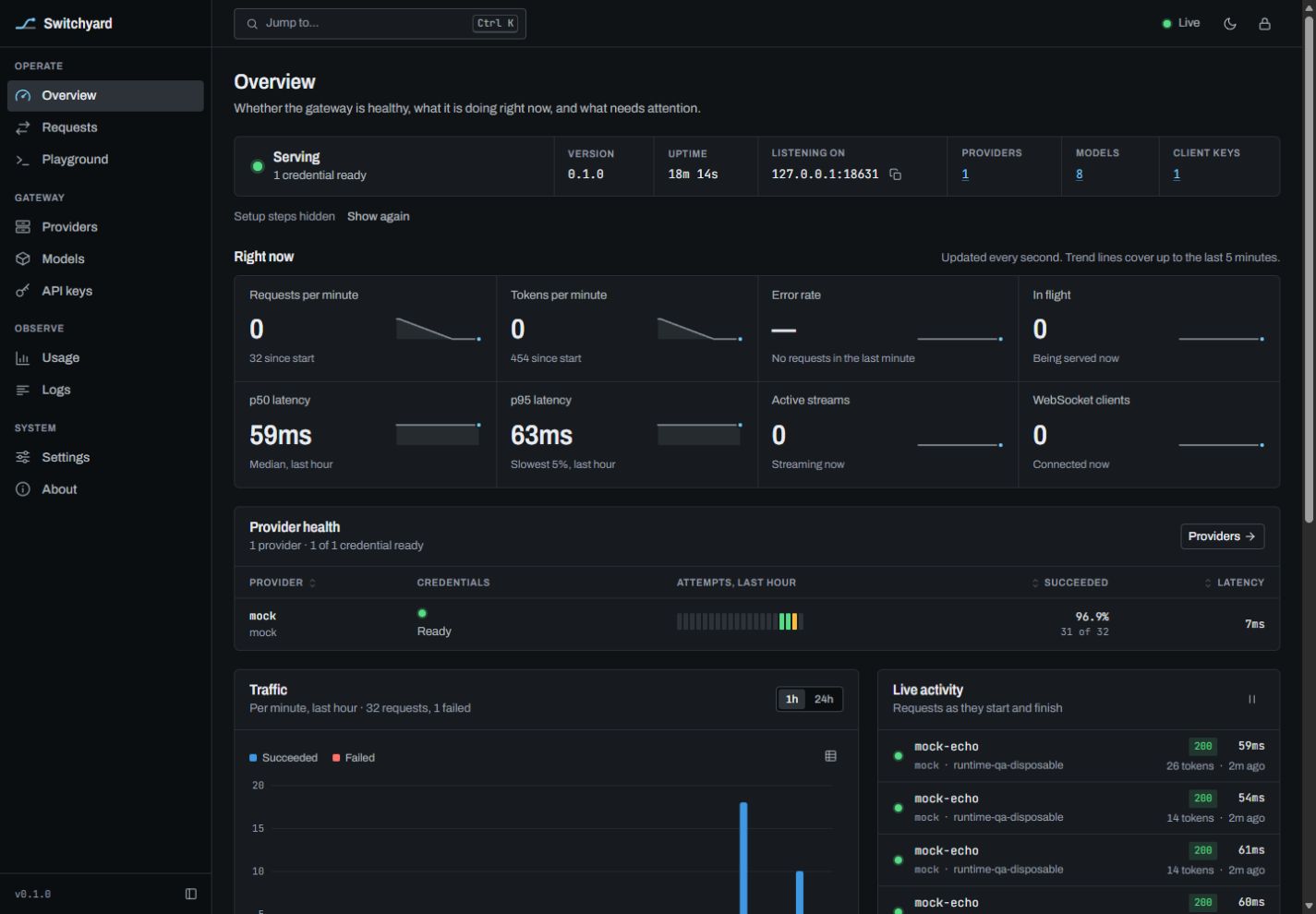
The dashboard above uses the built-in mock provider; its figures are test traffic.
What it does
- Four client protocols: OpenAI Chat Completions, OpenAI Responses,
Anthropic Messages and GeminigenerateContent— streaming and
non-streaming, tools, images, reasoning, structured output, token counting. - Any client, any provider: a request in one protocol can be served by a
provider that speaks another. Same-protocol requests preserve provider fields,
with model normalization and any configured reasoning or payload changes. - WebSockets: the OpenAI Responses API over WebSocket (
GET /v1/responses)
for any model, a relay for the OpenAI Realtime API (/v1/realtime), and a
live event feed for the dashboard. - Credential pools: several keys per provider with round-robin,
fill-first, weighted or least-latency selection, priorities, per-model
cooldowns with backoff,Retry-Afterawareness and automatic failover. - Model routing: aliases, provider prefixes (
team-a/gpt-5), fallback
chains (smart → claude-opus, then gpt-5), model discovery, exclusions. - Reasoning control:
gpt-5(high),claude-sonnet-4-5(16000),gemini-2.5-flash(none)— one suffix syntax, converted to whatever each
provider expects and clamped to what the model supports. - Dashboard at
/admin/: live request stream, provider and credential
health, usage and cost charts, a playground for every protocol, logs, and a
config editor. Embedded in the binary; no external assets. - Operations: hot-reloaded TOML config (the dashboard edits it in place
and keeps your comments), client API keys with model allow-lists and rate
limits, payload rewrite rules, usage history, request/response capture,
proxies (HTTP, SOCKS5) per provider or credential, optional TLS.
Upstream access is by API key or service account only. Switchyard does not
log in to consumer subscriptions or impersonate vendor CLIs.
Quick start
The Windows x64 download requires the Microsoft Visual C++ v14 x64
Redistributable.
Install it if Windows reports that VCRUNTIME140.dll is missing.
Download a binary from the releases page
(or build it: cargo install --git https://github.com/ichikuruma22-star/switchyard switchyard), then:
switchyard
On first start it writes switchyard.toml with a fresh admin secret and client
API key, and enables a built-in mock provider so you can try everything without
any upstream key. An interactive terminal shows the credentials once; redirected
logs omit them. Read admin.secret and the client key in the private config
file when running as a service. Open http://127.0.0.1:8317/admin/ and sign in
with the admin secret.
Add a real provider in the dashboard, or in switchyard.toml:
[[providers]]
name = "anthropic"
kind = "anthropic"
api_keys = ["env:ANTHROPIC_API_KEY"]

[[providers]]
name = "openai"
kind = "openai"
api_keys = ["env:OPENAI_API_KEY"]
Then call it with whichever SDK you like:
# OpenAI Chat Completions → served by Anthropic
curl http://127.0.0.1:8317/v1/chat/completions \
  -H "Authorization: Bearer $SWITCHYARD_KEY" -H "Content-Type: application/json" \
  -d '{"model":"claude-sonnet-4-5","messages":[{"role":"user","content":"Hello"}]}'

# Anthropic Messages → served by OpenAI
curl http://127.0.0.1:8317/v1/messages \
  -H "x-api-key: $SWITCHYARD_KEY" -H "anthropic-version: 2023-06-01" -H "Content-Type: application/json" \
  -d '{"model":"gpt-5","max_tokens":1024,"messages":[{"role":"user","content":"Hello"}]}'

# Gemini → served by anything
curl "http://127.0.0.1:8317/v1beta/models/gpt-5:generateContent" \
  -H "x-goog-api-key: $SWITCHYARD_KEY" -H "Content-Type: application/json" \
  -d '{"contents":[{"parts":[{"text":"Hello"}]}]}'
Using it from coding tools
| Tool | Setting |
|---|---|
| Claude Code | ANTHROPIC_BASE_URL=http://127.0.0.1:8317 and ANTHROPIC_API_KEY=<client key> |
| Codex CLI | a model_providers entry with base_url = "http://127.0.0.1:8317/v1", wire_api = "responses" |
| Gemini CLI | GOOGLE_GEMINI_BASE_URL=http://127.0.0.1:8317 and GEMINI_API_KEY=<client key> |
| OpenAI SDKs | base_url="http://127.0.0.1:8317/v1" |
Endpoints
POST /v1/chat/completions |
OpenAI Chat Completions |
POST /v1/completions |
legacy completions (served through chat; text prompts only, token-id prompts get a 400) |
POST /v1/responses |
OpenAI Responses |
GET /v1/responses |
Responses over WebSocket |
POST /v1/responses/input_tokens |
token count |
POST /v1/messages, /v1/messages/count_tokens |
Anthropic Messages |
POST /v1beta/models/{model}:generateContent, :streamGenerateContent, :countTokens |
Gemini |
GET /v1/models, /v1beta/models |
model lists in each vendor's shape |
GET /v1/realtime |
WebSocket relay to an OpenAI Realtime upstream |
POST /v1/ws-ticket |
authenticated, single-use browser WebSocket ticket |
POST /v1/embeddings, /v1/images/generations, /v1/moderations, /v1/audio/speech |
forwarded to an OpenAI-compatible provider |
GET /healthz |
liveness |
/admin/, /admin/api/… |
dashboard and admin API |
Clients authenticate with a key from [[auth.keys]], sent asAuthorization: Bearer, x-api-key, x-goog-api-key or ?key=.
Prefer headers. Browser WebSocket clients can mint a 30-second ticket withPOST /v1/ws-ticket using a key in a header, then connect with ?ticket= so
the long-lived key never appears in a URL.
Configuration
Everything lives in one TOML file; switchyard.example.toml
documents every setting with its default. Highlights:
[routing]
strategy = "round-robin"     # round-robin | fill-first | weighted | least-latency
max_attempts = 3

[[providers]]
name = "openrouter"
kind = "openai-compat"       # openai | anthropic | gemini | vertex | openai-compat | mock
base_url = "https://openrouter.ai/api/v1"
api_keys = ["env:OPENROUTER_API_KEY"]
prefix = "or"                # models are served as "or/<model>"

[[aliases]]
name = "smart"               # a virtual model with a fallback chain
targets = ["claude-opus-4-5", "gpt-5(high)"]

[[payload.override]]         # patch upstream request bodies
models = ["gpt-*"]
set = { "reasoning.summary" = "auto" }
Secrets may be literal or env:NAME (also written ${NAME}). Providerheaders values accept the same references, resolved like API keys; a header
whose variable is unset makes that provider's credentials unusable instead of
sending the reference text. The file is reloaded when it changes; an
invalid edit is rejected and the running config kept.
See the security and deployment model before sharing
access. Model allow-lists do not isolate files or resources within a shared
upstream account, and the dashboard's Remember option stores its admin secret
in the trusted browser profile.
Command line
switchyard [serve] [--config <path>] [--host <h>] [--port <p>]
switchyard init [--config <path>] [--force]         write a starter config with fresh secrets
switchyard check [--config <path>]                  validate a config file
switchyard import-cliproxy <config.yaml> [-o <path>]  convert the API-key sections of a CLIProxyAPI config
switchyard version
Environment: SWITCHYARD_CONFIG, SWITCHYARD_ADMIN_SECRET,SWITCHYARD_ADMIN_ALLOW_REMOTE.
Docker
Release images for linux/amd64 and linux/arm64 are published to GitHub
Container Registry as ghcr.io/ichikuruma22-star/switchyard:<version> and:latest. They run as an unprivileged user and keep their data in /data.
To build your own instead, run docker build -t switchyard:local . from this
checkout and use that tag below.
export SWITCHYARD_ADMIN_SECRET="$(openssl rand -hex 32)"
docker run -d --name switchyard -p 127.0.0.1:8317:8317 \
  -v switchyard-data:/data \
  -e SWITCHYARD_ADMIN_SECRET -e SWITCHYARD_ADMIN_ALLOW_REMOTE=true \
  ghcr.io/ichikuruma22-star/switchyard:0.1.1
This bash example generates a fresh admin secret in SWITCHYARD_ADMIN_SECRET;
use that value to sign in and keep it in a password manager. The config is
created at /data/switchyard.toml on first start. Admin access across the
container boundary is explicitly enabled, while the published port is bound
to the host's loopback interface. For access from other machines, use TLS and
restrict who can reach the gateway. Images leave remote admin access disabled
unless you enable it.
How translation works
Each protocol has a codec that maps it to and from one canonical request and
stream model, so supporting four protocols takes four codecs rather than
twelve pairwise translators. When the client and the provider speak the same
protocol its fields are preserved, with JSON normalization, model routing and
any configured reasoning or payload changes. Restricted client keys cannot use
upstream selectors that could bypass their model allow-list. Details that do not survive a
protocol boundary — provider-specific blocks, signed reasoning from another
vendor — are dropped rather than sent somewhere they would be rejected.
See docs/DESIGN.md.
Building
cargo build --release -p switchyard     # Rust 1.88+
cargo test --workspace
The dashboard in ui/ has no build step and is embedded at compile time. A
debug build (cargo run -p switchyard) serves it straight from ui/ on disk, so
edits show up on reload; node ui/tests/check.mjs runs its self-checks.
Acknowledgements
Switchyard is an independent implementation inspired by
CLIProxyAPI; see NOTICE.
Licence
MIT
Reviews (0)
Sign in to leave a review.
Leave a reviewNo results found