rtlify
Health Pass
- License — License: MIT
- Description — Repository has a description
- Active repo — Last push 0 days ago
- Community trust — 10 GitHub stars
Code Fail
- fs module — File system access in package.json
- spawnSync — Synchronous process spawning in src/cli.ts
- process.env — Environment variable access in src/cli.ts
- spawnSync — Synchronous process spawning in test/cli.test.mjs
- process.env — Environment variable access in test/cli.test.mjs
Permissions Pass
- Permissions — No dangerous permissions requested
No AI report is available for this listing yet.
RTL Brain for AI coding agents. Teach Claude Code, Cursor, Copilot, Windsurf, Cline, Gemini CLI, and Codex CLI to generate production-ready RTL code. Zero dependencies.
RTLify
The RTL Brain for AI Coding Agents
Teach your AI editor once — it generates production-ready
RTL code from that point on. No plugins. No runtime. One command.





Hebrew · Arabic · Persian (Farsi) · Urdu
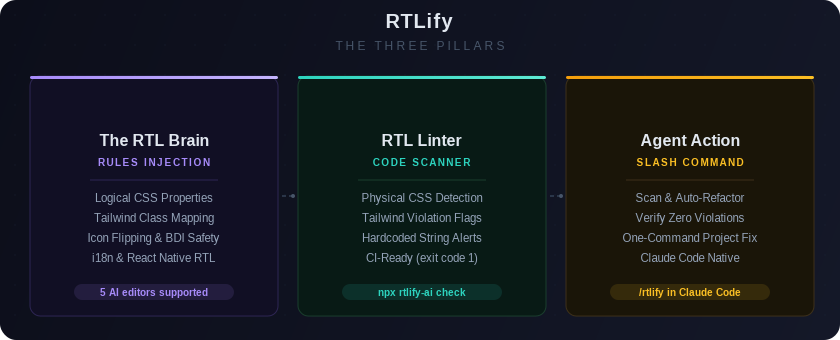
The Core Idea
RTLify doesn't fix code after generation — it prevents incorrect code from being generated in the first place. Teach your AI once instead of fixing every component manually.
RTLify is not an i18n library. It's an AI behavior layer — zero runtime dependencies — that ensures your coding agent uses correct RTL patterns and respects your existing localization setup.
Why
Every AI coding agent is trained on LTR codebases. Ask it to build an RTL interface and it will:
CSS & Layout
margin-leftinstead ofmargin-inline-startml-4in Tailwind instead ofms-4paddingLeftin React Native instead ofpaddingStart
Text & Bidi
- Hardcoded
"ברוכים הבאים"or"مرحباً"without translation functions - Mixed Hebrew + numbers without
<bdi>tags — content jumps around - US locale for dates and currency
Components
- Arrows and chevrons pointing the wrong way
- Carousels, charts, and sliders rendering backwards
...and dozens of subtle bugs that slip into production.
Quick Start
npx rtlify-ai init
Run once per project. After that, just code normally — your AI editor reads the rules automatically in the background.
Supported AI Platforms
| Claude Code CLAUDE.md + /rtlify |
Cursor .cursor/rules/rtlify.mdc |
Windsurf .windsurf/rules/rtlify.md |
Cline .clinerules (file or folder) |
Copilot copilot-instructions.md |
Gemini CLI GEMINI.md |
Codex CLI AGENTS.md |
Editors are auto-detected. Legacy .cursorrules / .windsurfrules files are reused if your project already has them.
Supported Frameworks
React & Next.js · Vite · React Native · Vue · Svelte · Astro · Vanilla JS/TS/CSS/SCSS · Tailwind CSS v3 & v4
How It Works
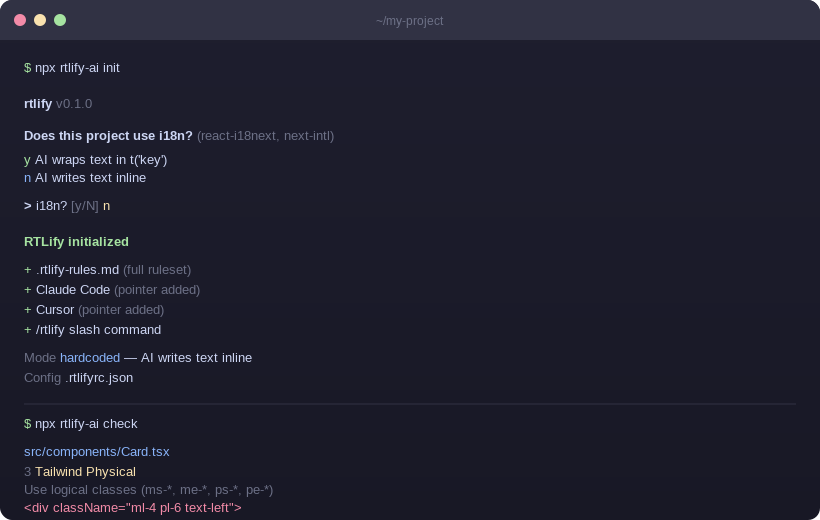
There is no black box. RTLify saves the full ruleset to .rtlify-rules.md and adds a short 3-line pointer to your editor config files. Your config stays clean — the AI knows where to find the rules. Open .rtlify-rules.md and read exactly what the AI sees.
Step 1 — 🧠 The Injection
npx rtlify-ai init
Installs the RTL Brain: 8 architecture rules with "do this / not that" code examples and a full Tailwind class mapping table. The AI reads them automatically — no extra prompting.
| Option | What it does |
|---|---|
--i18n / --hardcoded |
Pick the translation mode without the prompt (also switches an existing project) |
--editors claude,cursor |
Choose editors explicitly: claude, cursor, windsurf, cline, copilot, gemini, codex, all |
--no-skill |
Don't install the global /rtlify Claude Code skill |
Step 2 — 🔍 The Audit
npx rtlify-ai check
  src/components/Sidebar.tsx
       3 Tailwind Physical
         Use logical classes (ms-*, me-*, ps-*, pe-*)
         <div className="ml-4 pl-6 text-left">

  1 violation across 1 file
Scans .js .jsx .ts .tsx .mjs .cjs .css .scss .sass .less .vue .svelte .astro .html — physical CSS (margin-left, left:, text-align: right), inline and React Native styles (marginLeft, paddingRight), and physical Tailwind classes (ml-4, md:pl-2, text-left, rounded-tl, border-l…).
npx rtlify-ai check src/ app/     # only these paths
npx rtlify-ai check --json        # machine-readable report
| Exit code | Meaning |
|---|---|
0 |
No violations |
1 |
Violations found |
2 |
No scannable files (wrong folder?) |
Plug it into CI:
- run: npx rtlify-ai check
Intentional physical layout? (a chart axis, a phone-number input) Silence it:
<div className="ml-4" /> {/* rtlify-ignore */}
// rtlify-ignore-next-line
const axis = { left: 0 };
/* rtlify-ignore-file */   // in the first 5 lines
Step 3 — 🪄 The /rtlify Command
Type /rtlify in Claude Code. It will:
- Run
npx rtlify-ai checkto find violations - Apply targeted fixes — CSS to logical, icons flipped,
<bdi>tags added - Re-run the check to confirm zero violations
Safe by default: scoped to RTL layout fixes only. Never extracts strings to
t(). Never invents translation keys. Never introduces undefined imports. Every fix is reviewable in a standard diff.
Not using Claude Code? — 🔧 fix
npx rtlify-ai fix
Generates a ready-to-paste prompt and copies it to your clipboard. Paste it into Cursor, Windsurf, Cline, Copilot, or any AI editor — it tells the AI to scan, fix, and verify using the rules in .rtlify-rules.md.
Core Features
What the RTL Brain teaches your AI agent:
| Feature | What the AI Learns | Example | |
|---|---|---|---|
| 1 | Logical CSS | Replace physical properties with logical | margin-left → margin-inline-start |
| 2 | Tailwind Mapping | 20+ class conversions | ml-4 → ms-4, text-left → text-start |
| 3 | Icon Flipping | Flip directional icons only | rtl:-scale-x-100 on arrows/chevrons |
| 4 | BDI Safety | Wrap LTR in RTL with <bdi> |
<bdi>#12345</bdi> stays anchored |
| 5 | Localized Formats | Intl APIs with correct locales |
Intl.NumberFormat('he-IL') → 42.90 ₪ |
| 6 | Safe i18n | t() only if project has i18n |
Never auto-extracts, never breaks builds |
| 7 | Complex Components | RTL-aware carousels, charts, sliders | <Swiper dir="rtl"> |
| 8 | React Native | Mobile RTL APIs | paddingStart, I18nManager.isRTL |
Try It
After npx rtlify-ai init, try these prompts:
💬 "Build a checkout form in Hebrew"
AI uses
ms-4instead ofml-4, formats prices withIntl.NumberFormat('he-IL'), wraps text int('checkout.total').
💬 "Create a React Native settings screen in Arabic"
AI uses
paddingStartinstead ofpaddingLeft, checksI18nManager.isRTLfor icon transforms, setswritingDirection: 'rtl'.
💬 "Show: 'ההזמנה שלך #12345 אושרה'"
Order number renders as
<bdi>#12345</bdi>— stays anchored correctly.
🎮 Playground
git clone https://github.com/idanlevi1/rtlify.git
cd rtlify/examples/playground
npx rtlify-ai check
BrokenDashboard.tsx is packed with RTL mistakes. The linter flags the 8 lines with physical CSS and Tailwind; the bidi and icon issues are what the AI rules teach your editor to fix.
Contributing
We welcome contributions! Here's how to get started:
# 1. Clone & build
git clone https://github.com/idanlevi1/rtlify.git
cd rtlify
npm install
npm run build

# 2. Project structure
src/
├── cli.ts              # CLI entry — commands, templates, output
├── scanner.ts          # Lint patterns, file walking, ignore comments
├── targets.ts          # Editor detection and config file locations
└── rules.md            # 8 RTL rules (Rule 6 is a dynamic placeholder)
test/                   # node:test suites (no extra dependencies)

examples/playground/
└── BrokenDashboard.tsx # Test file with intentional violations

# 3. Test your changes
npm test                       # Build + run all tests
node dist/cli.js init          # Test init in a temp folder
node dist/cli.js check         # Run linter against playground
node dist/cli.js help          # Verify help output

# 4. Key files to know
# ARCHITECTURE.md              How everything connects (start here!)
# .rtlify-rules.md             Generated rules + config (single source of truth)

# 5. Submit a PR
git checkout -b feat/your-feature
git commit -m "feat: description"
git push -u origin feat/your-feature
gh pr create
Read ARCHITECTURE.md before diving in — it covers the data flow, key design decisions, and gotchas that will save you time.
RTLify is a step toward making AI-generated UI fully localization-aware — not just RTL-correct.
Built by Idan Levi · If RTLify helped you, give it a ⭐
Reviews (0)
Sign in to leave a review.
Leave a reviewNo results found