claude-unity-game-studio
Health Uyari
- License — License: MIT
- Description — Repository has a description
- Active repo — Last push 0 days ago
- Low visibility — Only 7 GitHub stars
Code Gecti
- Code scan — Scanned 12 files during light audit, no dangerous patterns found
Permissions Gecti
- Permissions — No dangerous permissions requested
Bu listing icin henuz AI raporu yok.
AI-powered Unity game development studio for Claude Code - 49 agents, 120+ skills, and a full studio hierarchy that turns a single AI session into a coordinated game dev team. View more about me in my portfolio.
Claude Unity Game Studio
Turns a single Claude Code session into a coordinated Unity game studio — 49 specialized AI agents in a director → lead → specialist hierarchy, 120+ skills, and quality gates, so your AI has structure instead of writing spaghetti in one long chat.




Built With This Toolkit
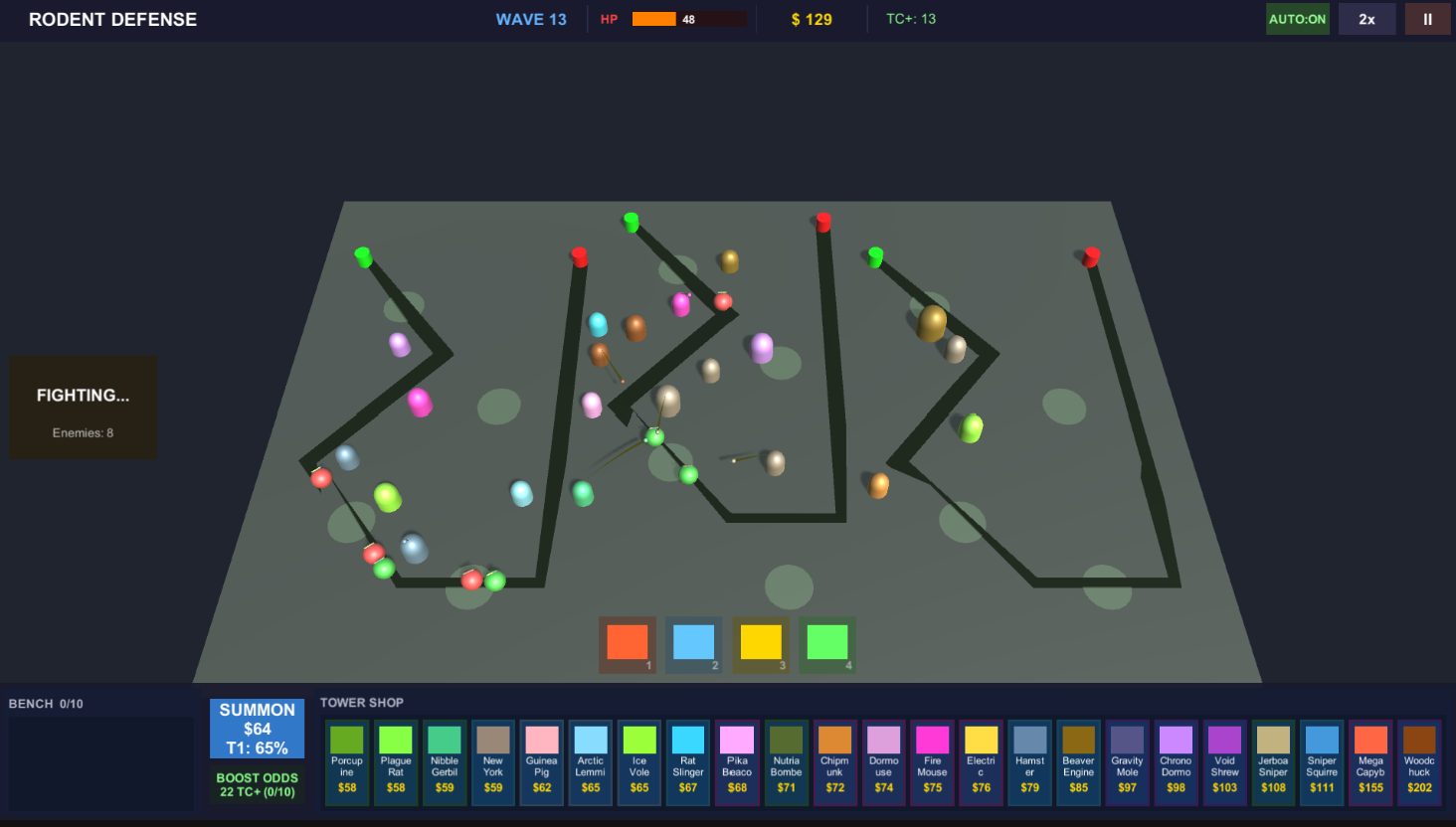
Rodent Defense — a tower defense prototype built entirely using this toolkit and Claude Code.
What Is This?
Building a game solo with AI is powerful, but a single chat has no structure. No one stops you from hardcoding magic numbers, skipping design docs, or writing spaghetti code. There's no QA pass, no design review, no one asking "does this actually fit the game's vision?"
Claude Unity Game Studio gives your AI session the structure of a real game studio. Instead of one general-purpose assistant, you get 49 specialized AI agents organized into a studio hierarchy — directors who guard the vision, leads who own their domains, and specialists who do the hands-on work. Each agent has defined responsibilities, escalation paths, and quality gates.
You still make every decision. But now you have a team that asks the right questions, catches mistakes early, and keeps your project organized from first brainstorm to launch.
Table of Contents
- What's Inside
- How It Works
- Prerequisites
- Quick Start (5 Minutes)
- Setup Options
- Your First Game: A Complete Walkthrough
- The Studio Hierarchy
- Skills Overview
- The Plugin System
- Director Gates (Quality Control)
- Development Phases
- Usage Modes
- Project Structure
- Slash Command Reference
- Hooks & Automation
- FAQ
- Credits
- License
What's Inside
This toolkit combines five specialized components into one cohesive system:
| Component | What It Provides | Count |
|---|---|---|
| Game Studios Template | Studio hierarchy, agents, skills, hooks, rules, templates | 49 agents, 72 skills, 12 hooks, 11 rules |
| Unity Knowledge Skills | Deep Unity 6.3 LTS API knowledge across every subsystem | 35 skills (95 files, 44,500+ lines) |
| Unity Middleware Skills | Production middleware expertise (VContainer, UniTask, Wwise, etc.) | 21 skills |
| Unity AI Workflow | Simplified workflow commands with game-feel-first philosophy | 9 commands, 13 skills |
| Unity MCP | Real-time bridge between Claude Code and Unity Editor | MCP server + C# plugin |
Total: 49 agents, 120+ skills, 12 hooks, 11 coding rules, 39 document templates.
How It Works
When you open a Claude Code session in your game project, the system loads automatically:
Claude Code Session Opens
|
+-> Loads CLAUDE.md (master instructions for the AI)
|
+-> Auto-discovers 49 agents (directors, leads, specialists)
|   Each knows its domain, responsibilities, and escalation paths
|
+-> Auto-discovers 120+ skills (slash commands)
|   From brainstorming to launch checklists
|
+-> Loads Unity knowledge plugins
|   35 API skills + 21 middleware skills = deep engine expertise
|
+-> Activates 12 hooks
|   Automated validation on commits, pushes, session lifecycle
|
+-> Ready for you to say: "/start"
From there, you drive. The AI asks questions, proposes options, and waits for your decisions. It never writes code without approval. It never skips design docs. It never pushes without your say-so.
Prerequisites
Before starting, you need:
Claude Code — Anthropic's CLI tool for AI-assisted development
# Install Claude Code
npm install -g @anthropic-ai/claude-code

# Verify installation
claude --version
You'll need an Anthropic API key or a Claude Pro/Max subscription.
Unity — You must install Unity to build and run your game. This toolkit helps Claude Code write Unity code for you, but the actual game runs in the Unity Editor.
- Download and install Unity Hub (free — works on Windows, macOS, and Linux)
- Create a free Unity account if you don't have one (Personal license is free)
- In Unity Hub, click Installs > Install Editor and install Unity 6.3 LTS (recommended) or any Unity 6.x version
- When creating a new project, choose a template (e.g., 3D Core or 2D Core) and save it inside your game workspace folder
The toolkit works with Unity 2022+ but the knowledge skills target Unity 6.3 LTS APIs specifically. If you use an older version, some API references may differ.
Git — For version control
git --version # Should be 2.x+Node.js (optional) — Only needed for the Unity MCP bridge
node --version # 18+ recommended
Quick Start (5 Minutes)
Option A: Fresh Game (Recommended for First-Timers)
# 1. Clone this repo
git clone https://github.com/IdoCohen560/claude-unity-game-studio.git

# 2. Create your game workspace
mkdir MyGame && cd MyGame

# 3. Run the setup script
bash ../claude-unity-game-studio/setup.sh

# 4. Create your Unity project inside the workspace
#    Open Unity Hub -> New Project -> save as MyGame/MyGameUnity/

# 5. Open Claude Code in your workspace
claude

# 6. Start the guided onboarding
#    Type: /start
Option B: Copy Into Existing Project
# 1. Clone this repo
git clone https://github.com/IdoCohen560/claude-unity-game-studio.git

# 2. Copy the toolkit into your project root
cp -r claude-unity-game-studio/game-studios-template/.claude/ ./your-project/.claude/
cp claude-unity-game-studio/game-studios-template/CLAUDE.md ./your-project/CLAUDE.md

# 3. Add Unity knowledge plugins
claude --plugin-dir claude-unity-game-studio/unity-knowledge-skills
claude --plugin-dir claude-unity-game-studio/unity-middleware-skills

# 4. Open Claude Code in your project
cd your-project && claude

# 5. Run the adoption workflow
#    Type: /adopt
Option C: Manual Setup (Full Control)
See SETUP.md for detailed manual installation instructions.
Setup Options
Minimal (Just the Studio)
Copy only the game-studios-template/ contents. You get 49 agents, 72 skills, and the full studio hierarchy. No Unity-specific knowledge plugins.
Standard (Recommended)
Studio + Unity Knowledge Skills + Unity Middleware Skills. This is the sweet spot for most Unity developers. Copy the template and load the two plugins.
Full (Everything)
All components including the Unity AI Workflow wrapper and Unity MCP bridge. Best for developers who want the complete experience with real-time Unity Editor integration.
Your First Game: A Complete Walkthrough
Here's what a full game development session looks like with this toolkit:
Phase 1: Ideation
You:   /start
AI:    Welcome! I see no engine configured and no game concept.
       Where are you starting from?
       1. No idea yet — let's brainstorm
       2. Vague idea — help me develop it
       3. Clear concept — let's design systems
       4. Existing project — help me organize it

You:   1

AI:    /brainstorm
       Let's explore. What kind of experience excites you?
       [Guided ideation using MDA framework, player psychology...]

       >>> After 10-15 minutes of conversation <<<

AI:    Here's your game concept. May I write this to design/game-concept.md?
       - Title: "Ember Hollow"
       - Genre: Action-roguelike
       - Core Fantasy: "Master elemental combinations to survive"
       - 3 Design Pillars: Discovery, Mastery, Expression
Phase 2: Design
You:   /map-systems
AI:    Based on your concept, I've identified 8 core systems:
       1. Combat System (melee + ranged + elemental)
       2. Element Combination System
       3. Procedural Level Generation
       4. Progression / Unlocks
       5. Enemy AI
       6. UI / HUD
       7. Audio / Music
       8. Save System

       Want me to design each one? I'll create GDDs with the 8 required sections.

You:   Start with Combat

AI:    [Asks detailed questions about combat feel, pacing, complexity...]
       [Produces a complete GDD with formulas, edge cases, tuning knobs]
       May I write this to design/gdd/combat-system.md?
Phase 3: Architecture
You:   /create-architecture
AI:    [Reads all GDDs, proposes architecture decisions]
       [Creates ADRs for: state management, event bus, DI approach, etc.]

You:   /gate-check concept
AI:    [4 directors review in parallel]
       Creative Director: READY — pillars are strong
       Technical Director: CONCERNS — one API needs verification
       Producer: READY — scope is feasible
       Art Director: READY — visual identity anchor prepared

       Result: CONCERNS (1 item to resolve before proceeding)
Phase 4: Implementation
You:   /create-epics
AI:    [Breaks architecture into 5 epics]

You:   /create-stories combat-epic
AI:    [Breaks combat epic into 12 stories with acceptance criteria]

You:   /dev-story stories/combat-01-hitbox-detection.md
AI:    [Spawns gameplay-programmer agent]
       [Agent reads story, GDD, ADRs, control manifest]
       [Implements with tests, asks before every file write]
       [Reports: COMPLETE with 4/4 acceptance criteria met]

You:   /story-done stories/combat-01-hitbox-detection.md
AI:    [Validates all criteria, records completion, surfaces next story]
Phase 5: Polish & Ship
You:   /team-polish combat
AI:    [Spawns performance-analyst + technical-artist + sound-designer + qa-tester]
       [Each reviews the combat system from their domain]
       [Returns: optimization opportunities, VFX suggestions, audio gaps, bugs]

You:   /gate-check release
AI:    [Full director review for release readiness]
       [Launch checklist generated]
The Studio Hierarchy
Agents are organized into three tiers, matching how real game studios operate:
Tier 1 — Directors (Opus model — strategic decisions)
  creative-director    technical-director    producer    art-director

Tier 2 — Department Leads (Sonnet model — domain ownership)
  game-designer        lead-programmer       audio-director
  narrative-director   qa-lead               release-manager
  localization-lead    ux-designer

Tier 3 — Specialists (Sonnet/Haiku model — hands-on work)
  gameplay-programmer  engine-programmer     ai-programmer
  network-programmer   tools-programmer      ui-programmer
  systems-designer     level-designer        economy-designer
  technical-artist     sound-designer        writer
  world-builder        prototyper            performance-analyst
  devops-engineer      analytics-engineer    community-manager

  Unity Specialists:
  unity-specialist          unity-shader-specialist
  unity-ui-specialist       unity-dots-specialist
  unity-addressables-specialist
Key principle: Directors never write code. Specialists never make vision decisions. Leads bridge the two. This separation prevents the AI from making unilateral decisions that cross domain boundaries.
Skills Overview
Studio Skills (72) — from Game Studios Template
| Category | Skills | Examples |
|---|---|---|
| Getting Started | 4 | /start, /setup-engine, /adopt, /onboard |
| Design | 10 | /brainstorm, /map-systems, /design-review, /quick-design |
| Architecture | 5 | /create-architecture, /architecture-decision, /architecture-review |
| Sprint Management | 8 | /create-epics, /create-stories, /sprint-plan, /sprint-status |
| Implementation | 6 | /dev-story, /story-done, /code-review, /prototype |
| Team Orchestration | 8 | /team-combat, /team-ui, /team-narrative, /team-audio, /team-polish |
| QA & Testing | 10 | /qa-plan, /smoke-check, /test-setup, /regression-suite |
| Release | 6 | /gate-check, /release-checklist, /launch-checklist, /day-one-patch |
| Utilities | 15 | /bug-report, /tech-debt, /scope-check, /balance-check |
Unity API Skills (35) — from Unity Knowledge Plugin
| Category | Skills |
|---|---|
| Core | unity-foundations, unity-scripting, unity-lifecycle |
| Rendering | unity-graphics, unity-lighting-vfx, unity-3d-math |
| Physics | unity-physics, unity-physics-queries |
| UI | unity-ui, unity-ui-patterns |
| Animation | unity-animation, unity-cinemachine |
| Audio | unity-audio |
| Input | unity-input, unity-input-correctness |
| Systems | unity-game-architecture, unity-state-machines, unity-data-driven |
| Networking | unity-multiplayer |
| Advanced | unity-ecs-dots, unity-async-patterns, unity-procedural-gen |
| Tools | unity-editor-tools, unity-testing, unity-performance, unity-platforms |
| Design Translation | unity-game-loop, unity-npc-behavior, unity-level-design, unity-save-system |
Middleware Skills (21) — from Middleware Plugin
| Skills |
|---|
unity-addressables, unity-behavior-designer, unity-cinemachine, unity-flowcanvas |
unity-gameplay-ability-system, unity-memorypack, unity-navmesh, unity-object-pooling |
unity-physics, unity-primetween, unity-profiling, unity-scriptable-objects |
unity-sentry, unity-state-machine, unity-test-framework, unity-ugui |
unity-unitask, unity-vcontainer, unity-wwise, unity-mobile-optimization |
unity-animation |
Workflow Commands (9) — from Unity AI Workflow
| Command | Purpose |
|---|---|
/uw-cmd-setup-project |
Full project initialization wizard |
/uw-cmd-brainstorm |
Guided ideation and concept development |
/uw-cmd-plan |
Technical planning and architecture |
/uw-cmd-create |
Asset and system creation |
/uw-cmd-implement-feature |
Full feature loop: interrogate -> GDD -> TDD -> game feel -> commit |
/uw-cmd-test |
Test generation and execution |
/uw-cmd-debug |
Structured debugging workflow |
/uw-cmd-polish |
VFX, SFX, camera, tweens refinement |
/uw-cmd-review |
Code review with Unity-specific checks |
The Plugin System
Skills are loaded through Claude Code's plugin architecture. This means you can mix and match:
Your Game Project
|
+-> game-studios-template/     (always loaded — core infrastructure)
|   +-> .claude/agents/        (49 agents)
|   +-> .claude/skills/        (72 skills)
|   +-> .claude/hooks/         (12 hooks)
|   +-> .claude/rules/         (11 rules)
|
+-> unity-knowledge-skills/    (plugin — deep Unity API knowledge)
|   +-> skills/                (35 Unity skills, auto-discovered)
|
+-> unity-middleware-skills/   (plugin — production middleware)
|   +-> skills/                (21 middleware skills, auto-discovered)
|
+-> unity-ai-workflow/         (optional — simplified commands)
    +-> .claude/commands/      (9 workflow commands)
    +-> .claude/skills/        (13 workflow skills)
Adding More Plugins
The system is extensible. Want roguelike-specific skills? Create a new plugin:
my-roguelike-skills/
+-- .claude-plugin/
|   +-- plugin.json
+-- skills/
    +-- dungeon-generation/
    |   +-- SKILL.md
    +-- procedural-loot/
        +-- SKILL.md
Drop it next to your project and load it with claude --plugin-dir ./my-roguelike-skills.
Director Gates (Quality Control)
The most powerful feature. Every major decision passes through quality gates:
How Gates Work
- You trigger a gate (e.g.,
/gate-check concept) - Four directors review in parallel, each from their domain:
- Creative Director — Does this fit the game's vision and pillars?
- Technical Director — Is the architecture sound? Risks documented?
- Producer — Is scope realistic for the timeline?
- Art Director — Is the visual identity established?
- Each returns:
READY,CONCERNS [list], orNOT READY [blockers] - Strictest verdict wins — one
NOT READYblocks the whole phase
Gate Intensity Modes
| Mode | Behavior | Best For |
|---|---|---|
| full | All gates run at every decision point | Complex games, teams |
| lean | Only phase gates at /gate-check |
Solo devs, medium projects |
| solo | No director gates | Game jams, rapid prototyping |
Set your mode in production/review-mode.txt.
Development Phases
The toolkit follows a structured development pipeline:
Concept  ->  Systems Design  ->  Architecture  ->  Pre-Production
   |              |                   |                  |
 /start      /map-systems    /create-architecture   /setup-engine
 /brainstorm /design-review  /architecture-decision  /test-setup
                             /gate-check concept     /gate-check pre-prod
                                                         |
                                                         v
Production  ->  Polish  ->  Release
    |             |           |
 /create-epics  /team-polish /gate-check release
 /create-stories            /release-checklist
 /dev-story                 /launch-checklist
 /story-done                /day-one-patch
 /sprint-plan
 /sprint-status
Each phase has a gate check. You can't skip ahead without addressing concerns.
Usage Modes
Mode A: Full Studio (Maximum Structure)
Use the complete Game Studios Template with all agents, gates, and workflows. Best for serious projects where quality matters.
# Open your game workspace
cd MyGame && claude

# Start with guided onboarding
> /start
Mode B: Simplified Workflow (Guided Experience)
Use the Unity AI Workflow wrapper for a streamlined experience. Hides complexity behind 9 high-level commands. Best for solo devs and game jams.
# Copy unity-ai-workflow into your project
# Use /uw-cmd-* commands instead of the full skill set
> /uw-cmd-implement-feature "melee parry system"
Mode C: Hybrid (Recommended for Most)
Use the full studio for planning and oversight, and the workflow commands for implementation. This gives you both structure and speed.
Dev Modes (from Unity AI Workflow)
| Mode | Behavior |
|---|---|
| guided (default) | Collaborative. AI suggests; you confirm key decisions. |
| autonomous | AI builds after onboarding Q&A. Minimal interruption. |
Set in docs/ProjectConfig.yaml -> ai_mode.
Project Structure
After setup, your game workspace looks like this:
MyGame/                          <- Open THIS in Claude Code
+-- CLAUDE.md                    <- Auto-loaded AI instructions
+-- .claude/
|   +-- agents/                  <- 49 agent definitions
|   +-- skills/                  <- 72+ skills (slash commands)
|   +-- hooks/                   <- 12 automated hooks
|   +-- rules/                   <- 11 path-scoped coding standards
|   +-- docs/                    <- Coordination rules, standards, templates
+-- design/
|   +-- gdd/                     <- Game design documents (one per system)
|   +-- narrative/               <- Story, lore, dialogue
|   +-- levels/                  <- Level design docs
|   +-- balance/                 <- Balance data and formulas
+-- src/                         <- Game source code
|   +-- core/                    <- Core systems
|   +-- gameplay/                <- Gameplay logic
|   +-- ai/                      <- AI/NPC behavior
|   +-- networking/              <- Multiplayer code
|   +-- ui/                      <- UI code
+-- assets/                      <- Art, audio, VFX, shaders
+-- tests/                       <- Unit, integration, performance tests
+-- docs/                        <- Technical docs, architecture, ADRs
+-- production/                  <- Sprint plans, milestones, releases
+-- prototypes/                  <- Throwaway prototypes (isolated from src/)
+-- MyGameUnity/                 <- Unity project (Assets/, Packages/, etc.)
Important: Don't open the Unity project directly in Claude Code. Open the parent workspace folder so Claude can read both design documents and Unity code simultaneously.
Slash Command Reference
Getting Started
| Command | Description |
|---|---|
/start |
First-time onboarding — detects project state, guides you to the right workflow |
/setup-engine |
Configure Unity version, rendering pipeline, plugins |
/adopt |
Integrate existing project into the studio structure |
/onboard |
Generate onboarding doc for a new team member or contributor |
Design
| Command | Description |
|---|---|
/brainstorm |
Guided ideation using MDA framework and player psychology |
/map-systems |
Decompose game concept into individual systems |
/design-review |
Review a GDD for completeness and consistency |
/quick-design |
Lightweight spec for small changes and tuning |
/review-all-gdds |
Cross-GDD consistency and game design theory review |
/balance-check |
Analyze balance data for outliers and broken progressions |
/consistency-check |
Scan all GDDs for cross-document inconsistencies |
Architecture
| Command | Description |
|---|---|
/create-architecture |
Full architecture document from all GDDs |
/architecture-decision |
Create an ADR for a technical decision |
/architecture-review |
Validate architecture against all GDDs |
/create-control-manifest |
Produce actionable rules sheet for programmers |
Sprint & Stories
| Command | Description |
|---|---|
/create-epics |
Translate GDDs + architecture into epics |
/create-stories |
Break an epic into implementable stories |
/sprint-plan |
Generate or update a sprint plan |
/sprint-status |
Quick progress snapshot with burndown |
/story-readiness |
Validate a story is implementation-ready |
/dev-story |
Implement a story end-to-end |
/story-done |
Completion review for a story |
/scope-check |
Check for scope creep |
Team Orchestration
| Command | Description |
|---|---|
/team-combat |
Coordinate full combat feature development |
/team-ui |
Orchestrate UI team through full UX pipeline |
/team-narrative |
Coordinate story, lore, and narrative design |
/team-audio |
Full audio pipeline from direction to implementation |
/team-polish |
Optimize and polish a feature for release quality |
/team-qa |
Full QA testing cycle |
/team-level |
Complete area/level creation |
/team-release |
Execute a release from candidate to deployment |
/team-live-ops |
Plan seasons, events, and live content |
QA & Testing
| Command | Description |
|---|---|
/qa-plan |
Generate QA test plan for a sprint or feature |
/test-setup |
Scaffold test framework and CI/CD pipeline |
/smoke-check |
Critical path smoke test before QA hand-off |
/regression-suite |
Map test coverage to critical paths |
/test-evidence-review |
Review test quality and assertion coverage |
/bug-report |
Create structured bug report |
/bug-triage |
Re-evaluate and prioritize open bugs |
Release
| Command | Description |
|---|---|
/gate-check |
Phase transition gate (concept/pre-prod/prod/release) |
/release-checklist |
Pre-release validation checklist |
/launch-checklist |
Complete launch readiness validation |
/day-one-patch |
Emergency patch workflow for launch issues |
/hotfix |
Bypass normal process for emergency fixes |
Hooks & Automation
12 hooks fire automatically at lifecycle events:
| Hook | When It Fires | What It Does |
|---|---|---|
session-start |
Session opens | Recover from crashes, read active.md |
detect-gaps |
Session opens | Audit for missing artifacts |
session-stop |
Session ends | Persist state for next session |
log-agent |
Subagent spawned | Audit trail of who was called |
log-agent-stop |
Subagent ends | Record output, cleanup |
validate-commit |
Before git commit | Check files follow rules |
validate-push |
Before git push | Final gate before remote push |
validate-assets |
After Write/Edit | Check standards compliance |
validate-skill-change |
After skill edit | Remind to run /skill-test |
pre-compact |
Before compaction | Prep session state |
post-compact |
After compaction | Remind to read active.md |
notify |
Notifications | Windows toast / Discord alerts |
FAQ
Do I need a paid Claude account?
Yes. Claude Code requires either an Anthropic API key or a Claude Pro/Max subscription. The toolkit uses multiple model tiers (Haiku for simple tasks, Sonnet for implementation, Opus for reviews) to optimize cost.
Does this work with Unity 2022 / 2023?
The studio template and workflow are engine-agnostic. The Unity Knowledge Skills target Unity 6.3 LTS APIs, so some API references may differ on older versions. The core workflow (agents, skills, gates) works regardless of Unity version.
Can I use this with Godot or Unreal?
Yes! The Game Studios Template supports Godot 4 and Unreal Engine 5 with dedicated specialist agents for each. The Unity-specific plugins (knowledge skills, middleware skills, AI workflow) are Unity-only, but the studio structure works with any engine. Run /setup-engine to configure.
How much does it cost to run?
Costs depend on session length and which model tiers you use. A typical 2-hour session might use $2-10 in API credits. The tiered model system (Haiku for lookups, Sonnet for coding, Opus for reviews) keeps costs reasonable. Set gate intensity to "lean" or "solo" to reduce Opus usage.
Can I contribute new skills or agents?
Absolutely. The plugin system is designed for community extensions. Create a new plugin following the format in unity-knowledge-skills/.claude-plugin/, add your skills, and submit a PR.
What's the difference between this and just using Claude Code?
Claude Code is a general-purpose AI assistant. This toolkit gives it the structure, knowledge, and workflows specific to professional game development. It's the difference between having a smart generalist and having a coordinated team of 49 specialists who know game dev inside and out.
Credits
This project assembles and extends several outstanding open-source projects. See CREDITS.md for full attribution.
| Component | Author |
|---|---|
| Claude Code Game Studios | Donchitos |
| Unity Claude Skills | Nice Wolf Studio |
| Unity Middleware Skills | TJ Boudreaux |
| Unity AI Workflow | devdavv |
| Unity MCP | Ivan Murzak |
License
MIT License. Free to use, modify, and distribute. See LICENSE.
Packaged and documented by Ido Cohen.
Yorumlar (0)
Yorum birakmak icin giris yap.
Yorum birakSonuc bulunamadi