AgentPolyfill
Health Warn
- License — License: Apache-2.0
- Description — Repository has a description
- Active repo — Last push 0 days ago
- Low visibility — Only 5 GitHub stars
Code Warn
- fs module — File system access in .github/workflows/codex-ard-test.yml
- fs module — File system access in .github/workflows/codex-server-cards-test.yml
Permissions Pass
- Permissions — No dangerous permissions requested
No AI report is available for this listing yet.
Polyfills for MCP support across hosts. Supports Claude Code and Codex
AgentPolyfill
Polyfills for agent protocols. Bring more of MCP to the clients you already
use. Plugins and extensions add Apps, Skills, Events, Server Cards and ARD;
the table below shows which run in each host.
An early proof of concept. It works today, and it has real gaps. Events,
Skills and Apps can't reach servers behind OAuth yet, Apps runs only in
Claude Code, and a few spec rules can't be met from a plugin. Each gap comes
from what the host APIs expose, and small, generic changes to those APIs
would close them:
what hosts would need to change.
MCP grows through extensions now: Apps, Skills, Events, Server Cards. A server
can adopt one in a day, but every host has to build each one itself, on its
own schedule, so a new extension can sit unused for months. A polyfill closes
that gap from the outside. It implements one published extension's client side
as a plugin or host extension, follows that extension's spec (any exception
is listed and can be switched off), and steps aside once the host ships its
own. Servers don't change at all.
We want this to be an open community around open specs: anyone can use these
extensions in the host they have, bring a polyfill to another host, or propose
a new extension, without waiting on one company's roadmap.
- If you use one of the supported hosts, see its install steps below.
- If you build, the
create-polyfillanddesign-extensionskills and the
contract every polyfill here meets are your
starting point. New polyfills, and existing ones brought to another host,
are welcome: Build one. If you keep one in your own
repository, list it in the community directory. - If you write specs, a polyfill can be the client half of the two
implementations an extension needs to reach Stable:
For spec authors.
Install
Claude Code (2.1.329 or newer). At the prompt of a claude session,
install every polyfill at once:
/plugin install agent-polyfill --marketplace idosal/AgentPolyfill
Or install just one, with its name in place of agent-polyfill:mcp-events, mcp-apps-cli, mcp-skills or mcp-server-cards. Beyond MCP,ard-discovery adds ARD; it isn't in the bundle, so install it by name. Then
start a new claude session.
Codex (0.170 or newer; Skills was tested on 0.172; Node 20 or newer). In a
terminal:
codex plugin marketplace add idosal/AgentPolyfill
codex plugin add mcp-events@agent-polyfill
codex plugin add mcp-skills@agent-polyfill
codex plugin add mcp-server-cards@agent-polyfill
Beyond MCP, ARD (a draft; every search asks you first and goes to a registry
you choose):
codex plugin add ard-discovery@agent-polyfill
Pi (1.6.0, the version tested; Node 22 or newer). Install Events, Skills
and Server Cards together:
pi install git:github.com/idosal/AgentPolyfill
Pi clones the repository into its agent folder (under ~/.pi/agent/git/)
and loads the three extensions from there. Nothing is published to npm or
Pi's package gallery, and nothing is built. Start pi to use them.
ARD is installed on its own, from a clone. As with the Claude Code bundle,
it is left out because its search sends the words of your request to a
registry, after asking you each time:
git clone https://github.com/idosal/AgentPolyfill.git
cd AgentPolyfill
pi install ./polyfills/ard/pi/extension
Pi loads a local path where it is, so keep the clone. The clone path also
works for any one form alone.
OpenCode (2.4 or newer, for the V2 plugin API; tested with 2.4.1; Git).
Nothing for OpenCode is published to npm: OpenCode installs each plugin from
this repository on GitHub. In a terminal:
opencode plugin add 'github:idosal/AgentPolyfill#main::path:polyfills/events/opencode/plugin'
opencode plugin add 'github:idosal/AgentPolyfill#main::path:polyfills/skills/opencode/plugin'
opencode plugin add 'github:idosal/AgentPolyfill#main::path:polyfills/server-cards/opencode/plugin'
Beyond MCP, ARD (a draft; every search asks you first and goes to a registry
you choose):
opencode plugin add 'github:idosal/AgentPolyfill#main::path:polyfills/ard/opencode/plugin'
Each line adds one plugin to your global opencode.json; OpenCode has no
bundle. OpenCode runs the plugins itself, so you don't need Node. They load
the next time OpenCode opens a project.
T3 Code (0.1.11, the version tested). T3 Code runs the Codex and Claude
Code you have, so install the plugins above for the agent you use in it. For
Events in Codex threads, add the T3 form from a clone instead of the Codex
plugin (nothing for T3 Code is published):
git clone https://github.com/idosal/AgentPolyfill.git
codex mcp add mcp-events-t3 -- node "$PWD/AgentPolyfill/polyfills/events/t3/plugin/dist/server.js"
Then Restart agent session in T3 Code. What works and what doesn't is in
In T3 Code.
There are more ways to install further down.
Polyfills
| Extension | Spec | Claude Code | Codex | Pi | OpenCode |
|---|---|---|---|---|---|
| Events | SEP-3415, Final | mcp-events |
mcp-events |
mcp-events |
mcp-events |
| Skills | SEP-2640, Final | mcp-skills |
mcp-skills |
mcp-skills |
mcp-skills |
| Server Cards | SEP-2127, Final (the extension is Beta) | mcp-server-cards |
mcp-server-cards |
mcp-server-cards |
mcp-server-cards |
| Apps | MCP Apps 2026-01-26, Stable | mcp-apps-cli |
not yet | not available | not available |
| ARD (beyond MCP) | Agentic Resource Discovery v0.91, a draft | ard-discovery |
ard-discovery |
ard-discovery |
ard-discovery |
T3 Code isn't a column here: it's an app that runs Codex, Claude Code and
other agents for you, so what works in it is mostly what works in those, with
one Events form of its own. In T3 Code says which.
All of them are early. Here is what each one does, and where it stops:
- Events. The agent watches events on your MCP servers, by poll, push or
webhook, and an event wakes an idle session. In Codex, a woken session is a
Codex CLI session (the terminal app orcodex exec): a chat in the ChatGPT
desktop app keeps its events but can't be woken, so ask it forrecent_events. A resumed Codex session starts watching at its first Events
tool call. In Pi, event types are listed in the system prompt at session
start.watch_eventasks in a Pi dialog, naming the server, event type,
filters and note, and saying that events will start turns. After yes, an
event wakes the idle session with a message starting[mcp-events], and
Pi reads it withget_event. The message says it came from the extension,
not from you; Pi delivers it to the model in the user's turn. In OpenCode,
by default a watch starts only after OpenCode asks you, naming the server
and event type. An event then wakes the idle session with a synthetic
message from the plugin, starting[mcp-events], which gives the events'
ids and none of their content; the model reads them withmcp_events_get_event. OpenCode stores the message as synthetic but sends
it to the model in the user's role, and OpenCode Desktop shows no entry for
it, so the turn starts with no visible cause. OpenCode's own automations
also take push events, so use a watch or an automation for an event type,
not both. - Skills. Skills an MCP server serves show up next to your own, load only
after you say yes to each one, and are checked against the server's
digests. In Codex they appear in Codex's own skill list after you ask once
to list the served skills, from the next turn. One rule of the spec can't be met in Codex
yet: a skill from one server reading another server's resources isn't put
to you first (rule X8), because Codex doesn't let a plugin ask. In Pi,
served skills appear in its own list asmcp-<server>-<name>, marked[MCP server "<server>", not a local skill]. Loading one asks "Don't load
it", "Show me its SKILL.md first", or "Load it"; a yes is kept for exactly
those files. Pi meets X8: a read from another MCP server while a served
skill is loaded asks first, naming both servers, including in codemode.
In OpenCode, served skills appear in its own skill list asmcp-skills:<server>:<name>, marked the same way, with none of their text.
Loading takes two steps: OpenCode's skill tool returns a note from the
plugin, then the model callsmcp_skills_load_skilland, by default,
OpenCode asks you, with no preview ofSKILL.md. "Allow always" covers
that skill as it is now; a changed skill is asked about again. OpenCode
meets X8: once a session has loaded a served skill, OpenCode's own resource
read of another server is asked about, per call, naming both servers,
including in Code Mode and in subagents. - Server Cards. Name a company and the agent finds the MCP servers its domain
publishes, checks each card against the schema, and adds the one you pick
to the host's own configuration. The host then connects it with its own
sign-in, so servers behind OAuth work. You see the host it connects to
before you add it. In Pi,add_mcp_serverasks "Don't add it" or "Add it",
showing the host, URL, headers,mcp.jsonfile and undo command. Only
"Add it" runspi mcp addand registers the server for the current
session, so it connects without a restart. In OpenCode, by defaultserver_cards_add_mcp_serverasks you about each addition ("Allow always"
saves nothing). Once you allow it, the server is in OpenCode's MCP servers
at once and OpenCode connects it. It belongs to the project it was added
in: the plugin keeps it in its OpenCode storage, adds it again each time it
loads there, and writes no configuration file. - Apps. A server's app opens right under the tool call in the terminal
and answers the mouse and keyboard: real pixels in iTerm2, kitty and
Ghostty, text cells everywhere else. This form runs in Claude Code. No Pi
form is built or tested: Pi 1.6.0 leaves outui://resources and tool_meta, so an extension can't get an App's UI. No OpenCode form is built:
OpenCode 2.4.1 has no MCP Apps support, a plugin can't read aui://
resource or a tool's_metaover OpenCode's connection, and there is no
place in the conversation for a plugin to draw.
Events, Skills and Apps can't reach servers behind OAuth yet, in any host
where these forms run.
Why, and what would fix it.
Beyond MCP, ard-discovery adds
Agentic Resource Discovery v0.91,
a draft. It finds MCP servers through a domain's ard.json, or by searching
an ARD registry you choose, and hands the cards to mcp-server-cards (the Pi
and OpenCode forms carry the Server Cards checks and add step themselves). A
search sends the words of your request to that registry, so every search asks
you first and names where it's going. That's also why it isn't part of the
Claude Code agent-polyfill bundle or Pi's one-line install. Install it by
name in Claude Code or Codex, from a clone in Pi, and with its ownopencode plugin add in OpenCode.
In Pi, ard_search asks "Don't send it" or "Send the search", naming the
registry endpoint and exact query. There is no default registry: name one
or set ARD_DISCOVERY_REGISTRY. ard_add_mcp_server asks separately before
adding, using the Server Cards Pi flow. It has its own tool name because
Pi shares tool names across extensions and keeps the first registration.
The Pi live run showed discovery and a
search of the repository's demo registry after consent, but did not complete
the add step: the model asked in chat instead of calling the add tool.
Adding is covered by real-Pi tests with a scripted model and a local server.
In OpenCode, by default each ard_search asks you first, on the registry
hosts, with the exact query in the request; "Allow always" saves nothing. A
registry a referral names is asked about on its own before the query goes
there. There is no default registry: name one or setARD_DISCOVERY_REGISTRY. ard_add_mcp_server adds a server as the OpenCode
Server Cards form does, under the same permission actions. The
OpenCode live run read buildkite.com'sard.json and sent a search to the repository's demo registry after
OpenCode asked; it added no server. Adding is covered by tests in a real
OpenCode with a scripted model and a local server. ARD wasn't tried in
OpenCode's TUI or in OpenCode Desktop.
The supported hosts don't implement these extensions themselves yet, apart
from part of Events in OpenCode. On 23 November 2026 the official
extension support matrix
listed Tasks for Claude Code, and none of Events, Apps or Skills (Server Cards
isn't in the matrix). Codex doesn't support Events for your own servers, or
Skills (openai/codex#48000). OpenCode 2.4's own client takes Events by push,
for its automations; it doesn't poll or take webhooks, and it skips event
types whose schemas it can't check. It doesn't support Skills, Server Cards
or Apps. Hosts add extensions all the time, so check the
matrix for today's picture. The Skills SEP notes that Claude Code support has
been prototyped at Anthropic.
Try it
Events: the agent wakes up when something happens
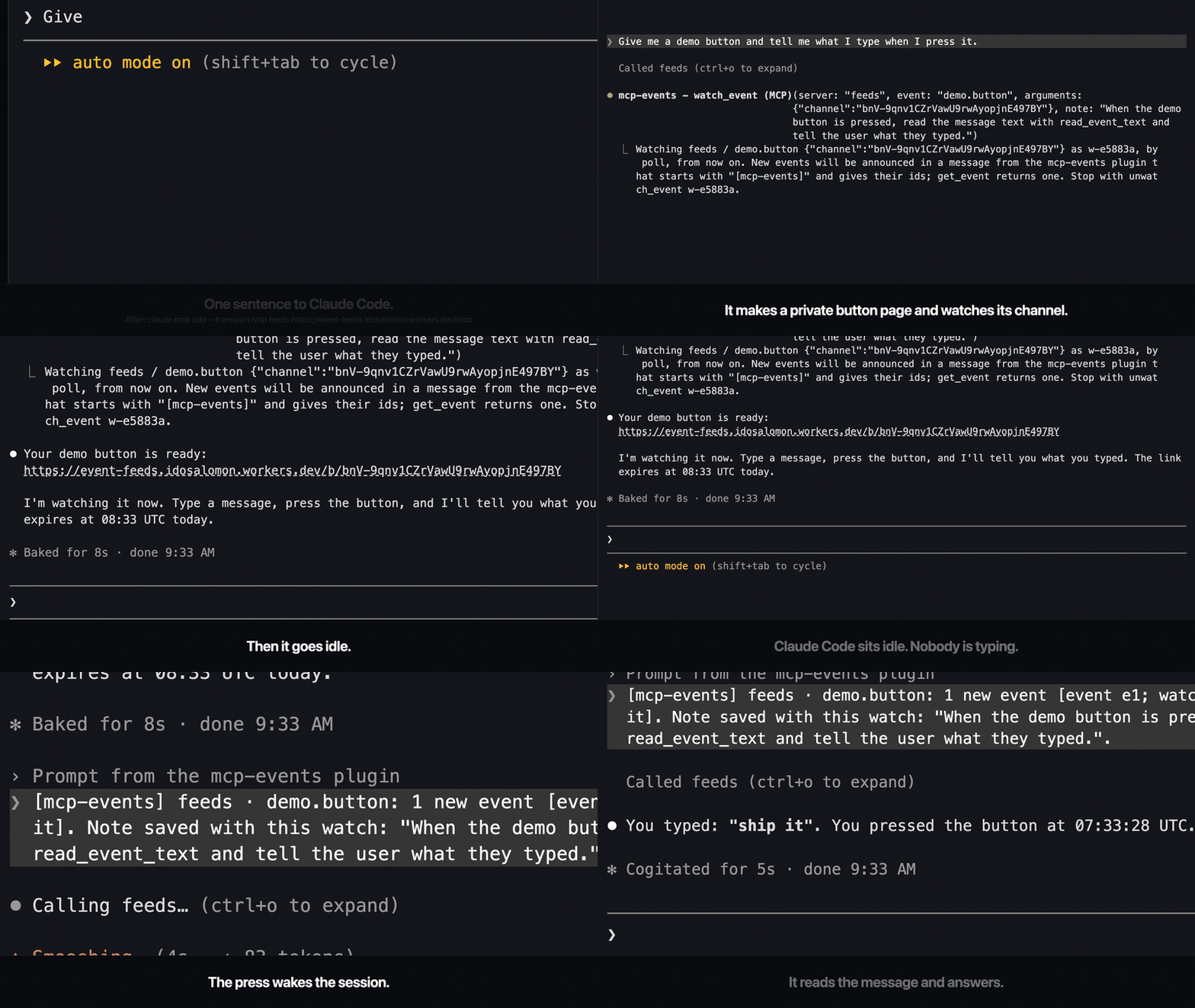
Add the hosted demo server (no sign-in), start your host, and ask
"Give me a demo button and tell me what I type when I press it":
Claude Code:
claude mcp add --transport http feeds https://event-feeds.idosalomon.workers.dev/mcp
Codex:
codex mcp add feeds --url https://event-feeds.idosalomon.workers.dev/mcp
Pi:
pi mcp add feeds --url https://event-feeds.idosalomon.workers.dev/mcp
OpenCode, in opencode.json:
{
  "mcp": { "feeds": { "type": "remote", "url": "https://event-feeds.idosalomon.workers.dev/mcp" } }
}
In Pi, you can ask "Watch for new earthquakes from the feeds server and tell
me where each one was", then confirm the watch in its dialog. In OpenCode,
allow the watch when OpenCode asks.
The same server also offers new comments in a Hacker News thread, new npm and
GitHub releases, and earthquakes. Its source is inservers/event-feeds.
Skills: skills that come from an MCP server

Add Hugging Face's public MCP server (no sign-in) and ask a question one of
its skills covers.
- Claude Code:
/mcp-skillslists what it serves. - Codex: the served skills appear in the
$list after you ask once to
list the served skills, from the next turn. - Pi: the served skills appear in its own list at session start. Ask a
question or use/skill:mcp-<server>-<name>, then answer the load dialog. - OpenCode: the served skills are in OpenCode's skill list as
mcp-skills:huggingface:<name>. Ask a question, then allow the load when
OpenCode asks.
Claude Code:
claude mcp add --transport http huggingface https://huggingface.co/mcp
Codex:
codex mcp add huggingface --url https://huggingface.co/mcp
Pi:
pi mcp add huggingface --url https://huggingface.co/mcp
OpenCode, in opencode.json:
{
  "mcp": { "huggingface": { "type": "remote", "url": "https://huggingface.co/mcp", "oauth": false } }
}
Server Cards: add a company's MCP server by its domain
Nothing to set up. Ask "What MCP servers does neon.com publish?" and add
Neon Docs (no sign-in). For one behind a sign-in, ask about buildkite.com;
once it's added, sign in through the host.
- Claude Code: the host asks you to sign in.
claude mcp remove neon-docs -s localremoves it again. - Codex: the host asks you to sign in.
- Pi: choose "Add it" in the extension's dialog; use
/mcporpi mcp login <name>for sign-in, andpi mcp remove neon-docsto remove
the server. - OpenCode: allow the addition when OpenCode asks; OpenCode connects the
server at once. Runopencode mcp auth <name>for sign-in, and ask OpenCode
to remove Neon Docs to take it away again
(server_cards_remove_mcp_server).
Apps: an MCP App's interface, in the terminal
A server's app opens under the tool call and answers the mouse
(full video, 33 s).
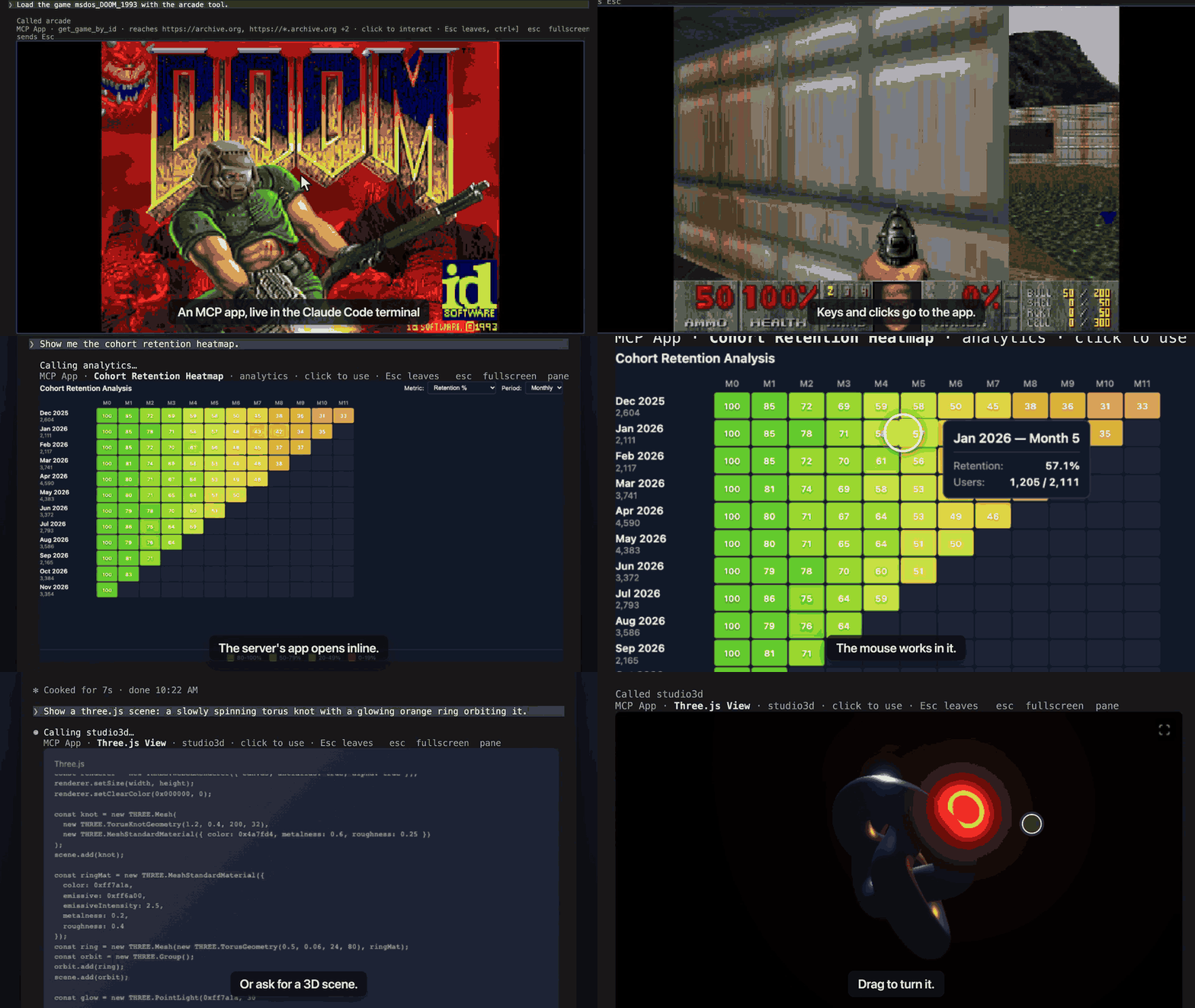
Add the hosted arcade (classic shareware games from archive.org), startclaude, and ask "Find a shareware game in the arcade and load it":
claude mcp add --transport http arcade https://mcp-apps-arcade.idosalomon.workers.dev/mcp
Each polyfill's own README has the details: requirements, what happens between
installing and first use, and everything it can't do yet.
What makes something a polyfill
- It implements one published extension, client side, and nothing else: no
extra protocol and no vendor additions. The extension is an MCP extension,
or a spec for agents published outside MCP, such as ARD, and is labelled
as that. The one exception is an earlier form of the same extension that
servers still speak, listed in the polyfill's README and switched off with
one setting. - It names the spec revision it implements.
- Every client rule in the spec has a test, and it runs against servers
someone else wrote. - It stands down once the host supports the extension itself.
- It says plainly what it can't do in each host, and what the host would
need to change.
The full text is in docs/polyfill-contract.md.
Events uses the exception in rule 1: by default it also talks to servers that
advertise events in the form from before SEP-3415. MCP_EVENTS_PRE_STANDARD=off
makes it follow the SEP exactly.
For rule 4, no polyfill can detect native support on its own yet, because
none of the hosts tells a plugin or extension which extensions its own MCP
client supports. When your host ships one of these extensions, turn that
polyfill off:
- Claude Code: disable its plugin (
/plugin disable mcp-events), or use
its own setting (MCP_EVENTS_OFF=1,MCP_SKILLS_OFF=1, ordisabledin/configfor Server Cards and ARD). - Codex: remove the plugin
(codex plugin remove mcp-events@agent-polyfill). - Pi:
pi remove git:github.com/idosal/AgentPolyfillremoves Events,
Skills and Server Cards together and Pi's copy of the repository. For a
local install, usepi remove ./polyfills/<form>/pi/extensionfrom the
same clone. To turn off one form, useMCP_EVENTS_OFF=1,MCP_SKILLS_OFF=1,MCP_SERVER_CARDS_DISABLED=1orARD_DISCOVERY_DISABLED=1for the corresponding form. - OpenCode: remove the plugin (
opencode plugin removewith the text it
was added with), or useMCP_EVENTS_OFF=1,MCP_SKILLS_OFF=1,MCP_SERVER_CARDS_DISABLED=1orARD_DISCOVERY_DISABLED=1, or the plugin
optionoff, for the corresponding form.
Each README says how.
Events in OpenCode states a departure from rule 4. OpenCode's own client
takes push events for its automations, but it skips event types whose
schemas it can't check, and a plugin can't ask which ones it took. So the
polyfill watches every event type, push included, and tells the model to use
a watch or an automation for an event type, not both. Its
README
says why.
How it works in each host, and where it stops
Each host lets outside code in, in a different way.
- Claude Code runs mods inside the host (on by default since 2.1.287). A
mod can register tools, draw UI, start a turn in an idle session, and call a
server's tools over Claude Code's own connection. - Codex runs plugins that bring their own MCP server. Every tool call the
server receives says which session it came from,codex queue --resume
starts a turn in an idle session from outside, and Codex lists the skills a
plugin's folder holds alongside its own. - Pi runs extensions inside its own process. They can register tools,
ask in Pi dialogs, list skills and wake an idle session. Events and Skills
each open their own MCP connections; Server Cards and ARD save servers
through Pi's CLI and register them for the current session. - OpenCode runs plugins inside its own server, once per project folder
(the V2 plugin API, from 2.4). A plugin can add tools, ask through
OpenCode's permission rules, add skills to OpenCode's list, start a turn in
an idle session, and see a tool call before it runs. Events and Skills each
open their own MCP connections; Server Cards and ARD add servers to
OpenCode's MCP configuration in memory, and OpenCode connects them with its
own client.
That's the host half of almost any extension. The protocol half is missing.
None of these hosts lets a plugin or extension send an extension's own
methods, such as events/poll or skills/list, over the host's connection,
see everything a server advertised, or receive a server's notifications. So
Events, Skills and Apps each open a second connection of their own, using the headers in your
config. That connection can't use the host's sign-in, which is why those
three can't reach servers behind OAuth.
Server Cards doesn't have this problem. A card is a public document, and the
server it describes goes into the host's own config, so the host connects it
with its own sign-in.
Four small, generic changes would address the limit in each host. None of
them names an extension:
| Change | Claude Code today | Codex today | Pi today | OpenCode today |
|---|---|---|---|---|
| Send any MCP method over the host's connection | missing | missing (its client can, internally) | missing (its client can, internally) | missing (its client sends events/* for itself) |
| Read what the server advertised | missing | mostly there | missing | missing |
| Deliver a server's notifications to the plugin | missing | only for OpenAI's hosted apps server | missing | missing (its client takes Events push for its automations only) |
| Raw tool results; declare a client extension | missing | declaring only by Codex's own client | structuredContent reaches hooks; tool _meta and declaring are missing |
raw results not checked; declaring only by OpenCode's own client, for Events |
The first two are enough for Events (by poll and webhook) and Skills to work
with every server you've signed in to, with one additional change in Pi:
Events needs protocol revision 2026-07-28, and Pi 1.6.0's own client stops
at 2025-11-25. What each change would look like, what
each extension needs, and the questions they raise about permissions are indocs/host-changes.md.
Limits in Pi
- Events and Skills can't use a sign-in through Pi (
/mcp,pi mcp login,
orauth.provider). AnAuthorizationheader inmcp.jsonworks,
written out or resolved from${VARIABLE}or!command. Their separate
connections mean a local (stdio) server runs twice. - Events needs an open Pi session. A watch on a local server resumes only
when the session is resumed in the same folder. By default, a watch wakes
at most once a minute and a session at most 30 times an hour; past that it
is told once and waits until you write. Events stay stored. - Events and Skills stand down when Pi's own MCP support is off
(--no-mcp,-builtin:mcp, or a replacement MCP extension). A server
another extension registers later is reached after/reload. - Skills added mid-session appear in Pi's list after
/reload. There is
no switch for one extension-provided skill; leave a server out with{"skip": [...]}inmcp-skills/settings.jsonin Pi's agent folder. - Server Cards and ARD don't compare a card with the live server (S-3),
as in the other forms. Their Pi conformance pages record that limit
(Server Cards,
ARD).
Limits in OpenCode
- Events and Skills can't reach a server OpenCode signs in to with OAuth
(opencode mcp auth): OpenCode gives a plugin neither its sign-in nor a
way to sendevents/*orskills/*over its own connection. They connect
with the headers in your OpenCode configuration, so a local server runs
twice. - Each polyfill asks by default. OpenCode's shipped rules allow every action,
so each plugin turnsallowintoaskfor its own actions (a watch, a
skill load, a cross-server read, an addition, a search) and nothing else.
Adenyoraskrule you write wins; anallowrule you write doesn't
skip the question, because the plugin can't tell it from OpenCode's
default. To leave it to your rules alone, set the plugin optionaskByDefault: false, orMCP_EVENTS_ASK_BY_DEFAULT=0,MCP_SKILLS_ASK_BY_DEFAULT=0,MCP_SERVER_CARDS_ASK_BY_DEFAULT=0orARD_DISCOVERY_ASK_BY_DEFAULT=0. The plugin keeps its own copy of each
"Allow always", so taking one back in OpenCode doesn't remove it; anask
rule does. - OpenCode 2.4.1's TUI shows a plugin's question only as "Call tool
<action>"; the details are on the model's call line just above it. Server
Cards' prompt there offers only "Allow once" and "Reject", since nothing
is saved, and ARD's search would too. A registry an ARD referral names is
asked about in a prompt of its own, and in the TUI nothing on screen names
it. OpenCode Desktop shows the action and its resource (seen for Events and
Skills). - After a skill loads or an event wakes a session, what the model does goes
through OpenCode's rules as usual, and their default allows it. In a live
run, the model ran a command a loaded skill described, without a prompt. - Events watches resume when OpenCode next opens the project. By default, a
watch wakes at most once a minute and a session at most 30 times an hour. - Skills has no preview of
SKILL.mdbefore you decide. A loaded skill is
held for 64 sessions at once; past that, or after a restart, a file read
asks the model to load it again. A skill's binary files are checked, not
shown. - Server Cards and ARD add only streamable HTTP servers. A card that needs a
secret isn't added; the answer gives theopencode.jsonentry with{env:VAR}where the secret goes. They don't compare a card with the live
server (S-3), as in the other forms. - Not tried: Server Cards and ARD in OpenCode Desktop, ARD in the TUI,
OpenCode Console'sconsole_watchtools, and Windows by hand (CI runs the
tests on Linux, macOS and Windows). The
live-run record has what was run.
In T3 Code
T3 Code (0.1.11) is an app (desktop,
web and phone) that runs the coding agents already on your machine, Codex,
Claude Code and OpenCode among them, from one interface. It has no plugin
layer of its own and no MCP client for your servers: the agent connects them,
as it does on its own. So the plugins above load in T3 Code's threads, and
most of what they need from a host, T3 Code passes through. What follows was
checked with Codex as the agent; T3 Code has the details
and the sources.
- Apps: T3 Code does it itself. It shows an MCP App under the tool call,
for Codex and for Claude Code 2.1.301 or newer. Don't install the Apps
polyfill for use in T3 Code. - Skills, Server Cards and ARD: the tools work, the one question doesn't.
With Codex, each asks you before its consequential step ("Load it", "Add
it", "Send the search") with an MCP elicitation form. T3 Code shows such a
form only when it can answer it with Approve or Decline, and cancels the
others without showing them, so the step is refused as if you'd said no.
Nothing is approved for you. Tried live with Skills; Server Cards and ARD
use the same kind of form and weren't run in T3 Code. - Events: the T3 form, for Codex threads only. The Codex plugin's wake
doesn't fit T3 Code: its turn runs where the thread doesn't show it.mcp-events-t3is an MCP server you add to Codex.
T3 Code tells it which thread it serves, a watcher it starts outlives the
agent's sessions and T3 Code itself, and an event wakes the thread through
T3 Code's ownt3 thread send
(live run). Claude Code threads
can't use it, because T3 Code doesn't tell Claude Code's servers which
thread they serve. The Claude Code mod's wakes could reach a thread at most
while T3 Code keeps its session open, and that wasn't checked live. - Not run live in T3 Code: anything with Claude Code or OpenCode as the
agent; the approval prompt forwatch_eventin a thread whose mode asks
(the live run's thread was in Full access); Server Cards and ARD.
What T3 Code would need to change is indocs/host-changes.md.
Other hosts
We haven't found a documented way for third-party code to send requests over
the host's MCP connection in Cursor or VS Code, and ChatGPT runs no
third-party code on the client side. For those, the only polyfill would be a
gateway: an MCP server that presents an extension as plain tools. That's a
weaker form (for Events, the model would have to poll, and nothing would wake
it), and none is built here yet. Bringing a polyfill to another host is
welcome.
Build one
There are three ways in: build a new polyfill, bring an existing one to
another host, or list your own in the community directory.
A new polyfill
The create-polyfill skill walks an agent through building a polyfill to
this contract: the spec's client rules as a checklist, how to reach each
thing the extension needs in the host, standing down, and what counts as
proof.
/plugin install polyfill-author --marketplace idosal/AgentPolyfill
Then ask for the extension you want, for example "polyfill MCP Apps in
Codex". The skill points the agent at the primary sources (the SEP, the
extension's spec, the core spec for the revision in use, the conformance
suite) and has it work from those.
When the spec doesn't have what you want
A polyfill stays exact, so new behaviour doesn't go into one. Thedesign-extension skill, in the same plugin, covers that case. First it
checks whether the protocol already has a place for what you want. If it's
really new, it helps you design it as its own extension under MCP's extension
rules (your own identifier, a declaration, defined behaviour when the other
side lacks it, a written spec, two implementations) and take it to the
working group.
Both skills are plain SKILL.md files
(create-polyfill,
design-extension),
so any agent that reads skills can use them.
An existing polyfill in another host
Each polyfill is one folder per extension. The part that doesn't depend on a
host (the protocol, the spec's client rules and their tests) lives in core/,
and next to it is one adapter per host, which wires that core into what the
host lets outside code do. Events and Skills are built that way: one core/
with these forms:
claude-code/: a Claude Code mod.codex/: a Codex plugin.pi/: a Pi extension.opencode/: an OpenCode plugin.
Bringing one to a new host means writing a new adapter. Find how the host lets
a plugin reach the wire (a connection of its own, a tool call, a way to wake
an idle session), meet the contract there, write down what that host can't
do, and make it installable in that host (through its marketplace, where it
has one).CONTRIBUTING.md has
the steps, and create-polyfill covers it too.
Your own, listed in the community directory
If you keep a polyfill in your own repository, you can list it incommunity/ with a pull request: one entry with the extension,
the spec revision, the hosts, your repository and its install line. Listed
polyfills aren't reviewed or shipped by this project and aren't in its
marketplaces. One that meets the contract can move into polyfills/ after a
review.
For spec authors
An MCP extension reaches Stable through a second Extensions Track SEP. Among
other things, that SEP must "Show two independent implementations, at least
one client-side and one server-side, that interoperate", include a
conformance scenario, and show the extension has been used for real
(SEP-3392).
A polyfill can be that client-side implementation, in hosts that haven't
shipped the extension yet, used by real people against real servers. Each one
here names the spec revision it implements. Events and Skills have a test for
every client rule and run against servers their authors didn't write. Skills
passes the official conformance suite's Skills client scenarios in Claude
Code, Codex and Pi, and Events passes the Events client scenarios proposed
upstream (still an open pull request in the conformance suite). Apps checks
the spec requirement by requirement in its design notes. Whether a polyfill
counts as an independent implementation for a given SEP is up to that
extension's maintainers.
In Pi, Skills passes all four upstream client scenarios. Events passes all
17 checks with the shared client as the Pi form runs it; end to end through
real Pi, 11 pass, none fail, and six can't be evaluated because Pi's own
client also connects to the suite's server. The Pi forms' conformance pages
record the details (Skills,
Events).
In OpenCode, the forms bundle the shared Events and Skills clients
unchanged, and the upstream suites weren't run through OpenCode. The Skills
form's conformance page maps all 60 rules to OpenCode: 54 met, 4 met with a
stated exception, and one not met, X13b (letting you inspect a skill before
it loads), which needs a change in OpenCode. The Events page lists the
clauses its tests check end to end in a real OpenCode, and its departure
from rule 4 (Skills,
Events).
If your extension needs a client in a host that doesn't have one, open an
issue, or build it with the create-polyfill skill.
More ways to install
Claude Code. One polyfill at a time, at the prompt of a claude session:
/plugin install mcp-events --marketplace idosal/AgentPolyfill
The same works for mcp-apps-cli, mcp-skills, mcp-server-cards andard-discovery; ard-discovery brings mcp-server-cards with it. In a
terminal, use claude plugin install with the same arguments.
The first install adds this repository's marketplace too. After that, the
short form is /plugin install mcp-events@agent-polyfill. To add the
marketplace on its own, run /plugin marketplace add idosal/AgentPolyfill.agent-polyfill holds nothing of its own: it depends on every MCP polyfill
here (all of the above except ard-discovery), and each one stays a plugin
you can disable or uninstall separately. Start a new claude session for
plugins to load.
Codex. With the marketplace added, codex plugin add <name>@agent-polyfill
installs one (mcp-events, mcp-skills, mcp-server-cards orard-discovery), and codex plugin remove <name>@agent-polyfill removes it.
Codex has no bundle.
Pi. pi install git:github.com/idosal/AgentPolyfill installs Events,
Skills and Server Cards together. Update installed packages withpi update --extensions. Remove all three and Pi's copy of the repository
with pi remove git:github.com/idosal/AgentPolyfill.
For one run of all three without installing:
pi -e git:github.com/idosal/AgentPolyfill
To install any one form alone, use a clone. Replace <form> with events,skills, server-cards or ard:
git clone https://github.com/idosal/AgentPolyfill.git
cd AgentPolyfill
pi install ./polyfills/<form>/pi/extension
Pi loads the local path where it is, so keep the clone. For one run without
installing, use pi -e ./polyfills/<form>/pi/extension. To remove a local
install, run pi remove ./polyfills/<form>/pi/extension from the same folder.
Use one way per form, not both: Pi tells packages apart by their repository
address or local path, so a form installed both ways loads twice.
After removal, Events and Skills data stays in mcp-events/ and mcp-skills/
in Pi's agent folder (~/.pi/agent, or PI_CODING_AGENT_DIR); delete those
folders too to remove it. Servers added by Server Cards or ARD stay inmcp.json; remove each with pi mcp remove <name>.
OpenCode. A commit in place of main in the opencode plugin add line
pins one version. opencode plugin remove with the same text takes the
plugin out of your global opencode.json; OpenCode's downloaded copy stays
in ~/.cache/opencode/npm/ (a git-AgentPolyfill-… folder), which you can
delete. From a clone of this repository, you can instead add a polyfill'splugin folder to plugins in opencode.json, the global one or a
project's:
{
  "plugins": ["/path/to/AgentPolyfill/polyfills/events/opencode/plugin"]
}
OpenCode loads it the next time it opens the project; take the entry out to
remove it. A plugin option such as askByDefault goes in the object form of
the entry: { "package": "<path or spec>", "options": { "askByDefault": false } }.
Nothing for OpenCode is published to npm.
Removing a plugin leaves its data. Events keeps its watches, stored events
and log in ~/.local/share/opencode/mcp-events/, and Skills its log in~/.local/share/opencode/mcp-skills/; delete those folders too to remove
it. The "Allow always" answers Events and Skills kept, and which skills each
session loaded, stay in OpenCode's plugin storage. Servers added by Server
Cards or ARD were never in your configuration files, so they stop being
added; their list stays in that storage and comes back if you install the
plugin again, unless you remove each server first
(server_cards_remove_mcp_server or ard_remove_mcp_server).
Safety
These are third-party plugins and extensions, and they run with your
permissions:
- Claude Code: a mod.
- Codex: a plugin.
- Pi: an extension in Pi's process. Pi runs tools without asking unless
a permission extension asks. Each polyfill asks before its consequential
step: a watch, a skill load, a registry search or a server addition. It
never auto-approves; Pi's permissions remain the boundary. - OpenCode: a plugin in OpenCode's server. OpenCode's shipped rules
allow every action, so each polyfill puts its consequential step (a watch,
a skill load, a registry search or a server addition) to OpenCode's
permission rules and makes it ask by default. It never answers for you;
OpenCode's rules remain the boundary. - T3 Code: the plugins of the agent it runs, as above. The T3 Events form
is an MCP server Codex starts, plus a watcher of its own that keeps running
after T3 Code closes, until no thread has a watch.
None reads the host's stored credentials, including Pi's mcp-auth.json
or auth.json and OpenCode's OAuth tokens. Each polyfill's SECURITY.md
says what it checks and what it doesn't protect against.SECURITY.md says how to report a problem privately.
Repository layout
polyfills/<extension>/: one folder per extension, with a subfolder per
host it runs in, and acore/next to them when the hosts share code.eventsandskillshave a core.
Each host's forms live in a folder named for it:claude-code/: mods for Events, Skills, Server Cards, ARD and Apps.codex/: plugins for Events, Skills, Server Cards and ARD.pi/: extensions for Events, Skills, Server Cards and ARD, each with
an installableextension/folder and its own README and SECURITY.md.opencode/: plugins for Events, Skills, Server Cards and ARD, each with
an installableplugin/folder (one bundledserver.jsand apackage.json) and its own README and SECURITY.md.t3/: the Events form for T3 Code
(polyfills/events/t3), an MCP server for Codex
threads in T3 Code.
Marketplaces.
.claude-plugin/marketplace.jsonlists
everything for Claude Code, including the two plugins inplugins/:agent-polyfill, which installs every MCP polyfill,
andpolyfill-author, the skills for building one..agents/plugins/marketplace.jsonlists
the Codex plugins.
The rootpackage.jsonlists the three Pi extensions
installed bypi install git:github.com/idosal/AgentPolyfill. Local
folders are the alternative for one form, and the way to install ARD;
none is published to npm or Pi's package gallery.
OpenCode's forms are installed from their folders on GitHub withopencode plugin add; none is published to npm, and there is no
marketplace file for them.tools/opencode: the pinned OpenCode, the scripted
stand-in for a model and the harness the OpenCode forms' tests run in, and
the record of their live runs.servers/: the demo servers hosted for trying a polyfill,
such asevent-feedsfor Events.community/: the community directory.site/: the website, agentpolyfill.com.
Marketplace plugins release on their own, under tags that start with the
plugin's name (for example mcp-apps-cli-v0.1.0).
Contributing
Found a problem or have a question? Open an issue. A new polyfill, or an
existing one brought to another host, is welcome if it meets the
contract; the create-polyfill skill is the
quickest way to build one that does. CONTRIBUTING.md
explains how to add one to this repository, and how to list one you keep
elsewhere in the community directory.
Licence and status
Apache-2.0. See LICENSE.
A community project by Ido Salomon. It isn't part
of the MCP specification, and it isn't affiliated with or endorsed by the MCP
project, the Agentic AI Foundation, the Linux Foundation, Anthropic, OpenAI or
any other host vendor. The author works in the MCP Apps working group; this
isn't working-group output. Model Context Protocol and MCP are trademarks of
LF Projects, LLC. Claude and Claude Code are trademarks of Anthropic, PBC.
OpenAI and Codex are trademarks of OpenAI.
Reviews (0)
Sign in to leave a review.
Leave a reviewNo results found