Crayotter
Health Warn
- No license — Repository has no license file
- Description — Repository has a description
- Active repo — Last push 0 days ago
- Community trust — 49 GitHub stars
Code Warn
- network request — Outbound network request in app/frontend/app.js
Permissions Pass
- Permissions — No dangerous permissions requested
This tool is an AI-driven agent that autonomously transforms text prompts into fully edited and produced videos, relying on multimodal LLMs to handle planning, researching, and executing the editing workflow.
Security Assessment
Overall Risk: Medium
The application makes outbound network requests via its frontend JavaScript file, which aligns with its core functionality of searching and downloading video素材. No hardcoded secrets or dangerous system permissions were detected in the automated scan. However, because this is an AI agent that orchestrates automated downloading and file manipulation, users should manually review how it handles untrusted external inputs and API keys.
Quality Assessment
The project appears to be actively maintained, with repository pushes happening as recently as today. It has garnered a moderate level of community trust, reflected by nearly 50 GitHub stars, and features clear, bilingual documentation. The primary concern is the complete absence of an open-source license. Without a defined license, the legal terms of use, modification, and distribution remain strictly restrictive by default, making it a potential legal liability for commercial or collaborative projects.
Verdict
Use with caution: the tool functions as expected and is actively maintained, but the lack of a formal software license and the inherent risks of automated network downloading require manual code review before integration.
🦦 Crayotter: A Multimodal AI-Agent for Video-Editing, Video-Composing, and Video Production. Powered by Multimodal LLMs for autonomous Text-to-Video agentic framework. | 基于多模态大模型 (Multimodal LLMs) 的 AI 剪辑智能体,支持从文字需求到视频成品的端到端全自动生产与创作。
Crayotter


If Crayotter helps your research or demos, please consider giving the repo a Star on GitHub.
Crayotter is a multimodal, agent-driven video editing system that turns a single text request into a complete edited video.
It combines planning, deep editing research, and tool-based execution into a three-phase workflow, with full logs and visual trace analysis for debugging and iteration.
NEWS
- 2026.4.10:The release has been updated.
- 2026.3.30: The first release version is now available. See v0.1.0-demo.
Overview
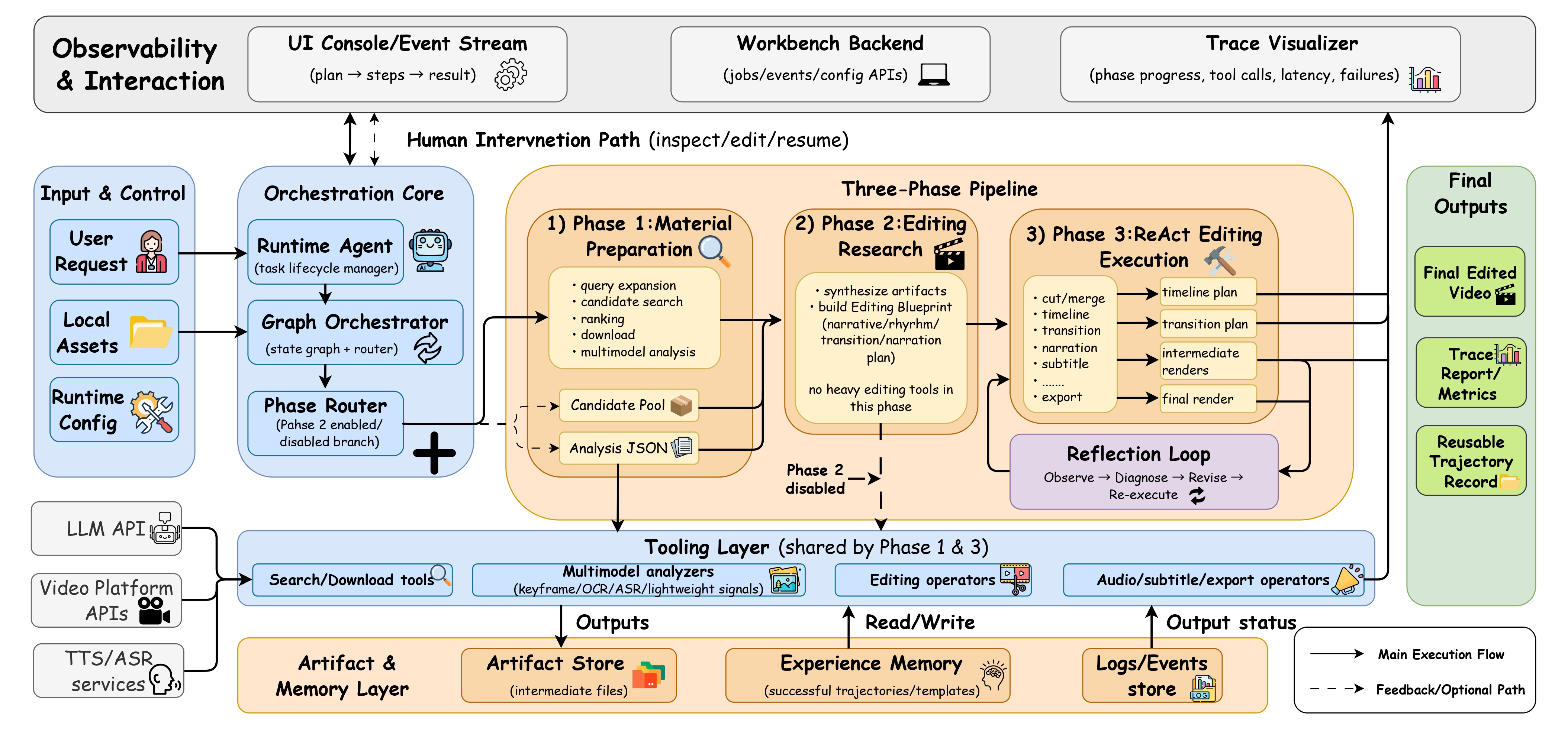
This repository centers around four core components:
script\agent.py: Main entrypoint. Initializes runtime, runs tasks (interactive or single request), performs workspace cleanup, and writes logs/experience memory.script\graph.py: Orchestration layer (LangGraph StateGraph). Defines the three-phase workflow and routing.script\tools\: Modular toolset for search, download, analysis, cutting, transitions, narration, subtitles, and export.script\visualize.py: Log parser + local trace server for inspecting phase progress and tool calls.
Supporting folders:
temp\: Intermediate and output artifacts during execution.user_temp\: User-provided local source assets.- **
logs\**: Runtime logs (video_agent_*.log). memory_experience\: Concise historical-case notes kept for reference only; they must not override the current task goal.website\: Static launch site and GitHub Pages assets.
Workflow
Crayotter uses a three-phase architecture:
Phase 1 — Material Preparation (Planner + Executor)
- Search candidate videos
- Rank/select high-quality candidates
- Download selected videos
- Analyze each source video multimodally
Phase 2 — Editing Research
- Read all analysis outputs
- Build a structured editing blueprint (narrative, rhythm, transitions, narration strategy)
- No editing tools are called in this phase
This phase can be disabled with
CRAYOTTER_ENABLE_PHASE2_RESEARCH=falsein the runtime.envto save tokens.
When disabled, the workflow becomes: Phase 1 → Phase 3.Phase 3 — ReAct Editing Execution
- Execute cutting, merging, transition design, narration/subtitles, and final export
- Log full tool-call trajectory for later trace visualization
Quick Start
1) Environment
Use Python 3.10+.
python -m venv .venv
.venv\Scripts\activate
2) Install Dependencies
pip install -r requirements.txt
3) Configure API Endpoints and Runtime Options
Copy .env.example to .env, then edit the values there:
copy .env.example .env
Common options:
CRAYOTTER_API_KEY=your-key
CRAYOTTER_BASE_URL=https://dashscope.aliyuncs.com/compatible-mode/v1
CRAYOTTER_MODEL_NAME=qwen-plus
CRAYOTTER_VIDEO_MODEL_NAME=qwen-vl-max-latest
CRAYOTTER_TTS_MODEL_NAME=qwen-tts-latest

CRAYOTTER_ENABLE_PHASE2_RESEARCH=true
CRAYOTTER_DIRECT_PHASE3_EXECUTION=false
CRAYOTTER_PREFER_LOCAL_MATERIALS=false
CRAYOTTER_AGENT_STALL_TIMEOUT_SECONDS=150
Notes:
CRAYOTTER_DIRECT_PHASE3_EXECUTION=trueskips material search/download and goes straight into the existing-material analysis + Phase 3 execution path.CRAYOTTER_PREFER_LOCAL_MATERIALS=trueanalyzes local materials first and only searches online when the current materials are not enough.CRAYOTTER_AGENT_STALL_TIMEOUT_SECONDScontrols the “no new progress” watchdog threshold for running jobs.- The workbench UI writes API settings, Phase 2, direct Phase 3, local-first mode, and timeout changes back to the same
.env. - Candidate ranking now treats target orientation as a scoring factor: landscape by default, portrait when the user explicitly asks for it. Merge/export also use scale-to-cover plus centered crop instead of direct stretching.
- For videos under
user_temp, Crayotter now writes the matching*_analysis.jsonback intouser_temp, reuses it on later runs, and removes the paired JSON when that upload is deleted from the workbench. memory_experience\latest_skills.mdis automatically compacted into bounded, reference-only case notes so it does not grow indefinitely or redefine future task goals.
Security note: never commit real API keys to version control.
4) Run the Agent
Interactive mode:
python script\agent.py
Single task mode:
python script\agent.py "Create a 1-minute campus-themed promo video"
5) Run the Workbench GUI
Start the local backend service:
python script\run_backend.py --host 127.0.0.1 --port 8765
Then open the local workbench in your browser:
http://127.0.0.1:8765/ui/
The workbench supports:
- task creation in
demoandagentmodes - local configuration management with
.envsync - task history
- structured logs and event viewing
- artifact preview and download
The backend also exposes local runtime routes such as:
GET /healthGET /configPUT /configGET /jobsPOST /jobsGET /jobs/{job_id}GET /jobs/{job_id}/eventsPOST /jobs/{job_id}/cancel
The GUI uses the runtime-root
.envas the only configuration source of truth. Do not commit real.envvalues.
Log Trace Visualization
Launch trace UI using the latest log:
python script\visualize.py
Use a specific log:
python script\visualize.py logs\video_agent_20260321_045836.log
Custom port:
python script\visualize.py --port 8080
script\visualize.py also exports a static trace HTML file next to the input log (e.g., *_trace.html).
Repository Layout
Crayotter\
├─ script\
│  ├─ agent.py
│  ├─ graph.py
│  ├─ visualize.py
│  └─ tools\
├─ logs\
├─ temp\
├─ user_temp\
├─ memory_experience\
├─ website\
├─ logo.png
└─ requirements.txt
Reviews (0)
Sign in to leave a review.
Leave a reviewNo results found