mermaid-live-mcp
mcp
Uyari
Health Uyari
- No license — Repository has no license file
- No description — Repository has no description
- Active repo — Last push 0 days ago
- Community trust — 11 GitHub stars
Code Gecti
- Code scan — Scanned 12 files during light audit, no dangerous patterns found
Permissions Gecti
- Permissions — No dangerous permissions requested
Purpose
This tool is an MCP server that lets AI assistants generate and interactively preview Mermaid diagrams in a browser, with real-time updates and SVG/PNG export capabilities.
Security Assessment
The overall risk is Low. The static code scan of 12 files found no dangerous patterns, hardcoded secrets, or requests for excessive permissions. The tool operates as a local server and opens a browser tab for live previews via WebSocket, which constitutes local network activity. It also exposes an export tool that writes SVG files to your disk, so file system writes are limited to the expected diagram outputs. No shell command execution or sensitive data access was detected.
Quality Assessment
The project is in active development, with the most recent push occurring today. However, there are some administrative gaps: the repository currently lacks a formal license file and a description in its metadata (despite the README mentioning an MIT license). Community trust is in the early stages, reflected by 11 GitHub stars. The project structure is well-organized into modular packages, and the README provides clear setup instructions for multiple platforms.
Verdict
Safe to use, though users should note that the formal MIT license is only referenced in the README and not yet committed as an actual file to the repository.
This tool is an MCP server that lets AI assistants generate and interactively preview Mermaid diagrams in a browser, with real-time updates and SVG/PNG export capabilities.
Security Assessment
The overall risk is Low. The static code scan of 12 files found no dangerous patterns, hardcoded secrets, or requests for excessive permissions. The tool operates as a local server and opens a browser tab for live previews via WebSocket, which constitutes local network activity. It also exposes an export tool that writes SVG files to your disk, so file system writes are limited to the expected diagram outputs. No shell command execution or sensitive data access was detected.
Quality Assessment
The project is in active development, with the most recent push occurring today. However, there are some administrative gaps: the repository currently lacks a formal license file and a description in its metadata (despite the README mentioning an MIT license). Community trust is in the early stages, reflected by 11 GitHub stars. The project structure is well-organized into modular packages, and the README provides clear setup instructions for multiple platforms.
Verdict
Safe to use, though users should note that the formal MIT license is only referenced in the README and not yet committed as an actual file to the repository.
README.md
mermaid-live-mcp
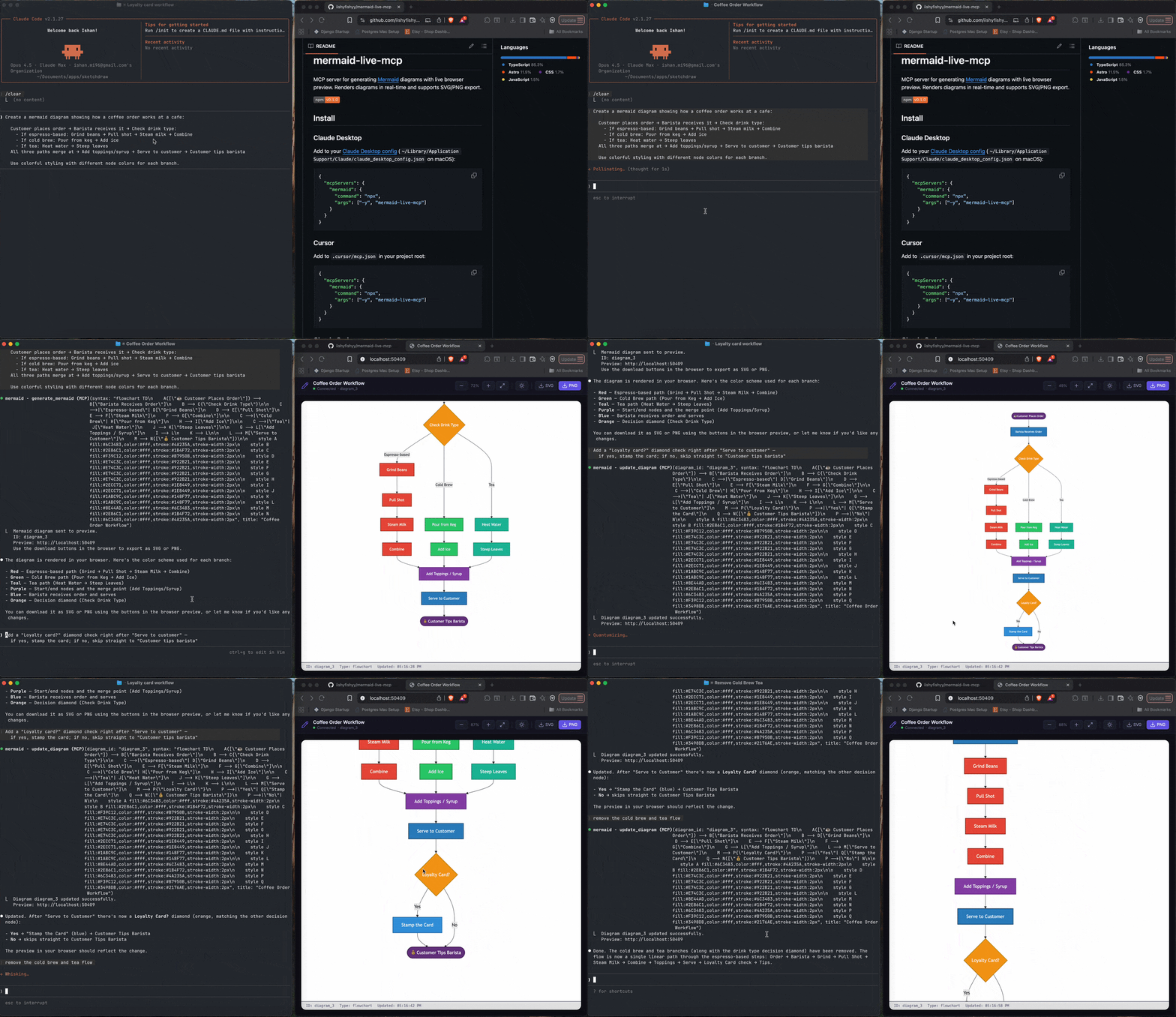
MCP server for generating Mermaid diagrams with live browser preview. Renders diagrams in real-time and supports SVG/PNG export.

Install
Claude Desktop
Add to your Claude Desktop config (~/Library/Application Support/Claude/claude_desktop_config.json on macOS):
{
  "mcpServers": {
    "mermaid": {
      "command": "npx",
      "args": ["-y", "mermaid-live-mcp"]
    }
  }
}
Cursor
Add to .cursor/mcp.json in your project root:
{
  "mcpServers": {
    "mermaid": {
      "command": "npx",
      "args": ["-y", "mermaid-live-mcp"]
    }
  }
}
Claude Code
claude mcp add mermaid -- npx -y mermaid-live-mcp
Windsurf
Add to ~/.codeium/windsurf/mcp_config.json:
{
  "mcpServers": {
    "mermaid": {
      "command": "npx",
      "args": ["-y", "mermaid-live-mcp"]
    }
  }
}
Tools
| Tool | Description |
|---|---|
generate_mermaid |
Generate a diagram from Mermaid syntax and open a live preview in the browser |
update_diagram |
Replace a diagram's Mermaid syntax and re-render the live preview |
list_diagrams |
List all diagrams generated in the current session |
export_diagram |
Write a diagram's SVG to disk |
How it works
When you ask your AI assistant to create a diagram, mermaid-live-mcp will:
- Parse the Mermaid syntax
- Open a browser tab with a live preview
- Render the diagram as SVG in real-time via WebSocket
- Provide download buttons for SVG and PNG export
Updates to a diagram are pushed instantly to the browser — no page refresh needed.
Supported diagram types
All Mermaid diagram types are supported, including flowcharts, sequence diagrams, class diagrams, state diagrams, ER diagrams, Gantt charts, pie charts, git graphs, mindmaps, timelines, and more.
Development
pnpm install
pnpm build
Project structure
| Package | Description |
|---|---|
packages/mcp-server |
MCP server (published as mermaid-live-mcp) |
packages/preview |
Live browser preview via WebSocket |
packages/core |
Diagram parsing, layout, and SVG rendering |
packages/cli |
Command-line interface |
License
MIT
Yorumlar (0)
Yorum birakmak icin giris yap.
Yorum birakSonuc bulunamadi