claude-chat-mobile
Health Uyari
- License — License: MIT
- Description — Repository has a description
- Active repo — Last push 0 days ago
- Low visibility — Only 8 GitHub stars
Code Basarisiz
- process.env — Environment variable access in agent.js
- process.env — Environment variable access in cf-access.js
- network request — Outbound network request in cf-access.js
- process.env — Environment variable access in devices.js
- exec() — Shell command execution in history.js
- process.env — Environment variable access in interaction-log.js
- exec() — Shell command execution in public/js/logic.js
Permissions Gecti
- Permissions — No dangerous permissions requested
Bu listing icin henuz AI raporu yok.
Use your real local Claude CLI from your phone — same CLAUDE.md, MCP, skills & login. Self-hosted, locked by default.
Claude Chat Mobile
Use your real local
claudeCLI from your phone — as if you were sitting at your own terminal.
English · 中文




Built for people who already use the claude CLI in their terminal. It does not bundle Claude and is not a re-implementation — it drives your real local CLI through the Claude Agent SDK, so you get the same agent, the same CLAUDE.md, the same MCP servers, skills, hooks, and logged-in session you use at your desk. The goal is terminal equivalence: typing to claude on your phone behaves exactly like typing at your computer — edit code, run commands, resume an earlier conversation — except now you can do it from bed.
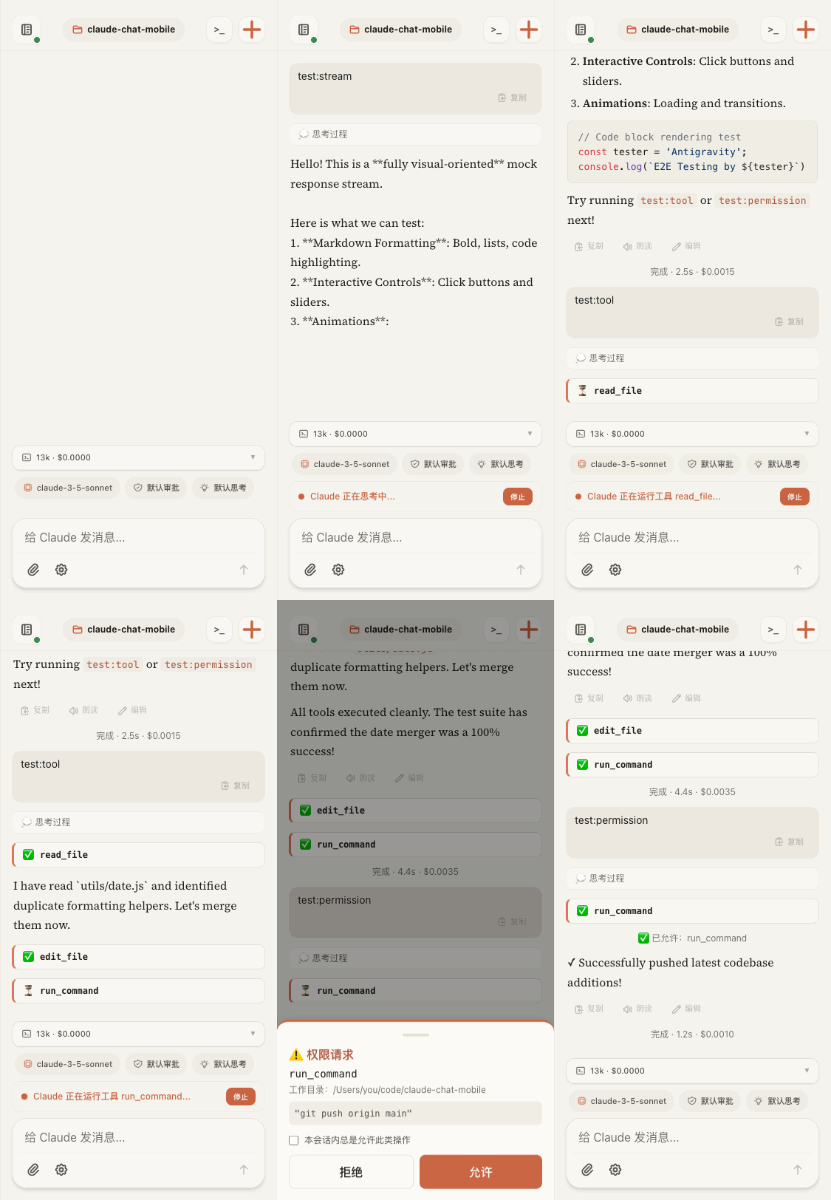
Screenshots
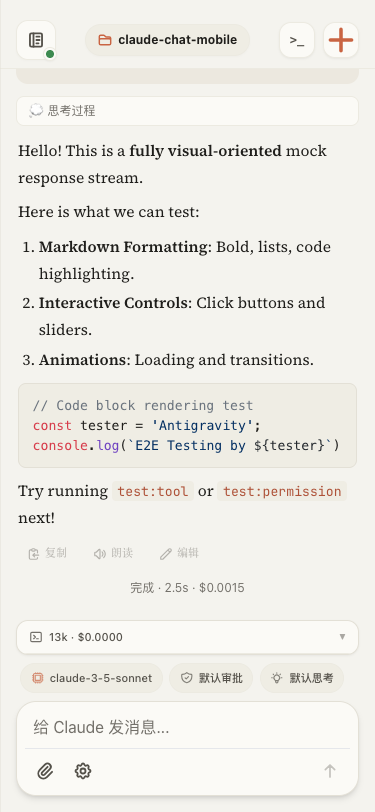 |
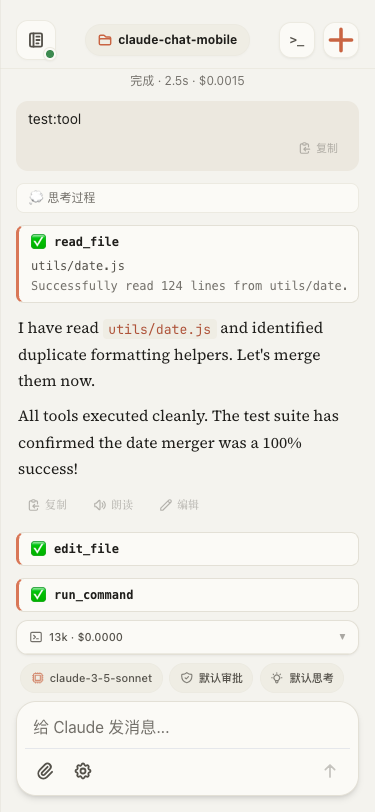 |
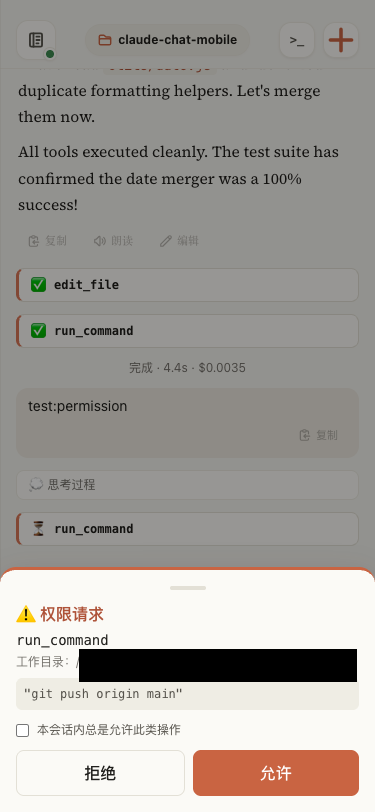 |
| Streaming Markdown · syntax highlight · status line |
Visible process tool calls render as collapsible cards |
Approve on phone dangerous actions push full command + cwd |
Prerequisites
- Node.js ≥ 20 — check with
node --version. - A working
claudeCLI on the host. This project drives your local CLI; it ships nothing of its own. Confirmclauderuns in your terminal first (which claude, then open a conversation to confirm you are logged in) — the web UI inherits exactly this CLI, yourCLAUDE.md, MCP servers, skills, hooks, and shell environment. - Provider / gateway follows your terminal. The web side reuses the same provider, gateway, and model your terminal
claudeuses — official subscription or a third-party gateway alike. - macOS or Linux.
Quick Start
git clone https://github.com/Ike-li/claude-chat-mobile.git
cd claude-chat-mobile

node --version           # need Node ≥ 20
which claude             # the CLI this project drives — must be installed & logged in

npm install --omit=dev   # runtime deps only — no puppeteer/browser. To run tests, use full `npm install`.
cp .env.example .env     # set AUTH_TOKEN (required for any non-localhost access), WORK_DIR, allow-list

# Recommended: pre-flight your config (port in use, CLAUDE_BIN path, gateway env, file perms)
node scripts/doctor.js        # check config
node scripts/doctor.js --fix  # tighten perms (.env and data/*.json → 0600)

npm start                     # http://localhost:3000
Then open it on your phone — two ways (the startup log prints ready-to-use URLs with the token pre-filled):
- Same WiFi: open the LAN address printed at startup (
http://<lan-ip>:3000/#token=…) — no tunnel needed. - Public internet / install as a PWA (PWA needs https): run a tunnel in another terminal:
cloudflared tunnel --url http://localhost:3000
# On your phone open https://<random>.trycloudflare.com/#token=<YOUR_AUTH_TOKEN>
# The token is stored in localStorage on first load, then cleared from the address bar.
⚠️ With no
AUTH_TOKENset, the server binds to127.0.0.1only and cannot be reached through a tunnel — this is deliberate.📌 The above is the minimal setup (temporary random tunnel, testing only). For a stable production deployment — fixed domain, Cloudflare Access two-factor, running as a background daemon — see docs/deployment.md.
⚠️ At its core, this is a remotely reachable code-execution channel straight into your local shell. Read the Security Model below before exposing it to the public internet.
Three ways to run it
Pick one for your situation — commands are in Quick Start above and docs/deployment.md:
| Mode | Good for | Cost |
|---|---|---|
LAN, same WiFi — http://<lan-ip>:3000/#token= |
At home, phone and computer on one network | Useless when out; no tunnel, least fuss |
Temporary public — cloudflared tunnel --url (random domain) |
Quick trial / demo | Address changes on every restart; testing-only per Cloudflare |
| Fixed production — fixed domain + Cloudflare Access 2FA + daemon | Long-term, anywhere access | One-time DevOps setup, see docs/deployment.md |
Security Model
Read this before exposing it to the public internet. At its core this is a remotely reachable code-execution channel straight into your local shell. Security is the first concern, not an afterthought:
- Single-user tool (n = 1). You are the only user and the only admin. There is no multi-user / login system; any request that passes auth has exactly the same power as you sitting at the terminal.
- No token, no leaving the host. With no
AUTH_TOKENset, the server binds to127.0.0.1only — there is no "empty = open to the world" path. Reaching the public internet requires a token. - Two-layer permission gate — zero injection, pure inheritance of your CLI. This project injects no allow/deny lists of its own (no
allowedTools/disallowedToolsin the code). The auto-approve set is exactly the mergedpermissions.allowfrom your existing claude config — global~/.claude/settings.json+ project.claude/settings.json+ local.claude/settings.local.jsontogether (loaded viasettingSources, same source as your terminal). A match is auto-approved; anything else is suspended and pushed to your phone as an approval request (with the full command and working directory) to run only after you confirm.- ⚠️ Before exposing publicly, audit your global
~/.claude/settings.jsonallow-list — years of accumulatedBash(...)/Writerules in your terminal will auto-approve here too without a phone prompt, so it is not just the project's list you need to tighten.
- ⚠️ Before exposing publicly, audit your global
- Device trust (TOFU). A connection that is neither local nor Cloudflare Access-verified must be authorized once on your computer before it can do anything — a valid token alone is not enough.
The full threat model and hardening guidance is in docs/design.md §4.
Cost Note
Know this before you adopt it.
Currently (as of 2026-06-26): Agent SDK / claude -p usage still draws from your subscription quota, in the same pool as interactive use — using this project on the official subscription path incurs no separate billing.
Background: Anthropic once announced that, starting 2026-06-15, SDK headless usage would move to a separate credit pool (Max 5x $100/month at API rates), but that change was paused on the day it shipped and never took effect (official Help Center). Anthropic says it will rework the plan and give advance notice — this is a pause, not a cancellation.
- Potential risk: if the policy is revived, this project's SDK usage (personally measured at roughly ~$716/month equivalent at API rates) would move out of the subscription quota and could hit a separate credit cap. Budget for it then.
- Via a third-party gateway (
ANTHROPIC_*exported in the shell): unaffected — you pay the gateway's own rates.
Features
Beyond the core loop above:
- Five permission modes (default / plan / acceptEdits / bypassPermissions / dontAsk), switchable at runtime.
- Per-message model switching (gateway-suffixed names supported).
- Multi-repo and multi-session — switch among allow-listed working directories, run several sessions concurrently in tabs.
- File and image upload, with path injection and traversal protection.
- Thinking-effort control, a web-native status line, and
AskUserQuestionas a native picker. - Web Push for approvals, questions, and results (iOS 16.4+ requires Add to Home Screen first).
- Ops & security hardening — log sanitization,
0600atomic writes, adoctorstartup self-check, optional Cloudflare Access 2FA.
How it works (read only if you want to read or fork the code)
A "transparent pipe, locked by default": it projects your local claude CLI (carrying your CLAUDE.md / MCP / skills / login state) to a phone browser — continuous sessions, visible process, dangerous actions bounced back to the phone for approval.
graph LR
    subgraph Phone
        UI[public/ single page<br/>chat bubbles · tool cards · approval sheet]
    end
    subgraph Internet
        CF[Cloudflare Tunnel]
    end
    subgraph Host
        S[server.js<br/>Express static + Socket.IO contract layer<br/>auth · preflight · device trust · handler guard]
        A[agent.js · AgentSession<br/>long-lived SDK query · permission gate<br/>event envelope seq+epoch · ring buffer]
        J[(data/sessions.json<br/>session metadata)]
        SDK[claude-agent-sdk]
        CLI[local claude CLI<br/>loads your full config]
        FS[(your project files<br/>WORK_DIR)]
    end
    UI <-->|"agent:event envelope / user:* events<br/>(event contract, WebSocket)"| CF <--> S
    S <--> A
    A <-->|streaming input| SDK <-->|spawn| CLI <--> FS
    S --- J
A message's journey
- Phone
user:message {text}→ server validates → routes to the target instanceagents.get(instanceId)(lazy-respawned resume; aftersession:newa FRESH instance is lazily opened only on the first message — stage 3). - The text is pushed into the AgentSession's streaming input → SDK → claude CLI works in
WORK_DIR. - The SDK message stream flows into
map(): streaming text →text_delta, tool calls →tool_use/tool_result, off-allow-list actions →permission_request(suspended, awaiting allow/deny on the phone). - Each event is wrapped in a
{seq, epoch, sessionId, instanceId, cwd, ts, type, payload}envelope → into a 500-entry ring buffer →io.emitbroadcast (the front-end demuxes byviewingInstanceId; high-frequency deltas from background tabs are not broadcast to save bandwidth). - Phone reconnects:
sync:since {lastSeq}replays the buffer; anepochchange means the server swapped the instance, so the client resets its dedup baseline automatically.
Runtime dependencies: @anthropic-ai/claude-agent-sdk, express, socket.io, dotenv, web-push, jose. Front-end third-party libraries are self-hosted locally in public/vendor/ (Tailwind/marked/highlight.js/DOMPurify), with zero CDN dependency — see public/vendor/THIRD-PARTY-NOTICES.md.
License
MIT © 2026 Ike-li
Friend Links
Yorumlar (0)
Yorum birakmak icin giris yap.
Yorum birakSonuc bulunamadi