necoder
Health Warn
- License — License: AGPL-3.0
- Description — Repository has a description
- Active repo — Last push 0 days ago
- Low visibility — Only 5 GitHub stars
Code Fail
- rm -rf — Recursive force deletion command in .github/workflows/release.yml
Permissions Pass
- Permissions — No dangerous permissions requested
No AI report is available for this listing yet.
Orient by color — a GPUI-native code editor for the AI-agent era (ACP)





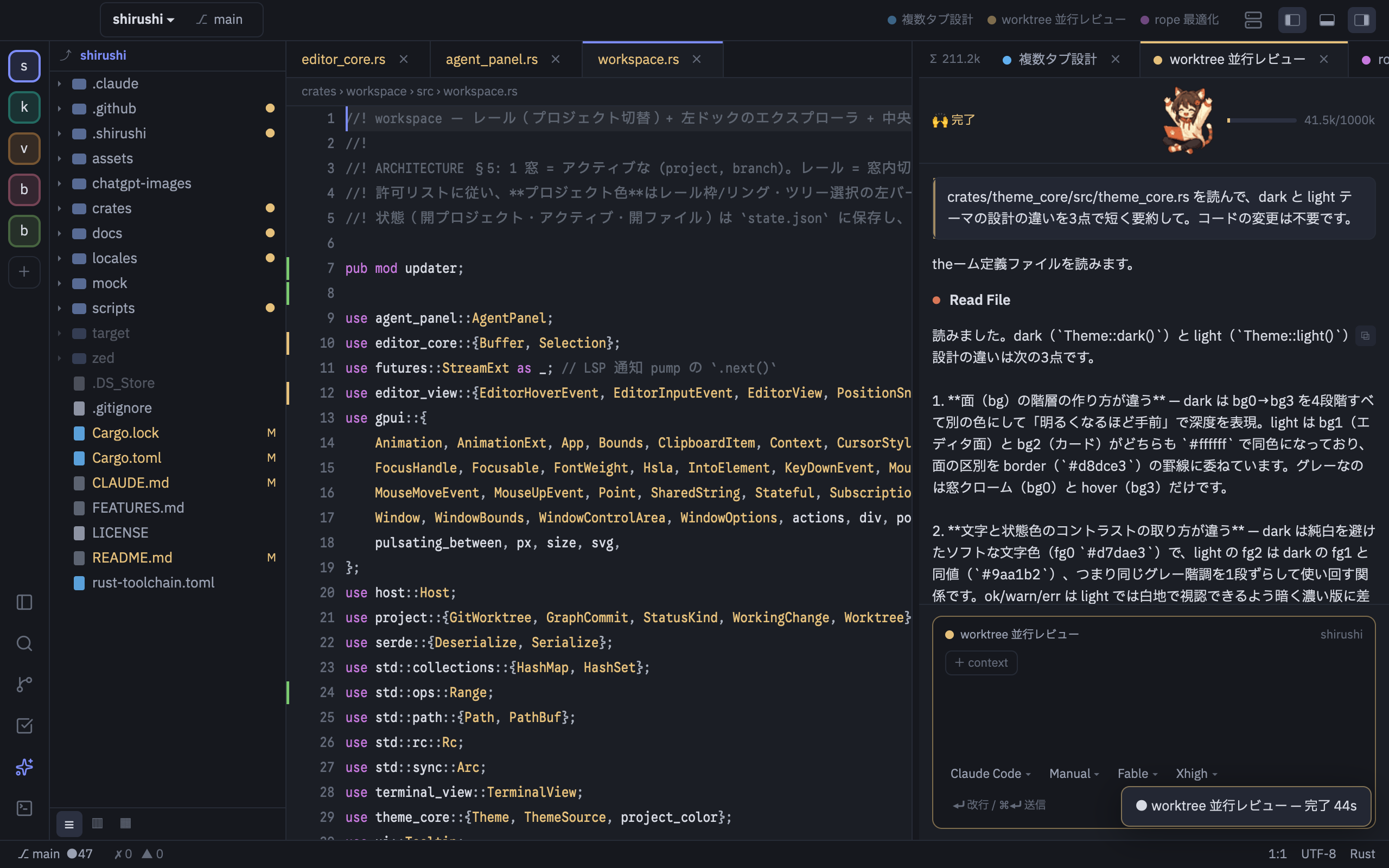
Why another editor?
I run AI coding agents all day across many repositories, branches and worktrees, and I kept getting lost.
- "Which thread is talking to which project?" Agent chats all look the same. One prompt sent to the wrong project can cost an afternoon.
- Token usage was invisible until the context silently compacted mid-task.
- No existing editor could fix it. I wanted color as identity, and that is impossible to bolt on from the outside: Zed extensions cannot render UI at all, and VSCode's UI flexibility comes bundled with webview weight. (Full background / research notes)
So necoder makes what agent-heavy development needs first-class in the editor core:
- Identity. Every project and branch carries a color that runs through the rail, tabs, caret and AI threads, so you always know where you are.
- Glanceable state. Destination chips (thread → project ⎇ branch), an always-visible token meter, and a fleet view showing what is running where.
- Native speed. GPUI, no Electron. Only HTML preview uses the OS WebView, created lazily.
Highlights
Color as a sense of direction. Per-project colors (auto-assigned or picked) flow through the rail, tab underline, caret and thread chips. Color marks identity, never decoration.
AI-agent native (ACP). Claude Code and other ACP agents run inside: colored threads with destination chips, streaming transcripts (⏺/⎿, ✳ thinking), diff review with accept/reject, checkpoints/rewind, and a todo board the agent checks off by itself. Talks to the
claudeCLI, so your existing Claude Code subscription works as-is; no separate API key.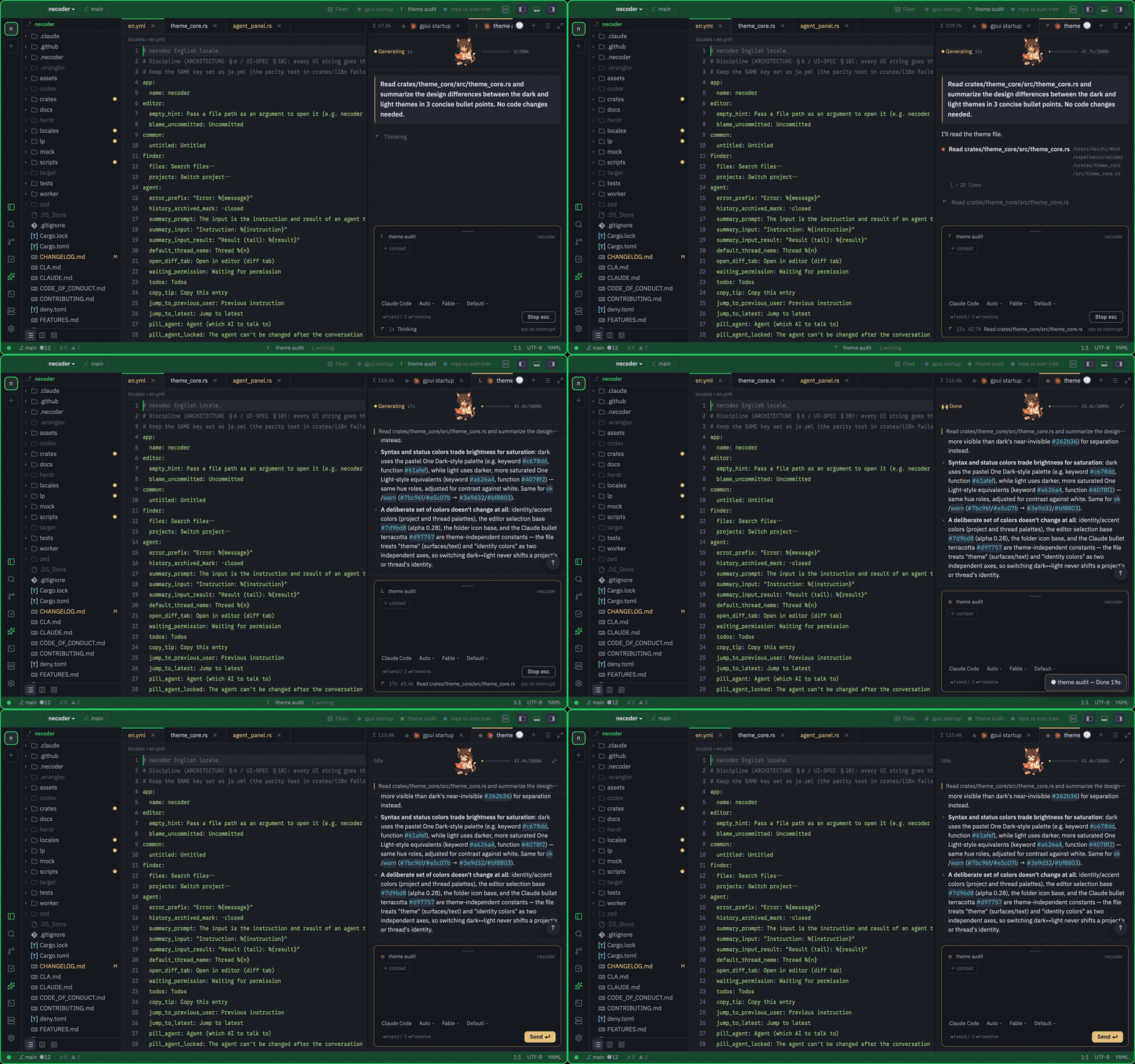
Fleet view for parallel agents. Run several agents side by side with a Captain, and see every thread's state at a glance.
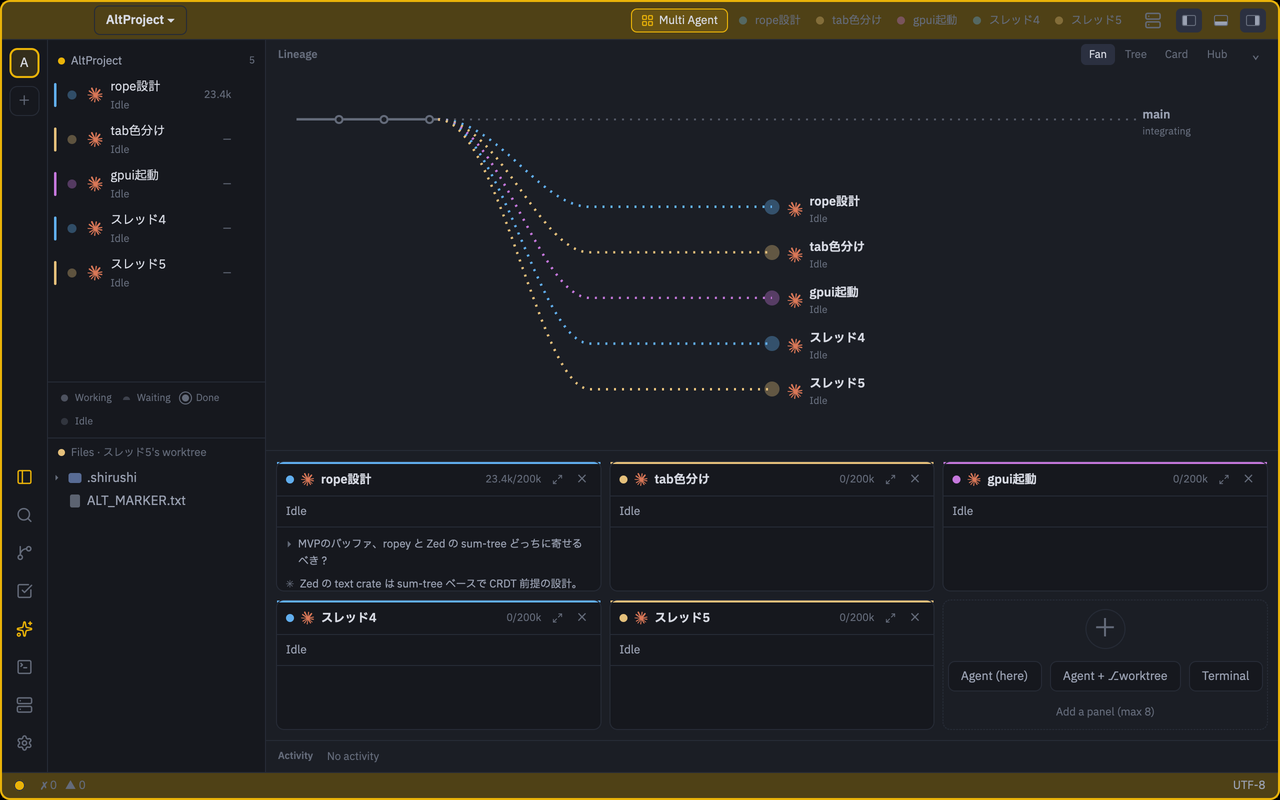
Across projects and branches. Worktree-first windows, a
⌘Odashboard listing every project with⎇ branch, dirty state and running agents; tear a rail item off into its own window.Fast and small. Native GPUI. Dev measurements: cold start ~215ms, idle RSS ~120MB, editor-core ops ~1µs (guarded in CI).
Native HTML preview. Switch local
.htmlfiles between source and rendered output with⌘⇧V. It uses WKWebView on macOS and WebView2 on Windows; no browser engine is bundled.Remote SSH. The same editor over
ssh://, backed by a ~2.4MB static musl server (idle RSS 6.5MB, no node on either side). Uses your system OpenSSH config, keys and ProxyJump as-is.Editor table stakes. LSP (diagnostics, completion, hover, rename, code actions, references, formatting), tree-sitter highlighting (Rust/TS/TSX/JS/Python/Go/JSON/YAML/TOML/HTML/CSS) with incremental parsing, Git (status colors, gutter diff, hunk stage/revert, blame, diff tabs, branch/worktree menu), integrated terminal with
file:linelinks, project-wide search, multi-cursor, soft wrap, Japanese IME, hot exit.Japanese / English UI (follows your OS locale), theme skinning with live preview, no telemetry, ever. The only network calls are the ones you initiate (your agents, your SSH hosts) plus a version check against GitHub Releases.
Install
macOS 13+ (Apple Silicon): download necoder.dmg from Releases and drag necoder into Applications. Builds are codesigned and notarized; the app self-updates from Releases (verifying the Apple signature before installing).
To open necoder from Terminal, install the ne command from Settings → Command line (approve the standard macOS authentication prompt), then run ne .. It opens paths in the running necoder window; without one it launches the app.
Windows 10+ (x64): download necoder-windows-x64.zip from Releases, unzip, run necoder.exe. The app notifies you of new versions and opens the release page.
For AI features, install and log in to the claude CLI; necoder talks to it over ACP.
Something broke? In-app Help → Report a Bug pre-fills an issue. Logs live in ~/Library/Application Support/necoder/logs/, crash reports in …/necoder/crashes/.
First 10 minutes
| Key | Action |
|---|---|
⌘O |
Open a project / worktree (dashboard) |
⌘P / ⇧⌘P |
File finder / command palette |
⇧⌘A |
New AI thread (needs claude CLI) |
⌘J |
Integrated terminal |
⇧⌘F |
Project-wide search |
⌘⇧T |
Theme selector (live preview) |
Build from source
git clone https://github.com/iKora128/necoder.git && cd necoder
cargo run -p necoder          # toolchain pinned by rust-toolchain.toml (rustup fetches it)
./scripts/bundle-mac.sh        # optional: assemble necoder.app with the app icon
The first build compiles GPUI and takes a while. Without full Xcode (Command Line Tools only), bundle-mac.sh automatically falls back to runtime shader compilation.
Remote SSH
Point necoder at an SSH URI, or browse from the launcher (+ → SSH). System OpenSSH (config, known_hosts, ssh-agent, ProxyJump) is used as-is; the matching server binary is deployed automatically and checksum-verified.
cargo run -p necoder -- 'ssh://[email protected]:22/home/user/project'
In necoder's integrated terminal for a Remote SSH project, ne . opens that remote directory in
the originating necoder window. The deployed lightweight server supplies the command even when the
remote host does not have the desktop app installed.
To exercise the complete SSH path locally, ./scripts/test-remote-ssh-docker.sh spins up a disposable Ubuntu/OpenSSH container and runs the live suite (add --gui to try the interactive connection flow). Details and remaining gaps: docs/research/remote-ssh-2026.md.
Documentation
| What | Where |
|---|---|
| Milestones & acceptance criteria | docs/ROADMAP.md |
| Architecture (crates, contracts) | docs/ARCHITECTURE.md |
| UI spec (tokens, color rules, keys) | docs/UI-SPEC.md |
| Decision log (license, window model…) | docs/DECISIONS.md |
| Feature backlog | FEATURES.md |
| Editor research (VSCode/Zed/Cursor) | docs/research/ |
| Agent working guide (this repo is built with agents) | CLAUDE.md |
Development docs are primarily in Japanese; the UI is fully bilingual (ja/en).
License & contributing
- AGPL-3.0-or-later (LICENSE). necoder-specific code is independently implemented; code from Zed's GPL application crates is not copied or adapted. The pinned GPUI dependency is marked Apache-2.0 upstream but currently brings documented GPL-3.0-or-later transitive crates; GPLv3/AGPLv3 §13 permits this combination under the applicable copyleft terms. See
THIRD_PARTY_NOTICES.mdanddocs/DECISIONS.md§5. - Contributions are welcome; read
CONTRIBUTING.mdfirst. All contributions require signing the CLA (a bot guides you on your first PR); this keeps future licensing options (including dual licensing) with the maintainer. - Bundled fonts are OFL-1.1 (
assets/fonts/); icons are Lucide (ISC) and Simple Icons (CC0) (crates/necoder/assets/icons/LICENSE.md).
Code signing policy
- macOS: release builds are signed with the maintainer's Apple Developer ID and notarized by Apple.
- Windows: free code signing provided by SignPath.io, certificate by SignPath Foundation.
Team and roles. necoder is developed and released by its maintainer, Daichi Nagashima (@iKora128), who acts as committer, reviewer and approver for signed releases. All release binaries are built from this public repository by GitHub Actions (release.yml) on version tags, and each signing request is approved manually.
Privacy. necoder does not collect or transmit any user data. No telemetry, ever. The only network requests are the ones you initiate yourself (your AI agents, your SSH hosts) and a version check against GitHub Releases.
日本語
なぜ作ったか
複数のリポジトリ・ブランチ・worktree をまたいで一日中 AI エージェントを走らせていると、必ず迷子になる。
「このスレッド、どのプロジェクトと話してるんだっけ?」エージェントのチャットは全部同じ色と見た目で、別のエージェントに指示を出しては時間とトークンを溶かしていました。既存エディタでは直せません。Zed の拡張は UI を描けず、VSCode の柔軟さは webview の重さと抱き合わせ。だから自作しました。(経緯と調査メモ)
necoder は、エージェント中心の開発に要るものをエディタのコアに直接実装しています:
- 識別色: プロジェクト/ブランチごとの色がレール・タブ・キャレット・AI スレッドまで貫通。今どこにいるかを見失わない
- 一目で分かる状態: 宛先チップ(スレッド → プロジェクト ⎇ ブランチ)、トークン常時表示、並行エージェントの編隊ビュー。どこで何が走っているかが分かる
- ネイティブの速さ: GPUI 直書き。Electron は使わず、HTML プレビューだけ OS 標準 WebView を遅延生成
ハイライト
色による方向感覚: プロジェクトごとの識別色(自動割当 or 選択)がレール・タブ下線・キャレット・スレッドチップまで流れる。色は識別のためだけに使い、装飾には使わない
AI エージェントネイティブ(ACP): Claude Code ほか ACP エージェントが中で動く: 色付きスレッド + 宛先チップ、ストリーミング表示(⏺/⎿、✳ thinking)、diff レビュー(accept/reject)、チェックポイント/巻き戻し、エージェントが管理する Todo ボード。既存の Claude Code サブスクのまま
claudeCLI 経由で、API キー不要並行エージェントの編隊ビュー: 複数エージェントをコーディネータ付きで並走させ、全スレッドの状態を一覧
プロジェクト/ブランチ横断: worktree ファーストのウィンドウ、全プロジェクトを
⎇ ブランチ・dirty・稼働エージェント付きで一覧する⌘Oダッシュボード、レール項目の別窓への切り離し速くて小さい: ネイティブ GPUI。実測で起動 ~215ms / idle RSS ~120MB / 編集コア操作 ~1µs(CI でガード)
ネイティブ HTML プレビュー: ローカル
.htmlを⌘⇧Vでソース⇄表示。macOS は WKWebView、Windows は WebView2 を使い、ブラウザエンジンは同梱しないRemote SSH: 同じエディタが
ssh://越しに動く。サーバは ~2.4MB の静的 musl バイナリ(idle RSS 6.5MB・両側 node 不要)。システムの OpenSSH 設定・鍵・ProxyJump をそのまま使うエディタの基本機能: LSP(診断・補完・hover・rename・code actions・参照・整形)、tree-sitter ハイライト(Rust/TS/TSX/JS/Python/Go/JSON/YAML/TOML/HTML/CSS・インクリメンタル)、Git(ステータス色・ガター diff・hunk stage/revert・blame・diff タブ・ブランチ/worktree メニュー)、
file:lineリンク付き統合ターミナル、プロジェクト全体検索、マルチカーソル、折り返し、日本語 IME、hot exit日本語/英語 UI(OS ロケール追従)、ライブプレビュー付きテーマ切替、テレメトリなし。通信は自分で起動するもの(エージェント・SSH)と GitHub Releases への更新チェックのみ
インストール
macOS 13+(Apple Silicon): Releases から necoder.dmg を取得して necoder を Applications へ。署名/公証済み・アプリ内自動更新(適用前に Apple 署名を検証)。
ターミナルから開くには、設定 → コマンドライン で ne コマンドをインストール(macOS の認証を許可)して ne .。実行中の necoder があればそのウィンドウで開き、無ければアプリを起動します。
Windows 10+(x64): Releases から necoder-windows-x64.zip を展開して necoder.exe を実行。新版はアプリ内通知からリリースページを開きます。
AI 機能には claude CLI のインストールとログインが必要です(necoder は ACP で対話します)。
困ったら、アプリ内 ヘルプ → バグを報告 で issue の下書きができます。ログは ~/Library/Application Support/necoder/logs/、クラッシュレポートは …/necoder/crashes/。
最初の10分
| キー | 動作 |
|---|---|
⌘O |
プロジェクト / worktree を開く(ダッシュボード) |
⌘P / ⇧⌘P |
ファイルファインダ / コマンドパレット |
⇧⌘A |
新しい AI スレッド(claude CLI が必要) |
⌘J |
統合ターミナル |
⇧⌘F |
プロジェクト全体検索 |
⌘⇧T |
テーマセレクタ(ライブプレビュー) |
ソースからビルド
git clone https://github.com/iKora128/necoder.git && cd necoder
cargo run -p necoder          # toolchain は rust-toolchain.toml で固定(rustup が自動取得)
./scripts/bundle-mac.sh        # 任意: アイコン付きの necoder.app を組み立て
初回ビルドは GPUI のコンパイルで時間がかかります。フル Xcode が無い環境(CLT のみ)では bundle-mac.sh が自動でランタイムシェーダにフォールバックします。
Remote SSH
SSH URI を渡すか、ランチャー(+ → SSH)から辿ります。システムの OpenSSH(config・known_hosts・ssh-agent・ProxyJump)をそのまま使用し、対応するサーババイナリは自動デプロイ(チェックサム検証付き)。
cargo run -p necoder -- 'ssh://[email protected]:22/home/user/project'
Remote SSH プロジェクトの統合ターミナルでは、ne . がそのリモートディレクトリを接続元の
necoder ウィンドウで開きます。接続先にデスクトップ版が無くても、配備済みの軽量サーバがne コマンドを提供します。
SSH 経路全体をローカルで試すには ./scripts/test-remote-ssh-docker.sh(使い捨ての Ubuntu/OpenSSH コンテナで実スイートを実行。--gui で対話フローも試せます)。詳細と残課題: docs/research/remote-ssh-2026.md。
ドキュメント
| 何 | どこ |
|---|---|
| マイルストーンと受入条件 | docs/ROADMAP.md |
| アーキテクチャ(crate 構成・契約) | docs/ARCHITECTURE.md |
| UI 仕様(トークン・色のルール・キー表) | docs/UI-SPEC.md |
| 設計判断ログ(ライセンス・ウィンドウモデル…) | docs/DECISIONS.md |
| 機能バックログ | FEATURES.md |
| エディタ調査(VSCode/Zed/Cursor) | docs/research/ |
| エージェント作業ガイド(このリポジトリはエージェントと作られています) | CLAUDE.md |
開発ドキュメントは主に日本語です。UI は日英完全対応。
ライセンスとコントリビュート
- AGPL-3.0-or-later(LICENSE)。necoder 固有のコードは独立に実装しており、Zed の GPL アプリケーション crate からの複製・翻案はありません。固定 rev の GPUI 依存は上流表示こそ Apache-2.0 ですが、現在は文書化された GPL-3.0-or-later の推移依存を含みます(GPLv3/AGPLv3 §13 の下で両立)。詳細:
THIRD_PARTY_NOTICES.md/docs/DECISIONS.md§5 - コントリビュート歓迎。まず
CONTRIBUTING.mdをお読みください。全てのコントリビュートに CLA への署名が必要です(初回 PR で bot が案内)。将来のライセンス選択肢(デュアルライセンス含む)をメンテナに残すためです - 同梱フォントは OFL-1.1(
assets/fonts/)、アイコンは Lucide(ISC)と Simple Icons(CC0)(crates/necoder/assets/icons/LICENSE.md)
コード署名ポリシー
- macOS: リリースビルドはメンテナの Apple Developer ID で署名し、Apple の公証を受けています
- Windows: コード署名は SignPath.io の無償提供、証明書は SignPath Foundation によるものです
体制: necoder はメンテナの長嶋大地(@iKora128)が開発・リリースし、署名リリースの committer / reviewer / approver を兼ねます。リリースバイナリは全てこの公開リポジトリのバージョンタグから GitHub Actions(release.yml)でビルドされ、署名リクエストは毎回手動で承認します。
プライバシー: necoder はユーザーデータを一切収集・送信しません(テレメトリなし)。通信は自分で開始するもの(エージェント・SSH ホスト)と GitHub Releases への更新チェックのみです。
Reviews (0)
Sign in to leave a review.
Leave a reviewNo results found