ternarywire
Health Uyari
- License — License: Apache-2.0
- Description — Repository has a description
- Active repo — Last push 0 days ago
- Low visibility — Only 5 GitHub stars
Code Gecti
- Code scan — Scanned 12 files during light audit, no dangerous patterns found
Permissions Gecti
- Permissions — No dangerous permissions requested
Bu listing icin henuz AI raporu yok.
Lightweight API client written entirely in Rust — a native Postman alternative for HTTP, GraphQL, gRPC, WebSocket, Socket.IO, MQTT, MCP and AI requests, with Postman-compatible collections and scripts and a newman-compatible CLI.
TernaryWire
A lightweight API client, written entirely in Rust.
TernaryWire is a native alternative to Postman: one small binary, no Electron, no Node.js, no account.
It draws its first frame in about 40 ms, idles at 0 % CPU and uses under 90 MB of memory, and a
100 MB response streams to disk instead of into memory. Collections are plain JSON files in a
folder you can commit to Git, and Postman collections, environments and pm.* scripts import and
run unchanged for common use.
Website: ilhamnadhif.github.io/ternarywire, with a live demo you can click through · Bahasa Indonesia
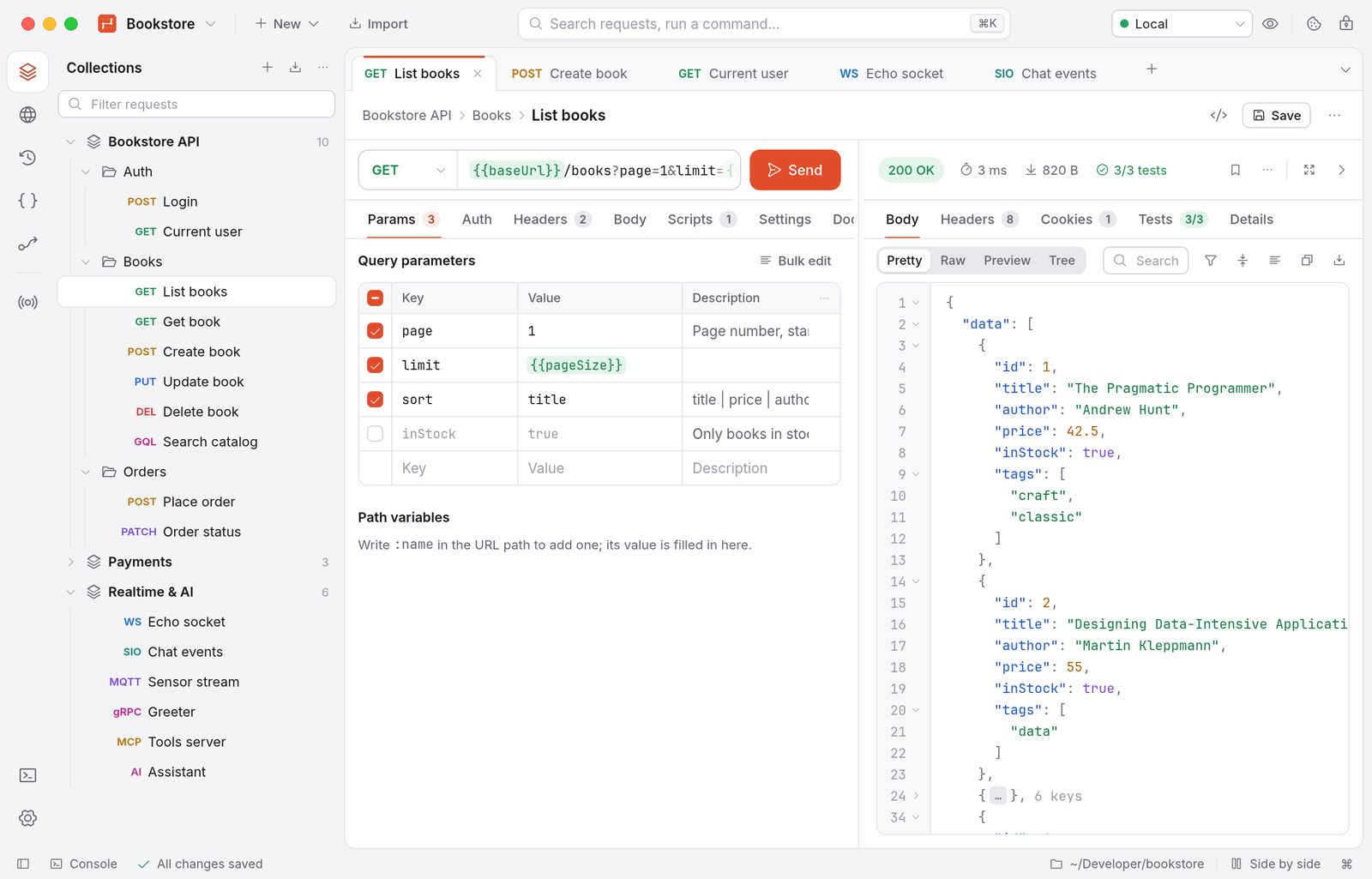
Highlights
- HTTP, GraphQL, gRPC, WebSocket, Socket.IO, MQTT, SOAP, MCP and AI model requests in one app,
each with its own tab, message log and scripts. - Postman compatible: collections v2.0/v2.1, environments and globals import and export;
pm.*
scripts run on an embedded JavaScript engine with the real Chai, lodash, moment, crypto-js and
tv4 (a corpus of 50 realistic Postman scripts passes 50/50). - Git-friendly workspaces: one pretty-printed file per request, stable ordering, and secrets
never written to the workspace; they live in the Keychain. - Collection Runner and CLI with data files, JUnit/HTML/JSON reports and newman-compatible
options, soternarywire runcan replacenewman runin CI. Performance tests with virtual users. - Flows: a visual canvas that chains requests, conditions, loops, parallel branches, scripts and
AI calls, and runs from the app or the CLI. - Spec Hub for OpenAPI, AsyncAPI, Protobuf, GraphQL and Smithy files with live validation, a
live docs preview and spec ⇄ collection sync. - Response tools that save round trips: fold JSON/XML, filter with JSONPath
($.data[?(@.active)].email), compare with the previous response, turn any value into a
variable or a test with a right-click, and generate tests (status, timing, schema) from a
response. - Mock server, webhook listener and capture proxy, all local.
- Twelve auth types, from Basic and OAuth 2.0 to AWS SigV4, NTLM and Akamai EdgeGrid.
- English and Indonesian UI, light and dark themes, keyboard and screen-reader friendly, no
telemetry. - Native everywhere: a real macOS menu bar, a Windows installer,
.deb,.rpmand AppImage
packages for Linux (x86_64 and ARM64). - Updates from GitHub releases; on macOS and with the AppImage one click installs the new
version and restarts.
Install
The app runs on macOS 12 Monterey or later (Apple Silicon and Intel, one universal build),
Windows 10 and 11 (x64), and Linux on x86_64 and ARM64 with glibc 2.28 or later: Ubuntu 20.04+,
Debian 11+, Fedora, RHEL/Rocky/Alma 8+, openSUSE Leap 15.6+ and, through the AppImage, most
other distributions (Arch, Manjaro, ...). macOS is the main platform; see Known limitations.
| System | Download from the latest release |
|---|---|
| macOS | TernaryWire-<version>-universal.dmg, or the one-line installer |
| Windows | TernaryWire-Setup-<version>-x64.exe (installer) or ternarywire-<version>-windows-x86_64.zip (portable) |
| Ubuntu, Debian, Mint, Pop!_OS | ternarywire_<version>_amd64.deb / _arm64.deb |
| Fedora, RHEL, Rocky, Alma, openSUSE | ternarywire-<version>-1.x86_64.rpm / .aarch64.rpm |
| Arch, Manjaro and others | TernaryWire-<version>-x86_64.AppImage / -aarch64.AppImage |
| Any Linux, by hand | ternarywire-<version>-linux-x86_64.tar.gz / -aarch64.tar.gz |
One-line installer (macOS, recommended)
curl -fsSL https://raw.githubusercontent.com/ilhamnadhif/ternarywire/master/scripts/install.sh | bash
The script downloads the latest release, checks it (the SHA-256 GitHub publishes, the bundle id,
the version and the code signature), quits a running TernaryWire, installs TernaryWire.app into/Applications and opens it. If anything fails, the copy you had stays in place. Run it again to
update. To install a specific version, pass it as an argument: … | bash -s -- v0.3.1. To install
somewhere else, set TERNARYWIRE_APP_DIR for bash: … | TERNARYWIRE_APP_DIR=~/Applications bash.
Disk image
Download TernaryWire-<version>-universal.dmg from the
latest release, open it and drag
TernaryWire onto Applications.
“TernaryWire” Not Opened / “Apple could not verify…”? Release builds are not notarized by Apple
yet (they are signed ad hoc), so macOS blocks apps downloaded with a browser. Since macOS 15, the
old right-click → Open trick no longer works. Do one of these:
- Use the one-line installer above. Nothing downloaded with
curlis blocked.- Allow it once in Settings: click Done in the warning, open System Settings → Privacy &
Security, scroll down to Security, and click Open Anyway next to “TernaryWire was
blocked…”. Confirm with your password, then open TernaryWire again.- Or in Terminal, after dragging the app to Applications:
xattr -dr com.apple.quarantine /Applications/TernaryWire.app
Homebrew
Each release includes a cask file, ternarywire.rb:
curl -fsSLO https://github.com/ilhamnadhif/ternarywire/releases/latest/download/ternarywire.rb
brew install --cask ./ternarywire.rb
xattr -dr com.apple.quarantine /Applications/TernaryWire.app   # until releases are notarized
The cask also links ternarywire-app into Homebrew's bin.
Windows
Run TernaryWire-Setup-<version>-x64.exe. It installs TernaryWire for your user account without
administrator rights (choose Install for all users in the first dialog to put it in Program
Files), adds it to the Start menu, can add the ternarywire command-line tool to PATH, and installs
over an older version when you update. Uninstall it from Settings › Apps like any other app.
The installer isn't signed with a code-signing certificate yet, so SmartScreen may say Windows
protected your PC: choose More info › Run anyway.
Prefer no installer? Unpack ternarywire-<version>-windows-x86_64.zip anywhere and runternarywire-app.exe.
Linux
Download the package for your distribution and architecture (amd64/x86_64 orarm64/aarch64), then:
# Ubuntu, Debian, Linux Mint, Pop!_OS, elementary OS
sudo apt install ./ternarywire_<version>_amd64.deb

# Fedora, RHEL, Rocky Linux, AlmaLinux
sudo dnf install ./ternarywire-<version>-1.x86_64.rpm

# openSUSE
sudo zypper install --allow-unsigned-rpm ./ternarywire-<version>-1.x86_64.rpm

# Arch, Manjaro and anything else: the AppImage runs without installing
chmod +x TernaryWire-<version>-x86_64.AppImage
./TernaryWire-<version>-x86_64.AppImage
The packages put ternarywire-app and ternarywire in /usr/bin and add TernaryWire to the application
menu. The AppImage needs FUSE, which desktop distributions have; if it won't start, install your
distribution's fuse/fuse2 package or run it with --appimage-extract-and-run. The .tar.gz
holds the same two binaries with a .desktop file and an icon: unpack it and run ./ternarywire-app,
or copy the binaries to a folder on your PATH (such as ~/.local/bin) and the .desktop file
to ~/.local/share/applications.
Every Linux and Windows file is built on GitHub Actions; the release workflow installs the
packages on Ubuntu 20.04/24.04, Debian 11/12, Fedora 41, Rocky Linux 8/9 and openSUSE Leap 15.6 and
installs, starts and uninstalls the Windows installer before publishing. Each release lists the
SHA-256 of every file (SHA256SUMS-*.txt).
Command line only
The CLI is a single binary as well. For macOS, take ternarywire-cli-<version>-macos-universal.tar.gz
from the release (the Linux and Windows archives above contain it too):
curl -fsSL https://github.com/ilhamnadhif/ternarywire/releases/download/v0.3.1/ternarywire-cli-0.3.1-macos-universal.tar.gz | tar -xz
sudo mv ternarywire /usr/local/bin/
ternarywire --version
Or build it with Cargo (Rust 1.88 or later), or use the Docker image:
cargo install --locked --git https://github.com/ilhamnadhif/ternarywire ternarywire-cli

docker build -f docker/Dockerfile -t ternarywire .
docker run --rm -v "$PWD:/work" ternarywire run collection.json -e env.json -r cli,junit
Updates
When it starts, TernaryWire asks GitHub for the latest release. That request sends only the app's
version as its User-Agent; turn it off in Settings › General › Updates (where Check now
checks right away). When a newer version is out, a window shows its release notes with the choice
to install it, be reminded later, or skip that version.
- On macOS, Install and restart downloads the app archive
(TernaryWire-<version>-macos-universal.zip), verifies it (the SHA-256 GitHub publishes, the bundle
id, the version and the code signature), replacesTernaryWire.appand opens the new version. - On Linux, the AppImage replaces itself the same way (Install and restart). A
.debor.rpminstall downloads the new package and opens it in your software installer; a.tar.gz
install downloads the new archive. - On Windows, TernaryWire downloads the new installer (or the
.zipfor a portable copy) and opens
it; the installer closes TernaryWire, updates it and can start it again.
Every download is checked against the SHA-256 that GitHub publishes for the file (or the release'sSHA256SUMS-*.txt); a download without a checksum is refused.
The one-line installer above also updates.
Uninstall
rm -rf /Applications/TernaryWire.app
rm -rf ~/Library/Application\ Support/TernaryWire   # settings, the default workspace, package cache
Workspaces you created elsewhere stay where you put them. Saved secrets are Keychain items with the
service name dev.ternarywire.workspace; remove them in Keychain Access.
On Windows, uninstall TernaryWire in Settings › Apps and delete %APPDATA%\TernaryWire for its
settings. On Linux, remove the package (sudo apt remove ternarywire, sudo dnf remove ternarywire)
or the AppImage, and delete ~/.config/TernaryWire; secrets are in your keyring (GNOME Keyring or
KWallet).
Getting started
- Open TernaryWire. It opens your last workspace, or creates My Workspace in its settings folder.
Use the workspace menu (top left) to create or open a workspace anywhere, for example inside a
Git repository. - Click Import to bring in a Postman collection, an OpenAPI file, a cURL command, a HAR file
and more, or New for a request of any protocol. - Pick an environment (
⌘E), type a URL and press⌘↩.{{variables}}are highlighted, and
hovering one shows its value. - Right-click a collection or folder and choose Run collection (or Run folder) to run its
requests and tests, or run the same collection in a terminal withternarywire run.
Features
Requests and responses
- Every HTTP method, plus custom ones. Query parameters and
:pathvariables stay in sync with the
URL; headers have autocomplete, and the automatic headers can be seen and turned off. - Bodies: none, form-data (text and files), x-www-form-urlencoded, raw (JSON, XML, text,
JavaScript, HTML), binary and GraphQL. Beautify keeps{{variables}}intact. - Per request: redirects, TLS verification, URL encoding, timeouts, HTTP/1.1 or HTTP/2.
- Responses as Pretty, Raw, Preview or Tree, with headers, cookies, test results and timings
(TTFB and total), search, save to a file or as an example. Large responses are streamed to a
temporary file and shown virtually, so a 100 MB response of half a million lines keeps the UI
responsive. - Pretty view with line numbers and folding (JSON by brackets; XML, HTML and YAML by indentation),
Expand all / Collapse all / collapse to level 1 or 2. - JSONPath filter for JSON responses:
$,.name,['name'],[n],[*],..(recursive),
unions, slices and filters such as[?(@.price < 10 && @.inStock)]or[?(@.name =~ /^a/i)],
with a match count; in the Pretty and Tree views. - Right-click a value: copy it or its JSONPath, Set as variable… (active environment,
collection or globals; optionally added to the post-response script so every run sets it) or
Add test for this value. - Compare with the previous response of the tab: status, time, size and header changes and a
line diff of the bodies (JSON with sorted keys). Pin a response to keep it as the baseline. - Generate tests from a response (status, response time, Content-Type and a JSON schema),
previewed before they are added to the post-response script. - Maximize the response panel or minimize it to one line; Copy as cURL (as sent) with the
resolved values. pm.visualizertemplates render inside the app (Handlebars, HTML and a CSS subset with grid,
flexbox, floats and positioning).- A cookie jar per domain (RFC 6265) you can view and edit, extra CA certificates, client
certificates per host (PEM or PKCS#12), proxies (HTTP, HTTPS, SOCKS4/5, the system settings, PAC
scripts and WPAD), Unix sockets (http://unix:/var/run/docker.sock:/info) and Windows named
pipes. - A searchable history with secret values masked.
- Code snippets in 18 flavours: cURL, raw HTTP, HTTPie, wget, fetch, axios, Python, Go, Rust, Java
(two), Kotlin, C#, PHP, Swift, Ruby, Dart and PowerShell.
Authentication
API key, Basic, Bearer, Digest, JWT, OAuth 1.0, OAuth 2.0 (authorization code with PKCE, implicit,
password, client credentials, automatic refresh), Hawk, AWS Signature v4, NTLM (with channel
binding), Akamai EdgeGrid and Atlassian ASAP, checked against the official test vectors where they
exist. Auth is inherited from the collection and folder; OAuth tokens are kept in the Keychain.
Collections, environments and variables
- Nested folders, drag and drop (also between collections), duplicate, rename; auth, scripts,
variables and a description on every collection and folder; search by name, URL or content. - Import: Postman collections (v2.0, v2.1), environments and globals, cURL, OpenAPI 3 and
Swagger 2, Insomnia, HAR, Hoppscotch, Thunder Client, WSDL (SOAP) and Smithy. Export: Postman
v2.1 (a round trip gives the same file) and OpenAPI. - Five variable scopes with Postman's precedence, initial values (in the workspace) and current
values (local only), a secret type that is masked and never written to a file, 118 dynamic
variables such as{{$guid}}and{{$randomEmail}}, and a vault:{{vault:name}}reads a value
from the Keychain or from HashiCorp Vault, AWS Secrets Manager, Azure Key Vault or 1Password. - Local forks: fork a collection, pull changes from its parent or merge back, with a three-way
diff and a choice for every conflict.
Scripts and tests
- Pre-request and post-response scripts on collections, folders and requests, in Postman's order,
withpm.test/pm.expect,pm.sendRequest(callbacks orawait),pm.environment,pm.collectionVariablesand the rest ofpm, plus the legacytests[]andpostman.*. - Scripts for the other protocols too: before a gRPC call and on each message, on every
WebSocket, Socket.IO and MQTT message, around MCP calls and AI requests. - npm and JSR packages through
pm.require('npm:zod@3'), cached for offline use and pinned by
SHA-256 in a lockfile; a Package Library in the workspace for your own modules;Intland Web
Streams. - Scripts run in a separate worker process with a time limit and a memory limit, so a runaway
script cannot freeze or crash the app. - A console with script logs, network lines and errors; snippets and
pm.autocomplete; re-run
the tests without sending the request again.
Details: docs/scripting.md.
Collection Runner and performance tests
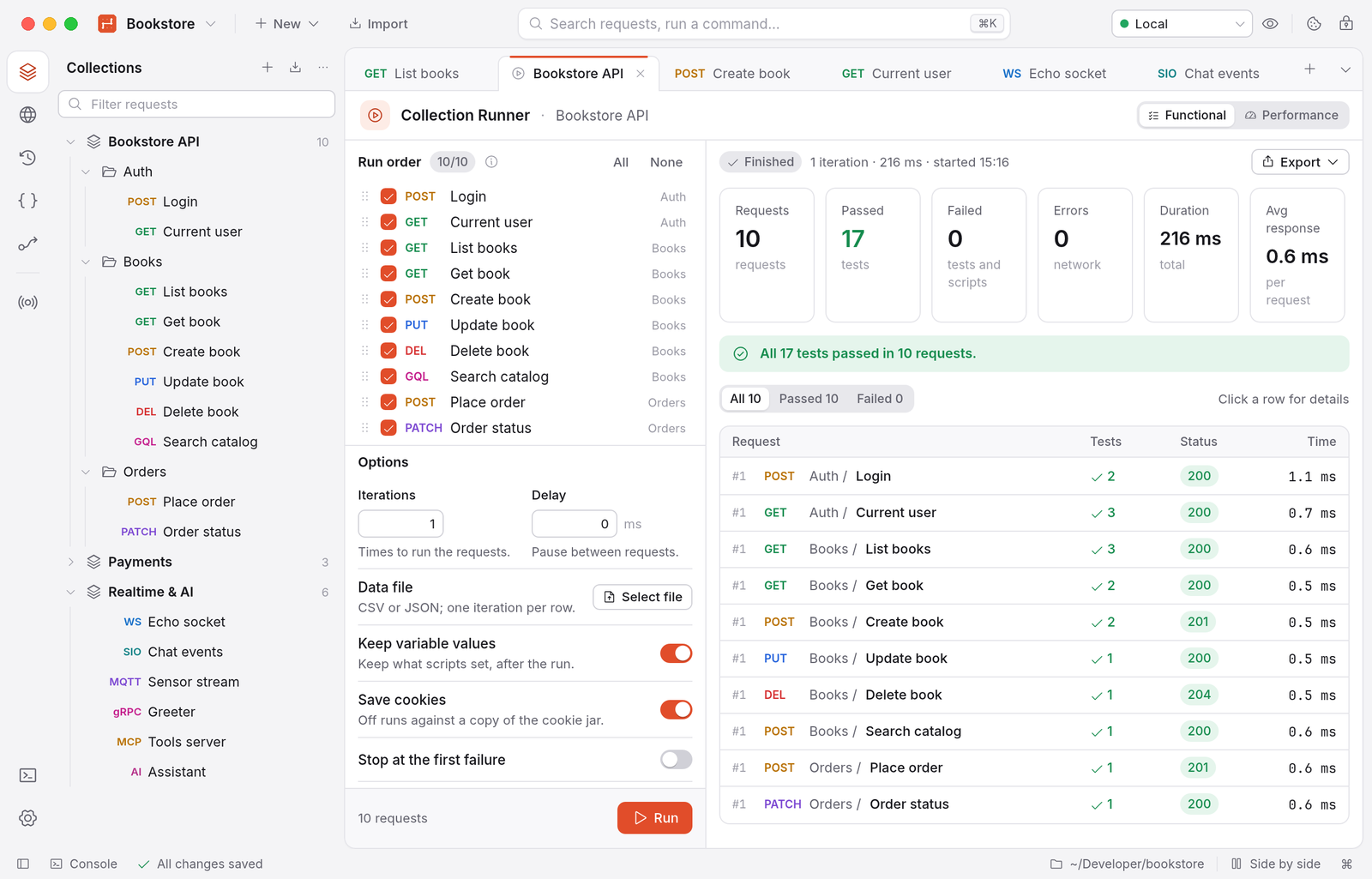
- Run a collection or folder with an environment, iterations, a delay, a CSV or JSON data file,
pm.execution.setNextRequest/skipRequest, a custom order and simulated network failures. - Results per request and iteration; export as JSON, JUnit or HTML. Runs continue in the
background, can be cancelled and keep memory flat over thousands of iterations. - Every protocol runs in the Runner: gRPC, AI and MCP calls, and WebSocket, Socket.IO and MQTT as
scripted sessions (connect, send the saved messages, stop after N messages, an event or a quiet
period). - Performance tests with virtual users and ramp-up: latency percentiles (p50 to p99), throughput
and errors, in the app or withternarywire perf.
Protocols
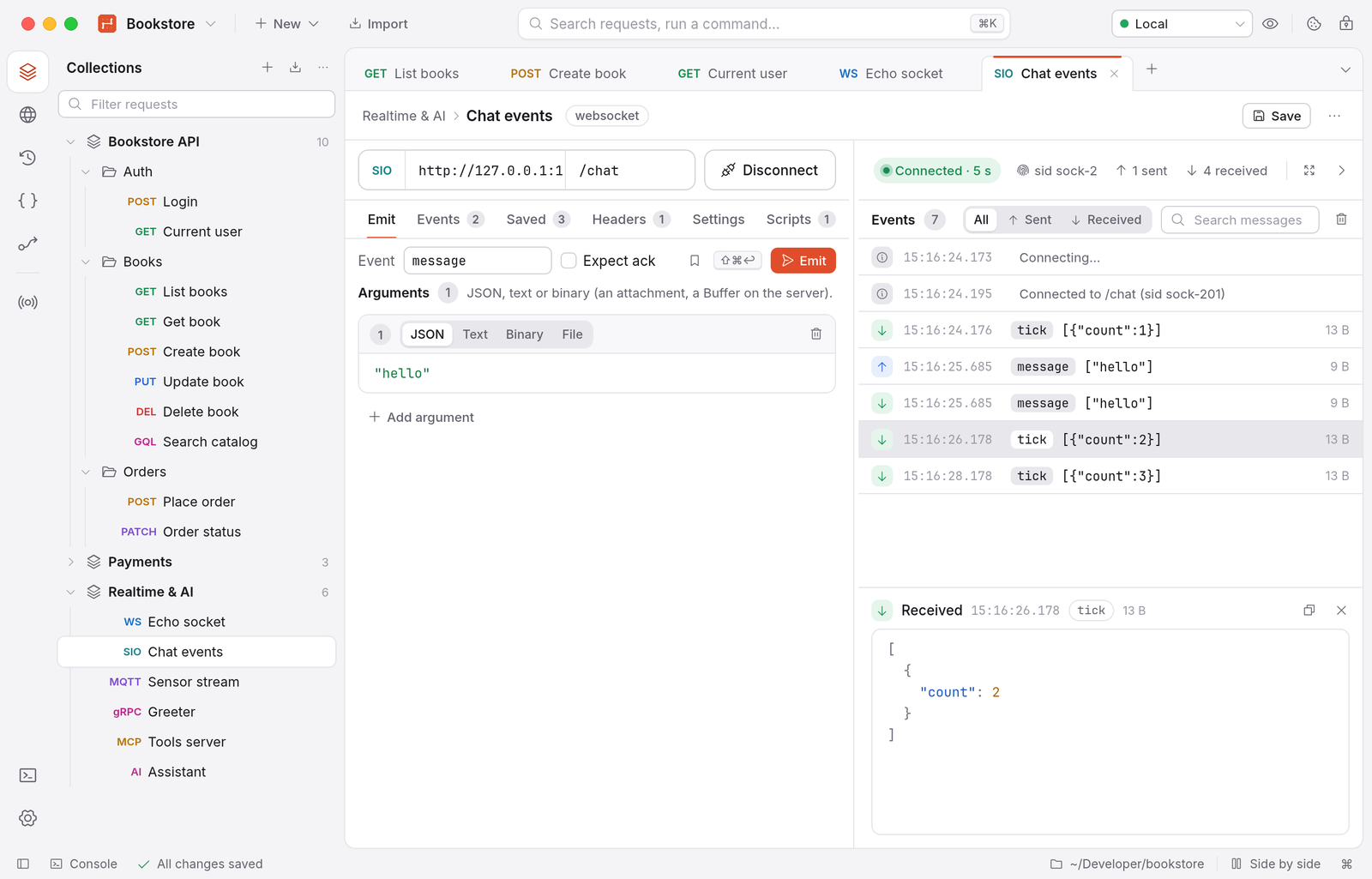
- GraphQL: queries, mutations and subscriptions (graphql-transport-ws), variables,
introspection, a schema explorer and autocomplete in the editor. - gRPC: schemas from
.protofiles (compiled in-process, with import paths) or server
reflection; unary, client streaming, server streaming and bidirectional calls; metadata,
deadlines, TLS and mTLS. - WebSocket: headers, subprotocols, text and binary messages, saved messages, a timestamped
log. - Socket.IO v2 to v4: long-polling with upgrade or WebSocket only, namespaces, the
auth
payload, events, acknowledgements and binary attachments. - MQTT 3.1.1 and 5 over TCP, TLS, WebSocket and secure WebSocket: subscriptions per QoS,
publish with QoS and retain, last will, MQTT 5 user properties. - SOAP: requests with envelope and SOAPAction from a WSDL.
- MCP (Model Context Protocol) servers over stdio, Streamable HTTP or the older SSE transport:
tools, resources and prompts, OAuth, sampling, elicitation, roots, and a config export. - AI requests to OpenAI, Anthropic, Google Gemini and OpenAI-compatible servers (Ollama, LM
Studio, vLLM): streaming with time to first token and token counts, multi-turn conversations, and
tools from your MCP requests.
Message logs are virtualized, so tens of thousands of messages stay smooth.
Flows
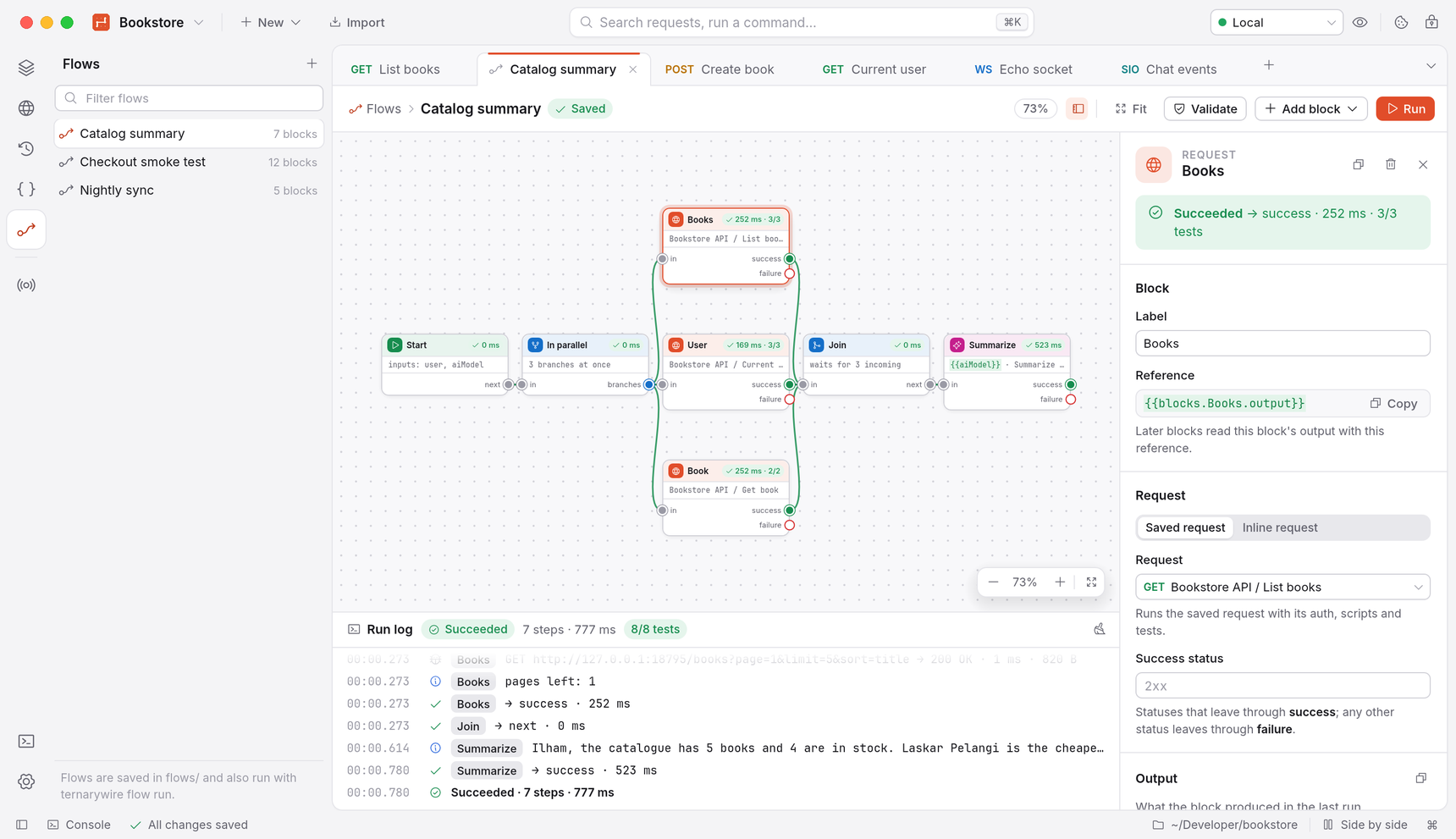
Flows chain blocks on a canvas: Start, Request (saved or inline), Condition, Loop, Parallel, Join,
Script, AI, Delay, Set Variable, Template, Output and Log. Parallel branches really run at the same
time and a Join waits for the branches that can reach it. Each block shows its status and timing
while the flow runs, AI answers stream onto the canvas, and problems are flagged before you run.
Flows are saved as flows/*.flow.json in the workspace and run from the CLI withternarywire flow run.
API design: Spec Hub
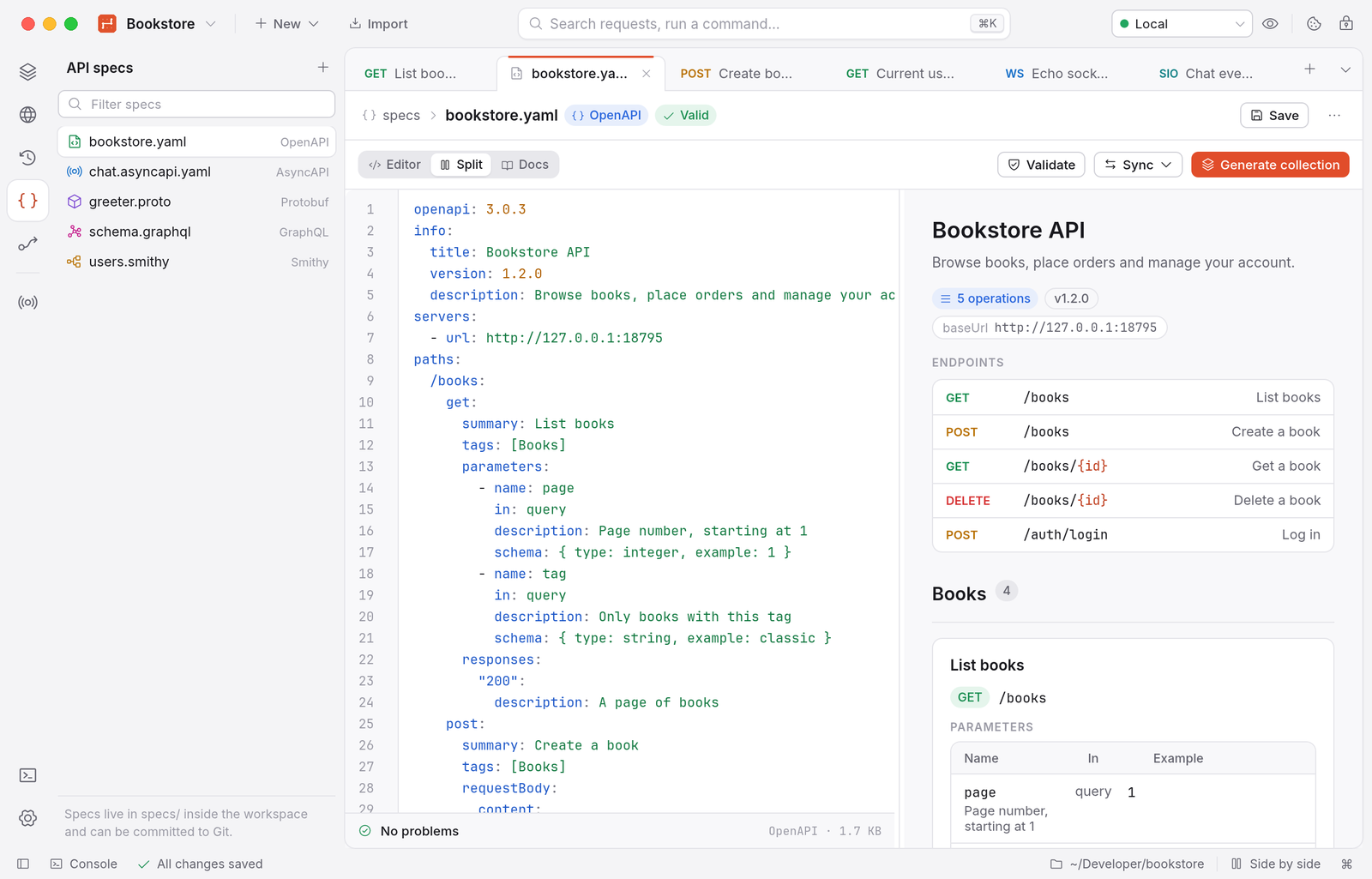
- Specs live in the workspace's
specs/folder: OpenAPI 3 and Swagger 2, AsyncAPI, Protobuf,
GraphQL SDL and Smithy (IDL 2.0 and JSON AST, models over many files,smithy-build.json). - An editor with live validation and a list of problems, templates, and a documentation preview
next to the editor. - Generate collection from an OpenAPI or Smithy spec, or update an existing one (requests are
added and changed, your scripts and tests stay); export a collection as OpenAPI. - Documentation for a collection as Markdown or a static HTML site with code samples, from the
app orternarywire docs.
Mock server, webhooks and capture
- Mock server from a collection's examples, with Postman-style matching, dynamic templates,
network simulation (latency, jitter, bandwidth, 4G/3G/satellite presets) and failure simulation
(error statuses, dropped connections, timeouts). One click points{{baseUrl}}at it. - Webhook listener: a local HTTP endpoint that records every request (method, path, headers,
body), answers with the response you set, and replays events to another URL. - Capture proxy: an HTTP/HTTPS proxy with its own local CA (its key stays in the Keychain) to
record the traffic of other apps, decrypt HTTPS per host, filter, save requests to a collection
and export HAR (WebSocket messages included).
The app
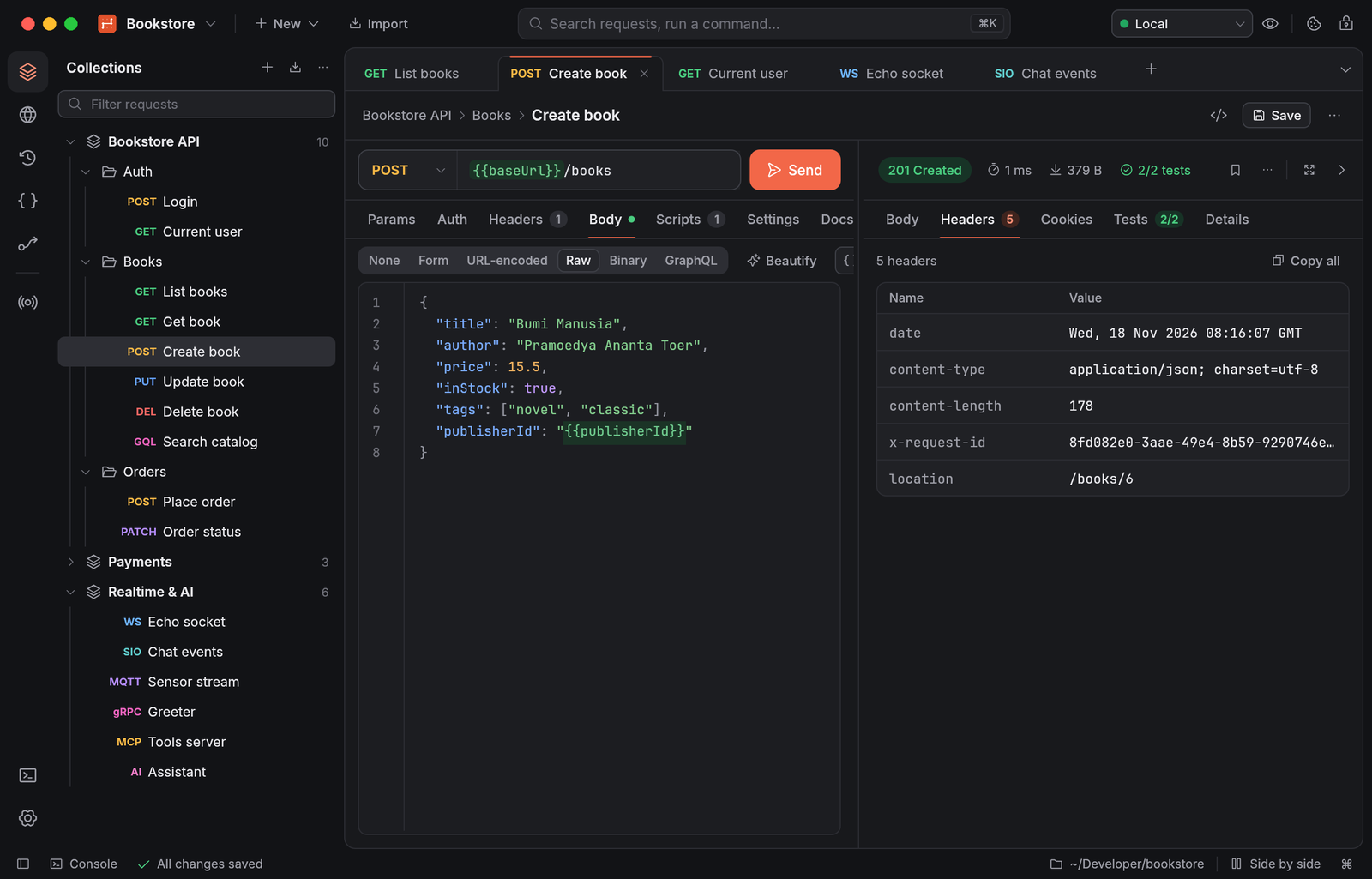
- Its own design system: Inter and JetBrains Mono, Phosphor icons, light and dark themes with a
coral accent, browser-like tabs, a command palette (⇧⌘P) and quick search (⌘K). - Open tabs, including unsaved ones, are restored after a restart or a crash. Closing an edited new
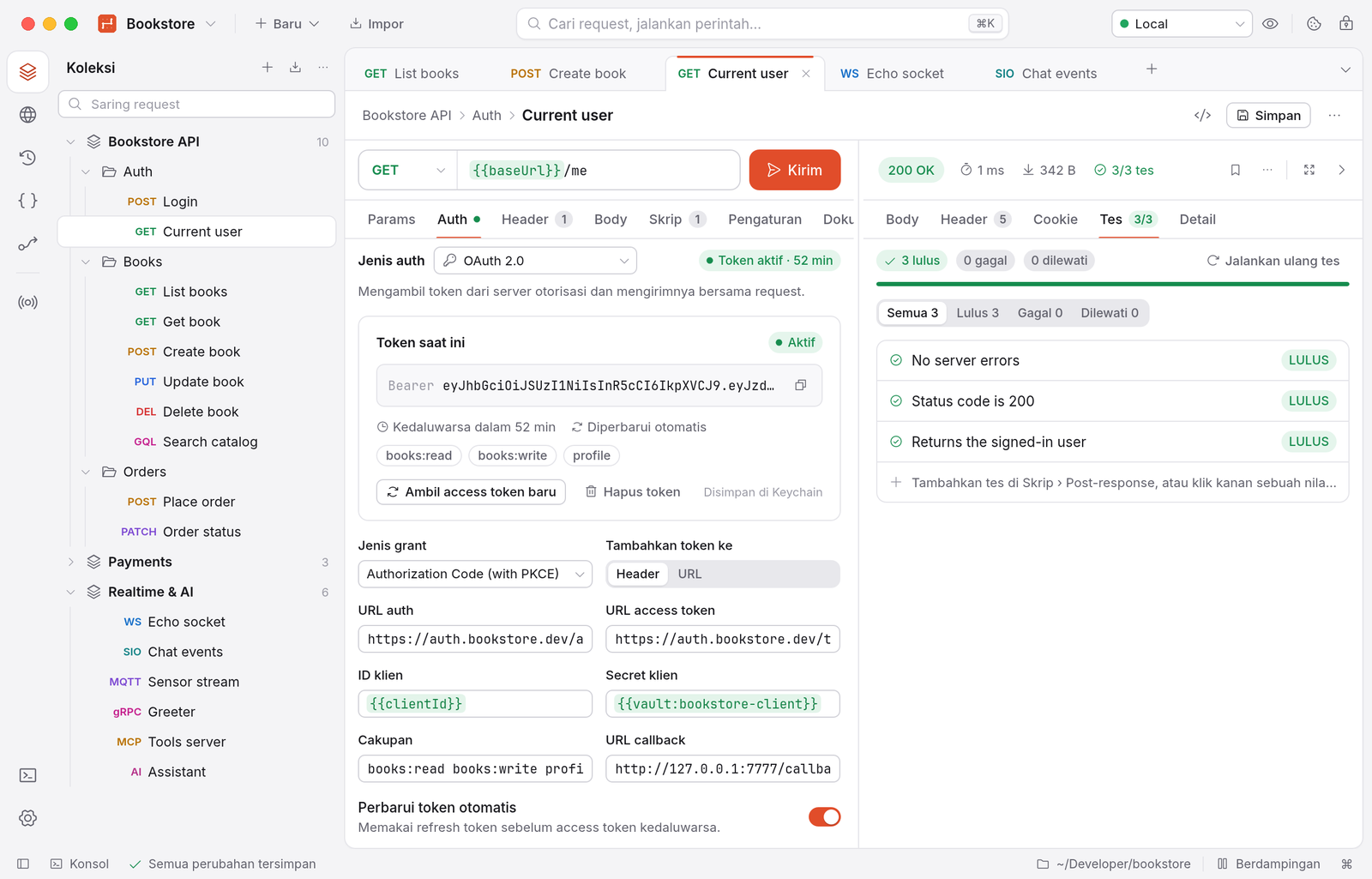
request or spec asks first. - English and Indonesian (Settings › General › Language).
- Accessible: keyboard navigation, and every button, tab, sidebar row and field has a name for
screen readers (via AccessKit).
Keyboard shortcuts
| Action | Shortcut |
|---|---|
| Send request | ⌘↩ |
| New request / new tab / close tab | ⌘N / ⌘T / ⌘W |
| Next / previous tab | ⇧⌘] / ⇧⌘[ |
| Save | ⌘S |
| Search requests | ⌘K |
| Command palette | ⇧⌘P |
| Switch environment | ⌘E |
| Toggle sidebar | ⌘B |
| Console | ⌥⌘C |
| Settings | ⌘, |
| Accept a variable suggestion | Tab |
⌘ is Ctrl on Windows and Linux.
Command line
ternarywire run       Run a collection (newman-compatible options)
ternarywire schedule  Run a collection repeatedly (--every 5m), keeping each run's results
ternarywire mock      Start a mock server from a collection's examples
ternarywire import    Import Postman, OpenAPI, Insomnia, HAR, cURL, … into a workspace
ternarywire export    Export a collection, environment or globals
ternarywire convert   Convert any importable file to Postman or OpenAPI
ternarywire validate  Check a file or workspace for errors and undefined variables
ternarywire codegen   Generate a code snippet for a request
ternarywire perf      Load test requests with virtual users
ternarywire docs      Generate documentation (static HTML site or Markdown)
ternarywire flow      Run, list and validate Flows
ternarywire init      Create an empty workspace
ternarywire run takes a Postman collection file, a TernaryWire workspace or a collection folder, and the
options you know from newman: -e, -g, -d, -n, --folder, --env-var, --global-var,--delay-request, --timeout, --timeout-request, --timeout-script, -k, --bail, -x,-r cli,json,junit,html with --reporter-*-export, --export-environment, --export-globals,--export-collection, --cookie-jar, --export-cookie-jar, --ssl-client-cert/-key/-passphrase,--ssl-client-cert-list, --ssl-extra-ca-certs, --color, --disable-unicode, --silent and--verbose. It exits with 0 when everything passed, 1 when a request, test or script failed, and 2
on usage or load errors, so it can gate CI. Credentials (Authorization and Cookie headers, API keys,
passwords in URLs, tokens in query strings) are masked in reports and terminal output unless you
pass --show-secrets.
ternarywire run postman_collection.json -e staging.postman_environment.json -d users.csv \
  -r cli,junit --reporter-junit-export report.xml
ternarywire init my-api && ternarywire import postman_collection.json -w my-api
ternarywire run my-api -e Staging --folder "Smoke tests" --bail
ternarywire mock my-api --port 3000 --network slow-3g --fail-rate 0.1 --fail-with timeout
ternarywire perf my-api --vus 20 --duration 30s
ternarywire flow run my-api "Catalog summary" -e Staging
ternarywire docs my-api -o site/ --languages curl,python    # or --markdown -o API.md
ternarywire <command> --help lists every option.
GitHub Action
The repository is also a GitHub Action (action.yml) that builds the CLI and runs a
collection, writing a JUnit report:
- uses: actions/checkout@v4
- uses: ilhamnadhif/[email protected]
  with:
    collection: api/                 # Postman collection file, workspace or collection folder
    environment: Staging             # Postman environment file or workspace environment name
    reporters: cli,junit
    args: --bail --env-var baseUrl=https://staging.example.com
- uses: actions/upload-artifact@v4
  if: always()
  with:
    name: api-tests
    path: ternarywire-reports/junit.xml
Other inputs: collection-name, iteration-data, junit-export and version (the Git ref of
TernaryWire to build). The action compiles the CLI with Cargo and caches the build between runs. It
has not been tried on GitHub's own runners yet, so please report any problem.
Workspace format
my-api/
  ternarywire.json                      manifest
  .gitignore                        ignores .ternarywire/
  globals.json
  environments/staging.json         initial values only; secrets left blank
  collections/bookstore-api/
    collection.json                 auth, scripts, variables, child order
    books/folder.json
    books/list-books.request.json   one pretty-printed file per request
  flows/catalog-summary.flow.json
  specs/bookstore.yaml
  packages/                         your own script modules
  .ternarywire/                         local only: current values, cookies, history, open tabs
Privacy and security
- No account and no telemetry. TernaryWire connects only to the servers you send requests to and, if
you leave the update check on, to GitHub once at start (with only the app version as
User-Agent). - Secret-type variables, sensitive auth fields (passwords, tokens, client secrets, private keys),
OAuth tokens, proxy passwords and certificate passphrases go to the macOS Keychain (one item per
workspace), never to workspace files, exports, history or run reports. On systems without a
keychain (CI, containers) they go to.ternarywire/secrets.json, which the workspace's.gitignore
keeps out of Git. - TLS certificates are verified by default. Scripts run in a sandbox without file or network
access except throughpm, in a separate process with time and memory limits. - Links in visualizer output, spec documentation and OAuth/MCP flows only open
http(s):andmailto:, never local files or apps.
| What | Where (macOS) |
|---|---|
| Settings | ~/Library/Application Support/TernaryWire/settings.json |
| Default workspace | ~/Library/Application Support/TernaryWire/workspaces/My Workspace |
| npm/JSR package cache | ~/Library/Application Support/TernaryWire/package-cache |
| Current values, cookies, history, open tabs | .ternarywire/ inside each workspace |
| Secrets | macOS Keychain, service dev.ternarywire.workspace |
On Linux the settings folder is the XDG config folder, on Windows %APPDATA%.
Performance
Measured with scripts/bench.sh on an Apple Silicon MacBook (macOS 14, Retina, 1280×820 window)
with the dist build. Memory is the physical footprint as Activity Monitor shows it.
| Target | Measured | |
|---|---|---|
| Memory, idle, one workspace | < 100 MB | 72–88 MB |
| Memory, five active request tabs | < 150 MB | 89–93 MB, plus 33 MB for the script worker |
| Cold start to first frame | < 1 s | ≈ 40 ms |
| CPU when idle | ≈ 0 % | 0.01 s of CPU in 15 s |
| App binary (arm64) | < 40 MB | 34.9 MB (33.3 MiB) |
| CLI binary (arm64) | 20.9 MB | |
| Disk image | 17.6 MB Apple Silicon only, ≈ 33 MB universal | |
| Workspace with 10,000 requests | < 1 s | 276–315 ms to first frame |
| 100 MB response | UI stays responsive | received in 73 ms (local), 550,741 lines shown virtually, 82–99 MB |
| Runner, 1,000 iterations | no linear growth | CLI peak RSS ≈ 21 MB at 100, 1,000 and 3,000 iterations |
| Overhead per request (CLI, with a JS test) | < 5 ms | 1.7–2.0 ms |
| Import of 10,000 requests | 1.5–1.9 s |
Rendering happens only when something changes, which is why the idle CPU is zero. More numbers
and how they were taken: docs/STATUS.md (in Indonesian).
Building from source
Requires the Rust stable toolchain (1.88 or later, via rustup); on macOS the
Xcode Command Line Tools, on Linux the development packages of libxkbcommon, wayland, gtk3
and dbus.
git clone https://github.com/ilhamnadhif/ternarywire.git && cd ternarywire
cargo run --release -p ternarywire-app            # the desktop app
cargo run --release -p ternarywire-cli -- --help  # the CLI
cargo build --profile dist -p ternarywire-app     # smallest binary, as shipped (fat LTO, opt-level s)
scripts/package-macos.sh                      # universal TernaryWire.app, DMG, zip, CLI tarball, Homebrew cask
scripts/package-macos.sh --native             # this Mac's architecture only (faster)
Signing and notarization need an Apple Developer account: set TERNARYWIRE_SIGN_IDENTITY (a
Developer ID Application identity) and TERNARYWIRE_NOTARY_PROFILE (made once withxcrun notarytool store-credentials) before running scripts/package-macos.sh. Without them the
app is signed ad hoc. Pushing a v* tag runs the release workflow, which builds macOS, Linux and
Windows and publishes the files with their checksums.
Project layout
| Crate | What it does |
|---|---|
ternarywire-core |
Data model, variables (5 scopes, dynamic variables, vault), workspace format, secrets, history, Postman import/export |
ternarywire-http |
HTTP engine on reqwest/hyper/rustls: redirects, cookies, proxies (PAC, WPAD), CA and client certificates, HTTP/1.1 and HTTP/2, Unix sockets and named pipes, streaming large bodies to disk; WebSocket client |
ternarywire-auth |
All auth types, from API key to OAuth 2.0, AWS SigV4, NTLM, EdgeGrid and ASAP |
ternarywire-script |
Script engine on boa (pure-Rust JavaScript): pm API, Chai, pm.sendRequest, packages, sandbox and worker processes |
ternarywire-runner |
The request pipeline shared by the app, Runner and CLI; Collection Runner, performance tests, reporters |
ternarywire-convert |
cURL, OpenAPI/Swagger, Insomnia, HAR, Hoppscotch, Thunder Client, WSDL and Smithy importers; OpenAPI export; code generators; GraphQL schema; documentation |
ternarywire-mock |
Mock server from examples, network and failure simulation; webhook listener |
ternarywire-grpc |
Dynamic gRPC client: .proto compilation or reflection, all four call types, mTLS |
ternarywire-mqtt |
MQTT 3.1.1/5 over TCP, TLS and WebSocket |
ternarywire-socketio |
Socket.IO v2–v4 client (Engine.IO 3/4, polling and WebSocket) |
ternarywire-mcp |
Model Context Protocol client (stdio, Streamable HTTP, SSE) with OAuth, sampling and elicitation |
ternarywire-ai |
Chat requests to OpenAI, Anthropic, Gemini and OpenAI-compatible servers, streaming, MCP tools |
ternarywire-flows |
Flows: model, storage, validation and executor |
ternarywire-secrets |
HashiCorp Vault, AWS Secrets Manager, Azure Key Vault and 1Password behind {{vault:name}} |
ternarywire-proxy |
Capture proxy: HTTP/HTTPS interception with a local CA, HAR export |
ternarywire-html |
HTML/CSS subset renderer for egui (visualizer, docs preview) |
ternarywire-cli |
The ternarywire binary |
ternarywire-app |
The desktop app (egui/eframe on wgpu) |
The pipeline is the same everywhere: pre-request scripts (collection → folder → request), variable
resolution, auth, send (with Digest and NTLM challenge retries), then post-response scripts and
tests. A run in the terminal behaves like a run in the app.
Also in the repository: docs/ (status of every requirement, design guide,
scripting), scripts/ (packaging, installer, benchmarks, i18n and
accessibility checks), packaging/ (Info.plist, icon, Homebrew cask, Linux .desktop), docker/
and action.yml.
Development
cargo test --workspace                       # about 1,065 tests, with local HTTP/WS/gRPC/MQTT/Socket.IO/MCP/proxy test servers
cargo clippy --workspace --all-targets -- -D warnings
cargo fmt --all
scripts/bench.sh                             # the performance targets above (macOS)
python3 scripts/i18n-scan.py                 # UI text that bypasses the translation system
swift scripts/ax-audit.swift <pid>           # the accessibility tree as VoiceOver reads it
CI runs formatting, clippy and the tests on macOS and Linux, and clippy on Windows. Tests that
need real services (socket.io, mosquitto, HashiCorp Vault, Ollama, the npm registry) are#[ignore]d; run them with -- --ignored after starting the service they name.
- UI: read docs/design.md first; screens use shared tokens and components.
- Translations: text users read goes through
tr()/trf()with an Indonesian entry incrates/ternarywire-app/i18n/id.tsv(about 1,670 entries); a test fails when one is missing. - Environment variables:
TERNARYWIRE_CONFIG_DIR(another settings folder),TERNARYWIRE_SECRETS=file|memory(no Keychain prompts with unsigned builds) andTERNARYWIRE_AUTOMATION=steps.json(drive the app from a list of steps and take screenshots; seecrates/ternarywire-app/src/automation.rs). - Test servers for the protocol tabs:
cargo run -p ternarywire-grpc --example greeter_server,cargo run -p ternarywire-socketio --example echo_server -- 3000, andtarget/debug/fake_mcp_server
(an MCP stdio server, built withcargo build -p ternarywire-mcp).
Issues and pull requests are welcome.
Known limitations
- Release builds are not signed with an Apple Developer ID or notarized yet, so macOS warns when
they are downloaded with a browser; see the note under Install. - macOS is where TernaryWire is built, measured and tested by hand. The Linux and Windows builds come
from CI and are less tested: CI runs the whole test suite on Linux, installs the packages on
several distributions and the Windows installer on Windows, but nobody has used them by hand yet.
Reports are welcome. - The Windows installer and executables are not code-signed yet (SmartScreen warns once).
- Tested against real services: Ollama, HashiCorp Vault, socket.io, mosquitto, the MCP reference
server and gRPC. OpenAI, Anthropic and Gemini with cloud keys, AWS Secrets Manager, Azure Key
Vault, 1Password and commercial OAuth providers for MCP were tested with mocks only. - Proxies: on Linux only the environment variables are read; plain HTTP requests through a proxy
that requires Digest authentication fail (tunnels for WebSocket, Socket.IO, MQTT and gRPC support
it); NTLM/Negotiate proxy authentication is not supported. - The capture proxy does not handle HTTP/3 or apps that pin certificates.
- The visualizer supports a subset of HTML and CSS; pages with scripts (e.g. Chart.js) open in the
browser. - Smithy dependencies are read only from the local Maven repository (not downloaded), and
smithy-build.jsonplugins and projections are not applied. - Team features of hosted API platforms (cloud sync, monitors, public workspaces) are out of scope:
workspaces are folders you share with Git,ternarywire scheduleruns collections on a timer, and
webhooks are received locally.
License
TernaryWire is dual-licensed under MIT or Apache-2.0, at your option.
The bundled JavaScript libraries keep their own licenses, listed incrates/ternarywire-script/js/vendor/THIRD_PARTY_LICENSES.txt. The bundled Inter and JetBrains Mono
fonts are under the SIL Open Font License 1.1 and the Phosphor icons under MIT; their license files
are in crates/ternarywire-app/assets/fonts.
Postman is a trademark of Postman, Inc. TernaryWire is not affiliated with Postman and uses none of its
names, logos or assets in the app.
Yorumlar (0)
Yorum birakmak icin giris yap.
Yorum birakSonuc bulunamadi