spidey-sense
Health Warn
- License — License: MIT
- No description — Repository has no description
- Active repo — Last push 0 days ago
- Community trust — 35 GitHub stars
Code Warn
- network request — Outbound network request in examples/complex-app/src/api.ts
Permissions Pass
- Permissions — No dangerous permissions requested
No AI report is available for this listing yet.
Spidey Sense
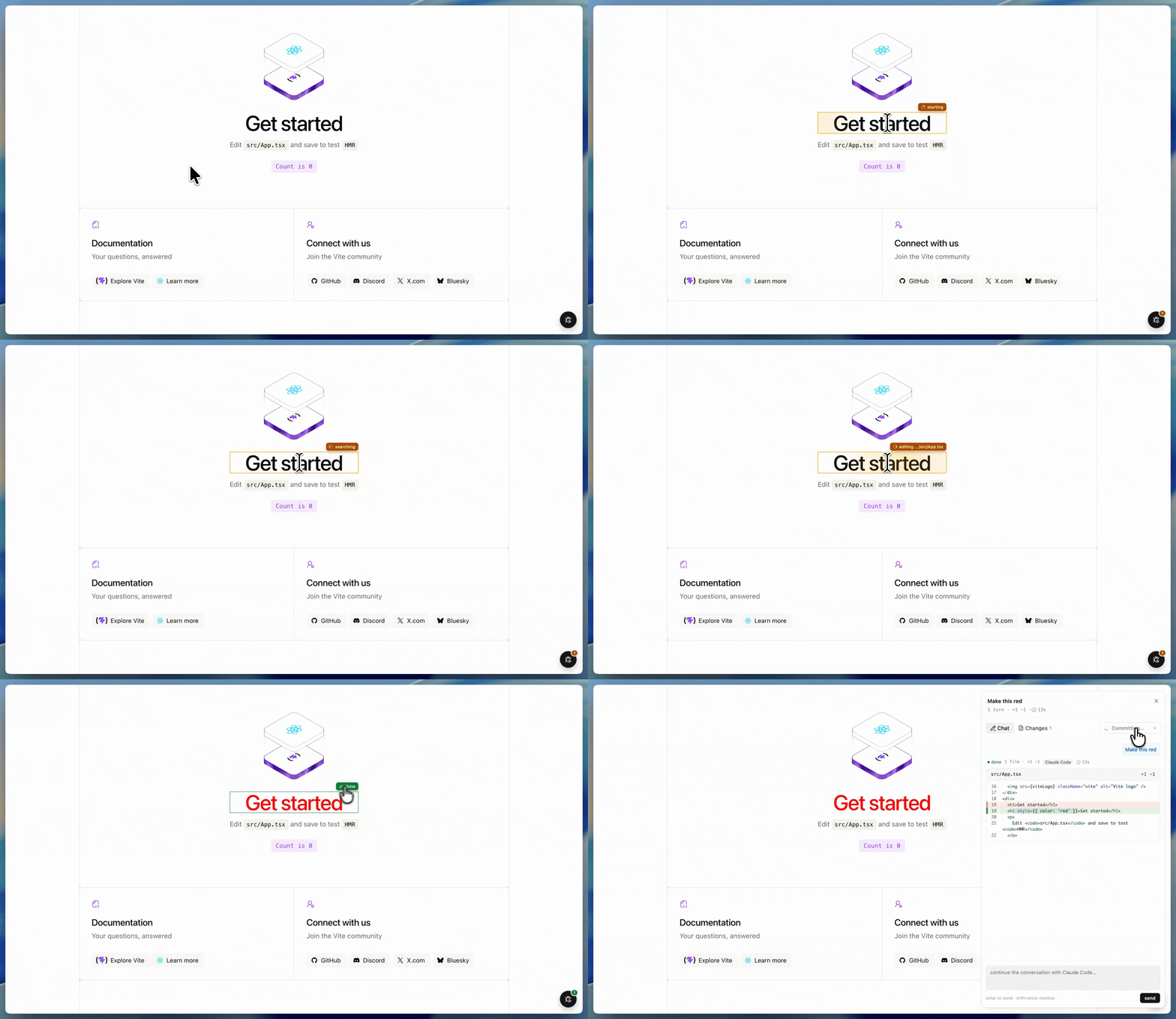
Vibe code from your website. Click any element in your local React app, ask for your change, get Claude or Codex to edit the source on disk
Install
bun install -D spidey-sense
or
npm install -D spidey-sense
Vite
Add the plugin to your vite.config.ts:
import { defineConfig } from 'vite'
import react from '@vitejs/plugin-react'
import spideySense from 'spidey-sense/vite'

export default defineConfig({
  plugins: [react(), spideySense()],
})
Next.js
Two pieces — wrap your next.config.{js,mjs,ts} and drop a component into
your root layout:
// next.config.mjs
import { withSpideySense } from 'spidey-sense/next'
export default withSpideySense({})
// app/layout.tsx (App Router)
import { SpideySense } from 'spidey-sense/next'

export default function RootLayout({ children }) {
  return (
    <html>
      <head>
        <SpideySense />
      </head>
      <body>{children}</body>
    </html>
  )
}
For the Pages Router, put <SpideySense /> inside the <Head> of yourpages/_document.tsx instead.
Run your dev server like normal — npm run dev. The plugin boots the
spidey-sense daemon in the same process and injects the runtime script in
dev only. No second terminal, no manual <script> paste, and nothing ships
to production builds.
A button appears in the bottom-right of your app:
- Click it to enter pick mode.
- Hover any element on the page; click to select.
- Type a natural-language prompt and press Enter.
- The element keeps a colored outline + status badge while a Claude agent runs.
- Repeat — multiple jobs run in parallel.
Requirements
- Node 18+
- The local
claudeCLI on PATH (or passclaudeBinto the plugin). - A React dev build (source mapping requires
_debugSource, available in dev only).
Plugin options
spideySense({
  port: 7878, // default; auto-bumps if taken
  cwd: undefined, // repo root for `claude` jobs (defaults to vite root)
  claudeBin: 'claude', // path to the claude binary
  codexBin: 'codex', // path to the codex binary (optional agent)
  softFailOnMissingClaude: true, // log a warning instead of failing if claude isn't installed
  disabled: false, // skip plugin entirely (useful for env-gated configs)
})
Standalone CLI (no Vite)
For projects without a supported bundler, you can still run the daemon
directly and paste the printed <script> tag into your app's <head> (in
dev only):
npx spidey-sense --cwd /path/to/your/repo
CLI flags:
--port <n>— port to listen on (default7878).--cwd <path>— repo root passed to spawnedclaudejobs.--claude-bin <path>— override theclaudebinary location.--codex-bin <path>— override thecodexbinary location.
Other bundlers
For projects using Webpack/CRA/Parcel directly (without Next), use the
standalone CLI and add the printed <script> to your dev-only HTML.
A first-class Webpack plugin is on the roadmap — PRs welcome.
Development
bun install
bun run build
bun scripts/dev.ts            # all-in-one dev harness for the example app
License
MIT
Reviews (0)
Sign in to leave a review.
Leave a reviewNo results found