browsentic
Health Pass
- License — License: MIT
- Description — Repository has a description
- Active repo — Last push 0 days ago
- Community trust — 17 GitHub stars
Code Fail
- child_process — Shell command execution capability in .github/workflows/release.yml
- process.env — Environment variable access in scripts/check-security.mjs
- crypto private key — Private key handling in scripts/check-security.mjs
- Hardcoded secret — Potential hardcoded credential in scripts/check-security.mjs
Permissions Pass
- Permissions — No dangerous permissions requested
No AI report is available for this listing yet.
An agentic browser extension: an AI side panel in your own logged-in Chrome, run by the agent you already have (Claude Code, Codex, Antigravity). Free, open source, no API key. Also an MCP server.
Browsentic – a completely integrated agentic browser extension




Hand your real, logged-in browser to the AI agent you already run. Browsentic is a browser extension with an AI side panel, plus a small local daemon: open the panel beside any tab, say what you want and it drives the page, ask a question and it reads the page and answers. It runs on Claude Code, Codex or Antigravity — whichever you already have logged in — and doubles as an MCP server so any MCP client can drive the same browser. No account, no API key, no cloud service.
Quick Start
macOS — one line installs Browsentic.app, and the app installs everything else, Node included, and runs it from a window:
curl -fsSL https://browsentic.com/install.sh | sh
Any platform — with Node.js 20 or newer:
npx browsentic setup
Either way two steps are left, both inside the browser: Load unpacked ~/browsentic/extension/chrome-mv3 at chrome://extensions, then paste the pairing code into the Browsentic popup. You also need one agent CLI logged in — claude, codex or agy. Details, updating and building from source are in the install guide.
Key Capabilities
- A Side Panel, Not a Terminal: Open it beside any tab, type or dictate, and watch every action land on a timeline with approvals where you are looking. The terminal is optional: the same daemon doubles as an MCP server for Claude Code, Cursor or Zed
- Your Real Browser, Not a Headless One: Drives the tab in front of you, in your own profile, with your own logins and sessions
- Bring Your Own Agent: Runs on the agent CLI you already pay for and are already signed in to — switch between Claude Code, Codex and Antigravity with one click, and pick the model each one runs
- 52 Page Capabilities: Reading, clicking, typing, dragging, on-site search, form submission, navigation, stepping into iframes, screenshots, file upload and download, captchas, theming and accessibility, console and network diagnostics, background progress monitoring, scheduled and repeating jobs, pointing at an element, and calling the tools a WebMCP site registers for agents
- Live Tools, Off By Default: For work that repeats twenty times or needs something no tool covers, flip the Live tool switch and the agent may write a small script for the page — you read the code in the panel and approve it before a line of it runs
- Keep What It Wrote: A script that worked can be kept as a tool of your own, named after the site it belongs to (
youtube.com:watch:darken-page-except-video-player) and run later by typing/. The code stays in the browser; no MCP client can reach it - Voice, Text, or Demonstration: Dictate in the side panel, type anywhere, or record yourself doing a job once and later say "do it like last time"
- Point at What You Mean (A-Eye): Press the lens, hover the page, click the thing — the element and its content ride along with your next message, and the agent can hand the lens back when it needs you to pick
- Teach It a Site Once: Point it at a site and it explores and writes reusable notes, so every later session already knows its way around
- Instant Commands: "Go back", "scroll to the top", "open github.com" run in the browser in milliseconds instead of becoming an agent round trip
- Guardrails, Not Vibes: A declarative policy gates consequential actions, confines each run to the sites it is about, and marks every byte of page text as untrusted data — tunable per rule from a Settings tab, with nothing overridden until you say so
- Off By Default: A fresh install contacts nothing until you redeem a one-time pairing code
How It Works
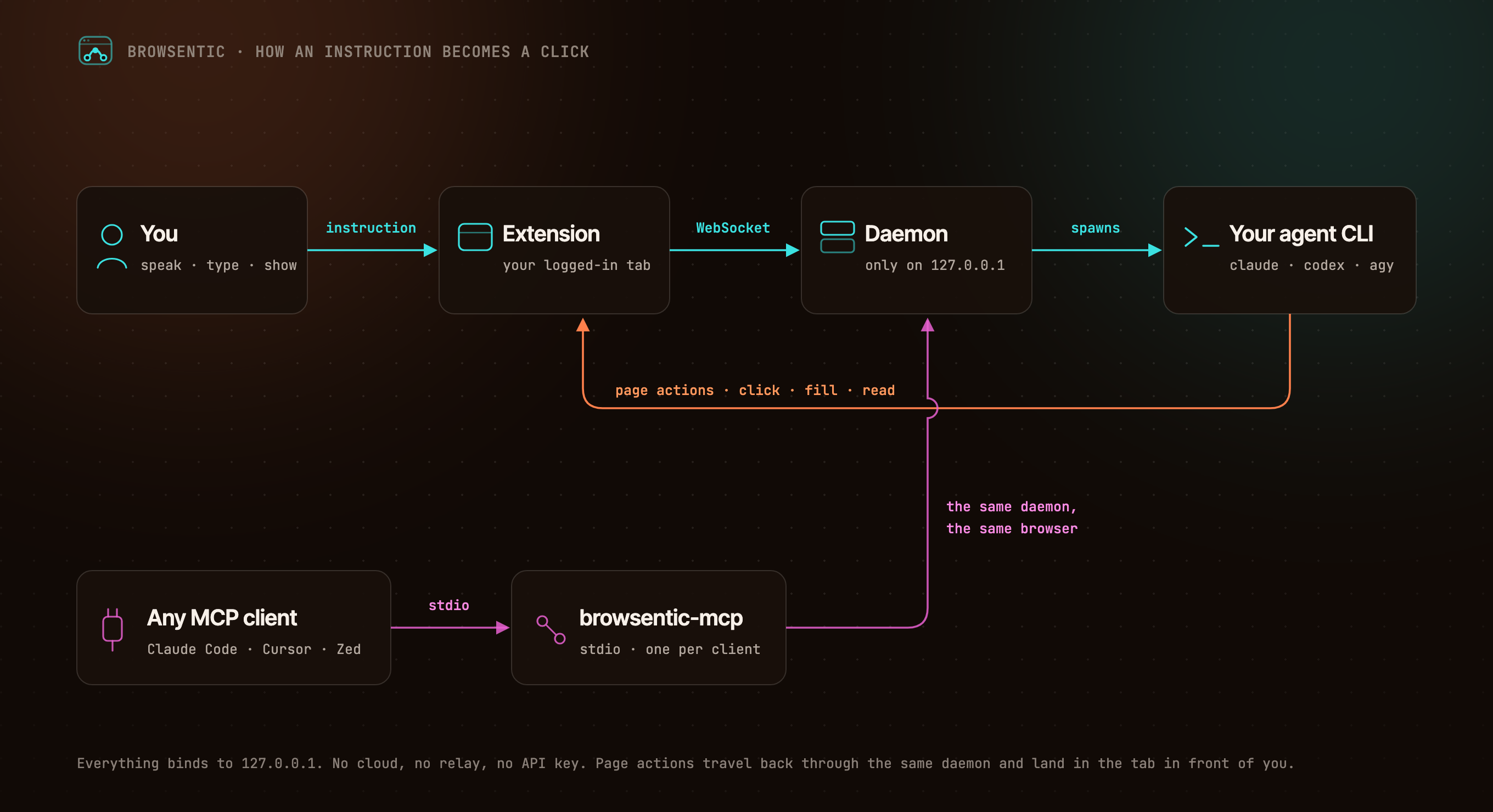
You ──speak or type──> Extension ──local WebSocket──> Daemon ──spawns──> your agent CLI
                            ▲                                        (claude │ codex │ agy)
                            └──────────────── page actions ─────────────────────┘

Any MCP client ──stdio──> browsentic mcp ──> the same daemon ──> the same browser
The extension dials out to the daemon, because a Manifest V3 service worker cannot listen for connections. One daemon owns the browser link, so several MCP clients can share one browser. Everything binds to 127.0.0.1.
Resources
- 📚 Documentation
- 🚀 Install and Pair
- ✨ Features
- 🧰 All 52 Page Tools
- 🔌 Optional: Drive It From Claude Code, Cursor or Zed Over MCP
- 🛡️ Approvals and Guardrails
- 🏗️ Architecture
- 🩺 Troubleshooting
Privacy and Security
Nothing connects until you pair, both ends prove themselves, consequential actions ask first, and credentials on a page are sealed before the agent sees them. The full model is in SECURITY.md, and what it does not cover is in Limits.
Contributing
Bugs and ideas are welcome — start at CONTRIBUTING.md.
License
Browsentic is MIT licensed.
- Source Available: Always visible source code
- Local First: No cloud component, no telemetry, no account
- Extensible: Add your own page capabilities, skills and agent runners
What does Browsentic mean?
Short answer: "Browse" + "agentic".
Long answer: Most browser automation asks you to hand the work to a different browser — a headless one, in a container, logged in to nothing. Browsentic is the other way round: the agentic part happens in the browser you are already looking at, with the sessions you are already signed in to. The name is the thesis — browsing, made agentic, where you already browse.
Reviews (0)
Sign in to leave a review.
Leave a reviewNo results found