andropi
Health Uyari
- License — License: BSD-3-Clause
- Description — Repository has a description
- Active repo — Last push 0 days ago
- Low visibility — Only 5 GitHub stars
Code Basarisiz
- execSync — Synchronous shell command execution in agent/build.mjs
- process.env — Environment variable access in agent/src/checkpoints.ts
- process.env — Environment variable access in agent/src/container.ts
- network request — Outbound network request in agent/src/container.ts
- network request — Outbound network request in agent/src/dns.ts
- process.env — Environment variable access in agent/src/gitops.ts
- process.env — Environment variable access in agent/src/host.ts
- process.env — Environment variable access in agent/src/integrations.ts
- network request — Outbound network request in agent/src/integrations.ts
- process.env — Environment variable access in agent/src/mcp.ts
Permissions Gecti
- Permissions — No dangerous permissions requested
Bu listing icin henuz AI raporu yok.
An AI coding agent that runs on your Android phone. Write, run, preview and deploy code without a laptop.

AndroPI
An AI coding agent that runs on your Android phone.
Write, run, preview and deploy code without a laptop.
Google Play · APK downloads · Website
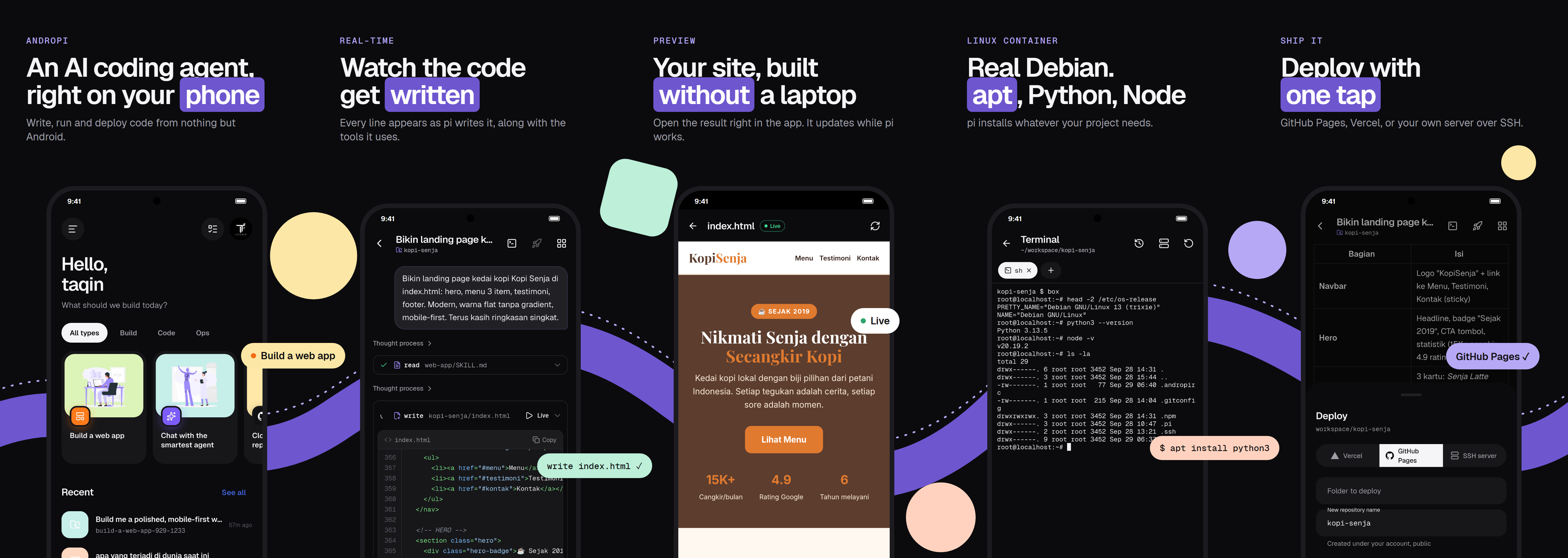
AndroPI puts the pi coding agent on Android. The agent runs locally in a
bundled Node.js runtime. It reads and writes files, runs shell commands in a real Debian or Alpine container,
searches the web, and ships your project to GitHub Pages, Vercel or your own server. You bring the model:
Anthropic, OpenAI, Gemini, OpenRouter and the other providers pi supports.
Features
- Chat with a coding agent. Replies stream in real time, with code blocks, tool calls and a live HTML
preview that updates while the agent writes the page. - Linux container. Debian or Alpine through proot, so
apt,pipandnpmwork. It is on by default and is
the agent's shell. - Projects. Each chat can use its own folder, or you can open any folder on the phone. The app includes a file
explorer, a code editor, project search, a diff view and a checkpoint/undo for every agent run. - Git and GitHub. Sign in with GitHub's device code, then clone repositories, commit, push, pick branches,
turn issues into pull requests and follow GitHub Actions runs. - Deploy. GitHub Pages, Vercel, or SSH/rsync to your own servers. Dev servers can be shared with a public tunnel.
- Terminal. Multi-tab terminal with SSH to saved servers.
- Agent controls.
- Approval modes: ask for everything, ask for risky actions only, or bypass all approvals.
- Plan mode, message queue, and fork or edit-and-resend on any message.
- Background tasks and schedules.
- MCP servers, skills (with a searchable skills catalogue), prompt templates and slash commands.
- Everyday use.
- Image and file attachments, and voice input.
- Share to AndroPI from other apps; home screen widget and Quick Settings tile.
- Notifications.
- Usage and cost tracking with a daily budget, and automatic fallback to another model.
- App lock, encrypted tokens, and backup and restore.
- Themes and accents, English and Bahasa Indonesia.
- Web search that survives DNS blocking. DNS-over-HTTPS for the agent's network access.
Build
Requirements: Flutter (stable), Node.js 20+, Python 3 with lief (pip install lief), the Android SDK/NDK, and an
Android 8+ device (arm64, armv7 or x86_64).
# 1. Native runtime: node, git, ssh, rsync, curl, proot, ... from the Termux repository, repackaged as jniLibs
#    for arm64-v8a, armeabi-v7a and x86_64 (pass ABI names to build only some)
python tool/bundle_runtime.py

# 2. The agent host (TypeScript), bundled into android/app/src/main/assets/agent.zip
cd agent && npm install && node build.mjs && cd ..

# 3. The app. Two flavors:
#    full: GitHub builds, with "All files access" so projects can live in any folder on the phone
#    play: Google Play builds, without it (projects live in the app's workspace)
flutter pub get
flutter build apk --flavor full --release --split-per-abi --target-platform android-arm,android-arm64,android-x64
flutter build appbundle --flavor play --release --target-platform android-arm,android-arm64,android-x64
Steps 1 and 2 generate files that are not in the repository (jniLibs/, agent.zip). Run them again after you
change tool/ or agent/.
Layout
| Path | What it is |
|---|---|
lib/ |
Flutter app (UI in lib/ui, agent client in lib/agent) |
agent/src/ |
Node host that runs pi and talks to the app over JSON lines |
agent/skills/ |
Skills bundled with the app |
android/ |
Kotlin side: runtime extraction, foreground service, share targets, widget, tile |
tool/ |
Runtime bundler and the box container launcher |
store/ |
Play Store assets (English and Indonesian) |
Credits
- pi: the coding agent (MIT)
- Termux packages: the Android builds of Node.js, git, OpenSSH, proot
and other tools bundled at build time, each under its own license - Storyset: illustrations
- Lucide and Simple Icons: icons
- Geist: fonts (OFL)
License
MIT © imtaqin (@fdciabdul)
Yorumlar (0)
Yorum birakmak icin giris yap.
Yorum birakSonuc bulunamadi