looklook
Health Uyari
- License — License: AGPL-3.0
- Description — Repository has a description
- Active repo — Last push 0 days ago
- Low visibility — Only 6 GitHub stars
Code Basarisiz
- rm -rf — Recursive force deletion command in client/packaging/install-linux.sh
- rm -rf — Recursive force deletion command in client/packaging/install-macos.sh
Permissions Gecti
- Permissions — No dangerous permissions requested
Bu listing icin henuz AI raporu yok.
Run Claude Code, Codex or any CLI agent on your own machine and open it from your phone's browser. Sessions keep running. No VPN, no port forwarding, no app.
Looklook
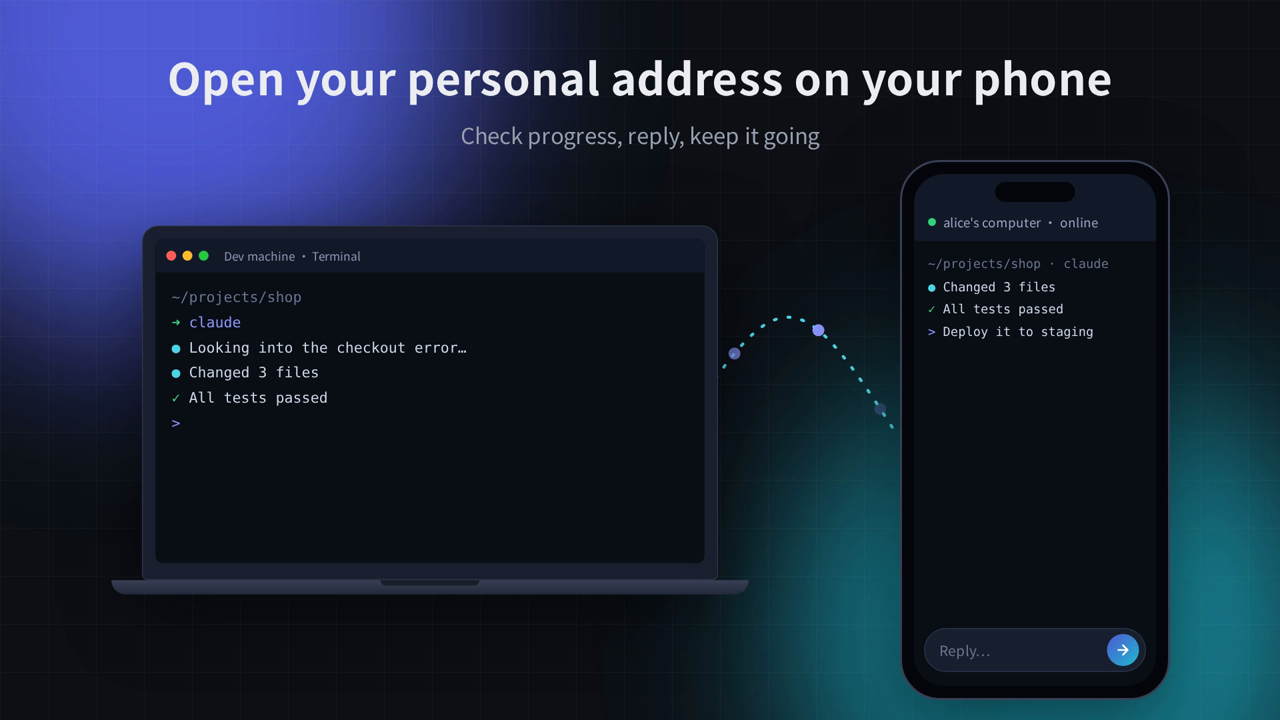
Run Claude Code, Codex or any CLI agent on your own machine. Check on it from your phone.
Close the tab and the work keeps going. No VPN, no port forwarding, no phone app.





Website · Download · Docs · Roadmap · Releases
English · 简体中文
▶ Click to watch the 36-second demo
Why Looklook
You start a long Claude Code or Codex task, then you have to leave the desk. The agent stops to ask a question, and nobody answers until you're back.
Looklook puts every terminal on your laptop, Linux server or homelab behind one personal address. Open it in any phone browser, read what the agent did, type a reply or paste a screenshot, and walk away again. The session keeps running on your machine.
Quick start
curl -fsSL https://looklook.dev/install.sh | sh   # Linux / macOS: installs a background service, verifies SHA-256
looklook login                                    # approve the sign-in from your phone
Then open your personal address (shown after you sign in) on your phone. On Windows and macOS you can use the desktop installer instead.
What it does
- Every agent, any auth. Looklook works at the terminal level. Claude Code and Codex start in one tap, and anything else (Gemini CLI, OpenCode, Kimi, Qwen Code, htop, vim,
docker logs) runs as is, whether it signs in with a subscription, an API key, Bedrock, Vertex or your own gateway. - Sessions that survive. A bundled tmux (
looklook-mux;psmuxon Windows) keeps terminals alive through closed tabs, dropped connections and app restarts. - Up to 7 machines on one page. Every terminal on every signed-in computer, grouped by machine.
- Local pages. Put
localhostdev servers under your address and open them anywhere. Codex and Claude Code can add them themselves through a local MCP server. - Images and files for your agent. Paste or upload screenshots and they reach Codex and Claude Code as images. Upload into the terminal's folder;
rz/szandtrzszwork too. - Built for headless boxes. It runs as a systemd user service or launchd agent, updates itself when idle, and has a System page for CPU, memory, disk and network.
- Phone-friendly terminal. A key bar for Esc, Tab, arrows and Ctrl combos, plus OSC 52 copy to the browser clipboard.
How it compares
| Looklook | SSH + VPN + tmux | Claude Code Remote Control | Self-hosted web UI | |
|---|---|---|---|---|
| Install on the phone | Nothing, any browser | SSH app + VPN app | Claude app | Nothing |
| Agents | Any CLI: Claude Code, Codex, Gemini CLI, OpenCode, Kimi… | Any CLI | Claude Code only | Usually a fixed list |
| Network setup | None, outbound tunnel | VPN on every device | None | Expose a port or run a tunnel yourself |
| Sessions survive a closed tab | Yes, tmux bundled | If you set up tmux | Yes | Depends |
| Several machines on one page | Up to 7 | One at a time | — | One per install |
| Phone keyboard for Esc / Ctrl / arrows | Yes | Depends on the app | Not a terminal | Depends |
How it works
phone / any browser ──HTTPS──▶ Looklook relay ──Noise tunnel──▶ this app ──▶ ttyd + tmux on 127.0.0.1
                                     ▲                               │
                                     └── platform: accounts, routing, short-lived access tokens
- The app opens an outbound, Noise-encrypted tunnel (rathole) to a relay, so no inbound ports are needed.
- Each remote request carries a short-lived token signed by the platform. This app verifies it before anything reaches a terminal (
src/gateway/). Terminals listen only on127.0.0.1with random credentials. - The local console listens on
0.0.0.0:1234but only allows this machine by default. LAN access and an IP allowlist are opt-in, and an access code is optional (src/gateway/access.rs). - Running in Docker? The host's browser reaches the container through a gateway (e.g.
172.17.0.1), not127.0.0.1. Start with--local-from 172.17.0.1(orLOOKLOOK_LOCAL_FROM, comma-separated IPs or ranges) to treat it as this machine, so local-only settings such as the MCP token can be changed there.
Security, plainly
- Encrypted on every hop: HTTPS from the browser to the relay, then Noise from the relay to your machine.
- Relays decrypt in order to forward. Like any HTTPS reverse proxy, a relay can technically see the traffic it forwards. Relays don't store or log terminal content. End-to-end encryption, where the browser and this app agree on keys and relays see only ciphertext, is on the roadmap.
- Your data stays local. Sessions, files and settings live on your machine; nothing is synced to the cloud.
- Releases are built here. The
client-releaseworkflow in this repo builds every package and publishes it withSHA256SUMS. The installer and the in-app updater verify the checksum. Signed update manifests and code-signed or notarized installers are next on the roadmap. Today, Windows SmartScreen and macOS Gatekeeper will warn on first run.
Found a vulnerability? See SECURITY.md.
What's open and what's hosted
This repository is the desktop app / client (client/) and the client ↔ server protocol (protocol/). The client is under AGPL-3.0-or-later and the protocol under MIT (see License). Remote access goes through the hosted Looklook service (accounts, relays, personal addresses) and needs a Looklook account. The first year is currently free.
Platforms
| Platform | Package | Notes |
|---|---|---|
| Linux x86_64 / arm64 | .tar.gz + install.sh (systemd user service) |
Works headless |
| macOS (Apple silicon) | .dmg desktop app, or .tar.gz + install.sh |
Not notarized yet |
| Windows x86_64 | -setup.exe desktop app, or .zip |
Beta; not code-signed yet |
FAQ
Does it work with my Claude / ChatGPT subscription? Yes. Looklook doesn't touch your agent's login. Whatever works in your terminal (subscription, API key, Bedrock, Vertex, a custom gateway) works through Looklook.
Do I need a public IP or to open a port? No. The app connects out to a relay, so it works behind NAT, CGNAT and home routers.
What happens if my phone's connection drops? Nothing on your machine. The session lives in tmux; reopen the page and you're back where you were.
Can I use it without the hosted service? The local console on port 1234 works on your machine and, if you allow it, on your LAN. Access from outside goes through the hosted relays.
Roadmap
Next up: end-to-end encryption, signed updates, an agent board across all your machines (running / waiting / done), notifications (Web Push, Slack, Telegram, ntfy…), start tasks and review diffs from your phone, shareable previews, and more relay regions. See the full roadmap. Feature requests and 👍 votes in Issues shape the order.
Support the project
If Looklook saves you a trip back to your desk, give it a ⭐ star. It's the main way other developers find it. Telling a friend who runs agents all day helps too.
Build
Requires Rust, Node.js 20+, python3 + fontTools (fonts), and zig 0.15 (only for building the bundled tmux/ttyd from source).
cd client
npm ci && npm run build                        # web console → static/
scripts/fetch-vendor.sh fonts linux-x86_64     # ttyd + fonts → vendor/ (SHA-256 checked)
cargo build --release                          # → target/release/looklook
Checks: cargo test, cargo clippy --all-targets, npm run check:locales. See CONTRIBUTING.md before opening a pull request.
| Directory | Contents |
|---|---|
client/ |
The client: Rust service + React console (src-ui/), packaging scripts |
protocol/ |
Client ↔ server protocol: request signing, gateway tokens, DTOs, error codes |
License
The client (client/) is licensed under the GNU Affero General Public License v3.0 or later. If you run a modified version that people use over a network, you must offer them its source (AGPL section 13). The app's Settings page links to this repository.
The protocol crate (protocol/) stays under MIT because the hosted service uses it too.
Client releases up to and including 1.34.0 were published under MIT and stay available under MIT. All copyright holders agreed to the change.
The chat view adapts parts of CloudCLI UI (https://github.com/siteboon/claudecodeui); see THIRD_PARTY_NOTICES.md.
Bundled third-party components are listed in THIRD_PARTY_NOTICES.md. The license covers the code only; the Looklook / 看看 name and logo are not licensed for use by forks.
Yorumlar (0)
Yorum birakmak icin giris yap.
Yorum birakSonuc bulunamadi