ccrelay
Health Warn
- License — License: MIT
- Description — Repository has a description
- Active repo — Last push 0 days ago
- Low visibility — Only 5 GitHub stars
Code Fail
- rm -rf — Recursive force deletion command in package.json
- os.homedir — User home directory access in packages/core/src/api/clientConfig.ts
- Hardcoded secret — Potential hardcoded credential in packages/core/src/api/clientConfig.ts
Permissions Pass
- Permissions — No dangerous permissions requested
No AI report is available for this listing yet.
CCRelay, a Claude Code Router & Gateway. Switch underlying LLM providers (Anthropic, OpenAI) on the fly.
CCRelay


CCRelay is a VSCode extension—with an optional Electron tray app (packages/desktop)—that bundles a built-in API proxy server so you can seamlessly switch between different AI providers without losing conversation context. It is designed to work with Claude Code, Claude Cowork, and OpenAI Codex (among other Anthropic- and OpenAI-compatible clients)—see Client integrations.
Website: https://ccrelay.inflab.org
Table of Contents
- Core Features
- Requirements
- Installation
- Desktop tray application (Electron)
- Quick Start
- Client integrations
- Usage Guide
- Configuration
- API Endpoints
- Commands
- Development
- File Locations
- TODO
- License
Core Features
- Built-in API Proxy Server: Runs a local HTTP server (default:
http://127.0.0.1:7575) that proxies requests to different AI providers - Multi-Instance Coordination: Leader/Follower mode for multiple VSCode windows - only one instance runs the server
- WebSocket Sync: Real-time provider synchronization between Leader and Followers via WebSocket
- Status Bar Indicator: Shows current provider, role (Leader/Follower), and server status
- Quick Provider Switching: Click the status bar or use commands to switch providers
- Provider Modes:
passthrough- Preserves original authentication headers for official APIinject- Injects provider-specific API Key
- Model Mapping: Automatically translates Claude model names to provider-specific models with wildcard support (e.g.,
claude-*→glm-4.7) - Vision Model Mapping: Separate model mapping for visual/multimodal requests (
vlModelMap) - OpenAI Format Conversion (LLM router): Accepts Anthropic, OpenAI Chat Completions, and OpenAI Responses (
/v1/responses); converts when the inbound wire does not match the provider (Chat/Responses are hubbed through Chat Completions for cross-provider routing) - Request Logging: Optional SQLite/PostgreSQL request/response logging with Web UI viewer; SQLite uses the
sqlite3CLI. By default the binary is resolved fromPATHonly; optionally setlogging.database.sqlite3_executableto an absolute path. If logging is enabled with SQLite butsqlite3cannot be resolved, the proxy keeps running without persisting logs (warning in logs) until you install SQLite CLI, fixPATH/config path, or use PostgreSQL instead - Concurrency Control: Built-in request queue and concurrency limits to prevent API overload
- Auto-start: Automatically starts the proxy server when VSCode launches
- Client integrations: Use the same proxy with Claude Code, Claude Cowork (Anthropic wire), and Codex (OpenAI wire +
~/.codex/config.toml); see Client integrations - Optional desktop tray app (Electron): Run CCRelay without VS Code via the bundled Electron app — same YAML config (
~/.ccrelay) and leader election as the extension; tray menu opens the/ccrelay/dashboard in an in-app HTTP window (details) - Internationalization (i18n): Web UI supports English and Chinese. Language is stored in
config.yaml(server.locale) for consistency across Electron and VS Code webviews. First visit shows a language selection modal if not yet configured - Provider import / export: Multi-select providers and export as JSON; import merges by provider ID (overwrite existing, add new, never delete)
Requirements
- VSCode version 1.80.0 or higher
- Node.js (for development)
Installation
Install from VSIX
- Download the latest
.vsixfile - In VSCode, press
Cmd+Shift+P(macOS) orCtrl+Shift+P(Windows/Linux) - Type
Extensions: Install from VSIX... - Select the downloaded
.vsixfile
Build from Source
# Clone the repository
git clone https://github.com/inflaborg/ccrelay.git
cd ccrelay

# Install dependencies
npm install

# Build the extension
npm run build

# Package VSIX
npm run package
Development Mode
# Install dependencies
npm install

# Compile
npm run compile

# Press F5 in VSCode to open Extension Development Host window
Desktop tray application (Electron)
The monorepo includes packages/desktop, an optional Electron tray app that drives the same shared core (@ccrelay/core) as the VS Code extension:
~/.ccrelay/config.yaml,~/.ccrelay/state.json, Leader/Follower election, WebSocket sync, provider switching, HTTP API, and/ccrelay/web UI behave the same across extension and desktop.- Tray → Open Dashboard loads the dashboard inside an Electron
BrowserWindowvia HTTP to the proxy (notfile:). Duplicate app launches bring the existing dashboard window forward. - Windows / Linux: the default Electron File / Edit / View / Window menu bar inside the dashboard window is hidden (
Menu.setApplicationMenu(null)). macOS uses the usual system menu bar. - Packaged installers are produced under
packages/desktop/dist/(macOS: zip only—name / version / platform / arch in the filename, e.g.CCRelay-0.2.0-darwin-arm64.zip(no DMG in CI builds; unsigned electron-builder DMGs were invalid UDIF)); Windows: NSIS.exe, e.g.CCRelay-0.2.0-win32-x64.exeandCCRelay-0.2.0-win32-arm64.exe(${platform}is Node’sdarwin/win32). Locally:npm run desktop:pack:macordesktop:pack:winon the host OS. electron-buildertargets declare bothx64andarm64(Intel vs Apple‑silicon Mac; x64 vs ARM64 Windows). GitHub Actions (Build Dev auto & manual, Build Prod) runconfigureto choose what's built (workflow_dispatchinputbuild_targets):all(default on push and when omitted);vscode;desktop(all four installers);desktop-mac/desktop-win(both arches for that OS); or a single installer:desktop-mac-x64,desktop-mac-arm64,desktop-win-x64,desktop-win-arm64. VSIX and desktop jobs are conditional; Build Dev (Auto) also acceptsworkflow_dispatchfor ad‑hoc partial builds. Build Dev (Manual) still uploads workflow artifacts only (no release); Dev auto & Prod publish a release with whatever was built.
macOS: first launch from a GitHub release (zip)
Release builds are not Apple-notarized. After you unzip, the browser may mark the download with quarantine; Gatekeeper can show “Apple could not verify … is free of malware”.
Remove quarantine from the app bundle (adjust the path if you moved or renamed it):
xattr -cr ~/Downloads/CCRelay.appIf the
.appis inside a folder (e.g. after unzipping), point at that path instead, e.g.xattr -cr ~/Downloads/CCRelay-darwin-arm64/CCRelay.app.Alternatively, Control‑click (right‑click)
CCRelay.app→ Open the first time, or approve the app under System Settings → Privacy & Security.
Apps you build locally under packages/desktop/dist/ usually have no quarantine, so they may open without these steps—see TODO for the long-term fix (signing + notarization).
SQLite-backed logging resolves sqlite3 from PATH (or logging.database.sqlite3_executable when set); if it cannot be resolved, that process persists no logs though the proxy keeps running—see core features above.
Quick Start
1. Configure providers
CCRelay uses a YAML configuration file (~/.ccrelay/config.yaml by default). The file is auto-created with defaults on first launch.
Edit the config file to add your providers:
providers:
  glm:
    name: "Z.AI-GLM-5"
    baseUrl: "https://api.z.ai/api/anthropic"
    mode: "inject"
    apiKey: "${GLM_API_KEY}"  # Supports environment variables
    modelMap:
      - pattern: "claude-opus-*"
        model: "glm-5"
      - pattern: "claude-sonnet-*"
        model: "glm-5"
      - pattern: "claude-haiku-*"
        model: "glm-4.7"
    enabled: true

defaultProvider: "glm"
2. Point Claude Code at CCRelay
Set environment variables for Claude Code in ~/.claude/settings.json (an env object). The recommended path is a persistent file config—not VS Code workspace settings or ad‑hoc steps in the CCRelay extension. See Claude Code for a full env example, or use the Web dashboard Client configuration to write the same keys.
3. Switch providers
- Click the CCRelay icon in the VSCode status bar at the bottom
- Or use Command Palette:
CCRelay: Switch Provider
Client integrations
Claude Code, Claude Cowork, and OpenAI Codex are first-class target clients. CCRelay exposes Anthropic-compatible routes (e.g. /v1/messages and /anthropic/v1/... when using a dedicated base URL) and OpenAI-compatible routes (e.g. /v1/chat/completions and /openai/...) on the same port (default 7575). For Claude Code / Cowork, set ANTHROPIC_BASE_URL to http://127.0.0.1:7575/anthropic (see below). For Codex, set base_url to http://127.0.0.1:7575/openai. Legacy root + /v1/... paths still work when pointed at http://127.0.0.1:7575 directly.
| Client | Wire | How to use CCRelay |
|---|---|---|
| Claude Code | Anthropic | Set ANTHROPIC_BASE_URL (and optional ANTHROPIC_DEFAULT_*_MODEL keys) in ~/.claude/settings.json → env — see Claude Code |
| Claude Cowork | Anthropic | Set the app’s API / Anthropic base URL to http://127.0.0.1:7575/anthropic (same host/port as CCRelay) |
| Codex (OpenAI Codex CLI) | OpenAI | Register CCRelay as a model provider in ~/.codex/config.toml (see example below) |
Claude Code
Persistent settings (~/.claude/settings.json) — recommended
Add an env object so every Claude Code session points at CCRelay. ANTHROPIC_AUTH_TOKEN can be a placeholder when CCRelay’s current provider is inject mode (CCRelay adds the real upstream key); adjust if your setup requires a real token. You do not need ANTHROPIC_DEFAULT_*_MODEL here if you are happy with CCRelay’s modelMap only—the Web dashboard can append those keys optionally (see below).
{
  "env": {
    "ANTHROPIC_AUTH_TOKEN": "ccrelay_apikey_placehold_do_not_need_to_setup_here",
    "ANTHROPIC_BASE_URL": "http://localhost:7575/anthropic",
    "API_TIMEOUT_MS": "3000000",
    "CLAUDE_CODE_DISABLE_NONESSENTIAL_TRAFFIC": 1
  }
}
Optional — per-tier default model names Claude Code will request (ANTHROPIC_DEFAULT_OPUS_MODEL, ANTHROPIC_DEFAULT_SONNET_MODEL, ANTHROPIC_DEFAULT_HAIKU_MODEL). CCRelay usually maps claude-* via modelMap without these. The dashboard’s Client configuration → Configure default models uses the suggested values below; you can change them in the UI.
If your settings.json already has other top-level keys, merge the "env" block in (or extend env with these keys) instead of replacing the whole file.
Example env with optional default model names (same suggestions as the web UI):
{
  "env": {
    "ANTHROPIC_AUTH_TOKEN": "ccrelay_apikey_placehold_do_not_need_to_setup_here",
    "ANTHROPIC_BASE_URL": "http://localhost:7575/anthropic",
    "API_TIMEOUT_MS": "3000000",
    "CLAUDE_CODE_DISABLE_NONESSENTIAL_TRAFFIC": 1,
    "ANTHROPIC_DEFAULT_OPUS_MODEL": "claude-opus-4-7",
    "ANTHROPIC_DEFAULT_SONNET_MODEL": "claude-sonnet-4-6",
    "ANTHROPIC_DEFAULT_HAIKU_MODEL": "claude-haiku-4-5"
  }
}
http://127.0.0.1:7575/anthropic and http://localhost:7575/anthropic are interchangeable for a local CCRelay bind.
Optional (shell only, not persistent) — quick test without editing ~/.claude/settings.json:
export ANTHROPIC_BASE_URL=http://127.0.0.1:7575/anthropic
claude
For day-to-day use, prefer the ~/.claude/settings.json env block above.
Claude Cowork
Point Claude Cowork at the same ANTHROPIC_BASE_URL as Claude Code: http://127.0.0.1:7575/anthropic (not the upstream provider URL). Switch models and backends in the CCRelay VSCode extension or config.yaml as usual.
Codex (~/.codex/config.toml)
Codex can use CCRelay by defining a custom provider whose base_url targets CCRelay’s /openai path on the proxy (OpenAI-compatible entrypoint).
Example (adjust model to one your current CCRelay provider maps, e.g. via modelMap):
# ~/.codex/config.toml
model = "gpt-5.4-mini"
model_provider = "ccrelay"

[model_providers.ccrelay]
name = "CCRelay"
base_url = "http://localhost:7575/openai"
base_urlshould behttp://<host>:<port>/openaiso Codex callshttp://localhost:7575/openai/chat/completions, etc.- Ensure CCRelay is running (VSCode extension) and the selected provider in CCRelay matches the model routing you need.
Usage Guide
Basic Setup
- Install and enable the extension
- The config file (
~/.ccrelay/config.yaml) is auto-created with defaults - Edit the config file to add your providers
- The server will auto-start (configurable via
server.autoStartin config) - Click the status bar to switch providers or access the menu
Multi-Instance Mode
When multiple VSCode windows are open:
- One instance becomes the Leader and runs the HTTP server
- Other instances become Followers and connect to the Leader via WebSocket
- Leader broadcasts provider changes to all Followers in real-time
- Followers can request provider switches through the Leader
- If the Leader closes, a Follower automatically becomes the new Leader
- Status bar shows your role:
$(broadcast)for Leader,$(radio-tower)for Follower - Request log persistence (
logging.enabled/logs.db) runs only in the Leader process. Followers do not open the log database; the dashboard and Log Viewer resolve the Leader’s HTTP URL and call/ccrelay/api/logsand/ccrelay/api/statson the Leader for history and aggregates. If the Leader URL is missing or unreachable, those APIs respond with 503. - IPC leader lock (Unix/macOS:
~/.ccrelay/ccrelay-lock.sock; Windows: named pipeccrelay-lock) coordinates the same Leader as the HTTP proxy across VS Code windows and the desktop tray app. When the Leader exits cleanly, the lock endpoint is released so another instance can bind; transient IPC failures trigger bounded retries so Followers do not spin on permanentECONNREFUSED.
Provider Modes
Passthrough Mode (Official Claude API)
- Preserves original authentication headers
- Used for official Claude API with OAuth sessions
- No API key required
Inject Mode (Third-party Providers)
- Replaces authentication with provider-specific API Key
- Requires API key configuration
- Supports GLM, OpenRouter, and other Claude-compatible APIs
Model Mapping
Supports wildcard pattern matching for model names using array format:
modelMap:
  - pattern: "claude-opus-*"
    model: "glm-5"
  - pattern: "claude-sonnet-*"
    model: "glm-4.7"
  - pattern: "claude-haiku-*"
    model: "glm-4.5"
Vision Model Mapping: For requests containing images, you can configure vlModelMap separately:
modelMap:
  - pattern: "claude-*"
    model: "text-model"
vlModelMap:
  - pattern: "claude-*"
    model: "vision-model"
Models list: modelMap does not rewrite GET /models responses. Upstream list ids and customModelsList entries are returned to clients as-is; mapping applies only to request bodies (model).
OpenAI Format Conversion (LLM router)
📋 Feature Note: CCRelay can accept Anthropic, OpenAI Chat Completions, and OpenAI Responses (
/v1/responses) entry points. Conversion is applied when the inbound wire format does not match the provider’sproviderType(Chat/Responses are both mapped via a Chat Completions hub when talking to OpenAI-compatible or Anthropic upstreams). When client and upstream are the same family, traffic is passed through (aside frommodelMapand auth).
Inbound API surfaces (paths)
OpenAI clients targeting ccrelay typically use http://127.0.0.1:<port>/openai (paths /openai/chat/completions, /openai/models — not /openai/v1/...) or http://127.0.0.1:<port> with legacy /v1/chat/completions, /v1/models, etc. resolveUpstreamPath turns each inbound into the client wire canonical path for that protocol (OpenAI: /models, /chat/completions, /responses; Anthropic: /v1/models, /v1/messages, …). Router.getTargetUrl is naive concatenation: baseUrl + that path (no /v1 dedup); configure baseUrl to match your vendor. Cross-protocol upstream path alignment stays in BodyProcessor via paths.ts.
| Path | Method | Client format |
|---|---|---|
/v1/messages, /anthropic/v1/messages |
POST | Anthropic Messages |
/v1/messages/count_tokens |
POST | Anthropic |
/v1/chat/completions |
POST | OpenAI Chat Completions |
/v1/responses |
POST | OpenAI Responses API (create) |
/v1/models |
GET | OpenAI models list (legacy; same protocol as /openai/models) |
/openai/models |
GET | OpenAI models list |
/anthropic/v1/models |
GET | Anthropic models list |
routing.forward in config.yaml should include the paths you use (defaults include the rows above). Unmatched paths return 404.
Conversion rules
- Client Anthropic + provider
providerType: openai: request A→O, response O→A (same as before). - Client OpenAI (chat) + provider
providerType: anthropic: request O→A, response A→O. - Client OpenAI Responses + any provider: request is converted to Chat Completions, then to Anthropic if needed; response is converted back to the Responses JSON shape. Hosted-only tools (e.g. web search, MCP) are stripped in v1.
- Same family on both sides (e.g. chat +
openaiprovider): no format conversion (only model name mapping, etc.). - GET models (
/v1/models,/openai/models,/anthropic/v1/models): the entry path fixes the client list shape (/v1/models= OpenAI-shaped).providerTypedetermines the upstream’s expected wire. On HTTP 200, if entry and upstream differ, the bodies are translated when JSON matches minimal OpenAI (object: list+data) or Anthropic (dataarray) list shapes; otherwise the response passes through unchanged. HTTP error responses are not synthesized—the upstream status and body are returned (cross-protocol errors may still be wrapped into the entry family’s usual error envelope when status ≥ 400).
Limitations (first iteration)
- Cross-protocol streaming to the upstream is not supported (requests are forced to
stream: falsefor conversion). If the client still sendsstream: trueonPOST /v1/responses(e.g. OpenAI Codex), CCRelay synthesizes a small SSE withresponse.created/response.completed/[DONE]so the client SDK can finish; the model output is not token-streamed, only delivered in the finalresponse.completedpayload. - If the upstream still returns an SSE response where conversion is required, CCRelay returns a clear error.
- Responses API (v1):
previous_response_id,conversation, and OpenAI-hosted tools are not fully supported; use chat-style function tools when possible.
Example: OpenAI-compatible provider (Gemini)
gemini:
  name: "Gemini"
  baseUrl: "https://generativelanguage.googleapis.com/v1beta/openai"
  providerType: "openai"
  mode: "inject"
  apiKey: "${GEMINI_API_KEY}"
  modelMap:
    - pattern: "claude-*"
      model: "gemini-2.5-pro"
GET /v1/models is a legacy OpenAI-protocol endpoint (use base URL without /anthropic prefix). Anthropic-shaped lists must use GET /anthropic/v1/models (base ending in /anthropic). Successful cross-family responses are converted as above; upstream errors are forwarded as-is (no fallback list).
Web UI Dashboard
CCRelay has a built-in Web UI dashboard that provides:
- Dashboard: Server status, current provider, request statistics
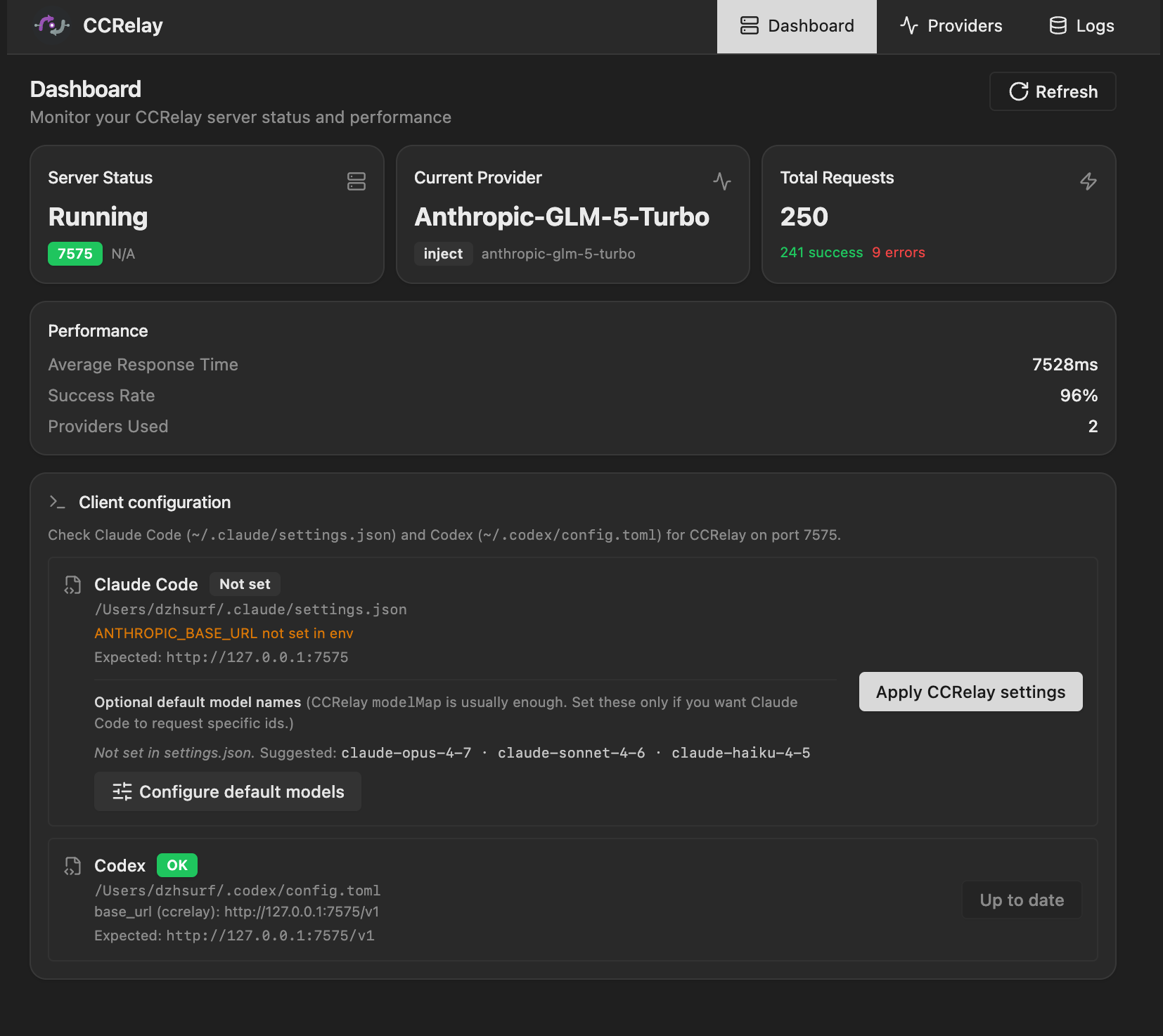
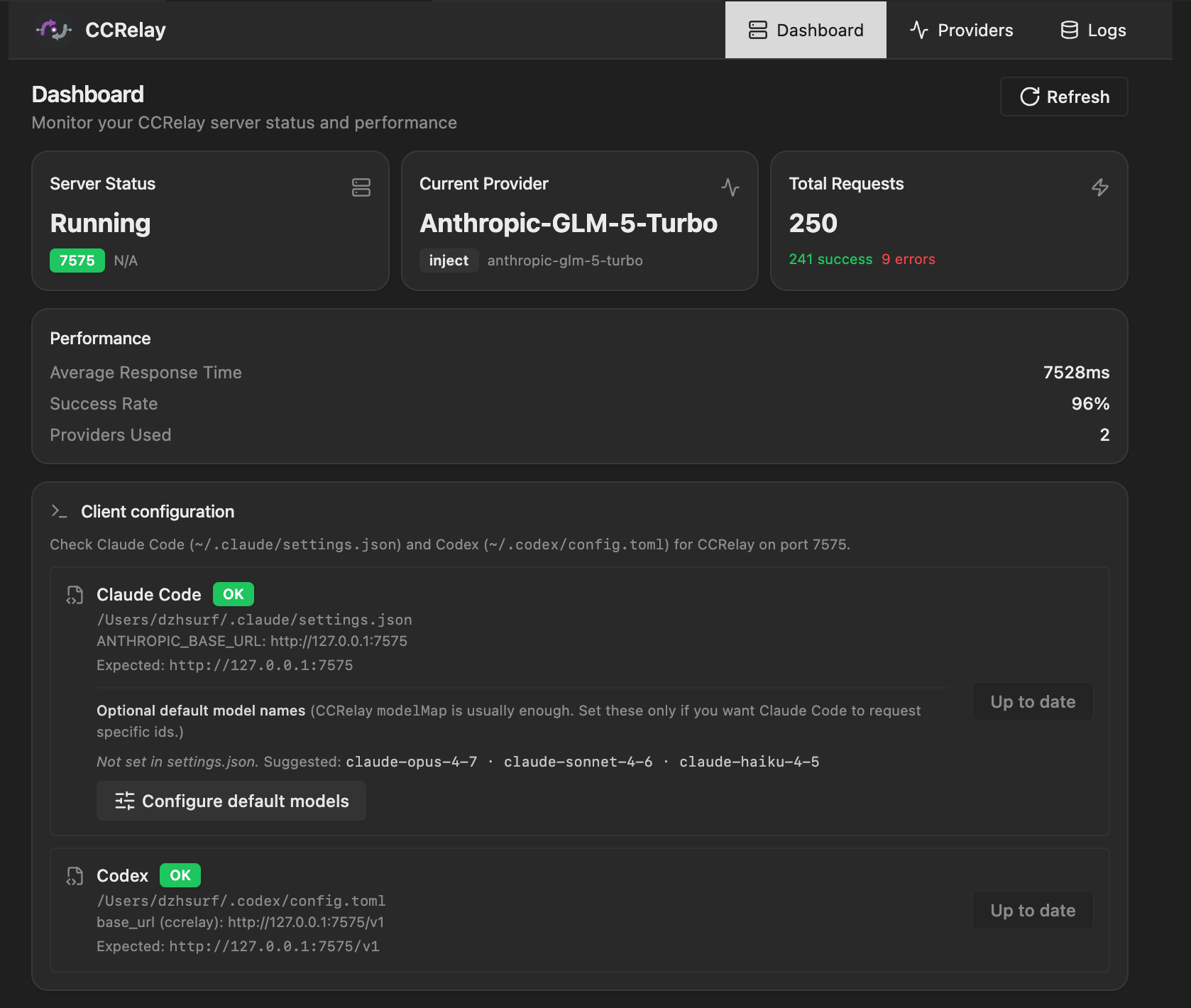
- Client configuration (optional): Set Claude Code’s
~/.claude/settings.jsonenvfrom the UI (e.g.ANTHROPIC_BASE_URL,ANTHROPIC_AUTH_TOKENplaceholder) and, if needed, per-tierANTHROPIC_DEFAULT_*_MODEL— see Claude Code. - Providers: View, switch, and manage providers. Multi-select with checkboxes to export selected providers as JSON; import merges by provider ID (overwrite existing, add new, never delete). The
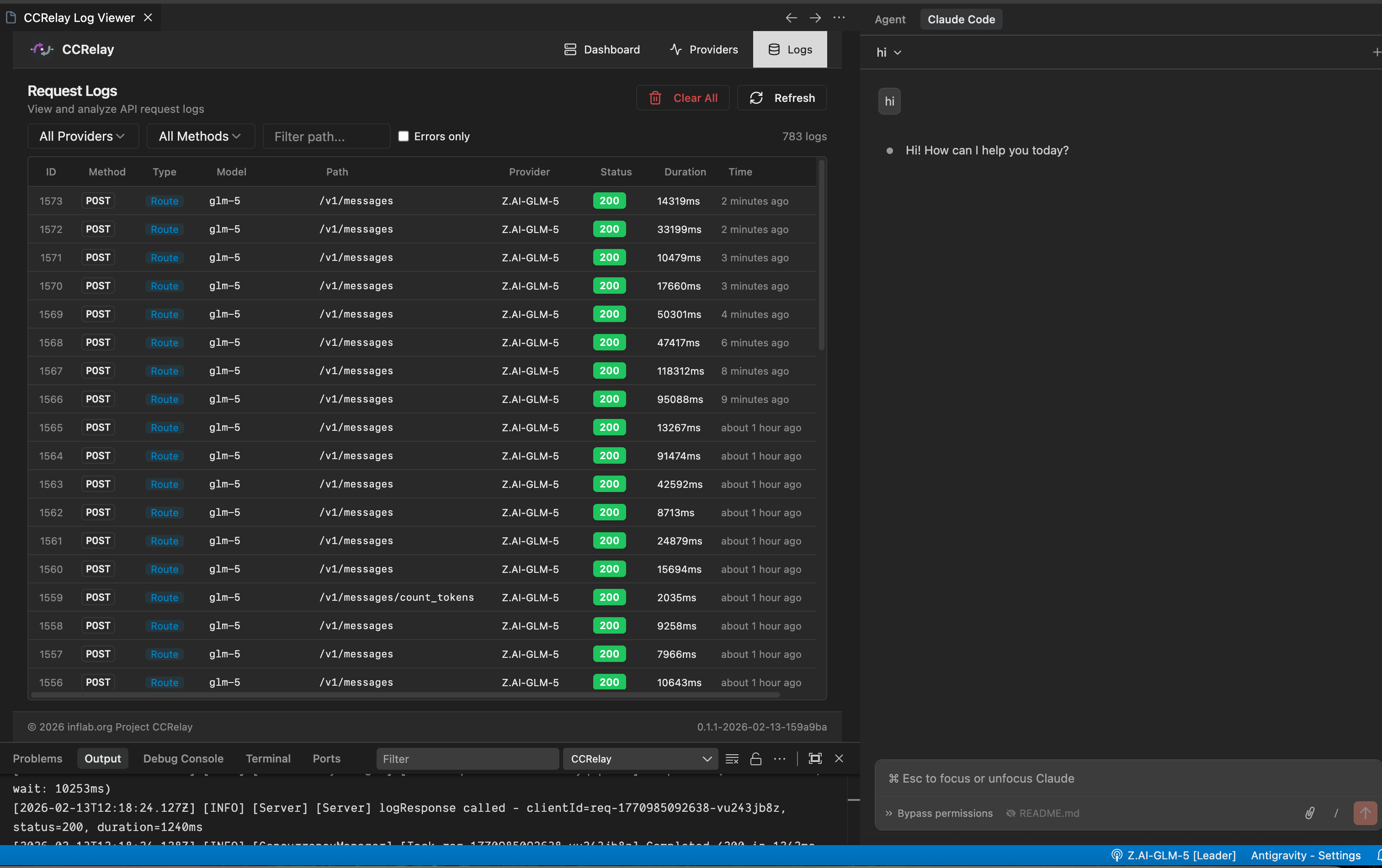
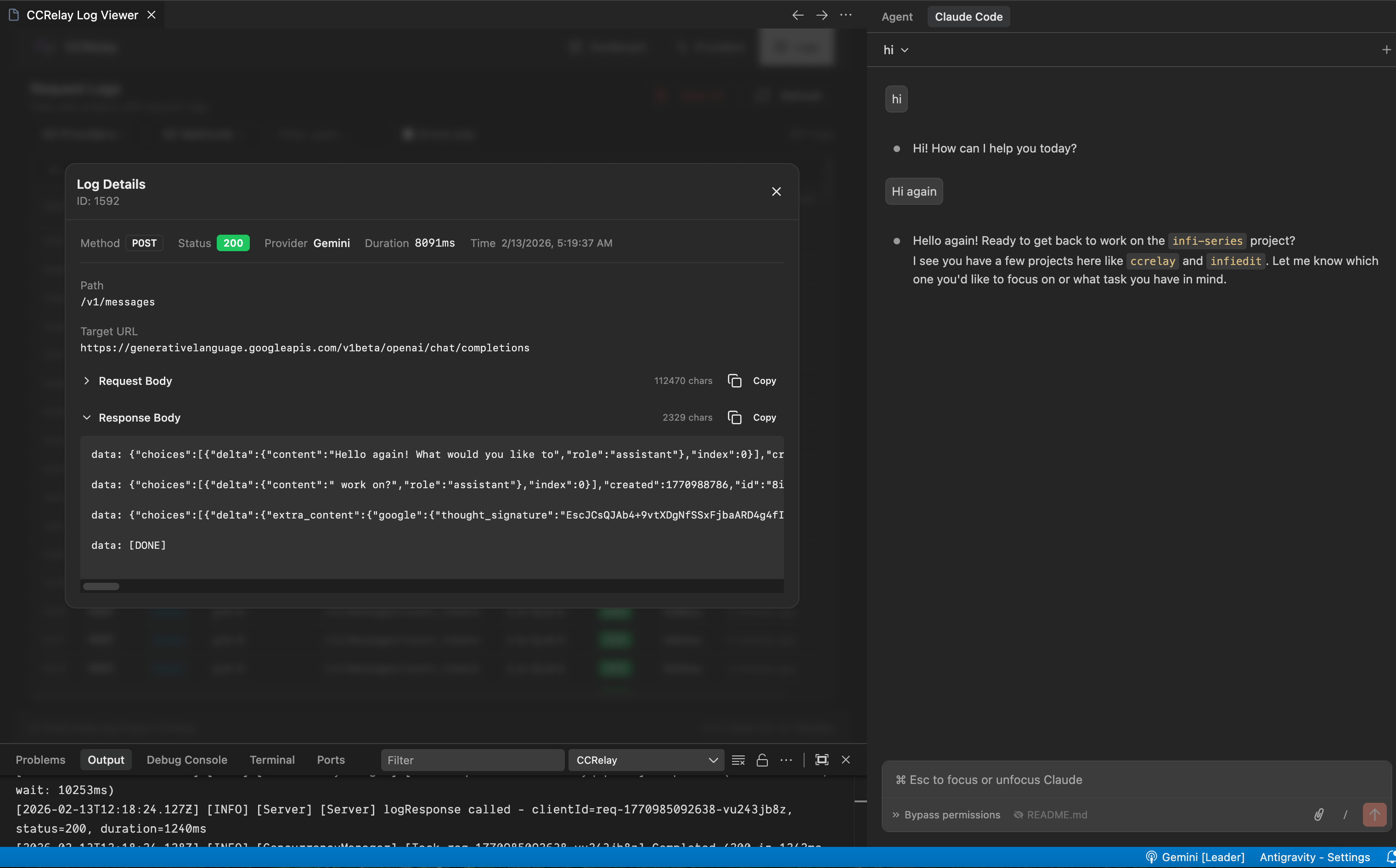
officialprovider cannot be selected for export. - Logs: Request/response log viewer (requires enabling log storage). The Logs tab is hidden when logging is disabled.
- Settings: Manage all YAML config groups (Logging, Concurrency, Server, Routing); routing and concurrency hot-reload—server and logging need a restart. Routing: the Routing and 404 note sits above the save row. Save routing is disabled when the editor matches disk (Up to date); Unsaved changes appears when the form is dirty. Restore default routing is on the same row, right-aligned—after the shared AlertDialog confirm it only updates the editor until you Save routing.
GET /ccrelay/api/configincludesroutingDefaults(bundled forward/block) for that preview.
Client configuration in the Web UI (same flows as the dashboard’s Client configuration / Configure default models actions):
Logs in the Web UI:
Access methods:
- Command Palette:
CCRelay: Open Dashboard - Browser:
http://127.0.0.1:7575/ccrelay/
Configuration
CCRelay uses a YAML configuration file (~/.ccrelay/config.yaml by default). The file is auto-created with defaults on first launch.
VSCode Settings
| Setting | Default | Description |
|---|---|---|
ccrelay.configPath |
~/.ccrelay/config.yaml |
Path to the YAML configuration file |
YAML Configuration File
Server Configuration
| Setting | Default | Description |
|---|---|---|
server.port |
7575 |
Proxy server port |
server.host |
127.0.0.1 |
Bind address |
server.autoStart |
true |
Auto-start server when extension loads |
Provider Configuration
| Setting | Default | Description |
|---|---|---|
defaultProvider |
official |
Default provider ID |
providers |
{...} |
Provider configurations |
Each provider supports:
name- Display namebaseUrl- API base URLmode-passthroughorinjectproviderType-anthropic(default),openai(full passthrough), oropenai_chat(Chat Completions only)apiKey- API key (inject mode, supports${ENV_VAR}environment variables)authHeader- Authorization header name (default:authorization)modelMap- Model name mappings (array of{pattern, model}, supports wildcards)vlModelMap- Vision model mappings (for multimodal requests)headers- Custom request headersenabled- Whether enabled (default:true)
Routing Configuration
| Setting | Default | Description |
|---|---|---|
configVersion |
"0.2.0" |
Config schema version. Legacy configs without this field are auto-migrated on load. |
routing.forward |
[{path, provider}, ...] |
Forward rules — first match wins. provider: "auto" = current active provider; or a specific provider ID (e.g. "official"). Unmatched paths return 404. |
routing.block |
[{path, response, code, condition?}, ...] |
Block rules — return custom response instead of forwarding. Checked before forward. Match is by path glob. Optional condition.providers (array of IDs) — rule applies only when the current provider is in this list; optional condition.providerNot — skip when current provider ID is in the list. |
Concurrency Control
| Setting | Default | Description |
|---|---|---|
concurrency.enabled |
true |
Enable concurrency queue |
concurrency.maxWorkers |
3 |
Maximum concurrent workers |
concurrency.maxQueueSize |
100 |
Maximum queue size (0 = unlimited) |
concurrency.requestTimeout |
60 |
Request timeout in queue (seconds, 0 = unlimited) |
concurrency.routes |
[] |
Per-route queue configuration |
Logging Storage
| Setting | Default | Description |
|---|---|---|
logging.enabled |
false |
Enable request log storage |
logging.database.type |
sqlite |
Database type (sqlite or postgres) |
SQLite Configuration:
| Setting | Default | Description |
|---|---|---|
logging.database.path |
"" |
Database file path (empty = ~/.ccrelay/logs.db) |
logging.database.sqlite3_executable |
"" |
Path to sqlite3 CLI (empty = resolve from PATH only) |
PostgreSQL Configuration:
| Setting | Default | Description |
|---|---|---|
logging.database.host |
localhost |
Server host |
logging.database.port |
5432 |
Server port |
logging.database.name |
ccrelay |
Database name |
logging.database.user |
"" |
Username |
logging.database.password |
"" |
Password (supports ${ENV_VAR}) |
logging.database.ssl |
false |
Enable SSL connection |
Complete Configuration Example
# CCRelay Configuration
# Docs: https://github.com/inflaborg/ccrelay#configuration
configVersion: "0.2.0"

# ==================== Server Configuration ====================
server:
  port: 7575                    # Proxy server port
  host: "127.0.0.1"             # Bind address
  autoStart: true               # Auto-start server when extension loads

# ==================== Provider Configuration ====================
providers:
  official:
    name: "Claude Official"
    baseUrl: "https://api.anthropic.com"
    mode: "passthrough"         # passthrough | inject
    providerType: "anthropic"   # anthropic | openai | openai_chat
    enabled: true

  glm:
    name: "Z.AI-GLM-5"
    baseUrl: "https://api.z.ai/api/anthropic"
    mode: "inject"
    apiKey: "${GLM_API_KEY}"    # Supports environment variables
    authHeader: "authorization"
    modelMap:
      - pattern: "claude-opus-*"
        model: "glm-5"
      - pattern: "claude-sonnet-*"
        model: "glm-5"
      - pattern: "claude-haiku-*"
        model: "glm-4.7"
    enabled: true

  gemini:
    name: "Gemini"
    baseUrl: "https://generativelanguage.googleapis.com/v1beta/openai"
    providerType: "openai"
    mode: "inject"
    apiKey: "${GEMINI_API_KEY}"
    modelMap:
      - pattern: "claude-*"
        model: "gemini-2.5-pro"
    enabled: true

# Default provider ID
defaultProvider: "official"

# ==================== Routing Configuration ====================
routing:
  # Forward rules: path → provider mapping. First match wins.
  # provider: "auto" = current active provider; or a specific provider ID.
  # Unmatched paths return 404.
  forward:
    - path: "/v1/messages"
      provider: "auto"
    - path: "/v1/chat/completions"
      provider: "auto"
    - path: "/v1/responses"
      provider: "auto"
    - path: "/v1/models"
      provider: "auto"
    - path: "/v1/messages/count_tokens"
      provider: "auto"
    - path: "/v1/users/*"
      provider: "official"
    - path: "/v1/organizations/*"
      provider: "official"

  # Block rules: return custom response instead of forwarding.
  # Checked before forward rules. Optional condition.providers limits to listed current-provider IDs;
  # optional condition.providerNot skips when the current ID is listed.
  block:
    - path: "/api/event_logging/*"
      response: ""
      code: 200
    - path: "/v1/messages/count_tokens"
      response: '{"input_tokens": 0}'
      code: 200

# ==================== Concurrency Control ====================
concurrency:
  enabled: true                 # Enable concurrency queue
  maxWorkers: 3                 # Maximum concurrent workers
  maxQueueSize: 100             # Maximum queue size (0=unlimited)
  requestTimeout: 60            # Request timeout in queue (seconds)

  # Per-route queue configuration
  routes:
    - pattern: "/v1/messages/count_tokens"
      name: "count_tokens"
      maxWorkers: 30
      maxQueueSize: 1000

# ==================== Logging Storage ====================
logging:
  enabled: true                 # Enable request log storage

  database:
    type: "sqlite"              # sqlite | postgres
    path: ""                    # Empty = ~/.ccrelay/logs.db

    # PostgreSQL configuration
    # type: "postgres"
    # host: "localhost"
    # port: 5432
    # name: "ccrelay"
    # user: ""
    # password: "${POSTGRES_PASSWORD}"
    # ssl: false
Note: YAML config supports both
camelCaseandsnake_casekeys.
Default merge behavior
On startup and when the config file is reconciled, CCRelay merges the bundled default template with your config.yaml: your values win for any key you set, and missing scalars/nested objects are filled from defaults. Three list sections merge by identity instead of replacing the whole array: routing.forward (by path), routing.block (by path + normalized condition), and concurrency.routes (by regex pattern) — your rows stay first, and any new default rows for keys you don’t already have are appended (handy when defaults gain routes in a release). If you omit one of those lists entirely, you get the full bundled list; an explicit empty list [] means “none” (defaults are not appended). Library users can call mergeFileConfigWithDefaults from @ccrelay/core for the same rules.
API Endpoints
The proxy server exposes management endpoints at /ccrelay/:
| Endpoint | Method | Description |
|---|---|---|
/ccrelay/api/status |
GET | Get current proxy status |
/ccrelay/api/providers |
GET | List all available providers |
/ccrelay/api/switch/{id} |
GET | Switch to a provider by ID |
/ccrelay/api/switch |
POST | Switch provider (JSON body) |
/ccrelay/api/providers/export |
POST | Export providers by ID (JSON body { ids }), returns full configs including API keys |
/ccrelay/api/providers/import |
POST | Import providers (JSON body { providers }), merge by ID — overwrite existing, add new |
/ccrelay/api/queue |
GET | Get queue statistics |
/ccrelay/api/logs |
GET | Get request logs (when logging enabled) |
/ccrelay/api/config |
GET, PATCH | GET: settings sections from YAML (logging, concurrency, server, routing) plus routingDefaults (bundled forward/block for the Routing Restore default preview). PATCH: JSON { "section": "<name>", "data": {…} } merges into that section; routing/concurrency reload live; server / logging may need restart. |
/ccrelay/ws |
WebSocket | Real-time sync for Followers |
/ccrelay/ |
GET | Web UI dashboard |
All other requests are proxied to the current provider.
Commands
| Command | ID | Description |
|---|---|---|
| CCRelay: Show Menu | ccrelay.showMenu |
Show main menu |
| CCRelay: Switch Provider | ccrelay.switchProvider |
Open provider picker |
| CCRelay: Start Server | ccrelay.startServer |
Manually start the server |
| CCRelay: Stop Server | ccrelay.stopServer |
Stop the server |
| CCRelay: Open Settings | ccrelay.openSettings |
Open extension settings |
| CCRelay: Show Logs | ccrelay.showLogs |
View output logs |
| CCRelay: Clear Logs | ccrelay.clearLogs |
Clear output logs |
| CCRelay: Open Dashboard | ccrelay.openWebUI |
Open dashboard panel |
Development
# Compile TypeScript
npm run compile

# Watch for changes and recompile
npm run watch

# Run ESLint
npm run lint

# Auto-fix lint issues
npm run lint:fix

# Format code
npm run format

# Run unit tests
npm run test

# Run integration tests
npm run test:integration

# Run all tests
npm run test:all

# Run tests with coverage
npm run test:coverage

# Build VSIX package
npm run package

# Desktop tray app (links against the same ~/.ccrelay config + leader election)
npm run desktop:start

# Desktop distributables — run on the OS you ship for (runs desktop:build under the hood)
npm run desktop:pack:mac
npm run desktop:pack:win

# Advanced: electron-builder arch on current machine after `npm run desktop:build`
# (cd packages/desktop && npx electron-builder --mac --x64 && npx electron-builder --mac --arm64)

# Development build
npm run build:dev

# Production build
npm run build:prod
Project Structure
ccrelay/
├── packages/
│   ├── core/src/             # Shared runtime (proxy, API, config, converters, …)
│   ├── vscode/
│   │   ├── src/              # VS Code extension entry + webviews/status bar
│   │   ├── assets/         # Icons & activity bar SVG
│   │   └── out/              # Build output (extension.cjs, web/, worker)
│   └── desktop/
│       ├── src/              # Electron tray + dashboard BrowserWindow (main process)
│       ├── assets/           # App/tray icons; buildResources for electron-builder
│       └── out/              # Bundled main.js + database-worker.cjs
├── web/                      # Web UI (React + Vite)
├── tests/                    # Vitest unit + integration tests
├── scripts/                  # esbuild, version, packaging helpers
└── dists/                    # Packaged .vsix (from `npm run package`)
File Locations
| File | Location | Description |
|---|---|---|
| YAML Config | ~/.ccrelay/config.yaml |
Main configuration file (auto-created) |
| Runtime state | ~/.ccrelay/state.json |
Persisted active provider id (shared by extension + desktop) |
| IPC leader lock | ~/.ccrelay/ccrelay-lock.sock (Unix/macOS); \\.\pipe\ccrelay-lock (Windows) |
Cross-process Leader election (extension + desktop) |
| Log database | ~/.ccrelay/logs.db |
Request/response logs (when enabled; Leader writes only in multi-instance) |
TODO
- Desktop (macOS) distribution: Ship Apple Developer ID signing and notarization via
electron-builderin CI (GitHub Secrets: certificate export asCSC_LINK/CSC_KEY_PASSWORD, and Apple notary API credentials — e.g.APPLE_ID,APPLE_APP_SPECIFIC_PASSWORD,APPLE_TEAM_ID). That removes Gatekeeper/quarantine prompts for downloaded builds. Optionally re-enable DMG once signing works (CI DMGs were invalid without a proper signing pipeline).
Contributing
Issues and Pull Requests are welcome!
Acknowledgments
This project is 100% AI-generated code. Special thanks to:
- Claude Code - The AI coding assistant that wrote all the code
- GLM - GLM models (glm-4.7, later glm-5) served as the backend provider
License
Copyright (c) 2026 inflab.org
Reviews (0)
Sign in to leave a review.
Leave a reviewNo results found