masala
Health Gecti
- License — License: MIT
- Description — Repository has a description
- Active repo — Last push 0 days ago
- Community trust — 85 GitHub stars
Code Gecti
- Code scan — Scanned 12 files during light audit, no dangerous patterns found
Permissions Gecti
- Permissions — No dangerous permissions requested
Bu listing icin henuz AI raporu yok.
A research workspace where an agent works beside you: chat, PDFs, notebooks and files in one dock, plus custom panes the agent builds on request.
Masala
A research workspace where the agent works beside you: chat, files, PDFs and notebooks in one dock, and the agent can also create custom viewers and apps when necessary
This is an early build for testers. Expect rough edges, and feel free to raise issues.
Masala was called Panel until September 2026. If you ran it under that name, see Upgrading from Panel.
Before you start
Node 22.18 or newer (or 24.12 and newer)
uv, which fetches the Python it needs (3.12 or newer) by itself
An agent CLI, at least one of:
- Claude Code, installed and signed in: run
claudeonce and log in. - Codex, installed with
npm install -g @openai/codex, plus an OpenAI API key (see The OpenAI key). Masala keeps Codex's settings in~/Masala/codex, apart from your own~/.codex, so signing in to Codex elsewhere does not sign Masala in.
The chat agent and the Modules, such as the literature review, run through one of these.
- Claude Code, installed and signed in: run
Install and start
pnpm install
uv sync
pnpm start
Then open http://localhost:4173. pnpm start builds the app first, so the first start takes a minute. Ctrl-C stops everything it started.
Where your things are
~/Masala/masala.dbholds your conversations and everything the agents did.~/Masala/workspacesis where new Workspaces are created, unless you pick another folder.
Both are outside this folder, so deleting or re-cloning the repo keeps them.
What works
- Chatting with an agent that can read and write files, and asks before running a tool.
- Workspaces: a folder the agent works in, with its own chats and saved layout.
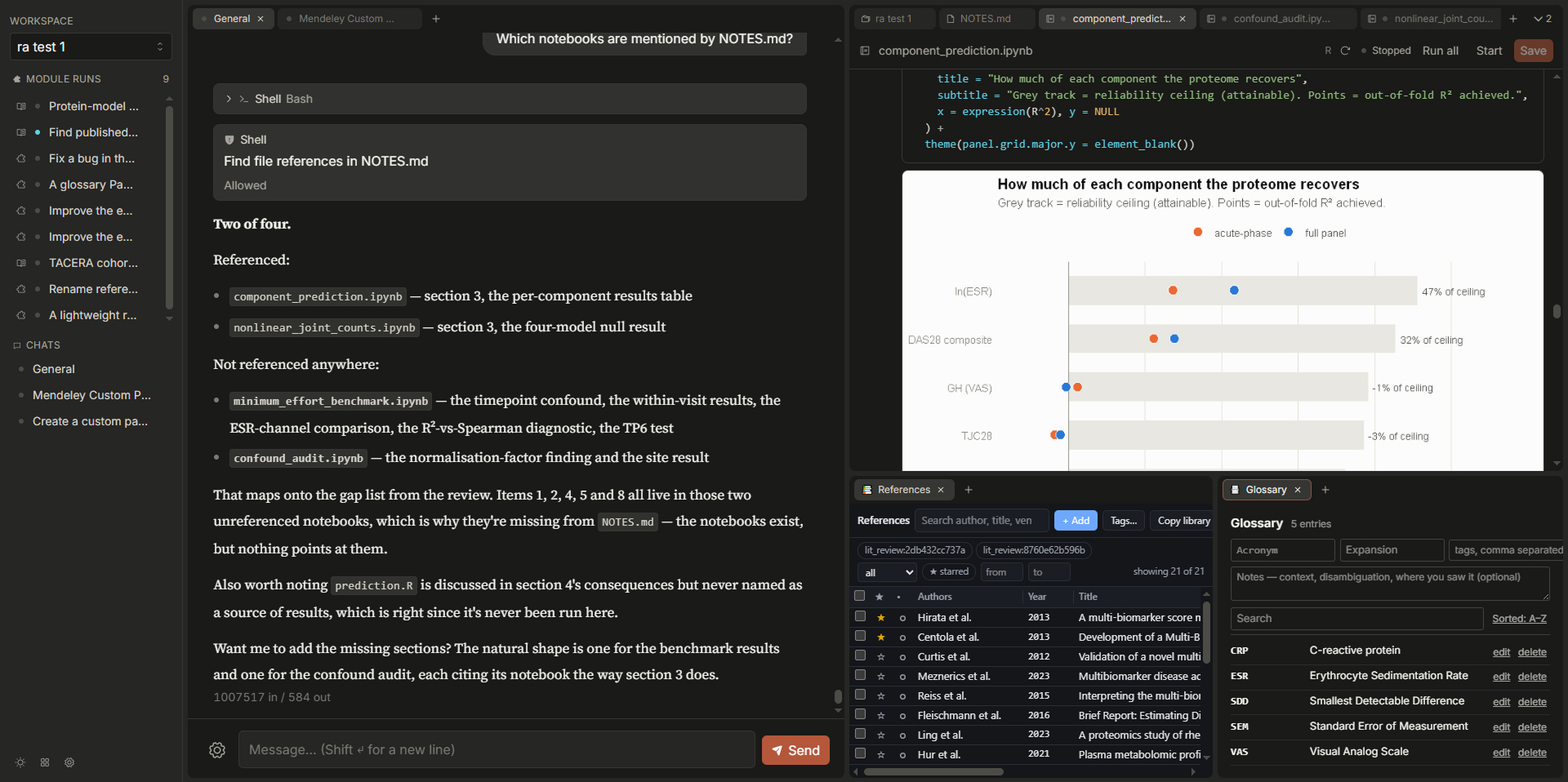
- Panes for files, PDFs, markdown and Jupyter notebooks. Notebooks run against a real kernel, and you and the agent can edit the same one.
- Long-running commands in the background, which you can watch and stop.
- Panes the agent writes for you when you ask to see something a built-in Pane cannot show.
- Changing one of those Panes from its own tab: click the pencil and say what should change.
- A literature review: ask the chat for one, or start it from a new tab under "Or run a Module".
What doesn't yet
- Most Modules are started from a plain JSON form. Only the one that writes Panes has a form of its own.
- A Module's final result is not shown in its Pane yet, only the progress it reported and a one-line summary.
- The hypothesis Modules have no view of their own, so their results can be hard to read.
- On Windows, Codex asks before every command it runs, even in "Auto in the workspace", because Masala does not set up Codex's sandbox. "Allow everything" stops the questions, and also lets Codex run anything.
The OpenAI key (optional)
Copy apps/server/.env.example to apps/server/.env and set OPENAI_API_KEY. The key does two things:
- It adds "OpenAI API" to the agent picker, for chat and tools.
- It signs in Codex, if Codex is installed. Codex can then chat and run every Module.
The "OpenAI API" agent does not run literature reviews or the hypothesis Modules: those need an agent that can search the web, and only Claude Code and Codex can. Without a key, the picker shows OpenAI API and Codex as not set up, which is expected.
Use the Modules from your own agent (optional)
Masala's Modules (the literature review, the hypothesis Modules, and the ones that write and manage Panes) are also offered as an MCP server. Any agent that speaks MCP over stdio can call them, such as Claude Code or Codex in your own terminal.
Masala has to be running (pnpm start), because each call runs inside it. The call shows up in the app as a Module Run, and what it writes lands in the Workspace.
Replace /path/to/masala with where you cloned this repo.
Claude Code:
claude mcp add masala -- uv run --directory /path/to/masala/apps/server python -m masala_server.modules.mcp_main
Codex, in ~/.codex/config.toml:
[mcp_servers.masala]
command = "uv"
args = ["run", "--directory", "/path/to/masala/apps/server", "python", "-m", "masala_server.modules.mcp_main"]
- Which Workspace. Calls go to the Workspace called
Default. Add--workspace "My project"(a name or an id) to the end of the command to pick another. If the name is not found, the server lists the Workspaces it knows. - Which agent does the work. A Module runs on Masala's own agent (Claude Code or Codex, whichever it can start), not on the agent that called it. The Module's cost is billed there.
- It can take minutes. A literature review or a new Pane takes several minutes, and the call waits for it. If your agent gives up on a tool call before then, raise its MCP tool timeout.
Upgrading from Panel
Your conversations, Workspaces and Panes carry over, but they have to be moved by hand once. Stop Masala first, and back up ~/Panel/panel.db.
macOS and Linux, from this folder:
mv ~/Panel ~/Masala
mv ~/Masala/panel.db ~/Masala/masala.db
rm -f ~/Masala/panel.db.lock
for d in ~/Masala/workspaces/*/.panel; do mv "$d" "${d%.panel}.masala"; done
find ~/Masala/workspaces/*/.masala/panes ~/Masala/panes \( -name node_modules -prune \) -o -type f \( -name '*.vue' -o -name '*.ts' -o -name '*.js' \) \
  -exec perl -pi -e 's/from ([\x27"])panel\1/from $1masala$1/g; s/\busePanel\b/useHost/g' {} + 2>/dev/null
uv run --directory apps/server python -c "import sqlite3, pathlib; sqlite3.connect(pathlib.Path.home() / 'Masala' / 'masala.db').executescript(open('../../scripts/upgrade-from-panel.sql').read())"
Windows, in PowerShell, from this folder:
Move-Item ~\Panel ~\Masala
Rename-Item ~\Masala\panel.db masala.db
Remove-Item ~\Masala\panel.db.lock -ErrorAction SilentlyContinue
Get-ChildItem ~\Masala\workspaces -Directory | ForEach-Object {
  $old = Join-Path $_.FullName '.panel'
  if (Test-Path $old) { Rename-Item $old '.masala' }
}
Get-ChildItem ~\Masala\workspaces -Directory | ForEach-Object { Join-Path $_.FullName '.masala\panes' } |
  Where-Object { Test-Path $_ } | Get-ChildItem -Recurse -File -Include *.vue,*.ts,*.js |
  Where-Object { $_.FullName -notmatch '\\node_modules\\' } | ForEach-Object {
    $text = Get-Content $_.FullName -Raw
    $new  = $text -replace "from (['""])panel\1", 'from $1masala$1' -replace '\busePanel\b', 'useHost'
    if ($new -ne $text) { [IO.File]::WriteAllText($_.FullName, $new) }
  }
uv run --directory apps/server python -c "import sqlite3, pathlib; sqlite3.connect(pathlib.Path.home() / 'Masala' / 'masala.db').executescript(open('../../scripts/upgrade-from-panel.sql').read())"
What each step does:
- The folder holds your database, your own Panes, the Pane cache and Codex's sign-in.
.panelbecomes.masalainside each Workspace. If you made a Workspace outside~/Masala/workspaces, rename its.paneland rewrite its Panes the same way.- Your Panes import from
'masala'now, andusePanel()isuseHost(). Each rebuilds the first time it opens. - The database stores each Workspace's full path and the paths of old results.
scripts/upgrade-from-panel.sqlpoints them at the new folders, so Workspaces open and old images still show.
Also:
- In
apps/server/.env, rename anyPANEL_setting toMASALA_. If you setPANEL_DB_PATH, run the SQL against that file instead. - If you added the MCP server to your own agent, add it again with the commands above and remove the old
panelone. - On Windows, if you set up Codex's sandbox, grant read on
~/Masalaand~/Masala/workspacesagain. - The browser forgets its layout and theme once.
If something's wrong
- "Masala couldn't reach its server." The server half is not running. Check the terminal
pnpm startis in, then press Retry. - An agent shows as not set up. The reason is written under the message box.
- A port is already in use, or the app answers but never loads: run
pnpm dev:doctor. It says what is holding each port and how to clear it.
Licence
The idea
UI
The UI has multiple configurable windows, called Panes, that can display things ranging from image files, data files, code, as well as chat sessions. This is critical for researchers who often have to context switch between different types of files.
A default set of Panes are provided for common use cases. But custom Panes can also be added by humans and agents, such as a PDB viewer or SQLite visualizer.
Module Protocol
Modules are similar to Skills but with additional definitions to support inter-module workflows and integration with the workspace.
Specifically, Modules have typed definitions for Inputs, Outputs, and Intermediates.
Inputs and Outputs are straightforward. Intermediates refer to objects that provide observability, such as the Chain-of-Thought or scratchpad for an agentic Module, or may be intermediate outputs in a multi-stage Module. These are especially important for processes that need transparency or long-running jobs that should show progress.
Having typed definitions for these enable validation at runtime and make it easier for humans and agents to develop custom Modules for downstream tasks and Panes for visualizations.
Data Abstraction Layer
A data abstraction layer (DAL) bridges in-memory and filesystem objects. A DAL helps to map a URI to either an in-memory store or a local file, so that the Module just has to concern itself with the manipulation of the object.
Yorumlar (0)
Yorum birakmak icin giris yap.
Yorum birakSonuc bulunamadi