inkshell
Health Warn
- License — License: Apache-2.0
- Description — Repository has a description
- Active repo — Last push 0 days ago
- Low visibility — Only 7 GitHub stars
Code Fail
- rm -rf — Recursive force deletion command in install.sh
Permissions Pass
- Permissions — No dangerous permissions requested
No AI report is available for this listing yet.
A tabbed desktop workspace for Claude Code. The CLI, with style. Every session in a tab, every project in one window — a thin shell around your own claude binary, never a fork.




InkShell is for people who already live in the claude CLI and have no intention
of leaving it, but who juggle several projects at once and want a desktop around
them. Every session in a pane, every project in one window, each with its own
configuration, so work and personal never share credentials or history and
switching between them costs nothing.
It stays a thin shell around the real thing. InkShell never reimplements Claude
Code: it spawns your own locally-installed claude inside a pseudo-terminal, so
you are always running the original, stable CLI, and a feature reaches you the
day it ships to the terminal rather than whenever we catch up. No fork, no
repackaged binary, no version lag. Close InkShell and your CLI is exactly where
you left it.
InkShell is a community project and is not affiliated with Anthropic.
"Claude" and "Claude Code" are trademarks of Anthropic.
✨ Features
- A split workspace, not a tab strip: show 1, 2 or 4 panes at once and
drag a chat from the sidebar — or from another pane — into any of them. Panes
minimize and maximize without touching the process behind them, so a session you
push off-screen keeps running and comes back exactly as you left it. - Every project in one window: the sidebar is a tree — each project, with its
open chats, terminals and files nested underneath, a badge showing which pane
each one currently sits in, and drag-to-reorder for the list itself. Any project
row starts a chat or a terminal in that project in one click, whether or not
it's the one currently selected. - History that is Claude Code's own: InkShell reads the CLI's transcript store
(~/.claude/projects) to list past sessions, names each one with the sameai-titlethe CLI uses, resumes it in a pane, or deletes it from the list. - Per-project configuration: each project carries an accent color that tints
the chrome and every pane belonging to it, plus its own Claude config directory
(CLAUDE_CONFIG_DIR). Point a project at a separate config dir and its sessions,
history, and context meter all follow it. No shell aliases, no.envrcjuggling. - Plain terminals, same window: open your own
$SHELLin the project
directory as just another pane — for thegit rebaseor the dev server you
didn't want to spend a chat on. - Model & effort switchers: one pick types
/modelor/effortinto the live
session. The model shown is the one actually backing it, read from the
transcript rather than guessed. - Context meter: a fuel gauge that mirrors the CLI's context indicator, live
from the active session's transcript, measured against that model's own context
window. Every pane carries its own reading in its title bar. - Git panel: stage, unstage, commit, and push without leaving the window;
browse the branch history with unpushed commits marked, and open any diff, file
or commit as a pane of its own. Commit messages can be drafted by Claude with
one click. - Files, diffs, and a real editor: the project's tree with modified files
marked, files opening in a Monaco editor you can actually edit and save, and
diffs and commits rendered as Monaco diffs. A single click peeks at a file, a
double click pins it. File paths Claude mentions in its output are clickable —
verified against the disk, so only real files light up. - Quick Open: fuzzy-search every file in the active project and open it
straight into the editor.
🖼️ A look around
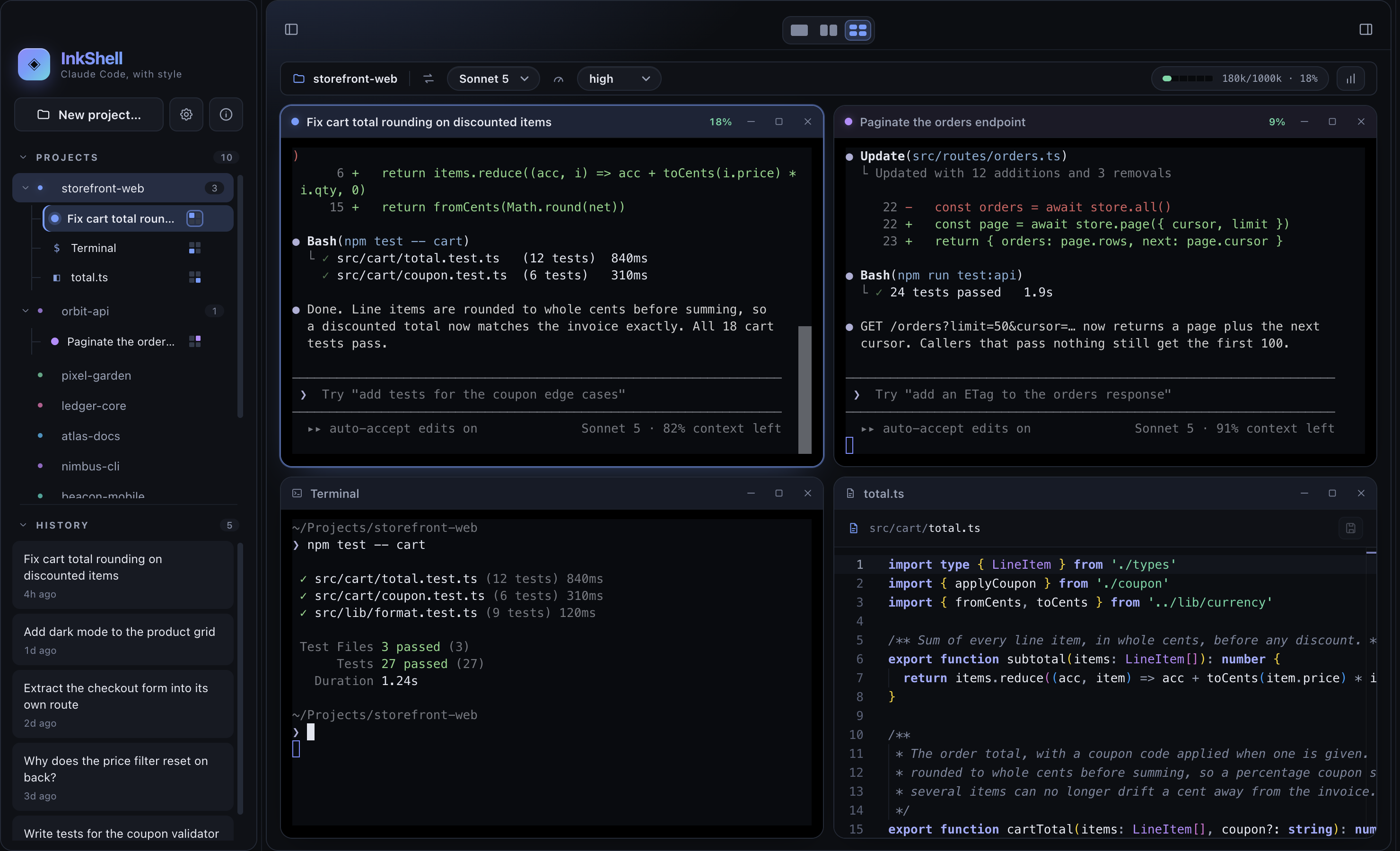
Four panes, one window — two chats from different projects, a terminal, and a file in the editor. Drag any of them between panes; what you push off-screen keeps running.
 Projects & history — every project in one tree, its open items nested underneath, and the past sessions of whichever one is selected.
|
 Diffs as panes — open any changed file, commit, or diff from the git panel and read it beside the session that wrote it.
|
 Per-project settings — name, accent color, and the Claude config directory this project runs against.
|
 Settings — the model list is editable (name, alias, id prefix, context window), so a newly released model is a config edit rather than a new release.
|
⌨️ Shortcuts
| Keys | Action |
|---|---|
⌘T / Ctrl+T |
New chat in the selected project |
⌘W / Ctrl+W |
Minimize the focused pane (the session keeps running) |
⌘P / Ctrl+P |
Quick Open — fuzzy file search in the active project |
⌘S / Ctrl+S |
Save the file open in the editor |
| Middle click | On a pane: minimize it · on a sidebar item: close it |
| Right click | On a project: its settings · on a history card: delete the chat |
📦 Requirements
- Claude Code installed (the
claudecommand must run in your terminal). InkShell asks your login shell
where it is and also checks the usual install locations, so it still finds the
CLI when the app is opened from the Finder with a truncatedPATH. A
non-standard install can be pointed at directly withINKSHELL_CLAUDE_BIN. - Node.js ≥ 20 and npm to build from source.
📥 Install (macOS)
curl -fsSL https://raw.githubusercontent.com/inkshell/inkshell/main/install.sh | sh
That downloads the latest release
— a universal build that runs on Apple Silicon or Intel — and installs it into/Applications (or ~/Applications when that isn't writable).
A Windows version is coming soon. Until it lands, Windows and Linux users
can run InkShell from source — see Getting started below.
Why a script and not a plain download? InkShell builds aren't code-signed yet,
and macOS quarantines anything a browser downloads, so opening the app that
way greets you with a misleading "InkShell is damaged and can't be opened"
dialog. curl downloads are never quarantined, so the script installs an app
that just opens. (You can read the script first — it's ~70
lines of sh.)
Download the .zip from the
Releases page, unzip it,
move InkShell.app to /Applications, then clear the quarantine flag your
browser attached to the download:
xattr -dr com.apple.quarantine /Applications/InkShell.app
Without that last step, macOS shows the "damaged" dialog above — the file is
fine; the message is Gatekeeper's way of saying "unsigned and quarantined".
🚀 Getting started
# 1. Clone
git clone https://github.com/inkshell/inkshell.git
cd inkshell

# 2. Install (also rebuilds the native node-pty module for Electron)
npm install

# 3. Run in development (hot reload)
npm run dev
To produce a distributable app for your platform:
npm run pack:mac     # .zip
npm run pack:win     # NSIS installer
npm run pack:linux   # AppImage + .deb
macOS is the only target that ships today. The Windows and Linux builds are
wired up but haven't been tested yet — if you try one, an issue (or a PR)
telling us how it went is very welcome.
🧠 How it works
InkShell is a standard three-process Electron app:
| Process | Responsibility |
|---|---|
| main | Spawns claude (or your $SHELL) in a pseudo-terminal (node-pty), reads config & history, drives git, owns the window. |
| preload | A tiny contextBridge exposing a typed, sandboxed window.inkshell API. |
| renderer | React UI: the pane grid, sidebar tree, git/files dock, an xterm.js view per session and a Monaco editor per file. |
Two rules the code holds to: the renderer never touches the OS except through
the typed IPC contract in src/shared, and Claude Code's own data is read,
never written — ~/.claude/projects is the CLI's, InkShell keeps its own
config in ~/.inkshell/config.json.
See docs/ARCHITECTURE.md for the full picture.
🎨 Theming
Every color, radius, and glow lives in CSS variables at the top ofsrc/renderer/src/styles/theme.css.
Re-theming InkShell is a one-file edit.
🗺️ Roadmap
Today InkShell speaks Claude Code, and only Claude Code. The design doesn't
depend on that, though: the app drives a real CLI agent inside a pseudo-terminal
and reads the transcripts that agent already writes, which is a shape more than
one tool fits.
Codex and GitHub Copilot are the next targets. The goal isn't a lowest
common denominator across all three, but one window where each project opens the
agent it actually calls for.
🤝 Contributing
Contributions are very welcome. See CONTRIBUTING.md and our
Code of Conduct. Good first issues are labeledgood first issue.
📄 License
Licensed under the Apache License 2.0. See NOTICE for
attribution and trademark details.
Reviews (0)
Sign in to leave a review.
Leave a reviewNo results found