ClaudeUsageWidget
Health Uyari
- License — License: MIT
- Description — Repository has a description
- Active repo — Last push 0 days ago
- Low visibility — Only 5 GitHub stars
Code Basarisiz
- rm -rf — Recursive force deletion command in macos/build.sh
- network request — Outbound network request in src/renderer.js
- child_process — Shell command execution capability in src/server.js
- exec() — Shell command execution in src/server.js
- os.homedir — User home directory access in src/server.js
- fs module — File system access in src/server.js
- network request — Outbound network request in src/server.js
Permissions Gecti
- Permissions — No dangerous permissions requested
Bu listing icin henuz AI raporu yok.
Real-time Claude Code usage in your macOS menu bar — burn-rate ETA · 7-day sparkline · custom alerts · CSV/JSON export · 4 languages (EN/KO/JA/ZH)
Claude Usage Widget
Track your Claude Code usage in real-time
Glassmorphism desktop widget for macOS & Windows
Homepage · Downloads · Blog · Issues
Features
- Real-time Monitoring — 5-hour session usage & 7-day weekly limits with a spring-animated session ring
- Burn-rate ETA — Predicts when you'll hit the session limit at current pace
- 7-day Sparkline — Usage trend strip in the Weekly Limits card (history persisted locally)
- Custom Alert Thresholds — Two sliders replace the fixed 80% / 90%; the menu-bar icon pulses at the lower one
- Rich Menu-Bar Tooltip — Hover the icon for current %, ETA, weekly usage, and last sync without opening the popover
- CSV / JSON Export — Send your 7-day history to a spreadsheet or notebook (Settings → Data)
- Multi-account — Point the widget at a non-default
~/.claude/.credentials.jsonto monitor a second account - Menu Bar Format — Off /
%/ Time / Both (segmented picker) - 3-step Onboarding — Intro →
claude logincopy button → notifications opt-in - Friendly Error Banner — Classified errors (credentials / rate-limit / network / server) with Retry & Open Terminal actions
- Auto-Update via Sparkle — One-click "Check for Updates" inside the app (macOS, EdDSA-signed)
- Launch at Login — Optional auto-start when you log in to macOS
- Universal Binary — Native on Apple Silicon and Intel Macs (macOS 13+)
- Rate-Limit Safe — ±10% jitter between syncs and 2×→16× exponential backoff on 429
- Light & Dark Theme — Off-white surface in light mode, dark surface in dark mode
- 에이투지체 (A2Z) Typography — Clean Korean-optimised font system across the popover
- 4 Languages — English · 한국어 · 日本語 · 中文 (switch instantly inside Settings)
- Accessibility — VoiceOver labels, ⌘R refresh, ⌘Q quit, ⌘, settings, system Reduce Motion honoured
- Zero Token Cost — Uses OAuth usage API only, no Claude messages sent
- Auto Sync — Configurable intervals: 1m / 5m / 10m / 30m / 1h / manual
- Tested — 22-test pure-logic suite (
swift test) for ETA, sparkline, thresholds, formatting - CI/CD — GitHub Actions for tests + auto build/sign/notarize/release/appcast on
v*-macostags - Claude Code Buddy — Official terminal pet integration (18 species, 5 rarity tiers, ASCII art)
- Cross Platform — Native Swift on macOS, Node.js web widget on Windows & Linux
Screenshots
| Web Widget | macOS Desktop Widget |
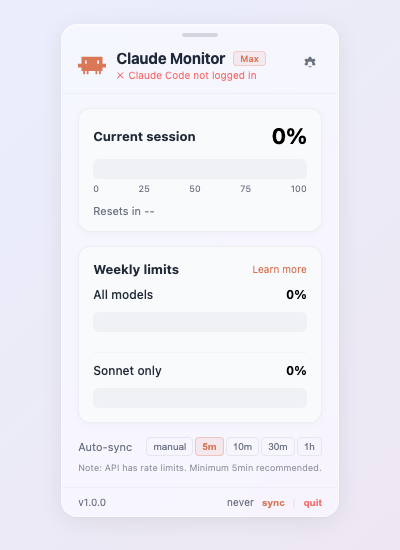 |
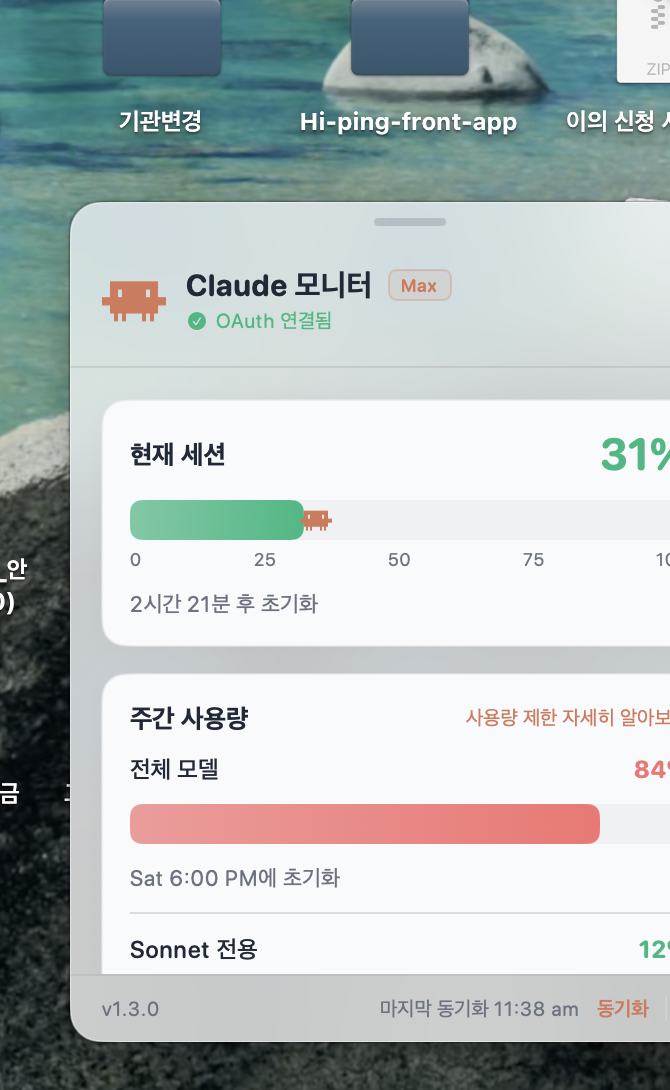 |
Claude Code Buddy
The widget integrates the official Claude Code Buddy terminal pet system.
  /buddy        → Hatch your buddy
  /buddy pet    → Pet your buddy (mood +1)
  /buddy off    → Put buddy to sleep
18 species — Each buddy is deterministically generated from your account ID. You can't choose or reroll.
  Cat         Dragon        Duck          Ghost         Owl
 /\_/\       /\_/\_          __          .___.        {o,o}
( · · )     (  · · )       >(··)__     | · · |      /)___)
 > ^ <       \ ~~ /         (  __)>    |  o  |       " "
             /|  |\          ||         \^^^/
5 rarity tiers — Common (60%) · Uncommon (25%) · Rare (10%) · Epic (4%) · Legendary (1%)
5 stats — DEBUGGING · PATIENCE · CHAOS · WISDOM · SNARK
1% Shiny variant with sparkle effects
Installation
macOS (Native App)
Requires macOS 13.0+ · Apple Silicon & Intel (Universal Binary)
Download the latest signed & notarized DMG from Releases, drag the app to /Applications, and launch.
✅ Signed with
Developer ID Application: INNO-HI Inc.and notarized by Apple.
Future updates ship via in-app Settings → Check for Updates (Sparkle).
Or build from source (requires an Apple Developer account for full signing):
git clone https://github.com/INNO-HI/ClaudeUsageWidget.git
cd ClaudeUsageWidget/macos
bash build.sh
open "build/Claude Usage Widget.app"
The macOS Swift source lives under
macos/. Sparkle 2.x is vendored atmacos/vendor/Sparkle.framework.
Windows / Linux (Cross-platform)
Requires Node.js 18+
git clone https://github.com/INNO-HI/ClaudeUsageWidget.git
cd ClaudeUsageWidget
node src/server.js
Opens automatically at http://127.0.0.1:19522.
Prerequisites
- Install Claude Code
- Run
claude loginin your terminal - Launch the widget
Credentials are read from ~/.claude/.credentials.json (or macOS Keychain).
How It Works
┌─────────────┐     OAuth Token     ┌──────────────────────┐
│  Widget App  │ ──────────────────► │  Anthropic Usage API │
│  (local)     │ ◄────────────────── │  /api/oauth/usage    │
└─────────────┘    Usage Data (%)    └──────────────────────┘
       │
       ▼
   ~/.claude-usage-widget-history.json   (7-day rolling, exportable)
• Reads OAuth credentials from ~/.claude/.credentials.json (or any user-picked JSON for multi-account use)
• Calls GET https://api.anthropic.com/api/oauth/usage
• Auto-refreshes expired tokens; ±10% jitter + 2×→16× exponential backoff on 429
• Stores each successful sync as a 7-day rolling history file used by the Sparkline and Burn-rate ETA
• No messages sent to Claude → zero token cost
Configuration
All settings live behind the gear icon in the popover.
| Setting | Options | Default |
|---|---|---|
| Language | English · 한국어 · 日本語 · 中文 | English |
| Credentials file | ~/.claude/.credentials.json (default) or any user-picked JSON |
default |
| Auto-sync | manual / 1m / 5m / 10m / 30m / 1h | 5m |
| Launch at Login | on / off | off |
| Menu Bar Text | Off / % / Time / Both | % |
| Compact mode | on / off | off |
| Keep on Top | on / off | off |
| Show Buddy | on / off | on |
| Usage Alerts | on / off | off |
| Alert thresholds (1st / 2nd) | 50–95% / 60–99% sliders | 80% / 90% |
| Data export | CSV · JSON · Clear history | — |
| Check for Updates | one-click (Sparkle) | — |
| Buddy commands | /buddy · /buddy pet · /buddy feed · /buddy off | off |
Troubleshooting
"Claude Widget is damaged and can't be opened. You should move it to the Trash."
This is macOS Gatekeeper rejecting a quarantined file whose Developer ID signature didn't survive the download (a known issue with some browsers and older builds — see #1). The current release is signed (Developer ID) and notarized, but if you still hit the message:
Move the app to
/Applicationsfirst (don't open from the DMG).Strip the quarantine attribute:
xattr -dr com.apple.quarantine "/Applications/Claude Usage Widget.app"Re-launch — you may be asked once for permission, then it stays approved.
If that still fails, the download was likely corrupted — re-download from Releases and verify the DMG size matches the release listing.
Widget shows -- or Token expired
Your Claude Code OAuth token has expired. Run in Terminal:
claude login
Then click Refresh in the widget settings.
Launch at Login isn't sticking
macOS may have queued a permission prompt under System Settings → General → Login Items. Enable the entry there, or toggle the option off/on inside the widget.
No notifications appearing
First time you enable Usage Alerts, macOS asks for notification permission. If you missed it: System Settings → Notifications → Claude Usage Widget → Allow Notifications.
"Check for Updates" says nothing happens
You're already on the latest version. Sparkle silently confirms when you're up to date.
Change Log
See CHANGELOG.md for the full version history.
v1.4.1 (latest)
- Fixed repeated macOS Keychain access prompts — credentials are now cached in memory between syncs; the Keychain is only queried again when the token actually expires, the server returns 401/403, or the user explicitly hits Refresh
v1.4.0
- Added CSV / JSON export of usage history (Settings → Data) + Clear history
- Added Multi-account credential path — point the widget at a non-default credentials file
- Added Rich menu-bar tooltip — hover the icon for current %, ETA, weekly %, last sync
- Added GitHub Actions CI for tests + release automation (auto build/sign/notarize/DMG/appcast on tag push)
- Added Mac App Store submission scaffolding — entitlements + dual-build guide
- Added 22-test unit suite (
swift test) for pure logic (ETA, sparkline, thresholds, formatting) - Added Homebrew Cask submission guide
v1.3.0
- Added Custom alert thresholds — two sliders replace fixed 80/90%
- Added 3-step onboarding with
claude logincopy button + notifications opt-in - Added Friendly error banner (credentials / rate-limit / network / server) with Retry & Open Terminal
- Added Japanese (日本語) and Simplified Chinese (中文) localisation — picker now EN / KO / JA / ZH
- Pulse + ring glow now follow the user's lower notification threshold
- Internal refactor:
Theme.swift,BuddyViews.swift,OnboardingView.swiftsplit out
v1.2.0
- Added Burn-rate ETA — predicts when the session limit will be hit
- Added 7-day Sparkline trend in the Weekly Limits card
- Added Menu Bar Text format — Off /
%/ Time / Both - Added Warning pulse — menu bar icon breathes at ≥80%, session ring gets a soft glow halo
- Added Skeleton loading + spring-animated session ring
- Refreshed Onboarding with animated ring hero and gradient CTA
- New 에이투지체 (A2Z) typography across the popover, wider 400 px layout, larger ring & progress bars
- Switched popover background from glassmorphism blur to solid off-white / dark surface
- Added accessibility labels,
⌘Qquit shortcut, system Reduce Motion support - Fixed deprecated
NSWorkspace.launchApplicationand stale footer version label
v1.1.0
- Added Sparkle auto-update (signed via EdDSA)
- Added Launch at Login option
- Added Mini / Full mode toggle (hide menu-bar %)
- Added Usage Alerts (80% / 90% session thresholds)
- Added Universal Binary (Intel + Apple Silicon)
- Added API rate-limit safety — ±10% jitter and 2×→16× exponential backoff on 429
- Build pipeline now produces signed & notarized DMG
v1.0.0
- Initial public release with menu-bar widget, glassmorphism UI, OAuth-based usage monitoring
Tech Stack
| Platform | Stack |
|---|---|
| macOS (native) | Swift 5.9, SwiftUI, AppKit, ServiceManagement, UserNotifications, Security (Keychain), Sparkle 2.x |
| Pure logic library | Swift Package (macos/Package.swift) — testable on any platform |
| Cross-platform | Node.js, HTML/CSS/JS |
| CI | GitHub Actions: swift test on every push/PR, build/sign/notarize/release on v*-macos tags |
Development
# Run the test suite (22 tests covering ETA, sparkline, thresholds, formatting)
cd macos
swift test

# Build a local unsigned .app for development
SKIP_SIGN=1 ./build.sh
open "build/Claude Usage Widget.app"

# Full signed + notarized release build (needs Developer ID identity + notary profile)
./build.sh
See:
macos/MAS-SUBMISSION.md— Mac App Store submission roadmapmacos/HOMEBREW-PR-GUIDE.md— Homebrew Cask submission instructions.github/workflows/release-macos.yml— required CI secrets
License
MIT
Built with ♥ for Claude Code users
Yorumlar (0)
Yorum birakmak icin giris yap.
Yorum birakSonuc bulunamadi