claude-dispatcher
Health Warn
- License — License: GPL-3.0
- Description — Repository has a description
- Active repo — Last push 0 days ago
- Low visibility — Only 9 GitHub stars
Code Pass
- Code scan — Scanned 4 files during light audit, no dangerous patterns found
Permissions Pass
- Permissions — No dangerous permissions requested
No AI report is available for this listing yet.
Terminal cockpit for running a fleet of Claude Code sessions across all your repos — dispatch work, watch what ships, and act on what's blocked, from one screen.
Claude Dispatcher
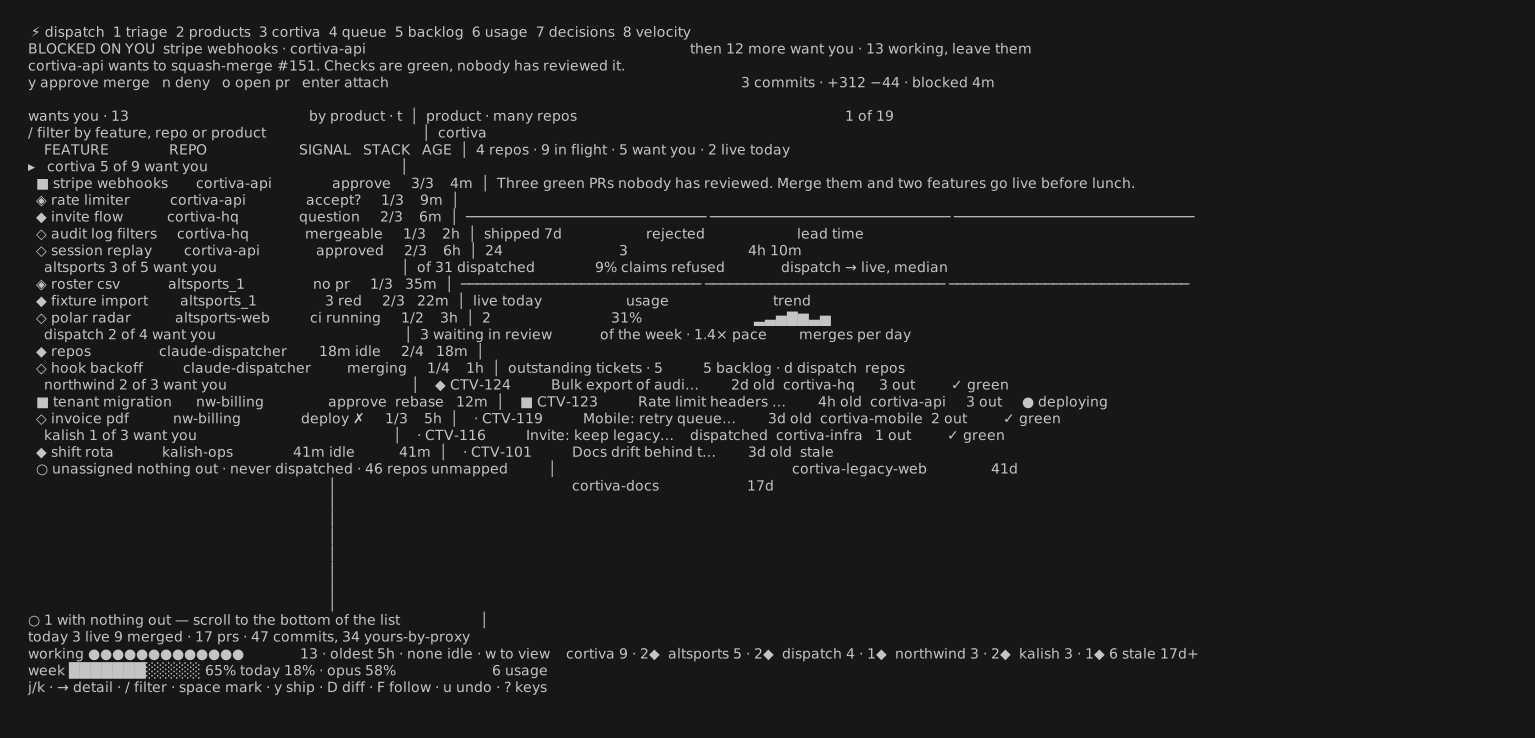
A terminal cockpit for running a factory of Claude Code sessions across all your repos. Dispatch work to many repositories at once, then see — at a glance, on one screen — what's working, what shipped, and the one thing that's actually blocked waiting on you.
It sits above your repos, not inside any one of them. Every dispatcher is a real claude session in its own tmux; the cockpit is a fast, keyboard-driven viewer over all of them.
Why
You can run ten Claude Code sessions. You can't watch ten terminals. The cockpit collapses the whole fleet into one triage surface: it surfaces the blocked and the finished, keeps the busy ones out of your way, and hands the terminal straight to tmux when you want to jump in.
- One screen, the whole factory — dispatchers, PRs, deploys, backlog, usage and velocity across every repo and product.
- Real data, live — dispatch records +
git+gh+ Linear + Azure Boards, refreshed on an fsnotify watch and a poll. Nothing is mocked. - Keyboard-first — eight lenses on the number keys, one key per action, a
:command palette, and?for the map. - Done means live — a feature stays open until it's actually deployed, not merely merged.
- Tokens, not dollars — built for a Claude subscription; usage speaks in tokens and effort.
Eight lenses
Switch with the number keys. Each lens is a different question about the same factory.
| lens | the question it answers | |
|---|---|---|
1 |
triage | what is blocked, claims done, or waiting on me right now? |
2 |
products | how is each product (many repos) doing? |
3 |
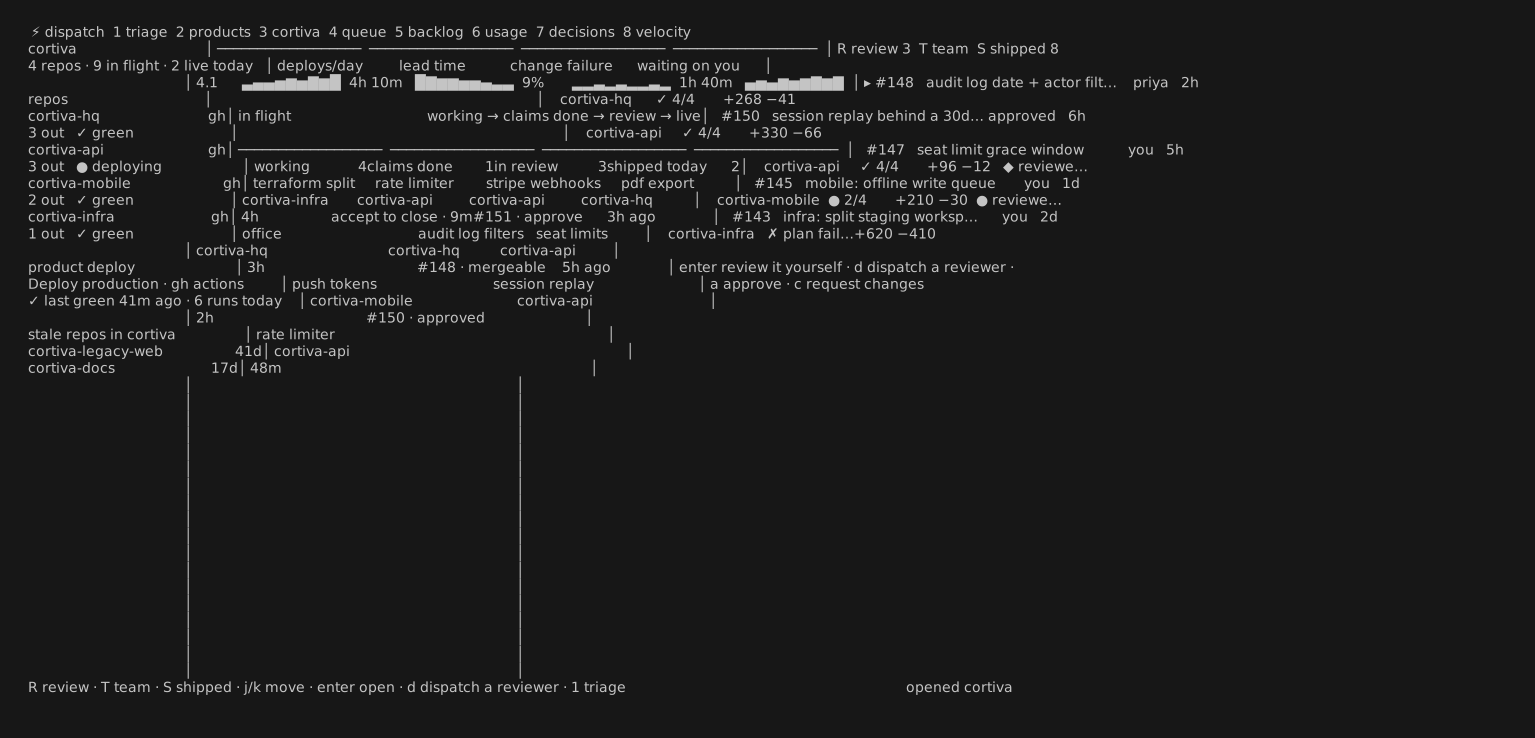
product | inside one product: velocity, in-flight lanes, review / team / shipped |
4 |
queue | what's drafted and ready to dispatch as a batch? |
5 |
backlog | GitHub Issues · Linear · Azure Boards, in one list |
6 |
usage | 5-hour and weekly consumption vs my learned limits |
7 |
decisions | ADRs and decision records per repo |
8 |
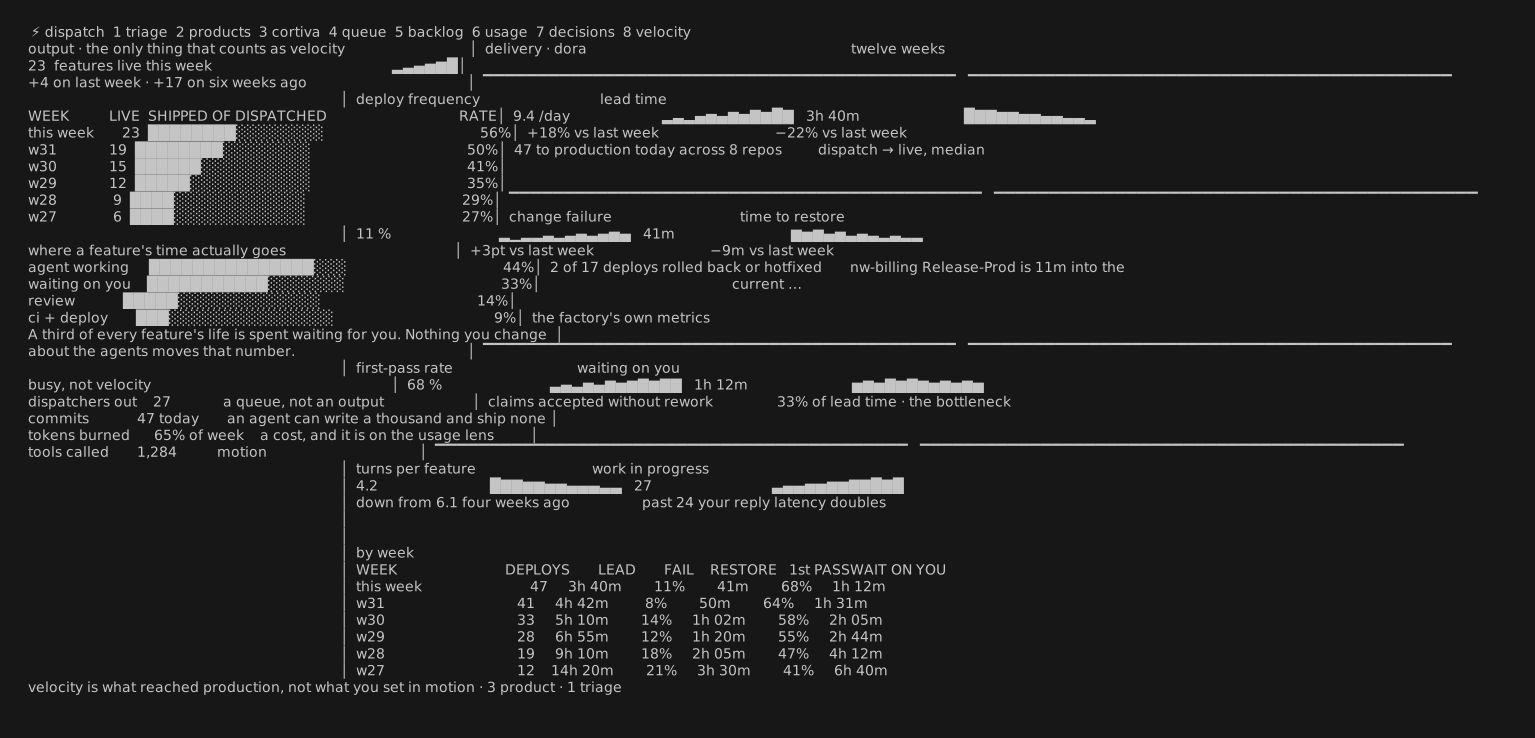
velocity | DORA + what actually reached production |
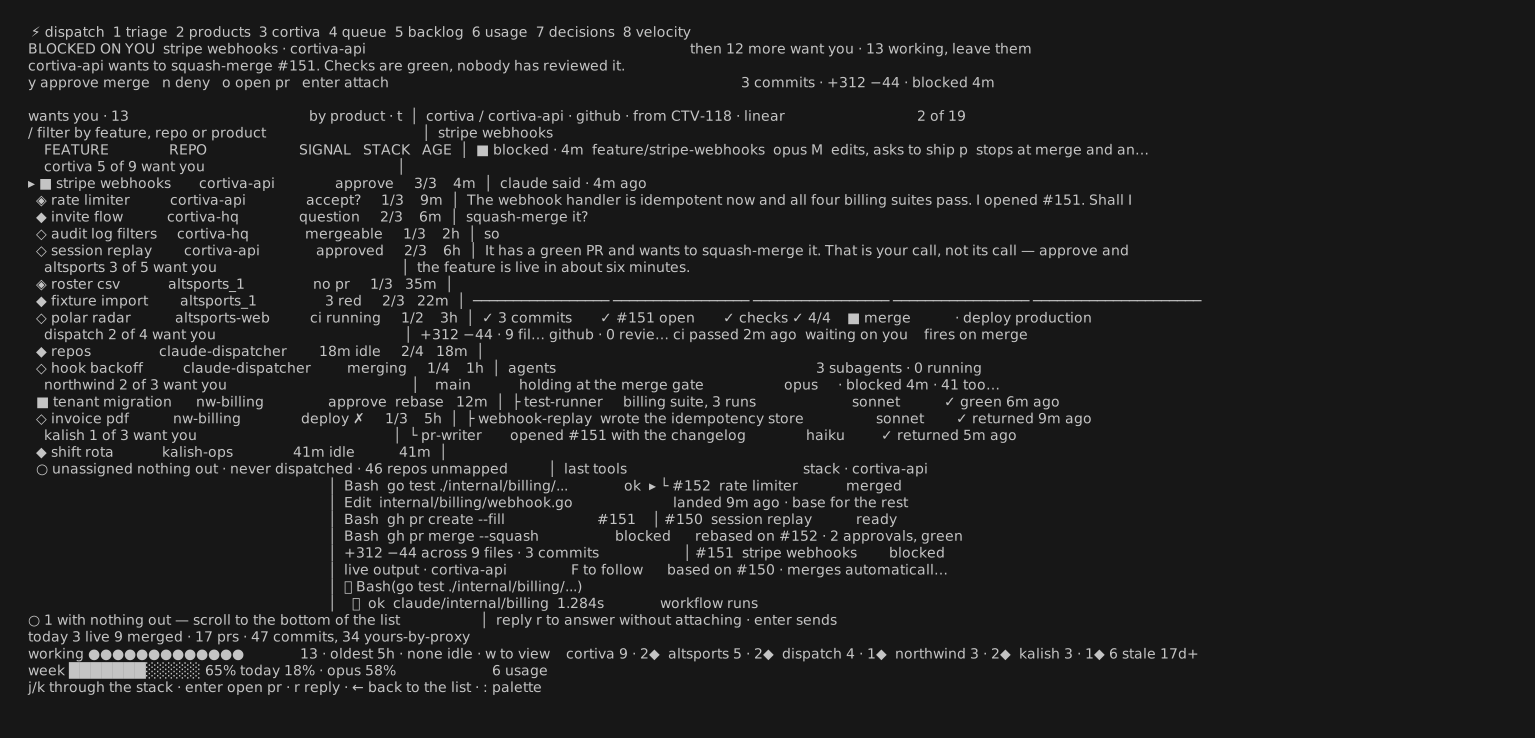
The triage detail pane reads the whole story of a dispatcher — what Claude said, the commit → PR → checks → merge → deploy chain, the PR stack, the live output tail — and lets you reply, attach, or ship without leaving it.
A product in one view — velocity tiles, in-flight kanban lanes, and review / team / shipped tabs:
Velocity — DORA delivery metrics beside what actually shipped, because a thousand commits that never merge isn't velocity:
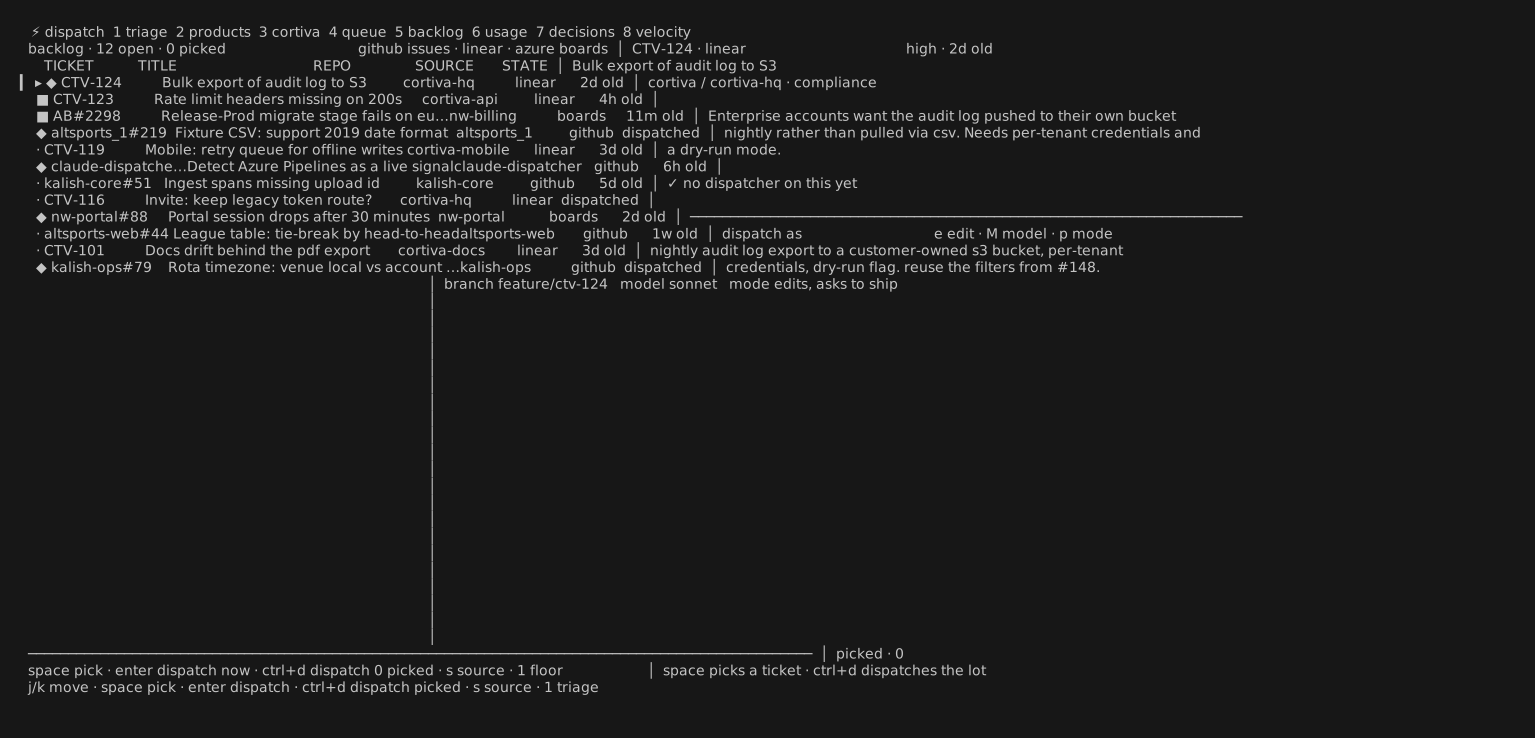
One backlog across GitHub Issues, Linear and Azure Boards — pick, then dispatch:
Usage limits, learned
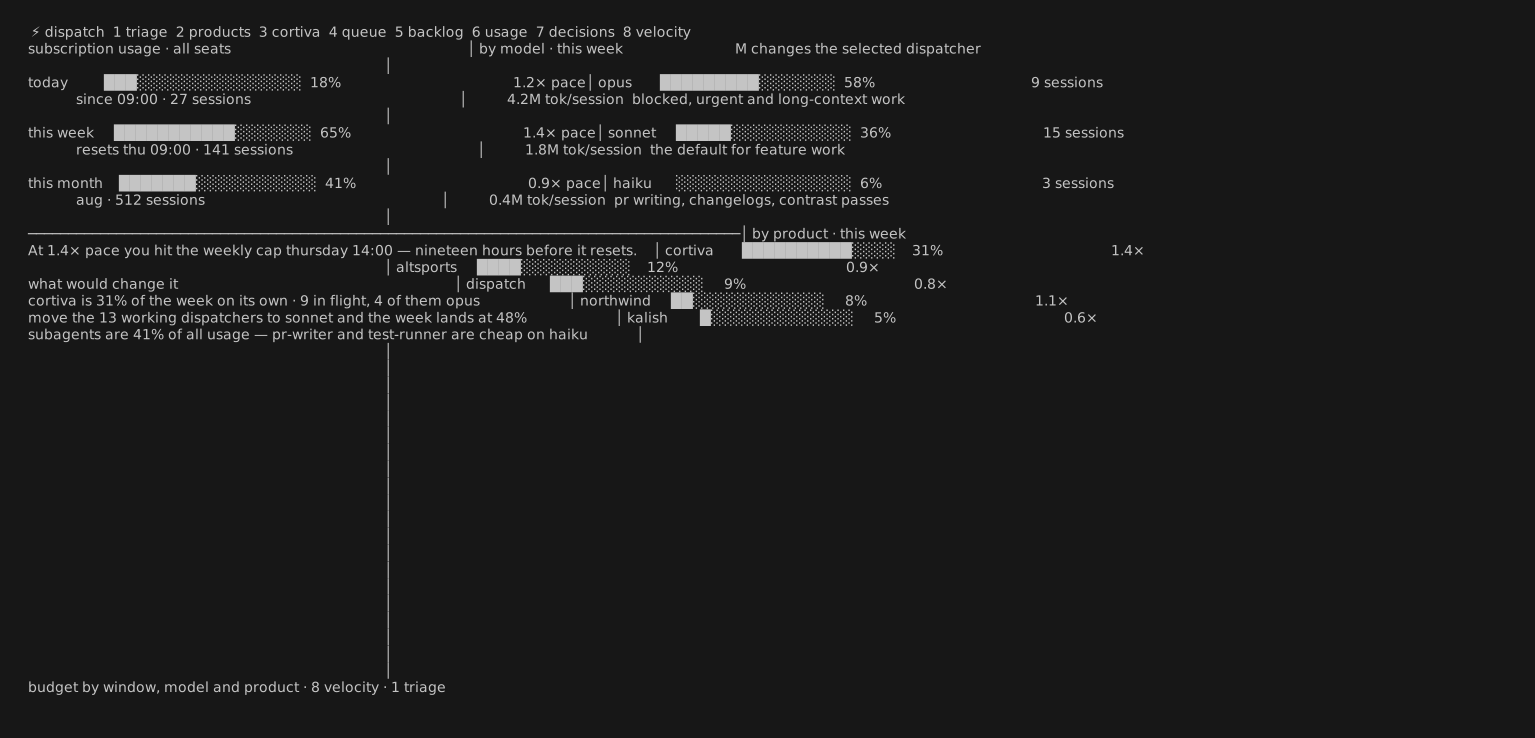
There is no API for a Claude subscription's limits — so the cockpit learns them. It measures your 5-hour rolling and weekly consumption from the session transcripts, and treats the usage at each real rate-limit (429) as that window's cap: assume that's the limit, until we sail past it and it's fine — then raise it. The estimate persists and sharpens over time.
Actions are real
Everything on the triage lens is wired to the live session, behind a confirm where it matters:
enterattach the tmux session at full fidelity (Ctrl-\to come back)rreply into the session without attachingyship —gh pr merge --squash --auto, then mark livexkill the session ·enteron a backlog ticket dispatches it
Install
Via Homebrew:
brew install innovology/tap/claude-dispatcher
claude-dispatcher init     # config + repo scan + status hook (asks first)
claude-dispatcher v2       # open the v2 cockpit
Or from source (needs Go):
make install # builds to ~/.local/bin/claude-dispatcher
~/.local/bin must be on your PATH ahead of Homebrew's, or a brew-installed copy keeps winning:
echo 'export PATH="$HOME/.local/bin:$PATH"' >> ~/.zshrc
The status hook embeds the absolute path of the binary that ran
init. If you switch install methods, re-runinitso the hook points at the new binary.
Requirements: macOS or Linux · tmux · git · the claude CLI · gh (for PR/deploy signals). Linear and Azure Boards are optional and off until configured.
Windows
Recommended: run under WSL2. The full experience — real tmux, in-place attach, reply-without-attaching, the whole cockpit — depends on tmux as the process supervisor, and tmux is a Linux tool. Install a WSL2 distro (Ubuntu is fine), then use the Linux build exactly as documented above (brew via Linuxbrew, or make install). This is the recommended way to run the dispatcher on a Windows machine.
Native preview (winget / scoop). A native Windows build is published for early access once the publishers below are configured. It is honestly a preview: without tmux there is no shared session multiplexer, so each dispatch opens in its own console window, and in-place attach and reply are not yet supported — the tmux-grade session model for Windows is still being built. For the real cockpit experience today, use WSL2, and watch claude-dispatcher v2 as the native session model lands.
Once configured, install natively with:
winget install Innovology.claude-dispatcher
# or
scoop bucket add innovology https://github.com/Innovology/scoop-bucket
scoop install claude-dispatcher
Quickstart
claude-dispatcher init     # first run: writes config, scans for repos, installs the hook
claude-dispatcher v2       # open the cockpit
Press 1–8 to move between lenses, j/k to move, → into the detail, / to filter, : for the command palette, ? for all keys, and , for settings.
Settings
Press , in the cockpit (or :settings) to edit — written straight to ~/.config/claude-dispatcher/config.toml:
- scan roots — the directories scanned (3 levels deep) for git repos
- products — map product names to repos for the roll-up (
[products]in the file) - Linear API key — turns on the Linear backlog source (or set
LINEAR_API_KEY) - Azure org / project — turns on Azure Boards (needs the
azCLI; or setAZURE_DEVOPS_ORG/AZURE_DEVOPS_PROJECT) - weekly token budget — optional; when set, the usage lens gauges against it, otherwise it shows learned caps and raw tokens
Environment variables override file values, so a secret can stay out of the file.
How it works
- Each dispatcher is an interactive
claudesession inside its own tmux session (disp-<slug>), started on afeature/<slug>branch. Sessions survive cockpit restarts; the cockpit is a stateless viewer over~/.local/state/claude-dispatcher/. - Status comes from one global Claude Code lifecycle hook (installed by
initinto~/.claude/settings.json). It maps events to states: working, needs you, blocked, done, exited. - Commits are attributed to dispatchers by provenance — each dispatch records the SHAs its feature branch produced (base tip at launch → branch tip). No trailers in your git history.
- Done means live: when a PR merges, the tracker watches the repo's deploy workflow (auto-detected by name, or set in
[deploy_workflows]) and flips the feature to done on a green run. Repos with no deploy workflow count merge as live. - The layout is responsive: wide terminals tile into three panes, narrower ones collapse to essentials.
Keys (v2 cockpit)
| key | action |
|---|---|
1–8 |
switch lens (triage · products · product · queue · backlog · usage · decisions · velocity) |
j / k · → / ← |
move · into the detail pane and back |
/ · t · w |
filter · change grouping · show the working ones |
enter / a |
attach the selected dispatcher's tmux session |
r · y · x |
reply · ship (squash-merge) · kill — the last two ask first |
D · F |
diff of everything it changed · follow the live output |
, · : · ? |
settings · command palette · all keys |
q |
quit |
The classic single-view cockpit is still there as the default claude-dispatcher (no subcommand); v2 opens the eight-lens redesign.
Development
make check runs build, vet, lint (golangci-lint), and the race-enabled test suite — the gates CI runs on every PR.
Releasing
Merging a PR into main cuts the next patch release automatically (goreleaser builds macOS/Linux tarballs, Windows .zips, and the Homebrew cask). Put release: minor / release: major in the merge commit for a bigger bump, or [skip release] to merge without releasing; doc-only merges skip on their own. Releases need a HOMEBREW_TAP_TOKEN secret (a fine-grained PAT with contents:write on Innovology/homebrew-tap):
gh secret set HOMEBREW_TAP_TOKEN -R Innovology/claude-dispatcher
Without it the Release workflow succeeds but tags and publishes nothing, so a merge never half-releases.
Windows publishing (optional)
The scoop and winget publishers are wired into .goreleaser.yml but stay a no-op until you set their tokens — the existing macOS/Linux + Homebrew release keeps working unchanged with only HOMEBREW_TAP_TOKEN. To turn on native Windows publishing, set up each publish repo exactly like the Homebrew tap:
scoop — create an
Innovology/scoop-bucketrepo, then add a fine-grained PAT with contents:write on it:gh secret set SCOOP_BUCKET_TOKEN -R Innovology/claude-dispatcherwinget (optional) — fork
microsoft/winget-pkgstoInnovology/winget-pkgs, then add a PAT with contents:write on the fork (goreleaser opens the manifest PR against it under publisherInnovology):gh secret set WINGET_TOKEN -R Innovology/claude-dispatcher
Each publisher's skip_upload is templated on its token, so an unset token means the manifest is generated but never pushed — a release can never half-publish.
Troubleshooting
- Everything stuck on "launching" — the hook isn't firing. Re-run
claude-dispatcher init; confirm~/.claude/settings.jsonpoints at the installed binary. needs youvsblockedlag — those rely on theNotificationhook matchers (idle_prompt/permission_prompt);Stopcovers turn completion regardless.- Backlog empty — set a Linear key / Azure org in settings, and check
gh auth statusfor GitHub Issues. - Rebuilds must go to the same path (
make install) because the hook embeds the absolute binary path.
Reviews (0)
Sign in to leave a review.
Leave a reviewNo results found