AIQSA
Health Warn
- License — License: AGPL-3.0
- Description — Repository has a description
- Active repo — Last push 0 days ago
- Low visibility — Only 5 GitHub stars
Code Pass
- Code scan — Scanned 12 files during light audit, no dangerous patterns found
Permissions Pass
- Permissions — No dangerous permissions requested
No AI report is available for this listing yet.
Self-hosted Question → Search → Answer workspace with explicit control over AI providers, models, search, MCP tools, and run data.
AIQSA



Self-hosted, conversation-first AI for multiple model providers, MCP tools, and web search.
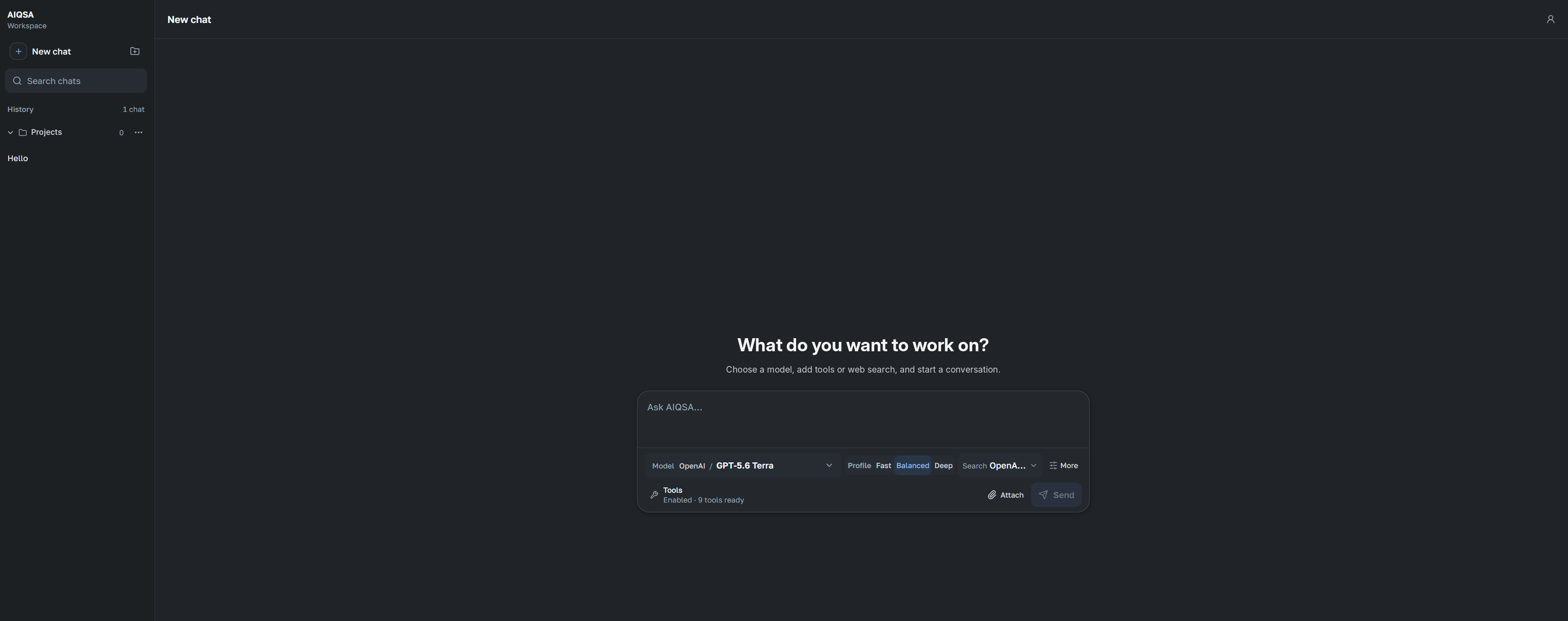
AIQSA is a multi-user web interface for working with LLMs without tying an installation to one provider. Connect OpenAI, Anthropic, Gemini, OpenRouter, or an OpenAI-compatible endpoint; choose the exact model for each message; add MCP tools, Knowledge, Memory, or web search when useful; and keep conversations, projects, Assistants, and files in one workspace.
The product keeps control explicit and the conversation calm. You choose the model and optional capabilities before sending, see concise live status while work is in progress, and receive the answer with safe Sources, generated outputs, and direct follow-up actions when present. Provider requests, retrieval internals, tool traces, event timelines, and per-answer usage details remain private operational data rather than a second inspection workspace.
Workspace state is stored in PostgreSQL and private S3-compatible storage. Content selected for a run is sent to the configured model provider and any tools used by that run. Client-side web-search integrations receive only a bounded generated query.
Why AIQSA
- Multiple providers, one interface. Use native OpenAI, Anthropic, Gemini, and OpenRouter adapters or configure compatible endpoints.
- Tools and search are optional capabilities. Enable MCP servers and select an ordered web-search plan per message instead of forcing every conversation through the same pipeline.
- Answers stay conversation-first. Read the response, open safe Sources or generated outputs when present, and continue or branch without navigating an execution dashboard.
- Built for operator-managed teams. Manage accounts, invitations, access groups, provider credentials, model availability, search integrations, SMTP, and MCP servers from the Control Center.
- Self-hosted application data. Keep workspace records and uploaded objects in infrastructure you control while choosing which external providers receive run content.
Current capabilities
- Branchable conversations, projects and nested folders, private attachments, and sanitized read-only share links.
- Private Knowledge bases with hybrid retrieval over native document text and printed Russian/English text recognized from scanned PDFs and raster images.
- Reusable versioned Assistants: save a model, instructions, run controls, Search plan, MCP tool allowlist, and starter prompts as one shareable object in the internal Assistants surface, with exact revision provenance on every accepted run.
- Exact model selection with per-model controls and optional reasoning or streaming settings where supported.
- Ordered web-search plans with up to three entitled sources, compatibility checks, normalized citations, and answer-bound Sources.
- Optional Memory for explicitly saved facts and retained-chat recall, with private management, lifecycle, and deletion controls.
- MCP server administration, user enablement, personal fields, OAuth flows, readiness checks, and approval before protected tool execution.
- Multi-user accounts, invitations, access rules and groups, optional Google/Yandex sign-in, usage views, and an administrative Control Center.
- System, light, and dark themes; responsive desktop/mobile layouts; code and math rendering; and private S3-compatible uploads.
Quick start
You need Docker Engine with the Docker Compose plugin and OpenSSL.
git clone https://github.com/insciqq/AIQSA.git aiqsa
cd aiqsa
bash prepare-secrets.sh
docker compose pull --ignore-buildable
docker compose build docling
docker compose up -d
The Docling parser image is built locally from a digest-pinned upstream image
and checksum-pinned English/Cyrillic OCR assets. The build needs registry/model
download access, but document conversion uses the sealed local assets and does
not download a model on first request.
The setup helper asks only for the initial administrator email, generates the initial password and installation secrets, writes .env with mode 0600, and prints the administrator password once. Save that password in a password manager. For unattended setup:
bash prepare-secrets.sh --admin-email [email protected]
To configure manually, copy .env.example to .env, set mode 0600, and replace every required placeholder. Never commit .env. agent_docs/ENV_VARIABLES.md owns the complete environment contract.
Open http://localhost:3000 and sign in with the initial administrator. In Control Center -> Providers, choose a provider, paste its API key, and select Test & Save. Provider keys, SMTP configuration, search integrations, and MCP definitions are database-managed and normally require no restart.
PostgreSQL and uploaded objects live in named Docker volumes. A normal rebuild or update preserves them. Never run docker compose down -v unless permanent deletion of installation data is intentional.
The release pipeline owns a same-Alpine PostgreSQL companion image with pgvector and records its immutable multi-platform digest; Compose adopts that image only after the manifest is published and verified, without changing the existing database volume. An external PostgreSQL deployment used with Knowledge features must make pgvector 0.7 or later available before its schema migration runs; pgvector 0.8.x is recommended for filtered approximate-nearest-neighbor retrieval.
Network exposure
The default application is intentionally bound to loopback. A trusted LAN or VPN may publish the app directly without another service by setting AIQSA_BIND_ADDRESS=0.0.0.0, using the matching browser-visible HTTP URL, and leaving both proxy variables blank. The release runtime ignores client forwarding headers in this mode and derives login-admission identity from the immediate TCP peer. Direct HTTP is unencrypted and emits a startup warning; an intermediary or NAT may make several users share one peer bucket.
For Internet access or transport security, keep the application bind on loopback, set an HTTPS AIQSA_APP_BASE_URL, enable secure cookies and the exact trusted-proxy declaration, and expose only a reverse proxy. Do not publish PostgreSQL, MinIO, ToolHive control, or MCP proxy ports.
The repository includes an Nginx template and validation procedure. For the bundled one-hop template use:
AIQSA_COOKIE_SECURE=1
AIQSA_TRUST_PROXY_HEADERS=1
AIQSA_TRUSTED_PROXY_COUNT=1
ToolHive can run administrator-selected npm, PyPI, or digest-pinned OCI MCP servers in sibling containers. ToolHive has trusted access to the host Docker socket, which is effectively host-root authority. Install only reviewed MCP code and grant a server only when its complete tool and external-data behavior is trusted.
Backups and updates
Back up before an update that may apply migrations:
ops/backup/create.sh /secure/aiqsa-backups
ops/backup/restore.sh --verify-only /secure/aiqsa-backups/aiqsa-backup-TIMESTAMP
Use an existing protected directory, copy verified bundles to encrypted off-host storage, and back up AIQSA_ENCRYPTION_KEY plus AIQSA_MEMORY_FINGERPRINT_KEYRING separately from those bundles. The helper stops and restores the web and Memory-worker roles around a durable lease fence; restore validates only the bundle's non-secret key IDs against the separately recovered keyring. The bundled helper supports the bundled private MinIO storage; external S3 requires its own consistent object-backup procedure coordinated with PostgreSQL.
Disaster recovery is deliberately two-step. Provision a unique privateaiqsa-restore-* project withops/backup/docker-compose.restore.yml,
restore into its empty Postgres/MinIO services with a new mode-0700 review
directory, then reapply any operator-owned post-backup deletion journal. Runops/backup/review.sh with either the applied journal file or an explicit
no-journal attestation. The review role has no public port or provider
credentials and writes a private promotion receipt only after keys,
deletion/account obligations, source barriers, leases, and objects pass. The
helpers never start the app or perform production cutover; see each script's--help for the exact environment.
For an existing installation, use the guarded tagged-release workflow whenever
the update can cross committed migrations. Release automation must invoke both
phases of the tracked cutover gate under the same installation operation lock;
inspect its exact fail-closed interface with:
bash scripts/ops-knowledge-cutover.sh --help
The workflow takes the shared deploy/backup/prune operation lock, verifies a
fresh backup, stops application writers, and applies migrations before running
the resumable V1-to-Source Knowledge backfill. It starts the app and worker only
after aggregate reconciliation reports zero discrepancies. Do not replace that
sequence with a plain docker compose up when upgrading an installation that
may contain pre-cutover Knowledge data.
Migration 20260818073000_knowledge_ingestion_v2 rewrites every existingKnowledgeChunk row and rebuilds its generated text-search column and GIN
index, so the guarded workflow treats it as downtime work. Before migration it
rejects open transactions/lock waits and requires PostgreSQL-volume free space
of at least 1 GiB or, for a larger chunk relation, three times its current total
size plus 512 MiB. A failure before migration restores the previous release and
writers. After migration begins, automatic old-code/schema rollback is blocked;
the verified backup, pending deployment record, and mode-0600 aggregate cutover
evidence remain for operator recovery, while the supported application rollback
is a non-destructive Knowledge profile pointer restore.
Existing users, settings, chats, and uploaded objects remain in the configured
volumes. Pin AIQSA_IMAGE=ghcr.io/insciqq/aiqsa:X.Y.Z in .env when a fixed
release is preferred over latest.
For automated backups, use the colocated systemd timer templates. Restore operations accept only unique disposable review projects and never overwrite canonical live services.
Development
Routine deterministic checks need no database, provider key, or external service:
npm ci
npm run check:hermetic
Container parity uses only the separate disposable development topology:
docker compose -f docker-compose.dev.yml up -d --build
npm run check:container
Never use the default persistent Compose installation as a development or test target. The complete verification contract is in agent_docs/TESTING.md.
Project status
AIQSA is pre-1.0 and intended for small, operator-managed, single-replica installations. It is not currently a high-availability system.
The architecture is intended to grow from tool-enabled chat toward agent workflows without presenting planned features as already shipped. Current releases should be evaluated on the capabilities documented above.
Contributing and security
See CONTRIBUTING.md for development guidance and SECURITY.md for vulnerability reporting.
License
AIQSA is licensed under the GNU Affero General Public License v3.0 only.
Reviews (0)
Sign in to leave a review.
Leave a reviewNo results found