chatgpt-codex-proxy
Health Warn
- No license — Repository has no license file
- Description — Repository has a description
- Active repo — Last push 0 days ago
- Community trust — 41 GitHub stars
Code Warn
- process.env — Environment variable access in dxt/server/index.js
- network request — Outbound network request in dxt/server/index.js
- network request — Outbound network request in src/auth.ts
- process.env — Environment variable access in src/codex/client.ts
- network request — Outbound network request in src/codex/client.ts
- process.env — Environment variable access in src/codex/models.ts
- process.env — Environment variable access in src/index.ts
Permissions Pass
- Permissions — No dangerous permissions requested
No AI report is available for this listing yet.
An Anthropic-compatible /v1/messages proxy that lets Claude Code use the ChatGPT Codex backend.
ChatGPT Codex Proxy
Run Claude Code on your ChatGPT Plus/Pro subscription — zero workflow change.
What is this?
This proxy lets Claude Code talk to ChatGPT's Codex backend instead of Anthropic's API.
You keep using claude exactly as before — same UI, same slash commands, same MCP tools — while inference is served by GPT.
Claude Code  ──POST /v1/messages──>  chatgpt-codex-proxy  ──POST /codex/responses──>  ChatGPT
             <──Anthropic response──                       <──Codex SSE response──
When to use this
| Situation | This proxy helps? |
|---|---|
| Anthropic quota exhausted / rate limited | ✅ Switch to GPT with one env var |
| Want to try GPT models without leaving Claude Code | ✅ Same workflow, different backend |
| Have ChatGPT Plus/Pro idle and want to make use of it | ✅ No API key cost |
| Need MCP tools (Stitch, Linear, etc.) to work with GPT | ✅ Only proxy that bridges this |
| Need an OpenAI-compatible endpoint for other clients | Use ChatMock instead |
| Need Ollama compatibility | Use ChatMock instead |
Why this, not ChatMock or similar tools
ChatMock and similar projects expose an OpenAI/Ollama-compatible API — great for general-purpose clients, but you'd have to switch away from Claude Code entirely.
This proxy is built specifically for Claude Code:
- Zero workflow change —
claudecommand, keybindings, CLAUDE.md, slash commands, all work unchanged. - MCP tools cross the boundary — Claude Code's MCP servers (Stitch, Linear, Chrome DevTools, etc.) are normally only available to Claude's backend. This proxy reads
~/.claude.jsonat startup, connects to your MCP servers, and injects their tool schemas into every GPT request. GPT gets the same tool access Claude would have. - Parallel tool call safety — the proxy detects mutating tools (Edit, Write, Delete, Bash) and automatically disables
parallel_tool_callsto prevent unsafe concurrent file operations. - Claude model name passthrough — use
--model claude-sonnet-4-20250514as usual; the proxy maps it to the right Codex model automatically. Or use GPT model names directly in passthrough mode.
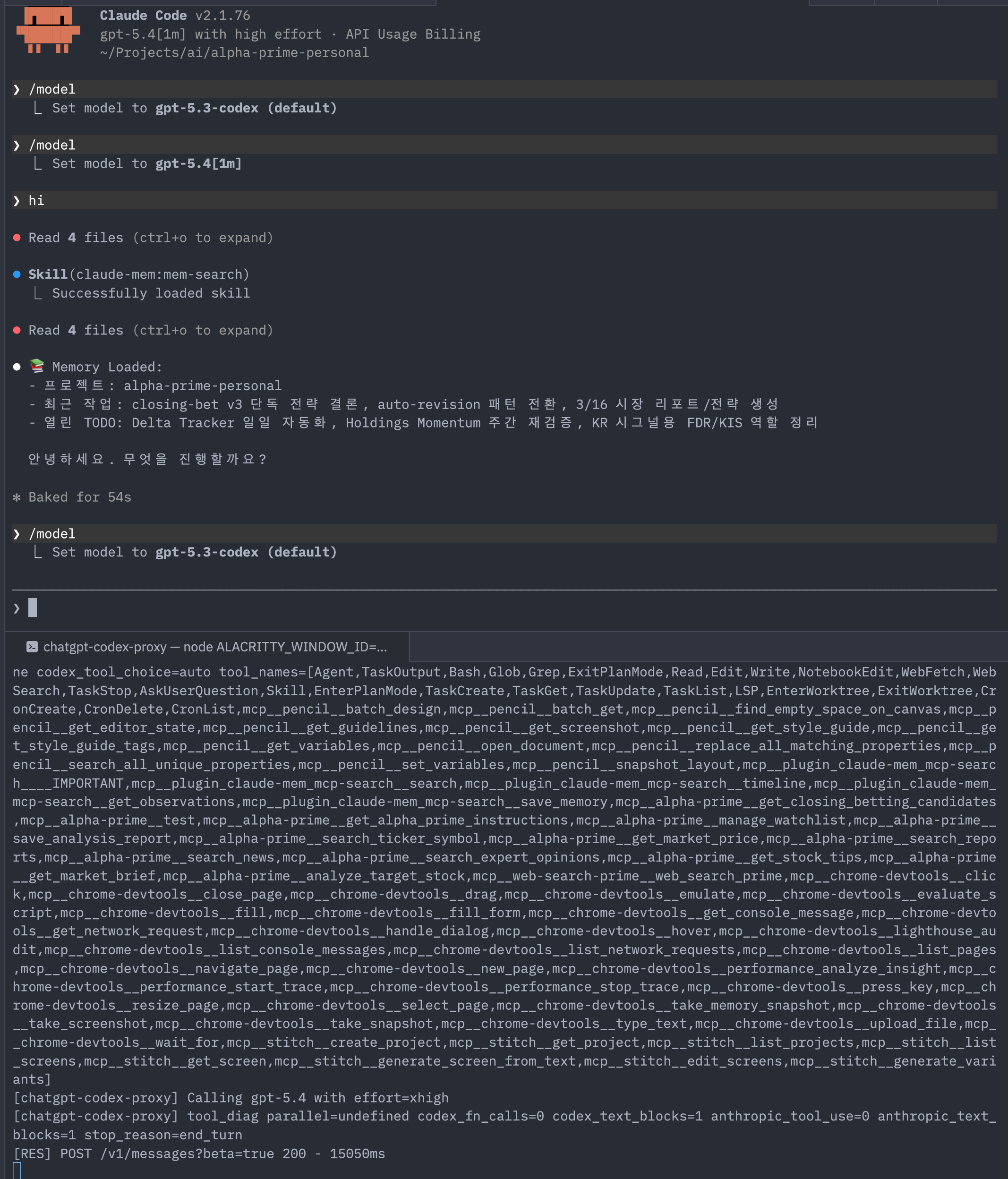
Example session
Features
- Anthropic Messages API compatible (
POST /v1/messages) - OAuth 2.0 login — no API key, just your ChatGPT subscription
- Full request/response transformation (Anthropic ↔ Codex)
- SSE streaming
- Claude → Codex model mapping with env overrides
- MCP tool injection (see below)
Quick start
git clone <repo-url>
cd chatgpt-codex-proxy
npm install && npm run build

# Login with your ChatGPT account (browser opens)
npm run login

# Start the proxy
npm run dev
Then in another terminal:
export ANTHROPIC_BASE_URL=http://127.0.0.1:19080
export ANTHROPIC_API_KEY=dummy   # value is unused; variable must be set
claude
That's it. Claude Code is now running on GPT.
Optional: shell helper
Add this to .zshrc/.bashrc for a quick gpt alias:
gpt() {
  emulate -L zsh
  local proxy_port="${CHATGPT_CODEX_PROXY_PORT:-19080}"
  local token="${ANTHROPIC_AUTH_TOKEN:-${ANTHROPIC_API_KEY:-dummy}}"

  export ANTHROPIC_BASE_URL="http://127.0.0.1:${proxy_port}"
  export ANTHROPIC_AUTH_TOKEN="$token"
  export ANTHROPIC_API_KEY="${ANTHROPIC_API_KEY:-$token}"
  export API_TIMEOUT_MS="${API_TIMEOUT_MS:-90000}"
  export PASSTHROUGH_MODE="${PASSTHROUGH_MODE:-true}"
  unset CLAUDE_CONFIG_DIR

  echo "Using local Codex proxy on :${proxy_port}"
  claude "$@"
}
MCP tool injection
Claude Code's MCP tools are normally invisible to non-Claude backends. This proxy bridges that gap.
Claude Code                   chatgpt-codex-proxy               ChatGPT Codex API
   │  tools: [Edit, Bash, ...]      │  tools: [Edit, Bash, ...        │
   │  (deferred: stitch, qmd, ...)  │          + mcp__stitch__*       │
   │                                │          + mcp__qmd__*  ]       │
   │ ──────────────────────────────>│ ──────────────────────────────> │
How it works:
- On startup: reads
~/.claude.json→mcpServers - Runs MCP handshake (
initialize→tools/list) for each enabled server - Caches schemas in memory for the lifetime of the proxy process
- On every
/v1/messagesrequest: appends cached tools to the Codextoolsarray - When GPT calls a tool: Claude Code receives the
tool_useresponse, executes the real MCP call, and sends the result back through the proxy
Both HTTP (type: http) and stdio (command) MCP servers are supported.
Configuration — set PROXY_MCP_SERVERS in .env:
# Specific servers (names must match keys in ~/.claude.json)
PROXY_MCP_SERVERS=stitch,linear

# All servers registered in ~/.claude.json
PROXY_MCP_SERVERS=all

# Disabled (default)
PROXY_MCP_SERVERS=
Startup log:
[mcp-registry] connecting to: stitch, linear
[mcp-registry] stitch: 8 tools loaded
[mcp-registry] linear: 6 tools loaded
[mcp-registry] ready: 14 total MCP tools
Configuration
.env setup
cp .env.example .env
Model mapping
By default (PASSTHROUGH_MODE=true) the proxy forwards whatever model name Claude Code sends straight to Codex. Set PASSTHROUGH_MODE=false to enable automatic Claude → Codex mapping:
| Claude model | Codex model |
|---|---|
claude-sonnet-4-20250514 |
gpt-5.2-codex |
claude-3-5-sonnet-20241022 |
gpt-5.2-codex |
claude-3-haiku-20240307 |
gpt-5.3-codex-spark |
claude-3-opus-20240229 |
gpt-5.3-codex-xhigh |
| (fallback) | gpt-5.2-codex |
Override per family:
ANTHROPIC_DEFAULT_HAIKU_MODEL=gpt-5.3-codex-spark
ANTHROPIC_DEFAULT_SONNET_MODEL=gpt-5.2-codex
ANTHROPIC_DEFAULT_OPUS_MODEL=gpt-5.2-codex
Available Codex models
| Model | Effort | Notes |
|---|---|---|
gpt-5.4 |
high | Flagship (2026) |
gpt-5 |
high | |
gpt-5-codex |
high | Optimized for agentic coding |
gpt-5-codex-mini |
medium | |
gpt-5.3-codex |
high | |
gpt-5.3-codex-xhigh |
xhigh | |
gpt-5.3-codex-medium |
medium | |
gpt-5.3-codex-low |
low | |
gpt-5.3-codex-spark |
low | Speed-optimized, >1000 tok/s |
gpt-5.2-codex |
high | Proxy default |
gpt-5.2-codex-xhigh |
xhigh | |
gpt-5.2-codex-medium |
medium | |
gpt-5.2-codex-low |
low | |
gpt-5.1-codex |
high | |
gpt-5.1-codex-max |
xhigh | |
gpt-5.1-codex-mini |
medium |
Shorthand aliases: gpt-5.3 → gpt-5.3-codex, gpt-5.2 → gpt-5.2-codex, gpt-5.1 → gpt-5.1-codex
Effort control
Claude Code's effort slider only affects native Claude models — it is not included in API requests when using GPT models. Control reasoning effort via:
Method 1 — model name suffix (recommended)
export ANTHROPIC_DEFAULT_SONNET_MODEL="gpt-5.3-codex-xhigh"  # xhigh
export ANTHROPIC_DEFAULT_HAIKU_MODEL="gpt-5.3-codex-spark"   # low
Method 2 — global override
PROXY_DEFAULT_EFFORT=high
Priority: thinking.budget_tokens in request → model name suffix/table → PROXY_DEFAULT_EFFORT → medium
CLI commands
| Command | Description |
|---|---|
npm run login |
OAuth login (browser) |
npm run logout |
Delete stored token |
npm run status |
Show auth status |
npm run dev |
Start dev server (hot reload) |
npm run start |
Start production server |
API compatibility
| Capability | Support | Notes |
|---|---|---|
| Basic chat | ✅ | |
| Streaming | ✅ | SSE |
| Multi-turn | ✅ | |
| System prompt | ✅ | Mapped to instructions |
| Tool calling | ✅ | Full tool_use/tool_result cycle |
| Image input | ⚠️ | Limited |
| Temperature | ❌ | Not supported by Codex backend |
| Max tokens | ❌ | Not supported by Codex backend |
Environment variables
| Variable | Default | Description |
|---|---|---|
PORT |
19080 |
Server port |
PROXY_JSON_LIMIT |
20mb |
JSON body size limit |
CODEX_BASE_URL |
https://chatgpt.com/backend-api |
Codex API base URL |
PASSTHROUGH_MODE |
true |
false to enable Claude→Codex model mapping |
ANTHROPIC_DEFAULT_HAIKU_MODEL |
- | Codex model for Haiku requests |
ANTHROPIC_DEFAULT_SONNET_MODEL |
- | Codex model for Sonnet requests |
ANTHROPIC_DEFAULT_OPUS_MODEL |
- | Codex model for Opus requests |
PROXY_DEFAULT_EFFORT |
(auto) | low / medium / high / xhigh |
PROXY_MCP_SERVERS |
(disabled) | all or comma-separated server names from ~/.claude.json |
Troubleshooting
# Health check
curl -fsS http://127.0.0.1:19080/health

# Port in use
lsof -tiTCP:19080 -sTCP:LISTEN -nP

# Passthrough test
gpt --model gpt-5.2

# Mapping mode test
PASSTHROUGH_MODE=false gpt --model claude-sonnet-4-20250514

# Recent logs
tail -n 120 /tmp/chatgpt-codex-proxy.log

# Tool calling smoke test
python3 scripts/tool_calling_smoke.py --base-url http://127.0.0.1:19080 --model gpt-5.2
Project structure
chatgpt-codex-proxy/
├── src/
│   ├── index.ts           # Entry point
│   ├── server.ts          # Express server
│   ├── cli.ts             # CLI commands
│   ├── auth.ts            # OAuth login
│   ├── routes/
│   │   └── messages.ts    # /v1/messages endpoint
│   ├── transformers/
│   │   ├── request.ts     # Anthropic → Codex
│   │   └── response.ts    # Codex → Anthropic
│   ├── codex/
│   │   ├── client.ts      # Codex API client
│   │   └── models.ts      # Model mapping
│   ├── mcp/
│   │   ├── config.ts      # Read ~/.claude.json MCP server configs
│   │   ├── client.ts      # HTTP + stdio MCP clients
│   │   └── registry.ts    # Tool schema cache (singleton)
│   ├── types/
│   │   └── anthropic.ts   # Types
│   └── utils/
│       └── errors.ts      # Error handling
├── .env.example
├── package.json
├── tsconfig.json
└── README.md
Security
Designed for personal, local-machine usage only.
npm run dev  # binds to localhost only
export ANTHROPIC_BASE_URL=http://127.0.0.1:19080
If you deploy to a server: add authentication, restrict CORS, add rate limiting, set token file permissions to 600, add monitoring.
Do not bind to 0.0.0.0 unless you have implemented all of the above.
License
MIT
Reviews (0)
Sign in to leave a review.
Leave a reviewNo results found