clio-agent
Health Warn
- License — License: NOASSERTION
- Description — Repository has a description
- Active repo — Last push 0 days ago
- Low visibility — Only 8 GitHub stars
Code Pass
- Code scan — Scanned 12 files during light audit, no dangerous patterns found
Permissions Pass
- Permissions — No dangerous permissions requested
No AI report is available for this listing yet.
A science agent supporting any general AI agent in performing data management operations at scale. Builds upon the heritage of the IOWarp platform and proudly represents work done at Gnosis Research Center at Illinois Tech. Supported by NSF.





What is CLIO Agent?
An autonomous agent for scientific data management — HDF5, Parquet, and CSV inspection through a FastMCP tool gateway, with a Bubbletea terminal UI (gact) for interactive work. CLIO is the Intelligence Layer (CEI) of the IOWarp platform.
The agent runs in three tiers: a main orchestrator (planner loop over registered tools and experts), domain experts (data / analysis / visualization), and ephemeral nanoagents for parallel sub-tasks. State lives in a local-first memory layer (ARC) that all tiers read and write.
- Multi-expert orchestration with capability-based routing
- FastMCP tool gateway, HDF5 + Parquet servers out of the box
- ARC memory with O(log N) context retrieval
- Optimizer layer for offline tuning + online learning
- Runtime doctor for LM / gateway / file-policy health
- Works with LM Studio, Ollama, OpenAI, Anthropic, OpenRouter, OpenAI
Codex subscriptions, and the Argonne ALCF inference gateway
Quick Start
One line installs clio-agent from PyPI, downloads the matching CLIO-branded
TUI binary for your platform, and drops a clio command on your PATH.
Linux / macOS
curl -fsSL https://raw.githubusercontent.com/iowarp/clio-agent/main/install/install.sh | bash
clio
Windows (PowerShell)
irm https://raw.githubusercontent.com/iowarp/clio-agent/main/install/install.ps1 | iex
clio
clio boots the server (if it isn't already up) and attaches the TUI. On first connect, pick an LM provider in the modal and you're chatting.
Prerequisites for the default release install: uv
or Python 3.12+ with pip. git and Go are only needed when you opt into
source-build mode with CLIO_REF or GACT_REF.
Using the clio command
clio with no arguments is the one-command UX. The subcommands manage the backing server without hunting PIDs:
| Command | What it does |
|---|---|
clio |
ensure the server is up, then attach the TUI |
clio start / stop / restart |
server lifecycle (process-tree kill on stop) |
clio status / ps |
PID, port, health |
clio logs [N] |
tail server + TUI stderr logs |
clio doctor |
check prerequisites and install layout |
clio report |
diagnostics bundle for filing GitHub issues |
clio completion <shell> |
tab-completion (bash / zsh / powershell) |
clio uninstall |
remove CLIO (--purge / -Purge to drop config too) |
Override paths with CLIO_PREFIX / CLIO_BIN_DIR and the server port with CLIO_PORT. Full install + uninstall reference: install/README.md.
Architecture
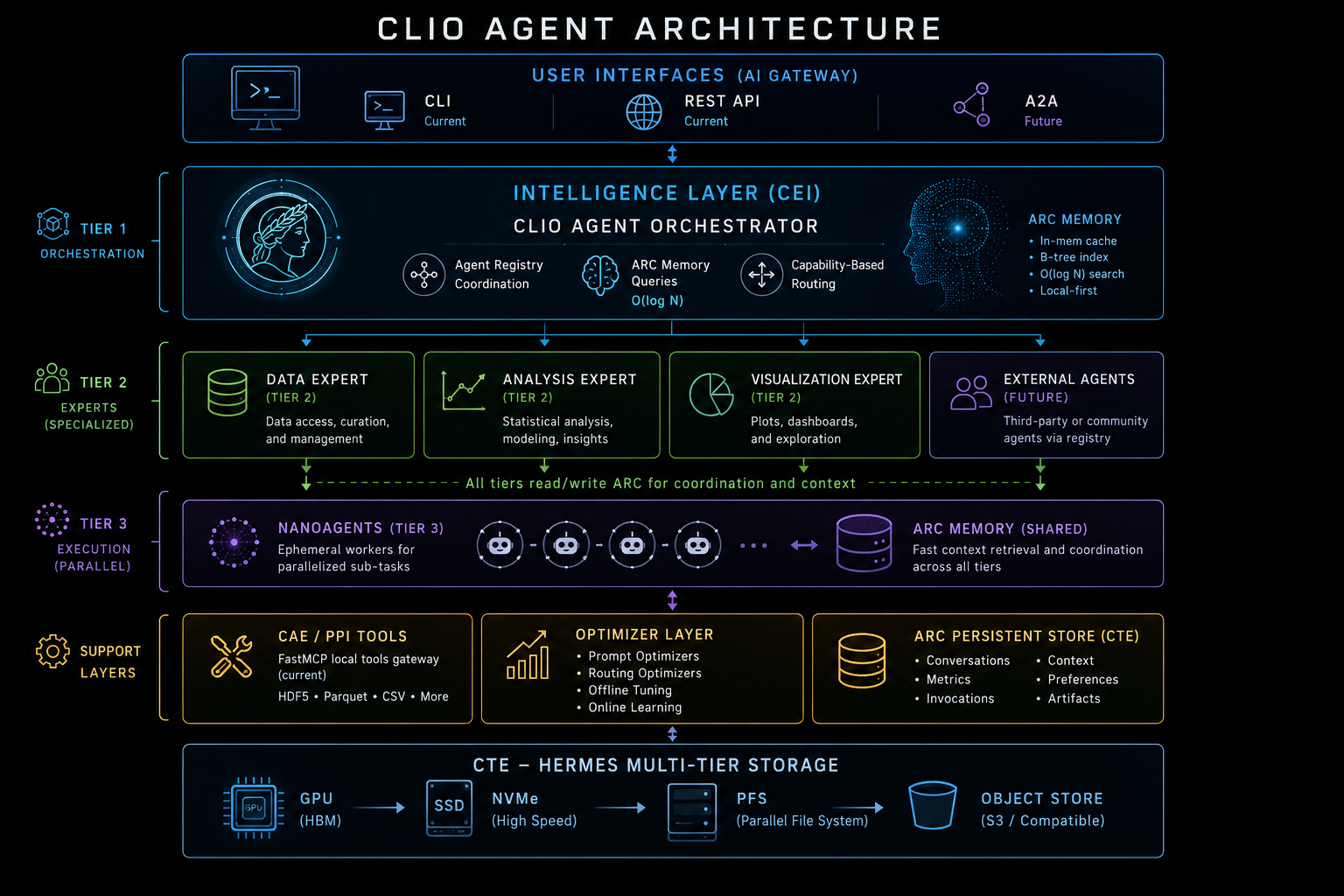
For the design rationale (three-tier hierarchy, ARC memory, optimizer layer, IOWarp integration), see docs/CLIO_AGENT_ARCHITECTURE.md.
Documentation
| Doc | What's in it |
|---|---|
| docs/CLIO_AGENT_ARCHITECTURE.md | Three-tier design, ARC memory, optimizer layer |
| docs/SYSTEM_IDENTITY.md | What the agent is, design principles |
| docs/SETUP.md | Release install, source-build install, and smoke test |
| docs/CONTRIBUTOR_QUICKSTART.md | Dev environment, quality checks, where to put code |
| docs/MCP_TOOL_INTEGRATION.md | Adding tools via FastMCP |
| docs/EXPERT_SYSTEM_DESIGN.md | Adding new experts |
| docs/ARC_MEMORY_LAYER.md | Memory model and storage |
| docs/SELF_IMPROVEMENT.md | Optimizer layer |
| docs/PERMISSIONS.md | Tool permission system |
| docs/providers/ | LM provider configuration |
| docs/CAPABILITIES_MATRIX.md | Feature matrix |
| PLAN.md | Roadmap |
Contributing
Start with docs/CONTRIBUTOR_QUICKSTART.md. For guidance specific to AI agents working on the codebase, see AGENTS.md.
License + Citation
BSD-3-Clause.
@software{clioagent2026,
  title  = {CLIO Agent: Autonomous Agent for Scientific Data Management},
  author = {IOWarp Team},
  year   = {2026},
  url    = {https://github.com/iowarp/clio-agent},
}
Reviews (0)
Sign in to leave a review.
Leave a reviewNo results found